Best Document Creation Software - Page 10

How Many Document Creation Software Products Does G2 Track?

Total Products under this Category: 343

Category Stats (Sep 2026)

  • Average Rating: 4.37/5 The average rating of products in this category, based on all submitted ratings
  • Top Trending Product: DocNexus (+2.22%) - Among all products in this category, DocNexus recorded the largest rating increase compared to last month

Last updated: September 01, 2026

How Does G2 Rank Document Creation Software Products?

Why You Can Trust G2's Software Rankings:

  • 30 Analysts and Data Experts
  • 156,500+ Authentic Reviews
  • 343+ Products
  • Unbiased Rankings

G2's software rankings are built on verified user reviews, rigorous moderation, and a consistent research methodology maintained by a team of analysts and data experts. Each product is measured using the same transparent criteria, with no paid placement or vendor influence. While reviews reflect real user experiences, which can be subjective, they offer valuable insight into how software performs in the hands of professionals. Together, these inputs power the G2 Score, a standardized way to compare tools within every category.

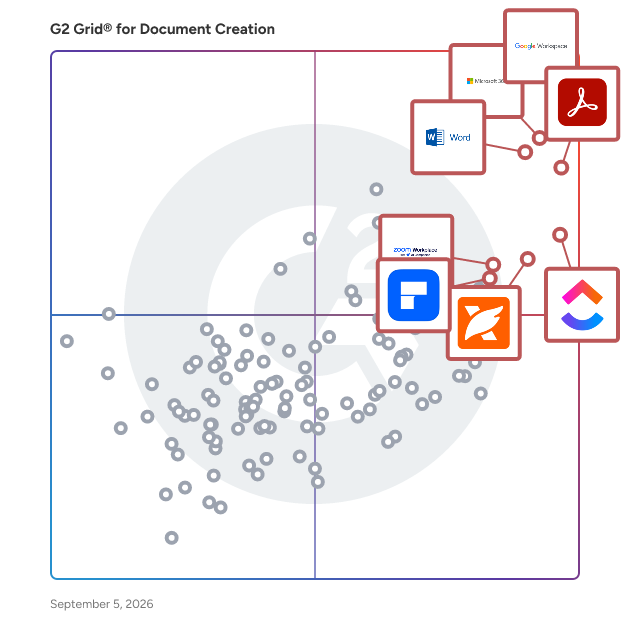
G2 Grid® for Document Creation Software

G2 Grid® for Document Creation Software plotting products by satisfaction and market presence

Highlighted products: Google Workspace, Microsoft 365, Adobe Acrobat, Microsoft Word, ClickUp, Foxit PDF Editor, Zoom Workplace, and Wondershare PDFelement.

Underlying data: [Grid® JSON](https://www.g2.com/categories/document-creation/grids.json?focus%5B%5D=google-workspace&focus%5B%5D=microsoft365&focus%5B%5D=adobe-acrobat&focus%5B%5D=microsoft-word&focus%5B%5D=clickup&focus%5B%5D=foxit-pdf-editor&focus%5B%5D=zoom-workplace&focus%5B%5D=wondershare-wondershare-pdfelement)

AceThinker PDF Writer

AceThinker PDF Writer is a pdf editing tool that enable to edit PDF documents, edit the contents including texts and images and also insert and split the pages in the documents according to the requirements.

Average Rating: 4.8/5.0

Total Reviews: 7

How Do G2 Users Rate AceThinker PDF Writer?

  • Has the product been a good partner in doing business?: 8.3/10 (Category avg: 9.0/10)
  • Quality of Support: 9.0/10 (Category avg: 8.6/10)
  • Ease of Use: 9.8/10 (Category avg: 8.9/10)
  • Ease of Admin: 8.3/10 (Category avg: 8.9/10)

Who Is the Company Behind AceThinker PDF Writer?

  • Seller: AceThinker
  • HQ Location: London, England
  • Twitter: @AceThinker_soft
    268 Twitter followers
  • LinkedIn® Page: www.linkedin.com
    1 employees on LinkedIn®

Who Uses This Product?

  • Company Size: 57% Small, 43% Medium

What Are Recent G2 Reviews of AceThinker PDF Writer?

What Are G2 Users Discussing About AceThinker PDF Writer?

Canea One

CANEA ONE is a comprehensive eQMS and Business Management platform that offers a powerful, no-code environment for organizations to digitize workflows, control documents, and manage strategic plans. The platform enables users to automate and streamline a wide range of administrative processes, from nonconformance and CAPA management to project and document lifecycles, ensuring full traceability and compliance. A key feature is its ability to create a "common thread" that links daily operations directly to overall strategic goals, ensuring all activities are aligned with the company's vision. Additionally, CANEA ONE integrates with existing business systems, including ERP solutions and Microsoft Office applications like SharePoint and Copilot AI assistant technology, supporting a seamless flow of information to enhance productivity.

Average Rating: 4.4/5.0

Total Reviews: 7

How Do G2 Users Rate Canea One?

  • Quality of Support: 8.8/10 (Category avg: 8.6/10)
  • Ease of Use: 10.0/10 (Category avg: 8.9/10)

Who Is the Company Behind Canea One?

  • Seller: Canea One
  • Year Founded: 2022
  • HQ Location: Orlando, US
  • Twitter: @CANEA_ONE
    2 Twitter followers
  • LinkedIn® Page: www.linkedin.com
    3 employees on LinkedIn®

Who Uses This Product?

  • Company Size: 43% Medium, 43% Large

What Are Recent G2 Reviews of Canea One?

Doxillion

Doxillion is a document converter to convert pdf, docx, doc, pdf, rtf, html, xml, wpd, odt and txt document files. Convert documents one at a time or batch convert many files at once. Even integrate Doxillion conversion option to your right click menu to quickly convert documents to many frequently used formats. Convert between many different text document formats. Supports Word converting doc and docx. Convert source code to html. Batch convert thousands of files at once. Use your right click menu to convert documents from outside the program. Drag and drop documents to be converted into Doxillion. Integrate with Express Burn Disc Burning Software to backup documents.

Average Rating: 4.4/5.0

Total Reviews: 7

How Do G2 Users Rate Doxillion?

  • Has the product been a good partner in doing business?: 8.3/10 (Category avg: 9.0/10)
  • Quality of Support: 8.6/10 (Category avg: 8.6/10)
  • Ease of Use: 8.6/10 (Category avg: 8.9/10)
  • Ease of Admin: 8.3/10 (Category avg: 8.9/10)

Who Is the Company Behind Doxillion?

  • Seller: NCH Software
  • Year Founded: 1993
  • HQ Location: Greenwood Village, CO
  • Twitter: @nchsoftware
    9,910 Twitter followers
  • LinkedIn® Page: www.linkedin.com
    77 employees on LinkedIn®

Who Uses This Product?

  • Company Size: 43% Medium, 29% Large

What Are Recent G2 Reviews of Doxillion?

What Are G2 Users Discussing About Doxillion?

UniPDF

UniPDF is a software library for the Go programming language. It enables developers to manage PDF files, anything from creating reports, to extracting text and checking for compliance.

Average Rating: 4.4/5.0

Total Reviews: 7

How Do G2 Users Rate UniPDF?

  • Quality of Support: 8.6/10 (Category avg: 8.6/10)
  • Ease of Use: 9.4/10 (Category avg: 8.9/10)

Who Is the Company Behind UniPDF?

  • Seller: UniDoc
  • Year Founded: 2016
  • HQ Location: Reykjavik, IS
  • LinkedIn® Page: www.linkedin.com
    7 employees on LinkedIn®

Who Uses This Product?

  • Company Size: 57% Medium, 29% Small

What Do G2 Reviewers Say About UniPDF?

AI-generated summary from verified user reviews

Pros
  • Users value the ease of use of UniPDF, allowing quick and efficient completion of PDF tasks without distractions.
  • Users appreciate the easy-to-understand interface of UniPDF, which streamlines their workflow and saves valuable time.
  • Users value the simple and efficient interface of UniPDF, facilitating quick and easy PDF tasks without distraction.
  • Users praise UniPDF for its effortless handling of daily PDF tasks, making workflows smooth and distractions minimal.
  • Users love the easy editing capability of UniPDF, allowing seamless conversion of documents and images.
Cons
  • Users find add-on costs limiting, as advanced features are often locked and affect performance on larger files.
  • Users face frustrating data deletion issues due to automatic refreshes that erase edits while using UniPDF.
  • Users find UniPDF expensive due to subscription costs for advanced features and extra charges for editing tools.
  • Users find the limited features of UniPDF's free plan restrictive and inconvenient, impacting usability and experience.
  • Users find UniPDF may feel limited in advanced features, especially when working with large or complex files.

What Are Recent G2 Reviews of UniPDF?

DocsFromTemplate

DocsFromTemplate takes the hassle out of PDF creation. With automatic PDF generation from Gravity Forms, you can turn form entries into professional, ready-to-share PDFs instantly. This solution handles everything—from form-to-PDF export to delivering fillable, branded documents—making it perfect for invoices, contracts, and more.

Average Rating: 5.0/5.0

Total Reviews: 6

How Do G2 Users Rate DocsFromTemplate?

  • Has the product been a good partner in doing business?: 10.0/10 (Category avg: 9.0/10)
  • Quality of Support: 10.0/10 (Category avg: 8.6/10)
  • Ease of Use: 9.7/10 (Category avg: 8.9/10)
  • Ease of Admin: 9.7/10 (Category avg: 8.9/10)

Who Is the Company Behind DocsFromTemplate?

  • Seller: WPRiders
  • Year Founded: 2015
  • HQ Location: Sacramento, US
  • Twitter: @wpriders
    99 Twitter followers
  • LinkedIn® Page: www.linkedin.com
    20 employees on LinkedIn®

Who Uses This Product?

  • Company Size: 83% Small, 17% Medium

What Do G2 Reviewers Say About DocsFromTemplate?

AI-generated summary from verified user reviews

Pros
  • Users love the time-saving automation of DocsFromTemplate, significantly reducing manual work for document generation.
  • Users love the automation features of DocsFromTemplate, streamlining document creation and saving valuable time.
  • Users find DocsFromTemplate to be an extremely easy-to-use plugin that streamlines daily document generation efficiently.
  • Users highlight the ease of use of DocsFromTemplate, significantly streamlining their document generation processes.
  • Users find DocsFromTemplate easy to use, greatly enhancing their document generation process and saving valuable time.

What Are Recent G2 Reviews of DocsFromTemplate?

Alliance Imager

Alliance Imager is a document management software that transforms paper documents into electronic documents that can be viewed, edited, distributed and managed in a searchable database.

Average Rating: 3.6/5.0

Total Reviews: 5

How Do G2 Users Rate Alliance Imager?

  • Quality of Support: 6.7/10 (Category avg: 8.6/10)
  • Ease of Use: 5.8/10 (Category avg: 8.9/10)

Who Is the Company Behind Alliance Imager?

Who Uses This Product?

  • Company Size: 80% Small, 20% Large

What Are Recent G2 Reviews of Alliance Imager?

What Are G2 Users Discussing About Alliance Imager?

Digital Binder

A software version of a physical binder

Average Rating: 4.5/5.0

Total Reviews: 5

How Do G2 Users Rate Digital Binder?

  • Has the product been a good partner in doing business?: 8.3/10 (Category avg: 9.0/10)
  • Quality of Support: 8.3/10 (Category avg: 8.6/10)
  • Ease of Use: 8.8/10 (Category avg: 8.9/10)
  • Ease of Admin: 8.3/10 (Category avg: 8.9/10)

Who Is the Company Behind Digital Binder?

  • Seller: Global Graphics
  • Year Founded: 1986
  • HQ Location: Cambridge, GB
  • Twitter: @Global_Graphics
    1,357 Twitter followers
  • LinkedIn® Page: www.linkedin.com
    97 employees on LinkedIn®

Who Uses This Product?

  • Company Size: 33% Medium, 33% Small

What Are Recent G2 Reviews of Digital Binder?

DocNexus

DocNexus is an AI-powered writing assistance platform designed for B2B enterprises that facilitates the creation, structuring, and management of complex professional documentation. It serves as a comprehensive drafting solution for teams required to produce high-stakes content, ranging from technical specifications and audit reports to legal documents and commercial proposals. The platform distinguishes itself through an inverse conversational methodology. Rather than relying solely on user prompts, the software proactively initiates a dialogue, asking targeted questions to define the document’s context, objectives, and essential data points. This process allows the system to structure content that aligns with specific business requirements before drafting begins. By integrating with existing workflows, DocNexus aims to reduce the time spent on initial structuring and drafting while maintaining high standards of consistency and compliance. Key features of DocNexus include: - Intelligent Knowledge Management: The platform allows users to import and index existing Word and PDF documents, such as previous reports or internal documentation. It analyzes this data to intelligently reuse relevant information in new projects while adhering to data confidentiality protocols. - Automated Quality Evaluation: DocNexus assesses documents against hundreds of specific checkpoints. It evaluates drafts for structure, clarity, logical consistency, and regulatory compliance, providing actionable suggestions to refine the content. - Integrated Research and Sourcing: The software includes built-in internet research capabilities to verify information and suggest relevant sources. It automatically integrates references to ensure that arguments are supported by accurate data. - Collaborative Project Mode: Designed for teams, the solution supports real-time collaboration, multilingual drafting (including French, English, and German), and the simultaneous management of related documents. It offers full compatibility for import and export with Microsoft Word and PDF formats. DocNexus is utilized across various business functions to streamline document production. Common use cases include managing responses to Requests for Proposals (RFPs) by automatically analyzing requirements, generating detailed technical documentation that adapts to audience expertise, and producing structured audit reports. Additionally, the platform assists in the formulation of strategic business plans and customized commercial contracts, ensuring that all output meets professional formatting and rigorous internal standards.

Average Rating: 4.6/5.0

Total Reviews: 5

How Do G2 Users Rate DocNexus?

  • Has the product been a good partner in doing business?: 10.0/10 (Category avg: 9.0/10)
  • Quality of Support: 9.4/10 (Category avg: 8.6/10)
  • Ease of Use: 8.3/10 (Category avg: 8.9/10)
  • Ease of Admin: 10.0/10 (Category avg: 8.9/10)

Who Is the Company Behind DocNexus?

Who Uses This Product?

  • Company Size: 100% Small

What Are Recent G2 Reviews of DocNexus?

GScan

Start your paperless office at your desktop - With high level customization and configuration capabilities, GScan adapts to any of your business needs. GScan supports your document input lifecycle through scanning, barcode recognition, automatic document separation and form classification, indexing, automatic recognition and much more. GScan enables the use of ID Capture, to get the identity right, the first time. With superior modules for ID cards, passports, and more, you’ll be able to recognize fraudulent documents and all information in/out of the Machine Readable Zone (MRZ). Get the ultimate robust document capture software, to start your paperless office. GScan Online - SharePoint Office 365 App: https://store.office.com/gscan-online-lite-WA104204738.aspx?assetid=WA104204738

Average Rating: 4.1/5.0

Total Reviews: 11

How Do G2 Users Rate GScan?

  • Has the product been a good partner in doing business?: 8.3/10 (Category avg: 9.0/10)
  • Quality of Support: 8.3/10 (Category avg: 8.6/10)
  • Ease of Use: 8.7/10 (Category avg: 8.9/10)
  • Ease of Admin: 9.2/10 (Category avg: 8.9/10)

Who Is the Company Behind GScan?

  • Seller: GRADIENT ECM
  • Year Founded: 1994
  • HQ Location: Bratislava, Slovak Republic
  • Twitter: @GRADIENTecm
    74 Twitter followers
  • LinkedIn® Page: www.linkedin.com
    7 employees on LinkedIn®

Who Uses This Product?

  • Company Size: 55% Medium, 36% Small

What Are Recent G2 Reviews of GScan?

What Are G2 Users Discussing About GScan?

HelpStudio Suite

HelpStudio simplifies the process of creating, managing, and publishing professional-quality documentation and help systems. With its single-source publishing capabilities, you can generate multiple output formats—such as Web Help, mobile-responsive documentation, and printable PDFs—from a single project, ensuring consistency and efficiency. 1. Single-Source Authoring & Multi-Format Publishing Write once, publish anywhere – Generate output in Web Help (responsive for desktop, tablet, and mobile) and PDF without duplicating efforts. Consistent branding & formatting – Maintain uniform styling across multiple formats. Effortless updates – Edit once and apply changes automatically across all published formats. 2. Intuitive, Feature-Packed Authoring Environment WYSIWYG editor – No coding required. Create professional, structured documentation with an easy-to-use interface. HTML-based layout templates – Fully customizable templates that align with your brand and style. Content widgets – Predefined dynamic elements to enhance interactivity and usability. 3. Seamless Content Reuse & Importing Use existing documentation – Import from Microsoft Word, Adobe RoboHelp, HTML, or other external sources. Content re-use in HelpStudio allows you to efficiently manage and maintain your documentation by reusing common content across multiple topics. 4. Advanced Styling & Customization Built-in CSS support – Fine-tune styles, layouts, and visual elements to match your corporate branding. Table editing & hyperlink designer – Create structured, easy-to-navigate documentation with rich formatting tools. Customizable TOC & terminology – Adapt content structure and language to align with internal standards. 5. Localization & Global Reach Multi-language support – Create help documentation in multiple languages, including Japanese, Chinese, and Korean. Embedded localization tips – Ensure high-quality translations with built-in guidance for different language settings. Unicode support – Maintain accurate, readable documentation in any character set. 6. Collaborative & Scalable Workflow Team-friendly authoring – Work on projects with multiple authors while maintaining consistency. Version control & unlimited undo – Track and manage changes effortlessly. Help desk – Access product documentation and support through the Contiem help desk portal. 7. Interactive & Dynamic User Experience Predefined content widgets – Enhance engagement with interactive elements. Auto-generated navigation & search – Ensure users can quickly find relevant information. Multiple output types – Deliver context-sensitive help, end-user manuals, online knowledge bases, and more. 8. Editions and Versions Editions and versions functionality allows you to publish multiple variations of your documentation, enabling users to switch between different editions and versions.

Average Rating: 3.9/5.0

Total Reviews: 9

How Do G2 Users Rate HelpStudio Suite?

  • Has the product been a good partner in doing business?: 7.8/10 (Category avg: 9.0/10)
  • Quality of Support: 8.6/10 (Category avg: 8.6/10)
  • Ease of Use: 8.1/10 (Category avg: 8.9/10)
  • Ease of Admin: 5.0/10 (Category avg: 8.9/10)

Who Is the Company Behind HelpStudio Suite?

  • Seller: Contiem
  • HQ Location: Annapolis, Maryland, United States
  • LinkedIn® Page: www.linkedin.com
    140 employees on LinkedIn®

Who Uses This Product?

  • Company Size: 56% Small, 33% Large

What Are Recent G2 Reviews of HelpStudio Suite?

What Are G2 Users Discussing About HelpStudio Suite?

IronWord

No Office Interop required; Word for .NET.

Average Rating: 5.0/5.0

Total Reviews: 5

How Do G2 Users Rate IronWord?

  • Ease of Use: 10.0/10 (Category avg: 8.9/10)

Who Is the Company Behind IronWord?

  • Seller: Iron Software
  • Year Founded: 2016
  • HQ Location: Chicago, IL
  • Twitter: @ironsoftwaredev
    143 Twitter followers
  • LinkedIn® Page: www.linkedin.com
    56 employees on LinkedIn®

Who Uses This Product?

  • Company Size: 60% Small, 20% Large

What Are Recent G2 Reviews of IronWord?

MasterWriter

MasterWriter is a powerful creative writing software designed for songwriters, authors, screenwriters, and poets. Included in MasterWriter are Word Families, Phrases, Synonyms, Rhymes, Definitions, Metaphors, Similes, Idioms, Oxymorons, Onomatopoeia, Alliterations, Allusions, Pop Culture references, Intensifiers, and much more. MasterWriter also features built-in word processing and everything you need to organize your projects effortlessly. While a computer program cannot compete with the mind and imagination of a writer (or songwriter), the mind cannot compete with the word choices MasterWriter will give you in an instant. When the two work together, great things happen… Take your creativity to the next level with MasterWriter’s all-in-one songwriting software. Whether you're crafting lyrics, developing characters, or refining dialogue, MasterWriter gives you the tools to write with clarity, originality, and confidence!

Average Rating: 3.8/5.0

Total Reviews: 6

How Do G2 Users Rate MasterWriter?

  • Quality of Support: 7.1/10 (Category avg: 8.6/10)
  • Ease of Use: 8.7/10 (Category avg: 8.9/10)

Who Is the Company Behind MasterWriter?

  • Seller: Masterwriter
  • Year Founded: 2000
  • HQ Location: Santa Barbara, US
  • Twitter: @masterwritersb
    519 Twitter followers
  • LinkedIn® Page: www.linkedin.com
    4 employees on LinkedIn®

Who Uses This Product?

  • Company Size: 67% Small, 33% Large

What Are Recent G2 Reviews of MasterWriter?

What Are G2 Users Discussing About MasterWriter?

Quick View Plus

Quick View Plus 13 Standard Edition lets you view virtually any file or email attachment you need instantly.

Average Rating: 4.5/5.0

Total Reviews: 5

How Do G2 Users Rate Quick View Plus?

  • Quality of Support: 8.3/10 (Category avg: 8.6/10)
  • Ease of Use: 7.2/10 (Category avg: 8.9/10)

Who Is the Company Behind Quick View Plus?

  • Seller: Avantstar
  • Year Founded: 2001
  • HQ Location: Chanhassen, US
  • LinkedIn® Page: www.linkedin.com
    5 employees on LinkedIn®

Who Uses This Product?

  • Company Size: 60% Medium, 20% Large

What Do G2 Reviewers Say About Quick View Plus?

AI-generated summary from verified user reviews

Pros
  • Users find Quick View Plus highly easy to use, as it simplifies viewing various file formats efficiently.
  • Users find the broad file format support of Quick View Plus highly beneficial for managing diverse attachments efficiently.
Cons
  • Users find the missing features of Quick View Plus, like annotation and cropping, disrupt their editing workflow.

What Are Recent G2 Reviews of Quick View Plus?

What Are G2 Users Discussing About Quick View Plus?

Snowbound

Take your document viewer to the next level with our web-based viewer that allows you to view, annotate, redact, split & merge, search, OCR, compare documents and more - all without the need for the creator application. Integrates with your ECM, BPM, CRM and homegrown repositories. Supports numerous document, image, audio and video file types including PDF, Word, Excel, AFP, DWG, TIFF, JPEG, SVG and more.

Average Rating: 4.3/5.0

Total Reviews: 5

How Do G2 Users Rate Snowbound?

  • Quality of Support: 9.3/10 (Category avg: 8.6/10)
  • Ease of Use: 8.3/10 (Category avg: 8.9/10)

Who Is the Company Behind Snowbound?

  • Seller: Snowbound Software
  • Year Founded: 1996
  • HQ Location: United States
  • Twitter: @snowbounds
    303 Twitter followers
  • LinkedIn® Page: www.linkedin.com
    16 employees on LinkedIn®

Who Uses This Product?

  • Company Size: 60% Medium, 40% Small

What Are Recent G2 Reviews of Snowbound?

What Are G2 Users Discussing About Snowbound?

TurboDocx

TurboDocx is an AI-powered platform for proposals, quoting, document generation, e-signatures, and APIs—built to automate the entire document lifecycle from data to signed agreement. Teams use TurboDocx to generate proposals, statements of work (SOWs), quotes, contracts, and slide decks by pulling structured data from CRMs, project management tools, spreadsheets, and internal knowledge bases. Dynamic templates, reusable content blocks, and AI-assisted drafting ensure documents are accurate, consistent, and on-brand—without manual copy-paste work. TurboDocx includes native quoting and pricing workflows, enabling teams to assemble line items, pricing tables, and commercial terms directly into proposals and contracts. Once finalized, documents can be sent for signature using built-in e-signature capabilities, creating a seamless flow from quote → proposal → signed agreement. The platform is API-first and developer-friendly, offering robust APIs and SDKs that allow teams to embed document generation, quoting, and e-signature directly into their own products, portals, and internal systems. TurboDocx supports both no-code web workflows and fully programmable automation, making it flexible enough for sales teams and powerful enough for engineering teams. TurboDocx is used by professional services firms, MSPs, and SaaS platforms that need end-to-end, composable document automation—whether as a standalone tool or embedded infrastructure.

Average Rating: 4.9/5.0

Total Reviews: 10

How Do G2 Users Rate TurboDocx?

  • Has the product been a good partner in doing business?: 10.0/10 (Category avg: 9.0/10)
  • Quality of Support: 10.0/10 (Category avg: 8.6/10)
  • Ease of Use: 9.8/10 (Category avg: 8.9/10)
  • Ease of Admin: 9.7/10 (Category avg: 8.9/10)

Who Is the Company Behind TurboDocx?

  • Seller: TurboDocx
  • HQ Location: Jupiter, Florida
  • Twitter: @TurboDocx
    3 Twitter followers
  • LinkedIn® Page: www.linkedin.com
    6 employees on LinkedIn®
  • Ownership: Private

Who Uses This Product?

  • Company Size: 80% Small, 30% Medium

What Do G2 Reviewers Say About TurboDocx?

AI-generated summary from verified user reviews

Pros
  • Users commend the robust API and multi-language SDKs that facilitate seamless integration and enhance workflow automation.
  • Users commend the automation features of TurboDocx, streamlining document generation and enhancing workflow efficiency.
  • Users appreciate the ease of use of TurboDocx, enabling seamless document generation and integration into workflows.
  • Users commend TurboDocx for its efficient document automation, streamlining real estate and sales processes with AI assistance.
  • Users commend TurboDocx for its robust REST API, enabling seamless integration and automation in document management.
Cons
  • Users face integration issues that can delay setup, especially for non-technical teams requiring custom configurations.
  • Users find the learning curve steep due to initial setup and configuration requirements for non-technical teams.
  • Users find the missing features in TurboDocx, like advanced templates and deeper integrations, hinder initial setup efficiency.
  • Users note that AI-generated text often requires edits to align with specific industry terminology and needs.
  • Users find the difficult setup process time-consuming, especially for teams less familiar with technical configurations.

What Are Recent G2 Reviews of TurboDocx?

Neeraja Prakash
NP
Researched and written by Neeraja Prakash
Updated April 10, 2026