Best Construction CRM Software - Page 11

Last updated: October 3, 2024

How Many Construction CRM Software Products Does G2 Track?

Total Products under this Category: 249

Category Stats (Nov 2026)

  • Average Rating: 4.35/5 (↓0.01 vs Oct 2026) The average rating of products in this category, based on all submitted ratings
  • Top Trending Product: Bolster (+0.13%) - Among all products in this category, Bolster recorded the largest rating increase compared to last month

Last updated: November 01, 2026

How Does G2 Rank Construction CRM Software Products?

Why You Can Trust G2's Software Rankings:

  • 30 Analysts and Data Experts
  • 50,600+ Authentic Reviews
  • 249+ Products
  • Unbiased Rankings

G2's software rankings are built on verified user reviews, rigorous moderation, and a consistent research methodology maintained by a team of analysts and data experts. Each product is measured using the same transparent criteria, with no paid placement or vendor influence. While reviews reflect real user experiences, which can be subjective, they offer valuable insight into how software performs in the hands of professionals. Together, these inputs power the G2 Score, a standardized way to compare tools within every category.

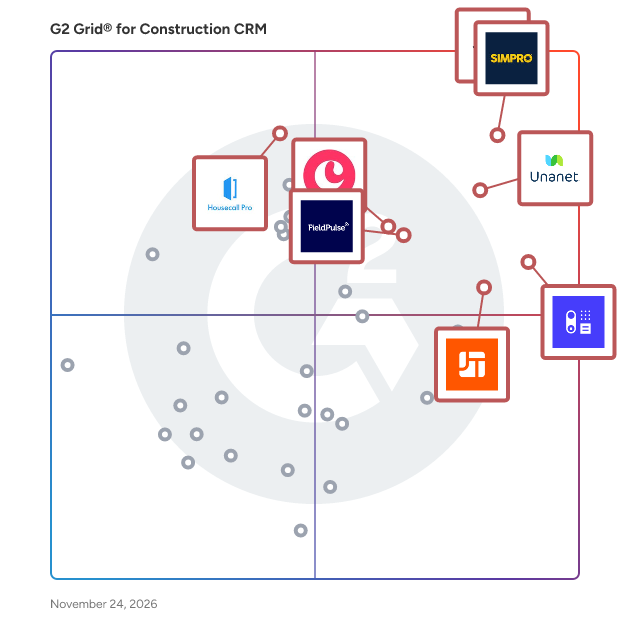
G2 Grid® for Construction CRM Software

G2 Grid® for Construction CRM Software plotting products by satisfaction and market presence

Highlighted products: Jobber, Simpro, Unanet CRM, Capsule CRM, JobTread, FieldPulse, Copper, and Housecall Pro.

Underlying data: [Grid® JSON](https://www.g2.com/categories/construction-crm/grids.json?focus%5B%5D=jobber&focus%5B%5D=simpro&focus%5B%5D=unanet-crm&focus%5B%5D=capsule-crm&focus%5B%5D=jobtread&focus%5B%5D=fieldpulse-fieldpulse&focus%5B%5D=copper&focus%5B%5D=housecall-pro)

Hello Renovate

Renovate is an all in one CRM for renovation and remodeling contractors in the US and Canada. Build branded estimates in minutes, split any signed job into a milestone billing schedule, track every lead on a weighted pipeline, and show clients a photorealistic room mockup before work starts. Clients pay invoices online and payouts land straight in your bank. Native iOS and Android apps. From $29.99 a month with unlimited users.

Who Is the Company Behind Hello Renovate?

HomeArize

Homearize is an all-in-one flooring business management software built for flooring retailers, dealers, installers, contractors, and flooring companies. The platform combines CRM, flooring estimating, takeoff, customer management, quote generation, scheduling, project management, and business automation into one cloud-based solution. Homearize helps flooring businesses streamline operations, close more sales, improve customer communication, and manage projects efficiently from lead to installation.

Who Is the Company Behind HomeArize?

HoneyBook

HoneyBook is a clientflow management platform designed for independent service businesses, such as photographers, venues, virtual assistants, wedding planners, and creative freelancers. The platform consolidates every stage of the client lifecycle into one place, from initial inquiry to final payment, allowing users to manage their operations without switching between multiple tools. Unlike generic CRM tools, HoneyBook offers a tailored experience that integrates lead capture, contracts, invoicing, scheduling, and client communication into a single platform. It includes AI-powered automation and customization features designed specifically for the workflows of service-based businesses. The target audience for HoneyBook includes service-oriented professionals who need a system to handle lead generation, client management, and payment processing. The platform is particularly relevant for those who operate in creative industries such as photography, event venues, graphic design, consulting, and virtual assistance, where client interactions and project management are central to running the business. Key features include: Branded lead forms and questionnaires that embed on any website, along with online scheduling, appointment booking, and automated follow-up sequences to convert inquiries into booked clients Online invoices with integrated payment processing, legally binding contracts with e-signatures, and customizable proposals that combine services, pricing, contracts, and payment in one document A visual project pipeline to track every client and job status, CRM and contact management to store client details and history, a branded client portal where clients can view documents and make payments, and automated workflows and task reminders to reduce manual follow-up HoneyBook integrates with over 40 third-party tools including Squarespace, Google Ads, Mailchimp, Zoom, and QuickBooks, allowing businesses to connect their existing tech stack. The platform is available on web and mobile. A 30-day free trial is available. No credit card required.

Average Rating: 4.4/5.0

Total Reviews: 247

How Do G2 Users Rate HoneyBook?

  • Has the product been a good partner in doing business?: 9.2/10 (Category avg: 9.3/10)
  • Ease of Admin: 8.9/10 (Category avg: 8.8/10)
  • Ease of Use: 8.8/10 (Category avg: 8.8/10)
  • Quality of Support: 9.0/10 (Category avg: 8.8/10)

Who Is the Company Behind HoneyBook?

  • Seller: HoneyBook
  • Company Website:
  • Year Founded: 2013
  • HQ Location: San Francisco, CA
  • LinkedIn® Page: www.linkedin.com
    325 employees on LinkedIn®

Who Uses This Product?

  • Who Uses This: Owner, Photographer
  • Top Industries: Photography, Events Services
  • Company Size: 97% Small, 2% Medium

What Do G2 Reviewers Say About HoneyBook?

AI-generated summary from verified user reviews

Pros
  • Users appreciate the seamless payment management of HoneyBook, enhancing organization and professionalism in their business operations.
  • Users love the easy creation of proposals and templates, streamlining client communication and management effortlessly.
  • Users find HoneyBook extremely user-friendly, seamlessly integrating essential business tasks into one efficient platform.
  • Users appreciate the easy customization of HoneyBook, enabling smooth creation of proposals, invoices, and contracts.
  • Users value the streamlined organization and ease of use in managing clients and payments with HoneyBook.
Cons
  • Users experience payment issues, particularly with complicated processes and lack of options for alternative payments.
  • Users find HoneyBook to be too expensive for the value provided, with frustrating data export limitations.
  • Users express frustration over the lack of integration options, complicating project management and data migration processes.
  • Users find limited features in HoneyBook, particularly in workflow automations, which restricts their operational efficiency.
  • Users find the reporting features lacking, complicating efforts to track earnings and improve business performance.

What Are Recent G2 Reviews of HoneyBook?

What Are G2 Users Discussing About HoneyBook?

AI can help you find the answers. G2 helps you trust them.

Connect G2 to Claude or ChatGPT for answers grounded in G2's trusted reviews, comparisons, and pricing from real user insights.

How it works

HubSpot Smart CRM

HubSpot Smart CRM is self-updating, AI-powered software that brings your customer data, teams, and tech stack together in one connected system Core Value Proposition HubSpot Smart CRM is the CRM that works for you, not the other way around. It keeps your CRM current through automatic updates and built-in enrichment, capturing customer conversations, creating and filling records, surfacing important changes, and turning the latest context into actionable next steps. Your team spends less time on data entry and more time building relationships. Updates stay visible, editable, and under your control, so you know what got updated and why. Built on HubSpot’s agentic customer platform, Smart CRM combines AI tools and agents, flexible customer views, automation, reporting, governance, and app connectivity so marketing, sales, and service teams can work from a single source of truth, move faster, and deliver better customer experiences at scale. Key capabilities See your customers clearly - Self-updating and self-cleaning CRM: Updates itself based on what actually happened — using, conversations, emails, notes, and the web — so your CRM data stays accurate and trusted. - Agentic onboarding: makes Smart CRM setup easy: contacts, companies, and deals automatically populate from email and calendar connections. - Breeze Assistant: conversational AI that pulls from self-updating CRM data to create content, reports, analysis, automation, and build and activate agents. - Custom data model: store any type of CRM data with custom objects, events, scoring, and calculations. - Data enrichment: automatically enrich contact and company records using emails, calls, the web, and HubSpot’s data sources. - Notetaker: transcribes notes (including voice notes) and captures follow-up items; deal progression drafts the recap email and next steps for reps. - Deal progression: analyzes conversations and recommends updates to deal stage and qualification fields, then drafts follow-up emails. - Data Agent: get updated answers on business-specific questions about customers and prospects by searching CRM data, emails, calls, documents, and the web. Intent signals: learn who’s in-market for your product and a good fit, what they’re searching for, and the right time to reach out. - AI insights: surface important changes, risks, and next-best actions from customer context stored within your CRM. - Reporting dashboards and analytics: make informed decisions fast with templated dashboards and built-in reports that include multiple visualization types and AI-assisted insights. - Sensitive data controls: protect sensitive customer information with encryption, access controls, SSO, and 2FA-ready governance. - Segmentation: easily segment customer or prospect data into lists that can be used for outreach. Get your team on the same page - Pipeline management: stay on top of deals with multiple pipelines, tags, and automated actions. Conditional logic ensures sales processes are never skipped. - Workflows and AI-assisted workflows: automate tasks and customer communications based on customer behavior and business logic. - Task management: keep reps organized and stay on track with automated task management and queues - Custom reporting and dashboards: turn CRM data into actionable insights across pipeline, attribution, and revenue performance with highly customizable reporting. - Team governance: manage precise permissions, team structures, SSO, 2FA, SOC2 compliance with administrative controls.. - Centralized audit log: track actions taken by users, automations, integrations, and agents. Undo and restore actions. - Automatic duplicate detection: use AI to identify and merge duplicate records, keeping the CRM accurate and usable. - Project management: coordinate customer-facing work, track progress, and automate handoffs without leaving the CRM. Connect all your tools in one place - HubSpot Marketplace: connect to more than 2,000 popular apps, including toolsGoogle Workspace, Microsoft 365, Slack, Zoom, and Shopify. - Data Sync: keep records updated automatically with two-way sync across HubSpot and third-party systems. - Custom CRM interface: visualize the same customer data in the format that makes sense for each team, including tables, charts, and custom views. - Sandbox test account: test changes and integrations safely before pushing them live. - UI extensibility: build custom interfaces and extend HubSpot with APIs to match your business processesIntegrated tool actions in workflows: combine HubSpot automation with external apps to streamline multi-system processes. Smart CRM vs. Alternatives HubSpot’s Smart CRM is different from traditional CRM solutions and AI-native CRMs. It unifies customer data, teams, and tech stacks securely, with self-cleaning capabilities that keep data continuously up-to-date. Leveraging your data and third-party insights, Smart CRM’s built-in AI helps deliver personalized customer experiences at scale. All AI-driven updates keep humans in the loop. Reps and admins can review, edit, or approve before anything is saved to the CRM, with the ability to restore data changes. Unlike standalone AI tools, notetakers, or workflow automation layers, self-updating CRM is built directly into HubSpot’s agentic customer platform and works with the data your team already uses. It’s easy to adopt without requiring a dedicated administrator, while still offering the flexibility to support more complex business needs. Outcome Smart CRM is a self-updating source of truth that helps businesses grow faster by unifying customer data, teams, and tools in one easy-to-use agentic customer platform. By having all business context in one place, Smart CRM becomes a source of truth you can rely on to drive outcomes for your business.

Average Rating: 4.6/5.0

Total Reviews: 107

How Do G2 Users Rate HubSpot Smart CRM?

  • Has the product been a good partner in doing business?: 10.0/10 (Category avg: 9.3/10)
  • Ease of Admin: 5.0/10 (Category avg: 8.8/10)
  • Ease of Use: 8.6/10 (Category avg: 8.8/10)
  • Quality of Support: 7.2/10 (Category avg: 8.8/10)

Who Is the Company Behind HubSpot Smart CRM?

  • Seller: HubSpot
  • Company Website:
  • Year Founded: 2006
  • HQ Location: Cambridge, Massachusetts, United States
  • LinkedIn® Page: www.linkedin.com
    17,628 employees on LinkedIn®
  • Ownership: NYSE:HUBS

Who Uses This Product?

  • Top Industries: Computer Software, Consulting
  • Company Size: 54% Medium, 39% Small

What Are Recent G2 Reviews of HubSpot Smart CRM?

Hyphen CRM

Hyphen CRM is a cloud-based Customer Relationship Management (CRM) solution specifically designed for Home Builders, aiming to enhance customer acquisition, marketing coordination and sales. With dedicated funnels for Homebuyers and real estate agents, it consolidates sales and marketing data in an easy-to-use interface. The platform offers tools for newsletter publishing, email campaigns and campaign tracking. By efficiently nurturing leads throughout the home purchase journey, Home Builders can maximize their sales and marketing investments. With Hyphen CRM, Home Builders gain a powerful CRM tool that simplifies sales and customer management processes, enabling Builders to focus on building quality homes and fostering satisfied customers.

Who Is the Company Behind Hyphen CRM?

Infissi360

Infissi360 è il gestionale cloud progettato specificamente per serramentisti, rivenditori, produttori e installatori di infissi. Riunisce in un unico workspace il percorso completo della pratica: dall'arrivo del lead al primo contatto, dal sopralluogo al preventivo, dalla configurazione tecnica alla commessa, fino al cantiere, alla documentazione amministrativa, alla fatturazione e al controllo degli incassi. CRM, clienti e attività commerciali Infissi360 raccoglie lead, anagrafiche, referenti, richieste, appuntamenti, note e storico delle comunicazioni in una scheda cliente unica. La pipeline commerciale rende visibili stato della trattativa, origine del contatto, valore potenziale, prossima azione e responsabile. Il team può distinguere rapidamente nuovi lead, sopralluoghi da pianificare, preventivi da preparare, offerte da seguire e opportunità concluse, senza affidarsi a fogli separati, promemoria personali o conversazioni sparse. Preventivi, cataloghi e marginalità Il modulo preventivi collega prodotti, varianti, misure, accessori, lavorazioni, posa, sconti, IVA e condizioni di pagamento alla stessa pratica commerciale. Listini e prezzari possono essere organizzati per categoria e utilizzati per comporre offerte coerenti. Imponibile, totale e marginalità vengono calcolati all'interno del flusso, mentre revisioni e versioni restano tracciate. Il risultato è un PDF brandizzato pronto per il cliente, collegato ai dati tecnici e utilizzabile come base per le fasi successive, senza ricopiare righe e importi. Configurazione e disegni tecnici 2D Infissi360 include strumenti per configurare serramenti e produrre disegni tecnici 2D legati alla pratica. Misure, tipologia di infisso, numero di ante, aperture, materiali, vetri, colori, accessori e annotazioni rimangono associati al preventivo e alla commessa. Commerciale e ufficio tecnico lavorano sullo stesso dato, riducendo incongruenze tra ciò che è stato proposto, ciò che deve essere ordinato e ciò che verrà installato. Disegni e schede possono essere esportati e condivisi come documentazione tecnica. Rilievi, commesse e produzione Dal sopralluogo è possibile raccogliere misure, foto, note e indicazioni direttamente sul lavoro interessato. Quando il preventivo viene confermato, le informazioni utili accompagnano la commessa senza dover essere reinserite. Produzione, ordini fornitore, materiali, documenti, avanzamento e attività operative possono essere controllati in un unico spazio, mantenendo il collegamento con cliente, offerta e cantiere. Questo consente di individuare prima dell'uscita eventuali dati, componenti o conferme mancanti. Cantiere e posa La gestione cantiere rende disponibili indirizzo, referenti, misure, disegni, materiali, foto, note di posa, priorità, squadra assegnata e checklist operative. Tecnici e posatori possono consultare le informazioni anche da mobile, aggiornare lo stato del lavoro e collegare alla pratica le evidenze raccolte prima, durante e dopo l'intervento. L'ufficio vede l'avanzamento senza dover ricostruire la situazione attraverso telefonate o messaggi separati. Documenti, DDT e fatturazione Documenti commerciali, tecnici e amministrativi rimangono archiviati nella stessa pratica. Infissi360 supporta la gestione di DDT, fatture, note di credito, scadenze, pagamenti e incassi, oltre alla generazione dei dati necessari alla fatturazione elettronica e del formato XML SDI. Importi e anagrafiche possono derivare dal lavoro già approvato, limitando la duplicazione manuale tra preventivo, commessa e fattura. Lo storico permette di ricostruire rapidamente cosa è stato concordato, consegnato, fatturato e incassato. Calendario, team e responsabilità Appuntamenti, sopralluoghi, pose, scadenze e follow-up possono essere pianificati nel calendario operativo. Ruoli e permessi consentono a titolare, commerciale, ufficio tecnico, amministrazione, magazzino e posatori di accedere alle viste e alle informazioni pertinenti. Ogni attività può avere un responsabile e una prossima azione chiara, così la pratica non dipende dalla memoria di una singola persona. Portale cliente, comunicazioni e automazioni Il portale cliente permette di organizzare documenti, appuntamenti e aggiornamenti relativi alla pratica. Email e comunicazioni operative possono essere mantenute nel contesto del cliente e del lavoro a cui si riferiscono. Promemoria, follow-up e automazioni aiutano il team a non dimenticare appuntamenti, offerte ferme, attività post-vendita e richieste di assistenza. Le funzionalità AI forniscono supporto operativo e suggerimenti nel rispetto delle configurazioni e dei dati disponibili. Controllo direzionale Dashboard e indicatori permettono di leggere pipeline commerciale, valore delle opportunità, stato dei preventivi, commesse in corso, scadenze e andamento operativo. Il titolare può individuare colli di bottiglia, attività ferme e priorità senza chiedere aggiornamenti separati a ogni reparto. Lo scopo non è aggiungere un altro strumento, ma mantenere un unico filo informativo dalla richiesta iniziale alla chiusura amministrativa. Cloud, mobilità e protezione dei dati Infissi360 è una piattaforma SaaS accessibile via web e utilizzabile anche da tablet e smartphone. Supporta ambienti aziendali separati, utenti multipli, ruoli, permessi, tracciamento operativo e gestione documentale. L'organizzazione dei dati è pensata per mantenere ogni azienda isolata dalle altre e per offrire esportabilità e controllo delle informazioni nel rispetto delle impostazioni e degli obblighi applicabili. A chi si rivolge Infissi360 è pensato soprattutto per micro, piccole e medie imprese del settore serramenti che vogliono superare la gestione frammentata tra carta, fogli di calcolo, chat, email e programmi non collegati. È adatto sia al titolare che segue personalmente clienti e preventivi, sia a squadre composte da commerciale, tecnico, amministrazione e posa. L'avvio viene costruito sul flusso reale dell'azienda, con onboarding guidato e possibilità di provare il sistema su una pratica concreta. Il valore centrale di Infissi360 è la continuità del dato: cliente, preventivo, disegno, commessa, cantiere, documento e fattura non sono archivi separati, ma fasi collegate dello stesso lavoro. Questo riduce le ricopiature, rende più chiaro lo stato di ogni pratica e permette alle persone coinvolte di lavorare con informazioni coerenti e aggiornate.

Who Is the Company Behind Infissi360?
Inncircles Arena

The construction industry is a complex and multifaceted process, mainly due to the involvement of numerous stakeholders operating across various geographies, the magnitude of the construction projects, the high volume of transactions, and several other related factors. These projects involve thousands of operational tasks that generate millions of data points every day, and in this process, there is a significant volume of data that goes unnoticed or is not effectively captured, leading to a limited organizational capacity to build intelligence and drive productivity, efficiency, and quality. Inncircles Arena, an innovative suite of Artificial Intelligence (AI) powered products, focused on leveraging cutting-edge data analytics and intelligence capabilities to drive core construction operations with minimal or no human intervention. With a keen focus on data-driven insights, Inncircles empowers organizations in the construction industry to optimize their operations, enhance their decision-making capabilities, and achieve improved outcomes.

Who Is the Company Behind Inncircles Arena?

iRestore

iRestore exists to empower individuals with the resources they need to be effective and successful in their service to others.

Total Reviews: 1

How Do G2 Users Rate iRestore?

  • Ease of Use: 0.0/10 (Category avg: 8.8/10)
  • Quality of Support: 5.0/10 (Category avg: 8.8/10)

Who Is the Company Behind iRestore?

Who Uses This Product?

  • Company Size: 100% Small

What Are G2 Users Discussing About iRestore?

iSqFt

iSqFt is a comprehensive pre-bid software suite designed to empower general contractors by streamlining the entire bidding process. It offers a robust platform that facilitates project sourcing, qualification, distribution, and management, all while integrating seamlessly with existing tools to enhance efficiency and competitiveness. Key Features and Functionality: - Project Database Access: Gain entry to a vast repository of over 825,000 active commercial construction projects, including more than 100,000 private projects published in the last year. - Bid Management: Organize and manage bids effortlessly from initiation to completion, utilizing tools for project setup, contact management, and customizable reporting. - Subcontractor Network: Connect with a network of over 2.7 million active contacts, facilitating efficient communication and collaboration with qualified subcontractors. - Prequalification Tools: Streamline contractor data management with a customizable dashboard, enabling quick identification and selection of the best bidders for projects. - Takeoff Integration: Integrate seamlessly with takeoff tools like On-Screen Takeoff® (OST) for faster, more efficient bid preparation. - Seamless Integrations: Sync with Project Leads, Prequalification, Procore, and OST to create a fully connected bid process. Primary Value and Solutions Provided: iSqFt addresses the challenges general contractors face in managing the preconstruction phase by offering a centralized platform that enhances project visibility, improves bid management efficiency, and fosters stronger connections with subcontractors. By leveraging iSqFt, contractors can: - Increase Bid Opportunities: Access a comprehensive database of projects to identify and pursue relevant opportunities. - Enhance Collaboration: Utilize integrated communication tools to maintain clear and effective interactions with subcontractors and project stakeholders. - Optimize Workflow: Customize workflows and reporting to align with specific project requirements, ensuring a streamlined bidding process. - Build Reliable Teams: Utilize prequalification features to assemble trustworthy and competent project teams. By integrating these functionalities, iSqFt empowers general contractors to manage their bidding processes more effectively, leading to increased project wins and overall business growth.

Average Rating: 3.9/5.0

Total Reviews: 19

How Do G2 Users Rate iSqFt?

  • Has the product been a good partner in doing business?: 8.3/10 (Category avg: 9.3/10)
  • Ease of Admin: 6.7/10 (Category avg: 8.8/10)
  • Ease of Use: 7.3/10 (Category avg: 8.8/10)
  • Quality of Support: 7.6/10 (Category avg: 8.8/10)

Who Is the Company Behind iSqFt?

Who Uses This Product?

  • Top Industries: Construction
  • Company Size: 53% Medium, 47% Small

What Do G2 Reviewers Say About iSqFt?

AI-generated summary from verified user reviews

Pros
  • Users appreciate the ease of use of iSqFt filters, making it simple to find relevant projects quickly.
Cons
  • Users desire improved export options for combined PDF downloads instead of individual files and better Takeoff integration.
  • Users desire improved file management, specifically wanting plans to be downloadable as a single PDF for convenience.
  • Users desire improved file organization in iSqFt, wishing for plans to be consolidated into a single PDF.
  • Users express frustration with the inefficiency of downloading plans individually instead of as a single PDF file.
  • Users desire improved integration features in iSqFt, particularly for downloading plans more efficiently.

What Are Recent G2 Reviews of iSqFt?

What Are G2 Users Discussing About iSqFt?

JACK

Built for builders, by builders. https://jackapp.io/us JACK is an all-in-one construction management platform that gives residential builders and contractors control over every job, from first estimate to final invoice. Built by people who have run building businesses, JACK replaces the spreadsheets, disconnected apps and paper trails that quietly erode margin on every project. Know your margin before you bid: Most builders find out a job was unprofitable long after it is finished. JACK's estimating and takeoff tools build accurate, itemised quotes from your own cost library, then track actual spend against that budget in real time. Purchase orders, variations, bills and progress claims all flow back to the job, so the margin you quoted is the margin you can see, live. One platform, not seven: - Estimating and takeoffs with reusable cost libraries and supplier pricing - Job management covering schedules, tasks, selections and specifications - Financials including budgets, purchase orders, variations, invoicing and cashflow forecasting - Site records through daily logs, photos and progress tracking - Trades and suppliers with RFQs, contractor management and job-level cost allocation - Timesheets and safety compliance captured on site, not retyped at the office - Client and lead management, so sales pipeline and delivery sit in one system Cashflow you can plan around: Cashflow is where many building businesses come unstuck. JACK models income and expenditure across your active jobs, so you can see what is coming in, what is going out and when, across the whole business rather than one project at a time. Built for the site, not just the office: The mobile app lets site teams log progress, capture photos, record hours and raise issues as they happen. Office staff get that information the same day instead of chasing it at week's end, and clients get updates that reflect reality. Who uses JACK: Residential builders, renovators, modular and prefab manufacturers, and specialist contractors, running anywhere from a handful of jobs to dozens of concurrent projects across multiple sites. Customers span Australia, New Zealand, the United States and Canada. Integrations and support: JACK integrates with Xero & QuickBooks so financial data moves between systems without double handling. Every subscription includes onboarding, account setup, full training, local support and ongoing updates. The result: Less admin, fewer surprises, and a clear view of profitability on every job. JACK gives builders the financial visibility large construction firms take for granted, in software designed for how building businesses actually run.

Who Is the Company Behind JACK?

  • Seller: Jack App
  • Year Founded: 2022
  • HQ Location: ADELAIDE, AU
  • LinkedIn® Page: www.linkedin.com
    27 employees on LinkedIn®

JobCRM

JobCRM is job management software for trade shops that quote, build and install: cabinet and woodworking shops, garage and storage companies, kitchen and bath dealers and remodelers. It runs the whole job in one app: leads, quotes, e-signatures, deposits, scheduling, work orders, invoices and payments, with a portal where clients can see their own job. It also covers supplier orders, job budgets and job costing, a time clock that feeds job cost, client sign-off on selections, and quotes read from a photo or an uploaded parts list. Item costs can be brought in from a spreadsheet. An AI assistant is included on every plan. A Today screen on your phone shows the day's jobs and what needs chasing. Ask the assistant where a job stands, or to draft a quote from your price list for you to approve. It also connects to Claude and ChatGPT. Clients sign the quote and pay the deposit in one step, by card or bank transfer, and payments are recorded against the job. From $99 a month. QuickBooks Online sync from $249. Try the Advanced plan free for 14 days, no card needed.

Who Is the Company Behind JobCRM?

JobPro Technology

JobPro Technology is the leading and established Job Management software system developed for a variety of subcontracting companies that install all types of insulation, gutters, windows and more. JobPro has a mission of contributing to your organization’s job profit. Job Pro is a web-based software, thus creating an environment that is easily accessible from wherever you have an internet connection. JobPro looks to simplify any organizations workflow through an easy to follow and structured process: managing leads, building and sending a proposal to your customer, scheduling, tracking actual material used on the job site to view profitability, and creating and sending an invoice to your customer. When you think “productivity,” “profitability, and "proficiency," think JobPro.

Who Is the Company Behind JobPro Technology?

JPFLD

JPFLD is a CRM built for small trade businesses, from solo operators to crews of a few people: roofers, plumbers, HVAC techs, electricians, landscapers, remodelers and more. It replaces the spreadsheets, sticky notes and separate apps most contractors juggle. Leads land in a visual pipeline, and AI lead scoring ranks them so you call the most promising ones first. From there you can send a quote, convert it to a job, put it on the schedule and invoice when the work is done. After the job, JPFLD texts your client a review request. Clients also get their own portal link to check invoices, proposal status and upcoming jobs without calling you. For teams that knock doors, the Field Canvass map lets reps tap a house, log the outcome and build a route, so canvassing and the sales pipeline live in one place instead of two tools. JPFLD runs in any browser on phone or desktop, with light and dark modes and team roles. Plans start at $49 per month, and the founder handles support directly.

Who Is the Company Behind JPFLD?

Neya Kumaresan
NK
Researched and written by Neya Kumaresan