Best Enterprise Cloud Infrastructure Monitoring Software - Page 3

How Many Cloud Infrastructure Monitoring Software Products Does G2 Track?

Total Products under this Category: 126

Category Stats (Oct 2026)

  • Average Rating: 4.54/5 The average rating of products in this category, based on all submitted ratings
  • Top Trending Product: Observe (+1.75%) - Among all products in this category, Observe recorded the largest rating increase compared to last month

Last updated: October 20, 2026

How Does G2 Rank Cloud Infrastructure Monitoring Software Products?

Why You Can Trust G2's Software Rankings:

  • 30 Analysts and Data Experts
  • 12,500+ Authentic Reviews
  • 126+ Products
  • Unbiased Rankings

G2's software rankings are built on verified user reviews, rigorous moderation, and a consistent research methodology maintained by a team of analysts and data experts. Each product is measured using the same transparent criteria, with no paid placement or vendor influence. While reviews reflect real user experiences, which can be subjective, they offer valuable insight into how software performs in the hands of professionals. Together, these inputs power the G2 Score, a standardized way to compare tools within every category.

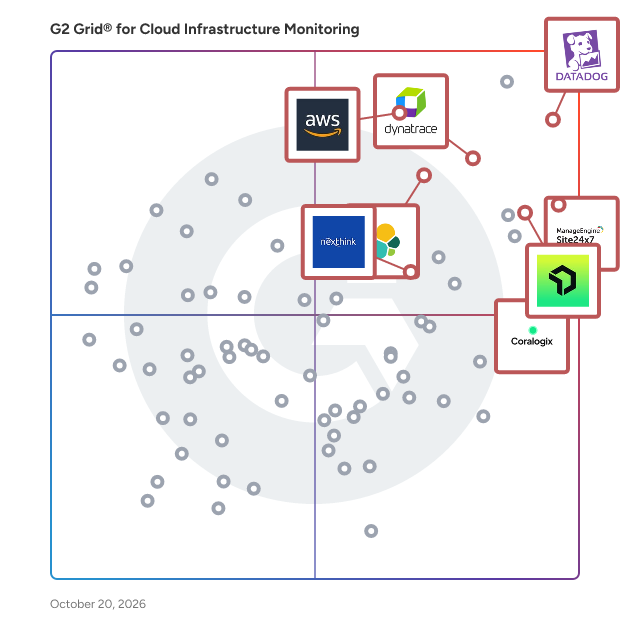
G2 Grid® for Cloud Infrastructure Monitoring Software

G2 Grid® for Cloud Infrastructure Monitoring  Software plotting products by satisfaction and market presence

Highlighted products: Datadog, Dynatrace, Amazon CloudWatch, Nexthink, New Relic, Coralogix, Site24x7, and Elastic Observability.

Underlying data: [Grid® JSON](https://www.g2.com/categories/cloud-infrastructure-monitoring/grids.json?focus%5B%5D=datadog&focus%5B%5D=dynatrace&focus%5B%5D=amazon-cloudwatch&focus%5B%5D=nexthink&focus%5B%5D=new-relic&focus%5B%5D=coralogix&focus%5B%5D=site24x7&focus%5B%5D=elastic-observability&segment=enterprise)

Google Cloud Monitoring

Cloud Monitoring collects metric data and provides tools that let you monitor and visualize how your applications and services are performing.

Average Rating: 4.2/5.0

Total Reviews: 67

How Do G2 Users Rate Google Cloud Monitoring?

  • Usage Monitoring: 8.8/10 (Category avg: 9.1/10)
  • Ease of Use: 8.6/10 (Category avg: 8.8/10)
  • Dashboards and Visualizations: 9.0/10 (Category avg: 8.9/10)
  • Reporting: 8.8/10 (Category avg: 8.6/10)

Who Is the Company Behind Google Cloud Monitoring?

  • Seller: Google
  • Year Founded: 1998
  • HQ Location: Mountain View, CA
  • Twitter: @google
    31,899,995 Twitter followers
  • LinkedIn® Page: www.linkedin.com
    301,144 employees on LinkedIn®
  • Ownership: NASDAQ:GOOG

Who Uses This Product?

  • Who Uses This: Software Engineer
  • Top Industries: Computer Software, Information Technology and Services
  • Company Size: 54% Small, 29% Medium

What Do G2 Reviewers Say About Google Cloud Monitoring?

AI-generated summary from verified user reviews

Pros
  • Users highlight the reliability and scalability of Google Cloud Monitoring, enhancing visibility for effective incident management.
  • Users value the large support community of Google Cloud Monitoring, enhancing their learning and troubleshooting experiences.
  • Users value the reliability and scalability of Google Cloud Monitoring, enhancing incident management and operational efficiency.
  • Users value the collaboration features of Google Cloud Monitoring, enhancing visibility and integration with ITSM tools.
  • Users find the user-friendly data management of Google Cloud Monitoring beneficial for easy data storage and access.
Cons
  • Users face billing issues related to storage space, realizing they can't actually purchase additional storage despite the option.
  • Users face data limitations with Google Cloud Monitoring due to insufficient storage options that aren't expandable.
  • Users face a difficult learning curve due to the complexity of features and integration challenges with non-Google services.
  • Users find Google Cloud Monitoring expensive due to complex pricing models that require extensive explanation to clients.
  • Users find integration issues challenging, especially when trying to connect with non-Google services effectively.

What Are Recent G2 Reviews of Google Cloud Monitoring?

What Are G2 Users Discussing About Google Cloud Monitoring?

Sysdig Monitor

Sysdig Monitor radically simplifies cloud and Kubernetes monitoring with deep visibility into container and Kubernetes workloads along with a managed Prometheus service. You get immediate, granular details and troubleshooting tools for rapidly changing container environments. Unlike other vendors who provide limited Kubernetes detail, Sysdig displays all important information in a single unified view with actionable remediation steps. Your team can remove silos by unifying monitoring for hybrid and multi-cloud environments. Offload the maintenance of Prometheus servers and get a fully compatible managed service with long-term storage, automatic service detection, out-of-the-box dashboards/alerts, and curated exporters for integrations. If you need custom metrics, Sysdig Monitor can provide more data from your application environments at a lower cost. Sysdig Monitor provides teams with: - Kubernetes monitoring and troubleshooting - Managed service for Prometheus - Cloud infrastructure monitoring - Cloud Costs Optimization - Custom Metrics - VM and Host monitoring

Average Rating: 4.6/5.0

Total Reviews: 40

How Do G2 Users Rate Sysdig Monitor?

  • Usage Monitoring: 10.0/10 (Category avg: 9.1/10)
  • Ease of Use: 9.0/10 (Category avg: 8.8/10)
  • Dashboards and Visualizations: 10.0/10 (Category avg: 8.9/10)
  • Reporting: 9.4/10 (Category avg: 8.6/10)

Who Is the Company Behind Sysdig Monitor?

  • Seller: Sysdig
  • Year Founded: 2013
  • HQ Location: San Francisco, California
  • Twitter: @Sysdig
    10,284 Twitter followers
  • LinkedIn® Page: www.linkedin.com
    556 employees on LinkedIn®

Who Uses This Product?

  • Top Industries: Computer Software, Information Technology and Services
  • Company Size: 40% Medium, 38% Large

What Do G2 Reviewers Say About Sysdig Monitor?

AI-generated summary from verified user reviews

Pros
  • Users value the seamless integration and deep visibility of Sysdig Monitor, enhancing cloud-native monitoring and troubleshooting.
  • Users value the seamless integration with Kubernetes, enhancing monitoring and troubleshooting across cloud-native environments effortlessly.
  • Users benefit from deep visibility into Kubernetes and containers, enhancing monitoring and troubleshooting in cloud-native environments.
  • Users appreciate the seamless deployment process of Sysdig Monitor, making cloud-native stack monitoring effortlessly efficient.
  • Users value the actionable insights and deep visibility offered by Sysdig Monitor for effortless cloud-native stack management.
Cons
  • Users find the pricing structure expensive, making it less suitable for smaller teams or specific use cases.
  • Users find the interface overwhelming and the pricing structure not cost-effective for smaller teams.
  • Users find the poor UI of Sysdig Monitor overwhelming, making navigation and usability challenging.
  • Users find the pricing structure of Sysdig Monitor to be not cost-effective for smaller teams or specific use cases.

What Are Recent G2 Reviews of Sysdig Monitor?

Logz.io

Logz.io is an AI-powered observability platform designed to help teams solve critical log management, monitoring, and troubleshooting challenges. Built for modern environments, Logz.io unifies log management, infrastructure monitoring, and distributed tracing in a single platform to provide deep, actionable insights into system performance and health. At its core, Logz.io’s AI Agent technology automates root cause analysis (RCA) and surfaces insights that accelerate investigations, reduce MTTR, and eliminate the need for time-consuming manual analysis or navigating multiple dashboards. Whether managing microservices or troubleshooting production issues, Logz.io empowers teams to quickly pinpoint issues, de-risk deployments, and focus on innovation. Unlike traditional observability tools that require ever-increasing data volumes and expertise, Logz.io offers a smarter, cost-optimized solution. With the ability to customize data ingestion and optimize telemetry costs, Logz.io ensures you get the insights you need without breaking the budget.

Average Rating: 4.5/5.0

Total Reviews: 163

How Do G2 Users Rate Logz.io?

  • Usage Monitoring: 8.6/10 (Category avg: 9.1/10)
  • Ease of Use: 8.8/10 (Category avg: 8.8/10)
  • Dashboards and Visualizations: 8.4/10 (Category avg: 8.9/10)
  • Reporting: 8.7/10 (Category avg: 8.6/10)

Who Is the Company Behind Logz.io?

  • Seller: Logz.io
  • Year Founded: 2014
  • HQ Location: Boston, MA
  • Twitter: @logzio
    3,156 Twitter followers
  • LinkedIn® Page: www.linkedin.com
    102 employees on LinkedIn®

Who Uses This Product?

  • Who Uses This: Software Engineer, Software Developer
  • Top Industries: Computer Software, Information Technology and Services
  • Company Size: 53% Medium, 30% Small

What Do G2 Reviewers Say About Logz.io?

AI-generated summary from verified user reviews

Pros
  • Users value the centralized log management of Logz.io, enabling efficient issue tracking and automated reporting.
  • Users highlight the excellent customer support of Logz.io, noting quick responses and knowledgeable assistance from the team.
  • Users value the ease of implementation of Logz.io, praising its smooth integration and user-friendly dashboards.
  • Users praise the implementation ease of Logz.io, enjoying a smooth integration and user-friendly dashboard.
  • Users value the centralized log collection of Logz.io, enhancing productivity with user-friendly tools and insights.
Cons
  • Users find the dashboard issues in Logz.io cumbersome, with needs for improved chart creation and UI updates.
  • Users face integration issues with Logz.io, citing lag in indexing and complexity in advanced configurations.
  • Users find the limited customization options in Logz.io restrictive, affecting their overall satisfaction with the product.
  • Users find the complex configuration challenging, particularly with alerts and custom parsing rules setup.
  • Users find complex debugging challenging, often needing to deeply analyze data to set up alerts and reports effectively.

What Are Recent G2 Reviews of Logz.io?

What Are G2 Users Discussing About Logz.io?

AI can help you find the answers. G2 helps you trust them.

Connect G2 to Claude or ChatGPT for answers grounded in G2's trusted reviews, comparisons, and pricing from real user insights.

How it works

OpenText Operations Bridge (OpsBridge)

Micro Focus is now part of OpenText! OpenText™ Operations Bridge (OpsBridge) automatically monitors and analyzes the health and performance of Hybrid IT resources across any device, operating system, database, application, or service on all data types. With industry-leading AIOps capabilities, including event consolidation engines and noise reduction technology, it uniquely integrates end-to-end service awareness with rule and machine learning-based event correlation capabilities. Problems identified using a Vertica big data lake and machine learning, for example, to identify significant logs, can be manually or automatically remediated with flexible runbook automation and orchestration. These capabilities also apply to over 200 integrations with third-party tools and technology stacks. Executive stakeholders gain actionable insight on any device that has a browser with tailored dashboards showing vital status, business, and IT KPIs. Hybrid Cloud Monitoring for the Digital Enterprise Hybrid IT has quickly become the new normal, and IT operations teams are expected to offer both cloud and on-premises infrastructure options, whichever best meets the needs of the application or service. IT operations teams must adapt to new technologies, adopt new cloud vendors and other services chosen by the business, and monitor new applications and application releases with increasing frequency. OpenText™ OpsBridge exploits all AIOps capabilities to consolidate and analyze all your data. It reduces event volumes, isolates root-cause, and provides chatbots for ChatOps. It includes automation to remediate problems quickly while reducing human error with over 8000 provided runbook – or you can build your own. Deliver What the Business Needs When It Needs It Designed to deliver real business value, OpenText™ OpsBridge integrates all your tools and automates manual tasks. It focuses operations teams on the business services and users being impacted by automatically identifying root cause faster than ever before possible. Built-in AIOps intelligent analytics drives historical analysis, applying machine learning and 50+ patented algorithms to logs, events, metrics, and topology, which is so much more powerful than search alone. Key Benefits - Increased effectiveness (time, money, resources) of tools and services - Reduced effort and time to process service requests and resolve problems - Confidence from the lines of business in IT’s ability to deliver consistent, compliant services - Business needs and strategy that are on time and budget, and in stronger collaboration with IT - Reduced business risk, better service price performance, and accelerated time-to-market for new services Key Features - Automated Hybrid IT Discovery and Monitoring: Discovery and monitoring consolidates and exploits all your data types (events, metrics, logs, and topology) within a dynamically updated and accurate model. It shows the impact of incidents, ensuring no new service goes overlooked with dynamic top-down and bottoms-up service modeling and with monitoring automation. Aggregate all our your Hybrid IT resources into a single view with 200+ technology integrations. OpsBridge solution templates and management packs provide in-depth domain-specific monitoring, including infrastructure, databases, Microsoft environments, SAP environments, middleware, cloud, big data, application platforms, automation, load balancers, and web servers. The data is integrated into collect once store one technology (COSO), a containerized common data collection and storage for real-time streaming data ingestion and processing. - Consolidate Data and Reduce Noise: IT experts advise that the application of common data ingestion and algorithmic Big Data driven analytics to all your data is the key to improving service excellence. OpsBridge includes analytics and incorporates 50+ patents for high-speed, high-volume data analysis. Automated log, metric, and event analysis, plus anomaly detection, proactively alerts operators to abnormal activity and uncovers the most relevant insights from hundreds of millions of records to help your team better prioritize. With “time machine” replay, which correlates disparate data over any time range and in relation to topology graphs, users can visualize with ease when the problem started and find the offending resource. To enhance your control of virtualized resources and dynamically changing workloads, OpsBridge proposes optimized recipes for your resources. These recipes give you the ability to visualize resources, forecast their allocation impact, and master costs to set the right level of service. - Automated AIOps: OpsBridge incorporates all 11 AIOps capabilities, from agent-based intelligence and real-time performance analytics to multi-mode stream-based and topology-based correlation of event streams over time and across dependencies. - Robotize Processes and Remediation: With more than 8,000 runbooks to choose from, including hundreds of out-of-the-box integrations to popular IT Service Management tools, OpsBridge simplifies and accelerates the automation of tasks such as remedial actions, notifications, and recovery procedures. Orchestration of complex and conditional execution and rollback provides the means to strengthen compliance, remove manual errors, and develop IT Process Automation (ITPA) to slash costs and drive compliance, releasing rare resources for more critical business priorities. Adapting to changing circumstances is a core requirement for an agile organization. That’s the DevOps methodology, and OpsBridge supports it with: > A dynamically updating model that reflects the deployment of new application and infrastructure instances, automatically activating the required monitoring. > Robotized features for ChatOps-based collaboration across teams and tools such as Sitescope, OpsBridge Reporter and Operations Orchestration > Automated tasks capture and share vital production information to the extended teams, as well as activating alternative configurations to keep your business on track. - Analyze Application Health: OpsBridge provides probes dispersed across the world to measure service quality, control SLAs, and application health. That data is also fed to COSO, processed by the AIOps based analytics, and shown in reports and dashboards. - Customize Dashboards and Reporting: The Business Value Dashboard (BVD) can exploit all the status and KPI data at your disposal to provide a TV-like, live channel of business and IT news that the BVD “paints” onto any device with a browser. BVD software can display online information—such as internet news feeds, live programs, and streaming videos—in views developed using popular office tools. BVD can consume historical data stored in COSO, preprocessing, and analyzing that data before being displayed for reporting. OpsBridge Performance Engine and BVD provide highly scalable, real-time performance collection, analysis, and graphing for hundreds of metrics and consume data from COSO. You can build and combine different metrics and IT status information into powerful dashboards you can quickly tailor into domain-specific or contextually-specific dashboard mashups. Supported Technologies Management Packs are domain-specific add-ons to OpsBridge that provide pre-programmed intelligence for that domain, domain-specific reports, and correlation rules. Full details are available here: https://www.microfocus.com/media/data-sheet/operations_bridge_ds.pdf - Infrastructure AIX CentOS Cluster Debian HPE-UX HyperV IBM LPAR KVM Oracle Enterprise Linux RedHat Solaris Solaris Zone SUSE Ubuntu VMware vSphere Windows XEN - Databases Cassandra Couchbase Apache CouchDB Informix Marklogic Microsoft SQL Server MongoDB MySQL Oracle Database Oracle RAC PostgreSQL Riak SAP Sybase ASE - Microsoft Environments Microsoft Active Directory Microsoft Azure Microsoft Exchange Server Microsoft IIS Microsoft SharePoint Server Microsoft Skype for Business - SAP Environments SAP SAP HANA - Middleware Apache ActiveMQ Apache Kafka Apache Tomcat Apache Web Server Glassfish IBM WebSphere Application Server iPlanet JBoss Memcached Oracle Weblogic Application Server Rabbit MQ Redis Varnish - Cloud Amazon Services (EC2, EBS, ECS, Dynamo DB, Beanstalk Services, AWS Service Status, RDS, ASG, ELB, SQS, RedShift, KMS, S3, AWS Billing, AWS Service Health Dashboards) Microsoft Azure (Azure Data Factory, Azure Data Lake, Virtual Machines, Azure SQL, Storage Account, Azure App Service Plan, Azure Web Apps, Azure Active Directory Discovery, Activity Logs, Windows Activity Logs hosted on the Azure environment, Azure Load Balancer, Multi-instance support for Storage account service) Google Cloud Platform OpenStack Kubernetes - Big Data Apache Falcon Apache Flume Apache Oozie Apache Spark Apache Storm Apache Zookeeper Hadoop (Apache, Cloudera distributions) HBase Micro Focus Vertica Database Solr - Application Platforms Docker (certified) Node.js - Automation Chef Jenkins - Generic BIND DHCP File Change Monitor FTP server Generic SMTP JMX Microsoft .NET OpenSSH Perfmon SNMP - Load Balancer HAProxy Nginx - Partner IBM AS/400 IBM DB2 IBM Mainframe - Web Server gUnicorn HTTP Lighttpd - Others Github Postfix - Integrations are connectors to other tools that bring in their data for display and analysis: Ambari AppDynamics Aternity BMC Impact Manager BMC Remedy CA Spectrum Cherwell ITSM CollectD DynaTrace APM (Compuware) Dynatrace Data Center RUM (Do IT WiSE) Dynatrace Data Center RUM (J9) Dynatrace Synthetics (Do IT Wise) ExtraHop Networks Helion Monasca HEP OneView HPE Systems Insight Manager IBM NetCool IBM Tivoli (J9) OpenText™ APM OpenText™ AppPulse Active / Mobile OpenText™ ArcSight Logger / ESM OpenText™ AppManager OpenText™ Network Node Manager i (NNMi) OpenText™ Operations Manager for UNIX OpenText™ Operations Manager for Windows OpenText™ Service Manager OpenText™ Universal CMDB Microsoft SCOM Nagios New Relic Nutanix Oracle Enterprise Manager Propel Service Exchange RemedyForce / Salesforce SAP Solution Manager Service Anywhere ServiceNow (AppLink) ServiceNow (Do IT WiSE) Solarwinds Network Performance Monitor Solarwinds Server and Application Monitor Splunk VMWare vCenter Operations Manager VMware vRealize Operations (VROPS) xMatters Zabbix Zenoss

Average Rating: 4.0/5.0

Total Reviews: 16

How Do G2 Users Rate OpenText Operations Bridge (OpsBridge)?
  • Usage Monitoring: 6.7/10 (Category avg: 9.1/10)
  • Ease of Use: 7.4/10 (Category avg: 8.8/10)
  • Dashboards and Visualizations: 8.3/10 (Category avg: 8.9/10)
  • Reporting: 5.0/10 (Category avg: 8.6/10)

Who Is the Company Behind OpenText Operations Bridge (OpsBridge)?

  • Seller: OpenText
  • Year Founded: 1991
  • HQ Location: Waterloo, ON
  • Twitter: @OpenText
    21,565 Twitter followers
  • LinkedIn® Page: www.linkedin.com
    22,835 employees on LinkedIn®
  • Ownership: NASDAQ:OTEX

Who Uses This Product?

  • Top Industries: Information Technology and Services, Retail
  • Company Size: 106% Large, 3% Medium

What Do G2 Reviewers Say About OpenText Operations Bridge (OpsBridge)?

AI-generated summary from verified user reviews

Pros
  • Users value the powerful infrastructure monitoring capabilities of OpenText OpsBridge for efficient system management.
  • Users commend the powerful infrastructure monitoring capabilities of OpenText OpsBridge, enhancing overall operational oversight.
  • Users appreciate the monitoring ease of OpenText OpsBridge, which simplifies the management of their infrastructure effectively.
  • Users value the powerful infrastructure monitoring capabilities of OpenText OpsBridge, enhancing their operational efficiency.
Cons
  • Users face significant delay issues with OpsBridge, as support tickets often remain unresolved for extended periods.
  • Users are frustrated by delays in support, as unresolved tickets linger for weeks without adequate assistance.
  • Users report frustrating logging issues with unresolved tickets, leading to wasted time and diminished support effectiveness.
  • Users report a poor support team that often leaves tickets unresolved for extended periods, frustrating the overall experience.
  • Users are frustrated with the poor customer support, as unresolved issues linger and response times are unacceptable.

What Are Recent G2 Reviews of OpenText Operations Bridge (OpsBridge)?

What Are G2 Users Discussing About OpenText Operations Bridge (OpsBridge)?

Splunk Observability Cloud

Splunk Observability Cloud is a comprehensive, real-time monitoring and troubleshooting platform designed to provide full-stack visibility across any environment. By integrating application performance monitoring, infrastructure monitoring, and digital experience monitoring, it enables organizations to detect and resolve issues swiftly, ensuring optimal system performance and enhanced user experiences. Built on OpenTelemetry standards, Splunk Observability Cloud offers AI-driven insights and analytics, facilitating proactive management of complex, distributed systems. Key Features and Functionality: - Application Performance Monitoring (APM): Identifies and addresses application issues by combining related data into intuitive visuals, accelerating mean time to resolution (MTTR). - Infrastructure Monitoring: Provides instant visibility and real-time alerts to improve hybrid cloud performance. - Digital Experience Monitoring: Delivers insights into frontend performance through Real User Monitoring and Synthetic Monitoring, ensuring seamless user experiences. - AI-Powered Analytics: Utilizes machine learning-driven features like Service Maps and Trace Analytics to offer guided troubleshooting and faster issue resolution. - OpenTelemetry-Native: Ensures data ownership and control, preventing vendor lock-in and allowing consistent instrumentation across applications. - No Data Sampling: Collects and analyzes 100% of data with NoSample™ tracing, eliminating blind spots. - Log Observer Connect: Correlates logs stored in Splunk Platform with real-time metrics and traces, providing deeper context for software behavior. Primary Value and Problem Solving: Splunk Observability Cloud addresses the challenges of monitoring and managing complex, distributed systems by offering unified visibility and real-time troubleshooting capabilities. It empowers organizations to: - Accelerate Issue Resolution: By correlating metrics, traces, and logs, teams can quickly identify root causes, reducing downtime and improving system reliability. - Enhance User Experiences: Continuous monitoring of digital experiences ensures that performance issues are detected and resolved before impacting end-users. - Optimize Operational Efficiency: AI-driven insights and automated analytics streamline troubleshooting processes, allowing teams to focus on innovation rather than firefighting. - Maintain Data Control: The OpenTelemetry-native approach provides flexibility and prevents vendor lock-in, enabling organizations to adapt and scale their observability practices as needed. By integrating these capabilities, Splunk Observability Cloud enables organizations to maintain high system performance, deliver exceptional user experiences, and drive continuous innovation.

Average Rating: 4.3/5.0

Total Reviews: 55

How Do G2 Users Rate Splunk Observability Cloud?

  • Usage Monitoring: 9.1/10 (Category avg: 9.1/10)
  • Ease of Use: 8.7/10 (Category avg: 8.8/10)
  • Dashboards and Visualizations: 8.7/10 (Category avg: 8.9/10)
  • Reporting: 8.6/10 (Category avg: 8.6/10)

Who Is the Company Behind Splunk Observability Cloud?

  • Seller: Cisco
  • Year Founded: 1984
  • HQ Location: San Jose, CA
  • Twitter: @Cisco
    720,366 Twitter followers
  • LinkedIn® Page: www.linkedin.com
    95,294 employees on LinkedIn®
  • Ownership: NASDAQ:CSCO

Who Uses This Product?

  • Top Industries: Information Technology and Services, Computer Software
  • Company Size: 38% Large, 33% Small

What Do G2 Reviewers Say About Splunk Observability Cloud?

AI-generated summary from verified user reviews

Pros
  • Users value the detailed insights and analytics from Splunk Observability Cloud, enhancing performance and health monitoring of infrastructure.
  • Users value the efficient logging capabilities of Splunk Observability Cloud for insightful log analytics and security checks.
  • Users find Splunk Observability Cloud to be extremely user-friendly, streamlining tasks and enhancing efficiency in monitoring.
  • Users praise the robust logging and alerting features of Splunk Observability Cloud for enhanced data insights.
  • Users value the efficient logging capabilities of Splunk Observability Cloud, providing detailed insights and intelligent alerting.
Cons
  • Users find the pricing too expensive, suggesting a need for more economical options to increase accessibility.
  • Users find the pricing issues significant, citing high costs and a lack of training resources for effective use.
  • Users find the steep learning curve of Splunk Observability Cloud challenging, requiring time and prior knowledge to master.
  • Users find the complex setup of Splunk Observability Cloud challenging, making it difficult to effectively utilize the tool.
  • Users find the difficult learning curve of Splunk Observability Cloud challenging, especially for beginners requiring time to adapt.

What Are Recent G2 Reviews of Splunk Observability Cloud?

What Are G2 Users Discussing About Splunk Observability Cloud?

Zabbix

Zabbix is an all-in-one, open source monitoring and observability solution that makes any hardware, software, service, or web application more efficient and reliable. Available on-premise and in the cloud, Zabbix can deploy anywhere and monitor any device, system, or app in any environment – while providing comprehensive data protection, easy integration, and limitless data visualization options. Zabbix uses a wide range of data collection methods to collect metrics, defining smart problem thresholds and harnessing the power of machine learning to suppress unwanted alert storms and notify users regarding the root cause of issues. Metrics are displayed on intuitive, easy-to-understand dashboards that allow users to access issues, reports, and maps with a single click. Users can monitor anything from physical and virtual servers or containers to network infrastructure and applications. Zabbix allows users to: • Control their infrastructure by collecting any metric from any source • Detect problems instantly • Get alerted on critical issues • Gain additional insights and extend observability via powerful data visualization • Leverage a single pane of glass for an entire infrastructure • Keep track of KPI's with business service monitoring • Seamlessly deploy Zabbix within any infrastructure • Deploy with just a few clicks, either on-premise or in the cloud • Scale quickly and without limits • Do business with the peace of mind that enterprise-grade security provides Zabbix also offers a full range of professional services, including: • Technical support subscriptions • Zabbix professional training • Migration • Upgrades • Template building • Development • Integration • Consulting • Turnkey solution

Average Rating: 4.4/5.0

Total Reviews: 207

How Do G2 Users Rate Zabbix?

  • Usage Monitoring: 9.2/10 (Category avg: 9.1/10)
  • Ease of Use: 7.4/10 (Category avg: 8.8/10)
  • Dashboards and Visualizations: 8.8/10 (Category avg: 8.9/10)
  • Reporting: 8.9/10 (Category avg: 8.6/10)

Who Is the Company Behind Zabbix?

  • Seller: Zabbix
  • Company Website:
  • Year Founded: 2005
  • HQ Location: Riga, Latvia
  • Twitter: @zabbix
    9,943 Twitter followers
  • LinkedIn® Page: www.linkedin.com
    171 employees on LinkedIn®

Who Uses This Product?

  • Who Uses This: IT Manager
  • Top Industries: Information Technology and Services, Telecommunications
  • Company Size: 61% Medium, 27% Large

What Do G2 Reviewers Say About Zabbix?

AI-generated summary from verified user reviews

Pros
  • Users appreciate the custom alert capabilities and fast alerts of Zabbix for effective monitoring of infrastructure.
  • Users find Zabbix to have a user-friendly integration process, making monitoring and alerting effortless.
  • Users value Zabbix's monitoring capabilities, effectively managing networks, servers, applications, and more across diverse infrastructures.
  • Users appreciate the monitoring ease of Zabbix, enjoying prompt alerts and intuitive dashboards for effective system management.
  • Users value the real-time monitoring capabilities of Zabbix, providing fast alerts and comprehensive infrastructure oversight.
Cons
  • Users find a steep learning curve when starting with Zabbix, complicating the setup of dashboards and integrations.
  • Users face dashboard limitations that hinder customization and fail to meet expectations, suggesting a need for enhancements.
  • Users highlight data limitations in Zabbix, finding it fails to meet expectations for customizable dashboards and features.
  • Users find the difficult configuration of Zabbix challenging, especially for new joiners and initial setups.
  • Users find the difficult learning curve challenging at first, especially with dashboards and calculations.

What Are Recent G2 Reviews of Zabbix?

What Are G2 Users Discussing About Zabbix?

Splunk Infrastructure Monitoring

SignalFx is the only real-time cloud monitoring platform for infrastructure, microservices, and applications. The platform discovers and collects metrics across every component in your cloud environment, replacing traditional point tools and providing real-time predictive analytics. The massively scalable SignalFx architecture is optimized for cloud infrastructure and microservices-based applications, It provides powerful visualization, proactive alerting, and collaborative triage capabilities for organizations of all sizes. SignalFx is used by leading enterprises across high tech, financial services, consumer products, retail, communications, media, entertainment, and web-scale players like Yelp, HubSpot, Acquia, and Kayak. SignalFx is venture-funded by Andreessen Horowitz, Charles River Ventures, and General Catalyst

Average Rating: 4.3/5.0

Total Reviews: 49

How Do G2 Users Rate Splunk Infrastructure Monitoring?

  • Usage Monitoring: 9.0/10 (Category avg: 9.1/10)
  • Ease of Use: 7.6/10 (Category avg: 8.8/10)
  • Dashboards and Visualizations: 8.8/10 (Category avg: 8.9/10)
  • Reporting: 9.1/10 (Category avg: 8.6/10)

Who Is the Company Behind Splunk Infrastructure Monitoring?

  • Seller: Cisco
  • Year Founded: 1984
  • HQ Location: San Jose, CA
  • Twitter: @Cisco
    720,366 Twitter followers
  • LinkedIn® Page: www.linkedin.com
    95,294 employees on LinkedIn®
  • Ownership: NASDAQ:CSCO

Who Uses This Product?

  • Who Uses This: Software Engineer
  • Top Industries: Computer Software, Information Technology and Services
  • Company Size: 45% Large, 37% Medium

What Do G2 Reviewers Say About Splunk Infrastructure Monitoring?

AI-generated summary from verified user reviews

Pros
  • Users find Splunk Infrastructure Monitoring to be easy to use, offering versatile modules and seamless integrations for effective monitoring.
  • Users value the real-time monitoring capabilities of Splunk, ensuring optimal performance and minimal production downtime.
  • Users appreciate the flexible log aggregation and monitoring features of Splunk, enhancing infrastructure and security management.
  • Users value the real-time monitoring capabilities of Splunk, ensuring smooth performance and minimal downtime.
  • Users value the real-time monitoring capabilities of Splunk Infrastructure Monitoring for ensuring seamless performance and uptime.
Cons
  • Users find Splunk Infrastructure Monitoring to be expensive, especially for large data volumes and a steep learning curve.
  • Users find the steep learning curve of Splunk Infrastructure Monitoring challenging, especially for customization and complex queries.
  • Users find the difficult learning curve of Splunk Infrastructure Monitoring challenging, impacting their ability to utilize its features effectively.
  • Users face a steep learning curve with Splunk Infrastructure Monitoring, making it challenging to master the application.
  • Users criticize the complex pricing structure based on data volume, making it costly for large enterprises.

What Are Recent G2 Reviews of Splunk Infrastructure Monitoring?

What Are G2 Users Discussing About Splunk Infrastructure Monitoring?

Pandora FMS

Pandora FMS is a unified monitoring and observability platform designed to consolidate visibility, alerting, reporting, and automation across heterogeneous IT environments. Instead of combining multiple point tools for networks, servers, applications, and cloud services, Pandora FMS centralizes data collection and operational workflows in a single console, reducing integration effort and operational complexity in on-premise, hybrid, and multi-cloud architectures. The platform collects telemetry using multiple methods, including agents, remote checks, standard protocols (e.g., SNMP/WMI), APIs, and log/event ingestion. This enables teams to monitor infrastructure and services end-to-end, correlate signals, and maintain consistent alerting policies and dashboards across distributed estates. Pandora FMS also supports capacity and trend analysis to anticipate resource constraints and identify recurring patterns, and includes AI-assisted capabilities for anomaly detection and automated thresholds to surface hard-to-spot operational signals. Pandora FMS is extensible through a large plugin ecosystem (500+ plugins and integrations), covering a wide range of enterprise and infrastructure technologies such as SAP, Oracle, Citrix, JBoss, VMware, AWS, SQL Server, Red Hat, and WebSphere. This extensibility helps organizations standardize monitoring across legacy and modern stacks without redesigning their monitoring approach per technology. Core capabilities: -Unified monitoring for networks, servers, applications, cloud services, endpoints, and logs -Centralized alerting, event correlation, dashboards, and scheduled reporting -Flexible data collection via agents, remote checks, APIs, and plugins -Scalability for distributed environments and large numbers of monitored elements -Analytics for trend/capacity planning plus AI-assisted anomaly detection and dynamic thresholds -A key differentiator is direct vendor support, which simplifies escalation and ensures continuity of expertise for deployment, tuning, and ongoing operations.

Average Rating: 4.6/5.0

Total Reviews: 226

How Do G2 Users Rate Pandora FMS?

  • Usage Monitoring: 9.6/10 (Category avg: 9.1/10)
  • Ease of Use: 9.1/10 (Category avg: 8.8/10)
  • Dashboards and Visualizations: 9.4/10 (Category avg: 8.9/10)
  • Reporting: 9.3/10 (Category avg: 8.6/10)

Who Is the Company Behind Pandora FMS?

  • Seller: Pandora FMS
  • Company Website:
  • Year Founded: 2004
  • HQ Location: Madrid, Spain
  • Twitter: @pandorafms
    5,458 Twitter followers
  • LinkedIn® Page: www.linkedin.com
    56 employees on LinkedIn®

Who Uses This Product?

  • Who Uses This: Data Analyst
  • Top Industries: Information Technology and Services, Telecommunications
  • Company Size: 50% Medium, 37% Small

What Do G2 Reviewers Say About Pandora FMS?

AI-generated summary from verified user reviews

Pros
  • Users value the reliable remote monitoring capabilities of Pandora FMS, ensuring seamless oversight of their systems.
  • Users enjoy the ease of use of Pandora FMS, appreciating its intuitive interface and reliable support.
  • Users value the real-time monitoring capabilities of Pandora FMS, enhancing visibility of all network devices effortlessly.
  • Users value the flexibility and adaptability of Pandora FMS, making it suitable for diverse IT monitoring needs.
  • Users value the versatility of network monitoring in Pandora FMS, effectively managing diverse devices and environments.
Cons
  • Users find the learning curve steep, particularly with initial setup and complex functionalities of Pandora FMS.
  • Users find the complex setup of Pandora FMS challenging, particularly due to compatibility issues and steep learning curves.
  • Users note the learning difficulty with Pandora FMS, especially for those lacking technical expertise for setup and configuration.
  • Users find the complex configuration of Pandora FMS challenging, especially without extensive technical expertise.
  • Users face a difficult learning curve with Pandora FMS, which can hinder effective usage for beginners.

What Are Recent G2 Reviews of Pandora FMS?

What Are G2 Users Discussing About Pandora FMS?

Honeycomb

Honeycomb is the observability platform that enables engineering teams to find and solve problems they couldn't before. Honeycomb’s approach is fundamentally different from other tools that claim observability, and is built to help teams answer novel questions about their ever-evolving cloud applications. Honeycomb is a modern observability platform built to help engineering teams quickly find and fix issues, including the ones they didn’t know to look for. Teams use Honeycomb to understand how their systems behave in production, get full context around every request, and resolve problems before customers notice. Where traditional tools separate logs, metrics, and traces, Honeycomb combines all telemetry into a single, unified event model. This enables fast, interactive querying across high-cardinality and high-dimensional data, so engineers can ask new questions without hitting limits or waiting minutes for results. Powered by a trace-first data store and designed for real-time exploration, Honeycomb makes it easy to pinpoint what’s broken, why it’s happening, and who is affected. It’s observability designed for modern, complex systems—simple to adopt, fast to query, and built to scale.

Average Rating: 4.5/5.0

Total Reviews: 36

How Do G2 Users Rate Honeycomb?

  • Usage Monitoring: 10.0/10 (Category avg: 9.1/10)
  • Ease of Use: 8.4/10 (Category avg: 8.8/10)
  • Dashboards and Visualizations: 9.0/10 (Category avg: 8.9/10)
  • Reporting: 7.5/10 (Category avg: 8.6/10)

Who Is the Company Behind Honeycomb?

  • Seller: Honeycomb.io
  • Company Website:
  • Year Founded: 2016
  • HQ Location: San Francisco, US
  • Twitter: @honeycombio
    14,830 Twitter followers
  • LinkedIn® Page: www.linkedin.com
    296 employees on LinkedIn®

Who Uses This Product?

  • Top Industries: Information Technology and Services, Computer Software
  • Company Size: 49% Medium, 41% Large

What Do G2 Reviewers Say About Honeycomb?

AI-generated summary from verified user reviews

Pros
  • Users find Honeycomb easy to use, enhancing system monitoring and alerting with intuitive visuals and extensive support.
  • Users value the efficient data analysis capabilities of Honeycomb, transforming their understanding of production systems.
  • Users value the intuitive data visualizations of Honeycomb, enhancing analysis and efficiency in system monitoring.
  • Users value Honeycomb for its real-time monitoring, enhancing system health awareness and enabling quick issue resolution.
  • Users value the intuitive data visualization and alerting features of Honeycomb, enhancing system monitoring and issue resolution.
Cons
  • Users find the difficult learning curve due to poor documentation and the need for self-learning, especially for beginners.
  • Users find the learning curve steep due to challenging documentation and the need for self-learning and external tools.
  • Users find the learning difficulty with Honeycomb frustrating due to unclear documentation and a steep learning curve.
  • Users desire more control in-product, citing limited features like the lack of aggregation options for reporting.
  • Users find limited reporting capabilities in Honeycomb necessitate reliance on external tools for effective analytics.

What Are Recent G2 Reviews of Honeycomb?

Virtana Platform

Virtana delivers the industry's deepest hybrid infrastructure observability platform, empowering enterprises to ensure the availability, efficiency, and resiliency of their mission-critical services. Our AI-powered platform unifies visibility across on-premises, cloud, and Kubernetes environments, providing comprehensive real-time insights and intelligent automation. Key differentiators: · AI-driven early warning system and automated root cause analysis · Comprehensive topology discovery and mapping across your entire IT estate · Consolidated alerts with policy-based noise reduction · Natural language infrastructure querying through Virtana Copilot · Vendor-agnostic platform supporting both on-premises and cloud deployments Organizations choose Virtana to: · Reduce mean time to resolution (MTTR) through AI-powered automation · Lower infrastructure costs with intelligent optimization · Improve team productivity by eliminating alert noise · Support demanding AI workloads with deep infrastructure insights · Transform infrastructure from a cost center to a strategic asset Whether you're managing traditional IT, hybrid environments, or advanced AI data centers, Virtana provides the deep observability and intelligent automation needed to drive operational excellence and accelerate digital transformation.

Average Rating: 4.3/5.0

Total Reviews: 35

How Do G2 Users Rate Virtana Platform?

  • Usage Monitoring: 8.7/10 (Category avg: 9.1/10)
  • Ease of Use: 7.7/10 (Category avg: 8.8/10)
  • Dashboards and Visualizations: 9.3/10 (Category avg: 8.9/10)
  • Reporting: 8.3/10 (Category avg: 8.6/10)

Who Is the Company Behind Virtana Platform?

  • Seller: Virtana
  • Year Founded: 2008
  • HQ Location: N/A
  • Twitter: @VirtanaCorp
    9,421 Twitter followers
  • LinkedIn® Page: www.linkedin.com
    168 employees on LinkedIn®

Who Uses This Product?

  • Company Size: 53% Large, 26% Medium

What Are Recent G2 Reviews of Virtana Platform?

What Are G2 Users Discussing About Virtana Platform?

Icinga Infrastructure Monitoring

Icinga is an open source monitoring platform for enterprise infrastructure and services. Organizations use Icinga to monitor servers, networks, cloud infrastructure, Kubernetes environments, applications, databases, VMware, and Windows systems across distributed and heterogeneous IT environments. Developed in Germany, Icinga is used by global enterprises, public institutions, service providers, and mid-sized companies that require flexible and scalable monitoring without vendor lock-in. The free and open source Icinga core already delivers comprehensive monitoring capabilities for infrastructure and services. Organizations can build and operate fully featured monitoring environments without licensing barriers while keeping full control over their monitoring data, workflows, and integrations. Icinga is designed for complex environments where standard monitoring approaches often reach their limits. Its distributed architecture supports everything from smaller deployments to large multi-site infrastructures with thousands of monitored systems and services. High availability and workload distribution help maintain operational resilience in critical environments. The platform integrates naturally into existing IT operations and DevOps ecosystems. Open APIs, Infrastructure as Code practices, and automation capabilities support standardized and scalable monitoring workflows. Icinga Director enables centralized configuration management and automated synchronization with external sources such as CMDBs, inventory systems, and cloud platforms. Monitoring data from different technologies and environments is consolidated into a unified operational view. Teams can combine health checks, metrics, and logs to troubleshoot incidents faster, analyze trends, and improve capacity planning. Dashboards, reporting, and business process views help operations teams and service owners focus on the information that matters most. Icinga supports integrations with tools such as PagerDuty, Opsgenie, Slack, Grafana, Prometheus, and many other operational platforms. Thousands of plugins and extensions allow organizations to adapt monitoring to their own infrastructure and operational requirements. Optional enterprise subscriptions provide professional support, long-term maintenance, and selected enterprise features such as Dependency Views and advanced team management capabilities. Organizations use Icinga to build scalable, vendor-independent monitoring strategies for modern infrastructure while maintaining flexibility across on-premises, cloud-native, and hybrid environments.

Average Rating: 4.4/5.0

Total Reviews: 22

How Do G2 Users Rate Icinga Infrastructure Monitoring?

  • Usage Monitoring: 10.0/10 (Category avg: 9.1/10)
  • Ease of Use: 8.5/10 (Category avg: 8.8/10)
  • Dashboards and Visualizations: 8.3/10 (Category avg: 8.9/10)
  • Reporting: 7.5/10 (Category avg: 8.6/10)

Who Is the Company Behind Icinga Infrastructure Monitoring?

  • Seller: Icinga
  • Year Founded: 2018
  • HQ Location: Nuremberg, Bavaria
  • LinkedIn® Page: www.linkedin.com
    14 employees on LinkedIn®

Who Uses This Product?

  • Top Industries: Information Technology and Services
  • Company Size: 55% Large, 36% Medium

What Are Recent G2 Reviews of Icinga Infrastructure Monitoring?

Tian Lin
TL
Researched and written by Tian Lin
Updated