Top Free Business Instant Messaging Software - Page 4

How Many Business Instant Messaging Software Products Does G2 Track?

Total Products under this Category: 149

Category Stats (Oct 2026)

  • Average Rating: 4.45/5 The average rating of products in this category, based on all submitted ratings
  • Top Trending Product: Sakari (+1.31%) - Among all products in this category, Sakari recorded the largest rating increase compared to last month

Last updated: October 13, 2026

How Does G2 Rank Business Instant Messaging Software Products?

Why You Can Trust G2's Software Rankings:

  • 30 Analysts and Data Experts
  • 217,700+ Authentic Reviews
  • 149+ Products
  • Unbiased Rankings

G2's software rankings are built on verified user reviews, rigorous moderation, and a consistent research methodology maintained by a team of analysts and data experts. Each product is measured using the same transparent criteria, with no paid placement or vendor influence. While reviews reflect real user experiences, which can be subjective, they offer valuable insight into how software performs in the hands of professionals. Together, these inputs power the G2 Score, a standardized way to compare tools within every category.

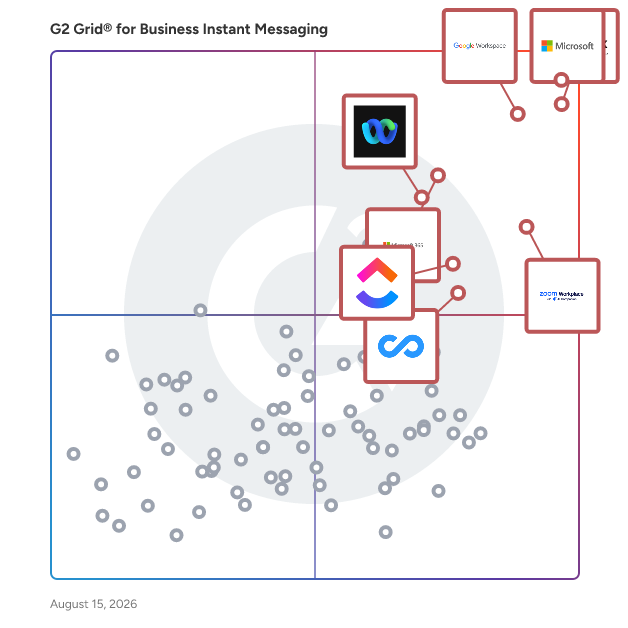
G2 Grid® for Business Instant Messaging Software

G2 Grid® for Business Instant Messaging Software plotting products by satisfaction and market presence

Highlighted products: Microsoft Teams, Slack, Google Workspace, Zoom Workplace, Microsoft 365, Webex Suite, ClickUp, and Connecteam.

Underlying data: [Grid® JSON](https://www.g2.com/categories/business-instant-messaging/grids.json?focus%5B%5D=microsoft-teams&focus%5B%5D=slack&focus%5B%5D=google-workspace&focus%5B%5D=zoom-workplace&focus%5B%5D=microsoft365&focus%5B%5D=cisco-webex-suite&focus%5B%5D=clickup&focus%5B%5D=connecteam)

YakChat

YakChat enables two-way SMS, MMS, RCS, and WhatsApp inside Microsoft Teams and Webex. Staff can message from desktop, mobile, or a web browser. It supports personal and shared inboxes and works with your existing Teams number, supported carrier numbers, or a YakChat-hosted number. Features include automatic translation, Microsoft 365 contact integration (Outlook, Entra ID, SharePoint), archiving and opt-in/out compliance tools, and support for receiving MFA/2FA codes—plus additional administration and workflow capabilities.

Average Rating: 4.2/5.0

Total Reviews: 20

How Do G2 Users Rate YakChat?

  • Has the product been a good partner in doing business?: 10.0/10 (Category avg: 8.8/10)
  • Web Application: 9.1/10 (Category avg: 9.0/10)
  • Third-Party Integrations: 8.9/10 (Category avg: 8.4/10)
  • File Sharing: 8.5/10 (Category avg: 8.9/10)

Who Is the Company Behind YakChat?

  • Seller: YakChat
  • HQ Location: Bristol, GB
  • LinkedIn® Page: www.linkedin.com
    16 employees on LinkedIn®
  • Phone: US: +1 425 385 0385 | UK: +44 117 325 4566

Who Uses This Product?

  • Company Size: 50% Small, 40% Medium

What Do G2 Reviewers Say About YakChat?

AI-generated summary from verified user reviews

Pros
  • Users praise YakChat for its ease of use, seamlessly integrating into familiar interfaces like Teams and Webex.
  • Users value the smooth integrations of YakChat with Microsoft Teams, Outlook, and Webex for seamless communication.
  • Users love the effortless communication with YakChat, enabling quick and convenient texting directly from their desktop.
  • Users find the setup ease of YakChat outstanding, enabling quick integration and effortless communication with colleagues.
  • Users appreciate the seamless integration of YakChat, enhancing collaboration directly within familiar platforms like Teams and Outlook.
Cons
  • Users experience connectivity issues with YakChat, including outages and delays in message refresh, impacting usability.
  • Users find the missing features in YakChat limiting, especially concerning reporting tools and video calling options.
  • Users find the interface not intuitive, feeling basic and clunky compared to modern messaging apps.
  • Users experience offline limitations with YakChat, impacting efficiency and customization of messaging features.
  • Users experience slow loading times with YakChat, especially when using unstable internet, impacting message refresh and stability.

What Are Recent G2 Reviews of YakChat?

Rock

Rock allows anyone to start collaborating on a new project within seconds with messaging, tasks, and everything related to project management in one space. Whether you work in a startup, marketing, software engineering, consulting, design, education or anything else, Rock can easily get people across teams together to work on new projects. Collaborate and message with freelancers, agencies, and other partners. All from the same place. Maximize your productivity while streamlining team communication and collaboration with: - Full-fledged messaging app with unlimited messages. - Tasks, project boards, to-do lists, filters, deadlines and more! - Kanban boards, sprints, recurring tasks, and more all in the Tasks mini-app. - Note-taking functionality to document important information with your team. - Seamless integrations with Google Drive, Zoom, GitHub, Zapier and more! The fastest way to start working on any project with anyone. Try Rock and collaborate and discuss with anyone.

Average Rating: 4.1/5.0

Total Reviews: 14

How Do G2 Users Rate Rock?

  • Has the product been a good partner in doing business?: 9.2/10 (Category avg: 8.8/10)
  • Web Application: 8.3/10 (Category avg: 9.0/10)
  • Third-Party Integrations: 7.1/10 (Category avg: 8.4/10)
  • File Sharing: 8.7/10 (Category avg: 8.9/10)

Who Is the Company Behind Rock?

  • Seller: Rock
  • Year Founded: 2019
  • HQ Location: San Francisco, US
  • Twitter: @LetsRockHQ
    514 Twitter followers
  • LinkedIn® Page: www.linkedin.com
    31 employees on LinkedIn®

Who Uses This Product?

  • Company Size: 64% Small, 21% Medium

What Do G2 Reviewers Say About Rock?

AI-generated summary from verified user reviews

Pros
  • Users appreciate the ease of use of Rock, enjoying its simple interface and smooth integration into workflows.
  • Users appreciate the clean and distraction-free interface of Rock, enhancing organization and teamwork efficiency.
  • Users appreciate the effective automation features that streamline tasks and organization for teams in one platform.
  • Users appreciate the convenience of Rock for its all-in-one interface and easy organization of tasks and notes.
  • Users appreciate the customization options in Rock, allowing for organized and tailored communication within teams.
Cons
  • Users find the limited features of Rock restricts functionality, with basic reporting and few third-party integrations.
  • Users face integration issues due to limited third-party options and basic reporting and analytics features.
  • Users find missing features in Rock, particularly with third-party integrations and basic reporting capabilities.
  • Users report performance issues with occasional slowdowns, impacting their overall experience and flexibility with the product.

What Are Recent G2 Reviews of Rock?

What Are G2 Users Discussing About Rock?

SPACE Channel

SPACE Channel is a fast team communication tool with minimal but required features so that teams enjoy working with no confusion. The simple UX makes it easy to use for teams. Create channels for purposeful and organized communications. In-app meetings promote quick decision-making and real-time collaboration. Search and find the desired information effortlessly and in no time. Channel boosts the productivity of the team by accelerating and streamlining the strategy and execution.

Average Rating: 4.1/5.0

Total Reviews: 13

How Do G2 Users Rate SPACE Channel?

  • Has the product been a good partner in doing business?: 5.0/10 (Category avg: 8.8/10)
  • Web Application: 7.5/10 (Category avg: 9.0/10)
  • Third-Party Integrations: 5.8/10 (Category avg: 8.4/10)
  • File Sharing: 7.9/10 (Category avg: 8.9/10)

Who Is the Company Behind SPACE Channel?

Who Uses This Product?

  • Company Size: 77% Small, 15% Medium

What Do G2 Reviewers Say About SPACE Channel?

AI-generated summary from verified user reviews

Pros
  • Users value the real-time communication capabilities of SPACE Channel, enhancing collaboration and peer interaction effectively.
  • Users appreciate the ease of use of SPACE Channel, finding its content clear, engaging, and enjoyable to follow.
  • Users appreciate the intuitive explanations of SPACE Channel, finding complex topics engaging and easy to understand.
  • Users appreciate the well-organized content of SPACE Channel, making complex space topics easy and enjoyable to understand.
  • Users appreciate the clear and engaging explanations of complex space topics, enhanced by high-quality visuals and organization.
Cons
  • Users experience integration issues with SPACE Channel, affecting compatibility with partner tools and usability on lower-end devices.
  • Users report performance issues with SPACE Channel, noting high resource usage and limited integration with partner tools.
  • Users experience software glitches, including UI issues and frequent hanging, detracting from the overall experience.

What Are Recent G2 Reviews of SPACE Channel?

What Are G2 Users Discussing About SPACE Channel?

AI can help you find the answers. G2 helps you trust them.

Connect G2 to Claude or ChatGPT for answers grounded in G2's trusted reviews, comparisons, and pricing from real user insights.

How it works

Thirdlane Connect

Thirdlane Connect is a white-label team collaboration tool with voice, omnichannel messaging, and video for MSPs, service providers, and telecom resellers on Thirdlane’s multi-tenant UCaaS platform. Deliver branded calling, chat, and meetings across web, desktop, and mobile with APIs and CRM integrations. Main features: - VoIP calling, call recording, transfer, and hold - Team chat for 1:1 and groups - Video meetings with screen sharing - Presence and status sync - File sharing and inline media - Click-to-call and CRM screen pops - Branded apps for web, Windows, macOS, Linux, iOS, and Android See how Thirdlane helps MSPs, UCaaS providers, resellers, and enterprises deliver white-label multi-tenant communications. Request a live demo today: https://www.thirdlane.com

Average Rating: 4.3/5.0

Total Reviews: 21

How Do G2 Users Rate Thirdlane Connect?

  • Has the product been a good partner in doing business?: 8.3/10 (Category avg: 8.8/10)

Who Is the Company Behind Thirdlane Connect?

  • Seller: Thirdlane
  • Year Founded: 2003
  • HQ Location: Fairfax, US
  • Twitter: @thirdlanepbx
    47 Twitter followers
  • LinkedIn® Page: www.linkedin.com
    4 employees on LinkedIn®
  • Ownership: Third Lane Technologies, LLC

Who Uses This Product?

  • Company Size: 44% Small, 30% Medium

What Do G2 Reviewers Say About Thirdlane Connect?

AI-generated summary from verified user reviews

Pros
  • Users love the ease of use of Thirdlane Connect, making communication seamless for everyone in the team.
  • Users value the easy communication of Thirdlane Connect, enjoying seamless calls, chats, and meetings in one platform.
  • Users value the consolidated communication tools in Thirdlane Connect, enhancing collaboration with seamless integration and ease of use.
  • Users find the easy setup of Thirdlane Connect allows for quick integration and smooth communication from the start.
  • Users value the intuitive interface of Thirdlane Connect, enhancing workflows and making communication seamless across all devices.
Cons
  • Users face a steep learning curve with Thirdlane Connect, making initial setup and navigation challenging for non-technical users.
  • Users often struggle with the difficult setup of Thirdlane Connect, as it demands technical expertise for configuration.
  • Users find the steep learning curve challenging, particularly for non-technical users during initial setup and navigation.
  • Users struggle with the steep learning curve and dated interface of Thirdlane Connect, complicating initial setup and navigation.
  • Users struggle with the difficult interface of Thirdlane Connect, finding setup and navigation overwhelming and challenging.

What Are Recent G2 Reviews of Thirdlane Connect?

What Are G2 Users Discussing About Thirdlane Connect?

Heed

Heed is an employee communication and alerting platform that enables organizations to deliver targeted messages directly to employees across desktop, mobile, and shared display devices. Heed belongs to the Employee Communication Software category and is used by medium to large enterprises that need to reach employees quickly and reliably, whether to share business updates, compliance notifications, or time-sensitive operational alerts. The platform is designed for industries where information visibility and accountability are essential, including financial services, government, healthcare, and technology. Heed helps communication, HR, and IT teams manage and distribute content through multiple channels while tracking delivery and engagement metrics in real time. Its cross-device architecture ensures messages appear prominently, not lost in crowded inboxes or internal chat threads. Key Features and Capabilities: * Desktop Alerts & Mobile Notifications: Deliver instant, attention grabbing updates across devices. * Digital Signage & Corporate Screensavers: Display branded content and announcements on shared screens and employee desktops. * Desktop Ticker: Keep key information visible throughout the day with a persistent scrolling news bar. * Targeting & Scheduling: Send messages to specific employee groups or locations, on demand or at scheduled times. * Analytics & Reporting: Measure message delivery, open rates, and engagement trends for transparency and optimization. Common Use Cases: - Communicating urgent IT, security, or operational incidents. - Sharing compliance and policy updates that require acknowledgment. - Promoting engagement initiatives, surveys, or internal campaigns. - Distributing leadership messages or cultural updates to dispersed teams. Heed integrates with existing enterprise tools such as ServiceNow, Microsoft Teams, and SharePoint, enabling organizations to automate and extend communication workflows. The platform supports both cloud and on-premise deployments, making it suitable for regulated or security-sensitive environments. By consolidating multiple communication channels into a single, manageable system, Heed provides a structured, measurable way for businesses to ensure the right message reaches the right people at the right time.

Average Rating: 4.9/5.0

Total Reviews: 10

How Do G2 Users Rate Heed?

  • Has the product been a good partner in doing business?: 10.0/10 (Category avg: 8.8/10)
  • Web Application: 10.0/10 (Category avg: 9.0/10)
  • Third-Party Integrations: 8.3/10 (Category avg: 8.4/10)
  • File Sharing: 9.2/10 (Category avg: 8.9/10)

Who Is the Company Behind Heed?

  • Seller: Heed
  • Year Founded: 2017
  • HQ Location: London, GB
  • LinkedIn® Page: www.linkedin.com
    21 employees on LinkedIn®
  • Ownership: privately owned

Who Uses This Product?

  • Company Size: 50% Small, 30% Medium

What Do G2 Reviewers Say About Heed?

AI-generated summary from verified user reviews

Pros
  • Users appreciate Heed's centralized platform for health, safety, and compliance, enhancing visibility and proactive responses.
  • Users value the real-time alerts and targeted notifications from Heed, enhancing team responsiveness and communication efficiency.
  • Users value the real-time alerts of Heed, enhancing team responsiveness and ensuring critical updates are promptly seen.
  • Users value the effective team collaboration provided by Heed, enhancing communication and engagement across remote teams.
  • Users appreciate the real-time alerts from Heed, enhancing responsiveness and alignment during critical situations.
Cons
  • Users find the costing to be expensive and require customization based on their specific industrial needs.
  • Users note that integration issues can complicate the setup process, impacting overall functionality and customization.
  • Users note a lack of integrations, which can hinder the seamless connection with existing tools and workflows.
  • Users frequently experience lagging performance with Heed, which detracts from their overall satisfaction with the product.
  • Users feel that Heed's limited customization options hinder their ability to tailor alerts and integrations for specific workflows.

What Are Recent G2 Reviews of Heed?

Channel Talk

Channel Talk is your first sales concierge designed to boost sales and LTV through your existing customers. Identify and engage key customers through our CRM. Provide personalized assistance through our live chat. Grow your a loyal fanbase through targeted marketing campaigns. It's the closest thing to an in-store customer experience for the online environment, helping you to turn first-time visitors into life-long regulars of your brand. Watch your LTV grow and prevent churn with our all-in-one sales concierge platform.

Average Rating: 4.8/5.0

Total Reviews: 13

How Do G2 Users Rate Channel Talk?

  • Has the product been a good partner in doing business?: 9.8/10 (Category avg: 8.8/10)

Who Is the Company Behind Channel Talk?

  • Seller: Channel
  • Year Founded: 2014
  • HQ Location: Seoul, South Korea
  • Twitter: @ChannelioUS
    14 Twitter followers
  • LinkedIn® Page: www.linkedin.com
    256 employees on LinkedIn®

Who Uses This Product?

  • Company Size: 85% Small, 15% Medium

What Are Recent G2 Reviews of Channel Talk?

TWT Chat

TWT Chat: All-in-One AI-Powered Platform for Global Teams – Integrating Support, Ticketing, Chat, Remote Help & Audio/Video Calls.

Average Rating: 4.0/5.0

Total Reviews: 5

How Do G2 Users Rate TWT Chat?

  • Has the product been a good partner in doing business?: 8.3/10 (Category avg: 8.8/10)
  • Web Application: 7.8/10 (Category avg: 9.0/10)
  • Third-Party Integrations: 7.5/10 (Category avg: 8.4/10)
  • File Sharing: 7.8/10 (Category avg: 8.9/10)

Who Is the Company Behind TWT Chat?

Who Uses This Product?

  • Company Size: 60% Small, 40% Medium

What Do G2 Reviewers Say About TWT Chat?

AI-generated summary from verified user reviews

Pros
  • Users appreciate the ease of use of TWT Chat, highlighting its straightforward navigation and reliable messaging.
  • Users appreciate the simple navigation and look forward to new features in TWT Chat.
  • Users appreciate the easy navigation of TWT Chat, making it simple to use and adapt to new features.
  • Users value the high reliability of TWT Chat, enjoying its fast and efficient messaging performance.
  • Users find TWT Chat simple to use with easy navigation, enhancing their overall chat experience.
Cons
  • Users note the absence of backup chat features in TWT Chat, limiting functionality and user experience.
  • Users experience slow loading times with TWT Chat, causing frustration and the need to restart the app frequently.
  • Users experience frustrating software glitches like lagging and missing features, impacting usability and media quality.

What Are Recent G2 Reviews of TWT Chat?

Midlap

Midlap is an online collaboration and brainstorming tool where we are solving the problem that arises due to switching between multiple apps to collaborate with your team. We solve this problem by providing tools like Whiteboards, Kanban Boards, Flow Diagrams, Files, Chat, Events, Gantt Charts etc under a single app. So no more switching between different apps and get more done with Midlap.

Average Rating: 4.9/5.0

Total Reviews: 12

How Do G2 Users Rate Midlap?

  • Web Application: 10.0/10 (Category avg: 9.0/10)
  • File Sharing: 10.0/10 (Category avg: 8.9/10)

Who Is the Company Behind Midlap?

Who Uses This Product?

  • Company Size: 75% Small, 17% Large

What Are Recent G2 Reviews of Midlap?

Sakari

All your business texting needs. One easy platform. Sakari is a global communication hub built for sales, marketing, and customer success teams who rely on SMS and MMS to drive real growth and engagement. With Sakari, your team can manage both two-way SMS conversations and 1:many bulk messaging campaigns all from the same platform — no more tech-stack swapping, whether you're closing a deal, running a territory-specific blast, nurturing new customers, or launching a full-scale marketing campaign across the globe. • Reach customers in 190+ countries with local numbers you can buy in minutes, plus compliance support for wherever you're sending. • Flexible phone numbers: Buy new, import an existing number, or enable texting with your office number! • Transparent plans & pricing starting as low as $25/month — no setup fees, no contracts, and no hidden carrier fees or surprise charges (taxes excluded, vary by jurisdiction) • Native integrations with HubSpot, Pipedrive, ActiveCampaign, Aircall, Slack, and Zapier, plus 1,000+ more — built to work seamlessly with your CRM, or as a powerful standalone solution Need more firepower? Sakari offers custom Enterprise contracts tailored to your growth needs. Ready to add SMS to your marketing stack? Start your free trial → https://sakari.io/

Average Rating: 4.5/5.0

Total Reviews: 22

How Do G2 Users Rate Sakari?

  • Has the product been a good partner in doing business?: 9.4/10 (Category avg: 8.8/10)
  • Web Application: 10.0/10 (Category avg: 9.0/10)
  • Third-Party Integrations: 10.0/10 (Category avg: 8.4/10)

Who Is the Company Behind Sakari?

  • Seller: Sakari
  • Company Website:
  • Year Founded: 2017
  • HQ Location: San Francisco, CA
  • Twitter: @sakari
    2,656 Twitter followers
  • LinkedIn® Page: www.linkedin.com
    45 employees on LinkedIn®

Who Uses This Product?

  • Company Size: 77% Small, 23% Medium

What Do G2 Reviewers Say About Sakari?

AI-generated summary from verified user reviews

Pros
  • Users find Sakari's ease of use remarkable, noting its friendly interface and seamless tool integrations.
  • Users appreciate the seamless integrations of Sakari, enhancing workflow efficiency and improving communication with existing tools.
  • Users value the CRM integration capability of Sakari, enhancing their workflow and efficiency significantly.
  • Users commend Sakari's outstanding customer support, highlighting its knowledgeable and responsive service that enhances user experience.
  • Users value the ease of understanding provided by Sakari's comprehensive guide, enhancing their overall experience.
Cons
  • Users find the limited group reassignment feature frustrating, as it hinders effective contact organization within Sakari.
  • Users experience delays as texts only go to contact owners, complicating communication and slowing response times.
  • Users experience a slight learning curve initially, but find Sakari valuable once they adapt to it.
  • Users find the limited customization options for templates somewhat restrictive, though the tool improves with familiarity.
  • Users find the limited templates in Sakari hinder customization, though the tool becomes great after a learning period.

What Are Recent G2 Reviews of Sakari?

What Are G2 Users Discussing About Sakari?

Virola Messenger

Virola Messenger is a secure corporate communication and collaboration tool that significantly improves teams' efficiency. It supports a wide range of features for effective communication and collaboration. Apart from standard messaging and video/audio conferencing features, Virola has a Task Board, an issues tracking system, LaTeX and markdown messaging formats, and flexible screen sharing and remote control features. Virola is self-hosted, which makes it more secure than cloud-based messengers and helps you keep control over your corporate data.

Average Rating: 4.7/5.0

Total Reviews: 12

How Do G2 Users Rate Virola Messenger?

  • Has the product been a good partner in doing business?: 8.3/10 (Category avg: 8.8/10)
  • Web Application: 9.0/10 (Category avg: 9.0/10)
  • Third-Party Integrations: 9.3/10 (Category avg: 8.4/10)
  • File Sharing: 9.8/10 (Category avg: 8.9/10)

Who Is the Company Behind Virola Messenger?

  • Seller: Provide Support
  • Year Founded: 2003
  • HQ Location: New York, New York
  • Twitter: @provide_support
    3,593 Twitter followers
  • LinkedIn® Page: www.linkedin.com
    26 employees on LinkedIn®

Who Uses This Product?

  • Company Size: 58% Small, 25% Medium

What Do G2 Reviewers Say About Virola Messenger?

AI-generated summary from verified user reviews

Pros
  • Users value the user-friendly interface of Virola Messenger, making communication and collaboration effortless for everyone.
  • Users value the top-notch security of Virola Messenger, ensuring privacy and secure communication for their teams.
  • Users value the immediacy of communication with Virola Messenger, enabling quick connections for work and support.
  • Users value the convenience of Virola Messenger for quick communication with colleagues and family, enhancing productivity.
  • Users enjoy the user-friendly interface of Virola Messenger, making it accessible for all skill levels.
Cons
  • Users find the limited mobile app features of Virola Messenger restrict their overall communication experience.
  • Users find the mobile version a bit slow, which can hinder the overall messaging experience.
  • Users find the initial learning curve challenging, but note that it becomes easier with practice over time.
  • Users suggest that features can be enhanced to improve usability and overall experience with Virola Messenger.
  • Users note the limited options with Virola Messenger, particularly regarding its user base and mobile app features.

What Are Recent G2 Reviews of Virola Messenger?

What Are G2 Users Discussing About Virola Messenger?

MyHub

Quickly create a beautiful intranet that will transform the way employees connect to information, processes, and each other. With MyHub, benefit from modern intranet features such as pre-built templates, chat, newsfeeds, forums, blogs, calendars, document storage, automated forms, social network, staff directories, alerts and notifications. When you need to ensure your team have the information they need, MyHub will get you there quickly.

Average Rating: 4.4/5.0

Total Reviews: 24

How Do G2 Users Rate MyHub?

  • Has the product been a good partner in doing business?: 9.1/10 (Category avg: 8.8/10)

Who Is the Company Behind MyHub?

  • Seller: MyHub
  • Year Founded: 2001
  • HQ Location: Auckland, New Zealand
  • Twitter: @MyHubIntranet
    12,286 Twitter followers
  • LinkedIn® Page: www.linkedin.com
    9 employees on LinkedIn®

Who Uses This Product?

  • Top Industries: Hospital & Health Care
  • Company Size: 52% Medium, 24% Large

What Are Recent G2 Reviews of MyHub?

What Are G2 Users Discussing About MyHub?

Cleariest

Cleariest is a team messaging platform that puts transparent communication at the center of how organizations work. Designed with a public-first philosophy, Cleariest encourages teams to communicate in open channels rather than buried DMs, so information stays accessible, searchable, and visible to everyone who needs it. Teams use Cleariest for real-time messaging, channel-based collaboration, file sharing, and rich text communication, with built-in transparency analytics that show how openly a team communicates. Features like channel discovery and full-text search help new team members get up to speed faster and reduce the information silos that slow organizations down. Cleariest is well-suited for teams that value openness, want to reduce "who knows what" friction, and believe that clear, shared communication leads to better collaboration.

Average Rating: 4.3/5.0

Total Reviews: 2

How Do G2 Users Rate Cleariest?

  • Has the product been a good partner in doing business?: 10.0/10 (Category avg: 8.8/10)
  • Web Application: 10.0/10 (Category avg: 9.0/10)
  • File Sharing: 10.0/10 (Category avg: 8.9/10)

Who Is the Company Behind Cleariest?

Who Uses This Product?

  • Company Size: 100% Small

What Are Recent G2 Reviews of Cleariest?

Heycollab

Heycollab is a tool that helps you stay organized, manage tasks, and helps employees collaborate by empowering teams to work together. It's an all-in-one productivity management tool for teams & freelancers that combines collaboration with extensive features to help you manage resources and maintain visibility on projects. You can chat in real-time, share files, manage workflow, and keep your team organized. With Heycollab you can easily break down projects into tasks, set due dates, track team workloads & share files, & images with team members. Use one tool from day 1 to the Deadline to plan & organize projects, communicate & collaborate.

Average Rating: 5.0/5.0

Total Reviews: 3

How Do G2 Users Rate Heycollab?

  • Has the product been a good partner in doing business?: 10.0/10 (Category avg: 8.8/10)

Who Is the Company Behind Heycollab?

  • Seller: Heycollab
  • Year Founded: 2017
  • HQ Location: Las Vegas, US
  • Twitter: @Heycollab27
    2 Twitter followers
  • LinkedIn® Page: www.linkedin.com
    2 employees on LinkedIn®

Who Uses This Product?

  • Company Size: 75% Small, 25% Medium

What Are Recent G2 Reviews of Heycollab?

#One

#One is a secure communication software offering a range of features to simplify communications and boost productivity. #One combines video meetings and conferencing, chats, instant messaging and file sharing seamlessly into one, cyber secure software. #One enables your teams and external partners to connect and collaborate effortlessly anywhere, anytime. The software caters to businesses, organisations, and individuals seeking a European GDPR-compliant communication platform to secure their communication. Key features of #One: - Online meetings and video conferences — Arrange and host secure online meetings and video conferences for real-time communication and collaboration with colleagues and external partners. Share presentations and important documents and use meeting chat for providing relevant information in written format. - Team chat and instant messaging — Chat with teams with rich group discussions to stay connected and updated on important topics. Connect with colleague via personal one-to-one instant messaging. Keep discussions organized with intuitive replies and chat history. - Rooms — Organise communication with teams and external stakeholders in #One Rooms, designed for streamlined collaboration. Rooms allow users to arrange online meetings, video calls, chats, and document sharing in one place per topic or team, helping teams and project members to stay aligned. Benefits of using #One: - All-in-one communication software — #One eliminates the need to switch between multiple tools by integrating video meetings, video calls, chat, instant messaging, and file sharing into one central platform. - Enhanced collaboration with dedicated rooms — Supports virtual collaboration rooms for departments, projects, or client communication. Each room serves as a centralised hub for messaging, meetings, and document sharing keeping everyone aligned and informed. - Secure and private infrastructure — Hosted in Finland within the EU on Dream Broker’s own server infrastructure, #One is built for organisations that take information security and privacy seriously. #One is audited by third-party experts in order to safeguard users’ data.

Average Rating: 5.0/5.0

Total Reviews: 1

How Do G2 Users Rate #One?

  • Web Application: 10.0/10 (Category avg: 9.0/10)
  • Third-Party Integrations: 10.0/10 (Category avg: 8.4/10)
  • File Sharing: 10.0/10 (Category avg: 8.9/10)

Who Is the Company Behind #One?

  • Seller: Dream Broker Ltd.
  • Year Founded: 2007
  • HQ Location: Espoo, Finland, FI
  • Twitter: @DreamBrokerLtd
    1,380 Twitter followers
  • LinkedIn® Page: www.linkedin.com
    63 employees on LinkedIn®

Who Uses This Product?

  • Company Size: 100% Small

What Are Recent G2 Reviews of #One?

Axero

Axero is a modern intranet and digital workplace platform that brings your people, content, and communication into one searchable, branded hub. Built for mid-size and enterprise companies, Axero is where HR leaders, internal communications teams, and IT administrators bring everything together — so employees can find information, collaborate on projects, and stay connected to what's happening across the company, no matter where they work. Key features and capabilities include: - Intranet & communication hub: Company news, announcements, and updates in one place, where every employee can actually see them - Knowledge management: Organized document libraries and wikis so nothing gets buried and information stays current - Team collaboration: Workspaces, task management, and project tools that keep teams moving without the back-and-forth - Tool consolidation: A native form builder, newsletter manager, and LMS mean fewer tools to juggle. And with Axero App Manager, you can build and deploy custom tools right inside the platform - People directory & profiles: Find the right person fast with employee search and org charts that actually reflect how the company is structured - Integrations: Connects with SharePoint, Microsoft 365, Google Workspace, Slack, and more so teams aren't starting from scratch Axero works for everyone, from employees who want drag-and-drop tools, to developers who want REST APIs, CSS overrides, webhooks, and full control through Axero App Manager. The result is an intranet that looks like your brand and works the way your people do. Available in the cloud or on-premise, with role-based permissions and SSO support. And when you work with Axero, you get more than software — you get a dedicated client success team that's with you through implementation, adoption, and everything after.

Average Rating: 4.3/5.0

Total Reviews: 99

How Do G2 Users Rate Axero?

  • Has the product been a good partner in doing business?: 9.1/10 (Category avg: 8.8/10)
  • Web Application: 8.8/10 (Category avg: 9.0/10)
  • Third-Party Integrations: 6.7/10 (Category avg: 8.4/10)
  • File Sharing: 8.9/10 (Category avg: 8.9/10)

Who Is the Company Behind Axero?

  • Seller: Axero Solutions, LLC
  • Company Website:
  • Year Founded: 2008
  • HQ Location: New York, NY
  • Twitter: @AxeroSolutions
    417 Twitter followers
  • LinkedIn® Page: www.linkedin.com
    45 employees on LinkedIn®

Who Uses This Product?

  • Top Industries: Financial Services, Information Technology and Services
  • Company Size: 55% Medium, 24% Small

What Do G2 Reviewers Say About Axero?

AI-generated summary from verified user reviews

Pros
  • Users find Axero's platform to be intuitive and easy to use, facilitating quick adoption and implementation.
  • Users highlight Axero's timely and responsive customer support, ensuring their needs are met efficiently and effectively.
  • Users value the customization flexibility of Axero, allowing precise tailoring of their intranet for large organizations.
  • Users find Axero's setup to be easy and intuitive, making configuration and maintenance a seamless experience.
  • Users value the flexibility and all-in-one solution of Axero, enhancing knowledge sharing and content management in organizations.
Cons
  • Users find the learning curve challenging, especially when editing page layouts and managing features without support.
  • Users note the missing features in Axero, lacking certain promised functionalities and experiencing undesired changes post-updates.
  • Users find Axero not intuitive, with complex navigation and limited search functions hindering the user experience.
  • Users find the menu options overwhelming, which can complicate the initial setup and usage of Axero.
  • Users experience inefficient searching as it requires deep navigation and lacks comprehensive content coverage in results.

What Are Recent G2 Reviews of Axero?

What Are G2 Users Discussing About Axero?

Neeraja Prakash
NP
Researched and written by Neeraja Prakash
Updated October 23, 2024