# Best Board Management Software

*By [Neeraja Prakash](https://research.g2.com/insights/author/neeraja-prakash)*


Board management software provides a workspace for board members, chief executives, C-level executives, corporate secretaries, committee chairs, and other professionals in charge to stay organized, make timely decisions, and collaborate cohesively.

Board members can annotate documents, review materials beforehand, and attend the virtual meeting while accessing all materials in a centralized location. These tools allow access to agendas, documents, notes, calendars, and contacts that can be used to inform and fortify the corporate meeting process. Files can be uploaded within the workspaces, and users can then be assigned access according to their roles and clearance levels.

These tools are most commonly used by leadership teams, such as a parent committee or board of a large corporation. Executive leaders use board management software to track the progress of strategic initiatives, assign responsibilities, and review updates during monthly meetings.

Board management software can be used alongside other team collaboration tools that facilitate collaboration among employees or participants at varying levels of authority.

To qualify for inclusion in the Board Management category, a product must:

- Be intended for use by board or committee members, or similarly ranking directors
- Enable the creation and storage of material such as agendas, meeting minutes, team notes, document annotations, board pack builders, etc.
- Allow for communication and engagement between members
- Enable features like voting, e-signatures, surveys, and questionnaires, allowing boards to gather opinions and collect group feedback
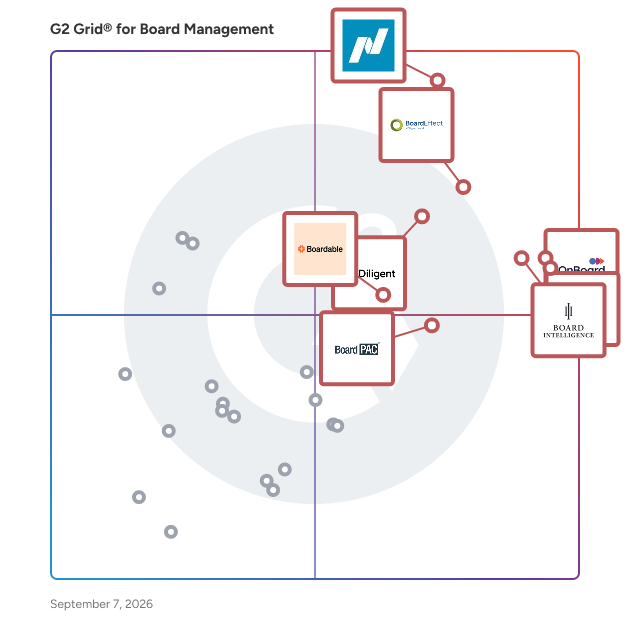


## Top Board Management Software at a Glance
| # | Product | Rating | Best For | What Users Say |
|---|---------|--------|----------|----------------|
| 1 | [Nasdaq Boardvantage](https://www.g2.com/products/nasdaq-boardvantage/reviews) | 4.6/5.0 (219 reviews) | Compliance-focused board governance | "[Easy to Learn and a Major Upgrade—Great Integrations and New AI Features](https://www.g2.com/survey_responses/nasdaq-boardvantage-review-12693752)" |
| 2 | [BoardEffect](https://www.g2.com/products/boardeffect/reviews) | 4.5/5.0 (312 reviews) | Nonprofit and association board coordination | "[New BoardEffect User - 3 Months](https://www.g2.com/survey_responses/boardeffect-review-10224862)" |
| 3 | [Convene](https://www.g2.com/products/azeus-systems-convene/reviews) | 4.8/5.0 (389 reviews) | Mobile-friendly board meetings and remote governance | "[Reliable Board Meeting Packs with Easy Document Sharing](https://www.g2.com/survey_responses/convene-review-12930081)" |
| 4 | [OnBoard Board Management Software](https://www.g2.com/products/onboard-board-management-software/reviews) | 4.7/5.0 (653 reviews) | Streamlined digital board meetings | "[Intuitive Platform, Great Service](https://www.g2.com/survey_responses/onboard-board-management-software-review-8613585)" |
| 5 | [Diligent Boards](https://www.g2.com/products/diligent-boards/reviews) | 4.5/5.0 (497 reviews) | Enterprise-grade governance and secure board operations | "[Effortless Board Book Creation with an Intuitive Interface](https://www.g2.com/survey_responses/diligent-boards-review-12092813)" |
| 6 | [Board Intelligence](https://www.g2.com/products/board-intelligence/reviews) | 4.6/5.0 (225 reviews) | Insight-ready board reporting and decision frameworks | "[Intuitive, Versatile, and Backed by Outstanding Support](https://www.g2.com/survey_responses/board-intelligence-review-12692641)" |
| 7 | [Boardable](https://www.g2.com/products/boardable/reviews) | 4.5/5.0 (277 reviews) | Accessible board coordination | "[Effortless Meeting Management, Needs Messaging Improvements](https://www.g2.com/survey_responses/boardable-review-12977851)" |
| 8 | [BoardPAC](https://www.g2.com/products/boardpac/reviews) | 4.6/5.0 (223 reviews) | Secure mobile governance with offline access | "[Simple, Easy to Use, and Packed with Strong Security](https://www.g2.com/survey_responses/boardpac-review-12911860)" |
| 9 | [BoardPro](https://www.g2.com/products/boardpro/reviews) | 4.8/5.0 (319 reviews) | Efficient meeting management for smaller boards | "[Easy-to-Read Boards with Helpful Reminders](https://www.g2.com/survey_responses/boardpro-review-12619188)" |
| 10 | [Diligent Community](https://www.g2.com/products/diligent-community/reviews) | 4.1/5.0 (41 reviews) | — | "[Interactive, User-Friendly Platform with Minor Improvable Aspects](https://www.g2.com/survey_responses/diligent-community-review-12673092)" |


## How Many Board Management Software Products Does G2 Track?
**Total Products under this Category:** 96

### Category Stats (Jul 2026)
- **Average Rating**: 4.43/5 (↓0.01 vs Jun 2026) The average rating of products in this category, based on all submitted ratings
- **Top Trending Product**: BoardPAC (+0.24%) - Among all products in this category, BoardPAC recorded the largest rating increase compared to last month
*Last updated: July 01, 2026*


## How Does G2 Rank Board Management Software Products?

**Why You Can Trust G2's Software Rankings:**

- 30 Analysts and Data Experts
- 4,100+ Authentic Reviews
- 96+ Products
- Unbiased Rankings

G2's software rankings are built on verified user reviews, rigorous moderation, and a consistent research methodology maintained by a team of analysts and data experts. Each product is measured using the same transparent criteria, with no paid placement or vendor influence. While reviews reflect real user experiences, which can be subjective, they offer valuable insight into how software performs in the hands of professionals. Together, these inputs power the G2 Score, a standardized way to compare tools within every category.


## Which Board Management Software Is Best for Your Use Case?

- **Leader:** [Nasdaq Boardvantage](https://www.g2.com/products/nasdaq-boardvantage/reviews)
- **Highest Performer:** [BoardPAC](https://www.g2.com/products/boardpac/reviews)
- **Easiest to Use:** [Convene](https://www.g2.com/products/azeus-systems-convene/reviews)
- **Top Trending:** [Convene](https://www.g2.com/products/azeus-systems-convene/reviews)
- **Best Free Software:** [OnBoard Board Management Software](https://www.g2.com/products/onboard-board-management-software/reviews)


---

**Sponsored**

### Easy Board

Easy Board is the #1 rated Easy to Use board meeting management software solution for nonprofits and CEOs, designed to help your entire board and committees streamline organization and boost engagement. This platform is specifically tailored for organizations seeking to enhance the efficiency of board meetings, document management, and committee collaboration. By providing a centralized hub for all board-related activities, Easy Board simplifies the complexities often associated with governance and decision-making processes. Key features of Easy Board include innovative Magic Links™, which allows one-click secure board meeting access with no login required. This feature enhances security while simplifying access, making it easier for members to participate in discussions and review materials. Additionally, the platform supports various document formats, enabling users to upload and share essential files effortlessly. The intuitive interface ensures that even those unfamiliar with digital tools can navigate the system with ease. Another significant benefit of Easy Board is its commitment to user satisfaction, backed by a 90-day money-back guarantee. This assurance reflects the platform&#39;s focus on delivering a positive experience for all users, fostering a sense of confidence in its capabilities. By prioritizing user engagement and providing tools that facilitate effective communication, Easy Board stands out in the board management software category, offering a comprehensive solution that meets the diverse needs of modern boards. The target audience for Easy Board includes non-profit organizations, corporate boards, and any group that requires effective management of board activities. With features designed to facilitate seamless interactions, Easy Board caters to users who may not be tech-savvy, ensuring that all board members can engage without the usual barriers associated with traditional board management tools. The software is particularly beneficial for organizations looking to improve their meeting preparation, document sharing, and overall board engagement. Overall, Easy Board is designed to enhance the effectiveness of board governance, making it an essential tool for organizations aiming to improve their operational efficiency and member engagement. With its user-friendly features and commitment to security, Easy Board provides a valuable resource for any organization looking to optimize its board management processes.


[Visit website](https://www.g2.com/external_clickthroughs/record?secure%5Bad_program%5D=ppc&amp;secure%5Bad_slot%5D=category_product_list&amp;secure%5Bcategory_id%5D=1090&amp;secure%5Bdisplayable_resource_id%5D=1090&amp;secure%5Bdisplayable_resource_type%5D=Category&amp;secure%5Bmedium%5D=sponsored&amp;secure%5Bplacement_reason%5D=page_category&amp;secure%5Bplacement_resource_ids%5D%5B%5D=1090&amp;secure%5Bprioritized%5D=false&amp;secure%5Bproduct_id%5D=123681&amp;secure%5Bresource_id%5D=1090&amp;secure%5Bresource_type%5D=Category&amp;secure%5Bsource_type%5D=category_page&amp;secure%5Bsource_url%5D=https%3A%2F%2Fwww.g2.com%2Fcategories%2Fboard-management%3Fpage%3D4&amp;secure%5Btoken%5D=455594be798be2fb7e4417782f3dea98f43adc4276db94d9539e6bad19f182dd&amp;secure%5Burl%5D=https%3A%2F%2Fcalendly.com%2Feasy-board%2Fgroup-demo&amp;secure%5Burl_type%5D=book_demo)

---

## What Are the Top-Rated Board Management Software Products in 2026?
### 1. [Nasdaq Boardvantage](https://www.g2.com/products/nasdaq-boardvantage/reviews)
Nasdaq Boardvantage® is a comprehensive board management platform designed to support the full lifecycle of board and committee work. Built for corporate boards, governance teams, and organizations across public, private, and nonprofit sectors, the platform streamlines how boards prepare for meetings, collaborate on materials, and make decisions. Nasdaq Boardvantage centralizes key governance workflows into a single environment, helping directors and administrators manage information efficiently while maintaining strict protection of sensitive data. Serving a wide range of industries and board structures, Nasdaq Boardvantage is designed for users of all experience levels—from seasoned directors to first time board members. Its intuitive interface simplifies complex governance tasks such as preparing agendas, distributing materials, collecting approvals, and maintaining accurate records. Organizations that manage frequent board meetings, multi-committee structures, or regulatory disclosures benefit from tools that reduce manual effort and provide greater visibility across governance processes. Nasdaq Boardvantage supports end-to-end meeting management. Administrators can create agendas, compile board books, and update materials in real time. During meetings, directors can access and annotate documents, participate in voting, and engage in discussions from any location. After meetings, the platform assists with drafting minutes, tracking attendance, completing follow up activities, and maintaining an auditable repository of past and current materials. AI supported features—developed in partnership with Microsoft—help users summarize lengthy documents and generate initial drafts of meeting minutes, enabling faster review and better information comprehension. Nasdaq Boardvantage also integrates with widely used productivity, collaboration, and governance tools to support seamless workflows. This includes connectivity with Microsoft 365 and Google Drive for accessing and managing files, Outlook for meeting notifications, and Teams and Zoom for conducting virtual meetings. The platform integrates with Docusign for electronic signatures aligned with regulatory standards and connects with entity management systems to help maintain accurate director and organizational data. AI capabilities developed with Microsoft and built directly into the platform assist with summarizing materials and extracting key insights, supporting faster preparation and more efficient decision-making. In addition to meeting management, Nasdaq Boardvantage is part of Nasdaq’s broader governance ecosystem. This includes support for digital compliance questionnaires, board and committee evaluations, and access to the Nasdaq Center for Board Excellence—a global community of governance leaders offering education, peer connection, and curated governance resources. These additional components allow organizations to manage board meetings, disclosures, and continuous improvement activities within a cohesive environment. Security and data protection are foundational to Nasdaq Boardvantage. The platform incorporates governance grade security practices, including SOC 2 audits, ISO 27001 certification, customizable permissions, third party penetration testing, and continuous monitoring by a global security operations center. These safeguards help ensure that sensitive board information remains protected throughout the workflow. Organizations also benefit from dedicated onboarding support, 24/7 global assistance, and ongoing training resources, helping teams adopt the platform effectively and maintain confidence in their governance processes. By combining structured workflows, collaborative tools, integrated governance solutions, and strong security measures, Nasdaq Boardvantage helps boards operate efficiently and stay aligned in an increasingly complex business environment.


**Average Rating:** 4.6/5.0
**Total Reviews:** 219
**How Do G2 Users Rate Nasdaq Boardvantage?**

- **Document Management:** 9.1/10 (Category avg: 8.7/10)
- **D&amp;O Questionnaires:** 7.3/10 (Category avg: 7.1/10)
- **Meeting Minutes:** 7.7/10 (Category avg: 8.2/10)
- **Quality of Support:** 9.7/10 (Category avg: 9.0/10)

**Who Is the Company Behind Nasdaq Boardvantage?**

- **Seller:** [Nasdaq](https://www.g2.com/sellers/nasdaq)
- **Company Website:** https://www.nasdaq.com/
- **Year Founded:** 1971
- **HQ Location:** New York
- **Twitter:** @Nasdaq (213,584 Twitter followers)
- **LinkedIn® Page:** https://www.linkedin.com/company/nasdaq/ (8,468 employees on LinkedIn®)

**Who Uses This Product?**
- **Who Uses This:** Executive Assistant
- **Top Industries:** Hospital &amp; Health Care, Banking
- **Company Size:** 41% Enterprise, 35% Mid-Market


#### What Are Nasdaq Boardvantage's Pros and Cons?

**Pros:**

- Ease of Use (31 reviews)
- Customer Support (25 reviews)
- Document Management (19 reviews)
- Board Management (18 reviews)
- Helpful (10 reviews)

**Cons:**

- Document Management (6 reviews)
- Calendar Integration (4 reviews)
- Lack of Customization (4 reviews)
- Lack of Features (4 reviews)
- Limited Functionality (4 reviews)


### What Do G2 Reviewers Say About Nasdaq Boardvantage?
*AI-generated summary from verified user reviews*

**Pros:**

- Users appreciate the **user-friendly interface** of Nasdaq Boardvantage, which simplifies document organization and collaboration.
- Users commend the **exceptional customer support** of Nasdaq Boardvantage, highlighting responsiveness and helpfulness as key strengths.
- Users appreciate the **user-friendly interface** of Nasdaq Boardvantage, which simplifies document organization and collaboration effectively.
- Users value the **user-friendly interface** of Nasdaq Boardvantage, which simplifies document management for Board members.
- Users find the **service teams exceptionally helpful** , enhancing their overall experience with Nasdaq Boardvantage.

**Cons:**

- Users find **document management cumbersome** , with issues like long upload lists and difficulty in tracking folder paths.
- Users find **calendar integration lacking** , wishing for easier cloning of invites to streamline recurring meetings.
- Users find the **lack of customization** in Boardvantage tedious, wishing for easier accessibility and streamlined permissions.
- Users find the **lack of features** in Nasdaq Boardvantage limits usability and overall effectiveness in certain tasks.
- Users find the **limited functionality** of Nasdaq Boardvantage restricts usability and complicates meeting management.

#### What Are Recent G2 Reviews of Nasdaq Boardvantage?

**"[Easy to Learn and a Major Upgrade—Great Integrations and New AI Features](https://www.g2.com/survey_responses/nasdaq-boardvantage-review-12693752)"**

**Rating:** 4.0/5.0 stars
*— Brielle H.*

[Read full review](https://www.g2.com/survey_responses/nasdaq-boardvantage-review-12693752)

---

**"[Effortless Board Management with Robust Security](https://www.g2.com/survey_responses/nasdaq-boardvantage-review-12389362)"**

**Rating:** 5.0/5.0 stars
*— Debbie S.*

[Read full review](https://www.g2.com/survey_responses/nasdaq-boardvantage-review-12389362)

---


#### What Are G2 Users Discussing About Nasdaq Boardvantage?

- [What is your experience with Nasdaq Boardvantage for board management, and what improvements would you suggest?](https://www.g2.com/discussions/what-is-your-experience-with-nasdaq-boardvantage-for-board-management-and-what-improvements-would-you-suggest)
- [How do I make a board book on Boardvantage?](https://www.g2.com/discussions/how-do-i-make-a-board-book-on-boardvantage)
- [What is a board portal Nasdaq?](https://www.g2.com/discussions/what-is-a-board-portal-nasdaq)
- [Can you print from Boardvantage?](https://www.g2.com/discussions/can-you-print-from-boardvantage) - 1 comment
- [What does Boardvantage do?](https://www.g2.com/discussions/what-does-boardvantage-do)

### 2. [BoardEffect](https://www.g2.com/products/boardeffect/reviews)
BoardEffect is an AI-powered board management software designed for mission-driven organizations. It equips volunteer boards with the tools to streamline board processes, enhance communication and promote accountability. Serving more than 5,000 mission-driven organizations, we empower volunteer boards with the tools to drive positive change. Our board management software is purpose-built with the unique needs of nonprofit organizations in mind, making it easier for you to focus on your mission.


**Average Rating:** 4.5/5.0
**Total Reviews:** 312
**How Do G2 Users Rate BoardEffect?**

- **Document Management:** 9.0/10 (Category avg: 8.7/10)
- **D&amp;O Questionnaires:** 6.3/10 (Category avg: 7.1/10)
- **Meeting Minutes:** 6.6/10 (Category avg: 8.2/10)
- **Quality of Support:** 9.1/10 (Category avg: 9.0/10)

**Who Is the Company Behind BoardEffect?**

- **Seller:** [Diligent Corporation](https://www.g2.com/sellers/diligent-corporation-9db2bcc4-90ac-4d53-93d9-d0478f837d14)
- **Company Website:** https://www.diligent.com/
- **Year Founded:** 2001
- **HQ Location:** New York, NY
- **Twitter:** @diligenthq (4,519 Twitter followers)
- **LinkedIn® Page:** https://www.linkedin.com/company/101105/ (3,011 employees on LinkedIn®)

**Who Uses This Product?**
- **Who Uses This:** Executive Assistant, Executive Director
- **Top Industries:** Non-Profit Organization Management, Hospital &amp; Health Care
- **Company Size:** 46% Mid-Market, 40% Small-Business


#### What Are BoardEffect's Pros and Cons?

**Pros:**

- Ease of Use (96 reviews)
- Document Management (54 reviews)
- Board Management (40 reviews)
- Customer Support (33 reviews)
- Agenda Management (30 reviews)

**Cons:**

- Document Management (19 reviews)
- Not Intuitive (17 reviews)
- Agenda Management (15 reviews)
- Limited Functionality (15 reviews)
- Board Management (13 reviews)


### What Do G2 Reviewers Say About BoardEffect?
*AI-generated summary from verified user reviews*

**Pros:**

- Users appreciate the **ease of use** of BoardEffect, facilitating efficient board preparation and enhancing collaboration among members.
- Users appreciate the **efficient document management** of BoardEffect, streamlining board meetings and enhancing productivity significantly.
- Users appreciate the **unified tools for Board communication and document management** , enhancing efficiency and confidentiality during meetings.
- Users appreciate the **excellent customer support** and seamless integration of BoardEffect for their organizational needs.
- Users value the **efficient agenda management** of BoardEffect, enhancing productivity and streamlining board meeting processes.

**Cons:**

- Users find the **document management process cumbersome** , with tedious navigation and limited customization for meeting minutes.
- Users find BoardEffect **not intuitive** , facing challenges with participant management and difficulty in learning the platform.
- Users find **agenda management cumbersome** , as it requires excessive time and lacks necessary customization and efficiency features.
- Users face **limited functionality** with BoardEffect, struggling with password management and complex registration processes.
- Users find BoardEffect lacking as a **standalone solution** , needing additional tools for essential features like messaging and minute-taking.

#### What Are Recent G2 Reviews of BoardEffect?

**"[New BoardEffect User - 3 Months](https://www.g2.com/survey_responses/boardeffect-review-10224862)"**

**Rating:** 5.0/5.0 stars
*— Beverly N.*

[Read full review](https://www.g2.com/survey_responses/boardeffect-review-10224862)

---

**"[Excellent for Board Agenda Creation, Meeting Coordination and Sharing Meeting Materials](https://www.g2.com/survey_responses/boardeffect-review-12870888)"**

**Rating:** 5.0/5.0 stars
*— Kaitlin R.*

[Read full review](https://www.g2.com/survey_responses/boardeffect-review-12870888)

---


### 3. [Convene](https://www.g2.com/products/azeus-systems-convene/reviews)
OUT NOW: Upgrade to Convene 9.0 Today Convene is a board management software designed to facilitate seamless and efficient meetings for organizations of all sizes. Developed by Azeus, a CMMI Level 5 company, Convene addresses the complexities of board meetings by providing a comprehensive platform that enhances communication, engagement, and overall productivity throughout the meeting lifecycle—from preparation to follow-up. This software is particularly beneficial for a diverse range of users, including FTSE 100 companies, Fortune 500 firms, banks, healthcare organizations, non-profits, and government entities. Convene caters to the needs of executives, board directors, and administrative staff who require a reliable tool to manage their board processes effectively. The software is designed to streamline various aspects of board management, making it an essential resource for any organization looking to improve its governance practices. Convene offers a full suite of features that support users in organizing meetings, building agendas, and facilitating discussions. The platform allows for easy voting on resolutions, tracking of action items, and secure signing of documents, ensuring that all necessary tasks are completed efficiently. The latest upgrade introduces innovative functionalities that further enhance the user experience, making it easier for boards and their teams to collaborate and make informed decisions. One of the standout aspects of Convene is its commitment to security and user privacy. The software employs advanced security measures to protect sensitive information, ensuring that users can conduct their meetings with confidence. Additionally, the intuitive interface allows for a smooth onboarding process, enabling users to quickly adapt to the platform and maximize its capabilities. By choosing Convene, organizations can expect to see improved engagement among board members, streamlined workflows, and enhanced overall meeting efficiency. The software not only simplifies the logistics of board meetings but also fosters a culture of transparency and accountability, making it a valuable asset for any organization aiming to elevate its governance standards.


**Average Rating:** 4.8/5.0
**Total Reviews:** 389
**How Do G2 Users Rate Convene?**

- **Document Management:** 9.6/10 (Category avg: 8.7/10)
- **D&amp;O Questionnaires:** 9.0/10 (Category avg: 7.1/10)
- **Meeting Minutes:** 9.5/10 (Category avg: 8.2/10)
- **Quality of Support:** 9.7/10 (Category avg: 9.0/10)

**Who Is the Company Behind Convene?**

- **Seller:** [Azeus Systems](https://www.g2.com/sellers/azeus-systems)
- **Company Website:** https://www.azeusconvene.com/
- **Year Founded:** 1991
- **HQ Location:** Singapore
- **Twitter:** @AzeusConvene (1,175 Twitter followers)
- **LinkedIn® Page:** https://www.linkedin.com/company/conveneglobal/ (679 employees on LinkedIn®)

**Who Uses This Product?**
- **Who Uses This:** Executive Assistant, Board Administrator
- **Top Industries:** Information Technology and Services, Automotive
- **Company Size:** 56% Mid-Market, 29% Small-Business


#### What Are Convene's Pros and Cons?

**Pros:**

- Ease of Use (123 reviews)
- Document Management (68 reviews)
- Agenda Management (67 reviews)
- Features (60 reviews)
- Meeting Management (60 reviews)

**Cons:**

- Expensive (16 reviews)
- Connectivity Issues (14 reviews)
- Integration Issues (10 reviews)
- Limited Customization (8 reviews)
- Limited Functionality (7 reviews)


### What Do G2 Reviewers Say About Convene?
*AI-generated summary from verified user reviews*

**Pros:**

- Users find Convene&#39;s **ease of use** exceptional, appreciating its intuitive interface and efficient meeting management capabilities.
- Users value the **effective document management** in Convene, streamlining access and collaboration during board meetings.
- Users value the **robust agenda management tools** of Convene, enhancing efficiency and simplifying board meeting processes.
- Users appreciate the **intuitive interface** and **centralized platform** of Convene for effective meeting management and collaboration.
- Users appreciate the **ease of scheduling and managing meetings** with Convene, enhancing organization and collaboration.

**Cons:**

- Users find Convene to be **somewhat expensive** for small businesses, especially compared to free alternatives.
- Users report **connectivity issues** with Convene, impacting smooth operation during board meetings and causing technical glitches.
- Users face **integration issues** with Convene, lacking compatibility with key applications like calendars and DocuSign.
- Users desire more **customization options** for agenda items and surveys to enhance their experience and usability.
- Users find that Convene has **limited functionality** , leading to connectivity issues and missing features compared to competitors.

#### What Are Recent G2 Reviews of Convene?

**"[Reliable Board Meeting Packs with Easy Document Sharing](https://www.g2.com/survey_responses/convene-review-12930081)"**

**Rating:** 5.0/5.0 stars
*— Jacob K.*

[Read full review](https://www.g2.com/survey_responses/convene-review-12930081)

---

**"[Convene Keeps Meeting Schedules and Agendas Perfectly Organized](https://www.g2.com/survey_responses/convene-review-12447691)"**

**Rating:** 4.5/5.0 stars
*— Marcin M.*

[Read full review](https://www.g2.com/survey_responses/convene-review-12447691)

---


#### What Are G2 Users Discussing About Convene?

- [What is Azeus Convene used for?](https://www.g2.com/discussions/what-is-azeus-convene-used-for)

### 4. [OnBoard Board Management Software](https://www.g2.com/products/onboard-board-management-software/reviews)
OnBoard unites agendas, materials, minutes, votes, approvals, and actions in one secure record. No PDFs or version sprawl, so directors prepare faster, and leaders decide with confidence. Prep time drops when everyone opens the same book, sees what changed since the last draft, and walks in ready to decide. Turn long board books into clear briefs with the AI Suite: draft minutes in minutes, summarize packets, highlight late edits, answer questions, and enter board meetings with full context - contained to your official record, not the open web. Directors review, annotate, and vote on any device, online or offline; chairs keep the discussion focused; committees move work forward between meetings. Publish one final board book, absorb late edits without rebuilds, and keep an audit-ready history. Executives assign actions, track approvals, and align decisions to strategy without spreadsheet gymnastics. Integrated messaging, e-signatures, surveys, Microsoft 365, and Zoom integrations cut app-switching and turn busywork into decisions. Keep sensitive work out of email with enterprise controls like SSO/MFA, role-based access, device and file permissions, and exportable audit logs. Data is hosted on Microsoft Azure with encryption in transit and at rest. Compliance frameworks include SOC 2 and ISO/IEC 27001; HIPAA-aligned controls support healthcare use cases; retention and legal hold policies protect books and records. Support how boards actually meet, whether it is mobile, remote, or hybrid, so every member stays aligned on any device. Directors who prefer PDFs stay comfortable; those who choose dashboards get a simple, organized view built for every skill level. Scale without complexity. Run multiple entities, committees, and calendars in parallel while maintaining least-privilege access and a single source of truth. Trusted by 6,000+ organizations worldwide, boards choose clarity, speed, ease of use, and defensible records in OnBoard.


**Average Rating:** 4.7/5.0
**Total Reviews:** 653
**How Do G2 Users Rate OnBoard Board Management Software?**

- **Document Management:** 9.2/10 (Category avg: 8.7/10)
- **D&amp;O Questionnaires:** 7.4/10 (Category avg: 7.1/10)
- **Meeting Minutes:** 8.3/10 (Category avg: 8.2/10)
- **Quality of Support:** 9.6/10 (Category avg: 9.0/10)

**Who Is the Company Behind OnBoard Board Management Software?**

- **Seller:** [OnBoard](https://www.g2.com/sellers/onboard)
- **Company Website:** https://www.onboardmeetings.com/
- **Year Founded:** 2003
- **HQ Location:** Indianapolis, IN
- **Twitter:** @onboardmeetings (1,066 Twitter followers)
- **LinkedIn® Page:** https://www.linkedin.com/company/60470/ (255 employees on LinkedIn®)

**Who Uses This Product?**
- **Who Uses This:** Executive Assistant, Executive Director
- **Top Industries:** Non-Profit Organization Management, Higher Education
- **Company Size:** 47% Mid-Market, 46% Small-Business


#### What Are OnBoard Board Management Software's Pros and Cons?

**Pros:**

- Ease of Use (88 reviews)
- Customer Support (41 reviews)
- Board Management (40 reviews)
- Features (35 reviews)
- Agenda Management (33 reviews)

**Cons:**

- Agenda Management (20 reviews)
- Limited Functionality (17 reviews)
- Email Notifications (9 reviews)
- Board Management (8 reviews)
- Document Management (8 reviews)


### What Do G2 Reviewers Say About OnBoard Board Management Software?
*AI-generated summary from verified user reviews*

**Pros:**

- Users appreciate the **ease of use** of OnBoard, simplifying repetitive tasks and enhancing overall efficiency for board meetings.
- Users appreciate the **exemplary customer support** from OnBoard, ensuring a smooth experience from start to finish.
- Users love **the all-in-one functionality** of OnBoard, simplifying board meeting preparation and enhancing member engagement.
- Users appreciate the **user-friendly group management feature** of OnBoard, enhancing board communication and document organization efficiently.
- Users value the **ease of agenda management** , streamlining meeting preparation and document sharing for efficient board collaboration.

**Cons:**

- Users find the **agenda management inadequate** , with issues in sharing, updating members, and unexpected document uploads.
- Users find the **limited functionality** of OnBoard challenging, especially regarding communication and document handling features.
- Users find the lack of **email notifications for RSVPs** inconvenient, often leading to missed updates before meetings.
- Users find the **RSVP management cumbersome** , as it lacks flexibility for admins to edit responses efficiently.
- Users express frustration with **document management issues** , including outdated member info that skews assessment data and lacks customer support.

#### What Are Recent G2 Reviews of OnBoard Board Management Software?

**"[Intuitive Platform, Great Service](https://www.g2.com/survey_responses/onboard-board-management-software-review-8613585)"**

**Rating:** 5.0/5.0 stars
*— Kellie M.*

[Read full review](https://www.g2.com/survey_responses/onboard-board-management-software-review-8613585)

---

**"[Our board doesn&#39;t remember life before OnBoard!](https://www.g2.com/survey_responses/onboard-board-management-software-review-12953029)"**

**Rating:** 4.5/5.0 stars
*— Steve S.*

[Read full review](https://www.g2.com/survey_responses/onboard-board-management-software-review-12953029)

---


#### What Are G2 Users Discussing About OnBoard Board Management Software?

- [What is OnBoard Board Management Software used for?](https://www.g2.com/discussions/what-is-onboard-board-management-software-used-for) - 1 comment

### 5. [Diligent Boards](https://www.g2.com/products/diligent-boards/reviews)
Diligent Boards is the most comprehensive and secure board portal on the market, relied on by more than 700,000 directors and 25,000 organizations worldwide. It supports and enhances the full board cycle, from meeting prep and collaboration, through execution and follow-up. Effortlessly manage templatized and customizable committee evaluations, board books, voting materials and more. AI-powered capabilities and easy-to-use workflow automations ensure that leadership gets the most out of limited time. With 24/7/365 concierge customer support, Diligent Boards empowers the people, processes and technology that drive sterling governance


**Average Rating:** 4.5/5.0
**Total Reviews:** 497
**How Do G2 Users Rate Diligent Boards?**

- **Document Management:** 8.9/10 (Category avg: 8.7/10)
- **D&amp;O Questionnaires:** 7.4/10 (Category avg: 7.1/10)
- **Meeting Minutes:** 7.6/10 (Category avg: 8.2/10)
- **Quality of Support:** 9.0/10 (Category avg: 9.0/10)

**Who Is the Company Behind Diligent Boards?**

- **Seller:** [Diligent Corporation](https://www.g2.com/sellers/diligent-corporation-9db2bcc4-90ac-4d53-93d9-d0478f837d14)
- **Company Website:** https://www.diligent.com/
- **Year Founded:** 2001
- **HQ Location:** New York, NY
- **Twitter:** @diligenthq (4,519 Twitter followers)
- **LinkedIn® Page:** https://www.linkedin.com/company/101105/ (3,011 employees on LinkedIn®)

**Who Uses This Product?**
- **Who Uses This:** Executive Assistant, Assistant Corporate Secretary
- **Top Industries:** Financial Services, Banking
- **Company Size:** 41% Mid-Market, 36% Enterprise


#### What Are Diligent Boards's Pros and Cons?

**Pros:**

- Ease of Use (122 reviews)
- Document Management (89 reviews)
- Board Management (80 reviews)
- Efficiency (57 reviews)
- Features (54 reviews)

**Cons:**

- Document Management (23 reviews)
- Navigation Difficulty (23 reviews)
- Lack of Features (22 reviews)
- Limited Functionality (19 reviews)
- Slow Performance (18 reviews)


### What Do G2 Reviewers Say About Diligent Boards?
*AI-generated summary from verified user reviews*

**Pros:**

- Users appreciate the **ease of use** of Diligent Boards, finding it intuitive and well-designed for seamless navigation.
- Users appreciate the **ease of document management** with Diligent Boards, enhancing board preparation and accessibility significantly.
- Users appreciate the **real-time document updates** in Diligent Boards, enhancing meeting efficiency and collaboration.
- Users highlight the **efficiency** of Diligent Boards, streamlining board prep and enhancing productivity significantly.
- Users appreciate the **intuitive user interface** and **secure access to board documents** for efficient management.

**Cons:**

- Users find the **document management** in Diligent Boards lacking, especially due to offline access issues and mobile glitches.
- Users find **navigation difficult** , noting that improvements are needed for intuitiveness and customization to enhance usability.
- Users experience a **lack of features** , wishing for enhanced functionality and improved document management capabilities.
- Users express concerns about **limited functionality** , desiring more features and customization options for enhanced productivity.
- Users experience **slow performance** with Diligent Boards, particularly when uploading large files or using the mobile app.

#### What Are Recent G2 Reviews of Diligent Boards?

**"[Effortless Board Book Creation with an Intuitive Interface](https://www.g2.com/survey_responses/diligent-boards-review-12092813)"**

**Rating:** 4.5/5.0 stars
*— Brooke A.*

[Read full review](https://www.g2.com/survey_responses/diligent-boards-review-12092813)

---

**"[Efficient, Feature-Rich with Minor Hurdles](https://www.g2.com/survey_responses/diligent-boards-review-12345084)"**

**Rating:** 4.0/5.0 stars
*— Carrie D.*

[Read full review](https://www.g2.com/survey_responses/diligent-boards-review-12345084)

---


#### What Are G2 Users Discussing About Diligent Boards?

- [What is Diligent Boards used for?](https://www.g2.com/discussions/what-is-diligent-boards-used-for) - 2 comments
- [What is board management software?](https://www.g2.com/discussions/diligent-boards-what-is-board-management-software)
- [What is board management software?](https://www.g2.com/discussions/what-is-board-management-software)
- [What is diligent BoardBooks?](https://www.g2.com/discussions/diligent-boards-what-is-diligent-boardbooks)
- [What is diligent BoardBooks?](https://www.g2.com/discussions/what-is-diligent-boardbooks)

### 6. [Board Intelligence](https://www.g2.com/products/board-intelligence/reviews)
Board Intelligence is a type of board technology solution designed to help organizations enhance the effectiveness and efficiency of their governance processes. This innovative platform is tailored for board members and governance teams, providing them with the tools necessary to streamline board operations and improve decision-making. By leveraging advanced AI-powered software and advisory services, Board Intelligence transforms traditional boardroom practices into a more dynamic and impactful experience. Targeted primarily at leaders within large organizations, including those in the Fortune 500, FTSE 100, and OMX 30, Board Intelligence serves a diverse audience of executives, directors, and governance professionals. The platform is particularly beneficial for those seeking to optimize their board processes, ensuring that meetings are more productive and that strategic decisions are made with greater insight. By distilling two decades of boardroom experience into its offerings, Board Intelligence addresses the unique challenges faced by governance teams in today’s fast-paced business environment. Key features of Board Intelligence include a suite of AI-driven tools that facilitate the preparation and management of board meetings, as well as comprehensive analytics that provide insights into board performance. These tools help governance teams save time by automating routine tasks, such as document distribution and agenda setting, allowing members to focus on strategic discussions. Additionally, the platform offers tailored reporting capabilities that enable boards to assess their effectiveness and identify areas for improvement, ultimately enhancing their contribution to organizational success. The benefits of using Board Intelligence extend beyond mere efficiency gains. By improving the quality of board interactions and decision-making processes, organizations can experience a significant impact on their overall performance. The platform empowers boards to operate more cohesively, fostering better communication and collaboration among members. This, in turn, leads to more informed decisions that align with the organization’s strategic goals, thereby driving long-term success. In a landscape where effective governance is paramount, Board Intelligence stands out as a comprehensive solution that combines technology with deep industry knowledge. Its focus on enhancing board effectiveness not only saves time but also elevates the role of governance teams within organizations, making them integral to achieving strategic objectives.


**Average Rating:** 4.6/5.0
**Total Reviews:** 225
**How Do G2 Users Rate Board Intelligence?**

- **Document Management:** 9.1/10 (Category avg: 8.7/10)
- **D&amp;O Questionnaires:** 5.9/10 (Category avg: 7.1/10)
- **Meeting Minutes:** 6.8/10 (Category avg: 8.2/10)
- **Quality of Support:** 9.6/10 (Category avg: 9.0/10)

**Who Is the Company Behind Board Intelligence?**

- **Seller:** [Board Intelligence](https://www.g2.com/sellers/board-intelligence)
- **Company Website:** https://www.boardintelligence.com
- **Year Founded:** 2002
- **HQ Location:** London, GB
- **Twitter:** @BoardIntel (2,987 Twitter followers)
- **LinkedIn® Page:** https://www.linkedin.com/company/board-intelligence/ (152 employees on LinkedIn®)

**Who Uses This Product?**
- **Who Uses This:** Executive Assistant, Company Secretary
- **Top Industries:** Financial Services, Education Management
- **Company Size:** 60% Mid-Market, 19% Small-Business


#### What Are Board Intelligence's Pros and Cons?

**Pros:**

- Ease of Use (39 reviews)
- Customer Support (36 reviews)
- Intuitive (13 reviews)
- Document Management (12 reviews)
- Efficiency (9 reviews)

**Cons:**

- Not Intuitive (5 reviews)
- Agenda Management (4 reviews)
- Learning Curve (4 reviews)
- Login Issues (4 reviews)
- Navigation Difficulty (4 reviews)


### What Do G2 Reviewers Say About Board Intelligence?
*AI-generated summary from verified user reviews*

**Pros:**

- Users appreciate the **ease of use** of Board Intelligence, enabling seamless access and a streamlined experience for administrators.
- Users highlight the **exceptional customer support** of Board Intelligence, praising its quick and efficient responses to queries.
- Users find Board Intelligence to be an **intuitive platform** that streamlines board paper management and enhances collaboration.
- Users value the **streamlined document management** with Board Intelligence, enhancing efficiency and facilitating easy access for members.
- Users commend Board Intelligence for its **increased efficiency** , simplifying processes and enhancing overall communication and governance.

**Cons:**

- Users find the interface **not intuitive** , with challenges in navigation and usability affecting their experience.
- Users find it disappointing that **automatic agenda point transfer** is not available, complicating the setup process.
- Users find the **learning curve challenging** initially, especially for those unfamiliar with digital board tools.
- Users experience **login issues** that complicate switching between boards, adding difficulty and inconvenience to their workflow.
- Users find the **navigation difficulty** frustrating, citing a busy interface and awkward logins as barriers to efficiency.

#### What Are Recent G2 Reviews of Board Intelligence?

**"[Intuitive, Versatile, and Backed by Outstanding Support](https://www.g2.com/survey_responses/board-intelligence-review-12692641)"**

**Rating:** 4.5/5.0 stars
*— Terence G.*

[Read full review](https://www.g2.com/survey_responses/board-intelligence-review-12692641)

---

**"[Easy, Organized Board Packs with a Professional Finish](https://www.g2.com/survey_responses/board-intelligence-review-12952302)"**

**Rating:** 5.0/5.0 stars
*— abbie s.*

[Read full review](https://www.g2.com/survey_responses/board-intelligence-review-12952302)

---


### 7. [Boardable](https://www.g2.com/products/boardable/reviews)
Boardable is a type of board management software solution designed to help nonprofit organizations enhance their operational efficiency and foster collaboration among board members. By streamlining various processes, Boardable empowers boards to focus on their mission and drive positive change within their communities. This software is tailored specifically for the unique needs of nonprofits, ensuring that they can manage their governance responsibilities effectively while maximizing engagement and productivity. The primary target audience for Boardable includes nonprofit organizations of all sizes, ranging from small community groups to larger foundations. These organizations often encounter challenges related to communication, meeting coordination, and document management. Boardable addresses these issues by providing a centralized platform where board members can easily schedule meetings, share agendas, and collaborate on important documents. This is particularly beneficial for organizations that rely on volunteers or have members located in different geographical areas, as it facilitates seamless communication and collaboration regardless of location. Key features of Boardable include comprehensive meeting management capabilities, which allow users to schedule and conduct meetings efficiently. Users can build and share agendas, draft minutes, and even conduct digital voting, all within the same platform. This not only saves time but also ensures that all relevant information is easily accessible and organized. Additionally, Boardable integrates with existing email, file-sharing, and calendar platforms, centralizing all meeting content and communications in one place. This integration reduces the need for multiple tools and helps streamline operations, making it easier for boards to stay organized and focused. Another standout feature of Boardable is its built-in virtual conferencing tool, Boardable Video. This functionality enables users to record meetings, ensuring that governance best practices are adhered to and that important discussions are documented for future reference. The software is designed for accessibility, offering both desktop and mobile applications that provide secure access to meeting details, documents, discussions, and tasks from any device. This flexibility is crucial for busy board members who may need to access information on the go, allowing them to stay engaged and informed no matter where they are. Boardable serves as a vital resource for nonprofit organizations looking to enhance their board management processes. By removing friction and renewing focus, it allows boards to concentrate on their core mission and make a greater impact in their communities. The combination of centralized content, integrated tools, and robust meeting management features positions Boardable as a valuable asset for any nonprofit striving to do more for others.


**Average Rating:** 4.5/5.0
**Total Reviews:** 277
**How Do G2 Users Rate Boardable?**

- **Document Management:** 8.8/10 (Category avg: 8.7/10)
- **D&amp;O Questionnaires:** 7.1/10 (Category avg: 7.1/10)
- **Meeting Minutes:** 8.0/10 (Category avg: 8.2/10)
- **Quality of Support:** 9.2/10 (Category avg: 9.0/10)

**Who Is the Company Behind Boardable?**

- **Seller:** [Boardable](https://www.g2.com/sellers/boardable)
- **Company Website:** https://boardable.com
- **Year Founded:** 2016
- **HQ Location:** Carmel, US
- **Twitter:** @BoardableApp (956 Twitter followers)
- **LinkedIn® Page:** https://www.linkedin.com/company/10783420/ (40 employees on LinkedIn®)

**Who Uses This Product?**
- **Who Uses This:** Executive Director, Administrator
- **Top Industries:** Non-Profit Organization Management, Education Management
- **Company Size:** 62% Small-Business, 38% Mid-Market


#### What Are Boardable's Pros and Cons?

**Pros:**

- Ease of Use (37 reviews)
- Document Management (29 reviews)
- Organization (29 reviews)
- Meetings Management (28 reviews)
- Agenda Management (23 reviews)

**Cons:**

- Document Management (13 reviews)
- Lack of Customization (12 reviews)
- Limited Features (12 reviews)
- Limited Functionality (12 reviews)
- Lack of Mobile App (10 reviews)


### What Do G2 Reviewers Say About Boardable?
*AI-generated summary from verified user reviews*

**Pros:**

- Users appreciate the **ease of use** of Boardable, enabling even non-tech-savvy members to navigate and utilize the platform effectively.
- Users appreciate the **organized document management** of Boardable, enhancing collaboration and efficiency during meetings.
- Users value how Boardable simplifies **organization** , enhancing board meetings and reducing stress with its intuitive, centralized platform.
- Users value the **simplified meetings management** of Boardable, enhancing organization, communication, and overall efficiency for teams.
- Users appreciate the **easy scheduling and agenda management** features of Boardable, enhancing collaboration and meeting efficiency.

**Cons:**

- Users find **document management cumbersome** , with slow loading times and a lack of real-time collaboration hindering efficiency.
- Users express frustration over the **lack of customization** , limiting flexibility in reports, interfaces, and meeting management.
- Users find the **limited features** of Boardable hinder collaboration and customization, affecting overall board effectiveness.
- Users find **limited functionality** in Boardable, which hampers customization and complicates advanced task management and reporting.
- Users find the **lack of a polished mobile app** frustrating, impacting usability and efficiency during meetings.

#### What Are Recent G2 Reviews of Boardable?

**"[Effortless Meeting Management, Needs Messaging Improvements](https://www.g2.com/survey_responses/boardable-review-12977851)"**

**Rating:** 4.5/5.0 stars
*— Aslam H.*

[Read full review](https://www.g2.com/survey_responses/boardable-review-12977851)

---

**"[Simple, Secure All-in-One Board Management with Powerful Document Handling](https://www.g2.com/survey_responses/boardable-review-12753649)"**

**Rating:** 4.5/5.0 stars
*— Konjengbam  M.*

[Read full review](https://www.g2.com/survey_responses/boardable-review-12753649)

---


### 8. [BoardPAC](https://www.g2.com/products/boardpac/reviews)
BoardPAC is the leading provider of Digital Board Meeting Automation, recognized for driving simple, secure, sustainable and experiential communications for Board and Executive members. BoardPAC serves a host of Forbes Global 2000 companies across the world, with over 50,000 users across 40 countries. With its 9 Global Offices, BoardPAC is a globally award winning company which is recognized as Asia&#39;s best place to work by the global ranking entity Great Places to Work. BoardPAC provides a comprehensive solution for managing remote, hybrid, and virtual board meetings that is designed to meet the needs of board members, chairpersons, CEOs, CXOs, executive committee members, senior management members, board secretaries, company secretaries, and general counsels. The platform offers an intuitive and user-friendly interface that is accessible through a variety of devices, including iPads, iPhones, Mac devices, Windows surfaces, Android tabs and phones. BoardPAC supports both on-premise and cloud storage options across multiple platforms, including iOS, macOS, Windows and Android. By leveraging BoardPAC, your organization can benefit from: - Video-enabled virtual meetings for board and committee meetings. - Digitized and secure meeting documents, ensuring easy accessibility and efficient archiving of sensitive information. - ISO 27001 certified and AES 256 military grade encrypted data security policies that are customizable to your organization&#39;s specific needs. - Collaborative tools that enable quicker decision-making and easy feedback on meeting documents. - Real-time document viewing and updating to reduce the need for printing. BoardPAC&#39;s comprehensive solution is designed to add significant value to your organization&#39;s board meeting management and senior management processes, enabling greater efficiency, security, and flexibility in conducting meetings.


**Average Rating:** 4.6/5.0
**Total Reviews:** 223
**How Do G2 Users Rate BoardPAC?**

- **Document Management:** 9.1/10 (Category avg: 8.7/10)
- **D&amp;O Questionnaires:** 7.6/10 (Category avg: 7.1/10)
- **Meeting Minutes:** 7.9/10 (Category avg: 8.2/10)
- **Quality of Support:** 9.4/10 (Category avg: 9.0/10)

**Who Is the Company Behind BoardPAC?**

- **Seller:** [BoardPAC](https://www.g2.com/sellers/boardpac)
- **Year Founded:** 2016
- **HQ Location:** Austin, Texas
- **LinkedIn® Page:** https://www.linkedin.com/company/6616532/ (121 employees on LinkedIn®)

**Who Uses This Product?**
- **Who Uses This:** Company Secretary, Assistant Company Secretary
- **Top Industries:** Banking, Financial Services
- **Company Size:** 42% Enterprise, 40% Mid-Market


#### What Are BoardPAC's Pros and Cons?

**Pros:**

- Ease of Use (23 reviews)
- Security (15 reviews)
- Customer Support (13 reviews)
- Simple (10 reviews)
- Document Management (9 reviews)

**Cons:**

- Board Management (4 reviews)
- Slow Performance (4 reviews)
- Technical Issues (4 reviews)
- Connectivity Issues (3 reviews)
- Document Management (3 reviews)


### What Do G2 Reviewers Say About BoardPAC?
*AI-generated summary from verified user reviews*

**Pros:**

- Users find BoardPAC to be **very easy to use** , enjoying its user-friendly design and seamless functionality.
- Users value the **secure and compliant digital meeting solutions** offered by BoardPAC, ensuring flexibility and safety.
- Users commend the **excellent customer support** from BoardPAC, enhancing their overall experience and efficiency.
- Users value the **user-friendly interface** of BoardPAC, praising its simplicity and ease of learning for meetings.
- Users value the **effective digital document management** of BoardPAC, enhancing efficiency and reducing printing costs significantly.

**Cons:**

- Users are frustrated by the **inability to rearrange agenda items** and various connectivity issues with BoardPAC.
- Users experience **slow performance** with BoardPAC, especially during document handling and multi-user access, impacting efficiency.
- Users report **technical issues** such as password reset troubles and limited mobile compatibility, hindering overall functionality.
- Users find **connectivity issues** with BoardPAC, hindering real-time collaboration and screen sharing during presentations.
- Users find the **document management features lacking** with issues like slow uploads and difficulty moving agenda items.

#### What Are Recent G2 Reviews of BoardPAC?

**"[Simple, Easy to Use, and Packed with Strong Security](https://www.g2.com/survey_responses/boardpac-review-12911860)"**

**Rating:** 5.0/5.0 stars
*— Ranga G.*

[Read full review](https://www.g2.com/survey_responses/boardpac-review-12911860)

---

**"[Secure and Effective Board Management Platform](https://www.g2.com/survey_responses/boardpac-review-12786755)"**

**Rating:** 4.5/5.0 stars
*— Aqeel J.*

[Read full review](https://www.g2.com/survey_responses/boardpac-review-12786755)

---


#### What Are G2 Users Discussing About BoardPAC?

- [What do you recommend for organizations considering BoardPAC for board management?](https://www.g2.com/discussions/what-do-you-recommend-for-organizations-considering-boardpac-for-board-management)
- [What is BoardPAC used for?](https://www.g2.com/discussions/what-is-boardpac-used-for) - 1 comment

### 9. [BoardPro](https://www.g2.com/products/boardpro/reviews)
BoardPro is a board management software solution designed to help small enterprises, small caps, and nonprofit organizations streamline their board meeting processes. This innovative platform simplifies the complexities of board administration, enabling users to create meeting agendas, compile board packs, take minutes, send action items, and securely store important documents—all in a fraction of the time typically required. By leveraging BoardPro, board administrators can save up to 75% of their time, allowing them to focus on more strategic initiatives. The target audience for BoardPro includes small to medium-sized enterprises and nonprofit organizations that require efficient management of board meetings. These groups often face challenges related to extensive regulatory oversight, time-consuming manual processes and the need for secure document handling. BoardPro addresses these challenges by providing a user-friendly interface that automates many of the tasks associated with board management. This improves productivity, accountability and transparency and also ensures that directors and trustees can concentrate on critical decision-making and strategic planning rather than administrative burdens. Key features of BoardPro include unlimited users and administrators, unlimited meetings, and document storage, all accessible from any device via a web application. This flexibility allows board members to engage with the platform anytime and anywhere, making it particularly valuable for organizations with diverse locations or remote members. Additionally, BoardPro offers regular feature releases, ensuring that users benefit from the latest advancements in board management technology. Another significant advantage of BoardPro is its dedicated customer support. Users have access to five-star support and live chat with real people available 24/7. The platform boasts an impressive response rate, with 80% of inquiries answered within the first two minutes during business hours. This level of support is crucial for organizations that may need immediate assistance while managing their board activities. BoardPro&#39;s pricing structure is designed to be accessible for small enterprises and nonprofits, with plans starting at just $75 per month. Organizations can choose to pay monthly or annually, with additional discounts available for nonprofits that opt for annual payments. This affordability, combined with the extensive features and support offered, makes BoardPro a compelling choice for organizations seeking to enhance their board management processes.


**Average Rating:** 4.8/5.0
**Total Reviews:** 319
**How Do G2 Users Rate BoardPro?**

- **Document Management:** 9.2/10 (Category avg: 8.7/10)
- **D&amp;O Questionnaires:** 7.7/10 (Category avg: 7.1/10)
- **Meeting Minutes:** 9.3/10 (Category avg: 8.2/10)
- **Quality of Support:** 9.3/10 (Category avg: 9.0/10)

**Who Is the Company Behind BoardPro?**

- **Seller:** [BoardPro Limited](https://www.g2.com/sellers/boardpro-limited)
- **Year Founded:** 2015
- **HQ Location:** Auckland
- **Twitter:** @boardproltd (118 Twitter followers)
- **LinkedIn® Page:** https://www.linkedin.com/company/boardpro-limited/ (36 employees on LinkedIn®)

**Who Uses This Product?**
- **Who Uses This:** CEO, General Manager
- **Top Industries:** Non-Profit Organization Management, Civic &amp; Social Organization
- **Company Size:** 63% Small-Business, 34% Mid-Market


#### What Are BoardPro's Pros and Cons?

**Pros:**

- Ease of Use (29 reviews)
- Agenda Management (20 reviews)
- Meeting Minutes (20 reviews)
- Simple (19 reviews)
- Board Management (16 reviews)

**Cons:**

- Limited Functionality (8 reviews)
- Document Management (7 reviews)
- Integration Issues (7 reviews)
- Limited Customization (7 reviews)
- Not Intuitive (5 reviews)


### What Do G2 Reviewers Say About BoardPro?
*AI-generated summary from verified user reviews*

**Pros:**

- Users find BoardPro to be **incredibly easy to use** , enhancing efficiency and organization in board meetings.
- Users appreciate the **easy segmentation of meetings** with BoardPro, enhancing organization and efficiency in agenda management.
- Users value the **ease of use and efficiency** of BoardPro for managing meeting minutes effortlessly.
- Users find **BoardPro easy to navigate** , allowing smooth management of board meetings and documents even with infrequent use.
- Users find that BoardPro enhances **efficiency and organization** as board members by simplifying communication and meeting management.

**Cons:**

- Users find the **limited functionality** of BoardPro restricts workflow efficiency and complicates user experience.
- Users find it frustrating that **documents can&#39;t be sorted by date** , making it difficult to locate the latest files efficiently.
- Users experience **integration issues** with BoardPro, limiting connections to essential collaboration tools and hindering overall efficiency.
- Users find the **limited customization options** in BoardPro restrict their ability to tailor agendas and reports effectively.
- Users find the **interface not intuitive** , with confusing screens and limited navigation options affecting usability.

#### What Are Recent G2 Reviews of BoardPro?

**"[Easy-to-Read Boards with Helpful Reminders](https://www.g2.com/survey_responses/boardpro-review-12619188)"**

**Rating:** 5.0/5.0 stars
*— Nikki P.*

[Read full review](https://www.g2.com/survey_responses/boardpro-review-12619188)

---

**"[Just so easy to use](https://www.g2.com/survey_responses/boardpro-review-12904043)"**

**Rating:** 5.0/5.0 stars
*— Verified User in Philanthropy*

[Read full review](https://www.g2.com/survey_responses/boardpro-review-12904043)

---


### 10. [Diligent Community](https://www.g2.com/products/diligent-community/reviews)
Diligent Community is the next-generation board management and governance software designed specifically for public and elected boards, by the trusted team who brought you BoardDocs and iCompass. With Diligent Community, you can enhance transparency, improve efficiency and build trust within your community. It offers a simple drag-and-drop agenda builder, customized workflows, and easily assigned and updated approvers. With Diligent Community, public meetings can run smoothly, and participants can engage and execute meetings more efficiently. It also offers powerful search tools, live stream broadcasts, and policies, maintaining ADA accessibility standards for all published information. Diligent, the leading governance, risk and compliance SaaS company, empowers more than 1 million users and 700,000 board members and leaders to clarify risk and elevate governance. Diligent Community is part of the Diligent One Platform which helps organizations manage complex risk, stay ahead of regulatory changes and deliver impactful insights, in one consolidated view. So boards and leaders can make better decisions, faster.


**Average Rating:** 4.1/5.0
**Total Reviews:** 41
**How Do G2 Users Rate Diligent Community?**

- **Document Management:** 9.3/10 (Category avg: 8.7/10)
- **Meeting Minutes:** 9.2/10 (Category avg: 8.2/10)
- **Quality of Support:** 8.9/10 (Category avg: 9.0/10)

**Who Is the Company Behind Diligent Community?**

- **Seller:** [Diligent Corporation](https://www.g2.com/sellers/diligent-corporation-9db2bcc4-90ac-4d53-93d9-d0478f837d14)
- **Company Website:** https://www.diligent.com/
- **Year Founded:** 2001
- **HQ Location:** New York, NY
- **Twitter:** @diligenthq (4,519 Twitter followers)
- **LinkedIn® Page:** https://www.linkedin.com/company/101105/ (3,011 employees on LinkedIn®)

**Who Uses This Product?**
- **Top Industries:** Education Management, Primary/Secondary Education
- **Company Size:** 54% Mid-Market, 34% Enterprise


#### What Are Recent G2 Reviews of Diligent Community?

**"[Interactive, User-Friendly Platform with Minor Improvable Aspects](https://www.g2.com/survey_responses/diligent-community-review-12673092)"**

**Rating:** 5.0/5.0 stars
*— Alejandra I.*

[Read full review](https://www.g2.com/survey_responses/diligent-community-review-12673092)

---

**"[Intuitive and Easy to Use—Still Learning New Things at Elevate](https://www.g2.com/survey_responses/diligent-community-review-12678370)"**

**Rating:** 4.5/5.0 stars
*— Pam S.*

[Read full review](https://www.g2.com/survey_responses/diligent-community-review-12678370)

---


### 11. [Zeck](https://www.g2.com/products/zeck/reviews)
Zeck is a cloud-based software platform that is transforming the board meeting. Zeck creates both time efficiency and qualitative improvement of board dynamics. Basically, after living through miserable and outdated board meetings, as both operators and board directors, we decided to completely reimagine the entire board meeting process. Zeck is co-founded by Edward Norton, an award-winning actor, filmmaker, and entrepreneur, and by Robert and Jeffrey Wolfe, the founders of Moosejaw (acquired by Walmart) and CrowdRise (acquired by GoFundMe). James Zubok, an incredibly experienced software company operator and private equity investor, is a founding partner. You likely know Edward Norton from his day job. But, Edward has also founded several companies and serves on many corporate and nonprofit boards. “Those of us who’ve started companies or sat on boards felt like the dynamic of the board meeting was broken. Board meetings had become a ‘punch yourself in the face’ moment for so many companies and organizations” - Edward Norton, Zeck Chief Strategy Officer The world is shifting and there is no chance we&#39;re doing board meetings the same way two years from now. Zeck is a game-changing transformative solution, and thousands of CEOs, board members and nonprofits agree. Notable investors include Salesforce Ventures, Khosla Ventures, Breyer Capital, Brian Sheth (co-founded Vista Equity), and David Blaine (which is mostly cool because he’s so good at magic). In addition to board meetings, companies and nonprofits are using Zeck for investor updates, all hands meetings, quarterly business reviews, etc.


**Average Rating:** 4.9/5.0
**Total Reviews:** 62
**How Do G2 Users Rate Zeck?**

- **Document Management:** 9.4/10 (Category avg: 8.7/10)
- **D&amp;O Questionnaires:** 5.6/10 (Category avg: 7.1/10)
- **Meeting Minutes:** 8.8/10 (Category avg: 8.2/10)
- **Quality of Support:** 9.9/10 (Category avg: 9.0/10)

**Who Is the Company Behind Zeck?**

- **Seller:** [Zeck](https://www.g2.com/sellers/zeck)
- **Year Founded:** 2022
- **HQ Location:** Detroit, US
- **LinkedIn® Page:** https://www.linkedin.com/company/zeck/about/ (44 employees on LinkedIn®)

**Who Uses This Product?**
- **Who Uses This:** CEO, Executive Director
- **Top Industries:** Non-Profit Organization Management, Financial Services
- **Company Size:** 61% Small-Business, 37% Mid-Market


#### What Are Zeck's Pros and Cons?

**Pros:**

- Ease of Use (21 reviews)
- Board Management (14 reviews)
- Customer Support (14 reviews)
- Communication Efficiency (12 reviews)
- Efficiency (11 reviews)

**Cons:**

- Learning Curve (3 reviews)
- Board Management (2 reviews)
- Limited Formatting (2 reviews)
- Limited Functionality (2 reviews)
- Expensive (1 reviews)


### What Do G2 Reviewers Say About Zeck?
*AI-generated summary from verified user reviews*

**Pros:**

- Users rave about Zeck&#39;s **ease of use** , which enhances engagement and simplifies board management effortlessly.
- Users value the **ease of use and intuitive design** of Zeck for effective Board management and communication.
- Users praise Zeck for its **unparalleled customer support** , highlighting quick responses and dedicated assistance during implementation.
- Users value the **communication efficiency** of Zeck, enhancing board engagement and simplifying meeting management.
- Users praise Zeck for its **efficiency** , streamlining reporting processes and enhancing meeting organization and engagement.

**Cons:**

- Users find the **steep learning curve** challenging, especially when trying to understand advanced features and functionalities.
- Users find it challenging to get **direct engagement from Board members** due to limited usage of comment features.
- Users find the **limited formatting options** restrictive, desiring more versatility in presentations and listings.
- Users find the **limited functionality** in Zeck frustrating but appreciate the team&#39;s commitment to updates and support.
- Users find Zeck to be **expensive** , impacting their overall satisfaction with the product.

#### What Are Recent G2 Reviews of Zeck?

**"[Zeck Transformed Our Board Experience—Effortless, Supportive, and Truly Enjoyable](https://www.g2.com/survey_responses/zeck-review-11866267)"**

**Rating:** 5.0/5.0 stars
*— Izabela D.*

[Read full review](https://www.g2.com/survey_responses/zeck-review-11866267)

---

**"[Revolutionized Our Board Presentations with Interactivity and Insight](https://www.g2.com/survey_responses/zeck-review-11944894)"**

**Rating:** 5.0/5.0 stars
*— David H.*

[Read full review](https://www.g2.com/survey_responses/zeck-review-11944894)

---


### 12. [Diliforce](https://www.g2.com/products/diliforce/reviews)
ContractZen is becoming Diliforce. Same trusted platform. New name. Diliforce is a governance + AI platform built for scaling companies. We unify boards, entities, contracts, and virtual data rooms into one secure, AI‑powered platform—replacing fragmented tools with frictionless, investor‑ready governance. One login. Zero silos. Diliforce gives growing companies the clarity, control, and speed they need for funding rounds, acquisitions, and rising investor demands—without the complexity or cost of traditional enterprise tools. Built on Microsoft Azure, Diliforce is secure, cloud‑native, and ready to scale with you from day one. No heavy setup. No lengthy onboarding. Just powerful governance, instantly. With integrated board portal, contract management, entity management, virtual data rooms, and a secure AI assistant running in your own encrypted environment, Diliforce turns governance into a strategic advantage. Enterprise power. Growth pricing. Investor‑ready by default. The Board Portal streamlines end‑to‑end meeting management—from scheduling and agenda building to minutes creation, task tracking, and e‑signing, now enhanced by AI Document Insights for faster preparation. Teams centralize contracts with metadata‑driven libraries, OCR‑powered full‑text search, automated, recurring reminders for key dates and powerful AI capabilities, such as document comparison and automated metadata extraction. Legal entity management provides a dynamic tree view of corporate structure plus powerful search and standardized records (including historical data), helping organizations stay compliant and audit‑ready. When sharing sensitive information for M&amp;A, audits, or due diligence, teams launch VDRs in seconds, auto‑populate with selected documents, and retain granular access control. Diliforce integrates with leading e‑signature providers (DocuSign, Adobe, Assently, Visma Sign, SignHero) for seamless sending, tracking, and signing directly inside the platform. Flexible plans start at $9.50/user/month with a 14‑day free trial; Advanced adds entity management and free VDRs; Custom offers domain, API, storage, and onboarding assistance.


**Average Rating:** 4.9/5.0
**Total Reviews:** 15
**How Do G2 Users Rate Diliforce?**

- **Document Management:** 10.0/10 (Category avg: 8.7/10)
- **D&amp;O Questionnaires:** 10.0/10 (Category avg: 7.1/10)
- **Meeting Minutes:** 10.0/10 (Category avg: 8.2/10)
- **Quality of Support:** 10.0/10 (Category avg: 9.0/10)

**Who Is the Company Behind Diliforce?**

- **Seller:** [ContractZen](https://www.g2.com/sellers/contractzen)
- **Company Website:** https://www.diliforce.com
- **Year Founded:** 2014
- **HQ Location:** Helsinki, FI
- **Twitter:** @ContractZen (556 Twitter followers)
- **LinkedIn® Page:** https://www.linkedin.com/company/10182343 (13 employees on LinkedIn®)

**Who Uses This Product?**
- **Company Size:** 53% Small-Business, 40% Mid-Market


#### What Are Diliforce's Pros and Cons?

**Pros:**

- Document Management (2 reviews)
- Ease of Use (2 reviews)
- Search Functionality (2 reviews)
- AI Functionality (1 reviews)
- Features (1 reviews)


### What Do G2 Reviewers Say About Diliforce?
*AI-generated summary from verified user reviews*

**Pros:**

- Users value the **efficient document management** of ContractZen, alleviating stress and saving precious time with easy retrieval.
- Users find **ease of use** with ContractZen, transforming contract management into a stress-free and efficient experience.
- Users appreciate the **advanced search functionality** of ContractZen, making document retrieval quick and stress-free.
- Users appreciate the **AI functionality** for enhancing search capabilities, making document retrieval quick and efficient.
- Users value the **varied search criteria** in ContractZen, enhancing the retrieval of contracts and documents effectively.


#### What Are Recent G2 Reviews of Diliforce?

**"[Easy to Use Platform for Meeting Minutes and Agreement Archives](https://www.g2.com/survey_responses/diliforce-review-12866784)"**

**Rating:** 5.0/5.0 stars
*— Tuomo L.*

[Read full review](https://www.g2.com/survey_responses/diliforce-review-12866784)

---

**"[Easy, Logical, and Backed by Friendly Professional Support](https://www.g2.com/survey_responses/diliforce-review-12845559)"**

**Rating:** 5.0/5.0 stars
*— Irina B.*

[Read full review](https://www.g2.com/survey_responses/diliforce-review-12845559)

---


#### What Are G2 Users Discussing About Diliforce?

- [What is ContractZen used for?](https://www.g2.com/discussions/what-is-contractzen-used-for) - 1 comment

### 13. [Knowa](https://www.g2.com/products/knowa/reviews)
AI powered governance, connecting everything your Board needs to govern. Future proof your Board with Knowa&#39;s plug-and-play governance platform, delivering AI enabled knowledge discovery, meetings and collaboration in one secure and versatile ecosystem.


**Average Rating:** 4.8/5.0
**Total Reviews:** 20
**How Do G2 Users Rate Knowa?**

- **Document Management:** 9.0/10 (Category avg: 8.7/10)
- **D&amp;O Questionnaires:** 10.0/10 (Category avg: 7.1/10)
- **Meeting Minutes:** 10.0/10 (Category avg: 8.2/10)
- **Quality of Support:** 9.9/10 (Category avg: 9.0/10)

**Who Is the Company Behind Knowa?**

- **Seller:** [Knowa](https://www.g2.com/sellers/knowa)
- **Year Founded:** 2018
- **HQ Location:** London, GB
- **LinkedIn® Page:** https://www.linkedin.com/company/29022237 (8 employees on LinkedIn®)

**Who Uses This Product?**
- **Top Industries:** Financial Services
- **Company Size:** 55% Small-Business, 25% Mid-Market


#### What Are Knowa's Pros and Cons?

**Pros:**

- Ease of Use (10 reviews)
- Simple (7 reviews)
- Customer Support (6 reviews)
- Document Management (4 reviews)
- Features (4 reviews)

**Cons:**

- Slow Performance (2 reviews)
- Agenda Management (1 reviews)
- Download Issues (1 reviews)
- Email Notifications (1 reviews)
- Technical Issues (1 reviews)


### What Do G2 Reviewers Say About Knowa?
*AI-generated summary from verified user reviews*

**Pros:**

- Users find Knowa&#39;s **ease of use** exceptional, streamlining board management and minimizing resistance to change.
- Users highlight the **user-friendly interface** of Knowa, making board governance tasks simpler and more efficient.
- Users praise Knowa for its **excellent customer support** , highlighting the team&#39;s responsiveness and helpfulness in resolving queries.
- Users value the **ease of document management** in Knowa, enhancing board governance efficiency and accessibility.
- Users find Knowa&#39;s **intuitive design and comprehensive features** streamline board governance and enhance collaboration effectively.

**Cons:**

- Users report **slow performance** with Knowa, noting delays in loading recordings and challenges with large spreadsheets.
- Users find the lack of **break scheduling between agenda items** a minor limitation for longer meetings, but improvements are expected.
- Users struggle with **download issues** as meeting packs include excessive pages that detail attendees unnecessarily.
- Users are disappointed by the lack of **email notifications** for chat updates, leading to missed communications.
- Users face **technical issues** with Knowa, including slow loading times and poor voice recognition in transcripts.

#### What Are Recent G2 Reviews of Knowa?

**"[A great product that makes your life easier](https://www.g2.com/survey_responses/knowa-review-12234975)"**

**Rating:** 4.5/5.0 stars
*— Paul C.*

[Read full review](https://www.g2.com/survey_responses/knowa-review-12234975)

---

**"[A transformative platform for pension scheme governance](https://www.g2.com/survey_responses/knowa-review-12300432)"**

**Rating:** 5.0/5.0 stars
*— Max G.*

[Read full review](https://www.g2.com/survey_responses/knowa-review-12300432)

---


#### What Are G2 Users Discussing About Knowa?

- [What is Knowa used for?](https://www.g2.com/discussions/what-is-knowa-used-for)

### 14. [Easy Board](https://www.g2.com/products/easy-board/reviews)
Easy Board is the #1 rated Easy to Use board meeting management software solution for nonprofits and CEOs, designed to help your entire board and committees streamline organization and boost engagement. This platform is specifically tailored for organizations seeking to enhance the efficiency of board meetings, document management, and committee collaboration. By providing a centralized hub for all board-related activities, Easy Board simplifies the complexities often associated with governance and decision-making processes. Key features of Easy Board include innovative Magic Links™, which allows one-click secure board meeting access with no login required. This feature enhances security while simplifying access, making it easier for members to participate in discussions and review materials. Additionally, the platform supports various document formats, enabling users to upload and share essential files effortlessly. The intuitive interface ensures that even those unfamiliar with digital tools can navigate the system with ease. Another significant benefit of Easy Board is its commitment to user satisfaction, backed by a 90-day money-back guarantee. This assurance reflects the platform&#39;s focus on delivering a positive experience for all users, fostering a sense of confidence in its capabilities. By prioritizing user engagement and providing tools that facilitate effective communication, Easy Board stands out in the board management software category, offering a comprehensive solution that meets the diverse needs of modern boards. The target audience for Easy Board includes non-profit organizations, corporate boards, and any group that requires effective management of board activities. With features designed to facilitate seamless interactions, Easy Board caters to users who may not be tech-savvy, ensuring that all board members can engage without the usual barriers associated with traditional board management tools. The software is particularly beneficial for organizations looking to improve their meeting preparation, document sharing, and overall board engagement. Overall, Easy Board is designed to enhance the effectiveness of board governance, making it an essential tool for organizations aiming to improve their operational efficiency and member engagement. With its user-friendly features and commitment to security, Easy Board provides a valuable resource for any organization looking to optimize its board management processes.


**Average Rating:** 4.8/5.0
**Total Reviews:** 20
**How Do G2 Users Rate Easy Board?**

- **Document Management:** 9.3/10 (Category avg: 8.7/10)
- **D&amp;O Questionnaires:** 6.1/10 (Category avg: 7.1/10)
- **Meeting Minutes:** 7.2/10 (Category avg: 8.2/10)
- **Quality of Support:** 9.9/10 (Category avg: 9.0/10)

**Who Is the Company Behind Easy Board?**

- **Seller:** [BrandHoot](https://www.g2.com/sellers/brandhoot-35fc46df-ecaa-48b0-b798-92af922daf78)
- **Company Website:** https://easyboard.com/
- **Year Founded:** 2020
- **HQ Location:** Rochester, US
- **LinkedIn® Page:** https://www.linkedin.com/company/easy-board (1 employees on LinkedIn®)

**Who Uses This Product?**
- **Top Industries:** Non-Profit Organization Management
- **Company Size:** 45% Mid-Market, 45% Small-Business


#### What Are Easy Board's Pros and Cons?

**Pros:**

- Ease of Use (8 reviews)
- Simple (5 reviews)
- Intuitive (3 reviews)
- User Interface (3 reviews)
- Organization (2 reviews)

**Cons:**

- Limited Features (2 reviews)


### What Do G2 Reviewers Say About Easy Board?
*AI-generated summary from verified user reviews*

**Pros:**

- Users love the **ease of use** of Easy Board, praising its simple setup and organized interface for efficiency.
- Users appreciate the **easy and intuitive interface** of Easy Board, making it perfect for efficient board management.
- Users find Easy Board extremely **intuitive** , making it easy for everyone to collaborate effectively and efficiently.
- Users love the **intuitive and organized interface** of Easy Board, making collaboration effortless and enjoyable.
- Users value the **user-friendly interface** of Easy Board, enhancing accessibility for all members with simple tools.

**Cons:**

- Users note **limited features** in Easy Board but appreciate ongoing efforts to incorporate new functionalities.

#### What Are Recent G2 Reviews of Easy Board?

**"[Easy Board Made Board Communication Effortless](https://www.g2.com/survey_responses/easy-board-review-12460904)"**

**Rating:** 5.0/5.0 stars
*— Eva T.*

[Read full review](https://www.g2.com/survey_responses/easy-board-review-12460904)

---

**"[Truly Easy to Set Up and Use—Already Saving Me Time](https://www.g2.com/survey_responses/easy-board-review-12374198)"**

**Rating:** 4.5/5.0 stars
*— Johanna K.*

[Read full review](https://www.g2.com/survey_responses/easy-board-review-12374198)

---


### 15. [Decisions AI](https://www.g2.com/products/decisions-ai/reviews)
Decisions is an AI-driven meeting management solution built for enterprise teams that rely on Microsoft Teams and Office 365. Designed to transform the way organizations meet, Decisions brings structure, accountability, and clarity to every stage of the meeting process—before, during, and after. Whether your teams are meeting in-person, remote, or hybrid, Decisions helps ensure that every conversation leads to action and impact. Meetings are where key decisions happen, yet too often they lack direction, focus, or follow-through. Decisions solves this with intelligent tools that streamline agenda planning, time management, real-time collaboration, and post-meeting documentation—all embedded directly into your Microsoft environment. With AI features like smart agenda suggestions, instant meeting summaries, and personalized briefings, leaders save hours while staying aligned and informed—without switching tools or changing how they work. Enterprise leaders choose Decisions because it scales with complex teams and governance needs. From Fortune 500 companies to global nonprofits, our customers trust Decisions to standardize meeting processes across departments, drive cross-functional collaboration, and improve meeting culture. AI credits are included with every license, making it easy to roll out transformative capabilities across the organization quickly and cost-effectively. With Decisions, teams can build agendas collaboratively, run more focused meetings, and leave with clear decisions, tasks, and documentation—automatically synced to Microsoft Planner and To Do. Feedback tools and engagement metrics provide visibility into what’s working and where to improve, so every meeting gets smarter over time. If your organization is ready to elevate meetings from time sinks to strategic drivers, it’s time to try Decisions.


**Average Rating:** 4.4/5.0
**Total Reviews:** 397
**How Do G2 Users Rate Decisions AI?**

- **Document Management:** 8.1/10 (Category avg: 8.7/10)
- **D&amp;O Questionnaires:** 6.4/10 (Category avg: 7.1/10)
- **Meeting Minutes:** 8.3/10 (Category avg: 8.2/10)
- **Quality of Support:** 8.7/10 (Category avg: 9.0/10)

**Who Is the Company Behind Decisions AI?**

- **Seller:** [Decisions AI](https://www.g2.com/sellers/decisions-ai)
- **Company Website:** https://www.meetingdecisions.com/
- **Year Founded:** 2016
- **HQ Location:** Oslo, NO
- **Twitter:** @decisions (466 Twitter followers)
- **LinkedIn® Page:** https://www.linkedin.com/company/meetingdecisions/ (72 employees on LinkedIn®)

**Who Uses This Product?**
- **Who Uses This:** Executive Assistant, Project Manager
- **Top Industries:** Hospital &amp; Health Care, Information Technology and Services
- **Company Size:** 39% Small-Business, 36% Mid-Market


#### What Are Decisions AI's Pros and Cons?

**Pros:**

- Ease of Use (61 reviews)
- Agenda Management (47 reviews)
- Meeting Minutes (47 reviews)
- Action Items (43 reviews)
- Efficiency (33 reviews)

**Cons:**

- Meeting Management (21 reviews)
- AI Inaccuracy (16 reviews)
- Learning Curve (15 reviews)
- Task Management (15 reviews)
- Limited Functionality (13 reviews)


### What Do G2 Reviewers Say About Decisions AI?
*AI-generated summary from verified user reviews*

**Pros:**

- Users appreciate the **ease of use** of Decisions AI, particularly its seamless integration and efficient meeting management features.
- Users appreciate the **easy agenda management** of Decisions AI, enhancing meeting organization and task tracking.
- Users value the **ease of use and quick results** with Decisions AI, enhancing meeting efficiency and organization.
- Users value the **efficient action item tracking** of Decisions AI, enhancing post-meeting productivity and collaboration.
- Users appreciate the **efficiency** of Decisions AI, experiencing smooth workflows and significant time savings during usage.

**Cons:**

- Users find **meeting management cumbersome** due to complicated setup and task import limitations, impacting usability for organizers.
- Users experience **AI inaccuracy** in Decisions AI, often leading to irrelevant or incorrect task assignment and information.
- Users find the **learning curve steep** , making it challenging to navigate and use Decisions AI effectively.
- Users find **task management cumbersome** , struggling with planner integration and the complexity of meeting organization.
- Users face **limited functionality** with Decisions AI, struggling to interact efficiently with planner tools and settings.

#### What Are Recent G2 Reviews of Decisions AI?

**"[Quick, Accurate Note-Taking That Saves Me Tons of Time](https://www.g2.com/survey_responses/decisions-ai-review-12953715)"**

**Rating:** 5.0/5.0 stars
*— nermeenragab A.*

[Read full review](https://www.g2.com/survey_responses/decisions-ai-review-12953715)

---

**"[Revolutionized Meeting Minutes and Recaps](https://www.g2.com/survey_responses/decisions-ai-review-12259845)"**

**Rating:** 5.0/5.0 stars
*— Jude M .*

[Read full review](https://www.g2.com/survey_responses/decisions-ai-review-12259845)

---


### 16. [DiliTrust](https://www.g2.com/products/dilitrust/reviews)
DiliTrust is the only AI-native, fully integrated platform built to simplify and connect every dimension of legal work. Designed for in-house legal teams and boards, DiliTrust replaces fragmented point solutions with a single, secure workspace to manage contracts, entities, matters, boards, and committees. The platform is designed for rapid deployment and immediate value, combining intuitive design with enterprise-grade flexibility across its five core modules. It scales effortlessly from lean legal teams to complex, multi-entity global organizations. AI capabilities are embedded natively throughout the platform, helping users automate routine work, respond to natural-language requests, surface insights, and standardize processes. DiliTrust instills security-by-design, with ISO 27001 and SOC 2 Type II certifications, sovereign hosting options, and granular access controls that meet the expectations of regulated and international enterprises. Trusted by more than 250,000 users and 3,000+ clients across 60+ countries, DiliTrust stands out for its customer commitment, offering 24/7 multilingual support and unlimited training to ensure adoption and long-term value. DiliTrust — Where Legal Leads.


**Average Rating:** 4.2/5.0
**Total Reviews:** 27
**How Do G2 Users Rate DiliTrust?**

- **Document Management:** 8.3/10 (Category avg: 8.7/10)
- **D&amp;O Questionnaires:** 6.7/10 (Category avg: 7.1/10)
- **Meeting Minutes:** 6.7/10 (Category avg: 8.2/10)
- **Quality of Support:** 8.7/10 (Category avg: 9.0/10)

**Who Is the Company Behind DiliTrust?**

- **Seller:** [DiliTrust](https://www.g2.com/sellers/dilitrust)
- **Company Website:** https://www.dilitrust.com
- **Year Founded:** 2005
- **HQ Location:** Paris, Île-de-France, France
- **LinkedIn® Page:** https://au.linkedin.com/company/dilitrust (348 employees on LinkedIn®)

**Who Uses This Product?**
- **Company Size:** 50% Mid-Market, 25% Enterprise


#### What Are Recent G2 Reviews of DiliTrust?

**"[Secure, all in one place, and easy to use](https://www.g2.com/survey_responses/dilitrust-review-12460374)"**

**Rating:** 4.5/5.0 stars
*— Gabriel B.*

[Read full review](https://www.g2.com/survey_responses/dilitrust-review-12460374)

---

**"[Streamlined Meetings with Centralized Organization](https://www.g2.com/survey_responses/dilitrust-review-12459283)"**

**Rating:** 5.0/5.0 stars
*— Victoria G.*

[Read full review](https://www.g2.com/survey_responses/dilitrust-review-12459283)

---


#### What Are G2 Users Discussing About DiliTrust?

- [What is DiliTrust Exec used for?](https://www.g2.com/discussions/what-is-dilitrust-exec-used-for)

### 17. [iBabs](https://www.g2.com/products/ibabs/reviews)
Enhance your board&#39;s effectiveness with our intuitive and budget-friendly platform. Leading with cutting-edge security measures and seamless document management, iBabs empowers informed decision-making. Redefining board management, our platform offers a comprehensive suite of governance tools and enhanced collaboration features. Discover unparalleled simplicity, security, and efficiency tailored for strategic planning and effective governance through our innovative solution. With iBabs, you will be able to: - Create and share meeting packs, including agendas, minutes, reports and other relevant documents, - Schedule meetings, set reminders, and view all upcoming events in one place - Securely share important documents with board members, control access settings and always access the most up-to-date document versions, - Ensure a streamlined approval process with discussion items, e-signatures and automated notifications, - Access iBabs on any device, even without an internet connection, - Integrate your office ecosystem into iBabs (Microsoft 365...), - Ensure security and compliance, iBabs is ISO-certified, GDPR-proof and uses 256-bits AES encryption. iBabs provides simplicity, security, and efficiency in decision-making and governance to over 300,000 users across 3,000 organisations globally. Book a demo and discover what iBabs can do for you!


**Average Rating:** 4.6/5.0
**Total Reviews:** 19
**How Do G2 Users Rate iBabs?**

- **Document Management:** 9.1/10 (Category avg: 8.7/10)
- **D&amp;O Questionnaires:** 8.1/10 (Category avg: 7.1/10)
- **Meeting Minutes:** 8.9/10 (Category avg: 8.2/10)
- **Quality of Support:** 9.5/10 (Category avg: 9.0/10)

**Who Is the Company Behind iBabs?**

- **Seller:** [iBabs](https://www.g2.com/sellers/ibabs)
- **Company Website:** https://ibabs.com
- **Year Founded:** 1999
- **HQ Location:** Hoorn, NL
- **Twitter:** @IbabsUK (558 Twitter followers)
- **LinkedIn® Page:** https://www.linkedin.com/company/ibabs (25 employees on LinkedIn®)

**Who Uses This Product?**
- **Company Size:** 37% Small-Business, 37% Enterprise


#### What Are iBabs's Pros and Cons?

**Pros:**

- Security (4 reviews)
- Access Control (3 reviews)
- Ease of Use (3 reviews)
- Easy Access (3 reviews)
- Organization Structure (3 reviews)

**Cons:**

- Integration Issues (3 reviews)
- Learning Curve (3 reviews)
- Lack of Customization (2 reviews)
- Limited Functionality (2 reviews)
- Steep Learning Curve (2 reviews)


### What Do G2 Reviewers Say About iBabs?
*AI-generated summary from verified user reviews*

**Pros:**

- Users praise the **secure environment** of iBabs, enhancing meeting preparation and collaboration efficiently and effortlessly.
- Users value the **secure and centralized access** to meeting materials, enhancing organization and collaboration effortlessly.
- Users appreciate the **ease of use** of iBabs, enjoying its intuitive interface for seamless meeting preparation and collaboration.
- Users appreciate the **easy access** to documents and agendas, enhancing collaboration and streamlining meeting preparations.
- Users value the **centralized organization structure** of iBabs, enhancing collaboration and efficiency during meetings.

**Cons:**

- Users often experience **integration issues** with iBabs, affecting compatibility with other tools and overall efficiency.
- Users note a significant **learning curve** when first navigating iBabs, particularly with advanced features and integration.
- Users express a need for greater **customization options** in iBabs to enhance usability and personalization.
- Users find **limited functionality** in iBabs due to a learning curve and occasional syncing issues across devices.
- Users face a **steep learning curve** with iBabs, especially when navigating advanced features and settings.

#### What Are Recent G2 Reviews of iBabs?

**"[Easy-to-Use Board Management with Great SharePoint Integration](https://www.g2.com/survey_responses/ibabs-review-12661022)"**

**Rating:** 4.0/5.0 stars
*— James V.*

[Read full review](https://www.g2.com/survey_responses/ibabs-review-12661022)

---

**"[iBabs:- Simplyfing governance and taking decisions](https://www.g2.com/survey_responses/ibabs-review-11123826)"**

**Rating:** 4.5/5.0 stars
*— Dhairay A.*

[Read full review](https://www.g2.com/survey_responses/ibabs-review-11123826)

---


#### What Are G2 Users Discussing About iBabs?

- [What is iBabs used for?](https://www.g2.com/discussions/what-is-ibabs-used-for)

### 18. [Stellar Board](https://www.g2.com/products/stellar-board/reviews)
Stellar Boards is built for directors who want to lead with clarity, confidence, and efficiency. Our secure board management platform centralizes everything you need—agendas, board packs, minutes, actions, and decisions—into one intuitive space designed specifically for board governance. With Stellar, directors gain instant access to the right information at the right time, whether preparing for meetings, reviewing papers, or following up on key decisions. Seamless collaboration tools make it easy to stay aligned, while enterprise-grade security ensures your most sensitive documents are always protected. Every subscription comes with personalized onboarding, unlimited training, and a dedicated account manager—so directors and administrators alike can focus less on process and more on strategic outcomes. Whether you sit on a corporate board, council, or not-for-profit, Stellar empowers you to make better decisions, faster.


**Average Rating:** 4.6/5.0
**Total Reviews:** 24
**How Do G2 Users Rate Stellar Board?**

- **Document Management:** 9.7/10 (Category avg: 8.7/10)
- **Meeting Minutes:** 9.4/10 (Category avg: 8.2/10)
- **Quality of Support:** 9.6/10 (Category avg: 9.0/10)

**Who Is the Company Behind Stellar Board?**

- **Seller:** [Stellar Board](https://www.g2.com/sellers/stellar-board)
- **Year Founded:** 2011
- **HQ Location:** Auckland, New Zealand
- **LinkedIn® Page:** https://www.linkedin.com/company/stellar-software-ltd/ (14 employees on LinkedIn®)

**Who Uses This Product?**
- **Who Uses This:** Director
- **Top Industries:** Sports
- **Company Size:** 68% Small-Business, 16% Mid-Market


#### What Are Stellar Board's Pros and Cons?

**Pros:**

- Ease of Use (10 reviews)
- Time-Saving (10 reviews)
- Customer Support (8 reviews)
- Document Management (6 reviews)
- Implementation Ease (6 reviews)

**Cons:**

- Slow Performance (2 reviews)
- Complexity (1 reviews)
- Connectivity Issues (1 reviews)
- Integration Issues (1 reviews)
- Limited Formatting (1 reviews)


### What Do G2 Reviewers Say About Stellar Board?
*AI-generated summary from verified user reviews*

**Pros:**

- Users appreciate the **ease of use** of Stellar Board, enjoying seamless navigation and convenient document access.
- Users find Stellar Board to be a **time-saving tool** , enabling efficient document management and seamless access for meetings.
- Users commend the **excellent customer support** from Stellar Board, enhancing their experience and facilitating smooth implementation.
- Users appreciate the **centralized document management** of Stellar Board, enhancing efficiency and accessibility for all involved.
- Users find the **implementation easy** , benefiting from straightforward processes and efficient document management.

**Cons:**

- Users experience **slow performance** with Stellar Board, particularly during document replacement and processing times.
- Users find the **navigation complexity** of Stellar Board challenging, particularly for those who are new to the platform.
- Users often face **connectivity issues** with Stellar Board, especially when outside coverage areas, limiting offline capabilities.
- Users face **integration issues** with personal calendars, which slightly hinders an otherwise positive experience with Stellar Board.
- Users find the **limited formatting** options, like inconsistent page numbering, slightly inconvenient in Stellar Board.

#### What Are Recent G2 Reviews of Stellar Board?

**"[Keeps Us Organized, But Can Be Slow at Times](https://www.g2.com/survey_responses/stellar-board-review-11908749)"**

**Rating:** 4.0/5.0 stars
*— Aditya R.*

[Read full review](https://www.g2.com/survey_responses/stellar-board-review-11908749)

---

**"[Stellar Secure Business](https://www.g2.com/survey_responses/stellar-board-review-11441204)"**

**Rating:** 4.0/5.0 stars
*— Shubh S.*

[Read full review](https://www.g2.com/survey_responses/stellar-board-review-11441204)

---


### 19. [Aprio Board Portal](https://www.g2.com/products/aprio-board-portal/reviews)
Aprio is an easy-to-use board portal software to streamline board meeting preparation and communication, improve board engagement, and facilitate decision-making outside the boardroom. Our secure cloud-based governance platform is the first choice among credit unions, banks, healthcare, education and public corporations to provide instant access to board materials from any device and enable real-time collaboration and communication. Backed by the best customer service in the industry with 24/7 support from former board admins, Aprio makes good governance simple.


**Average Rating:** 4.4/5.0
**Total Reviews:** 29
**How Do G2 Users Rate Aprio Board Portal?**

- **Document Management:** 9.4/10 (Category avg: 8.7/10)
- **D&amp;O Questionnaires:** 6.4/10 (Category avg: 7.1/10)
- **Meeting Minutes:** 6.3/10 (Category avg: 8.2/10)
- **Quality of Support:** 9.1/10 (Category avg: 9.0/10)

**Who Is the Company Behind Aprio Board Portal?**

- **Seller:** [Aprio Inc.](https://www.g2.com/sellers/aprio-inc)
- **Company Website:** https://aprioboardportal.com/
- **Year Founded:** 2003
- **HQ Location:** Vancouver, BC
- **LinkedIn® Page:** https://www.linkedin.com/company/1460054/ (14 employees on LinkedIn®)

**Who Uses This Product?**
- **Top Industries:** Financial Services
- **Company Size:** 52% Mid-Market, 38% Small-Business


#### What Are Aprio Board Portal's Pros and Cons?

**Pros:**

- Document Sharing (2 reviews)
- Ease of Use (2 reviews)
- Features (2 reviews)
- User Interface (2 reviews)
- Board Management (1 reviews)

**Cons:**

- Login Issues (2 reviews)
- Document Management (1 reviews)
- Inadequate Search Functionality (1 reviews)
- Slow Performance (1 reviews)


### What Do G2 Reviewers Say About Aprio Board Portal?
*AI-generated summary from verified user reviews*

**Pros:**

- Users appreciate the **secure and user-friendly document sharing** in Aprio Board Portal, enhancing board meeting efficiency.
- Users value the **user-friendly interface** of Aprio Board Portal, making navigation and collaboration effortless for all.
- Users appreciate the **security and ease of use** of Aprio Board Portal, enhancing board meeting efficiency and privacy.
- Users love the **user-friendly interface** of Aprio, enabling easy navigation and quick access for everyone.
- Users appreciate the **user-friendly interface** of Aprio Board Portal, enhancing collaboration and streamlining board meetings effectively.

**Cons:**

- Users face **login issues** due to mandatory work email registration and frequent automatic logouts, affecting usability.
- Users note the need for **faster performance** and improved search options for managing large documents in Aprio Board Portal.
- Users find the **inadequate search functionality** of Aprio Board Portal limits their efficiency when locating older documents.
- Users find Aprio Board Portal&#39;s **slow performance** frustrating, especially when loading large documents and searching older files.

#### What Are Recent G2 Reviews of Aprio Board Portal?

**"[one of reliable platform](https://www.g2.com/survey_responses/aprio-board-portal-review-11218907)"**

**Rating:** 5.0/5.0 stars
*— Arun  R.*

[Read full review](https://www.g2.com/survey_responses/aprio-board-portal-review-11218907)

---

**"[Secure, Friendly, Needs Performance Boost](https://www.g2.com/survey_responses/aprio-board-portal-review-12111607)"**

**Rating:** 4.5/5.0 stars
*— Nitesh R.*

[Read full review](https://www.g2.com/survey_responses/aprio-board-portal-review-12111607)

---


#### What Are G2 Users Discussing About Aprio Board Portal?

- [What is Aprio Board Management Software used for?](https://www.g2.com/discussions/what-is-aprio-board-management-software-used-for) - 1 comment

### 20. [Board Papers](https://www.g2.com/products/board-papers/reviews)
Installed in a SharePoint site collection, the Board Papers board portal lets you quickly set up meetings and create agendas to organize your documents. Agendas and documents are then published to an intuitive book-like app on participants&#39; iPads, laptops, and mobile devices for on and offline access. In the app, board members and meeting attendees mark up documents with pen and highlighter tools, add and share notes, and electronically sign pages. Votes are cast with a single click. Participants come to meetings prepared, and that means shorter, more effective meetings. Board Papers is used by large and small organizations in over 30 countries to deliver electronic board books and meeting packs for all types of meetings. Key benefits of Board Papers: - All of your documents are stored in your Microsoft 365 tenancy, making security and permissions seamless. - Affordable for any sized organization. - Simple book-like app, all tools are just a tap or click away. Directors don’t have to search for features. - Designed to be flexible and scalable. Used by small and large organizations alike. In 2008, Pervasent was founded to bring mobile apps to the enterprise. Over the next two years, Pervasent built some of the most popular and well-received apps for the iPhone and iPad. But from the start, our focus has been getting the information that business users need onto the devices they always have on hand. In 2011, Pervasent teamed with Standard Chartered Bank to develop a board portal that could meet the bank’s stringent requirements for security and ease of use. That June, Board Papers was used for the first time at a board meeting in Nairobi, Kenya. In early 2012, Board Papers was released to the market and showcased as a featured business app at Apple Store.


**Average Rating:** 4.5/5.0
**Total Reviews:** 16
**How Do G2 Users Rate Board Papers?**

- **Document Management:** 9.6/10 (Category avg: 8.7/10)
- **D&amp;O Questionnaires:** 0.0/10 (Category avg: 7.1/10)
- **Meeting Minutes:** 7.6/10 (Category avg: 8.2/10)
- **Quality of Support:** 9.0/10 (Category avg: 9.0/10)

**Who Is the Company Behind Board Papers?**

- **Seller:** [Pervasent](https://www.g2.com/sellers/pervasent)
- **Year Founded:** 2008
- **HQ Location:** Oakland, US
- **LinkedIn® Page:** https://www.linkedin.com/company/pervasent (9 employees on LinkedIn®)

**Who Uses This Product?**
- **Company Size:** 50% Mid-Market, 25% Enterprise


#### What Are Board Papers's Pros and Cons?

**Pros:**

- Ease of Use (4 reviews)
- Document Management (3 reviews)
- Upload Ease (3 reviews)
- Customer Support (2 reviews)
- Centralization (1 reviews)

**Cons:**

- Learning Curve (2 reviews)
- Board Management (1 reviews)
- Editing Difficulty (1 reviews)
- Limited Functionality (1 reviews)
- Login Issues (1 reviews)


### What Do G2 Reviewers Say About Board Papers?
*AI-generated summary from verified user reviews*

**Pros:**

- Users appreciate the **ease of use** of Board Papers, facilitating efficient access to important documents for board meetings.
- Users appreciate the **easy document management** of Board Papers, streamlining access to essential meeting materials efficiently.
- Users appreciate the **upload ease** with Board Papers, finding it simple to manage and review documents effectively.
- Users praise the **A+ customer support** of Board Papers, enhancing their overall experience and satisfaction.
- Users value the **centralization** of Board Papers, seamlessly integrating documents within the Microsoft environment for ease of use.

**Cons:**

- Users face a **steep learning curve** , requiring additional support and training for effective board meeting deployment.
- Users faced a **learning curve for board members** , requiring in-person support to effectively deploy meetings.
- Users struggle with **editing difficulty** on mobile/tablet platforms, finding it cumbersome to amend documents effectively.
- Users find the **limited functionality** of Board Papers constraining and suggest more training resources for improvement.
- Users struggle with **authentication issues** when trying to access binders, impacting their overall experience with Board Papers.

#### What Are Recent G2 Reviews of Board Papers?

**"[Effortless Board Meetings with Board Papers](https://www.g2.com/survey_responses/board-papers-review-12432195)"**

**Rating:** 4.0/5.0 stars
*— Chris L.*

[Read full review](https://www.g2.com/survey_responses/board-papers-review-12432195)

---

**"[Long Time BP Customer](https://www.g2.com/survey_responses/board-papers-review-12432265)"**

**Rating:** 4.5/5.0 stars
*— Thomas J. C.*

[Read full review](https://www.g2.com/survey_responses/board-papers-review-12432265)

---


### 21. [Boardlogic](https://www.g2.com/products/boardlogic/reviews)
Boardlogic is a secure board management collaboration platform purpose-built for boards of pre-IPO, small-cap and mid-cap companies, as well as regulated private businesses. With Boardlogic, board members can organise meetings, manage and share sensitive documents, and execute their governance responsibilities remotely and securely. Boardlogic has become an indispensable solution for organisations around the world, enhancing the way boards run meetings and make decisions. It is the only board portal listed on the London Stock Exchange Issuer Services Marketplace.


**Average Rating:** 4.8/5.0
**Total Reviews:** 20
**How Do G2 Users Rate Boardlogic?**

- **Document Management:** 9.6/10 (Category avg: 8.7/10)
- **Meeting Minutes:** 9.0/10 (Category avg: 8.2/10)
- **Quality of Support:** 9.9/10 (Category avg: 9.0/10)

**Who Is the Company Behind Boardlogic?**

- **Seller:** [Praxonomy](https://www.g2.com/sellers/praxonomy)
- **Year Founded:** 2017
- **HQ Location:** London, England
- **Twitter:** @Praxonomy (65 Twitter followers)
- **LinkedIn® Page:** https://www.linkedin.com/company/13362765/ (1 employees on LinkedIn®)

**Who Uses This Product?**
- **Company Size:** 60% Mid-Market, 35% Small-Business


#### What Are Recent G2 Reviews of Boardlogic?

**"[User-friendly, efficient, with a professional feel for keeping Minutes now](https://www.g2.com/survey_responses/boardlogic-review-9427660)"**

**Rating:** 5.0/5.0 stars
*— Talia B.*

[Read full review](https://www.g2.com/survey_responses/boardlogic-review-9427660)

---

**"[Boardlogic review](https://www.g2.com/survey_responses/boardlogic-review-9890513)"**

**Rating:** 4.5/5.0 stars
*— Angela B.*

[Read full review](https://www.g2.com/survey_responses/boardlogic-review-9890513)

---


#### What Are G2 Users Discussing About Boardlogic?

- [What is Boardlogic used for?](https://www.g2.com/discussions/what-is-boardlogic-used-for)

### 22. [BoardDocs](https://www.g2.com/products/boarddocs/reviews)
BoardDocs allows organizations to significantly improve the way they create and manage board packets, access information, and conduct meetings. We developed BoardDocs for the specific needs of K-12 school systems and community colleges. BoardDocs has helped over 3,500 organizations dramatically lower costs, increase transparency and reduce time-of-staff by up to 75%. Because our solutions are so easy to use, your organization will operate more effectively from day one


**Average Rating:** 4.5/5.0
**Total Reviews:** 50
**How Do G2 Users Rate BoardDocs?**

- **Document Management:** 8.3/10 (Category avg: 8.7/10)
- **D&amp;O Questionnaires:** 5.4/10 (Category avg: 7.1/10)
- **Meeting Minutes:** 8.5/10 (Category avg: 8.2/10)
- **Quality of Support:** 9.0/10 (Category avg: 9.0/10)

**Who Is the Company Behind BoardDocs?**

- **Seller:** [Diligent Corporation](https://www.g2.com/sellers/diligent-corporation-9db2bcc4-90ac-4d53-93d9-d0478f837d14)
- **Year Founded:** 2001
- **HQ Location:** New York, NY
- **Twitter:** @diligenthq (4,519 Twitter followers)
- **LinkedIn® Page:** https://www.linkedin.com/company/101105/ (3,011 employees on LinkedIn®)

**Who Uses This Product?**
- **Top Industries:** Education Management, Primary/Secondary Education
- **Company Size:** 54% Mid-Market, 26% Enterprise


#### What Are BoardDocs's Pros and Cons?

**Pros:**

- Document Management (3 reviews)
- Ease of Use (3 reviews)
- Efficiency (3 reviews)
- Access Control (2 reviews)
- Agenda Management (2 reviews)

**Cons:**

- Navigation Difficulty (2 reviews)
- Document Management (1 reviews)
- Limited Customization (1 reviews)
- Not Intuitive (1 reviews)
- Technical Issues (1 reviews)


### What Do G2 Reviewers Say About BoardDocs?
*AI-generated summary from verified user reviews*

**Pros:**

- Users benefit from the **effortless document management** of BoardDocs, enhancing accessibility, transparency, and efficiency in meetings.
- Users love the **user-friendly interface** of BoardDocs, which simplifies meeting management and document access.
- Users praise BoardDocs for its **efficiency in managing meetings and documents** , streamlining workflows and enhancing productivity.
- Users value the **user-friendly access control** of BoardDocs, ensuring efficient management of meetings and documents.
- Users appreciate the **intuitive agenda management** of BoardDocs, enhancing transparency and efficiency in meetings and document handling.

**Cons:**

- Users find **navigation difficult** in BoardDocs, noting challenges in searching and organizing relevant information effectively.
- Users find the **search functionality inadequate** , lacking intuitiveness and ADA compliance for effective document management.
- Users find BoardDocs to have **limited customization** , making it challenging to tailor to specific district needs.
- Users find BoardDocs **not intuitive** , struggling with usability and search limitations that hinder effective board management.
- Users report that **technical glitches** significantly hinder the usability of BoardDocs, affecting its overall effectiveness.

#### What Are Recent G2 Reviews of BoardDocs?

**"[Transform your Meetings!](https://www.g2.com/survey_responses/boarddocs-review-11096308)"**

**Rating:** 5.0/5.0 stars
*— Daquia M.*

[Read full review](https://www.g2.com/survey_responses/boarddocs-review-11096308)

---

**"[An Efficient Tool with Easy Access and Discussion-Making](https://www.g2.com/survey_responses/boarddocs-review-11096403)"**

**Rating:** 5.0/5.0 stars
*— Becky K.*

[Read full review](https://www.g2.com/survey_responses/boarddocs-review-11096403)

---


#### What Are G2 Users Discussing About BoardDocs?

- [What is BoardDocs used for?](https://www.g2.com/discussions/what-is-boarddocs-used-for)

### 23. [GOVRN](https://www.g2.com/products/govrn/reviews)
Govrn is a type of board management software solution designed to help organizations streamline their governance processes and enhance decision-making. As the first AI-native platform of its kind, Govrn is specifically tailored for European boards, ensuring compliance with GDPR regulations while providing a user-friendly experience. This innovative tool empowers directors and administrators to work more efficiently, allowing them to focus on strategic discussions rather than administrative tasks. The target audience for Govrn includes board members, corporate secretaries, and administrative professionals across various sectors who require a reliable and secure platform for managing board activities. With its intuitive design and ease of use, Govrn is particularly beneficial for organizations looking to modernize their governance practices without the need for extensive training or IT support. The platform has received high ratings from users, reflecting its effectiveness in facilitating quick onboarding and adoption, which is crucial for organizations aiming to enhance their operational efficiency. Key features of Govrn include AI-powered insights and automation that significantly enhance productivity. The software automatically generates structured board summaries, meeting notes, and document insights, allowing directors to prepare for meetings more efficiently. This capability not only saves time but also enables boards to engage in more meaningful discussions during meetings. The collaboration with leading university researchers and AI professionals ensures that the insights provided are both relevant and actionable, making it easier for boards to make informed decisions. Govrn&#39;s commitment to security is evident in its robust features designed to protect sensitive information. The platform employs end-to-end encryption, role-based access controls, and integrated e-signatures, ensuring that confidential documents and resolutions remain secure while allowing for effective collaboration among directors. This focus on security is particularly important for organizations handling sensitive governance materials, providing peace of mind to users who prioritize data protection. In addition to its advanced features, Govrn offers transparent pricing, making it a cost-effective alternative to traditional board management solutions. By providing essential functionalities such as agenda management, document sharing, and meeting archives at a fraction of the cost of legacy providers, Govrn positions itself as a valuable tool for organizations seeking to enhance their governance processes without compromising on quality or security. This combination of features, security, and affordability makes Govrn a compelling choice for organizations aiming to improve their governance framework.


**Average Rating:** 4.8/5.0
**Total Reviews:** 13
**How Do G2 Users Rate GOVRN?**

- **Document Management:** 9.6/10 (Category avg: 8.7/10)
- **Meeting Minutes:** 8.6/10 (Category avg: 8.2/10)
- **Quality of Support:** 9.7/10 (Category avg: 9.0/10)

**Who Is the Company Behind GOVRN?**

- **Seller:** [GOVRN](https://www.g2.com/sellers/govrn)
- **Year Founded:** 2020
- **HQ Location:** Sint-Pieters-Woluwe, BE
- **Twitter:** @GovrnClub (18 Twitter followers)
- **LinkedIn® Page:** https://www.linkedin.com/company/govrncorp/ (21 employees on LinkedIn®)

**Who Uses This Product?**
- **Company Size:** 79% Small-Business, 14% Mid-Market


#### What Are Recent G2 Reviews of GOVRN?

**"[Easy and intuitive to start with](https://www.g2.com/survey_responses/govrn-review-8124485)"**

**Rating:** 4.5/5.0 stars
*— Jan-Charles  V.*

[Read full review](https://www.g2.com/survey_responses/govrn-review-8124485)

---

**"[Simple and efficient](https://www.g2.com/survey_responses/govrn-review-8998236)"**

**Rating:** 4.5/5.0 stars
*— Anne C.*

[Read full review](https://www.g2.com/survey_responses/govrn-review-8998236)

---


#### What Are G2 Users Discussing About GOVRN?

- [What is GOVRN used for?](https://www.g2.com/discussions/what-is-govrn-used-for)

### 24. [eScribe](https://www.g2.com/products/escribe/reviews)
eScribe is a cloud-based meeting management software that makes public meetings hassle-free for everyone involved—from city clerks to meeting participants to the public. With simple navigation and a suite of tools that save time, simplify collaboration, and improve accessibility, you&#39;ll never have to dread tedious meeting-related work again. Whether you&#39;re preparing agendas or minutes, collaborating on documents, conducting meetings, holding a vote, or even just trying to find that one item you&#39;re looking for, eScribe makes it easy.         Want to learn more? Schedule a demo today!


**Average Rating:** 4.4/5.0
**Total Reviews:** 23
**How Do G2 Users Rate eScribe?**

- **Document Management:** 9.4/10 (Category avg: 8.7/10)
- **D&amp;O Questionnaires:** 8.3/10 (Category avg: 7.1/10)
- **Meeting Minutes:** 9.0/10 (Category avg: 8.2/10)
- **Quality of Support:** 8.6/10 (Category avg: 9.0/10)

**Who Is the Company Behind eScribe?**

- **Seller:** [eScribe Software Ltd](https://www.g2.com/sellers/escribe-software-ltd)
- **Year Founded:** 2003
- **HQ Location:** Markham, Ontario
- **Twitter:** @eScribemeetings (534 Twitter followers)
- **LinkedIn® Page:** https://www.linkedin.com/company/escribemeetings/ (59 employees on LinkedIn®)

**Who Uses This Product?**
- **Top Industries:** Government Administration
- **Company Size:** 48% Small-Business, 43% Mid-Market


#### What Are Recent G2 Reviews of eScribe?

**"[Made our Board Management Easier.](https://www.g2.com/survey_responses/escribe-review-9056731)"**

**Rating:** 4.5/5.0 stars
*— Ayanitself M.*

[Read full review](https://www.g2.com/survey_responses/escribe-review-9056731)

---

**"[eScribe in a School Board Environment](https://www.g2.com/survey_responses/escribe-review-5314543)"**

**Rating:** 5.0/5.0 stars
*— Emily V.*

[Read full review](https://www.g2.com/survey_responses/escribe-review-5314543)

---


#### What Are G2 Users Discussing About eScribe?

- [What is eScribe used for?](https://www.g2.com/discussions/what-is-escribe-used-for)

### 25. [BoardSpot](https://www.g2.com/products/boardspot/reviews)
BoardSpot is an online board portal built to facilitate the management of nonprofit committees, meetings and documents in a single location. Take BoardSpot for an instant test drive. https://demo.boardspot.com We have designed BoardSpot to be the easiest and most effective way to engage your board. Sending out meeting announcements, and receiving RSVPs has never been simpler. Governing documents are one of the most important resources that a board member needs to govern effectively. We&#39;ve designed governing documents to all display on a single page, grouped into related folders. Finding the right document has never been easier. Upgrade to the standard plan to take your board to the next level, with role-based permissions, voting, committee admins, guest users, and private committees.


**Average Rating:** 4.8/5.0
**Total Reviews:** 27
**How Do G2 Users Rate BoardSpot?**

- **Document Management:** 8.7/10 (Category avg: 8.7/10)
- **D&amp;O Questionnaires:** 8.1/10 (Category avg: 7.1/10)
- **Meeting Minutes:** 9.2/10 (Category avg: 8.2/10)
- **Quality of Support:** 9.8/10 (Category avg: 9.0/10)

**Who Is the Company Behind BoardSpot?**

- **Seller:** [BoardSpot](https://www.g2.com/sellers/boardspot)
- **Year Founded:** 2018
- **HQ Location:** Colorado Springs, CO
- **Twitter:** @boardspotapp (1 Twitter followers)
- **LinkedIn® Page:** https://www.linkedin.com/company/boardspot/ (7 employees on LinkedIn®)

**Who Uses This Product?**
- **Top Industries:** Non-Profit Organization Management
- **Company Size:** 78% Small-Business, 22% Mid-Market


#### What Are Recent G2 Reviews of BoardSpot?

**"[Supportive for Board Development](https://www.g2.com/survey_responses/boardspot-review-8623746)"**

**Rating:** 4.0/5.0 stars
*— Milan B.*

[Read full review](https://www.g2.com/survey_responses/boardspot-review-8623746)

---

**"[Easy onboarding, clear UI &amp; UX, with integration in calendar apps](https://www.g2.com/survey_responses/boardspot-review-8586441)"**

**Rating:** 4.5/5.0 stars
*— Steven C.*

[Read full review](https://www.g2.com/survey_responses/boardspot-review-8586441)

---


#### What Are G2 Users Discussing About BoardSpot?

- [What is BoardSpot used for?](https://www.g2.com/discussions/what-is-boardspot-used-for)


## What Is Board Management Software?

[Collaboration &amp; Productivity Software](https://www.g2.com/categories/collaboration-productivity)

## What Software Categories Are Similar to Board Management Software?

- [Meeting Management Software](https://www.g2.com/categories/meeting-management)


---

## How Do You Choose the Right Board Management Software?

### What You Should Know About Board Management Software 

### What is Board Management Software?

Board management tools, also called board portals, are used to organize board meetings and crowdsource executive opinions and ideas on financial, directional, and product decisions within a company. Tools with survey features make it simple to gather various types of feedback without the pressure of delivering it in front of a crowd or within the timeline of the meetings. These surveys can help gather thoughts on how a meeting was run, gauge unanimity on decisions that were made, and allow employees an outlet where their input will be heard.

Board management tools simplify aspects of managerial meetings, the planning of which requires communication. Some tools will integrate with a team’s calendar, email, and contact settings to make this planning process easier. The solution can ensure those required at a meeting receive email notifications about possible meeting times and automatically send out calendar events reflecting the final decision.

Key Benefits of Board Management Software

- Spend less time working around schedules by integrating work calendars
- Conduct better-organized meetings
- Notify users of document, meeting, or agenda changes
- Send users summaries and other meeting notes
- Search through content to locate former agendas, documents, comments, etc.

### Why Use Board Management Software?

Company leadership can make or break a company. One of the most straightforward methods to achieve strong company leadership is to guarantee that the top of a company is efficient with their time and has relevant materials exactly when they need them, including content like briefings and internal data.

**Centralized Information Hub —** Searching for documents across disparate [content management systems](https://www.g2.com/categories/content-management) is frustrating for anyone. The cost of the time spent looking for shareable documents is much higher in the context of executive board meetings. Board management software offers a singular, integrated portal where directors can find all the materials they need.

**Meeting Management —** Meetings without direction waste valuable time and energy. Executives don’t have time to spare, so ensuring that meetings are efficient and informative is imperative to the success of an organization or company. Board management tools provide features available before, during, and after meetings that keep everyone on track and on topic. This can include features such as meeting agendas, note-taking, and document viewers and editors that can be accessed from one board portal.

**Remote Collaboration —** Board members cannot always be in the same place at the same time and are sometimes dispersed into locations that do not have quality internet connections. For this reason, a team of executives might prefer a board management tool that allows users to view documents, agendas, notes, and more offline. In this way, a CEO who cannot physically attend a meeting could still look at the meeting’s agenda on their tablet on an airplane.

**Preparedness —** Many board management tools allot storage space for the various documents and board materials that teams require in meetings. These meeting documents can be uploaded prior to meetings so team members are able to consult them in advance to prepare questions or comments. Many tools also offer version control for these files and documents so there’s no confusion as to the most recently updated version.

### Which is the Best Software for Managing Board Documents Efficiently?

- [Boardable](https://www.g2.com/products/boardable/reviews): Provides a clean, easy-to-navigate platform for organizing board materials, scheduling meetings, and securely sharing documents—ideal for small teams needing streamlined board collaboration.
- [Govenda](https://www.g2.com/products/govenda/reviews): Offers centralized document management, real-time board book updates, and secure access controls, helping small businesses keep board operations organized and compliant.
- [Nasdaq Boardvantage](https://www.g2.com/products/nasdaq-nasdaq-boardvantage/reviews): Delivers secure board document sharing, annotations, and meeting prep tools with a focus on governance and efficiency, well-suited for small businesses with high accountability needs.

### Who Uses Board Management Software?

As the name implies, board management tools are intended for executive boards. However, any high-level group within an organization can find use in board management tools since their base features have broad applicability to any meeting setting. This can include middle management within a company, such as managers or coordinators who meet with one another often. However, the base functions of the software will look the same regardless of what level of management is handling it.

Some board management software is intended specifically or has functions tailored for specific types of executive boards, most notably those for nonprofit organizations. Extra features could provide lists of donors and integrate with other types of [nonprofit software](https://www.g2.com/categories/nonprofit). Board meetings will look different across disciplines, and board management software can offer specialized features based on use case. It’s crucial for a board to ensure that board portal software provide all the discipline-specific features they require if they want an effective solution.

### Board Management Software Features

**Document Storage and Sharing —** Documents can be shared and stored within most board management portals. These documents can be pulled from an outside content management system or uploaded and stored in the portal itself. Documentation can then be viewed by board members in the portal or attached to agendas and meeting notes later.

**Meeting Agenda —** One of the staple features of board management software is meeting agenda creation. An agenda can be set and viewed by board members before the meeting takes place, which can help them stay on track. Documents related to meeting talking points can also be attached to an agenda for easy access.

**Meeting Notes —** It can be inconvenient to move to a separate application to take notes during a meeting, so many board management tools provide note-taking capability. Notes can either be private or shared with other members in the portal. Some board management tools will even automate the note-taking process and send meeting minutes to members once a meeting has ended.

**Surveys —** Surveys are an excellent tool to streamline decision-making during a meeting, and board management solutions will sometimes provide a survey function within their offering. Survey results can be attached to a meeting’s minutes or stored elsewhere in the portal to be referred to later.

#### Additional Board Management Features

**Comments and Annotations —** Users can record notes publicly or privately throughout the meeting to be shared with team members or attached to documents. These notes help users remember details of the meeting and can be used later for reference. These features are helpful for team members who like to have a record of their individual perception of meeting details.

**Offline Availability —** For board teams that are frequently able to gather in full, offline capabilities might not matter as much. For those that are often operating from separate corners of the globe, this feature could help keep members in the loop.

**Integrations —** Some board management solutions won’t offer some of the features listed here and instead integrate with outside software to provide them. This can actually be beneficial in the case of calendars or content management systems, since most businesses already have these in place.

### Which Board Software Has the Best Features for Executives?

- [Diligent Boards](https://www.g2.com/products/diligent-boards/reviews): Comprehensive governance platform with secure communication, real-time document sharing, and analytics for enterprise-level boards.
- [OnBoard](https://www.g2.com/products/onboard-board-management-software/reviews): Intuitive and user-friendly with agenda building, secure messaging, and AI-powered insights, ideal for executive collaboration.
- [BoardEffect](https://www.g2.com/products/boardeffect/reviews): Designed for nonprofits and healthcare, offering scheduling, document management, and performance tracking in a simple interface.
- [Convene](https://www.g2.com/products/azeus-systems-convene/reviews): Secure platform featuring real-time annotations, voting, and video conferencing, perfect for sensitive board discussions.
- [BoardPro](https://www.g2.com/products/boardpro/reviews): Affordable and easy-to-use board management for small to mid-sized organizations, with scheduling, minutes, and action tracking.

### Software and Services Related to Board Management Software

**Structured Collaboration —** Board management software has broad overlap with [structured collaboration software](https://www.g2.com/categories/structured-collaboration), in that both provide a framework which organizes and streamlines meetings. Both offer features like document sharing, polling, agenda note-taking, and meeting note-taking. However, structured collaboration tools are intended for generalized usage, whereas board management software is tailored specifically for executives and board members.

**Employee Intranet —** The online portal and document sharing components of board management software are also found in [employee intranet software](https://www.g2.com/categories/employee-intranet). Some board management tools may even provide communication features akin to those found in employee intranet solutions. Employee intranet and board management software differs in their intended use case, with the former being employed by an entire workforce and the latter only serving the highest levels of a company.


---
## What Are the Most Common Questions About Board Management Software?
*AI-generated · Last updated: June  3, 2026*
### Board Management software with audit trails and compliance reporting for public companies
According to verified users, board management software is most valuable when it creates a secure, centralized record of agendas, materials, approvals, and governance documents. Recent G2 reviews describe audit trails through tracked approvals, version control, searchable records, and secure access controls that help teams keep board and committee activity organized. Reviewers also highlight compliance-related workflows such as questionnaires, evaluations, governance document storage, approval tracking, and maintaining a single source of truth for decisions. Across products in this category, buyers consistently mention that these capabilities reduce manual follow-up, improve visibility into sensitive materials, and make it easier to manage formal board processes without relying on email chains or printed binders.


### Which Board Management platforms ensure board member accountability with automated task tracking
Based on G2 reviews, several board management platforms are used to improve accountability and follow-up.

- [BoardEffect](https://www.g2.com/products/boardeffect) — voting, approvals, and decision records.
- [Convene](https://www.g2.com/products/azeus-systems-convene) — track approvals, votes, and agendas.
- [OnBoard Board Management Software](https://www.g2.com/products/onboard-board-management-software) — board engagement metrics and voting.
- [Boardable](https://www.g2.com/products/boardable) — reminders, task ownership, and follow-up.


### Board Management tools that simplify board communication and reduce meeting prep time
According to verified users, the strongest time-saving board management tools centralize agendas, board books, meeting materials, minutes, and announcements in one place. Recent G2 reviews repeatedly mention faster agenda creation, easier board pack assembly, quick document updates, and less reliance on email attachments or printed packets. Reviewers also value reminders, notifications, collaboration spaces, and secure messaging that keep directors aligned before meetings. Many buyers describe reduced prep time when documents can be uploaded once, linked to agenda items, updated in real time, and shared through a single portal. For teams managing recurring board or committee meetings, those workflow improvements are frequently tied to better organization, fewer version-control issues, and smoother meeting execution.


### What are the most important features in board management software
According to verified users, the most important features in board management software are secure document sharing, agenda and board book creation, centralized storage, minutes and decision tracking, and easy access for directors across devices. Recent reviews also point to voting and approvals, annotations, permissions, reminders, searchable archives, and tools that help admins manage updates without rebuilding materials from scratch. Buyers consistently call out workflow features that reduce manual work, such as drag-and-drop agenda building, real-time document updates, and automated notifications. Integrations also matter when they support existing document or calendar workflows. Overall, reviewers favor platforms that keep materials organized, maintain confidentiality, and make it easier for boards to prepare, collaborate, and follow up after meetings.


### How does Board Management integrate with document workflows
According to verified users, board management platforms fit best into document workflows when they reduce duplicate uploads and keep meeting materials tied to agenda items, approvals, and archives. Recent G2 reviews mention integrations or workflow connections with tools such as Microsoft 365, Outlook, SharePoint, Google Drive, Word, DocuSign, and SharePoint-style repositories. Buyers value the ability to upload, edit, link, replace, and distribute documents without losing organization or sending multiple versions by email. Reviewers also describe benefits from centralized folders, searchable records, and easier last-minute changes to meeting books or board packs. In practice, that means smoother preparation for admins and more reliable access for directors who need current documents in one secure location.


