Best AI Meeting Assistants Software - Page 10

How Many AI Meeting Assistants Software Products Does G2 Track?

Total Products under this Category: 253

Category Stats (Nov 2026)

  • Average Rating: 4.7/5 The average rating of products in this category, based on all submitted ratings
  • Top Trending Product: Strety (+0.68%) - Among all products in this category, Strety recorded the largest rating increase compared to last month

Last updated: November 01, 2026

How Does G2 Rank AI Meeting Assistants Software Products?

Why You Can Trust G2's Software Rankings:

  • 30 Analysts and Data Experts
  • 127,400+ Authentic Reviews
  • 253+ Products
  • Unbiased Rankings

G2's software rankings are built on verified user reviews, rigorous moderation, and a consistent research methodology maintained by a team of analysts and data experts. Each product is measured using the same transparent criteria, with no paid placement or vendor influence. While reviews reflect real user experiences, which can be subjective, they offer valuable insight into how software performs in the hands of professionals. Together, these inputs power the G2 Score, a standardized way to compare tools within every category.

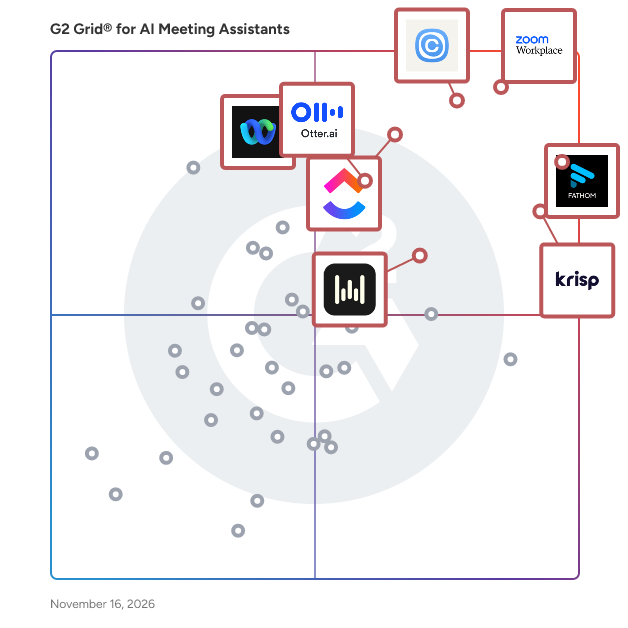
G2 Grid® for AI Meeting Assistants Software

G2 Grid® for AI Meeting Assistants Software plotting products by satisfaction and market presence

Highlighted products: Zoom Workplace, Fathom, Calendly, Krisp, ClickUp, Webex Suite, Otter.ai, and Wispr Flow Notetaker.

Underlying data: [Grid® JSON](https://www.g2.com/categories/ai-meeting-assistants/grids.json?focus%5B%5D=zoom-workplace&focus%5B%5D=fathom-video&focus%5B%5D=calendly&focus%5B%5D=krisp&focus%5B%5D=clickup&focus%5B%5D=cisco-webex-suite&focus%5B%5D=otter-ai&focus%5B%5D=wispr-flow-notetaker)

In Parallel

In Parallel is the context layer for your company's AI. The AI tools your team already uses, such as Claude, ChatGPT, Copilot and Cursor, don't know what your team decided last week. In Parallel joins your meetings and reads the threads you connect, captures the decisions, commitments and open questions, and keeps them as one living record. Through MCP, every AI tool in your stack can read that record, so answers reflect what the company actually decided, with the source behind each one. Notes, workspaces, pages, chat and self-updating plans sit on the same record, so people and agents work from the same facts. It is built for sensitive, cross-functional work: every workspace is permission-scoped, an AI only sees what its user may see, data stays in the EU unless you ask, and nothing is used to train models. It holds ISO 27001, ISO 42001 and SOC 2 Type II.

Who Is the Company Behind In Parallel?

Jamy.ai

Jamy is an AI meeting assistant that generates summaries and transcripts from your online meetings. Jamy detects tasks and assigns them to people responsible. Jamy connects to your CRM to update clients profiles or sales leads. Jamy works with Google Meet, Microsoft Teams, Zoom and Webex. Plus, you can connect it to Slack, Trello, Monday, Hubspot, Pipedrive and 100s of other tools

Who Is the Company Behind Jamy.ai?

Jasett

Jasett automatically transcribes and summarizes professional meetings (Zoom, Google Meet, Microsoft Teams) in Canadian French without any visible bot. Available as a native desktop app (Mac and Windows) or Chrome extension. After each meeting, Jasett delivers a structured 5-section report by email: summary, decisions made, action items with owners and deadlines, follow-up points, and recommended next step. Built for Quebec SMBs. Data hosted in Canada. Bill 25 (Quebec privacy law) compliant. Developed by Syntherion Inc., Lévis, Quebec, Canada.

Who Is the Company Behind Jasett?

AI can help you find the answers. G2 helps you trust them.

Connect G2 to Claude or ChatGPT for answers grounded in G2's trusted reviews, comparisons, and pricing from real user insights.

How it works

Jottoo

Jottoo is AI meeting notes software that captures, organizes, and automates post-conversation tasks. It records meetings, accepts uploaded audio files, or allows manual note entry, generating searchable transcripts. AI-powered summaries highlight key decisions and discussion points, while action items convert into tasks within the integrated task management system, enabling tracking of responsibilities and deadlines. Smart folders organize notes automatically, and calendar integration streamlines workflow. Offline access allows note viewing and editing without connectivity, with automatic synchronization upon reconnection. End-to-end encryption secures sensitive content. Native iOS and Android apps in beta offer mobile recording, note-taking, and task management with full workspace synchronization across devices. The platform operates on a subscription model without ads or data selling practices.

Who Is the Company Behind Jottoo?

Jurnie

Jurnie is a meeting assistant with memory and agents, hosted in the EU. It captures meetings on desktop with no meeting bot, in person on mobile, on phone calls or with a bot, and writes summaries in your language. It then connects each conversation to everything your team has discussed before, so every client, person and project has one record that fills in over time, and you can ask about any of them in plain language. Agents draft the follow-up emails, CRM updates and issues that come next, and nothing changes in your tools until you approve it. Jurnie works with HubSpot, Pipedrive, Jira, Confluence, Gmail, Outlook and Google Drive, and Claude, ChatGPT and other AI tools can search your meetings through its MCP connector. Built for client-facing teams in sales, account management, consulting and advisory.

Who Is the Company Behind Jurnie?

  • Seller: Jurnie
  • Year Founded: 2024
  • HQ Location: Copenhagen, DK
  • LinkedIn® Page: www.linkedin.com
    4 employees on LinkedIn®

Kai

Kai is an AI executive assistant for founders, freelancers, consultants and busy professionals who run their own inbox and calendar. Connect your Gmail or Outlook account and your calendar, and Kai works in the background: it reads what comes in, works out what matters, and has the next step ready for you. Who Kai is for People who need an assistant but don't have one: startup founders, solopreneurs, freelancers, agency owners, sales leads and executives who lose hours every week to email, scheduling and meeting follow-up. What you can use Kai for - Inbox management: Kai sorts your email into Needs reply, FYI and Waiting for reply, with a one-line summary per thread, so you see what needs you first. - AI email replies: Kai drafts replies in your voice, using context from your past emails and your recent meetings. Nothing is sent until you press Send. - Follow-ups: threads you're waiting on come back after a few days, and Kai drafts the follow-up when you ask. - AI meeting notes: Kai records calls on Zoom, Google Meet, Microsoft Teams, Webex and Slack Huddles from your own device, with no bot joining. After the call you get a summary, the decisions and action items you can accept or edit. - Calendar and scheduling: ask Kai to put a task on your calendar and it books time around your meetings. - Morning brief: each morning Kai reads your calendar, tasks and inbox and tells you what matters today. - Workflows: describe a recurring job in plain language, like a weekday brief, and it runs even when the app is closed. Key features - One AI assistant for email, calendar, meetings and tasks - AI email assistant for Gmail and Outlook - AI note taker with no meeting bot - Learns your preferences: tell Kai how you like things done and it remembers, in memories you can edit - Works with Claude and ChatGPT, so the AI tools you already use can reach your inbox, calendar and calls - Nothing is sent, moved or deleted without your OK Integrations Gmail, Outlook, Google Calendar, Outlook Calendar, Zoom, Google Meet, Microsoft Teams, Webex, Slack Huddles, Claude and ChatGPT. Platforms and pricing Kai runs on the web, Mac and Android, with iPhone in beta. Start with a free trial, no credit card needed. Paid plans start at $20 per user per month. If you're comparing a virtual executive assistant, an AI email assistant like Fyxer or an AI note taker like Otter.ai, Kai covers email, meetings and your calendar in one place.

Who Is the Company Behind Kai?

Klang

Klang turns conversations into structured, searchable knowledge. Record or upload video meetings, in-person meetings, phone calls and interviews, and Klang delivers accurate transcripts with speaker labels, clear summaries, and suggested action items. Everything becomes searchable. Find exact phrasing, filter by speaker, and compare statements across months of conversations. Klang can also analyze patterns across your whole archive: recurring themes, decisions, and follow-ups. Klang connects to anywhere you work. Send structured conversation data to the tools you already use, or build your own flows over API and MCP. See all integrations at klang.ai/integrations Built for work where every word matters, including legal, public sector, insurance and research. Transcription quality leads in the Nordic languages, with 40+ languages supported. Hosted in Europe, GDPR-compliant, and ISO 27001 and ISO 42001 certified. Your data stays encrypted and is never used to train models.

Who Is the Company Behind Klang?

KlayPod

KlayPod is an AI agent on WhatsApp. Send a voice note in Hindi, Hinglish or English and it creates tasks, follows up with your team and updates Google Sheets, Jira and Salesforce. It also joins Google Meet, Zoom and Teams calls as an AI note taker.

Who Is the Company Behind KlayPod?

Kola

Who Is the Company Behind Kola?

  • Seller: Kola
  • Year Founded: 2026
  • HQ Location: N/A
  • LinkedIn® Page: www.linkedin.com
    1 employees on LinkedIn®

Laconote

Laconote turns meetings into structured notes without putting a bot in the call. Recording happens in your browser, desktop app or phone, so nobody sees an extra participant and you never ask the host to admit anything. On calls with clients, candidates and anyone outside your company, that is the difference between a normal conversation and a guarded one. Your audio does not survive the transcription. Laconote runs transient processing: the recording is sent, turned into text, and permanently deleted from the servers. There is no audio archive to leak, subpoena or misconfigure. What remains is the transcript and the summary, text you can read, edit and delete yourself. Most tools in this category keep the recording so you can replay it; we decided the replay is not worth the liability. Summaries arrive while the meeting is still running, at an interval you choose: every 30 seconds, or 1, 2, 3 or 5 minutes. Join a call late and you can read what you missed before you speak. After the call you get a full summary written for the type of meeting it was, with action items you can assign. Laconote recognises 79 languages and detects each meeting's language on its own, so multilingual teams configure nothing per call. Meetings live in shared projects the whole team can search, and Team Pulse turns them into trends on mood, engagement and talk balance without running a survey. Through the Model Context Protocol you can ask Claude, ChatGPT or Gemini about your own meetings. Pricing starts at €3/month for 50 hours and €5 for 100, with a five-person team at €9, billed per account rather than per seat until the team plan. Organisations that cannot send recordings anywhere run Workspace Server on their own infrastructure: €500/month for 100 seats, €900 for 200, up to 10 000 seats, with unlimited transcription and the option to run the AI models locally as well.

Who Is the Company Behind Laconote?

Lansy Desk

Lansy Desk is a desktop app for Mac (macOS 14.2+), Windows and Linux. It records Zoom, Google Meet, Microsoft Teams, Webex, softphone and messenger calls from your own computer, with no bot joining the meeting. Recording starts automatically when a call begins. A few minutes after the call, you get a recap, decisions, tasks with an owner and a deadline, and a meeting score. Team plans provide a shared view of calls and sharing by link. Any meeting can be made private. Data is encrypted and personal data anonymised. Free: 90 minutes a week, no card. Pro: AED 59/month (AED 39 billed annually). Team: AED 79/seat/month (AED 59 annually), minimum three seats. Desktop only. I’m on the Lansy team.

Who Is the Company Behind Lansy Desk?

LensNote

LensNote turns recorded lectures, meetings, and long videos into visual notes. Upload audio or video in the web app, or record a window on macOS. The app identifies distinct slides and key frames, matches them with timestamps and the relevant transcript, and writes a key message for each visual. Sessions include searchable transcripts, summaries, action items, and structured reports. Jump from a slide or transcript line to the original moment. Export slides as PPTX, reports as PDF or Word, and transcripts as TXT, or share a read-only link. No meeting bot is required. Available on the web and macOS 14 or later, with a 14-day trial and a Pro plan at $30 per month.

Who Is the Company Behind LensNote?

LivePrompt AI

The strategic intelligence platform for professionals who live in conversations. Turn every meeting from recruiting calls to client consultations into actionable insights.

Who Is the Company Behind LivePrompt AI?

Neeraja Prakash
NP
Researched and written by Neeraja Prakash
Updated April 9, 2026