# Best Advanced Planning and Scheduling (APS) Software - Page 5

*By [Nathan Calabrese](https://research.g2.com/insights/author/nathan-calabrese)*


Advanced planning and scheduling (APS) software helps manufacturers optimize the allocation of raw materials and production capacity to fulfill demand. APS is most beneficial to companies with complex manufacturing operations which require advanced planning functionality. While manufacturing departments benefit most from using APS software, this type of software can also be leveraged by other departments such as inventory management and procurement.

APS software integrates with [manufacturing execution systems](https://www.g2.com/categories/manufacturing-execution-system) to deploy production plans on the shop floor. Integration with [ERP systems](https://www.g2.com/categories/erp-systems) is also required to exchange information on demand, inventory, and production.

To qualify for inclusion in the Advanced Planning and Scheduling category, a product must:

- Consolidate demand information from multiple separate systems
- Track the availability of raw materials and production capacity
- Create production schedules based on demand and constraints
- Optimize production schedules based on changes in demand
- Allows managers to convert production plans into schedules
- Deliver production plans and schedules for multiple locations


## G2 Grid® for Advanced Planning and Scheduling (APS) Software
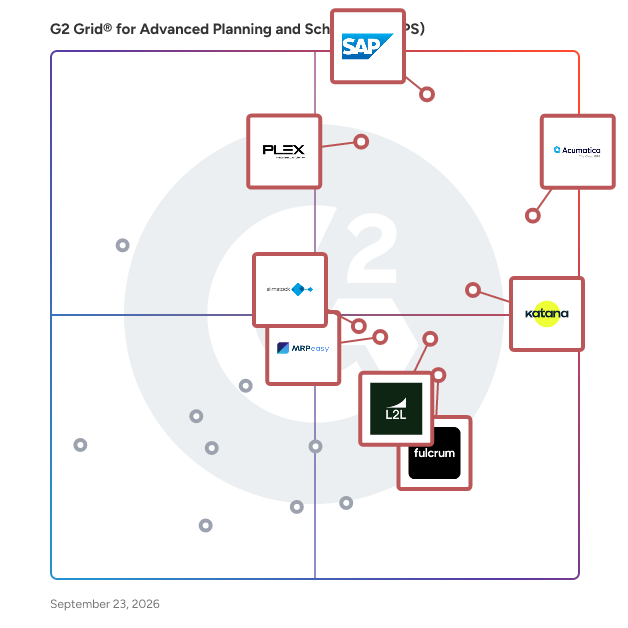
![G2 Grid® for Advanced Planning and Scheduling (APS) Software plotting products by satisfaction and market presence](https://www.g2.com/categories/advanced-planning-and-scheduling-aps/grids.png?focus%5B%5D=19175&focus%5B%5D=14659&focus%5B%5D=40987&focus%5B%5D=90674&focus%5B%5D=161966&focus%5B%5D=105857&focus%5B%5D=15365&focus%5B%5D=74684)
Highlighted products: SAP Cloud ERP (SAP S/4HANA Cloud), Acumatica, Plex Smart Manufacturing Platform, Katana Cloud Inventory, L2L, Fulcrum, MRPeasy, and PlanetTogether.
Underlying data: [Grid® JSON](https://www.g2.com/categories/advanced-planning-and-scheduling-aps/grids.json?focus%5B%5D=sap-cloud-erp-sap-s-4hana-cloud&amp;focus%5B%5D=acumatica&amp;focus%5B%5D=plex-smart-manufacturing-platform&amp;focus%5B%5D=katana-cloud-inventory&amp;focus%5B%5D=l2l&amp;focus%5B%5D=fulcrum-fulcrum&amp;focus%5B%5D=mrpeasy&amp;focus%5B%5D=planettogether)


## How Many Advanced Planning and Scheduling (APS) Software Products Does G2 Track?
**Total Products under this Category:** 80

### Category Stats (Jul 2026)
- **Average Rating**: 4.34/5 The average rating of products in this category, based on all submitted ratings
- **Top Trending Product**: Logility Solutions (+0.77%) - Among all products in this category, Logility Solutions recorded the largest rating increase compared to last month
*Last updated: July 16, 2026*


## How Does G2 Rank Advanced Planning and Scheduling (APS) Software Products?

**Why You Can Trust G2's Software Rankings:**

- 30 Analysts and Data Experts
- 4,300+ Authentic Reviews
- 80+ Products
- Unbiased Rankings

G2's software rankings are built on verified user reviews, rigorous moderation, and a consistent research methodology maintained by a team of analysts and data experts. Each product is measured using the same transparent criteria, with no paid placement or vendor influence. While reviews reflect real user experiences, which can be subjective, they offer valuable insight into how software performs in the hands of professionals. Together, these inputs power the G2 Score, a standardized way to compare tools within every category.

## Which Advanced Planning and Scheduling (APS) Software Is Best for Your Use Case?

- **Leader:** [SAP Cloud ERP (SAP S/4HANA Cloud)](https://www.g2.com/products/sap-cloud-erp-sap-s-4hana-cloud/reviews)
- **Highest Performer:** [L2L](https://www.g2.com/products/l2l/reviews)
- **Easiest to Use:** [Fulcrum](https://www.g2.com/products/fulcrum-fulcrum/reviews)
- **Top Trending:** [Acumatica](https://www.g2.com/products/acumatica/reviews)
- **Best Free Software:** [SAP Cloud ERP (SAP S/4HANA Cloud)](https://www.g2.com/products/sap-cloud-erp-sap-s-4hana-cloud/reviews)


---

**Sponsored**

### Cetec ERP

Cetec ERP is a highly practical web-based ERP platform built for small and mid-market manufacturing companies. It is designed to help SMB manufacturers efficiently manage all aspects of their manufacturing company and solve their most difficult challenges unique to a manufacturing environment. It is built on modern/innovative technology, which positions its customers to successfully transform their business, become resilient as a company, and grow efficiently. An enterprise-caliber ERP solution provided at an approachable price point, Cetec ERP’s streamlined, transparent, and straightforward model makes for a fast and affordable implementation. It provides a low barrier of entry to ERP for manufacturers that perpetually adds value to manufacturers with modern technology, user friendly interfaces, real-time data, strong cost accounting, and a fully integrated workflow. Cetec ERP is making ERP accessible to any manufacturer looking to run their business the right way As an all-in-one, web-native cloud ERP platform, Cetec ERP is simple, nimble, user-friendly, flexible, and robust with a deep feature-set built for manufacturing. The solution includes modules and functionality for complex BOMs, sales and job costing, inventory control and traceability, mobile warehouse, procurement and supply chain management, scheduling and capacity planning, shop floor management, quality assurance, document mgmt and control, accounting, and open APIs for easy integration to any other software.


[Visit website](https://www.g2.com/external_clickthroughs/record?secure%5Bad_program%5D=ppc&amp;secure%5Bad_slot%5D=category_product_list&amp;secure%5Bcategory_id%5D=1756&amp;secure%5Bchosen_at%5D=2026-07-17T06%3A17%3A09Z&amp;secure%5Bdisplayable_resource_id%5D=1553&amp;secure%5Bdisplayable_resource_type%5D=Category&amp;secure%5Bmedium%5D=sponsored&amp;secure%5Bplacement_reason%5D=neighbor_category&amp;secure%5Bplacement_resource_ids%5D%5B%5D=634&amp;secure%5Bplacement_resource_ids%5D%5B%5D=1553&amp;secure%5Bprioritized%5D=false&amp;secure%5Bproduct_id%5D=61908&amp;secure%5Bresource_id%5D=1756&amp;secure%5Bresource_type%5D=Category&amp;secure%5Bsource_type%5D=category_page&amp;secure%5Bsource_url%5D=https%3A%2F%2Fwww.g2.com%2Fcategories%2Fadvanced-planning-and-scheduling-aps%3Fpage%3D5&amp;secure%5Btoken%5D=987ced9c96a1db73976ac993856669361538d82c3cc5752378d5cb120a6d3898&amp;secure%5Burl%5D=https%3A%2F%2Fcetecerp.com%2F%3Futm_source%3Dg2%26utm_medium%3Dads%26utm_campaign%3Dmanufacturing&amp;secure%5Burl_type%5D=custom_url)

---


## What Is Advanced Planning and Scheduling (APS) Software?

[ Manufacturing](https://www.g2.com/categories/manufacturing)

## What Software Categories Are Similar to Advanced Planning and Scheduling (APS) Software?

- [ERP Systems](https://www.g2.com/categories/erp-systems)
- [Manufacturing Execution System (MES) Software](https://www.g2.com/categories/manufacturing-execution-system)
- [Discrete ERP Software](https://www.g2.com/categories/discrete-erp)


---

## How Do You Choose the Right Advanced Planning and Scheduling (APS) Software?

### What You Should Know About Advanced Planning and Scheduling (APS) Software

### What is Advanced Planning and Scheduling (APS) Software?

Advanced planning and scheduling (APS) software helps manufacturers optimize the allocation of raw materials and production capacity to fulfill demand. This software allows manufacturers to manage production planning and shop floor scheduling. This software helps generate achievable production schedules using advanced algorithms to balance demand and capacity. Using APS software can help with shorter lead times to meet customer demands and easier, more rapid responses to unexpected production changes.

APS is most beneficial to companies with complex manufacturing operations which require advanced planning functionality. Other departments such as inventory management and procurement can also leverage APS software.

**What Does APS Stand For?**

APS stands for advanced planning and scheduling and is commonly referred to as advanced manufacturing.

### What are the Common Features of Advanced Planning and Scheduling (APS) Software?

The following are some core features of advanced planning and scheduling (APS) software:

**Production schedules based on demand and constraints:** Using advanced algorithms to balance demand and capacity, APS software enables manufacturers to quickly analyze and calculate achievable production schedules while considering multiple constraints and business rules.

**Modeling capabilities:** APS software can create detailed digital models of the production environment, including production constraints.

**Algorithm optimization:** Algorithms optimization allows the comparison of a plan or schedule variations in order to arrive at the best possible solution.

**Distribution planning:** Distribution planning coordinates the demand for a future period with the on-hand inventory and the safety stock requirements for that period. Overall, this component determines how much inventory of each material or part is needed to achieve high order-fulfillment status.

**Transportation planning:** Transportation planning identifies the transportation needs of a facility and assesses the efficiency, cost, and design of the transportation model. Transportation planning also involves defining future policies, goals, investments, and designs to adequately prepare for future transportation needs.

### What are the Benefits of Advanced Planning and Scheduling (APS) Software?

Advanced planning and scheduling solutions improve the coordination of manufacturing processes and provide greater visibility to increase on-time delivery while reducing inventory levels and waste. The benefits of this software include:

**Increased visibility:**  **&amp;nbsp;** APS software can identify what types of products are running, any capacity bottlenecks, and late orders or materials.

**Waste reduction:** By streamlining production operations, APS software helps to reduce waste within operations, cuts costs, and improves profitability.&amp;nbsp;

**Heightened responsiveness:** APS software can quickly respond to customer and market demands by automatically generating production schedules, allowing planners and schedulers to change strategies and production schedules, accommodate new products, and support fast changeovers.

### Who Uses Advanced Planning and Scheduling (APS) Software?

The following teams use advanced planning and scheduling software:

**Inventory management teams:** Inventory management teams use APS software to track how much inventory is available within a specific period and set up alerts if the inventory levels are experiencing a shortage, below the safety stock, adequate, or above the maximum inventory allowed.

**Manufacturing teams:** Manufacturing teams use APS software to manage production planning and shop floor scheduling, as well as balance demand and capacity and generate achievable production schedules.

### Challenges with Advanced Planning and Scheduling (APS) Software

APS solutions can come with their own set of challenges.&amp;nbsp;

**Real-time data requirements:** The more data APS systems have to work with, the more effectively they can provide workable plans, but this information should include data from as many touch points on the value chain as possible. Manufacturing is dynamic, so it’s necessary that capacity, lead time, and workloads are based on real-time data and not assumed information.

**Disconnected from software ecosystem:** APS platforms typically don’t feature the transactional elements similar to an ERP system, which can leave it disconnected from the rest of its software ecosystem. This could lead to the generation of plans that don’t reflect recent changes to the production area.

**Production triggers:** Manufacturing orders can be triggered by demand forecasting, customer orders, or a combination of both. If the production management has both triggers, the software should be flexible enough to accommodate both. If not, it can lead to overproduction of some products in real time or backorders on others.

### How to Buy Advanced Planning and Scheduling (APS) Software&amp;nbsp;

#### Requirements Gathering (RFI/RFP) for Advanced Planning and Scheduling (APS) Software

When selecting APS software, it is essential to first look at how the business operates and then familiarize oneself with the different types of software available. There are various options for APS software products, including those designed for the business needs of small and medium-sized companies. Some things to consider while buying APS software include its ability to calculate production schedules, how many constraints and business rules it can handle, and how quickly it can change strategies.

#### Compare Advanced Planning and Scheduling (APS) Software Products

**Create a long list**

Depending on the industry, the buyer might want to create a long list of software products designed to help businesses in that particular industry. For example, there are platforms specifically built for enterprise-sized manufacturers, while other platforms have flexibility with the number of users and allow additional production locations to be integrated.

**Create a short list**

After reviewing and researching the software on the long list, the buyer can whittle it down based on the budget. APS software is available for all budgets, and some general applications may be downloaded free or bought off the shelf at a lower price.

However, buyers must keep in mind that the more specialized a software is, the more expensive it gets. This is the case because the user base for specialized software is relatively small. The company should be prepared to pay a premium if it wants something specific to its industry or customized for its business.

**Conduct demos**

As a rule of thumb, companies should demo all products on their short list. During demos, buyers should ask specific questions about the functionalities they care about most. For example, one might ask to be walked through any features for revenue recognition and allocation, forecasting project cost and revenue and analyzing the performance of special offers, packages, and incentives.

#### Selection of Advanced Planning and Scheduling (APS) Software

**Choose a selection team**

The managers from departments such as manufacturing, inventory, and procurement using this software must be involved in the selection process. Every business is different, and frequent users are most likely in the best position to offer an educated opinion about the best choice for the business&#39;s particular needs. Users may even be able to help the company install and set up the software of choice.

After choosing a software, buyers must remember that they don’t have to be stuck with this selection forever; most platforms allow for add-ons or modifications. However, the company shouldn’t make this decision lightly because no matter what software is chosen, it will involve considerable time and money commitment. To see a return on investment (ROI), buyers can’t change their minds a few months later and switch software again.

**Negotiation**

Negotiating a software contract is vital to minimize risk, whether in terms of performance protection, security protection, or simply ensuring that both parties agree on what to expect from the other. If the business has the cash flow, it could ask for a discount in return for an annual upfront payment, and many software providers are happy to make that deal. A software provider may offer unlimited usage if the buyer pays up front instead of a monthly or quarterly package price.

Buyers should also determine if they need help implementing or integrating the software with another system. Usually, a software provider&#39;s first offer will include some implementation services in a given timeframe. Buyers can ask for these services to be removed if they can manage it themselves or if a third party can do it for cheaper.

Buyers also need to decide for how long they will need this software. If the company uses the software for years, the buyer can negotiate longer terms which sometimes results in more favorable pricing.

**Final decision**

The final decision should be based on all the information gathered previously. Businesses should try to prioritize needs and select the solution that meets most, if not all, of their requirements. Companies must remember that there isn&#39;t a perfect software, but there is one that is best for their business. If possible, buyers should try to conduct a pilot program with a smaller sample size of users to gauge how well the software is received. If the platform gets high marks, they can buy with more confidence. If the tool is inefficient or not performing as expected, it might be time to test another software.


---
## What Are the Most Common Questions About Advanced Planning and Scheduling (APS) Software?
*AI-generated · Last updated: June  3, 2026*
### Which scheduling solutions avoid complexity and steep learning curves that slow team adoption on production floors
Based on G2 reviews, these products are repeatedly described as easier to adopt for manufacturing teams.

- [Acumatica](https://www.g2.com/products/acumatica) — intuitive UI for production scheduling.
- [Katana Cloud Inventory](https://www.g2.com/products/katana-cloud-inventory) — easy onboarding for inventory planning.
- [MRPeasy](https://www.g2.com/products/mrpeasy) — simple manufacturing and inventory workflows.


### Planning and scheduling platforms built by people who understand daily operational needs on manufacturing floors
According to verified users, buyers often value platforms that reflect real shop floor work instead of forcing teams into rigid processes. Recent reviews highlight demand for practical scheduling, inventory visibility, job tracking, production order management, and clear status updates that can be used by both office and floor teams. Reviewers also repeatedly mention the importance of intuitive interfaces, easy training, and workflows that reduce spreadsheet work or paper-based coordination. In this category, products stand out when they help teams prioritize jobs, coordinate purchasing and production, improve traceability, and make day-to-day decisions faster without adding unnecessary complexity during adoption.


### Planning platforms that improve workforce engagement and cross-team training by surfacing clear operational visibility
According to verified users, operational visibility improves adoption when teams can easily see order status, inventory, production progress, and job priorities in one place. Recent reviews connect better visibility with smoother handoffs between sales, production, procurement, warehouse, and finance teams. Users also describe faster onboarding when dashboards, reports, and live data reduce guesswork for newer employees. In several reviews, clear workflows help reduce manual follow-up, support accountability, and make training easier because teams can understand what needs attention without switching between disconnected tools. Buyers evaluating APS software should look for visibility into schedules, materials, work orders, and downstream fulfillment tasks.


### What should buyers look for in advanced planning and scheduling software
G2 reviewers mention that buyers typically focus on real-time visibility, scheduling usability, inventory coordination, and how well the system connects planning with production execution. In recent reviews, strong products help teams manage production schedules, demand planning, purchase orders, work orders, job tracking, and on-time delivery from one shared system. Ease of onboarding matters as much as feature depth, since several reviewers note that setup quality, data accuracy, and user training affect adoption. Buyers also look for reporting, dashboarding, traceability, and integration support so planners, operations teams, and leadership can work from the same information rather than relying on spreadsheets or disconnected systems.


### How do teams use advanced planning and scheduling for inventory planning
According to verified users, teams use advanced planning and scheduling to connect inventory signals with production timing, purchasing, and fulfillment priorities. Recent reviews describe planners using these systems to monitor stock levels, reorder points, incoming materials, work orders, and lead times so they can prevent shortages and avoid delays. Reviewers also mention faster inventory regeneration, better visibility into expected materials, and easier coordination between sales orders and production. For many teams, the practical value comes from replacing manual spreadsheets with a shared view of inventory and schedule dependencies. That helps operations react earlier to demand changes, keep production moving, and support more reliable delivery commitments.


