Best 3D Rendering Software

How Many 3D Rendering Software Products Does G2 Track?

Total Products under this Category: 189

Category Stats (Sep 2026)

  • Average Rating: 4.4/5 The average rating of products in this category, based on all submitted ratings
  • Top Trending Product: Super Renders Farm (+0.27%) - Among all products in this category, Super Renders Farm recorded the largest rating increase compared to last month

Last updated: September 01, 2026

How Does G2 Rank 3D Rendering Software Products?

Why You Can Trust G2's Software Rankings:

  • 30 Analysts and Data Experts
  • 8,400+ Authentic Reviews
  • 189+ Products
  • Unbiased Rankings

G2's software rankings are built on verified user reviews, rigorous moderation, and a consistent research methodology maintained by a team of analysts and data experts. Each product is measured using the same transparent criteria, with no paid placement or vendor influence. While reviews reflect real user experiences, which can be subjective, they offer valuable insight into how software performs in the hands of professionals. Together, these inputs power the G2 Score, a standardized way to compare tools within every category.

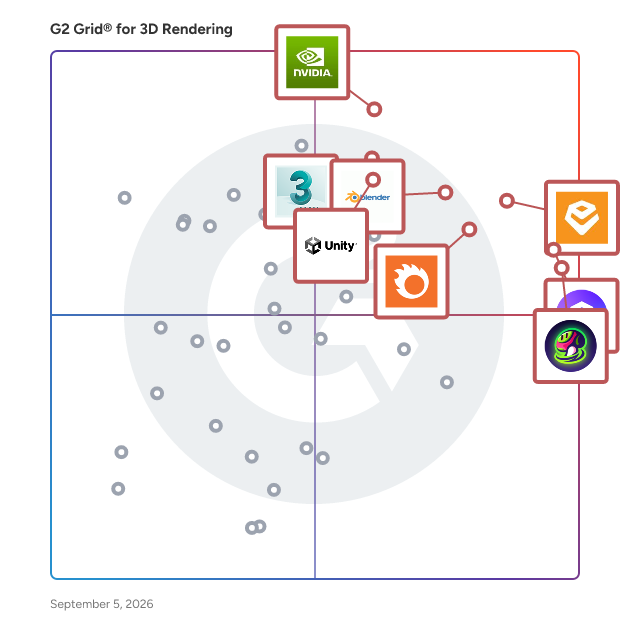
G2 Grid® for 3D Rendering Software

G2 Grid® for 3D Rendering Software plotting products by satisfaction and market presence

Highlighted products: Enscape, D5 Render, Meshy, Iray, Blender, Corona, 3ds Max Design, and Unity.

Underlying data: [Grid® JSON](https://www.g2.com/categories/3d-rendering/grids.json?focus%5B%5D=enscape&focus%5B%5D=d5-render&focus%5B%5D=meshy&focus%5B%5D=iray&focus%5B%5D=blender&focus%5B%5D=corona&focus%5B%5D=3ds-max-design&focus%5B%5D=unity)

Enscape

Enscape is a real-time rendering software solution designed specifically for architects and designers, enabling them to visualize their designs with remarkable speed and precision. By integrating seamlessly with popular BIM and CAD software such as Revit, SketchUp, Rhino, Archicad, and Vectorworks, Enscape facilitates a smooth workflow that allows users to make informed design decisions in real-time. This innovative tool combines advanced rendering capabilities with AI-powered features, making it an essential companion for professionals seeking to enhance their design processes. The target audience for Enscape primarily includes architects, interior designers, and landscape architects who require a robust visualization tool to bring their concepts to life. With its intuitive interface and minimal setup requirements, Enscape caters to both seasoned professionals and those new to architectural visualization. The software is particularly beneficial for teams that need to collaborate effectively, as it allows for instant evaluation of design options and fosters a more dynamic creative environment. By eliminating the need for manual exporting and switching between applications, Enscape streamlines the design workflow from initial concept to final presentation. Key features of Enscape include real-time rendering and visualization, which enables users to see design changes live, facilitating quicker iterations and decision-making. The AI-powered ideation tools, such as the Veras integration, allow designers to explore various creative directions effortlessly. Additionally, the AI-enhanced scene enrichment feature provides lifelike visuals through the Chaos AI Enhancer, while the AI image upscaler transforms low-resolution drafts into high-quality visuals, reaching up to 16K resolution. The bi-directional sync feature ensures that any updates made in the model or within Enscape are reflected instantly, maintaining consistency throughout the design process. Enscape also supports sustainable design practices with its Impact add-on, optimizing building performance directly within the workflow. Full virtual reality support allows clients to experience projects at full scale, enhancing engagement and understanding. Users can create shareable panoramas and interactive tours, produce realistic animations, and access a library of high-quality 3D assets, all contributing to a more immersive presentation experience. With its integrated workflow and compatibility with existing design tools, Enscape stands out as a trusted solution used by leading architecture firms in over 150 countries, helping teams to explore ideas, make faster decisions, and deliver clear, impactful presentations.

Average Rating: 4.6/5.0

Total Reviews: 412

How Do G2 Users Rate Enscape?

  • Quality of Support: 8.4/10 (Category avg: 8.4/10)

Who Is the Company Behind Enscape?

  • Seller: Chaos Software
  • Company Website:
  • Year Founded: 1997
  • HQ Location: Karlsruhe, Germany
  • Twitter: @ChaosGroup
    30,407 Twitter followers
  • LinkedIn® Page: www.linkedin.com
    917 employees on LinkedIn®

Who Uses This Product?

  • Who Uses This: Architect, Student
  • Top Industries: Architecture & Planning, Design
  • Company Size: 71% Small, 13% Medium

What Do G2 Reviewers Say About Enscape?

AI-generated summary from verified user reviews

Pros
  • Users appreciate the ease of use of Enscape 3D, finding it intuitive and efficient for generating realistic renders.
  • Users love the fast real-time rendering in Enscape 3D, enhancing client communication and design understanding effectively.
  • Users appreciate the real-time rendering capability of Enscape 3D, enhancing design visualization and productivity significantly.
  • Users love the real-time rendering of Enscape 3D, enhancing design interactivity and client understanding efficiently.
  • Users find Enscape 3D to have a very short learning curve, allowing for quick and intuitive use in design projects.
Cons
  • Users experience lighting issues with Enscape 3D, finding it challenging to achieve desired effects without external adjustments.
  • Users find the material library limited, wishing for more features and editing options for enhanced accuracy and visual needs.
  • Users feel the rendering quality is poor, lacking realism compared to other engines and facing UI navigation issues.
  • Users find the asset library limited and note higher hardware requirements compared to other rendering solutions.
  • Users experience performance issues with Enscape 3D, especially on lower-end hardware, leading to delays and crashes.

What Are Recent G2 Reviews of Enscape?

What Are G2 Users Discussing About Enscape?

D5 Render

D5 is a visualization ecosystem for architecture, landscape architecture, interior design, engineering, and other 3D design professionals. Combining real-time rendering, AI-assisted visualization, design content, and team collaboration, the D5 ecosystem brings together D5 Render, D5 Lite, D5 Works, and D5 Teams to support visualization workflows from concept design through project presentation and collaboration. The D5 ecosystem includes four complementary products: - D5 Render is a real-time rendering and visualization solution that combines GPU ray tracing, rasterization, and real-time path tracing. It enables designers to create photorealistic images, animations, panoramas, and Interactive Presentations while visualizing design changes in real time. D5 Render supports LiveSync and direct import workflows for SketchUp, Revit, Rhino, Archicad, 3ds Max, Blender, Cinema 4D, and Vectorworks. - D5 Lite is an AI-native visualization plugin for SketchUp, Rhino, and Revit. It brings AI-powered visualization and real-time path tracing into the modeling environment, allowing designers to explore lighting, materials, and atmosphere during early-stage design before continuing in D5 Render. - D5 Works is a 3D asset platform for architecture, landscape, and interior design. It offers professionally curated models, materials, and design assets, and integrates with D5 Render to support content discovery and visualization workflows. - D5 Teams is a collaboration solution for design teams featuring Enterprise Team Library, enabling teams to securely access, organize, and share content across projects. Key capabilities of D5 Render include: - Real-time rendering with GPU ray tracing, real-time path tracing, and D5 Global Illumination (D5 GI). - Interactive visualization and presentation, including Interactive Presentation, animation, VR Recording, and stereoscopic panoramas. - AI-powered visualization tools, including AI Agent, AI Scene Match, AI Atmosphere Match, AI PBR Material Snap, AI Ultra HD Texture, AI Model Generation, AI Enhancer, AI Style Transfer, and AI Inpainting. - Landscape and environment tools, including Scatter, Brush, Path, Terrain, City Generator, Seasonal Vegetation, and HeightField Tracing. - Professional rendering output, supporting images and panoramas up to 16K resolution, 4K video rendering at up to 120 FPS, and render passes including Material ID, Reflection, Ambient Occlusion (AO), Sky Mask, and Z-depth. - Integrated CAD and BIM workflows through LiveSync plugins and direct file support for SketchUp, Revit, Rhino, Archicad, 3ds Max, Blender, Cinema 4D, and Vectorworks.

Average Rating: 4.8/5.0

Total Reviews: 1,052

How Do G2 Users Rate D5 Render?

  • Quality of Support: 9.1/10 (Category avg: 8.4/10)

Who Is the Company Behind D5 Render?

  • Seller: Dimension 5 Techs
  • Company Website:
  • Year Founded: 2020
  • HQ Location: New York, US
  • LinkedIn® Page: www.linkedin.com
    140 employees on LinkedIn®

Who Uses This Product?

  • Who Uses This: Architect, Student
  • Top Industries: Architecture & Planning, Design
  • Company Size: 90% Small, 2% Medium

What Do G2 Reviewers Say About D5 Render?

AI-generated summary from verified user reviews

Pros
  • Users praise D5 Render for its ease of use, making complex rendering tasks quick and straightforward.
  • Users praise the fast real-time rendering of D5 Render, transforming architectural visualization with stunning results and efficiency.
  • Users love the realistic rendering of D5 Render, transforming architectural visualization with stunning results and intuitive interface.
  • Users admire the impressive rendering quality of D5 Render, finding it user-friendly and efficient for professional design work.
  • Users love the real-time rendering quality of D5 Render, enabling quick and stunning visuals effortlessly.
Cons
  • Users find the limited assets in D5 Render hinder their ability to create detailed, customized presentations.
  • Users find the limited materials in D5 Render restricts their creative options, especially for advanced rendering needs.
  • Users face performance issues on lower-end devices, affecting the experience and leading to lag in projects.
  • Users feel that D5 Render is expensive, especially with no trial available to assess its value before purchase.
  • Users find that D5 Render has high system requirements, necessitating powerful hardware for optimal performance.

What Are Recent G2 Reviews of D5 Render?

What Are G2 Users Discussing About D5 Render?

Meshy

Meshy is an AI 3D model generator designed to assist artists, game developers, 3D printing enthusiasts, and XR (extended reality) aficionados in transforming text and images into high-quality 3D models. This innovative tool streamlines the 3D modeling and animation process, making it accessible to individuals without prior experience in 3D design. By leveraging advanced AI technology, Meshy empowers users to create stunning 3D assets, thus unlocking their creative potential. The product caters to a diverse audience, including professionals in the gaming and animation industries, as well as hobbyists looking to explore the realm of 3D printing or digital art. With its user-friendly interface, Meshy is suitable for anyone, regardless of their technical background. Artists can utilize the platform for rapid prototyping and concept visualization, while game developers can create intricate models for their projects. Additionally, 3D printing enthusiasts can generate unique designs tailored to their specifications, enhancing their creative workflows. Meshy offers a range of key features that distinguish it from traditional 3D modeling software. The Text to 3D functionality allows users to convert written descriptions into fully realized models, facilitating quick iterations during the design process. The Image to 3D feature enables the transformation of photos or concept art into detailed 3D representations in mere seconds, capturing intricate details with ease. Furthermore, the AI Texturing capability generates beautiful textures for existing models based on simple text prompts, significantly reducing the time required for texture creation. In addition to these core functionalities, Meshy supports PBR (Physically Based Rendering) maps, enhancing the realism of 3D models. Users can choose from various art styles, including Realistic, Cartoon, Sculpture, Anime, and Voxel, allowing for creative flexibility. The platform also features API integration, enabling seamless incorporation of 3D model generation into other applications. With support for multiple export formats such as OBJ, FBX, USDZ, GLB, STL, and BLEND, users can ensure compatibility with various software platforms. The automatic resizing and adjustable polygon count features further streamline the modeling process, making it easier to meet project specifications. By fostering a vibrant community, Meshy encourages users to share their creations and access a wide array of user-generated models. The AI texture editing and smart healing capabilities enhance the visual quality of textures, ensuring professional results. Overall, Meshy stands out as a comprehensive solution for anyone looking to explore the world of 3D modeling and animation, making advanced design techniques accessible to all.

Average Rating: 4.7/5.0

Total Reviews: 3,563

How Do G2 Users Rate Meshy?

  • Quality of Support: 8.8/10 (Category avg: 8.4/10)

Who Is the Company Behind Meshy?

  • Seller: Meshy
  • Company Website:
  • HQ Location: Sunnyvale, California
  • LinkedIn® Page: www.linkedin.com
    137 employees on LinkedIn®

Who Uses This Product?

  • Who Uses This: Owner, CEO
  • Top Industries: Computer Games, Arts and Crafts
  • Company Size: 75% Small, 1% Medium

What Do G2 Reviewers Say About Meshy?

AI-generated summary from verified user reviews

Pros
  • Users find Meshy remarkably easy to use, simplifying the process of creating 3D printable files effortlessly.
  • Users admire Meshy's effortless 3D modeling, transforming complex tasks into simple, accurate outputs with a user-friendly interface.
  • Users appreciate the speed and efficiency of Meshy, significantly enhancing their creativity in 3D design.
  • Users praise the effortless modeling from text and images, enabling quick and accessible 3D creation.
  • Users value the high quality content produced by Meshy, enhancing their productivity and project outcomes significantly.
Cons
  • Users note that 3D modeling issues arise with complex shapes, requiring extra manual processing for better results.
  • Users report poor rendering quality, noting issues with detail and recognition in 3D model outputs.
  • Users criticize the inaccuracy of generated images, often leading to frustration and wasted credits on unusable models.
  • Users are disappointed with the topology issues in Meshy, leading to inconsistent and unsatisfactory results.
  • Users find the limited modeling capabilities of Meshy hinder advanced asset creation, affecting quality and precision.

What Are Recent G2 Reviews of Meshy?

Iray

NVIDIA Iray is a state-of-the-art, physically based rendering technology that produces photorealistic images by simulating the physical behavior of light. Designed for both interactive and batch rendering workflows, Iray leverages advanced technologies such as AI denoising, CUDA, NVIDIA OptiX, and the Material Definition Language (MDL) to deliver exceptional performance and visual fidelity. When paired with NVIDIA RTX-based hardware, Iray enables rapid rendering, allowing designers and artists to visualize their creations with unprecedented speed and accuracy. Key Features and Functionality: - NVIDIA RTX Support: Iray utilizes dedicated ray-tracing acceleration hardware (RT Cores) and an advanced acceleration structure to enable real-time ray tracing in graphics applications. - AI Denoising: By harnessing Tensor Cores on the latest NVIDIA hardware, Iray employs deep learning techniques to accelerate the completion of final images and enhance interactive rendering, providing smoother and more efficient workflows. - Material Definition Language (MDL): MDL allows for the definition of complex material properties, including surface color, reflection, refraction, light emission, and additional geometric attributes like cut-outs and bump maps, facilitating the creation of realistic materials. - Multi-GPU and Multi-Machine Support: Iray supports any combination of GPUs and CPUs within a single machine and offers control over resource allocation, making multi-GPU systems ideal for demanding rendering tasks. - Advanced Rendering Features: Iray includes capabilities such as light path expressions, emissive geometry, caustics, spectral rendering, OpenVDB support, photometric lights, instancing, rounded corners, section planes, decals, depth of field, motion blur, stereo viewing, panoramic snapshots, hair/fur rendering, volume rendering, subsurface scattering, and more. Primary Value and User Solutions: NVIDIA Iray addresses the need for high-quality, physically accurate rendering in various industries, including design, architecture, and visual effects. By providing rapid, photorealistic visualizations, Iray enables professionals to make informed design decisions, reduce reliance on physical prototypes, and accelerate time-to-market. Its integration with NVIDIA's latest hardware and AI technologies ensures that users can achieve exceptional rendering performance, enhancing creativity and productivity in their workflows.

Average Rating: 4.2/5.0

Total Reviews: 16

How Do G2 Users Rate Iray?

  • Quality of Support: 8.2/10 (Category avg: 8.4/10)

Who Is the Company Behind Iray?

  • Seller: NVIDIA
  • Year Founded: 1993
  • HQ Location: Santa Clara, CA
  • Twitter: @nvidia
    2,582,827 Twitter followers
  • LinkedIn® Page: www.linkedin.com
    51,762 employees on LinkedIn®
  • Ownership: NVDA

Who Uses This Product?

  • Company Size: 100% Small

What Are Recent G2 Reviews of Iray?

FAQs About 3D Rendering Software

Generated using AI

Last updated: June 3, 2026

What 3D Rendering tools integrate seamlessly with existing workflows without implementation overhead

According to verified users, seamless workflow fit usually means rendering tools connect directly to design environments teams already use, so they can keep modeling while seeing updates quickly. Recent reviewers frequently mention live sync or direct integrations with tools like Revit, SketchUp, Rhino, Archicad, Blender, Maya, and 3ds Max. They also value easy setup, minimal exporting, and interfaces that reduce training time. Across the category, users describe the best workflow experiences as those that shorten handoffs, support quick iterations, and let teams move from concept to client-ready visuals without rebuilding scenes or learning a separate, complex process.

Which 3D Rendering vendors support teams going live within three months without extensive external help

Based on G2 reviews, these products are frequently described as easy to start and adopt quickly.

  • Enscape 3D — live sync for design updates.
  • D5 Render — intuitive real-time rendering for teams.
  • Coohom — fast cloud-based interior visualization workflows.
  • MyArchitectAI — quick concept renders with minimal setup.

Best 3D Rendering platforms for design teams requiring rapid deployment and minimal training

Based on G2 reviews, these products stand out for quick onboarding and approachable everyday workflows.

  • Enscape 3D — intuitive plugin workflow for architects.
  • D5 Render — beginner-friendly real-time visualization and assets.
  • Coohom — drag-and-drop layouts with fast renders.
  • MyArchitectAI — fast visual concepts from prompts.

What features define modern 3d rendering software

According to verified users, modern 3d rendering software is defined by real-time or fast rendering, realistic lighting and materials, asset and material libraries, and direct integrations with modeling tools. Reviewers also point to live sync, walkthroughs, animation, panoramas, and video output as important for presentations. Ease of setup and intuitive interfaces come up repeatedly because teams want to get useful visuals without heavy training. Across recent reviews, buyers also care about material editing, lighting controls, scene management, and the ability to make quick changes during design reviews so concepts can be refined without slowing down production.

How do teams use 3D Rendering for client presentations

According to verified users, teams use 3D Rendering to turn models, layouts, and concepts into visuals that are easier for clients to understand than plans alone. Recent reviews describe using renders for interior and architectural presentations, walkthroughs, panoramas, animation, virtual reality, and side-by-side material or lighting comparisons. Buyers often mention faster approvals because clients can react to realistic scenes, scale, and atmosphere earlier in the process. Reviewers also connect presentation value to rapid iteration, since teams can adjust materials, lighting, furniture, or design details quickly and return with updated visuals without restarting the whole workflow.

Blender

Blender is a free and open-source 3D creation suite that supports the entire 3D pipeline, including modeling, rigging, animation, simulation, rendering, compositing, motion tracking, and video editing. Designed for versatility, Blender caters to a wide range of users, from hobbyists to professionals, enabling the creation of high-quality 3D content across various media platforms. Key Features and Functionality: - Modeling: Comprehensive tools for creating and editing 3D models, including sculpting and retopology. - Rendering: Integrated rendering engines like Cycles and EEVEE for realistic and real-time rendering. - Animation & Rigging: Advanced animation tools with a robust rigging system for character animation. - Video Editing: Built-in video editor for cutting, splicing, and adding effects to videos. - VFX: Tools for motion tracking, masking, and compositing to create visual effects. - Simulation: Capabilities for simulating fluids, smoke, fire, cloth, and rigid bodies. - Scripting: Python API for custom tools and add-ons. Primary Value and User Solutions: Blender's primary value lies in its comprehensive, all-in-one toolset that eliminates the need for multiple software applications, streamlining the 3D creation process. Its open-source nature ensures continuous improvement and adaptability, driven by a global community of developers and artists. Blender empowers users to produce professional-grade 3D content without financial barriers, fostering creativity and innovation across industries such as film, gaming, and design.

Average Rating: 4.6/5.0

Total Reviews: 309

How Do G2 Users Rate Blender?

  • Quality of Support: 8.6/10 (Category avg: 8.4/10)

Who Is the Company Behind Blender?

  • Seller: Blender
  • Year Founded: 2002
  • HQ Location: Amsterdam
  • Twitter: @BlenderDev
    86,088 Twitter followers
  • LinkedIn® Page: www.linkedin.com
    1,652 employees on LinkedIn®

Who Uses This Product?

  • Who Uses This: Software Engineer, Graphic Designer
  • Top Industries: Animation, Computer Games
  • Company Size: 76% Small, 11% Medium

What Do G2 Reviewers Say About Blender?

AI-generated summary from verified user reviews

Pros
  • Users love Blender's flexibility for diverse content creation, enabling animation, 3D visualization, and game design effortlessly.
  • Users love the ease of use in Blender, thanks to its intuitive interface and supportive community for learning.
  • Users appreciate the simple interface and powerful features of Blender, enhancing their 3D modeling and animation experience.
  • Users love Blender's intuitive interface and extensive animation tools, making creative projects enjoyable and efficient.
  • Users love Blender's intuitive interface and diverse features, enabling seamless modeling, animation, and artistic creation.
Cons
  • Users find Blender's poor usability frustrating, citing confusing tools and non-intuitive navigation for beginners.
  • Users report frequent software crashes during rendering and exporting, leading to instability and frustration.
  • Users experience software instability with frequent crashes and bugs affecting rendering and exporting processes.
  • Users find Blender to be power-hungry and heavy, leading to slow performance and poor optimization for portable devices.
  • Users frequently face crashes during rendering, which can hinder stability and disrupt their workflow.

What Are Recent G2 Reviews of Blender?

What Are G2 Users Discussing About Blender?

Corona

Corona is a photorealistic rendering tool designed to assist users in creating high-quality imagery with minimal setup. It is particularly beneficial for architects, interior designers, visualization artists, and 3D artists who seek to produce visually stunning representations of their designs. With its focus on realism and user-friendly interface, Corona simplifies the rendering process, allowing professionals to achieve impressive results without the burden of complex technical settings. The target audience for Corona includes a diverse range of professionals in the design and visualization fields. Architects and interior designers utilize Corona to showcase their projects with lifelike detail, while visualization artists and 3D artists leverage its capabilities to enhance their creative presentations. The software is particularly useful for both novices and seasoned experts, as its accessible workflow enables users to concentrate on their design intentions rather than navigating intricate configurations. This balance of simplicity and functionality is a key reason why many professionals opt for Corona in their rendering projects. Key features of Corona include its intuitive tools and default settings, which facilitate quick and effective results for users of all skill levels. The software excels in delivering photorealistic quality through realistic lighting and physically accurate materials, ensuring that the imagery produced is both striking and true to life. Advanced caustics capabilities enhance the realism of glass, water, and glossy surfaces, while the integration of Chaos Cosmos provides access to over 13,000 render-ready models, materials, and HDRIs, streamlining the scene-building process. Moreover, Corona's built-in post-processing tools allow users to refine lighting, color, and contrast directly within the application, eliminating the need to switch between different software. The inclusion of powerful AI tools, such as the AI Image Enhancer and AI Material Generator, further enhances the user experience by enabling quick adjustments and realistic material creation. With balanced performance that does not require demanding hardware, Corona stands out as a practical choice for professionals seeking efficiency without compromising on quality. The integrated workflow of Corona with 3ds Max and Cinema 4D ensures a seamless transition from modeling to final rendering. Features like Chaos Scatter, Cosmos assets, and scanned materials are readily available within the host application, allowing users to move fluidly from concept to completed 3D visualization. This streamlined approach has made Corona a trusted tool for teams worldwide, particularly in architectural visualization, interior design, product visualization, and advertising, where the demand for lifelike imagery is paramount.

Average Rating: 4.7/5.0

Total Reviews: 116

How Do G2 Users Rate Corona?

  • Quality of Support: 8.7/10 (Category avg: 8.4/10)

Who Is the Company Behind Corona?

  • Seller: Chaos Software
  • Company Website:
  • Year Founded: 1997
  • HQ Location: Karlsruhe, Germany
  • Twitter: @ChaosGroup
    30,407 Twitter followers
  • LinkedIn® Page: www.linkedin.com
    917 employees on LinkedIn®

Who Uses This Product?

  • Who Uses This: Architect, Student
  • Top Industries: Architecture & Planning, Design
  • Company Size: 88% Small, 3% Medium

What Do G2 Reviewers Say About Corona?

AI-generated summary from verified user reviews

Pros
  • Users appreciate the ease of use of Chaos Corona, valuing simple setups and intuitive features for seamless rendering.
  • Users highlight the superior quality of Chaos Corona, appreciating its reliable performance and user-friendly interface.
  • Users rave about the outstanding rendering quality of Chaos Corona, achieving realistic results effortlessly in their projects.
  • Users value the realistic rendering of Chaos Corona, praising its outstanding visual results and intuitive interface.
  • Users commend the intuitive interface of Chaos Corona, facilitating a smooth learning curve for complex projects.
Cons
  • Users find the poor rendering quality of Chaos Corona disappointing, needing improvements in clarity and speed.
  • Users report frustrating licensing issues with Chaos Corona, leading to frequent disruptions and confusion during use.
  • Users note that the slow rendering in complex scenes can hinder performance, especially for animations in Chaos Corona.
  • Users note a slow performance in rendering, especially for complex scenes and animation, impacting overall efficiency.
  • Users note a limited materials library in Chaos Corona, wishing for more built-in presets to enhance creativity.

What Are Recent G2 Reviews of Corona?

3ds Max Design

Autodesk 3ds Max Design is a professional 3D modeling, rendering, and animation software tailored for architects, designers, and visualization specialists. It enables users to create detailed and realistic visualizations of architectural designs, engineering projects, and other complex structures, facilitating effective communication of design intent and exploration of creative concepts. Key Features and Functionality: - Advanced 3D Modeling: Offers an extensive polygon modeling and texturing toolset, including the Graphite toolset for free-form sculpting and advanced polygonal modeling, allowing for the creation of unique forms and detailed designs. - High-Quality Rendering: Equipped with multiple rendering options, including the integrated Arnold renderer, enabling the production of photorealistic images and animations. - Lighting Simulation and Analysis: Features Exposure technology for simulating and analyzing sun, sky, and artificial lighting, assisting in achieving accurate lighting conditions and supporting LEED 8.1 certification. - Interoperability: Provides optimized workflows for aggregating data from various CAD and Building Information Modeling (BIM) file formats, ensuring efficient data continuity throughout the design process. - Animation Tools: Includes advanced animation support with tools like rigging, keyframing, and procedural animation, helping bring designs to life with natural movement. Primary Value and User Solutions: 3ds Max Design addresses the need for high-quality visual communication in design professions. By offering powerful modeling and rendering tools, it enables users to create compelling visualizations that effectively convey design concepts to clients and stakeholders. The software's interoperability with other Autodesk products and support for various file formats streamline workflows, reducing time and effort in the design process. Additionally, its lighting simulation capabilities allow for accurate analysis of environmental lighting conditions, aiding in sustainable design practices and compliance with certification standards.

Average Rating: 4.3/5.0

Total Reviews: 279

How Do G2 Users Rate 3ds Max Design?

  • Quality of Support: 7.7/10 (Category avg: 8.4/10)

Who Is the Company Behind 3ds Max Design?

  • Seller: Autodesk
  • Year Founded: 1982
  • HQ Location: San Francisco
  • Twitter: @autodesk
    273,215 Twitter followers
  • LinkedIn® Page: www.linkedin.com
    15,757 employees on LinkedIn®
  • Ownership: NASDAQ:ADSK

Who Uses This Product?

  • Who Uses This: Interior Designer, Architect
  • Top Industries: Architecture & Planning, Design
  • Company Size: 64% Small, 23% Medium

What Do G2 Reviewers Say About 3ds Max Design?

AI-generated summary from verified user reviews

Pros
  • Users value the powerful 3D modeling and visualization tools of 3ds Max Design, enhancing creativity and productivity in design.
  • Users appreciate the ease of use in 3ds Max Design, making complex 3D modeling accessible and efficient.
  • Users value the effective 3D modeling tools in 3ds Max Design, facilitating impressive visualizations and professional results.
  • Users appreciate the effective 3D visualization tools of 3ds Max Design, enabling realistic renders and creative flexibility.
Cons
  • Users find the difficult learning curve of 3ds Max Design challenging, especially for beginners navigating its extensive tools.
  • Users find the high hardware requirements of 3ds Max Design limits its feasibility and efficiency significantly.
  • Users face high system requirements for 3ds Max Design, leading to slow performance with complex scenes and heavy files.
  • Users express frustration with slow rendering times, especially when dealing with complex scenes and limited hardware capabilities.
  • Users often face software bugs, leading to crashes and delays during rendering, affecting workflow efficiency.

What Are Recent G2 Reviews of 3ds Max Design?

What Are G2 Users Discussing About 3ds Max Design?

Unity

Unity is the world’s leading platform for creating and operating interactive, RT3D content. Creators, ranging from game developers to artists, architects,and automotive designers to filmmakers and more, use Unity to make their imaginations come to life. The Unity platform provides a comprehensive set of software solutions to create and operate real-time 2D and 3D content for multiple platforms, including mobile phones, tablets, PCs, consoles, and augmented and virtual reality devices.

Average Rating: 4.5/5.0

Total Reviews: 353

How Do G2 Users Rate Unity?

  • Quality of Support: 8.3/10 (Category avg: 8.4/10)

Who Is the Company Behind Unity?

  • Seller: Unity
  • Year Founded: 2010
  • HQ Location: San Fransisco
  • Twitter: @unity
    113,557 Twitter followers
  • LinkedIn® Page: www.linkedin.com
    7,162 employees on LinkedIn®

Who Uses This Product?

  • Who Uses This: Unity Developer, Game Developer
  • Top Industries: Computer Games, Computer Software
  • Company Size: 75% Small, 18% Medium

What Do G2 Reviewers Say About Unity?

AI-generated summary from verified user reviews

Pros
  • Users find Unity to be easy to use, with a user-friendly interface and good cross-platform support.
  • Users appreciate the intuitive design of Unity, making game development accessible and enjoyable for all levels.
  • Users appreciate the strong community support in Unity, enhancing their game development experience through shared knowledge and resources.
  • Users appreciate the seamless integrations in Unity, making it easy to build and import assets efficiently.
  • Users value the user-friendly interface of Unity, enhancing their experience across multiple platforms.
Cons
  • Users find Unity's pricing to be too high for small businesses and indie developers, limiting accessibility for some users.
  • Users find the expensive subscriptions of Unity burdensome, especially for small businesses and indie developers.
  • Users find that Unity has high hardware requirements, necessitating a powerful computer and significant storage space.
  • Users find the high subscription cost of Unity burdensome, especially for small studios and indie developers.
  • Users report significant performance issues with Unity, citing lost work and overwhelming compilation errors as major frustrations.

What Are Recent G2 Reviews of Unity?

What Are G2 Users Discussing About Unity?

Twinmotion

Twinmotion is a real-time visualization tool designed to assist users, including architects, designers, filmmakers, and storytellers, in producing high-quality images, panoramas, standard or 360° VR videos, and interactive presentations from 3D data. This software harnesses the power of Unreal Engine, recognized as one of the most advanced real-time 3D creation platforms, to deliver an intuitive and efficient workflow for creating stunning visual content. Targeting professionals in the architecture, construction, and design industries, Twinmotion caters to a wide range of use cases. It allows users to visualize their projects in real-time, enabling immediate feedback and adjustments. This capability is particularly beneficial in collaborative environments where quick iterations are essential. The software supports various file formats from major CAD, BIM, and modeling solutions, ensuring seamless integration into existing workflows. Users can easily sync their projects with Twinmotion, allowing for efficient updates and modifications. One of Twinmotion's standout features is its extensive library of over 10,000 drag-and-drop assets, which includes animated characters, props, and environmental elements. This vast selection enhances the realism of visualizations, allowing users to create dynamic scenes that reflect real-world conditions. Additionally, Twinmotion offers physically based materials, enabling users to achieve accurate textures and finishes for their projects. The ability to manipulate time of day, seasons, and weather conditions through simple sliders further enriches the visualization experience, allowing stakeholders to see how designs will look under various circumstances. The software also includes advanced animation sequencing tools, allowing users to import animated files and create synchronized videos with precise camera movements. With features like Lumen dynamic global illumination and the Path Tracer for high-quality final imagery, Twinmotion elevates the realism of visualizations. Users can easily share their projects via Twinmotion Cloud, providing stakeholders with accessible, browser-based presentations without the need for high-end hardware. Overall, Twinmotion stands out in the realm of real-time visualization tools by combining user-friendly design with powerful features that cater to the needs of professionals across various fields. Its ability to produce high-quality, interactive visual content quickly and efficiently makes it a valuable asset for anyone looking to enhance their design presentations and storytelling capabilities.

Average Rating: 4.5/5.0

Total Reviews: 61

How Do G2 Users Rate Twinmotion?

  • Quality of Support: 8.4/10 (Category avg: 8.4/10)

Who Is the Company Behind Twinmotion?

  • Seller: Epic Games
  • Year Founded: 1991
  • HQ Location: Cary, NC
  • Twitter: @EpicGames
    5,413,781 Twitter followers
  • LinkedIn® Page: www.linkedin.com
    11,971 employees on LinkedIn®

Who Uses This Product?

  • Who Uses This: Architect
  • Top Industries: Architecture & Planning
  • Company Size: 75% Small, 18% Medium

What Do G2 Reviewers Say About Twinmotion?

AI-generated summary from verified user reviews

Pros
  • Users value the ease of use of Twinmotion, enhancing their 3D workflow with stable and intuitive features.
  • Users commend Twinmotion for its intuitive interface and excellent rendering quality, making it a favorite in 3D workflows.
  • Users value the speed and efficiency of Twinmotion, enabling quick workflows and impressive visual results.
  • Users value the ease of learning with Twinmotion, appreciating its intuitive interface and quick mastery for 3D workflows.
  • Users commend the excellent rendering quality of Twinmotion, consistently achieving impressive and expected results in their projects.
Cons
  • Users experience poor rendering quality, with long animation times and inconsistencies that hinder project completion.
  • Users express frustration over the limited library in Twinmotion, hindering realistic rendering and functionality.
  • Users find the features limited, particularly in the library, lighting, and camera tools, affecting their workflow.
  • Users experience lighting issues with Twinmotion, finding tools inadequate for realistic rendering and camera manipulation.
  • Users find limited modeling capabilities in Twinmotion, hindering more complex design tasks and professional use.

What Are Recent G2 Reviews of Twinmotion?

What Are G2 Users Discussing About Twinmotion?

Direct3D

Direct3D is a low-level graphics API that enables you to manipulate visual models of 3D objects and take advantage of hardware acceleration such as video graphics cards.

Average Rating: 4.3/5.0

Total Reviews: 20

How Do G2 Users Rate Direct3D?

  • Quality of Support: 8.1/10 (Category avg: 8.4/10)

Who Is the Company Behind Direct3D?

  • Seller: Microsoft
  • Year Founded: 1975
  • HQ Location: Redmond, Washington
  • Twitter: @microsoft
    13,091,739 Twitter followers
  • LinkedIn® Page: www.linkedin.com
    232,750 employees on LinkedIn®
  • Ownership: MSFT

Who Uses This Product?

  • Company Size: 38% Large, 38% Small

What Are Recent G2 Reviews of Direct3D?

What Are G2 Users Discussing About Direct3D?

V-Ray

V-Ray is a sophisticated photorealistic rendering solution tailored for architectural visualization and the media and entertainment sectors. This powerful tool is designed to assist architects, designers, 3D artists, and visualization specialists in producing high-quality imagery with comprehensive control over lighting, materials, and rendering processes. Its seamless integration with major 3D modeling software enables users to transition effortlessly from initial design concepts to final production-ready outputs. The target audience for V-Ray includes professionals in various fields, such as architecture, product design, and visual effects. These users require a rendering tool that can deliver photorealistic accuracy and creative flexibility. V-Ray stands out in its category by providing physically based rendering capabilities that closely mimic real-world lighting and materials. This level of realism is crucial for professionals who need to present their designs convincingly to clients or stakeholders. With support for CPU, GPU, and hybrid rendering, V-Ray offers the performance and adaptability necessary for high-quality visualizations across diverse workflows. Key features of V-Ray include its physically based rendering engine, which allows users to simulate authentic lighting, materials, and global illumination. This capability is essential for creating true-to-life stills and animations. Additionally, V-Ray can handle large, complex scenes containing billions of polygons and thousands of lights without requiring manual optimization, making it suitable for intricate projects. The built-in post-processing tools, such as LightMix and VFB, enable users to adjust lighting, colors, and effects directly within the application, streamlining the workflow. V-Ray also offers access to Chaos Cosmos, a library of over 13,000 render-ready models, materials, and HDRIs, which helps users build scenes more efficiently. The integration of powerful AI tools enhances the material creation process and improves realism in surrounding details, such as people and foliage, without the need for re-rendering. Furthermore, the standardized .vrscene format facilitates easy scene transfer between CAD and DCC tools, ensuring a cohesive workflow across various applications. The integrated workflow of V-Ray allows users to work directly within their preferred 3D modeling software, such as 3ds Max, Cinema 4D, SketchUp, and more, while maintaining consistency in lighting, materials, and rendering. With features like Chaos Cloud for collaborative design reviews and distributed rendering to accelerate render times, V-Ray is trusted by teams worldwide for its reliability and high-quality output in architectural visualization, product design, VFX, and 3D animation.

Average Rating: 4.5/5.0

Total Reviews: 215

How Do G2 Users Rate V-Ray?

  • Quality of Support: 8.0/10 (Category avg: 8.4/10)

Who Is the Company Behind V-Ray?

  • Seller: Chaos Software
  • Company Website:
  • Year Founded: 1997
  • HQ Location: Karlsruhe, Germany
  • Twitter: @ChaosGroup
    30,407 Twitter followers
  • LinkedIn® Page: www.linkedin.com
    917 employees on LinkedIn®

Who Uses This Product?

  • Who Uses This: Architect, Designer
  • Top Industries: Architecture & Planning, Design
  • Company Size: 81% Small, 11% Medium

What Do G2 Reviewers Say About V-Ray?

AI-generated summary from verified user reviews

Pros
  • Users find V-Ray to be exceptionally easy to use, enabling quick setup and seamless integration with various software.
  • Users commend the photorealistic rendering quality of V-Ray, ensuring detailed and stunning outputs effortlessly.
  • Users value the exceptional realism of V-Ray, consistently achieving photorealistic results in architectural visualizations.
  • Users praise V-Ray for its photorealistic quality, consistently delivering stunning results in complex rendering tasks.
  • Users admire the realistic lighting quality of V-Ray, enhancing their rendering experience with exceptional global illumination.
Cons
  • Users find V-Ray's difficult learning curve steep, especially for those unfamiliar with advanced rendering concepts and lighting.
  • Users find the interface complex, requiring advanced knowledge while navigating scattered settings and slower performance.
  • Users experience poor rendering quality and slow speeds compared to other software, impacting production efficiency.
  • Users find V-Ray's complex settings challenging, leading to slower performance and difficulties with high-detail projects.
  • Users find V-Ray to be expensive, making it less accessible for students and small studios.

What Are Recent G2 Reviews of V-Ray?

What Are G2 Users Discussing About V-Ray?

Lumion Pro

Lumion Pro is the trusted advanced visualization solution for thousands of architects, designers and visualization professionals worldwide. It benefits those seeking to take full control of their design visualizations, creating high-quality, photorealistic results without compromising speed or creativity. Built for professionals, it combines intuitive tools, lightning-fast performance, and unparalleled realism to help you turn your models into client-ready visuals. Lumion Pro contains everything you need to turn models into client-ready visuals: -Import your 3D model: Use the LiveSync plugin to create a real-time connection with your favorite CAD or BIM tool. -Build scenes from the ground up: Apply realistic materials using a full PBR workflow. Shape terrain with intuitive landscape controls and create projects of any scale, from garden plots to entire city blocks. -Add context fast: Select items from an asset library of over 10,000 items. Apply terrain, nature, objects, characters and more. -Fine-tune with effects: Sharpen the mood using a wide range of stunning weather and atmospheric effects and post-processing options. -Render high-quality outputs: tell your design stories effectively through high-quality images, videos, or panoramas. Upscale images to 4x with AI Upscaler. -Get projects finished, and signed-off, faster: Upload renders to Lumion Cloud for teams and clients to collaborate and approve. Compatible with all major CAD & BIM, including: -ArchiCAD -AutoCAD -Autodesk FormIt -Revit -Rhino -SketchUp And many more! System Requirements & Recommendations Lumion Pro is Windows-only software. As a 3D rendering program, Lumion Pro is different from other CAD software as it relies primarily on having an excellent graphics card. This is especially important for Lumion Pro’s high-end features. Lumion Pro requires a computer with a fast graphics card, plenty of memory, and an internet connection. Check the system requirements on our website. Lumion’s software is trusted by hundreds of thousands of users in more than 180 countries and is adopted by three-quarters of the world’s top 100 architecture firms. Whether you're presenting early ideas or final designs, Lumion’s solutions help communicate intent visually, so clients understand faster and approvals come sooner.

Average Rating: 4.5/5.0

Total Reviews: 107

How Do G2 Users Rate Lumion Pro?

  • Quality of Support: 8.6/10 (Category avg: 8.4/10)

Who Is the Company Behind Lumion Pro?

  • Seller: Lumion
  • Company Website:
  • Year Founded: 2001
  • HQ Location: Warmond, Netherlands
  • Twitter: @lumion3d
    11,140 Twitter followers
  • LinkedIn® Page: www.linkedin.com
    153 employees on LinkedIn®

Who Uses This Product?

  • Who Uses This: Architect, Designer
  • Top Industries: Architecture & Planning, Construction
  • Company Size: 70% Small, 19% Medium

What Do G2 Reviewers Say About Lumion Pro?

AI-generated summary from verified user reviews

Pros
  • Users love the excellent speed in rendering of Lumion Pro, significantly boosting their workflow efficiency.
  • Users appreciate the time-saving rendering speed of Lumion Pro, significantly enhancing workflow efficiency compared to other software.
  • Users value the excellent speed in rendering of Lumion Pro, significantly enhancing their workflow efficiency.
  • Users appreciate the ease of use of Lumion Pro, enhancing workflow and simplifying the rendering process significantly.
  • Users highlight the excellent speed in rendering with Lumion Pro, significantly enhancing their workflow efficiency.
Cons
  • Users find the limited materials in Lumion Pro challenging, complicating workflow and impacting project quality.
  • Users find managing materials complex, especially in large projects, complicating their experience with Lumion Pro.
  • Users find material management complex in Lumion Pro, particularly when handling large projects, complicating the experience.
  • Users find the difficulty learning curve of Lumion challenging, particularly in managing materials for large projects.
  • Users note the requirement for good hardware in Lumion Pro complicates high-detail project executions.

What Are Recent G2 Reviews of Lumion Pro?

What Are G2 Users Discussing About Lumion Pro?

Coohom

Coohom is an AI-powered, cloud-based 3D interior design and visualization platform for furniture brands, manufacturers, retailers, dealers, and design professionals. It connects space planning, product visualization, sales, marketing, and manufacturing preparation in one digital workflow. Coohom is the international brand of Manycore Tech Inc. (HKEX: 00068), a spatial intelligence company founded in 2011. Supported by proprietary GPU cloud rendering and Spatial AI technologies, It serves more than 47,000 enterprise clients across over 200 countries and regions. The platform supports 16 languages and provides access to more than 480 million 3D models and assets. Businesses use Coohom to create interior and kitchen designs with real product data, manage enterprise catalogs, generate marketing content, and connect approved designs with downstream business systems. Key capabilities include: • AI-powered design: AI Kitchen helps users create personalized kitchen concepts and compare layouts, styles, materials, and finishes. AI Instant transforms ideas and reference images into interior visualizations without requiring advanced 3D design skills. • 3D content and visualization: AI Modeler turns product information and concepts into usable 3D assets. Coohom PhotoStudio 2.0 creates product renderings, videos, and 360° panoramas for e-commerce, websites, and social media. • Enterprise catalog management: Centralized product libraries help headquarters, branches, and dealers maintain current product information and consistent brand standards. • Global operations: GoGlobal Suite supports multilingual product catalogs and synchronized content updates across markets and dealer networks. • Design-to-production integration: Coohom can generate CAM-ready files containing customer, design, and product data for integration with ERP and manufacturing systems. By connecting AI design, 3D visualization, product data, customer engagement, marketing, and production, Coohom helps home furnishing businesses manage their workflows more efficiently on one platform.

Average Rating: 4.4/5.0

Total Reviews: 135

How Do G2 Users Rate Coohom?

  • Quality of Support: 8.0/10 (Category avg: 8.4/10)

Who Is the Company Behind Coohom?

  • Seller: Coohom
  • Company Website:
  • Year Founded: 2018
  • HQ Location: New York
  • Twitter: @coohom
    856 Twitter followers
  • LinkedIn® Page: www.linkedin.com
    149 employees on LinkedIn®

Who Uses This Product?

  • Who Uses This: Architect
  • Top Industries: Architecture & Planning, Design
  • Company Size: 86% Small, 7% Medium

What Do G2 Reviewers Say About Coohom?

AI-generated summary from verified user reviews

Pros
  • Users appreciate the ease of use with Coohom, enabling quick and intuitive 3D design creation for all skill levels.
  • Users praise Coohom for its fast rendering capabilities, enabling quick design iterations and efficient project development.
  • Users love the fast and efficient real-time 3D rendering capabilities of Coohom, streamlining the design process significantly.
  • Users value the fast 3D rendering and intuitive interface of Coohom, enhancing their design process effortlessly.
  • Users highlight the impressive rendering speed of Coohom, enabling quick transformations of designs into stunning visuals.
Cons
  • Users note the extra costs associated with premium features, restricting access to full capabilities of Coohom.
  • Users find the slow performance of Coohom frustrating, particularly with rendering and exporting large scenes.
  • Users feel that the subscription costs are expensive, especially after the initial month, impacting overall satisfaction.
  • Users feel the lack of features limits functionality, particularly for free users needing more models and templates.

What Are Recent G2 Reviews of Coohom?

What Are G2 Users Discussing About Coohom?

Autodesk 3ds Max

Autodesk 3ds Max is a professional 3D modeling, animation, and rendering software widely used in industries such as game development, film production, and architectural visualization. It offers a comprehensive suite of tools that enable artists and designers to create intricate 3D models, realistic animations, and high-quality visual effects. Key Features and Functionality: - 3D Modeling: Provides a robust set of modeling tools, including polygon, spline, and NURBS-based modeling, allowing for the creation of complex geometries and detailed designs. - Animation: Features advanced animation tools such as character rigging, keyframe animation, and motion paths, facilitating the development of lifelike character movements and dynamic scenes. - Rendering: Equipped with powerful rendering engines like Arnold, enabling the production of photorealistic images and animations with accurate lighting, shading, and textures. - Simulation: Includes particle systems, cloth simulation, and fluid dynamics, allowing for the creation of realistic environmental effects like smoke, fire, and water. - Scripting and Automation: Supports MAXScript and Python scripting languages, enabling users to automate repetitive tasks and customize workflows to enhance productivity. Primary Value and User Solutions: Autodesk 3ds Max addresses the needs of professionals seeking a versatile and efficient platform for 3D content creation. Its comprehensive toolset streamlines the production pipeline, reducing the time and effort required to develop high-quality 3D assets. By integrating modeling, animation, and rendering capabilities within a single application, it minimizes the need for multiple software solutions, thereby enhancing workflow efficiency. This makes 3ds Max an invaluable asset for artists and designers aiming to produce immersive and visually compelling content across various media platforms.

Average Rating: 4.5/5.0

Total Reviews: 41

How Do G2 Users Rate Autodesk 3ds Max?

  • Quality of Support: 8.1/10 (Category avg: 8.4/10)

Who Is the Company Behind Autodesk 3ds Max?

  • Seller: Autodesk
  • Year Founded: 1982
  • HQ Location: San Francisco
  • Twitter: @autodesk
    273,215 Twitter followers
  • LinkedIn® Page: www.linkedin.com
    15,757 employees on LinkedIn®
  • Ownership: NASDAQ:ADSK

Who Uses This Product?

  • Top Industries: Architecture & Planning, Design
  • Company Size: 81% Small, 14% Medium

What Do G2 Reviewers Say About Autodesk 3ds Max?

AI-generated summary from verified user reviews

Pros
  • Users applaud the ease of use of Autodesk 3ds Max, enabling efficient modeling and seamless workflow integration.
  • Users praise the powerful modeling tools of Autodesk 3ds Max, enhancing creativity for intricate 3D designs and visuals.
  • Users value the advanced tools for detailed 3D modeling in Autodesk 3ds Max, enhancing their creative projects effectively.
  • Users praise the powerful animation tools of Autodesk 3ds Max, enhancing both designs and professional animations.
  • Users appreciate the advanced modeling and animation tools of Autodesk 3ds Max, enabling the creation of detailed 3D visuals.
Cons
  • Users find the complex interface of Autodesk 3ds Max challenging, making it difficult for newcomers to learn effectively.
  • Users find Autodesk 3ds Max to be cumbersome, with occasional crashes hindering their workflow and experience.
  • Users find Autodesk 3ds Max presents a difficult learning curve, especially for those not familiar with 3D software.
  • Users find the subscription cost high, making it challenging for freelancers and small studios to afford Autodesk 3ds Max.
  • Users warn about the high resource usage of Autodesk 3ds Max, requiring powerful PCs for optimal performance.

What Are Recent G2 Reviews of Autodesk 3ds Max?

What Are G2 Users Discussing About Autodesk 3ds Max?

Maya

Autodesk Maya is a comprehensive 3D computer graphics application designed for professionals in the film, television, and gaming industries. It offers a robust suite of tools for modeling, animation, simulation, and rendering, enabling the creation of intricate 3D assets and dynamic visual effects. Key Features and Functionality: - Modeling: Supports NURBS, polygons, and subdivision surfaces, providing flexibility in creating detailed 3D models. - Animation: Offers advanced character animation tools, including rigging and keyframe animation, facilitating lifelike movements. - Simulation: Includes capabilities for simulating realistic physics, such as fluid dynamics, cloth behavior, and hair movement. - Rendering: Integrates with powerful rendering engines like Arnold, delivering high-quality visual outputs. - Customization: Features scripting languages like MEL and Python, allowing users to tailor workflows and develop custom tools. Primary Value and User Solutions: Maya empowers artists and designers to bring their creative visions to life by providing a versatile and efficient platform for 3D content creation. Its comprehensive toolset addresses the complex demands of modern digital production, streamlining workflows and enhancing productivity. By offering extensive customization options and supporting industry-standard formats, Maya ensures seamless integration into various production pipelines, making it an essential tool for professionals aiming to produce high-quality visual content.

Average Rating: 4.3/5.0

Total Reviews: 259

How Do G2 Users Rate Maya?

  • Quality of Support: 7.7/10 (Category avg: 8.4/10)

Who Is the Company Behind Maya?

  • Seller: Autodesk
  • Year Founded: 1982
  • HQ Location: San Francisco
  • Twitter: @autodesk
    273,215 Twitter followers
  • LinkedIn® Page: www.linkedin.com
    15,757 employees on LinkedIn®
  • Ownership: NASDAQ:ADSK

Who Uses This Product?

  • Who Uses This: 3D Artist, Director
  • Top Industries: Animation, Computer Games
  • Company Size: 62% Small, 24% Medium

What Do G2 Reviewers Say About Maya?

AI-generated summary from verified user reviews

Pros
  • Users value the straightforward UV mapping in Maya, highlighting its excellent features and overall effectiveness.
  • Users find Maya's ease of use in UV mapping makes it an excellent investment in 3D software.
  • Users appreciate the impressive features of Maya, particularly its straightforward UV mapping and overall excellent performance.
Cons
  • Users experience unpredictable crashes with Maya, which detracts from an otherwise good software experience.
  • Users often face software bugs that lead to crashes and unpredictable behavior, impacting their overall experience with Maya.
  • Users often face software instability with Maya, noting crashes and unpredictable behavior that disrupt their experience.
  • Users experience software issues like occasional crashes and unpredictable behavior, affecting their overall satisfaction with Maya.

What Are Recent G2 Reviews of Maya?

What Are G2 Users Discussing About Maya?

Neeraja Prakash
NP
Researched and written by Neeraja Prakash
Updated October 8, 2024

Learn More About 3D Rendering Software

What is 3D rendering?

3D rendering software is a process that takes previously created 3D models and seamlessly places them into a fully actualized 3D environment or image. 3D rendering involves adding textures and lighting to models of objects to create lifelike, photorealistic images depending on the style and purpose. 

Graphic designers and media developers use 3D rendering to take contrasting characters and objects, typically imported from 3D modeling software, and place them into a graphically appropriate environment.. Some 3D rendering solutions may include or integrate with animation software so animators can bring their scenes to life. Features like lighting and texturing allow users to add depth to their scenes and make them as realistic as possible. Visual artists in industries such as entertainment, automotive, architecture, advertising, interior design, and web design can use 3D rendering software to create lifelike scenes for client engagement purposes or to create new types of media.

Common features of 3D rendering software

3D rendering solutions come equipped with several features for users’ design needs. The following features are commonly found in 3D rendering solutions:

  • Render setup: A 3D rendering solution should allow users to generate reusable templates to quickly render a complex scene. 
  • Surface modeling: These tools enable users to continue their work on 3D models once they have been imported into the 3D rendering solution. You can modify, align, and digitally transform the geometry of your objects.
  • Animation tools: 3D rendering solutions typically include character animation functionality. This functionality lets the user detail the model's surface, along with perfecting its movements.
  • Motion paths: This feature lets users preview the path animated objects will follow. Users can adjust the direction of the paths and convert them to and from splines. They can also add a curve to the object’s path.
  • Physical camera: 3D rendering software may also offer a physical camera that will integrate with the user’s scene. This feature is ideal for users hoping to create a photorealistic, physically based rendering. Additionally, a physical camera integration can help with exposure control.

Benefits of using 3D rendering software

3D rendering offers a wide range of benefits across industries. Some of the key benefits of this software type include: 

  • Visualization: 3D rendering allows users to create a compelling, highly realistic visualization, helping them present their concepts appealingly. This can speed up the design and visualization process, leading to quicker decision-making. Various industries can use it for architectural visualization, photorealistic rendering, and more.
  • Design iteration: Designers can easily iterate and make changes to their prototypes or models in a virtual space, allowing quick adjustments without creating a physical prototype. 
  • Marketing and advertising: 3D rendering can be used extensively in marketing and advertising to create visually appealing and impactful promotional material.
  • Cost saving: The need for physical prototypes and mockups are reduced, leading to cost savings. 
  • Training and simulation: It can be used by healthcare, aviation, architecture, and other industries to create training material. 
  • Collaboration: 3D rendering software helps users easily share and review work done by multiple stakeholders, thus fostering collaboration among both internal teams and clients. 
  • Precision and accuracy: 3D rendering software offer users complete control over their designs. These tools typically integrate with CAD solutions and can store necessary images from the project. Data from these solutions can provide information, like the distance between two points on your model. So, thanks to those integrations, users can have access to precise measurements as they design.

Who uses 3D rendering software?

3D rendering software is typically used by those working in entertainment and design fields. This includes, but is not limited to, the following industries:

  • Animation: The vast majority of animation nowadays is 3D instead of 2D. Animators start by creating a 3D model and then uploading it to a 3D rendering platform. Modeling tools will let animators put these static 3D models into motion. Some animation software comes equipped with 3D rendering capabilities, but many will integrate with 3D rendering solutions.
  • Architecture: 3D rendering tools and architectural rendering software can also be used in the design process for objects that aren’t intended to move. Users begin by creating a model of their building in computer-aided design (CAD) or 3D modeling platforms. They subsequently upload these models into 3D rendering tools. The tools, then, capture building data from CAD software or 3D modeling platforms. Therefore, architects have that information at hand and are enabled to design and manipulate their building model from any angle. 
  • Advertising: Advertising professionals can use 3D rendering software for purposes similar to animators. 3D rendering tools enable users to create more interactive media. This allows advertisers to create more engaging advertisements for their audience.

3D rendering software pricing

Different pricing models are available for different 3D rendering software. Each software may offer unique features and subscription models. This pricing is sourced from existing pricing information found on G2. 

  • Min annual price per license: $269.85
  • Min annual price per license (without free): $269.85
  • Max annual price per license: $1795.00
  • Average annual price per license: $682.72

How to choose the best 3D rendering software 

Choosing the best 3D rendering software depends on several factors—industry, personal preferences, specific needs, budget, and more. 

  • Identify requirements: Every industry has different requirements. The user must list the essential features required from the 3D rendering software and go through the list before finalizing the software.
  • Budget considerations: One must determine the budget allocated to software usage. Multiple options and price variations, free trials, and subscriptions are available in the market today. A user must, try out trial versions, demos, or free versions whenever possible to gauge the software's compatibility with their workflow.
  • Integration: It is essential to check if the software integrates well with other tools commonly used. Compatibility with file formats is crucial for smooth collaboration. There are certain open-source software that are readily available and integrate well with other tools.
  • Availability: A large and active user community can be beneficial for getting help, tutorials, and third-party plugins. The availability of customer support and documentation is also beneficial to 3D artists.
  • Learning curve: The user interface and workflow should be evaluated. Choosing software that aligns with skill level, has a user-friendly interface, can be used by beginners without extensive training, and offers a comfortable learning curve is ideal.
  • Updates and development: Regular software updates indicate active maintenance and improvement. Depending on the requirements, the history of updates and the development roadmap for different operating systems, such as Windows, Mac, Linux, and Android, should be considered..
  • Scalability: Some software may be better suited for smaller projects, while others excel in handling large, complex scenes.

Potential issues with 3D rendering software

3D rendering software, like floor plan software, is massively useful to those in building and design industries. However, as with every software solution, 3D rendering tools have potential disadvantages.

  • Unrealistic expectations: Some experts in the industry argue that 3D rendering can give users unrealistic expectations for what their final product may look like. As the product often ends up looking different in real life, these tools can sometimes provide deceiving designs and confusing concepts for the client.
  • Cost: 3D rendering can allow users to create an incredibly realistic design of a building or an object. But because that design is so realistic, it can often be incredibly expensive. These solutions may be out of budget for smaller businesses or individual users.