AI-Generated Results
Finding matches…
Pluno is the only AI support agent built for complex, messy tickets, not just FAQs.
It automates the kind of support work that normally breaks AI, with teams reaching up to 70% automated resolution. Instead of relying on static knowledge bases or rigid SOPs, Pluno learn directly from your past tickets and resolutions, so it understands how your team actually solves problems in the real world.
That means it stays accurate as your product, policies, and edge cases evolve, without constant retraining or manual upkeep.
AI Agent that knows when humans should stay involved
For tickets that should not be fully automated, Pluno acts as an agent copilot. It drafts clear, high-quality responses using historical resolutions, internal notes, and connected tools, and shows references so agents can review and send with confidence.
Smart escalation management with clean handoffs
When an issue needs engineering or another team, it gathers missing details using a custom template, summarizes the issue for a quick overview, and escalates cleanly into the right workflow, including Jira and Slack. No vague handoffs. No context loss. No SLA breaches.
Built to run inside real support operations
- Automatically applies tags, ticket types, and custom fields
- Generates structured internal notes from customer calls
- Supports multiple brands with strictly separated knowledge
- Provides AI-powered QA for support agents, scoring conversations for quality and consistency against your criteria
Visibility, control, and trust
Pluno gives teams full visibility into how automation is performing.
Track all the metrics that matter and understand what AI is handling, where humans step in, and what is driving support volume over time.
Deploys directly inside your existing help desk with minimal disruption and is SOC2 and GDPR compliant, so it is ready for enterprise use from day one at a price that makes sense.
Not seeing what you're looking for?
Dive deeper into "Znote" on G2 AI

Export IBM Lotus Notes emails, documents and databases to PDF + XML

EssentialPIM is the award-winning personal information manager. It handles all your appointments, contacts, tasks, notes, password entries and email messages with easy-to-use, intuitive tools. In addition, EssentialPIM offers speed, intuitive interface, and the ability to synchronize all your information with EPIM Cloud, Android and iOS devices and practically any online service available. Supported by a large community of users, EssentialPIM has been widely acknowledged as the best PIM system.

Lotus Notes to Exchange Migration software works towards migrating NSF data to live Exchange Server and PST file format. NSF mailbox items including emails, calendars, contacts and tasks can be exported to Exchange Server in error free manner.

HCL owns Lotus Notes. Whereas Outlook is a product of Microsoft. Many users find Outlook better than Lotus Notes because Outlook is cost-efficient. Lotus Notes stores data into NSF files; however, Outlook stores data in PST file format. As PST, files are easily accessible to port and export, users want to work with PST files. There are many other reasons too, which is why users execute the conversion task. Lotus Notes is difficult to use as compared to Outlook; therefore, users go with Outlook, as users do not want any difficulty or issues in performing the task. Hence, users generally opt for Outlook. Are you considering performing the task? If you are. You can use the best converter tool, called Shoviv Lotus Notes to Outlook Converter, as the software has advanced features and many benefits.
Features of the Shoviv software-:
1. Users can migrate multiple NSF files to Outlook without any limitation in file size.
2. The Shoviv Lotus Notes to Outlook converter tool does not alter the integrity of data and maintains the folders' hierarchy. Therefore, it is the ideal software for executing Lotus Notes to Outlook migration task.
3. The software allows saving NSF files to EML and MSG file formats.
4. The GUI of the Shoviv software is so user-friendly that along with technical experts, non-technical users can convert Lotus Notes to Outlook without any difficulty.
5. Instead of restarting the whole task, you can resume it from the last interrupted point, whether intentionally or not. You can use the Incremental export feature, which also prevents data from duplicating.
6. You can filter your data with the Filter option, which helps you to exclude the undesired data and include the desired ones.
7. It has the option to split large PST files and set the size for resultant PST files.
8. You can use the Email translation feature to change the email address according to the destination server's email addresses.
Download the free demo version of the Shoviv Lotus Notes to Outlook Converter Tool to evaluate more features.

Gracenote Sports captures, curates and delivers in-depth sports data including schedules, scores, statistics, play-by-play details and team and player information for the world's major professional leagues and events.

Shoviv Lotus Notes Calendar to Outlook Converter is a reliable tool designed to transfer Lotus Notes calendar data to Outlook with complete accuracy. It converts NSF calendar entries into PST format while preserving meeting details, schedules, reminders, and recurring events. With an easy-to-use interface and secure process, it simplifies calendar migration for both personal and business users.

Shoviv Lotus Notes Contacts to Outlook Converter is a reliable tool designed to transfer Lotus Notes contacts to Outlook quickly and accurately. It converts NSF contact files into PST format while preserving all contact details, including names, email addresses, phone numbers, and other information. With a simple interface and secure conversion process, it makes contact migration easy for both personal and business users.
NSF to PST Converter Software for Lotus Notes is an nsf to pst converter for Windows that moves mail out of IBM and HCL Notes databases. It reads the .nsf file on its own, so the PC needs neither a Notes client nor a Domino server, and it writes a Unicode PST that Outlook opens like any other data file. Nothing is uploaded anywhere: parsing and writing happen on your machine. It suits the common NSF to PST job where the archive survived and Notes did not.
🛠️ How to use
1. Open a .nsf or .ntf database, whether it sits in a local folder, on a mapped drive or on an external disk.
2. Browse the folder tree and read messages in the preview pane before anything is written.
3. Set a date range, search by subject, sender or recipient, and leave Trash out if you do not need it.
4. Choose a destination and press Start. When the summary appears, add the new PST to Outlook as a data file from the File menu.
✅ Why IT and office teams pick it
- No Notes install. The nsf to pst converter parses the database directly, which matters once the company has retired Notes.
- Mail stays on the workstation, with no cloud step and no account.
- Attachments come out as real files, including the ones Domino compressed on the server.
- Canonical Notes names are replaced with SMTP addresses, so replies work in Outlook.
- Inbox, Sent, Drafts and personal folders keep their names, and a message listed both in a folder and in All Documents is written once.
- Filters run inside the reader, so the message list on screen matches what lands in the PST.
- Multi-gigabyte databases are read by a separate 64-bit process.
- When a file cannot be read, the program says why instead of showing an empty mailbox.
👥 Who uses it
IT admins moving a department from Notes to Outlook or Microsoft 365, migration contractors who receive NSF archives from clients, legal or audit staff who need to search an inherited mailbox, and anyone handed an old archive with nothing to open it in.
❓ FAQ
Can I convert NSF to PST without Lotus Notes installed?
Yes. The program reads the file structure itself, so you need neither Notes nor a Domino server. Outlook is only needed later, to open the PST.
Which Notes versions does it support?
Databases with On-Disk Structure 41 to 55, which covers Notes 5 up to the 14.x line. Files written by Notes 4.x and older are reported as unreadable.
Does it convert contacts and calendar entries?
No. This version handles mail only: messages, folders and attachments.
What does NSF stand for?
NSF is short for Notes Storage Facility. Template files with the .ntf extension share that on-disk format, and the program reads them too.
💡 The free trial of the nsf to pst converter needs no sign-up and converts a sample of each database so you can check the result in Outlook. Runs on Windows 11 and 10 with 4 GB of RAM.
SysInfo EDB to Lotus Notes Converter is a tool that converts Exchange EDB files to Lotus Notes NSF format. It handles both healthy and corrupted EDB files, recovering data like emails, contacts, and calendars. The software allows batch conversion, provides a preview of data before conversion, and offers multiple recovery modes (Standard, Advanced, Deep). It doesn’t require an Exchange Server, but IBM Lotus Notes must be installed. The free version converts up to 25 emails, while the full version allows unlimited conversions. It's compatible with all versions of Lotus Notes and Windows.

Amanote is a GenAI-powered learning notebook designed to enhance student engagement and streamline the educational experience. By integrating seamlessly with Learning Management Systems (LMS), it transforms traditional course materials—such as slides, PDFs, and textbooks—into interactive, annotatable content. This allows students to take structured notes directly alongside their study materials, fostering a more organized and effective learning process. Amanote's contextual chatbot, powered by advanced language models, provides instant, relevant answers to student queries by understanding the specific context of the course material being studied. Educators can customize the chatbot's behavior and control the resources it accesses, ensuring alignment with institutional standards for data protection and educational quality. Additionally, Amanote supports both typed and handwritten notes, accommodates various learning styles, and offers collaborative features that enable students to share notes and insights, promoting a more interactive and engaging educational environment.
Key Features and Functionality:
- Interactive Note-Taking: Enables students to annotate course materials directly, supporting both typed and handwritten notes for versatile learning preferences.
- Contextual AI Chatbot: Provides instant, context-aware responses to student inquiries, enhancing understanding and engagement with the material.
- Seamless LMS Integration: Integrates effortlessly with popular LMS platforms, ensuring a smooth user experience without disrupting existing workflows.
- Collaborative Learning Tools: Facilitates student collaboration through shared notes, comments, and resource linking, enriching the learning process.
- Customizable Educator Controls: Allows educators to tailor the chatbot's behavior and resource access, maintaining control over educational content and data privacy.
Primary Value and Problem Solved:
Amanote addresses the challenge of passive learning by transforming static course materials into interactive, engaging content. It empowers students to actively participate in their education through structured note-taking and immediate access to contextual information. For educators, Amanote offers tools to enhance course delivery, monitor student engagement, and ensure that learning resources are utilized effectively. By integrating advanced AI capabilities within a secure and customizable framework, Amanote bridges the gap between traditional educational methods and modern technological advancements, leading to improved learning outcomes and a more dynamic educational environment.

Voz AI Voice Note Taker is an advanced application designed to enhance productivity by recording, transcribing, and summarizing various audio content, including lectures, calls, and YouTube videos. Leveraging artificial intelligence, it automatically generates structured notes and allows users to interact with transcripts by asking questions and receiving instant answers.
Key Features and Functionality:
- Audio Recording: Capture high-quality recordings of lectures, meetings, and other audio sources.
- Transcription: Convert recorded audio into accurate text transcripts.
- Summarization: Automatically generate concise, structured notes from transcripts.
- Interactive Transcripts: Engage with transcripts by posing questions and obtaining immediate responses.
- Data Security: Ensure privacy with end-to-end encryption and personal iCloud storage, keeping data inaccessible to third parties.
Primary Value and User Solutions:
Voz AI Voice Note Taker addresses the challenge of efficiently managing and extracting valuable information from audio content. By automating the processes of recording, transcribing, and summarizing, it saves users significant time and effort. The interactive transcript feature further enhances comprehension and retention, making it an invaluable tool for students, professionals, and anyone seeking to optimize their note-taking and information retrieval practices.

Thinkery is a lightweight tool for storing notes, bookmarks, todos, organized through hashtags and bookmarks are stored in full-text runs on Android and iOS app.

Where brilliant ideas are captured, fleshed out, and realized.
AmpleLogic Electronic Logbook is a web-based software or platform that records general production requirements and keeps track of Area and Equipment operational usage, Packing, Cleaning, Break Down, Clearance, and Preventive Maintenance, Fogging and Defogging Log, Granulation, Calibration, Equipment Usage, Stability Schedule, Standards Usage, Service Log, Dispensing, Production, Chemical Usage Log, and many other equipment details log.
This eLogbook Software is designed to assist users in converting manual paper forms to electronic equivalents. Additionally, the logbook software guarantees that details or log are entered accurately and on time, and that they may be validated, reviewed, and authorized via approval workflows.
AmpleLogic Equipment Usage Logbook Software is compliant with FDA regulations governing electronic records and signatures, including 21 CFR Part 11. This solution also complies with other regulatory standards such as EU Annex 11, MHRA, GAMP, Good Manufacturing Practice (GMP), Standard Operating Procedures (SOP’s), and ISO. The software was created having in mind the requirements of major regulatory authorities, and to better serve our clients
The AmpleLogic eLogbook Software/Electronic Logbook guarantees that information is disseminated throughout the organization’s essential operational departments including the quality, production, planning, and maintenance departments; and they serve to bring clarity and transparency to the entire organization’s production and QC lab activities.

Softspace is an innovative spatial computing workspace designed to enhance productivity, creativity, and cognitive flow. By leveraging users' innate visual and spatial abilities, Softspace offers an immersive environment where ideas can be organized, connected, and explored in three-dimensional space. This platform integrates seamlessly with existing content types—such as text, images, and websites—allowing for a dynamic and intuitive approach to information management. Softspace is particularly beneficial for tasks like brainstorming, research, and complex problem-solving, providing a unique toolset that fosters deeper understanding and innovative thinking.
Key Features and Functionality:
- Immersive 3D Workspace: Softspace provides a virtual environment where users can arrange and manipulate notes, images, and web content spatially, facilitating a more natural and engaging way to organize information.
- AI-Powered Assistance: The platform incorporates artificial intelligence to offer creative suggestions, generate relevant content, and identify connections between ideas, thereby accelerating workflows and enhancing ideation processes.
- Persistent Virtual Workspaces: Users can create and maintain virtual spaces that persist over time, allowing for ongoing projects to be developed and revisited without loss of context or data.
- Extensive File Support: Softspace supports a wide range of file formats, including PDFs, JPEGs, PNGs, TIFs, and 3D OBJ files, enabling users to import and work with diverse content types within the spatial environment.
- Integrated Web Browsing: The platform features an embedded browser, allowing users to access and incorporate online resources directly into their workspace without leaving the immersive environment.
Primary Value and User Solutions:
Softspace addresses the limitations of traditional, linear digital tools by offering a spatial computing solution that mirrors the way humans naturally think and organize information. By providing a three-dimensional workspace, it enables users to visualize complex relationships, draw connections between disparate ideas, and manage large volumes of information more effectively. This approach not only enhances individual productivity but also fosters creativity and innovation, making Softspace an invaluable tool for professionals engaged in research, design, education, and any field that benefits from complex problem-solving and idea generation.

Doppio is an AI note taker built for teams and professionals in Bangladesh. It records meetings and classes, transcribes them in Bangla, English or both mixed in the same sentence, and turns them into a clear summary, decisions and action items with owners. An Ask box answers questions across all past meetings, with timestamps.
Doppio works as a Chrome extension for Google Meet, Zoom and Teams, an Android app for in-person meetings and calls, and a web portal for reading, searching and sharing notes. Speaker labels and saved voices show who said what. Spaces keep office and personal meetings apart, and the Team plan gives up to 10 people a shared team memory of every meeting.
Pricing is in Bangladeshi Taka with local payment through bKash or Nagad: a free plan every month, paid plans from Tk 149/month, and a Team plan at Tk 1,499/month for up to 10 people. Audio stays on the user's device and is never stored on Doppio's servers. An MCP connector lets teams bring their meeting notes into Claude and other AI assistants.
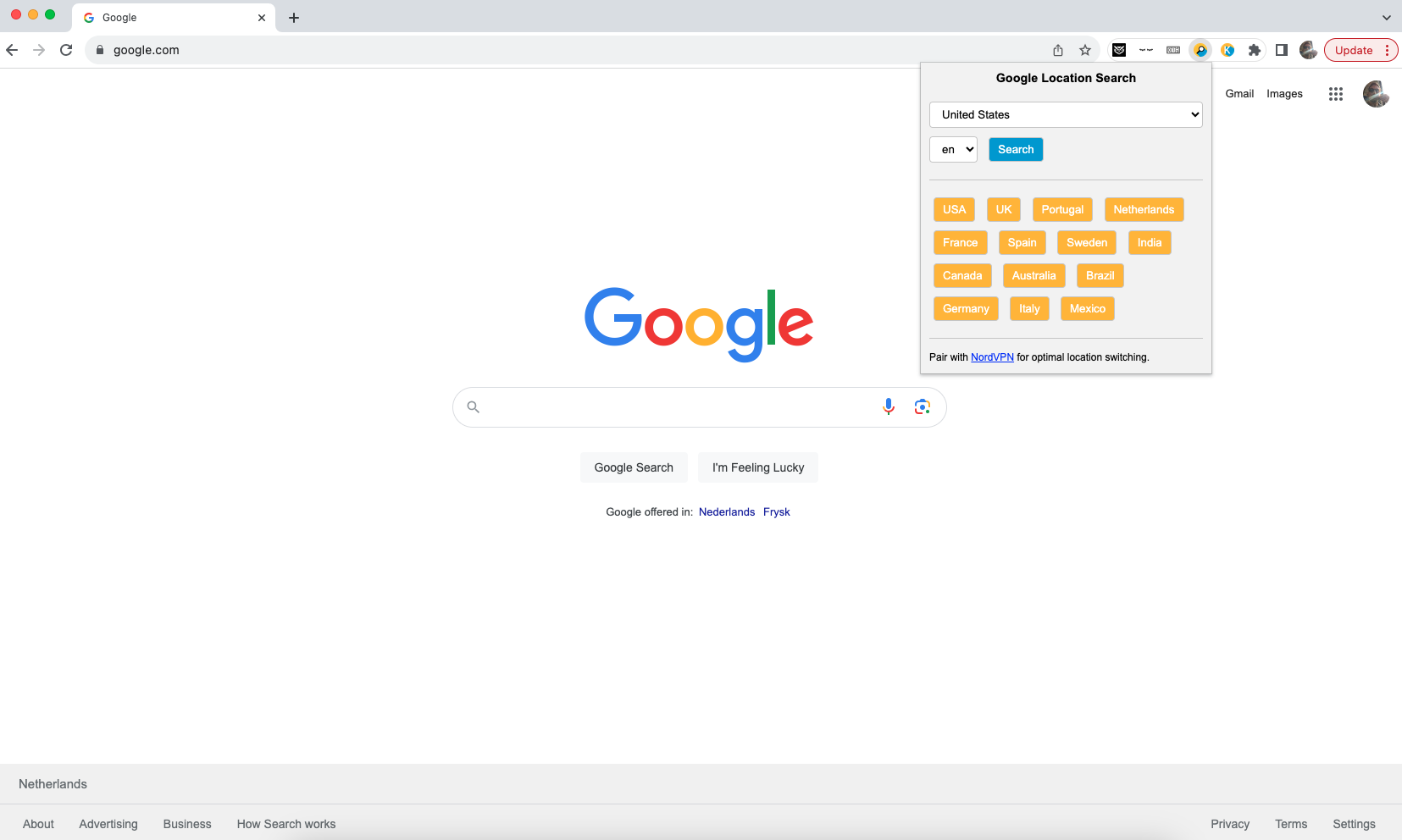
The Google Location Changer is a Chrome extension that allows users to modify their browsing location and language settings on Google Search. It offers a list of countries and languages to choose from and integrates into the Google search interface without altering default settings. The extension is commonly used for purposes like SEO analysis, content localization, market research, and language learning. Note that while the extension changes the appearance of being in a different location for search results, it does not alter the user's actual physical location unless paired with a VPN.

The Electronic Laboratory Notebook designed by chemists for chemists. New cloud-based ELN with built-in raw analytical data support and automatic structure confirmation capabilities.