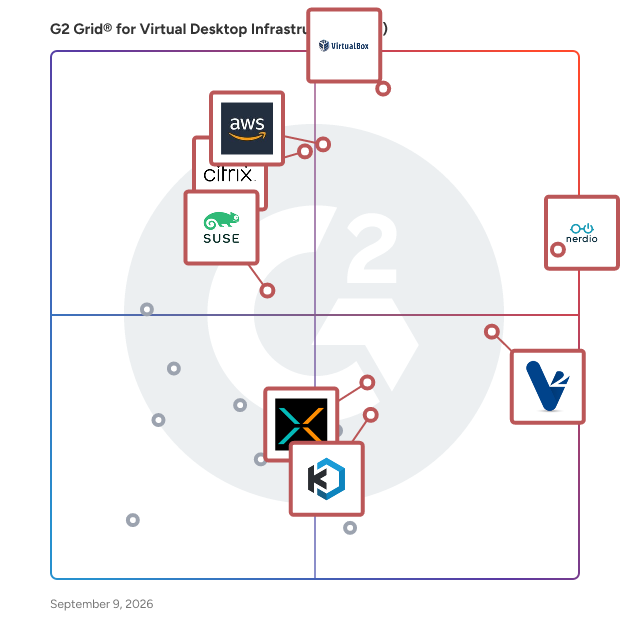
# Best Virtual Desktop Infrastructure (VDI) Solutions - Page 2

  *By [Shalaka Joshi](https://research.g2.com/insights/author/shalaka-joshi)*


   Virtual desktop infrastructure (VDI) software provides and manages virtual desktops hosted on-premises or in the cloud. These desktops run on virtual machines located on servers in a data center instead of the actual desktop hardware. VDI software allows users to run and manage operating systems in a data center and helps to host desktops remotely. A “virtual image&quot; of the user&#39;s desktop is sent over the network to the remote user, allowing the user to access the desktop image as if it was being accessed locally. Once users gain access to the virtual desktops, they can continue their work and run applications.

Businesses use VDI software to leverage existing computer resources without increasing costs, update enterprise software tools, and allow employees to access desktop images using their own or company devices while maintaining data security. VDI tools are often the key component in [infrastructure as a service (IaaS) providers](https://www.g2.com/categories/infrastructure-as-a-service-iaas), in which host servers provide virtual tools (most commonly desktop infrastructures). VDI tools can also integrate with or launch any additional business software a team or company requires.

To qualify for inclusion in the Virtual Desktop Infrastructure category, a product must:

- Provide users with a virtual desktop they can remotely access anywhere, anytime
- Support device portability. Users should be able to access their desktop from multiple devices such as mobiles, laptops, and tablets
- Ensure end-to-end security and regulatory compliance


## How Many Virtual Desktop Infrastructure (VDI) Software Products Does G2 Track?
**Total Products under this Category:** 69

### Category Stats (Jun 2026)
- **Average Rating**: 4.4/5 The average rating of products in this category, based on all submitted ratings
- **New Reviews This Quarter**: 31
- **Buyer Segments**: Small-Business 58% │ Mid-Market 34% │ Enterprise 8% Represents the distribution of reviewers across all products in this category.
- **Top Trending Product**: Amazon WorkSpaces (+0.22%) - Among all products in this category, Amazon WorkSpaces recorded the largest rating increase compared to last month
*Last updated: June 18, 2026*

  
## How Does G2 Rank Virtual Desktop Infrastructure (VDI) Software Products?

**Why You Can Trust G2's Software Rankings:**

- 30 Analysts and Data Experts
- 1,900+ Authentic Reviews
- 69+ Products
- Unbiased Rankings

G2's software rankings are built on verified user reviews, rigorous moderation, and a consistent research methodology maintained by a team of analysts and data experts. Each product is measured using the same transparent criteria, with no paid placement or vendor influence. While reviews reflect real user experiences, which can be subjective, they offer valuable insight into how software performs in the hands of professionals. Together, these inputs power the G2 Score, a standardized way to compare tools within every category.

  
## Which Virtual Desktop Infrastructure (VDI) Software Is Best for Your Use Case?

- **Leader:** [Nerdio Manager](https://www.g2.com/products/nerdio-manager/reviews)
- **Highest Performer:** [V2 Cloud](https://www.g2.com/products/v2-cloud/reviews)
- **Easiest to Use:** [Nerdio Manager](https://www.g2.com/products/nerdio-manager/reviews)
- **Top Trending:** [Nerdio Manager](https://www.g2.com/products/nerdio-manager/reviews)
- **Best Free Software:** [Nerdio Manager](https://www.g2.com/products/nerdio-manager/reviews)

  
---

**Sponsored**

### DialMyCalls

DialMyCalls is a web-based mass notification solution designed to help organizations efficiently communicate with large groups of people through text messages, phone calls, and emails. With over 15 years of experience in the industry, and 40,000+ organizations relying on it, DialMyCalls has established itself as a reliable platform for sending millions of messages annually, catering to a diverse range of users across the United States and Canada. The target audience for DialMyCalls includes schools, businesses, non-profit organizations, and emergency services that require a streamlined method for disseminating information quickly. Whether it&#39;s for routine staffing notifications, event reminders, or urgent alerts during a crisis, DialMyCalls provides a versatile communication tool that meets various organizational needs. Its user-friendly interface allows administrators to create and send messages in seconds, ensuring that critical information reaches recipients without delay. Key features of DialMyCalls include its ability to send voice messages, SMS, and emails simultaneously, which enhances the likelihood of message delivery across different communication preferences. The platform is entirely web-based, eliminating the need for additional hardware or software installations. Users can access the service from any computer or mobile device, making it convenient to manage communications on the go. Additionally, the mobile apps for iPhone and Android devices empower users to send notifications from anywhere, ensuring that they remain connected even when away from their desks. DialMyCalls also offers a free trial that includes 25 free phone calls and SMS messages, allowing potential users to experience the platform&#39;s capabilities without any financial commitment. This trial period provides organizations with the opportunity to evaluate how DialMyCalls can enhance their communication strategies and improve overall efficiency. The combination of ease of use, accessibility, and robust functionality positions DialMyCalls as a valuable tool for organizations looking to improve their mass notification processes.


[Visit website](https://www.g2.com/external_clickthroughs/record?secure%5Bad_program%5D=ppc&amp;secure%5Bad_slot%5D=category_product_list&amp;secure%5Bcategory_id%5D=189&amp;secure%5Bdisplayable_resource_id%5D=258&amp;secure%5Bdisplayable_resource_type%5D=Category&amp;secure%5Bmedium%5D=sponsored&amp;secure%5Bplacement_reason%5D=retargeted_product&amp;secure%5Bplacement_resource_ids%5D%5B%5D=9170&amp;secure%5Bprioritized%5D=false&amp;secure%5Bproduct_id%5D=9170&amp;secure%5Bresource_id%5D=189&amp;secure%5Bresource_type%5D=Category&amp;secure%5Bsource_type%5D=category_page&amp;secure%5Bsource_url%5D=https%3A%2F%2Fwww.g2.com%2Fcategories%2Fvirtual-desktop-infrastructure-vdi&amp;secure%5Btoken%5D=be01b58938588d29e87a065893328c4f5804fb78afc5d1a24b115581d1aad554&amp;secure%5Burl%5D=https%3A%2F%2Fwww.dialmycalls.com%2Fsignup&amp;secure%5Burl_type%5D=free_trial)

---

  ## What Are the Top-Rated Virtual Desktop Infrastructure (VDI) Software Products in 2026?
### 1. [EuVantage](https://www.g2.com/products/euvantage/reviews)
  A SaaS-based intelligent AIOps platform, EuVantage® simplifies the management and delivery of virtual desktops and applications, whether hosted on private or public cloud. It provides unparalleled visibility and adaptive correlation for effective user experience management. What sets EuVantage® apart is its unique ability to discover and leverage the relationships among the various network, server and virtualization layer components involved in application delivery. By understanding this relationship and prioritizing end-user impacting issues, EuVantage® helps organizations maximize application availability, simplify management, and optimize the cost of a virtual desktop environment. Core Functionalities from EuVantage®: • Swift Issue Identification through Automation: Identify potential issues at a glance through automated discovery of application delivery components. • User Insights on Your Fingertips: Gain an on-demand end-user-centric view of the application delivery infrastructure, streamlining insights for quicker decision-making. • Smart Dashboards, Faster Decisions: Benefit from adaptive analytics and intuitive dashboards, driving faster business choices that save both time and money. • Proactive Management with Real-Time Reports: Receive actionable reports that offer a live glimpse into application performance and its subsequent effect on user experience. What EuVantage® Offers You: • Purpose-built for enterprise VDI and DaaS monitoring to see the environment as a correlated application delivery chain. • Auto-discovered, end-user-centric dependency mapping that is continuously kept up to date. • End-user performance alerts automatically mapped to underlying infrastructure. • Auto-association technology that correlates relevant metrics and alerts to reduce noise and clutter • SaaS-based simple installation with transparent per desktop/end-user pricing. Learn more at: https://www.anuntatech.com/platforms/euvantage/


  **Average Rating:** 4.0/5.0
  **Total Reviews:** 4
**How Do G2 Users Rate EuVantage?**

- **Desktop Virtualization:** 8.9/10 (Category avg: 9.0/10)
- **Access Controls and Permissions:** 8.9/10 (Category avg: 9.0/10)
- **Has the product been a good partner in doing business?:** 6.7/10 (Category avg: 9.0/10)
- **Application Virtualization:** 7.2/10 (Category avg: 8.8/10)

**Who Is the Company Behind EuVantage?**

- **Seller:** [Anunta Tech](https://www.g2.com/sellers/anunta-tech)
- **Year Founded:** 2012
- **HQ Location:** Mumbai, Maharashtra
- **Twitter:** @anuntatech (869 Twitter followers)
- **LinkedIn® Page:** https://www.linkedin.com/company/anuntatech/ (1,065 employees on LinkedIn®)

**Who Uses This Product?**
  - **Company Size:** 50% Small-Business, 25% Mid-Market


### 2. [FOSS-Cloud](https://www.g2.com/products/foss-cloud/reviews)
  FOSS-Cloud (FOSS-Cloud software and hardware) is an integrated and redundant server infrastructure to provide virtualization- and cloud-services, Windows or Linux based SaaS-, Terminal Server-, Virtual Desktop Infrastructure (VDI) or virtual server environments. FOSS-Cloud covers all aspects of a virtualized IT environment. FOSS-Cloud is a pure Open Source solution, is licensed under EUPL and is available on the sourceforge.net. FOSS-Cloud is the most advanced Open Source Cloud.


  **Average Rating:** 4.5/5.0
  **Total Reviews:** 4
**How Do G2 Users Rate FOSS-Cloud?**

- **Desktop Virtualization:** 8.3/10 (Category avg: 9.0/10)
- **Access Controls and Permissions:** 9.2/10 (Category avg: 9.0/10)
- **Has the product been a good partner in doing business?:** 10.0/10 (Category avg: 9.0/10)
- **Application Virtualization:** 7.5/10 (Category avg: 8.8/10)

**Who Is the Company Behind FOSS-Cloud?**

- **Seller:** [FOSS-Group](https://www.g2.com/sellers/foss-group)
- **HQ Location:** N/A
- **LinkedIn® Page:** https://www.linkedin.com/company/No-Linkedin-Presence-Added-Intentionally-By-DataOps (1 employees on LinkedIn®)

**Who Uses This Product?**
  - **Company Size:** 100% Small-Business


### 3. [Navisite Managed Virtual Desktops](https://www.g2.com/products/navisite-managed-virtual-desktops/reviews)
  More than ever, organizations need the ability to quickly and cost-effectively support remote workers and implement widescale work-from-home programs. Changes in cloud computing have made this possible with virtual desktop infrastructure (VDI) technology.


  **Average Rating:** 3.4/5.0
  **Total Reviews:** 4
**How Do G2 Users Rate Navisite Managed Virtual Desktops?**

- **Desktop Virtualization:** 8.3/10 (Category avg: 9.0/10)
- **Access Controls and Permissions:** 6.7/10 (Category avg: 9.0/10)
- **Application Virtualization:** 8.3/10 (Category avg: 8.8/10)

**Who Is the Company Behind Navisite Managed Virtual Desktops?**

- **Seller:** [Accenture](https://www.g2.com/sellers/accenture)
- **Year Founded:** 1989
- **HQ Location:** Dublin, Ireland
- **Twitter:** @Accenture (515,273 Twitter followers)
- **LinkedIn® Page:** https://www.linkedin.com/company/accenture (672,927 employees on LinkedIn®)
- **Ownership:** NYSE:ACN

**Who Uses This Product?**
  - **Company Size:** 50% Mid-Market, 25% Small-Business


### 4. [Ulteo OVD](https://www.g2.com/products/ulteo-ovd/reviews)
  OVD is desktop virtualization solution that provides on-demand access to virtual computers.


  **Average Rating:** 4.4/5.0
  **Total Reviews:** 7
**How Do G2 Users Rate Ulteo OVD?**

- **Desktop Virtualization:** 10.0/10 (Category avg: 9.0/10)
- **Access Controls and Permissions:** 10.0/10 (Category avg: 9.0/10)
- **Has the product been a good partner in doing business?:** 9.2/10 (Category avg: 9.0/10)
- **Application Virtualization:** 10.0/10 (Category avg: 8.8/10)

**Who Is the Company Behind Ulteo OVD?**

- **Seller:** [Ulteo](https://www.g2.com/sellers/ulteo)
- **Year Founded:** 2007
- **HQ Location:** N/A
- **Twitter:** @Ulteo (635 Twitter followers)
- **LinkedIn® Page:** https://www.linkedin.com/company/463275 (1 employees on LinkedIn®)

**Who Uses This Product?**
  - **Company Size:** 50% Small-Business, 25% Enterprise


### 5. [Login VSI](https://www.g2.com/products/login-vsi/reviews)
  Control Your EUC Workspace. Validate Every Change. Login VSI helps enterprise IT teams run and validate digital workspace environments at scale. Hydra is how Windows in the Cloud should be run, across Azure Virtual Desktop (AVD), Windows 365, and hybrid deployments. Built for administrators and MSPs alike, Hydra restores a familiar and streamlined way to transition to and manage modern virtual desktops, without the unnecessary cost, complexity, or operational tradeoffs of native or traditional third-party tooling. Login Enterprise continuously validates mission-critical enterprise performance across applications, infrastructure, and user workflows before and after every change. It catches regressions before rollout, detects drift after go-live, and protects user experience across every environment.


  **Average Rating:** 4.5/5.0
  **Total Reviews:** 3
**How Do G2 Users Rate Login VSI?**

- **Desktop Virtualization:** 9.4/10 (Category avg: 9.0/10)
- **Access Controls and Permissions:** 8.9/10 (Category avg: 9.0/10)
- **Application Virtualization:** 8.3/10 (Category avg: 8.8/10)

**Who Is the Company Behind Login VSI?**

- **Seller:** [Login VSI](https://www.g2.com/sellers/login-vsi)
- **Year Founded:** 2012
- **HQ Location:** Boston, Massachusetts, United States
- **Twitter:** @LoginVSI (5,557 Twitter followers)
- **LinkedIn® Page:** https://www.linkedin.com/company/loginvsi/ (69 employees on LinkedIn®)

**Who Uses This Product?**
  - **Company Size:** 67% Small-Business, 33% Mid-Market


#### What Are Login VSI's Pros and Cons?

**Pros:**

- Customer Support (1 reviews)
- Customer Understanding (1 reviews)
- Ease of Learning (1 reviews)
- Easy Integrations (1 reviews)
- Features (1 reviews)

**Cons:**

- Expensive (2 reviews)
- Complex Setup (1 reviews)
- Not User-Friendly (1 reviews)
- Poor Customer Support (1 reviews)

### 6. [Stratodesk NoTouch](https://www.g2.com/products/stratodesk-notouch/reviews)
  Stratodesk is the leading innovator of an ultra-secure endpoint OS engineered with precision to meet the unique demands of modern enterprises. With zero-trust principles embedded in its core, NoTouch OS is the market-leading endpoint OS for VDI, DaaS, SaaS, and Secure Browsing as well as IIoT and Automation use cases. NoTouch OS delivers CAPEX and OPEX savings by simplifying IT processes and endpoint management, advances sustainability goals through hardware life cycle extension, and revolutionizes user experience and productivity, while ensuring comprehensive endpoint security on any device and in any location.


  **Average Rating:** 4.3/5.0
  **Total Reviews:** 8
**How Do G2 Users Rate Stratodesk NoTouch?**

- **Desktop Virtualization:** 10.0/10 (Category avg: 9.0/10)
- **Access Controls and Permissions:** 10.0/10 (Category avg: 9.0/10)
- **Has the product been a good partner in doing business?:** 7.9/10 (Category avg: 9.0/10)
- **Application Virtualization:** 10.0/10 (Category avg: 8.8/10)

**Who Is the Company Behind Stratodesk NoTouch?**

- **Seller:** [Stratodesk](https://www.g2.com/sellers/stratodesk)
- **Year Founded:** 2010
- **HQ Location:** San Francisco, US
- **Twitter:** @stratodesk (18,496 Twitter followers)
- **LinkedIn® Page:** https://www.linkedin.com/company/1160693 (10 employees on LinkedIn®)

**Who Uses This Product?**
  - **Company Size:** 50% Mid-Market, 38% Enterprise


#### What Are Stratodesk NoTouch's Pros and Cons?

**Pros:**

- Ease of Use (2 reviews)
- Security (2 reviews)
- Time-saving (2 reviews)
- Centralized Management (1 reviews)
- Easy Implementation (1 reviews)

**Cons:**

- App Incompatibility (1 reviews)
- Driver Issues (1 reviews)
- Lack of Customization (1 reviews)
- Learning Curve (1 reviews)
- Limited Customization (1 reviews)

### 7. [Apporto](https://www.g2.com/products/apporto/reviews)
  Apporto is a cloud-based service provider specializing in virtual desktop solutions. Their platform primarily caters to educational institutions and businesses, offering solutions for secure mobile workspaces, virtual computer labs, cybersecurity labs and more. Apporto&#39;s services enable users to access desktops and applications from any device, facilitating flexible and remote learning or working scenarios. They emphasize ease of use, security, and scalability, aiming to enhance the digital experience while reducing the need for physical IT infrastructure.


  **Average Rating:** 4.9/5.0
  **Total Reviews:** 15
**How Do G2 Users Rate Apporto?**

- **Has the product been a good partner in doing business?:** 10.0/10 (Category avg: 9.0/10)

**Who Is the Company Behind Apporto?**

- **Seller:** [Apporto](https://www.g2.com/sellers/apporto)
- **Year Founded:** 2014
- **HQ Location:** Palo Alto, US
- **LinkedIn® Page:** https://www.linkedin.com/company/apporto (63 employees on LinkedIn®)

**Who Uses This Product?**
  - **Company Size:** 67% Mid-Market, 20% Enterprise


### 8. [Dynamic Environment Manager](https://www.g2.com/products/dynamic-environment-manager/reviews)
  User Environment Manager offers personalization and dynamic policy configuration across any virtual, physical and cloud-based Windows desktop environment, and is a key component of JMP: the next generation of desktop and application delivery. Utilizing the Horizon Cloud Manager, this focused, powerful and scalable solution is engineered to deliver workplace productivity while driving down the cost of day-to-day desktop support and operations.


  **Average Rating:** 3.5/5.0
  **Total Reviews:** 2
**How Do G2 Users Rate Dynamic Environment Manager?**

- **Desktop Virtualization:** 10.0/10 (Category avg: 9.0/10)
- **Access Controls and Permissions:** 10.0/10 (Category avg: 9.0/10)
- **Has the product been a good partner in doing business?:** 8.3/10 (Category avg: 9.0/10)
- **Application Virtualization:** 10.0/10 (Category avg: 8.8/10)

**Who Is the Company Behind Dynamic Environment Manager?**

- **Seller:** [Broadcom](https://www.g2.com/sellers/broadcom-ab3091cd-4724-46a8-ac89-219d6bc8e166)
- **Year Founded:** 1991
- **HQ Location:** San Jose, CA
- **Twitter:** @broadcom (63,832 Twitter followers)
- **LinkedIn® Page:** https://www.linkedin.com/company/broadcom/ (55,094 employees on LinkedIn®)
- **Ownership:** NASDAQ: CA

**Who Uses This Product?**
  - **Company Size:** 50% Enterprise, 50% Mid-Market


### 9. [FLEXAPP](https://www.g2.com/products/flexapp/reviews)
  FlexApp layering instantly delivers applications to any Windows desktop environment, independent of the Windows operating system version. The solution supports VDI and DaaS desktops from Citrix and VMware, Microsoft RDSH and Citrix XenApp environments, as well as Amazon WorkSpaces, and physical desktops


  **Average Rating:** 2.5/5.0
  **Total Reviews:** 2

**Who Is the Company Behind FLEXAPP?**

- **Seller:** [Liquidware Labs](https://www.g2.com/sellers/liquidware-labs)
- **Year Founded:** 2009
- **HQ Location:** Alpharetta, US
- **Twitter:** @liquidware (2,389 Twitter followers)
- **LinkedIn® Page:** https://www.linkedin.com/company/liquidware-labs (86 employees on LinkedIn®)

**Who Uses This Product?**
  - **Company Size:** 50% Enterprise, 50% Mid-Market


### 10. [flexVDI](https://www.g2.com/products/flexvdi/reviews)
  The Open Full-Stack VDI Solution. Securely deliver Windows, Linux, web and SaaS apps plus full virtual desktops to any device.


  **Average Rating:** 5.0/5.0
  **Total Reviews:** 2
**How Do G2 Users Rate flexVDI?**

- **Has the product been a good partner in doing business?:** 10.0/10 (Category avg: 9.0/10)

**Who Is the Company Behind flexVDI?**

- **Seller:** [FlexVDI](https://www.g2.com/sellers/flexvdi)
- **Year Founded:** 2015
- **HQ Location:** N/A
- **LinkedIn® Page:** https://www.linkedin.com/company/5214645/ (2 employees on LinkedIn®)

**Who Uses This Product?**
  - **Company Size:** 100% Small-Business


### 11. [Surf Security Zero Trust Enterprise Browser](https://www.g2.com/products/surf-security-zero-trust-enterprise-browser/reviews)
  Founded in London, UK in 2022, SURF Security is an endpoint protection Browser-SASE (secure access service edge) cybersecurity company that has created the world’s first enterprise zero-trust browser and extension with security at its core. These two products capitalise on the rise of both the working-from-home phenomenon, and ‘software as a service’ or SaaS platforms that are used through a browser. SURF secures the browser itself, either replacing or augmenting consumer browsers such as Chrome, Edge, or Safari. This approach helps ensure compliance, defends organisations from breaches and protects users from social engineering attacks such as phishing—all on the user’s device.


  **Average Rating:** 4.9/5.0
  **Total Reviews:** 5
**How Do G2 Users Rate Surf Security Zero Trust Enterprise Browser?**

- **Desktop Virtualization:** 0.0/10 (Category avg: 9.0/10)
- **Has the product been a good partner in doing business?:** 10.0/10 (Category avg: 9.0/10)
- **Application Virtualization:** 0.0/10 (Category avg: 8.8/10)

**Who Is the Company Behind Surf Security Zero Trust Enterprise Browser?**

- **Seller:** [SURFSecurity](https://www.g2.com/sellers/surfsecurity)
- **Year Founded:** 2021
- **HQ Location:** London, GB
- **LinkedIn® Page:** http://www.linkedin.com/company/surfsecurity (33 employees on LinkedIn®)

**Who Uses This Product?**
  - **Company Size:** 40% Enterprise, 40% Small-Business


#### What Are Surf Security Zero Trust Enterprise Browser's Pros and Cons?

**Pros:**

- Access Control (2 reviews)
- Ease of Use (2 reviews)
- Password Management (2 reviews)
- Performance (2 reviews)
- Safety/Security (2 reviews)

**Cons:**

- Complex Configuration (1 reviews)
- Difficult Configuration (1 reviews)
- Learning Curve (1 reviews)
- Limited Customization (1 reviews)
- Onboarding Difficulties (1 reviews)

### 12. [Thinfinity Remote Workspace](https://www.g2.com/products/thinfinity-remote-workspace/reviews)
  Thinfinity® Workspace 7 is a comprehensive, secure platform that offers a zero-trust approach, enabling secure and contextual access to corporate virtual desktops, virtual applications, internal web apps, SaaS, and files, whether they are on Windows, Linux, or mainframes. It supports various deployment models, including cloud, on-premise, and hybrid settings, and can be deployed on any cloud provider of your choice. With its proprietary reverse gateway technology, Thinfinity® Remote Workspace 7 ensures secure reverse connections over SSL with TLS 1.3 encryption. This robust approach doesn&#39;t require client-side installations, firewall modifications, or the opening of inbound ports on your network, thereby enhancing the security infrastructure of your business. The platform ensures all browser-based connections are secured over HTTPS, offering a wide variety of authentication options, from straightforward User/Password to sophisticated Active Directory authentication. Moreover, it seamlessly integrates with any identity provider, such as Okta, DUO, or Azure AD, employing standard security protocols like SAML, OAuth, and Radius for enhanced security and flexibility. The solution protects users, applications, and corporate data against internet web threats and data exfiltration, providing advanced security controls for managed, unmanaged, and BYO devices. With its Role-Based Permissions and native two-factor authentication with Microsoft or Google Authenticator, Thinfinity® Remote Workspace 7 offers an extensive security approach based on zero-trust principles. In addition to its robust security features, Thinfinity® Remote Workspace 7 also delivers an efficient and streamlined remote working experience. Its user-centric interface, combined with advanced features like user analytics and resource reservation views, allows for effective management of remote resources. With its flexible pricing models and an array of advanced features, Thinfinity® Remote Workspace 7 is an optimal solution for organizations aiming to maximize the potential of a virtual workspace. Regardless of your team&#39;s size or nature of business, Thinfinity provides a secure, efficient, and tailored solution for your remote access requirements.


  **Average Rating:** 4.5/5.0
  **Total Reviews:** 2
**How Do G2 Users Rate Thinfinity Remote Workspace?**

- **Desktop Virtualization:** 10.0/10 (Category avg: 9.0/10)
- **Access Controls and Permissions:** 6.7/10 (Category avg: 9.0/10)
- **Has the product been a good partner in doing business?:** 10.0/10 (Category avg: 9.0/10)
- **Application Virtualization:** 10.0/10 (Category avg: 8.8/10)

**Who Is the Company Behind Thinfinity Remote Workspace?**

- **Seller:** [Thinfinity Workspace](https://www.g2.com/sellers/thinfinity-workspace)
- **Year Founded:** 2002
- **HQ Location:** Draper, US
- **LinkedIn® Page:** https://www.linkedin.com/company/1486632 (71 employees on LinkedIn®)

**Who Uses This Product?**
  - **Company Size:** 100% Mid-Market


### 13. [Hosted VDI and DAAS](https://www.g2.com/products/hosted-vdi-and-daas/reviews)
  Ace Cloud Hosting (ACE) provides fully managed cloud-hosted virtual desktops and Desktop as a Service (DaaS) to clients globally. Our Hosted VDI solutions like DaaS and WaaS give your team complete flexibility, device mobility, HIPAA compliant security, 99.99% uptime, and data safety. ACE is partnered with VMware and Citrix to offer desktop and app VDI solutions.


  **Average Rating:** 5.0/5.0
  **Total Reviews:** 1

**Who Is the Company Behind Hosted VDI and DAAS?**

- **Seller:** [Ace Cloud Hosting](https://www.g2.com/sellers/ace-cloud-hosting)
- **Year Founded:** 2009
- **HQ Location:** Florida, US
- **Twitter:** @AceCloudHosting (1,635 Twitter followers)
- **LinkedIn® Page:** https://www.linkedin.com/company/ace-cloud-hosting/ (92 employees on LinkedIn®)

**Who Uses This Product?**
  - **Company Size:** 100% Small-Business


### 14. [INFINITY Workspaces](https://www.g2.com/products/infinity-workspaces/reviews)
  IronOrbit INFINITY Workspaces deliver seamless performance and exceptional customer experience. Extremely powerful cloud desktops, including GPU-Accelerated editions, are designed from the application backwards to meet the most demanding application requirements. IronOrbit’s all-in-one solution is customized for your needs and business strategy. IronOrbit INFINITY Workspaces are built for specific use-cases, profiles, and business-critical applications. Comprehensive and flexible workspaces with scalable resources as your business needs change. Users work from any location on a single, secure cloud network, accessible 24/7/365, from any device, from anywhere. IronOrbit offers INFINITY Workspaces as a turnkey solution that encompasses: Secure &amp; Compliant Collaboration-Ready DR &amp; Business Continuity Continuous Upgrades &amp; Unmetered Usage Scalable and Modular Configuration 24/7 US-based Support Centralized File Repositories All-in-One Predictable Monthly Fee


  **Average Rating:** 5.0/5.0
  **Total Reviews:** 1
**How Do G2 Users Rate INFINITY Workspaces?**

- **Desktop Virtualization:** 10.0/10 (Category avg: 9.0/10)
- **Access Controls and Permissions:** 10.0/10 (Category avg: 9.0/10)
- **Application Virtualization:** 10.0/10 (Category avg: 8.8/10)

**Who Is the Company Behind INFINITY Workspaces?**

- **Seller:** [IronOrbit](https://www.g2.com/sellers/ironorbit)
- **Year Founded:** 1997
- **HQ Location:** Anaheim Hills, US
- **LinkedIn® Page:** https://www.linkedin.com/company/ironorbit (62 employees on LinkedIn®)

**Who Uses This Product?**
  - **Company Size:** 100% Mid-Market


### 15. [Leostream](https://www.g2.com/products/leostream/reviews)
  The Leostream Remote Desktop Access Platform embodies over 20 years of Leostream research and development in supporting customers with hosted desktop environments, including VDI, hybrid cloud, and high-performance display protocols. It provides the world’s most robust desktop connection management and remote access feature set, allowing today’s enterprises to choose the best-of-breed components to satisfy their complex security, cost, and flexibility needs while working with them as they evolve into tomorrow.


  **Average Rating:** 5.0/5.0
  **Total Reviews:** 1
**How Do G2 Users Rate Leostream?**

- **Desktop Virtualization:** 10.0/10 (Category avg: 9.0/10)
- **Access Controls and Permissions:** 10.0/10 (Category avg: 9.0/10)
- **Application Virtualization:** 10.0/10 (Category avg: 8.8/10)

**Who Is the Company Behind Leostream?**

- **Seller:** [Leostream](https://www.g2.com/sellers/leostream)
- **Year Founded:** 2002
- **HQ Location:** Boston, US
- **LinkedIn® Page:** https://www.linkedin.com/company/leostream-corporation/ (20 employees on LinkedIn®)

**Who Uses This Product?**
  - **Company Size:** 100% Enterprise


### 16. [Nfusion](https://www.g2.com/products/nfusion/reviews)
  Nfusion is a software tool that isolates your applications, browsing activity, and identity separate from your local machines and networks to create a safe desktop environment.


  **Average Rating:** 5.0/5.0
  **Total Reviews:** 1
**How Do G2 Users Rate Nfusion?**

- **Desktop Virtualization:** 10.0/10 (Category avg: 9.0/10)
- **Access Controls and Permissions:** 10.0/10 (Category avg: 9.0/10)
- **Application Virtualization:** 10.0/10 (Category avg: 8.8/10)

**Who Is the Company Behind Nfusion?**

- **Seller:** [Ntrepid](https://www.g2.com/sellers/ntrepid)
- **Year Founded:** 2010
- **HQ Location:** Herndon, US
- **LinkedIn® Page:** https://www.linkedin.com/company/1666706 (158 employees on LinkedIn®)

**Who Uses This Product?**
  - **Company Size:** 100% Small-Business


### 17. [OS-Easy Mac Management System](https://www.g2.com/products/os-easy-mac-management-system/reviews)
  OS-Easy Mac Management System (OS-Easy MMS) is a comprehensive management system for classroom equipped with iMac and Macbook.


  **Average Rating:** 4.0/5.0
  **Total Reviews:** 1

**Who Is the Company Behind OS-Easy Mac Management System?**

- **Seller:** [OS-EASY](https://www.g2.com/sellers/os-easy)
- **Year Founded:** 2013
- **HQ Location:** Wuhan, CN
- **LinkedIn® Page:** https://www.linkedin.com/company/74335241/ (13 employees on LinkedIn®)

**Who Uses This Product?**
  - **Company Size:** 100% Small-Business


### 18. [Ravada VDI](https://www.g2.com/products/ravada-vdi/reviews)
  Ravada is an open-source project that allows users to connect to a virtual desktop. It is a VDI broker. Its back-end has been designed and implemented in order to allow future hypervisors to be added to the framework. Currently it supports KVM and LXC is in the works.


  **Average Rating:** 4.0/5.0
  **Total Reviews:** 1
**How Do G2 Users Rate Ravada VDI?**

- **Desktop Virtualization:** 8.3/10 (Category avg: 9.0/10)
- **Access Controls and Permissions:** 8.3/10 (Category avg: 9.0/10)
- **Has the product been a good partner in doing business?:** 10.0/10 (Category avg: 9.0/10)
- **Application Virtualization:** 8.3/10 (Category avg: 8.8/10)

**Who Is the Company Behind Ravada VDI?**

- **Seller:** [RavadaVDI](https://www.g2.com/sellers/ravadavdi)
- **HQ Location:** N/A
- **LinkedIn® Page:** https://www.linkedin.com/company/No-Linkedin-Presence-Added-Intentionally-By-DataOps (1 employees on LinkedIn®)

**Who Uses This Product?**
  - **Company Size:** 100% Enterprise


### 19. [SmartProfile for Azure Virtual Desktop Assessment](https://www.g2.com/products/smartprofile-for-azure-virtual-desktop-assessment/reviews)
  Businesses have deployed Microsoft Azure Virtual Desktop (AVD) in production. However, many AVD environments are still not utilizing full capabilities of FSLogix and Windows 10/Windows 11 or these AVD environments might be missing recommended settings. We have designed AVD Assessment Tool that can be used to perform assessment of complete AVD environment and provide an Assessment Report which includes issues and recommendations to fix the issues.


  **Average Rating:** 5.0/5.0
  **Total Reviews:** 1
**How Do G2 Users Rate SmartProfile for Azure Virtual Desktop Assessment?**

- **Has the product been a good partner in doing business?:** 10.0/10 (Category avg: 9.0/10)
- **Application Virtualization:** 10.0/10 (Category avg: 8.8/10)

**Who Is the Company Behind SmartProfile for Azure Virtual Desktop Assessment?**

- **Seller:** [DynamicPacks Technologies](https://www.g2.com/sellers/dynamicpacks-technologies)
- **Year Founded:** 2019
- **HQ Location:** Minneapolis, US
- **LinkedIn® Page:** https://www.linkedin.com/company/31072104 (18 employees on LinkedIn®)

**Who Uses This Product?**
  - **Company Size:** 100% Small-Business


### 20. [SmartVDI](https://www.g2.com/products/smartvdi/reviews)
  ClearCube’s Smart Virtual Desktop Infrastructure (SmartVDI™) solutions address an extensive range of user needs and smoothly transition staff from using physical desktops to highly available virtual desktops that deliver superior end UX. SmartVDI™ facilitates complete desktop-to-data center vision and accountability, with purpose-built VMware® configurations and the broadest selection of Zero Clients. SmartVDI™ desktops are capable of handling advanced configurations with the same personalization features as regular PCs.


  **Average Rating:** 4.5/5.0
  **Total Reviews:** 1
**How Do G2 Users Rate SmartVDI?**

- **Desktop Virtualization:** 10.0/10 (Category avg: 9.0/10)
- **Access Controls and Permissions:** 10.0/10 (Category avg: 9.0/10)
- **Application Virtualization:** 10.0/10 (Category avg: 8.8/10)

**Who Is the Company Behind SmartVDI?**

- **Seller:** [ClearCube Technology](https://www.g2.com/sellers/clearcube-technology)
- **Year Founded:** 1997
- **HQ Location:** Cedar Park, US
- **LinkedIn® Page:** https://www.linkedin.com/company/clearcube-technology (58 employees on LinkedIn®)

**Who Uses This Product?**
  - **Company Size:** 100% Small-Business


### 21. [Sonet.io](https://www.g2.com/products/sonet-io/reviews)
  Sonet.io is a cloud-native workspace solution for IT leaders that don’t want the cost and frustration of traditional VDIs, DaaS or VPNs. Sonet.io makes it easy for remote workers to access web apps, desktop apps and desktops from any device or browser, while implementing fine-grain security and visibility. Deployment is simple, and can be done in under one hour - no rack and stack, no shipping devices, no device deployments. And you can leverage elastic scaling when you need it.


  **Average Rating:** 4.8/5.0
  **Total Reviews:** 2
**How Do G2 Users Rate Sonet.io?**

- **Desktop Virtualization:** 10.0/10 (Category avg: 9.0/10)
- **Access Controls and Permissions:** 10.0/10 (Category avg: 9.0/10)
- **Application Virtualization:** 10.0/10 (Category avg: 8.8/10)

**Who Is the Company Behind Sonet.io?**

- **Seller:** [Sonet.io](https://www.g2.com/sellers/sonet-io)
- **HQ Location:** San Jose, US
- **LinkedIn® Page:** https://www.linkedin.com/company/sonet-io (16 employees on LinkedIn®)

**Who Uses This Product?**
  - **Company Size:** 100% Enterprise


### 22. [Wipro VirtuaDesk](https://www.g2.com/products/wipro-virtuadesk/reviews)
  Virtual Desktop Infrastructure (VDI) is instrumental in helping businesses stay abreast of the changing digital economy and create an efficient next-gen digital workspace.


  **Average Rating:** 3.5/5.0
  **Total Reviews:** 1
**How Do G2 Users Rate Wipro VirtuaDesk?**

- **Desktop Virtualization:** 10.0/10 (Category avg: 9.0/10)
- **Access Controls and Permissions:** 8.3/10 (Category avg: 9.0/10)
- **Application Virtualization:** 6.7/10 (Category avg: 8.8/10)

**Who Is the Company Behind Wipro VirtuaDesk?**

- **Seller:** [Wipro](https://www.g2.com/sellers/wipro)
- **Year Founded:** 1945
- **HQ Location:** Bangalore
- **Twitter:** @Wipro (513,142 Twitter followers)
- **LinkedIn® Page:** https://www.linkedin.com/company/1318/ (254,638 employees on LinkedIn®)
- **Ownership:** WIT

**Who Uses This Product?**
  - **Company Size:** 100% Enterprise


### 23. [Cloudbrink VDI](https://www.g2.com/products/cloudbrink-vdi/reviews)
  Cloudbrink&#39;s secure access service boosts employee productivity and morale. Customers who use Cloudbrink have happier more secure employees. The Cloudbrink service brings the industry’s first highest-performance connectivity to the modern hybrid workforce anywhere in the world. Cloudbrink uses AI and ML to provide edge-native hybrid access as a Service (HAaaS). HAaaS delivers accelerated performance for cloud, SaaS, and data center applications. Cloudbrink’s software-only solution includes the world&#39;s first high-performance ZTNA with personal SD-WAN and Automated Moving Target Defense (AMTD) security. With the ability to use thousands of dynamic PoPs called FAST edges, Cloudbrink provides an in-office experience with a 30x increase in application performance. This powerful experience for users comes with reduced operational complexity for network, security, and IT administrators.


**Who Is the Company Behind Cloudbrink VDI?**

- **Seller:** [Cloudbrink](https://www.g2.com/sellers/cloudbrink)
- **Year Founded:** 2019
- **HQ Location:** Sunnyvale, US
- **LinkedIn® Page:** https://www.linkedin.com/company/cloudbrink/ (41 employees on LinkedIn®)


### 24. [Dizzion Cloud PC](https://www.g2.com/products/dizzion-cloud-pc/reviews)
  Dizzion Cloud PC is a personal, persistent desktop in the cloud designed to simplify how organizations deliver secure, high-performance desktops to users across locations and devices. It eliminates the complexity of traditional VDI and the overhead of self-assembled virtual desktop solutions by combining pre-integrated infrastructure, fixed monthly pricing, and centralized management. Cloud PC is available exclusively on Amazon WorkSpaces Core and IBM Cloud Virtual Private Cloud (VPC). This curated deployment model enables fast, consistent, and secure delivery without requiring organizations to manage infrastructure or navigate platform compatibility. Each Cloud PC provides a persistent user environment, where applications, settings, and data persist across sessions. This makes it especially well-suited for hybrid and remote employees, contractors, and teams with compliance or security requirements. Dizzion Cloud PC enables organizations to: - Deliver full-time desktops to users without physical devices - Maintain consistent desktop environments for each user - Scale desktops up or down with minimal IT effort - Avoid complex builds by using built-in infrastructure and automation - Integrate identity, policy, and access controls into one platform - Meet compliance needs for HIPAA, SOC 2, PCI, and GDPR Key features include: - Persistent desktop sessions with individual user state - Browser-based access with multi-monitor, 4K, and video conferencing support - Fixed per-user pricing for cost predictability - Fast provisioning on pre-approved cloud environments - Unified admin console for desktop management and policy enforcement Dizzion Cloud PC is ideal for organizations that want to simplify desktop delivery without giving up control, security, or user experience, particularly in use cases like remote onboarding, third-party access, or scaling distributed teams.


**Who Is the Company Behind Dizzion Cloud PC?**

- **Seller:** [Dizzion](https://www.g2.com/sellers/dizzion)
- **Year Founded:** 2011
- **HQ Location:** San Antonio, TX
- **Twitter:** @Dizzion (896 Twitter followers)
- **LinkedIn® Page:** https://www.linkedin.com/company/dizzion-inc- (64 employees on LinkedIn®)


### 25. [Flashpoint Managed Attribution](https://www.g2.com/products/flashpoint-managed-attribution/reviews)
  Flashpoint Managed Attribution is a secure virtual environment that is completely isolated from your organization’s browsers, computers, and network infrastructure. This allows analysts and investigators to conduct advanced research, download potentially malicious files, and interact with threat actors and nefarious online content while protecting against malware, trackers, and other cyber threats.


**Who Is the Company Behind Flashpoint Managed Attribution?**

- **Seller:** [Flashpoint for Threat Intelligence](https://www.g2.com/sellers/flashpoint-for-threat-intelligence)
- **Year Founded:** 2010
- **HQ Location:** New York, NY
- **Twitter:** @FlashpointIntel (13,801 Twitter followers)
- **LinkedIn® Page:** https://www.linkedin.com/company/flashpoint-intel/ (362 employees on LinkedIn®)


    ## What Is Virtual Desktop Infrastructure (VDI) Software?
  [IT Infrastructure Software](https://www.g2.com/categories/it-infrastructure)
  ## What Software Categories Are Similar to Virtual Desktop Infrastructure (VDI) Software?
    - [Remote Desktop Software](https://www.g2.com/categories/remote-desktop)
    - [Desktop as a Service (DaaS) Providers](https://www.g2.com/categories/desktop-as-a-service-daas)

  
---

## How Do You Choose the Right Virtual Desktop Infrastructure (VDI) Software?

### What You Should Know About Virtual Desktop Infrastructure Software

### What is Virtual Desktop Infrastructure (VDI) Software?

Virtual desktop infrastructure (VDI) software is based on desktop virtualization technology which allows end users to run virtual desktops within their native desktops which could be any device like laptops and tablets to mobile devices and thin clients. This is facilitated by a virtual machine that lives on a centralized host server of a data center.&amp;nbsp;

Administrators can consolidate hardware resources into more flexible appliances through VDI solutions. End users are able to access multiple desktop variants in just about any location on a device connected to the VDI’s server. VDI solutions are implemented with the help of two major components: a hypervisor and connection broker. A hypervisor is a software program that can be installed over the host server in the data center. Through virtualization, a hypervisor creates multiple virtual machines that run on the host server which is deployed on premises. Each virtual machine can deploy a virtual desktop instance over it and is capable of running separate unique operating systems as well. Connection broker is also a software-based gateway that connects the end-user device to the virtual desktop instance.

VDIs help businesses eliminate the need to operate and maintain multiple PCs in a workspace. Some use cases of VDI solutions include remote access for remote workers, bring your own device (BYOD) programs, rotational shift workers, etc. VDI is being used by organizations that require to comply with regulatory standards like healthcare firms. VDI provides easy access to data stored in a data center as it provides centralized management.

**What Does VDI Stand For?**

VDI stands for virtual desktop infrastructure. VDI is a technology that provides desktop virtualization by hosting desktop environments on a centralized server. It also offers features that can help a business work from anywhere using any device. It lets businesses enhance their digital workspace experiences, and at the same time ensure secure remote access.&amp;nbsp;

#### What Types of Virtual Desktop Infrastructure (VDI) Software Exist?

There are two versions of VDI platforms:

**Persistent VDI:** This type of solution lets a user connect to a similar desktop each time and allows them to personalize their desktops as per their requirements. This personalization set by end users is saved and does not need a reset every time a new connection is initiated. Thus, persistent VDI is similar to personal physical desktops.

**Non-persistent VDI:** This type of solution lets a user connect to generic desktops. The&amp;nbsp;personalization made to these desktops is not saved, therefore there is no requirement to maintain any custom set desktop. Organizations that need not perform too many repetitive tasks utilize non-persistent VDI.&amp;nbsp;

### What are the Common Features of Virtual Desktop Infrastructure (VDI) Software?

The following are some core features within VDI that can help users remotely access their virtual desktops from anywhere, anytime:&amp;nbsp;

**Desktop virtualization:** This feature enables desktop environment simulations and runs applications on the cloud using virtual desktop images that can be accessed remotely.

**Application virtualization:** This feature creates a virtualized image of the applications and copies them to all the virtual machines.

**Desktop provisioning:** Desktop provisioning allows virtual desktops to be provisioned almost instantaneously as the settings have to be mirrored from a desktop image.

**Image management:** These solutions provide a central image management feature for multiple physical and virtual machines.&amp;nbsp;

**Multidevice portability:** Multidevice portability enables access to a desktop from various devices like mobiles, laptops, tablets, or thin clients. These platforms also enable a wide variety of hypervisors as well.&amp;nbsp;

**Two-factor authentication:** VDI supports two-factor authentication that provides multifactor security identification while connecting to VDI environments.

**Single sign-on (SSO):** SSO lets users access VDI environments with one set of sign-in credentials.

**Encryption:** VDI solutions provide encryption while files are in transit and storage or when files are being accessed through unsecured WiFi.

**Access controls and permissions:** VDI allows companies to control user access to applications or any other hosted resource.

**Centralized management:** This feature enables IT teams to update and configure all their virtual desktops very easily because VDI hosts desktop environments on a centralized server and makes them accessible to end users.&amp;nbsp;

**Scalability** : Software options within VDI range from allowing a single user to run two operating systems on one machine to an entire enterprise having access to virtualized machines. The software buying decision will depend largely on the number of users accessing the virtualized desktops. Furthermore, buyers must consider whether scaling the virtualized desktops to more users will be necessary in the future. Standalone software tools may not support the same scalability as software suites.

**Mobile virtualization** : It’s worth noting that not every VDI software tool comes with a mobile application. While virtual desktops set up through these options may still be accessed through a mobile browser, not having a native application may make it more difficult to navigate the virtual environment.&amp;nbsp;

### What are the Benefits of Virtual Desktop Infrastructure (VDI) Software?

VDI’s desktop virtualization technology helps boost the performance of businesses. This helps companies with cost savings, improved response time, and higher employee productivity by managing and securing their&amp;nbsp;IT infrastructure. All of the usual upgrades can be taken care of without user intervention.&amp;nbsp;

**Better technology and cost savings**** :** Instead of supplying standardized devices across the company or paying for other costly IT infrastructure components, VDI puts a ton of control in the hands of administrators. They can update devices, provide new applications, and ensure security, all at a fraction of the cost of the manual and infrastructural expense.&amp;nbsp;

The BYOD world makes it much more necessary to provide virtual tools since each device&#39;s capabilities are different. As long as a device is reasonably up to date, it can run any program the administrator delegates. This means more operating systems, business applications, and virtual machines regardless of the type of device an employee is using. The tools allow for increased monitoring and improved security.&amp;nbsp;

As all the processing is handled by the host servers, infrastructure requirements for the end user are minimal. End users can handle their virtual desktops built on the virtual machines of the host server from any device like traditional PC’s thin clients, mobile devices, tablets, etc, thus reducing hardware expenses.&amp;nbsp;

**Reducing infrastructural burden:** Some investment in server and storage hardware may still be necessary, but VDI solutions typically connect devices to hosted networks and cloud storage environments. This makes it easier for the end user to navigate databases and prevents large files from bogging down devices and slowing performance. Hosted databases can be as large as needed and typically scale with costs. Administrators are at an advantage since they get a single navigation point for network access and managing endpoints and storage. These systems also isolate and centralize resources to make the remote devices run more smoothly and securely.

**Remote access:** VDI allows end users to connect to their virtual desktops from anywhere around the world using any device. This provides employees with remote working options and in turn, improves their productivity.

**User experience** : VDI solutions provide a consistent experience across devices including PCs, tablets, smartphones, and thin clients, thus providing employees with an experience of working on their workspace desktop in real time.

**Extensive options and customization**** :** In addition to customizing the setup to meet storage needs, businesses can customize applications, user access requirements, and bespoke virtual machines. From the administrator end, users can customize security protocols, network monitoring dashboards, and document historical records. Combining the two ends can help develop a remote IT setup that is both cost- and resource-efficient.&amp;nbsp;

Businesses are enabled to give Mac users access to Windows-native applications or vice versa; virtually every application becomes OS agnostic since the organization is choosing the operating system, regardless of the end user’s device. These standardized environments can often be deployed to users across the globe, with limited effects on functionality.

**Enhanced employee productivity** : With VDI platforms, employees can access their company systems remotely from any device at any time through an internet connection. One can gain access to all the data and applications present on their remote PCs or devices. This provides employees with the flexibility of working from anywhere in the world on their own schedule.

**Security:** Security is probably the largest additional solution. Properly implemented VDI solutions can improve security by adding further firewall layers, malware scanning applications, and vulnerability management solutions.

All the data and applications reside on a centralized server in the data centers rather than endpoint devices. In case an employee loses their laptop or device, there is no chance the data can be accessed because there is no data stored on the device. Thus, VDI solutions provide high-level security by storing and managing all the sensitive data on remote servers across data centers.&amp;nbsp;

### Who Uses Virtual Desktop Infrastructure (VDI) Software?

**End users:** Employees, task workers, field workers, medical experts, regularly depend on VDI solutions to access a reliable virtual desktop from multiple devices and locations. VDI also provides employees the flexibility to work remotely.

### **What are the Alternatives to Virtual Desktop Infrastructure (VDI) Software?**

Alternatives to VDI can replace this type of software, either partially or completely:

[Desktop as a service (DaaS)](https://www.g2.com/categories/desktop-as-a-service-daas): DaaS solutions provide a virtualized desktop experience to users, entirely from the cloud. Unlike VDI software, which utilizes on-premises hosting for desktop virtualization, DaaS solutions center around cloud hosting the desktop admin console and virtual desktops.

[Remote desktop software](https://www.g2.com/categories/remote-desktop): Remote desktop software allows a user to seamlessly connect to and interact with a computer in another location via an internal network or the internet.&amp;nbsp;

Remote desktop software enables the user to see and control a connected PC or laptop as though they were sitting directly in front of it. Remote desktop software is helpful for collaborative work, technical support, and demonstrations.

#### Software Related to Virtual Desktop Infrastructure (VDI) Software

Related solutions that can be used together with VDI&amp;nbsp;include:

**VDI software vs.** [infrastructure as a service (IaaS)](https://www.g2.com/categories/infrastructure-as-a-service-iaas) **:** IaaS solutions typically provide VDI capabilities, but only as a component of their overall infrastructure offerings. In addition to VDI, IaaS products provide virtual hardware, server space, and network connections. They can also help users host applications, backup data, and automate system maintenance. They can be a lot more all-encompassing infrastructure solutions, but do not provide the same level of end-user control.

**VDI software vs. remote desktop software:** These two software solutions are quite different, despite their similar names. Remote desktop users are not provided with dedicated, independent virtual machines. Instead, multiple users are operating on the same virtual machine and server operating system. Remote desktop software limits administrative access between users since they are sharing the same virtual machine. Remote desktops can be cheaper and less complex, while also hosting more users. However, they do not provide the same level of freedom for the end user.

### Challenges with Virtual Desktop Infrastructure (VDI) Software

Software solutions can come with their own set of challenges.&amp;nbsp;

**IT requirements:** Deploying a VDI solution on premises within an organization leads to a lot of infrastructure management costs. The company will need to maintain and manage the VDI infrastructure which will, in turn, require a workforce of IT experts to look into the implementation and setup, and later the maintenance and regular upgrades too.

### How to Buy Virtual Desktop Infrastructure (VDI) Software

#### Requirements Gathering (RFI/RFP) for Virtual Desktop Infrastructure (VDI) Software

If a company is just starting out and looking to purchase the first VDI solution, or maybe an organization needs to update a legacy system--wherever a business is in its buying process, g2.com can help select the best data warehouse software for the business.

The particular business pain points might be related to connecting to virtual desktops from any location and device while ensuring security. If the company wants to provide flexibility in workspace environments by enabling remote access for their employees, the need is to look for a solution that can provide access to virtual desktops easily at the same time ensure security. Users should think about the pain points and jot them down; these should be used to help create a checklist of criteria. Additionally, the buyer must determine the number of employees who will need to use this software, as this drives the number of licenses they are likely to buy.

Taking a holistic overview of the business and identifying pain points can help the team springboard into creating a checklist of criteria. The checklist serves as a detailed guide that includes both necessary and nice-to-have features including a budget, features, number of users, integrations, security requirements, cloud or on-premises solutions, and more.

Depending on the scope of the deployment, it might be helpful to produce an RFI, a one-page list with a few bullet points describing what is needed from a VDI software.

#### Compare&amp;nbsp;Virtual Desktop Infrastructure (VDI) Software Products

**Create a long list**

From meeting the business functionality needs to implementation, vendor evaluations are an essential part of the software buying process. For ease of comparison after all demos are complete, it helps to prepare a consistent list of questions regarding specific needs and concerns to ask each vendor.

**Create a shortlist**

From the long list of vendors, it is helpful to narrow down the list of vendors and come up with a shorter list of contenders, preferably no more than three to five. With this list in hand, businesses can produce a matrix to compare the features and pricing of the various solutions.

**Conduct demos**

To ensure the comparison is thoroughgoing, the user should demo each solution on the shortlist with the same use case and datasets. This will allow the business to evaluate like for like and see how each vendor stacks up against the competition.&amp;nbsp;

#### Selection of&amp;nbsp;Virtual Desktop Infrastructure (VDI) Software Products

**Choose a selection team**

Before getting started, it&#39;s crucial to create a winning team that will work together throughout the entire process, from identifying pain points to implementation. The software selection team should consist of members of the organization who have the right interest, skills, and time to participate in this process. A good starting point is to aim for three to five people who fill roles such as the main decision maker, project manager, process owner, system owner, or staffing subject matter expert, as well as a technical lead, IT administrator, or security administrator. In smaller companies, the vendor selection team may be smaller, with fewer participants multitasking and taking on more responsibilities.

**Negotiation**

Just because something is written on a company’s pricing page, does not mean it is the hard and fast rule (although some companies will not budge). It is imperative to open up a conversation regarding pricing and licensing. For example, the vendor may be willing to give a discount for multi-year contracts or for recommending the product to others.

**Final decision**

After this stage, and before going all in, it is recommended to roll out a test run or pilot program to test adoption with a small sample size of users. If the tool is well used and well received, the buyer can be confident that the selection was correct. If not, it might be time to go back to the drawing board.

### What Does Virtual Desktop Infrastructure (VDI) Software Cost?

The pricing of VDI solutions typically depends on per named user or the number of concurrent users of virtual desktops.&amp;nbsp;

### Virtual Desktop Infrastructure (VDI) Software Trends

VDI has been an emerging trend in the technology industry. It has helped businesses enhance their digital workspaces by providing greater flexibility, lower operating costs, and improved employee productivity. Some of the trends driving VDI solutions include:

**BYOD**

BYOD programs align closely with VDI implementation. VDI lets users access their desktops from any personal device such as laptops, mobile phones, PCs, etc. This makes BYOD simpler and achievable. While letting employees use their personal devices, companies can deal with security issues. VDI also solves issues related to securing all the data and applications accessed by the employee.&amp;nbsp;

**Flexible workspaces**

With the increase in organizations adopting remote work culture, VDI solutions providing secure remote access to desktops for their employees. This lets employees work from home or anywhere efficiently and effectively.