

Compare this with other toolsSave it to your board and evaluate your options side by side.
Save to board

eResource Scheduler Reviews & Product Details

Pricing

Pricing provided by EResource Scheduler.

Scheduling Module

$5.00
1 Resource Per Month

eResource Scheduler Media

eResource Scheduler Demo - eResource Scheduler
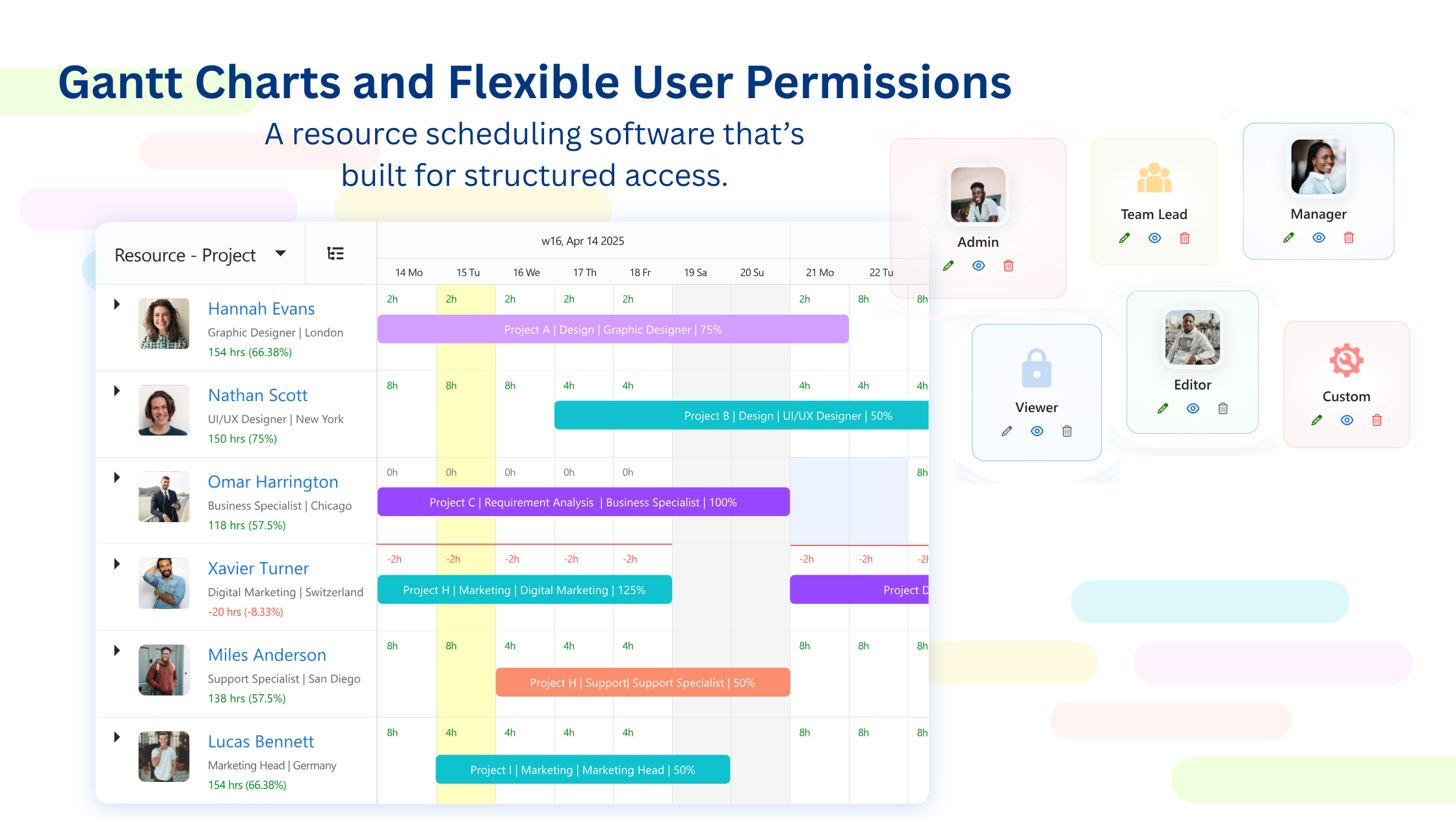
Gantt Charts and Flexible User Permissions
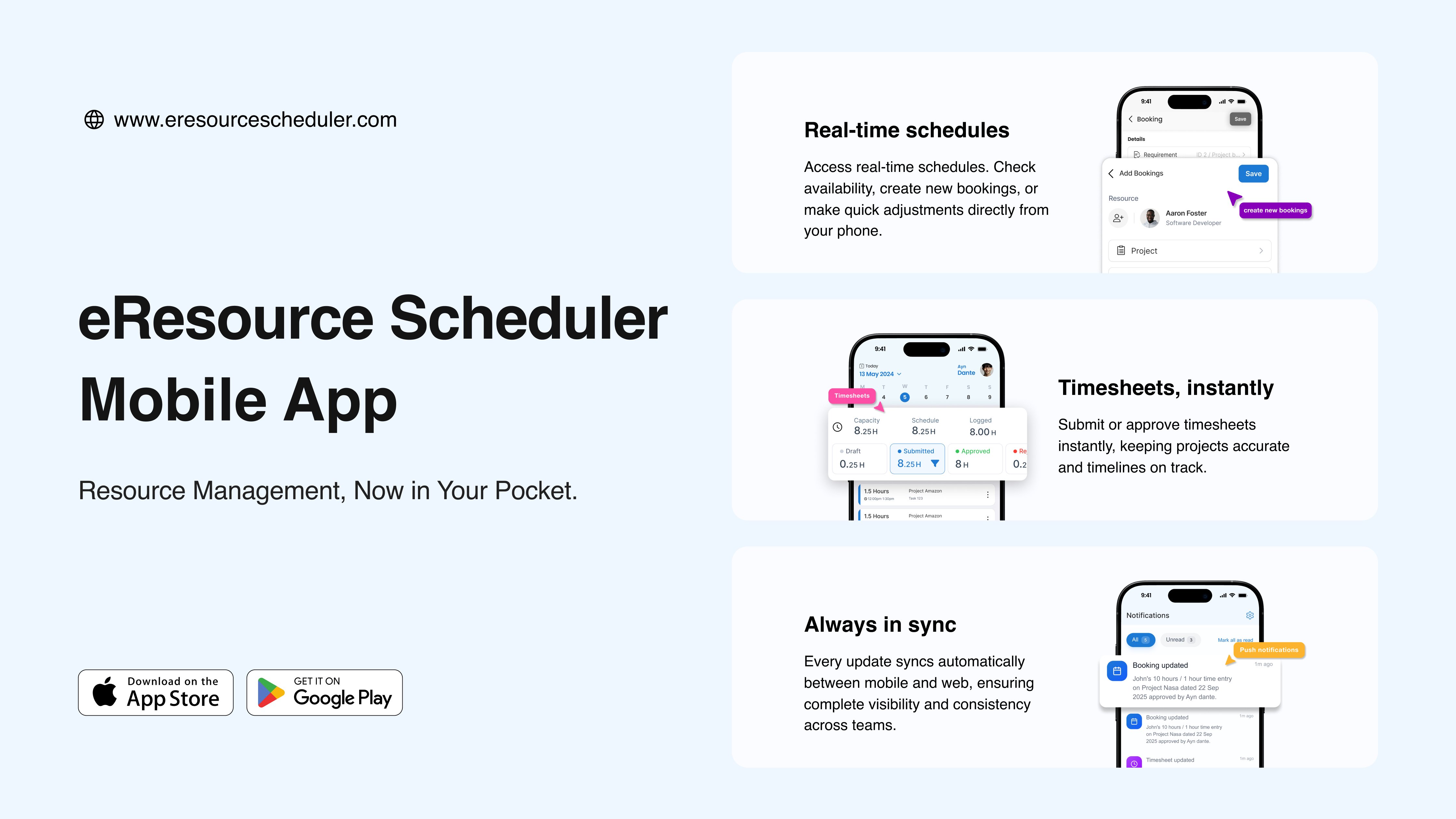
eResource Scheduler Demo - eResource Scheduler Mobile App
Manage your resources and workloads, anytime, anywhere. The eResource Scheduler mobile app keeps you connected, quick, and always in sync with your team.
eResource Scheduler Demo - eResource Scheduler
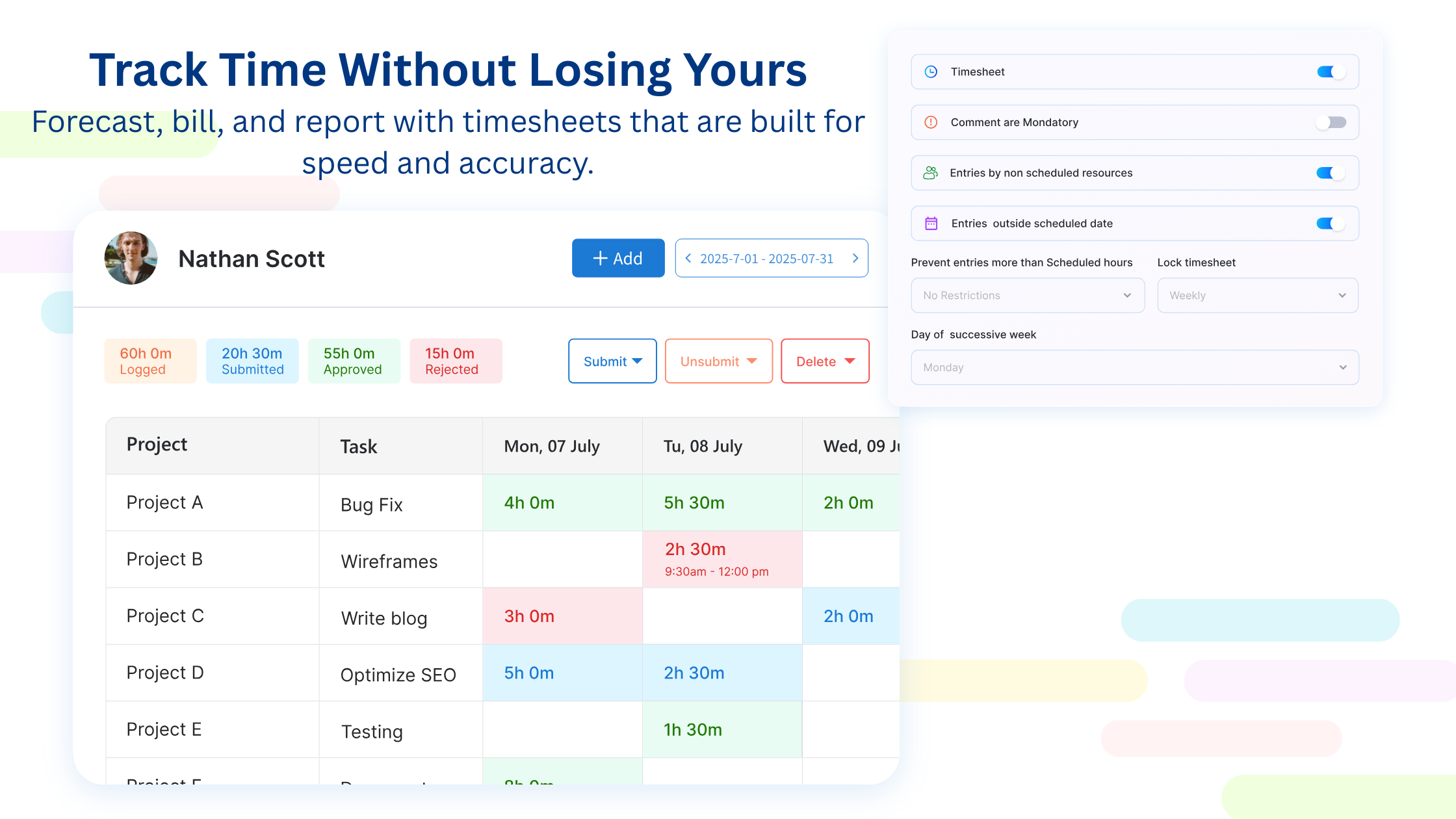
Track Time with Timesheets
eResource Scheduler Demo - eResource Scheduler
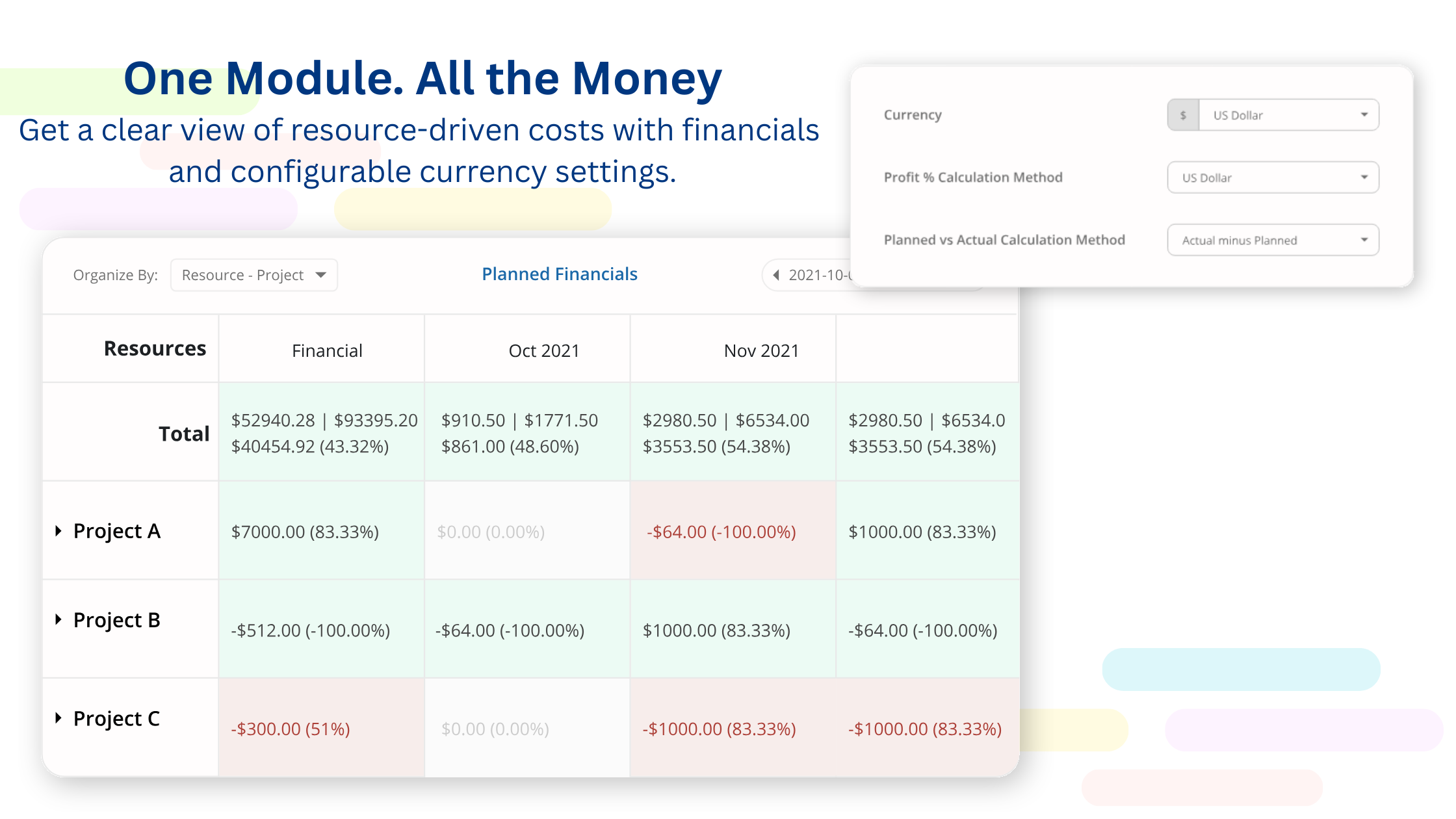
One Module. All the Money
eResource Scheduler Demo - eResource Scheduler
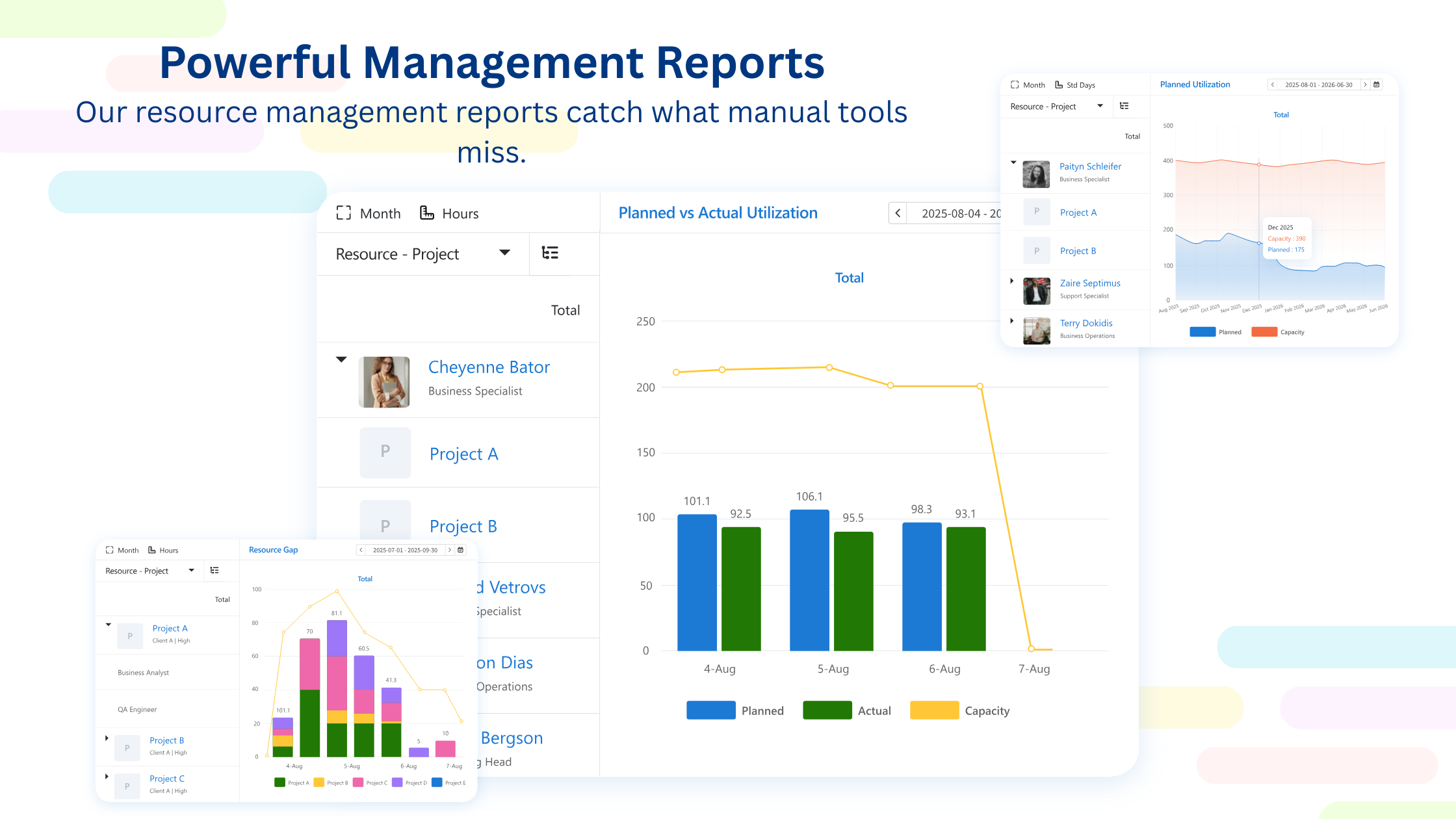
Powerful Management Reports
eResource Scheduler Demo - eResource Scheduler
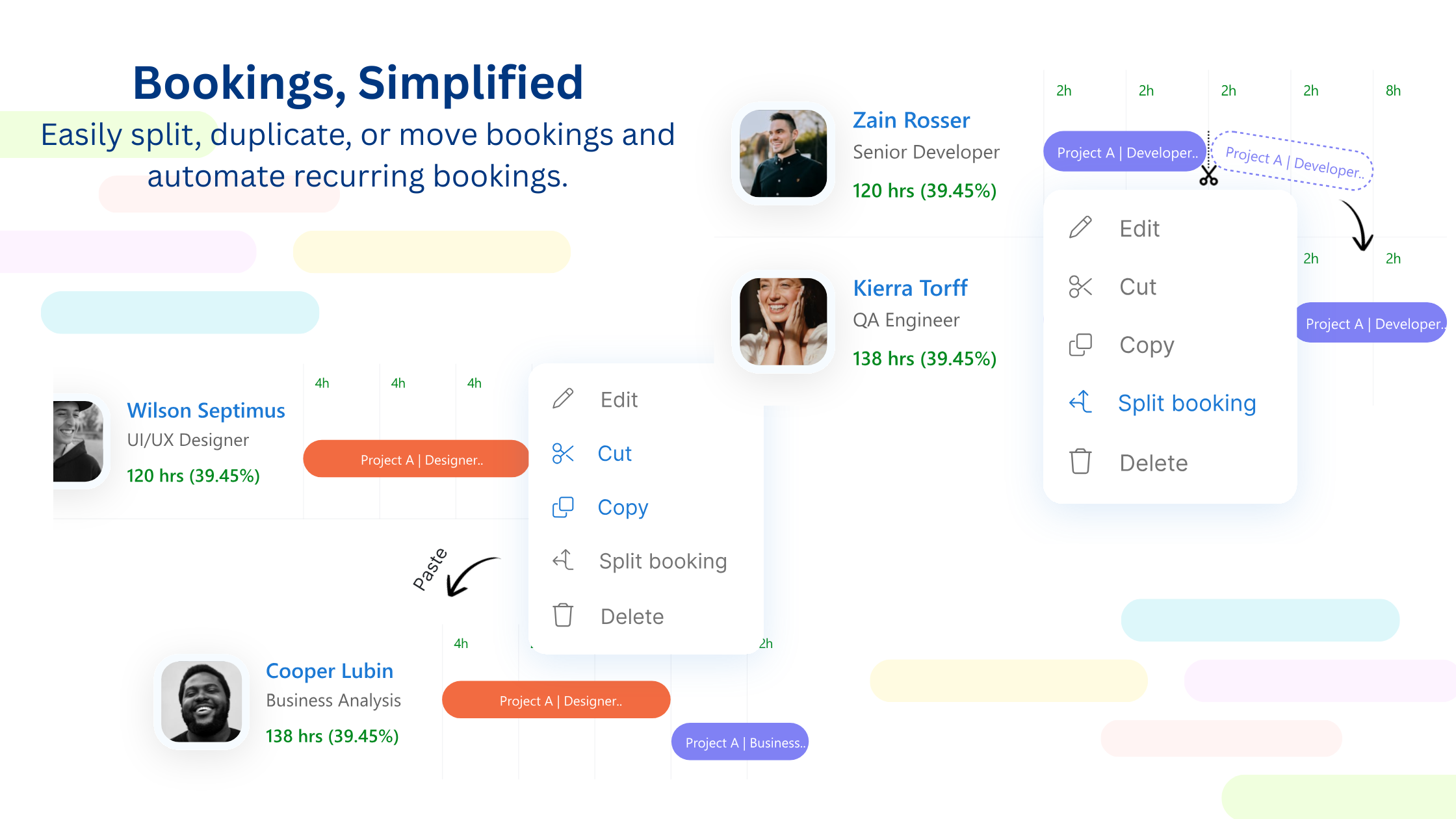
Bookings, Simplified
Product Avatar Image

Have you used eResource Scheduler before?

Answer a few questions to help the eResource Scheduler community

eResource Scheduler Reviews (26)

Reviews

eResource Scheduler Reviews (26)

4.9
26 reviews

Review Summary

Generated using AI from real user reviews
Users consistently praise the visual scheduling capabilities of eResource Scheduler, highlighting how it simplifies resource management and makes it easy to see availability at a glance. The interface is described as intuitive and straightforward, allowing for quick adjustments without disrupting operations. However, some users note that advanced features can be less intuitive, which may require additional time to learn.

Pros & Cons

Generated from real user reviews
View All Pros and Cons
Search reviews
Filter Reviews
Clear Results
G2 reviews are authentic and verified.
Marion J.
MJ
Technology Sales
Telecommunications
Mid-Market (51-1000 emp.)
"Effortless Team Coordination Across Regions"
What do you like best about eResource Scheduler?

I use eResource Scheduler to coordinate technical teams and network specialists across multiple regions, and it excels at managing resource allocation for various activities like deployments and maintenance. I love how the platform consolidates everything, making it easier to plan workloads and avoid resource conflicts on critical projects. One of my favorite aspects is how it supports planning across distributed teams, allowing me to quickly adjust schedules when priorities shift and ensuring the right expertise is aligned with the right tasks without delays. It's especially useful for coordinating teams across different regions, making handling time zone differences seamless. Its ability to quickly show availability and reassign resources as priorities change keeps projects moving without delays. Also, the setup was very fast and easy to navigate. Review collected by and hosted on G2.com.

What do you dislike about eResource Scheduler?

It would be beneficial to have more advanced forecasting features, especially for long-term capacity planning across regions and large-scale projects. Better forecasting with past data trends and simple 'what if' planning would improve long-term capacity visibility. Review collected by and hosted on G2.com.

Olha P.
OP
Project Manager
Information Technology and Services
Small-Business (50 or fewer emp.)
"Centralized Resource Management for Improved Team Efficiency"
What do you like best about eResource Scheduler?

I use eResource Scheduler to effectively plan and allocate my design and development teams across multiple projects. It helps us coordinate resources like UX/UI designers and developers, ensuring they are distributed properly based on workload and deadlines. I like the visual scheduling interface because it's very effective for our workflow, allowing us to quickly see who is assigned to which project and identify overloaded team members. This means we can rebalance tasks without disrupting ongoing work, which has improved both planning accuracy and team efficiency. Also, the initial setup for basic scheduling was relatively smooth. Review collected by and hosted on G2.com.

What do you dislike about eResource Scheduler?

Reporting could be more flexible, especially when trying to analyze resource utilization across different project types or generate summaries for internal reviews. More flexible filters would help a lot. Also, simple visual reports and reusable templates would make tracking and sharing insights faster. Review collected by and hosted on G2.com.

Abigail  H.
AH
TRAINER
Higher Education
Small-Business (50 or fewer emp.)
"Visual Scheduling Simplified, Needs Better Reporting"
What do you like best about eResource Scheduler?

I use eResource Scheduler to plan team schedules, assign resources to projects, and keep track of availability across different departments. I love how the visual scheduler makes it easy to understand team capacity at a glance and to quickly adjust assignments when priorities change. It provides a clear, timeline-based view of all resources, so I can instantly see who is available, overbooked, or underutilized, making it much easier to reassign tasks quickly and keep projects balanced without delays. Review collected by and hosted on G2.com.

What do you dislike about eResource Scheduler?

The reporting options are somewhat limited when it comes to creating highly customized or client ready reports. More customization reports would help, especially the ability to filter by project, team, or timeframe and save those views. It would also be useful to have clearer export formats and simple dashboards tailored for stakeholder reporting. Review collected by and hosted on G2.com.

Caleb S.
CS
SDR
Manufacturing
Small-Business (50 or fewer emp.)
"Streamlined Resource Management with Visual Precision"
What do you like best about eResource Scheduler?

I use eResource Scheduler to manage team allocation, track resource availability, and plan project timelines across multiple departments. The visual scheduling interface and dashboard stand out the most. It is very easy to see team allocation at a glance, quickly identify overbooked or underutilized resources, and make adjustments instantly. This significantly improved planning accuracy and team coordination. They give a clear, real-time view of who is working on what, making it easy to spot overlaps or gaps instantly. This helps me adjust resources quickly and keep projects running smoothly without delays. Additionally, the initial setup was easy and fast. Review collected by and hosted on G2.com.

What do you dislike about eResource Scheduler?

everything works well Review collected by and hosted on G2.com.

Stepan L.
SL
Cloud Engineer | DevOps Engineer | Cloud Architect | Monitoring Enthusiast
Information Technology and Services
Enterprise (> 1000 emp.)
"Centralized Resource Management with Room for Reporting Improvement"
What do you like best about eResource Scheduler?

I find the visibility eResource Scheduler provides across teams extremely useful. The dashboard makes it easy to understand resource allocation across different projects and departments at a glance. The dashboard offers a clear, real-time view of how resources are spread out across multiple teams and projects. This feature is critical at scale as it helps quickly identify overlaps or gaps and make adjustments before they affect delivery timelines. This level of visibility enhances coordination and ensures that projects run more efficiently across departments. Review collected by and hosted on G2.com.

What do you dislike about eResource Scheduler?

Reporting could be more customizable, especially for generating high level summaries for management and stakeholders. More customizable reports by team, region and project would help a lot. Automated high level summaries for utilization and progress would also make stakeholder reporting easier. Review collected by and hosted on G2.com.

Jussi E.
JE
Product Leader
Entertainment
Small-Business (50 or fewer emp.)
"Centralized Resource Management for Game Development Teams"
What do you like best about eResource Scheduler?

I like how eResource Scheduler's dashboard gives a clear view of team allocation across different roles like developers, artists, and QA, which is especially useful when priorities shift between development, sprints, and live game updates. It lets us see in real time how our teams are allocated across different game features and live updates, and when priorities shift, we can quickly reassign resources without disrupting sprint timelines, keeping development moving smoothly. The whole team was able to adopt it quickly without interrupting ongoing development work, thanks to its straightforward initial setup. Review collected by and hosted on G2.com.

What do you dislike about eResource Scheduler?

I'd say more flexibility in reporting would be useful, especially when reviewing resources, allocation across multiple projects or sprints. More visual summaries for resource allocation, especially across live ops versus new development, and an easier way to create high-level reports for stakeholders without manual adjustment would make it easier to turn day-to-day scheduling into clear insights for planning and decision-making. Review collected by and hosted on G2.com.

Oliver U.
OU
Co-Founder
Education Management
Small-Business (50 or fewer emp.)
"Effortless Scheduling with Impressive Visual Tool"
What do you like best about eResource Scheduler?

I use eResource Scheduler for coordinating sessions and mentor availability, which was manual and time-consuming before. The visual scheduling feature makes it easy to manage training cohorts, mentor availability, and session timelines in one place. It gives a clear overview of who is assigned to each sprint phase and lets us map out each sprint phase clearly to avoid overlaps. I appreciate how easy it is to make quick adjustments without disrupting the whole schedule. This feature keeps everything visible and organized, helping maintain consistency across sessions. The setup was quick and straightforward, allowing us to start managing schedules almost immediately. Review collected by and hosted on G2.com.

What do you dislike about eResource Scheduler?

reporting could be more flexible especially for tracking learner progress alongside resource allocation Review collected by and hosted on G2.com.

ManueI F.
MF
Co-Founder
Computer Games
Small-Business (50 or fewer emp.)
"Streamlined Coordination for Game Development"
What do you like best about eResource Scheduler?

I find eResource Scheduler particularly useful for balancing creative workloads. It's great for quickly adjusting schedules when priorities shift, allowing us to move resources between story elements and gameplay features without disrupting the overall timeline. I regularly use the visual schedules and resource allocation view to plan tasks across teams. The real-time availability tracking is very helpful for making quick adjustments without disrupting the workflow. Setup was fast and easy. Review collected by and hosted on G2.com.

What do you dislike about eResource Scheduler?

It would be great if it supported more creative-focused views, like milestone tracking tied to production phases. Adding phase-based views for creative workflows would make it even better. Review collected by and hosted on G2.com.

Jerry K.
JK
CEO
Medical Devices
Small-Business (50 or fewer emp.)
"Streamlined Scheduling with Real-Time Availability"
What do you like best about eResource Scheduler?

I really appreciate the availability it provides across all team members, which makes it easy to understand who is available, who is booked, and where adjustments are needed without constant back and forth communication. Having a clear, real-time view of everyone's availability helps us assign the right consultant quickly without delays. The straightforward setup for basic use made getting started with eResource Scheduler easy. Review collected by and hosted on G2.com.

What do you dislike about eResource Scheduler?

it would be great and helpful if reporting offered more healthcare specific insights like tracking time spent per client or service category in a more flexible way Review collected by and hosted on G2.com.

BW
CTO
Program Development
Small-Business (50 or fewer emp.)
"Simplifies Resource Management with Ease"
What do you like best about eResource Scheduler?

I really appreciate how straightforward the scheduling experience is with eResource Scheduler. It's easy to see availability, make adjustments, and keep resources aligned without unnecessary steps. The interface feels practical and doesn't require much explanation for new users, making day-to-day operations smooth. I also find that the clear and accessible scheduling views make it easy to get a quick overview of resource availability and make changes without disrupting existing plans. The system feels consistent and dependable, which simplifies scheduling and reduces the need for manual follow-ups. Moreover, setting up eResource Scheduler was fairly simple, and we found that core features were usable almost immediately. Review collected by and hosted on G2.com.

What do you dislike about eResource Scheduler?

There are a few areas where small usability refinements could make certain workflows even smoother but nothing that has blocked our use or caused issues so far. Review collected by and hosted on G2.com.

People Icons

Start a Discussion about eResource Scheduler

Have a software question? Get answers from real users and experts.

Start a Discussion

Pricing Options

Pricing provided by EResource Scheduler.

Scheduling Module

$5.00
1 Resource Per Month

Scheduling Plus

$2.00
1 Resource Per Month

Timesheets Module

$4.00
1 Resource Per Month
Product Avatar Image
EResource Scheduler