



Compare this with other toolsSave it to your board and evaluate your options side by side.
Save to board

AudioEye Reviews & Product Details

Value at a Glance

Averages based on real user reviews.

Time to Implement

1 month

AudioEye Media

AudioEye Demo - Visibility and insights in one dashboard
Track progress, monitor compliance, and tap into expert help from a single, easy-to-use platform.
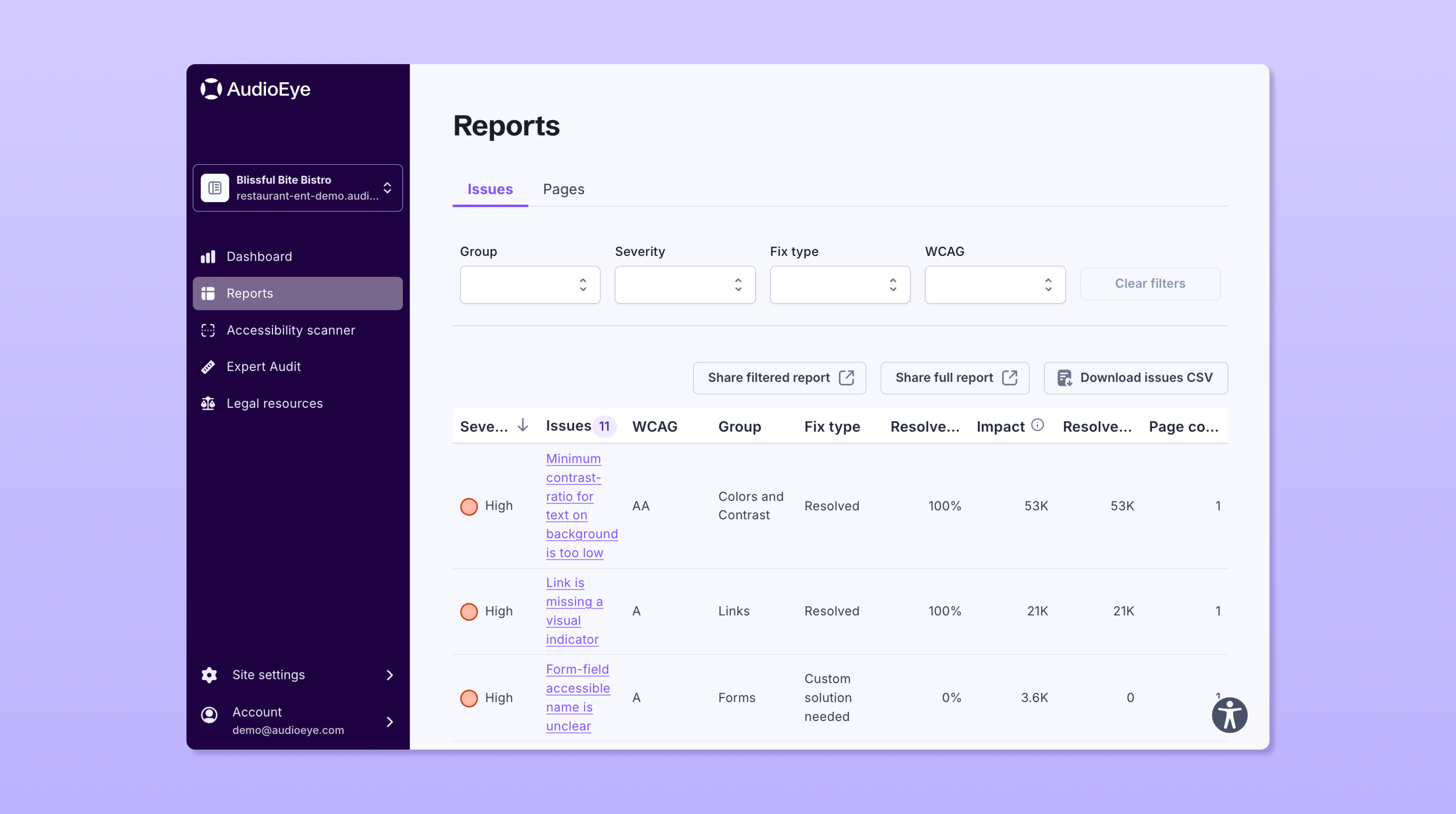
AudioEye Demo - Detailed reports for all site issues
View a high-level summary of accessibility issues we’ve already fixed on your website — or zoom into an individual issue to get detailed guidance on what’s wrong and how to fix it.
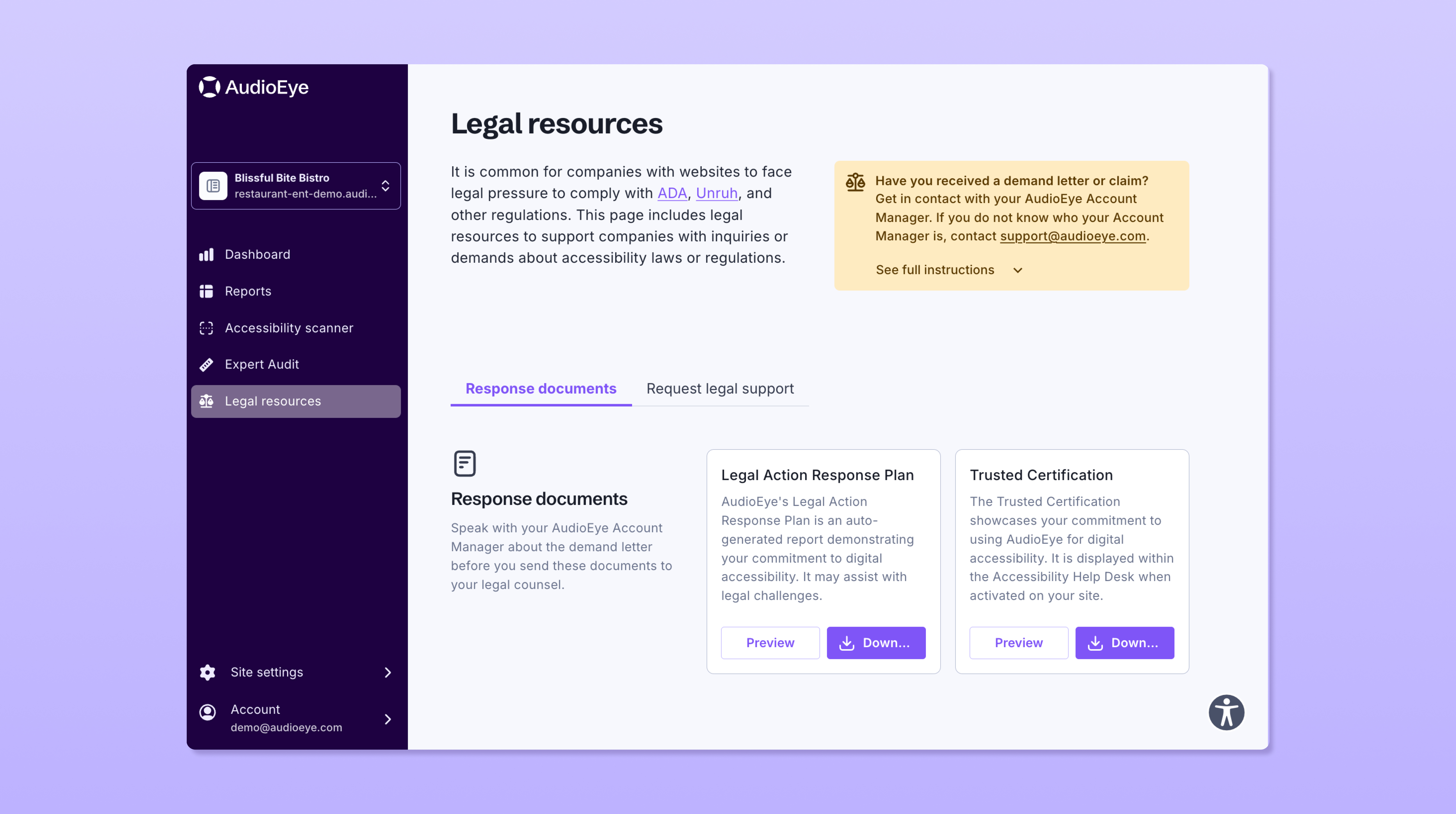
AudioEye Demo - Legal support if you should need it
If you receive a legal claim, we'll help you respond line by line. Our experts have helped get thousands of frivolous accessibility claims dismissed — and we're here to do the same for you.
AudioEye Demo - Identify unresolved accessibility issues with user-driven reporting
The AudioEye Accessibility Help Desk provides users with an easy-to-use interface for reporting issues — fast-tracking fixes and improving compliance.
Did you know the average web page has 37 accessibility errors? For businesses, these errors can lead to missed sales, poor reviews, lost customers, and even lawsuits.
Play AudioEye Video
Did you know the average web page has 37 accessibility errors? For businesses, these errors can lead to missed sales, poor reviews, lost customers, and even lawsuits.
AudioEye’s Protection Status gives you a more accurate representation of how accessible your website really is—considering factors beyond automation, providing Custom Fixes and Expert Services.
Play AudioEye Video
AudioEye’s Protection Status gives you a more accurate representation of how accessible your website really is—considering factors beyond automation, providing Custom Fixes and Expert Services.
Learn why AudioEye combines automation with human experts and users with disabilities to address digital accessibility.
Play AudioEye Video
Learn why AudioEye combines automation with human experts and users with disabilities to address digital accessibility.
A web accessibility tutorial on using AudioEye to help make your website more accessible and help address certain fundamental laws and standards, such as the Americans with Disabilities Act (ADA).
Play AudioEye Video
A web accessibility tutorial on using AudioEye to help make your website more accessible and help address certain fundamental laws and standards, such as the Americans with Disabilities Act (ADA).
Whether you’re new to accessibility or want to stay current on the latest best practices, our best-in-class accessibility learning platform, AudioEyeQ, can help you create more accessible digital experiences.
Play AudioEye Video
Whether you’re new to accessibility or want to stay current on the latest best practices, our best-in-class accessibility learning platform, AudioEyeQ, can help you create more accessible digital experiences.
Product Avatar Image

Have you used AudioEye before?

Answer a few questions to help the AudioEye community

AudioEye Reviews (229)

Reviews

AudioEye Reviews (229)

4.7
229 reviews

Review Summary

Generated using AI from real user reviews
Users consistently praise the product for its ease of use and outstanding support, highlighting how it simplifies accessibility compliance with automated fixes and clear reporting. Many appreciate the intuitive dashboard that provides actionable insights, making it easier to maintain website accessibility. However, some users note that certain issues may require manual intervention, which can be a limitation for less technical users.

Pros & Cons

Generated from real user reviews
View All Pros and Cons
Search reviews
Filter Reviews
Clear Results
G2 reviews are authentic and verified.
UI
Technical Support Specialist
Mid-Market (51-1000 emp.)
"Effortless Accessibility Enhancement"
What do you like best about AudioEye?

I like using AudioEye because it makes my website accessible and ensures my customers do not face any issues while using it. Before AudioEye, I lost many leads due to undetected issues on my website, but now I can quickly find and fix problems in real time, which works great for me. I appreciate how easy AudioEye is to use, navigate, and apply, saving me time and energy for other tasks. I no longer have to constantly check my website because this tool monitors it well. I also found the initial setup to be really easy, and even my non-tech-savvy friends could do it. Review collected by and hosted on G2.com.

What do you dislike about AudioEye?

Honestly, I like it, but sometimes in more complex errors, this tool gives a lot of recommendations that seem unclear as to which I should follow and which not. It would be great if this can be improved. Review collected by and hosted on G2.com.

João S.
JS
Lead Project Manaer
Small-Business (50 or fewer emp.)
"Outstanding Accessibility Support with Expert Guidance"
What do you like best about AudioEye?

What I appreciate about AudioEye is that it goes beyond being just a website tool. It offers access to a team of human experts who can review your site and make necessary modifications to address accessibility issues. The platform is also very straightforward to implement and use, and the customer support is outstanding. Review collected by and hosted on G2.com.

What do you dislike about AudioEye?

One major drawback is that there is no way to mark issues caused by third-party external plugins as 'can't fix.' This means you can't remove them from the report or even hide them, so they continue to appear and are repeatedly flagged for fixes that simply aren't possible. Review collected by and hosted on G2.com.

Uzma I.
UI
support specialist
Mid-Market (51-1000 emp.)
"Effortless Website Accessibility Monitoring"
What do you like best about AudioEye?

I find AudioEye really easy to use because it automatically checks and fixes basic and common issues, which saves me a lot of time. It helps me monitor my client's website for any accessibility or other issues that could affect user experience. I really appreciate the real-time glitch detection, which allows me to fix problems immediately and not lose any leads. The dashboard metrics offer a clear picture of the current status, which I admire every time I open it, even when I'm not actively working. The automated fixation is also a relief because it feels like someone is working in the backend to help me. Setting up AudioEye was easy with clear instructions, and I never felt lost during the process. Review collected by and hosted on G2.com.

What do you dislike about AudioEye?

The only thing I notice is that sometimes it gives so many fixation advises that it gets overwhelming. Review collected by and hosted on G2.com.

"Effortless Accessibility Compliance, with Scope for Improvement"
What do you like best about AudioEye?

I like how simple it is to add a script with AudioEye, and it just starts working. I appreciate that they review our site and configure the tool to automatically fix accessibility issues. The reports are clear, providing not only what's broken but also solutions to fix it. I find the detailed reports, which include URLs and explanations of issues, along with instructions on how to solve them, very beneficial. It's also great that we receive scores for multiple websites. I also enjoyed the ease of setup after the first website and appreciated being able to test the product in non-production before going live. Review collected by and hosted on G2.com.

What do you dislike about AudioEye?

We utilize other accessibility tools to review our site for issues. Our development team will remediate the issue, but then at times we have to work with AudioEye to either have them adjust the script or remove the code they were fixing the issue with. It would be nice if it could be self-service in a way that we could adjust what's happening, but I'm sure not every customer is as technical as we are. Review collected by and hosted on G2.com.

Verified User in Financial Services
AF
Mid-Market (51-1000 emp.)
"Effortless Accessibility Compliance with powerful Automation"
What do you like best about AudioEye?

I like that AudioEye is pretty easy to set it and forget it, with a lot of automated fixes that help address 90-95% of issues on our websites. It's really beneficial for our team as it automatically adds accessibility tags, saving us significant development time. The initial setup was really easy too, just copying the code into the header and footer of our workflow. Review collected by and hosted on G2.com.

What do you dislike about AudioEye?

I think because it's easy to set it and forget it, a lot of time, it's a little bit more challenging to make sure that we're using it to its full potential. I think maybe having more consistent smaller areas for improvement throughout the year versus one big report that seems daunting that we have to address. Review collected by and hosted on G2.com.

Verified User in Apparel & Fashion
AA
Mid-Market (51-1000 emp.)
"Comprehensive Accessibility Tools with Insightful Reporting"
What do you like best about AudioEye?

The on-site toolbox contains a wide range of options that support the accessibility of our site. Also, the automated and manual reporting is a valuable addition to the service, it gives us clear insights on what we should fix on our website. Review collected by and hosted on G2.com.

What do you dislike about AudioEye?

The backoffice overview of findings is a pretty straight forward table, though it could be enhanced maybe with some features for less experienced users, maybe add coloring and simple features like "what you should fix first" or "least risky a11y errors". Review collected by and hosted on G2.com.

SS
Senior SAP Consultant
Enterprise (> 1000 emp.)
Business partner of the seller or seller's competitor, not included in G2 scores.
"AudioEye Makes WCAG Compliance Simple with Smart Automation and Human Expertise"
What do you like best about AudioEye?

I really like AudioEye for it's smart mix of automation and human expertise. It made my website accessiblity simple to manage while ensuring real complaince with standards like WCAG. I also like customer support, enjoyed it. Review collected by and hosted on G2.com.

What do you dislike about AudioEye?

I did not find anything to dislike about it, so far so good. Review collected by and hosted on G2.com.

KS
President
Mid-Market (51-1000 emp.)
"Don't Waste Your Time On A Demo."
What do you like best about AudioEye?

Unfortunately, I have nothing positive to share about Audio Eye. Review collected by and hosted on G2.com.

What do you dislike about AudioEye?

We booked a Sales Demo on their Website. Their rep showed up 10 minutes late which gave us plenty of time to chat with the AI Chatbot on their Website which would never send us to a human representative. The Sales Rep wasn't even interested in working with us and didn't even do a demo making it a complete waste of time and this is coming from an agency with hundreds of clients potentially looking to use their services. Review collected by and hosted on G2.com.

VR
Ecommerce Manager
Small-Business (50 or fewer emp.)
"Enhancing Accessibility and Compliance for a Better User Experience"
What do you like best about AudioEye?

I like the downloadable excel sheet that I can send to my dev team to work on the necessary changes. Review collected by and hosted on G2.com.

What do you dislike about AudioEye?

I would prefer if some of the easier things were automatically adjusted by AudioEye directly. Review collected by and hosted on G2.com.

"Effortless Accessibility Management with Reliable Support"
What do you like best about AudioEye?

I really like the very helpful account manager and the engineering teams at AudioEye. It's easy to request assistance from them through the ticketing system. I also appreciate having a dashboard that's available with lots of information. It's great that AudioEye manages accessibility for our website, especially since we don't have a large team to do it ourselves. If there's any action needed on our end, they promptly notify us and provide help whenever possible. Review collected by and hosted on G2.com.

What do you dislike about AudioEye?

Nothing comes to mind. Review collected by and hosted on G2.com.

Questions about AudioEye? Ask real users or explore answers from the community

Get practical answers, real workflows, and honest pros and cons from the G2 community or share your insights.

GU
Guest User
Last activity over 3 years ago

What is ADA compliant software?

Verified User
G2
Verified User

Who uses AudioEye?

Pricing Insights

Averages based on real user reviews.

Time to Implement

1 month

Return on Investment

11 months

Average Discount

9%

AudioEye Comparisons
Product Avatar Image
accessiBe
Compare Now
Product Avatar Image
UserWay
Compare Now
Product Avatar Image
Siteimprove
Compare Now
AudioEye Features
Compliance Monitoring
Real-Time Monitoring
Dynamic Crawling
Prioritization
Page Reports
Automated Testing
Automated Scan
Automated Regression Testing
Customizable Testing Tools
Individual Page Auditing
Product Avatar Image
AudioEye