Top 10 Alternatives to Adobe Acrobat Reader Recently Reviewed By G2 Community
AI can help you find the answers. G2 helps you trust them.
Connect G2 to Claude or ChatGPT for answers grounded in G2's trusted reviews, comparisons, and pricing from real user insights.
How it works


KDAN PDF Reader is a document productivity solution that supports a wide range of document functions for your business and daily life. The Kdan PDF Reader series enables you to view, store, and manage various document file formats, including iWorks, MS Office, text, images, audio, and video files.

Foxit PDF Reader is the PDF Reader which enables you to become part of the connected world. Provide authors with comments on documents, be notified when new document versions become available, discuss interesting topics right in the document, or securely open protected documents.
PDF Reader Pro is a PDF powerhouse, helping to annotate, fill forms, edit pages, encrypt files on Mac, iPad, iPhone, Android and Windows.

FineReader is an all-in-one OCR and PDF software application designed to increase business productivity. It provides easy-to-use tools to access and modify information locked in paper-based documents and PDFs.

File Viewer Plus is an essential utility for business. Don't clutter your users' computers with expensive software. Open hundreds of file formats with one easy-to-use app.

File Viewer Lite is a FREE Windows utility that allows you to view any file. It can display the native view of over 150 of the most popular file formats, such as word processing files, spreadsheets, PDFs, audio, and video files.
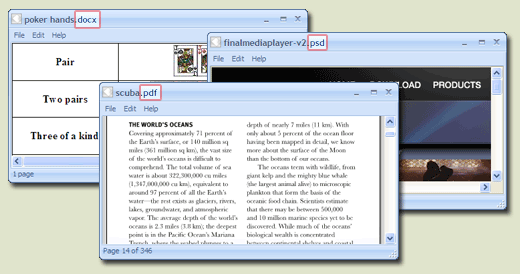
FreeFileViewer is a, all-in-one file viewer designed for Windows operating systems, supporting over 200 file formats. It enables users to open and view a wide array of documents, images, videos, and audio files without the need for multiple specialized software installations. This lightweight application is compatible with Windows 10, 8, 7, Vista, and XP, accommodating both 32-bit and 64-bit versions. Key Features and Functionality: - Extensive Format Support: FreeFileViewer can handle a diverse range of file types, including: - Documents: DOC, DOCX, PDF, TXT, XLS, XLSX - Images: JPG, PNG, GIF, PSD - Videos: FLV, MP4, MOV, MPG - Audio Files: FLAC, MP3, OGG, WMA - Others: BIN, CFG, DAT, DIZ - Standalone Operation: The software functions independently, allowing users to view files without requiring the original programs used to create them. For instance, it can display Adobe PDF files and Microsoft Office documents without needing Adobe Reader or Microsoft Office installed. - User-Friendly Interface: Designed with simplicity in mind, FreeFileViewer offers an intuitive interface that facilitates easy navigation and file access. - Comprehensive Installation: All necessary components are included within the installer, ensuring a seamless setup process without the need for additional software or plugins. Primary Value and User Solutions: FreeFileViewer addresses the common challenge of managing multiple file types by providing a unified solution that eliminates the need for numerous specialized applications. Users can effortlessly open and view a vast array of file formats, streamlining their workflow and enhancing productivity. This all-encompassing approach not only saves time but also conserves system resources, making it an ideal choice for individuals seeking a reliable and efficient file viewing tool.

Readdle Documents helps to open and view any type of document, including iWork, MS Office, music and PDFs on iPhone and iPad.

Print Conductor print management software is free for non-commercial use. Print Conductor allows you to monitor and easily manage your print jobs through intuitive features and interface icons. It links a printer and the machines that demand print jobs.

Free BKF Viewer offers a simple and easy to use interface to browse Windows .bkf files. If a user is unable to open any .bkf file on Windows 10 OS or lower version then BKF file reader can easily view the data of backup files. Once BKF file scanned, the application generates a preview of all items within backup file. The tool is allowed to view the data associated with each item in the list like file name, file size (KB), modification date & time.