



Compara esto con otras herramientasGuárdalo en tu tablero y evalúa tus opciones lado a lado.
Guardar en el tablero

CMap Reseñas y Detalles del Producto

Valor de un vistazo

Promedios basados en opiniones de usuarios reales.

Tiempo de Implementación

3 meses

Contenido Multimedia de CMap

Demo CMap - Real-time decision making
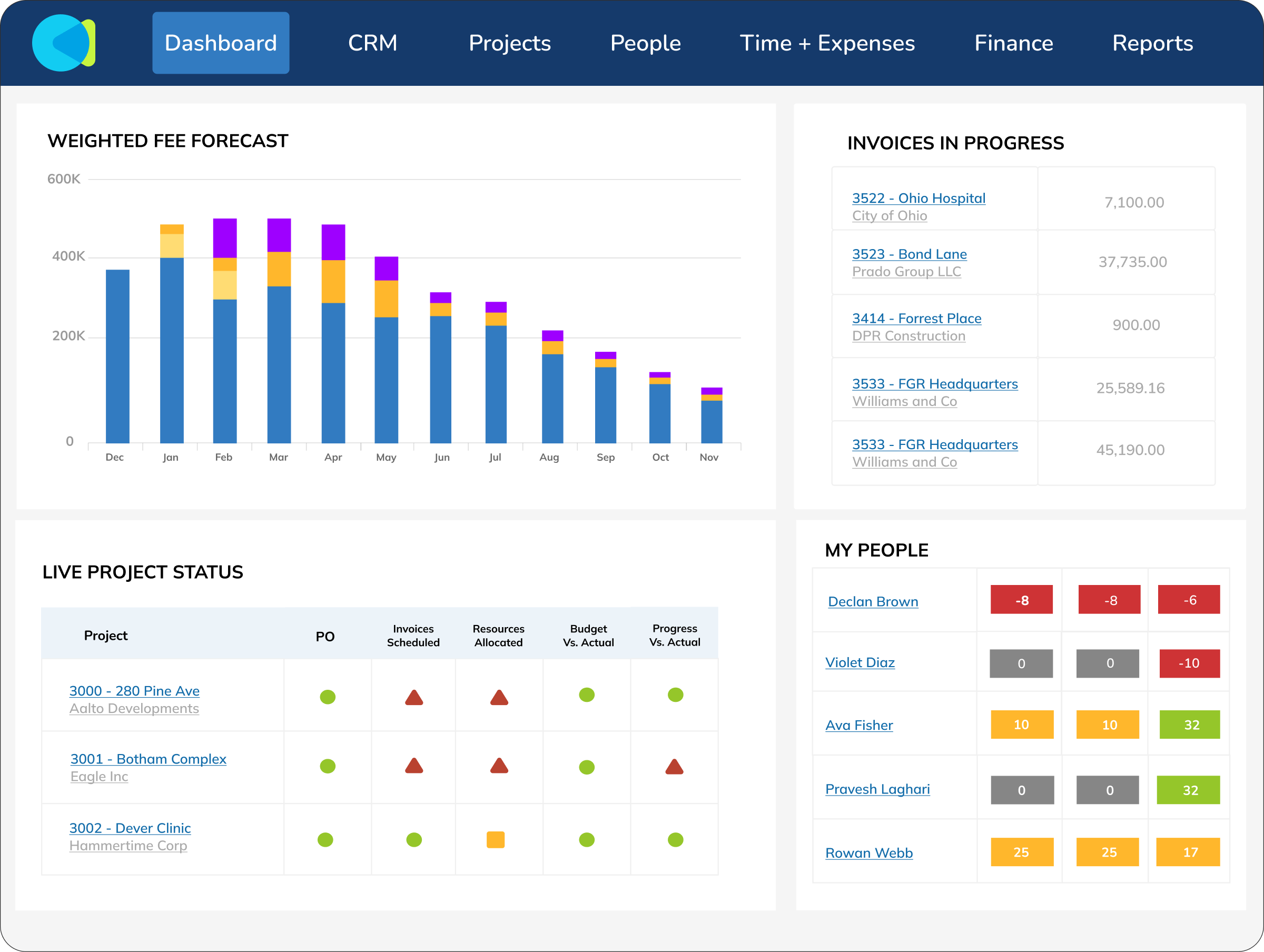
Reports should be something you make decisions on, not something you spend hours and hours creating. CMap’s data feeds reports and live, personalised dashboards to give you the info you need to make key decisions swiftly.
Demo CMap - Business intelligence
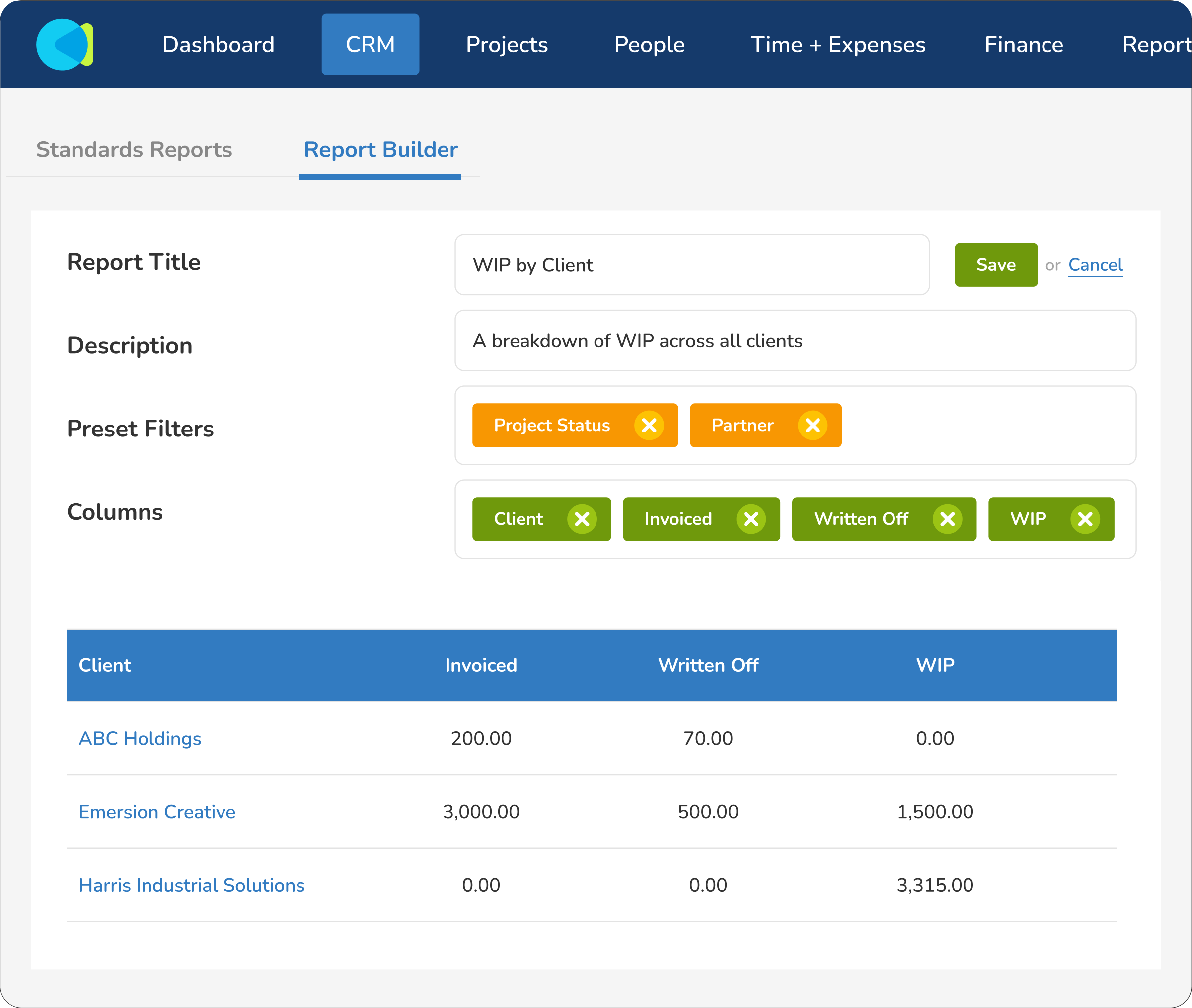
CMap comes with a suite of insightful out-of-the-box reports, but that’s just the start. With the ability to create custom in-app reports and gain direct access to your raw data (in Excel or external BI tools like Power BI), reporting capabilities go stratospheric.
Demo CMap - The power of in-built CRM
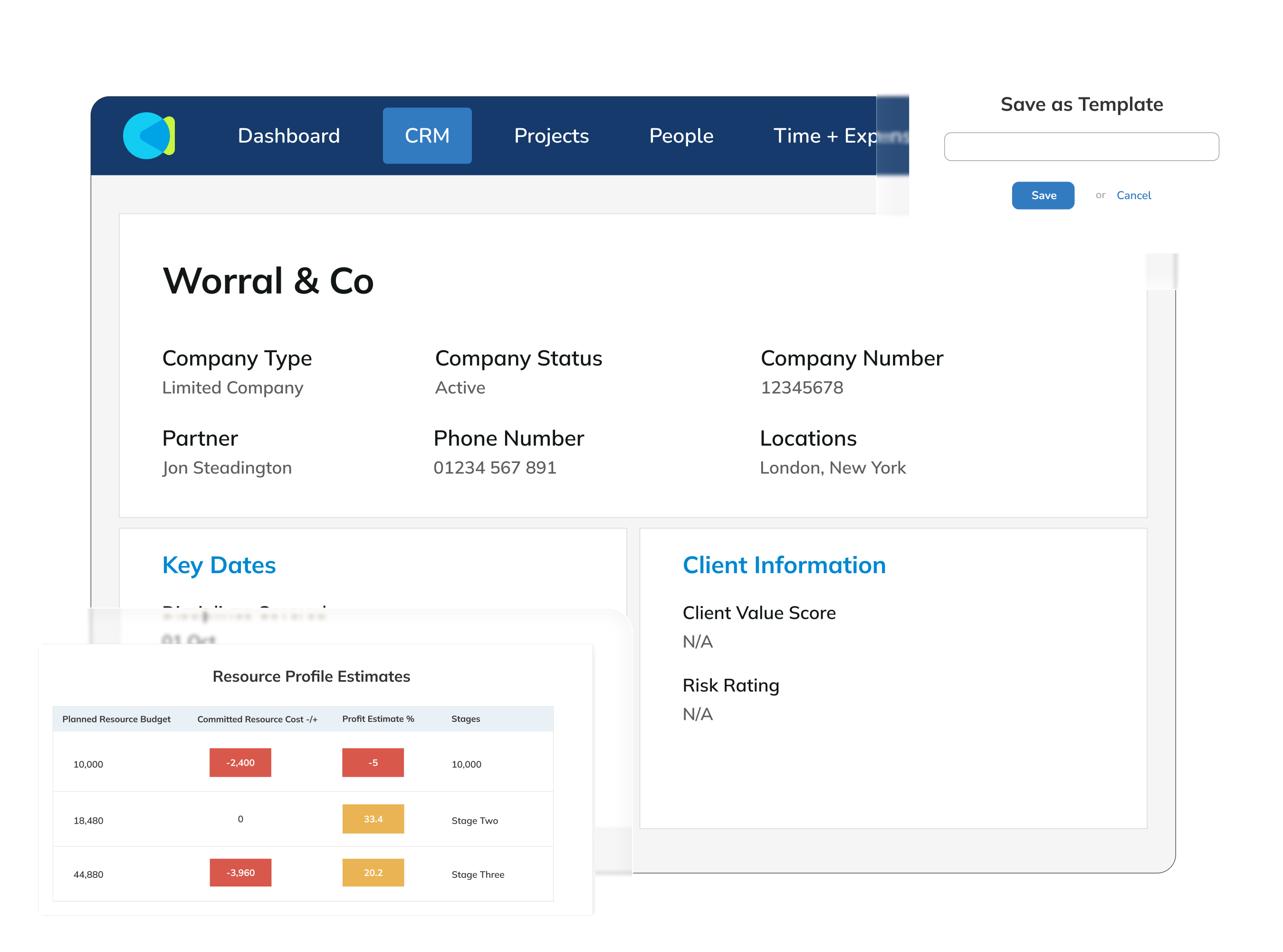
With a separate CRM, data is inconsistent. For example, a “deal value” may be nothing more than a number typed into a field. Whereas CMap’s innovative “Fee Estimator” robustly calculates this value, considering roles, rates and deliverables. Separate CRMs are limited to a pipeline-only view, b...
Demo CMap - Innovative resourcing tools
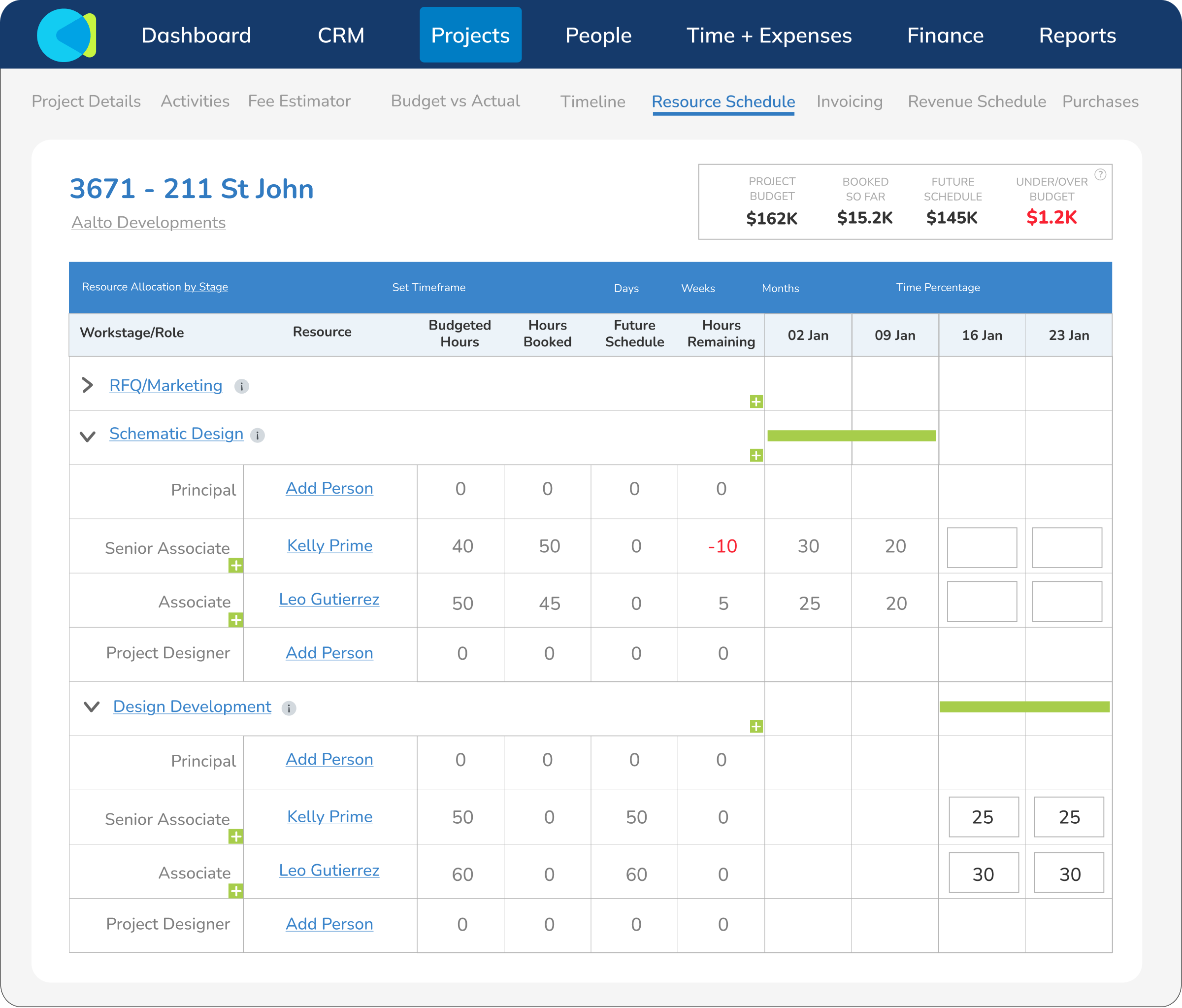
The problem with most resourcing software isn’t the initial set-up of resourcing data: it’s keeping on top of the changes. CMap’s cutting-edge resourcing tools empower you to make super-quick changes and get instant feedback on how they impact the project outcome. With stunning reports that sp...
Demo CMap - HR you can actually use
Many companies only use a fraction of their HR systems. With CMap, we give you the tools & functionality you actually need... and none of the bloat. Thanks to the power of CMap’s “Pages” functionality, setting up a highly configured HR system is a breeze. Performance reviews? Sure thing. I...
Demo CMap - CMap in Outlook
CMap For Outlook is a game-changer for people who live in email. Just received an email from a client to discuss a new potential project? Effortlessly create the opportunity in CMap’s CRM from within Outlook. Need to submit your timesheet? No problem, do it from within Outlook. People love ...
CMap is a PSA software that helps professional services firms, from consultancies to architecture & engineering practices, manage their people, projects, profits and more - all in one place.
Reproducir vídeo de CMap
CMap is a PSA software that helps professional services firms, from consultancies to architecture & engineering practices, manage their people, projects, profits and more - all in one place.
NextWave testimonial
Reproducir vídeo de CMap
NextWave testimonial
Imagen del Avatar del Producto

¿Has utilizado CMap antes?

Responde algunas preguntas para ayudar a la comunidad de CMap

Reseñas de CMap (162)

Reseñas

Reseñas de CMap (162)

4.4
Reseñas de 162

Resumen de Revisión

Generado usando IA a partir de reseñas reales de usuarios
Los usuarios elogian constantemente a CMap por su diseño intuitivo y facilidad de uso, lo que simplifica la gestión de proyectos y mejora la colaboración en equipo. La plataforma consolida eficazmente diversas funciones empresariales, permitiendo una mejor visibilidad del rendimiento de los proyectos y las finanzas. Sin embargo, algunos usuarios señalan que las funciones de informes podrían ser más intuitivas y completas.

Pros y Contras

Generado a partir de reseñas de usuarios reales
Ver Todos los Pros y Contras
Buscar reseñas
Filtrar Reseñas
Borrar resultados
Las reseñas de G2 son auténticas y verificadas.
Lisa B.
LB
Personal Assistant to Borough Commander (Neil Basu)
Pequeña Empresa (50 o menos empleados)
"Outstanding Human Support and Tailored Onboarding That Helps Us Manage Projects"
¿Qué es lo que más te gusta de CMap?

The human contact is a real standout. Having an account manager who is happy to meet with us and go over our needs throughout the year is incredibly helpful. We’re a small social enterprise, so we really appreciate that support. The onboarding was good and tailored to us, and although it’s quite a financial investment for our organisation, it genuinely helps us manage our projects. Reseña recopilada por y alojada en G2.com.

¿Qué es lo que no te gusta de CMap?

As a primarily funded organisation, we feel CMAP is really geared toward traditional consultancies—where you create a quote for the client and then the client pays. With funded work, it tends to be the other way around, so we end up creating a quote in CMAP almost retrospectively. That doesn’t fully match how we operate day to day, but it still helps us keep track of things overall. Reseña recopilada por y alojada en G2.com.


David S.
DS
Director at Beckenham Office, Quantity Surveyor
Mediana Empresa (51-1000 empleados)
"Great invoicing and dashboards, but external cost tracking needs better reporting"
¿Qué es lo que más te gusta de CMap?

Scheduling of invoicing is simple and easy to track. Reporting is simple and the custom reports feature is simple to use and allows bespoke reports to be generated.

The dashboards feature allows me to set up simplified dashboards for fee earning staff to allow a snapshot of their position which I can measure them against each other. Reseña recopilada por y alojada en G2.com.

¿Qué es lo que no te gusta de CMap?

The External costs feature does not allow us to monitor expenditure in the same way as Invoicing which is frustrating. We would like a monthly projection of externals spend to be provided on a simple report in the same way as invoicing.

CMAP is also relatively expensive for the amount of the software we use. Reseña recopilada por y alojada en G2.com.

Alesha P.
AP
Finance Manager
Pequeña Empresa (50 o menos empleados)
"Auto-Budgeting Made Easy, with Fast and Helpful Support"
¿Qué es lo que más te gusta de CMap?

I like how it can automatically build a budget from a fee, based on the profit target you’re aiming for. The resourcing schedule is very easy to use, and it lets you enter placeholders so the budget can be as accurate as possible.

The way employees add their timesheets and expenses is also straightforward and easy.

I also appreciate how quickly the support contact number can deal with queries and how they always keep you in the loop. Reseña recopilada por y alojada en G2.com.

¿Qué es lo que no te gusta de CMap?

There’s really nothing to dislike—only more to learn. We’re not using CMap to its fullest potential yet, and that’s something we’re actively working on with our account manager. Reseña recopilada por y alojada en G2.com.

Ian S.
IS
Project Architect
Pequeña Empresa (50 o menos empleados)
"Boosts Project Insight, Needs Expense Management Tweaks"
¿Qué es lo que más te gusta de CMap?

I like how CMap collates up-to-date data across all our projects, helping us understand where attention is needed in the business. I appreciate how time incurred and planned resources for individual projects are presented in clear reports. This allows us to see if a project is performing as expected or if we need to make adjustments. I also value that fee forecasts are collated and updated instantly, so we can see what impact each project will have on the business's scheduled income. Reseña recopilada por y alojada en G2.com.

¿Qué es lo que no te gusta de CMap?

Management, tracking, and planning of expenses is still quite clumsy and time-consuming. Creating custom reports requires a bit of trial and error to get the information that's wanted. A better link to Xero or Hubdoc for sharing or allocating bills to projects would be helpful. Being able to create expense categories when entering a bill, rather than ensuring this is set up first, is needed. Reseña recopilada por y alojada en G2.com.

Usuario verificado en Consultoría
AC
Pequeña Empresa (50 o menos empleados)
"CMap Delivers Great Value with Easy Navigation, Strong Sage Integration, and Helpful Support"
¿Qué es lo que más te gusta de CMap?

CMap is a fantastic product overall, and it’s definitely worth the money. It covers everything a business needs for day-to-day operations, from project tracking to managing your workforce, and it makes it easier to keep on top of the essentials.

CMap connects well with Sage using the integration tool which makes it easy to post invoices and purchase orders through.

The overall system performance of CMap is good, however there is times it can run quite slow or you receive an error message. It provides you with a code for you to contact support and they are able to look into and help you with any issues.

The new CMap Chat which is powered by AI is absolutely fantastic, it can search through the whole system to answer questions you may have on projects, reporting, people etc.

Overall navigating CMap is very easy but if you have any issues CMap support and your support manager are always very helpful. Reseña recopilada por y alojada en G2.com.

¿Qué es lo que no te gusta de CMap?

I feel CMap onboarding could be improved, this was the most difficult stage for us. CMap academy has so many training videos to watch which is fantastic once you are up and running but actually providing the original data to CMap was challenging. Reseña recopilada por y alojada en G2.com.

Usuario verificado en Arquitectura y Planificación
AA
Pequeña Empresa (50 o menos empleados)
"All-in-One Project Info and Reporting That Saves Us Hours"
¿Qué es lo que más te gusta de CMap?

I like how all project information can be stored in one place with easy access to costs, invoicing and who is working on the projects. on a daily basis the dashboard provides up to date information about all of our projects and the navigation is smooth when moving from one area of the software to another.

The reporting options work well for us and the pre-loaded as well as custom reports have saved us countless hours and avoided the use of numerous excel spreadsheets. The integration with Xero has also assisted with time saving.

The support offered by CMap is really helpful and all advisors that I've dealt with have been knowledgeable and eager to assist with any queries that we may have.

I have only used the new intelligence features in a limited manner but I imagine that as these continue to be developed that they will become an integral part of the way I use the software. The initial information provided by AI about how previous projects to a certain client have been over or under budget have been completely enlightening. Reseña recopilada por y alojada en G2.com.

¿Qué es lo que no te gusta de CMap?

There are some limitations with the reporting options that make it difficult to refine certain reports to show the data we actually want to see. If we were able to amend the pre-loaded reports and then save them as new custom reports, with some additional information included, that would be massively helpful.

It would also be useful if we could remove some of the automatically created options for project creation, as well as reduce some of the list options within particular sections.

We do sometimes experience slow performance from CMap. While it generally doesn’t stop us from working, it can still be frustrating.

The pricing options for increasing users are also fairly frustrating, as we need to increase numbers in multiples of five. Being able to increase or decrease users individually would be more cost-effective for us as a business. Reseña recopilada por y alojada en G2.com.

NP
Pequeña Empresa (50 o menos empleados)
"Versatile Tool with Project Planning and Invoice Integration"
¿Qué es lo que más te gusta de CMap?

I like that CMap is very useful for planning projects, and I like that you can add things if needed. The integration with all the invoicing and being able to update and have your own kind of templates for invoicing is good. The report builder is good as well because I can build my own reports as I want them. Being able to export to Excel is good. Reseña recopilada por y alojada en G2.com.

¿Qué es lo que no te gusta de CMap?

The worst thing is doing time charge. We have to always go back and put into the resource builder what we ended up spending on the time. It's a bit laborious because you normally estimate your time charge, do the work, and it might differ. To reconcile the invoices and the fee estimator, we have to go back in and put what we actually did on the time charge back into the fee estimator. Reseña recopilada por y alojada en G2.com.

Usuario verificado en Arquitectura y Planificación
CA
Mediana Empresa (51-1000 empleados)
"Streamlined Project Financials, but Reporting Still Needs More Flexibility"
¿Qué es lo que más te gusta de CMap?

CMap has replaced about 10 Excel spreadsheets into one manageable piece of software that everyone can access. We were after software that enabled us to manage the financial status of projects and by having invoicing, resourcing, timesheets, project profitability planning and CRM in one place - all linked together has improved our financial accountability and streamlined many elements of the business. The report builder tool also allows us to generate custom reports and graphs that are focused on specific company metrics and KPI's. Over time, many features have been introduced that improve useability such as showing availability of staff members alongside wider project resource planning, and being able to filter projects and resource by probability so we can see who is resourced to something that may have a low probability of happening. Reseña recopilada por y alojada en G2.com.

¿Qué es lo que no te gusta de CMap?

While all the data is there, we have found that the standard reports are extensive in nature but quite limiting in many cases in relation to the use for our organisation. The report builder has helped us create better reports for our purpose - but does not always allow reports to be built that help us get the best out of our data - so we often create multiple reports and then combine in Excel which isn't ideal and means that the data that could be presented on dashboards for staff to see easily now takes place behind the scenes. We know that it is theoretically possible to use pay extra to use the background data and process in software like power BI and then take back into dashboards - but this proved too expensive and incredibly complex - and would be much better if this could be delivered by CMap directly. Reseña recopilada por y alojada en G2.com.

Usuario verificado en Consultoría
UC
Mediana Empresa (51-1000 empleados)
"Streamlined Projects and Invoicing, but Reporting and Costs Need More Flexibility"
¿Qué es lo que más te gusta de CMap?

What I like most about CMAP is how it brings everything together in one clear, easy‑to‑use platform. It has replaced multiple Excel spreadsheets and made managing projects, invoicing, resourcing, and timesheets far more efficient. The invoicing scheduling and tracking are simple, and the reporting tools make it easy to create tailored reports around our key metrics. I also really value the dashboards, which give fee‑earning staff a clear snapshot of their performance. Support is always very quick in responses and resolutions. Overall, CMAP has improved financial visibility, accountability, and saved a significant amount of time across the business. Reseña recopilada por y alojada en G2.com.

¿Qué es lo que no te gusta de CMap?

While CMAP holds a lot of valuable data, the standard reports can feel quite limiting for our specific needs. Although the report builder is helpful, it doesn’t always allow us to fully combine or present data in the most useful way, which often means exporting multiple reports and finishing the work in Excel. This reduces how much meaningful information can be easily shared through dashboards. The external costs feature is also less developed than invoicing, as it doesn’t provide clear monthly projections. Additionally, the cost of the software feels relatively high compared to the level of functionality we actively use. Reseña recopilada por y alojada en G2.com.

AH
Mediana Empresa (51-1000 empleados)
"Streamlined Project Management with Room for API Improvement"
¿Qué es lo que más te gusta de CMap?

I find CMap really helpful because having resourcing and project tracking in the same system provides a single source of truth. The interface is generally pretty good. I like that the resource demand from the project managers can be seen immediately by the team leads, allowing us to see the impact of changes in allocated grades straight away in the resourcing schedule and make adjustments accordingly. Reseña recopilada por y alojada en G2.com.

¿Qué es lo que no te gusta de CMap?

Getting data in and out can be tricky. A better API for linking to other systems, like Power BI for visualization, or being able to import dates from MS Project would be really helpful. Real-time data updates, rather than having to wait for an overnight database extraction, would also be beneficial. It's not easy to bulk change data. Reseña recopilada por y alojada en G2.com.

¿Preguntas sobre CMap? Pregunta a usuarios reales o explora respuestas de la comunidad

Obtén respuestas prácticas, flujos de trabajo reales y pros y contras honestos de la comunidad de G2 o comparte tus ideas.

GU
Guest User

¿Para qué se utiliza CMap?

0 Votos positivos
0
Únete a la conversación

Información de Precios

Promedios basados en opiniones de usuarios reales.

Tiempo de Implementación

3 meses

Retorno de la Inversión

14 meses

Descuento Promedio

6%

CMap Comparaciones
Características de CMap
Contabilidad de proyectos
Gestión de facturas
Contabilidad de proyectos
Mapas de proyectos
Presupuestación de proyectos
Flujo
Propuestas
Gestión de la fuerza laboral
Tiempo y asistencia