Top Free Virtual Classroom Software - Page 2

How Many Virtual Classroom Software Products Does G2 Track?

Total Products under this Category: 125

Category Stats (Oct 2026)

  • Average Rating: 4.46/5 The average rating of products in this category, based on all submitted ratings
  • Top Trending Product: Pencil Spaces (+1.48%) - Among all products in this category, Pencil Spaces recorded the largest rating increase compared to last month

Last updated: October 01, 2026

How Does G2 Rank Virtual Classroom Software Products?

Why You Can Trust G2's Software Rankings:

  • 30 Analysts and Data Experts
  • 79,600+ Authentic Reviews
  • 125+ Products
  • Unbiased Rankings

G2's software rankings are built on verified user reviews, rigorous moderation, and a consistent research methodology maintained by a team of analysts and data experts. Each product is measured using the same transparent criteria, with no paid placement or vendor influence. While reviews reflect real user experiences, which can be subjective, they offer valuable insight into how software performs in the hands of professionals. Together, these inputs power the G2 Score, a standardized way to compare tools within every category.

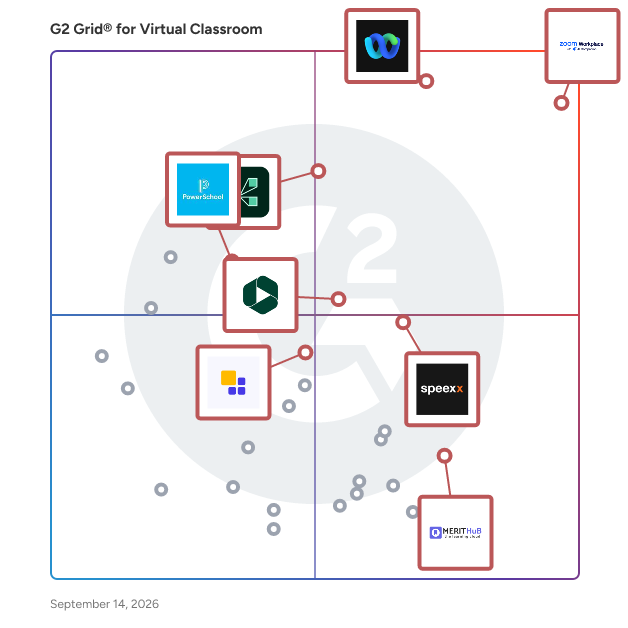
G2 Grid® for Virtual Classroom Software

G2 Grid® for Virtual Classroom Software plotting products by satisfaction and market presence

Highlighted products: Zoom Workplace, Webex Suite, Adobe Connect, Speexx, Panopto, MeritHub, PowerSchool Schoology Learning, and Class.

Underlying data: [Grid® JSON](https://www.g2.com/categories/virtual-classroom/grids.json?focus%5B%5D=zoom-workplace&focus%5B%5D=cisco-webex-suite&focus%5B%5D=adobe-connect&focus%5B%5D=speexx&focus%5B%5D=panopto&focus%5B%5D=merithub&focus%5B%5D=powerschool-schoology-learning&focus%5B%5D=class-technologies)

iTeach.world

iTeach.world is a comprehensive virtual classroom platform designed to replicate and enhance the traditional teaching experience in an online environment. Unlike standard video conferencing tools, it integrates a suite of educational features that facilitate interactive and effective remote learning. Educators can engage students through whiteboards, screen sharing, breakout groups, real-time notes, and live polls. The platform's Workspace allows for the seamless sharing of multimedia content, including videos, presentations, and documents. Unique features like Direct Talk enable private conversations with individual students without leaving the virtual classroom. Additionally, iTeach.world offers tools for attendance tracking, assignment management, progress reporting, and a real-time grade book, all within a user-friendly interface. By consolidating these functionalities, iTeach.world simplifies the online teaching process, saving educators time and enhancing student engagement and learning outcomes.

Average Rating: 4.3/5.0

Total Reviews: 104

How Do G2 Users Rate iTeach.world?

  • Has the product been a good partner in doing business?: 8.7/10 (Category avg: 9.1/10)

Who Is the Company Behind iTeach.world?

Who Uses This Product?

  • Top Industries: Information Technology and Services, Computer Software
  • Company Size: 50% Small, 35% Medium

What Do G2 Reviewers Say About iTeach.world?

AI-generated summary from verified user reviews

Pros
  • Users love the ease of use of iTeach.world, appreciating its user-friendly interface and seamless functionality.
  • Users praise the high audio and video quality of iTeach.world, enhancing their meeting experience significantly.
  • Users appreciate the user-friendly interface of iTeach.world, enhancing understanding for students and professionals alike.
  • Users praise the web conferencing capabilities of iTeach.world, enhancing interactive learning through seamless video meetings.
  • Users praise the screen sharing feature of iTeach.world, enhancing their teaching experience and improving connections with students.
Cons
  • Users find the participant limitations of iTeach.world restrictive, as only 12 can join, hindering larger group interactions.
  • Users find the limited features of iTeach restrict its usability for complex teaching needs and group settings.
  • Users often experience technical glitches and occasional slow performance, impacting overall usability of iTeach.world.
  • Users find the customer support difficult to reach, causing delays in resolving issues and overall frustration.
  • Users find the UI messy and difficult to use, suggesting improvements for a better overall experience.

What Are Recent G2 Reviews of iTeach.world?

What Are G2 Users Discussing About iTeach.world?

ClassIn

ClassIn is dedicated to building classrooms for the future. 7 years ago, ClassIn started building a classroom online, a place where learners and educators can come together without regards of geographical barriers to learn and connect. In 2016, ClassIn launched the world’s first ever virtual classroom solution designed purely for educational purposes. ClassIn virtual classroom is a student-centered environment where learners can connect with teachers, interact with educational content, and acquire knowledge through active learning behaviors. After 200 million hours of online sessions, ClassIn continues to empower over 60 thousand institutions, 20 million teachers and students, from 150 countries worldwide to collaborate and develop. In the future, ClassIn is going back to the classroom—back to the physical campuses that we have long missed, to build ClassIn X, a connected ecosystem where learners, educators and institutions can communicate, interact and transfer knowledge seamlessly with the help of integrated hardware and software technology. With ClassIn X, classrooms are connected with teachers and students wherever they are, whenever it is. Learning activities form a continuity in which students can thrive and prepare themselves for a better future. ClassIn, engaging students, enabling teachers, empowering education worldwide.

Average Rating: 4.3/5.0

Total Reviews: 10

How Do G2 Users Rate ClassIn?

  • Has the product been a good partner in doing business?: 10.0/10 (Category avg: 9.1/10)
  • Video Streaming: 7.9/10 (Category avg: 8.5/10)
  • Session Recording: 7.9/10 (Category avg: 8.7/10)
  • Screen Sharing: 9.2/10 (Category avg: 8.9/10)

Who Is the Company Behind ClassIn?

  • Seller: ClassIn
  • Year Founded: 2014
  • HQ Location: Singapore, Singapore
  • Twitter: @ClassInEEO
    170 Twitter followers
  • LinkedIn® Page: www.linkedin.com
    202 employees on LinkedIn®

Who Uses This Product?

  • Top Industries: Higher Education
  • Company Size: 62% Small, 15% Medium

What Are Recent G2 Reviews of ClassIn?

What Are G2 Users Discussing About ClassIn?

WizIQ

WizIQ LMS provides a complete solution to tutors, institutes and organizations to deliver live online classes and launch self-paced courses. WizIQ is easy-to-use, affordable and gives the freedom to learners to access the courses from any location and device. With WizIQ, businesses can launch their own custom-branded learning/training portal with features such as virtual classroom, course builder, tests and assessment builder, customized mobile application, eCommerce and reports.

Average Rating: 4.2/5.0

Total Reviews: 45

How Do G2 Users Rate WizIQ?

  • Has the product been a good partner in doing business?: 6.9/10 (Category avg: 9.1/10)
  • Video Streaming: 9.0/10 (Category avg: 8.5/10)
  • Session Recording: 8.8/10 (Category avg: 8.7/10)
  • Screen Sharing: 8.8/10 (Category avg: 8.9/10)

Who Is the Company Behind WizIQ?

  • Seller: WizIQ
  • Year Founded: 2007
  • HQ Location: Gurugram, Haryana
  • Twitter: @WizIQ
    6,435 Twitter followers
  • LinkedIn® Page: www.linkedin.com
    150 employees on LinkedIn®

Who Uses This Product?

  • Top Industries: Education Management, E-Learning
  • Company Size: 50% Small, 26% Medium

What Are Recent G2 Reviews of WizIQ?

What Are G2 Users Discussing About WizIQ?

AI can help you find the answers. G2 helps you trust them.

Connect G2 to Claude or ChatGPT for answers grounded in G2's trusted reviews, comparisons, and pricing from real user insights.

How it works

NexGen Virtual Office

NexGen Virtual Office is setting the standard for the best solution for managing hybrid workforces. Our digital business management platform doesn't just offer video conferencing. We offer a revolutionary technology and innovative intuitive design which delivers customers an all-in-one comprehensive solution for bringing remote workforces together no matter team member's locations. NexGen Virtual Office encourages real-time engagement, seamless integrated tools, and customized productivity reporting. Empower your workforce today and establish a stronger community, culture that collaborates in real-time better than ever before.

Average Rating: 4.4/5.0

Total Reviews: 97

How Do G2 Users Rate NexGen Virtual Office?

  • Has the product been a good partner in doing business?: 9.2/10 (Category avg: 9.1/10)
  • Video Streaming: 8.3/10 (Category avg: 8.5/10)
  • Session Recording: 7.3/10 (Category avg: 8.7/10)
  • Screen Sharing: 8.0/10 (Category avg: 8.9/10)

Who Is the Company Behind NexGen Virtual Office?

Who Uses This Product?

  • Top Industries: Marketing and Advertising, Pharmaceuticals
  • Company Size: 62% Small, 17% Medium

What Do G2 Reviewers Say About NexGen Virtual Office?

AI-generated summary from verified user reviews

Pros
  • Users value the ease of use in NexGen Virtual Office, making business management simple and efficient.
  • Users value the freedom to work remotely with NexGen Virtual Office, enhancing productivity and collaboration seamlessly.
  • Users admire the easy setup of NexGen Virtual Office, making it simple to start and manage their business effectively.
  • Users appreciate the efficiency of NexGen Virtual Office, simplifying business operations and enhancing productivity in remote work.
  • Users love the easy setup of NexGen Virtual Office, finding it quick and straightforward to start using.
Cons
  • Users often face performance delays with latency and slow syncing, which hinders workflow and overall experience.
  • Users frequently experience delay issues with NexGen Virtual Office, affecting performance and overall user experience.
  • Users find the steep learning curve of NexGen Virtual Office challenging, especially for those new to virtual environments.
  • Users face a steep learning curve with NexGen Virtual Office, particularly with advanced customization and unfamiliar virtual environments.
  • Users experience performance issues like latency and audio/video quality, especially in low-bandwidth settings.

What Are Recent G2 Reviews of NexGen Virtual Office?

What Are G2 Users Discussing About NexGen Virtual Office?

MagicBox

MagicBox is an AI-powered, end-to-end digital publishing platform that empowers K-12 and higher education publishers, authors, and content providers, as well as enterprise publishers, to create, manage, enrich, and deliver digital content through custom-branded web and mobile apps. With its multi-tenant architecture, each school, district, or corporate entity is a separate tenant that can be customized to individual requirements. With over 7 million users globally, MagicBox has received several accolades for its inclusive learning solutions and continues to innovate to enhance its features and functionalities.

Average Rating: 4.6/5.0

Total Reviews: 28

How Do G2 Users Rate MagicBox?

  • Has the product been a good partner in doing business?: 9.5/10 (Category avg: 9.1/10)
  • Video Streaming: 8.1/10 (Category avg: 8.5/10)
  • Session Recording: 9.4/10 (Category avg: 8.7/10)
  • Screen Sharing: 8.9/10 (Category avg: 8.9/10)

Who Is the Company Behind MagicBox?

  • Seller: Magic Software
  • Year Founded: 2013
  • HQ Location: New York, US
  • Twitter: @getmagicbox
    215 Twitter followers
  • LinkedIn® Page: www.linkedin.com
    4 employees on LinkedIn®

Who Uses This Product?

  • Top Industries: Primary/Secondary Education, Publishing
  • Company Size: 71% Medium, 26% Small

What Do G2 Reviewers Say About MagicBox?

AI-generated summary from verified user reviews

Pros
  • Users find MagicBox highly user-friendly, enjoying its intuitive tools and straightforward navigation for seamless content development.
  • Users enjoy the comprehensive assessment features of MagicBox, enabling easy creation and customization of digital evaluations.
  • Users appreciate the wide range of assessment types in MagicBox, enhancing their e-Learning experience effortlessly.
  • Users value the excellent customer support of MagicBox, praising their quick responses and effective issue resolution.
  • Users praise the great features and flexibility of MagicBox's eBook, enhancing teaching and learning experiences.
Cons
  • Users find difficult usability in MagicBox, leading to frustrations with setup and implementation in educational settings.
  • Users find MagicBox difficult to use, facing challenges with setup, reporting, and overall implementation in classrooms.
  • Users find MagicBox to be not user-friendly, citing difficulties with navigation and complex reporting features.
  • Users find MagicBox expensive due to high costs for custom reporting and difficulties in usage and onboarding.
  • Users express concern over the limited customization options in MagicBox, hindering unique design and branding efforts.

What Are Recent G2 Reviews of MagicBox?

ProProfs Training Maker

ProProfs Training Maker is an AI-powered LMS and course builder for employee training, compliance, and skill assessment, built so teams can create and manage courses without switching tools or hiring instructional designers. Organizations use it to run onboarding programs, compliance and safety training, skill assessments, and sales enablement courses, all from one workspace, cutting course-build time and keeping training audit-ready as regulations and teams change. Popular use cases: • Employee onboarding and new-hire training • Compliance and regulatory training (sexual harassment, HIPAA, OSHA) • Skill assessments and certification programs • Sales, product, and soft-skills training • Courses sold to external learners or clients ProProfs AI: The Engine Behind Course Creation ProProfs AI takes a course from an idea to a fully built one, then keeps improving it as learners move through it. It powers: • AI Course Builder - describe a topic, and AI generates a full course, with chapters, content, and structure, ready for learners right away • AI Course Assistant - refine a generated course on demand: add chapters, improve section titles, rewrite content, or restructure it entirely, without starting over • AI Learning Path Automation - AI designs personalized learning paths for each learner based on job role, department, or current progress • AI Voiceovers & Accessibility - converts written content into natural-sounding narration (powered by Google Text-to-Speech) across multiple languages, in one click • AI Reports & Insights - surfaces completion rates and engagement patterns across a team, flagging knowledge gaps before they become problems • AI Report Summary - the moment a report is opened, AI delivers a summary of the key takeaways up front Everything else you'd expect from a modern LMS: • Course templates and a library of 500+ expert-built courses (compliance, DEI, safety, leadership, soft skills) • Gamification and leaderboards to drive completion • Custom certificates, branding, and custom domains • Learner paths with sequential progress requirements • Mobile learning on any device • SSO/SAML/LDAP, SCORM, TinCan, and API access • HRIS and payroll integrations (BambooHR, Workday, ADP, and more) with auto-enrollment • Detailed reporting, compliance-ready exports, and automated reminders • Course monetization via Stripe or the ProProfs payment gateway Whether the goal is onboarding new hires faster, staying audit-ready for compliance training, or building courses to sell to external learners, ProProfs Training Maker brings it all together in one platform.

Average Rating: 4.6/5.0

Total Reviews: 36

How Do G2 Users Rate ProProfs Training Maker?

  • Has the product been a good partner in doing business?: 8.5/10 (Category avg: 9.1/10)
  • Video Streaming: 8.9/10 (Category avg: 8.5/10)
  • Session Recording: 9.2/10 (Category avg: 8.7/10)
  • Screen Sharing: 8.8/10 (Category avg: 8.9/10)

Who Is the Company Behind ProProfs Training Maker?

  • Seller: ProProfs
  • Year Founded: 2009
  • HQ Location: Los Angeles, CA
  • Twitter: @ProProfs
    4,731 Twitter followers
  • LinkedIn® Page: www.linkedin.com
    214 employees on LinkedIn®

Who Uses This Product?

  • Top Industries: Marketing and Advertising, Information Technology and Services
  • Company Size: 54% Small, 51% Medium

What Do G2 Reviewers Say About ProProfs Training Maker?

AI-generated summary from verified user reviews

Pros
  • Users value the simplicity and ease of use of ProProfs Training Maker for managing diverse training sessions effectively.
  • Users value the customization options in ProProfs Training Maker, allowing tailored lessons and assessments according to their needs.
  • Users value the measurable impact of ProProfs Training Maker, enhancing knowledge retention and job performance effectively.
  • Users benefit from efficient assignment management, ensuring organization and timely progress tracking for training programs.
  • Users value the ease of course creation and scalability, facilitating effective training for diverse audiences effortlessly.
Cons
  • Users face a significant initial learning curve with ProProfs Training Maker, requiring time to become proficient.
  • Users face a steep learning curve with ProProfs Training Maker, requiring considerable time to become proficient.
  • Users find that the complexity issues of ProProfs Training Maker hinder effective course structuring and organization.
  • Users find the difficult setup of ProProfs Training Maker challenging, requiring significant time to learn effectively.
  • Users find the initial learning difficulty notable, requiring significant time to understand the platform effectively.

What Are Recent G2 Reviews of ProProfs Training Maker?

What Are G2 Users Discussing About ProProfs Training Maker?

Agora

Agora's Video Calling API enables developers to seamlessly integrate high-definition, real-time video communication into web, mobile, and native applications. Designed for ultra-low latency and cross-platform compatibility, it ensures smooth video experiences even under challenging network conditions. This solution is ideal for various applications, including telehealth, education, team collaboration, and any scenario requiring face-to-face interaction. Key Features and Functionality: - Global Coverage: Agora's Software-Defined Real-Time Network (SDRTN®) supports users in over 200 countries and regions, ensuring reliable connectivity worldwide. - High-Quality Video at Scale: Delivers consistent high-definition video quality for both one-on-one calls and large group meetings, maintaining performance even with thousands of concurrent users. - Multiple Audio and Video Tracks: Allows publishing multiple audio and video streams from a single instance, supporting multi-channel capture from various cameras and microphones. - Screen Sharing and Collaboration: Facilitates screen sharing and interactive whiteboards, enabling users to draw, annotate, and share content across multiple devices simultaneously. - AI-Powered Audio Enhancement: Incorporates advanced audio features such as 3D spatial audio, AI noise suppression, and gain control to provide an immersive and clear audio experience. - Call Recording: Offers options for recording video calls either in the cloud or on-premises, with customizable settings for format, storage path, and quality. Primary Value and User Solutions: Agora's Video Calling API addresses the need for reliable, high-quality real-time video communication across diverse applications. By providing a scalable and customizable solution, it empowers developers to enhance user engagement and collaboration within their platforms. The API's robust features, including global coverage, AI-driven enhancements, and flexible integration options, ensure that users experience seamless and interactive video communication, thereby improving productivity and user satisfaction.

Average Rating: 4.1/5.0

Total Reviews: 41

How Do G2 Users Rate Agora?

  • Has the product been a good partner in doing business?: 8.2/10 (Category avg: 9.1/10)
  • Video Streaming: 10.0/10 (Category avg: 8.5/10)
  • Session Recording: 8.3/10 (Category avg: 8.7/10)
  • Screen Sharing: 10.0/10 (Category avg: 8.9/10)

Who Is the Company Behind Agora?

  • Seller: Agora.io
  • Year Founded: 2014
  • HQ Location: Santa Clara, CA
  • Twitter: @AgoraIO
    26,359 Twitter followers
  • LinkedIn® Page: www.linkedin.com
    938 employees on LinkedIn®
  • Ownership: NASDAQ:API

Who Uses This Product?

  • Who Uses This: CEO
  • Top Industries: Computer Software, Events Services
  • Company Size: 68% Small, 27% Medium

What Do G2 Reviewers Say About Agora?

AI-generated summary from verified user reviews

Pros
  • Users commend the exceptional audio quality of Agora, appreciating its low latency and adaptability across connections.
  • Users praise Agora's responsive customer support, which effectively addresses inquiries and enhances user experience.
  • Users commend Agora for its high quality, enjoying seamless video and speech integration with low latency and adaptability.
  • Users praise Agora for its low latency and exceptional video quality, greatly enhancing real-time communication experiences.
Cons
  • Users find the learning curve steep, especially for less technical team members struggling to understand the system.
  • Users find limited customization options challenging, especially when transitioning to the Pro version of Agora.

What Are Recent G2 Reviews of Agora?

What Are G2 Users Discussing About Agora?

Pearl

Pearl develops software for tutoring at scale. Our fully integrated classroom and administrative tools allow enterprise tutoring companies, academic organizations and ARP ESSER funded State Education Agencies (SEAs) to launch and scale tutoring programs with ease. Whether instruction occurs online or in person, Pearl's platform provides education leaders everything they need to improve student learning outcomes while collecting and protecting the necessary data to prove efficacy for multiple stakeholders (parents, teachers, districts, states, agencies). Under a robust Research Collaboration Agreement, Pearl's team works closely with the Annenberg Institute at Brown University to ensure that every piece of the platform empowers evidence-based tutor program design.

Average Rating: 4.4/5.0

Total Reviews: 11

How Do G2 Users Rate Pearl?

  • Has the product been a good partner in doing business?: 7.6/10 (Category avg: 9.1/10)
  • Video Streaming: 8.8/10 (Category avg: 8.5/10)
  • Session Recording: 10.0/10 (Category avg: 8.7/10)
  • Screen Sharing: 9.6/10 (Category avg: 8.9/10)

Who Is the Company Behind Pearl?

  • Seller: Pearl
  • Year Founded: 2016
  • HQ Location: Richmond, US
  • Twitter: @TutorWithPearl
    167 Twitter followers
  • LinkedIn® Page: www.linkedin.com
    71 employees on LinkedIn®

Who Uses This Product?

  • Company Size: 91% Small, 9% Medium

What Do G2 Reviewers Say About Pearl?

AI-generated summary from verified user reviews

Pros
  • Users find Pearl to be a great tool for delivering online lessons, often surpassing the effectiveness of Zoom.
  • Users find that when it functions properly, Pearl offers a more effective tool for online lessons than Zoom.
Cons
  • Users criticize Pearl for its inflexible licensing model, especially during fluctuating tutor numbers throughout the year.
  • Users find Pearl's inflexible licensing model challenging, as it doesn't adjust with fluctuating tutor numbers.

What Are Recent G2 Reviews of Pearl?

Wise

Wise is a platform built for online teaching and tutoring businesses. Automate scheduling, reminders and invoices. With the 2-way sync calendar scheduling afford greater flexibility to students and instructors. Simplify tutor management and keep parents up-to-date with student reports. Set your tutoring business operations on auto-pilot and do more with your time. Wise offers a host of features tailored for every type of learning- 1-1 personalized sessions, self-paced recorded courses, cohort-based sessions and in-person sessions. Built by Educators to simplify daily time taking tasks- The platform offers 1-click start to sessions, automatic attendance, gamified sessions, detailed learner reports, feedback forms and a whole lot more.

Average Rating: 4.7/5.0

Total Reviews: 9

How Do G2 Users Rate Wise?

  • Has the product been a good partner in doing business?: 8.9/10 (Category avg: 9.1/10)
  • Video Streaming: 8.3/10 (Category avg: 8.5/10)
  • Session Recording: 7.5/10 (Category avg: 8.7/10)
  • Screen Sharing: 10.0/10 (Category avg: 8.9/10)

Who Is the Company Behind Wise?

  • Seller: WISE App
  • Year Founded: 2020
  • HQ Location: Bengaluru South, Karnataka
  • Twitter: @wiseapplive
    605 Twitter followers
  • LinkedIn® Page: www.linkedin.com
    34 employees on LinkedIn®

Who Uses This Product?

  • Top Industries: Education Management
  • Company Size: 92% Small, 8% Medium

What Do G2 Reviewers Say About Wise?

AI-generated summary from verified user reviews

Pros
  • Users value the effective communication tools in Wise, enhancing collaboration and keeping everyone informed.
  • Users appreciate the ease of use of Wise, finding it intuitive and supportive for educational management.
  • Users appreciate the intuitive platform and robust features like automatic grading and personalized learning tools.
  • Users value the effective monitoring capabilities of Wise, enabling organized student management and insightful analytics.
  • Users value the intuitive resources of Wise, benefiting from personalized instruction and seamless multimedia integration.
Cons
  • Users face access issues with Wise, requiring a constant internet connection to access content, even previously opened items.
  • Users find the platform to have difficult learning curves, particularly for new educators and those unfamiliar with technology.
  • Users find the platform overwhelming for newcomers, experiencing slow performance that hinders lesson delivery and engagement.
  • Users find the high bandwidth requirement of Wise problematic, as it necessitates constant internet connectivity for access.
  • Users find that the insufficient training leads to confusion, particularly among educators lacking tech familiarity.

What Are Recent G2 Reviews of Wise?

Buzz

Agilix is a SaaS company that empowers educational content creators and publishers to deliver quality online and blended learning to any LMS and on mobile. We partner with leading educational content publishers to deliver online courses for blended, virtual, hybrid, and remote learning.

Average Rating: 4.1/5.0

Total Reviews: 10

How Do G2 Users Rate Buzz?

  • Has the product been a good partner in doing business?: 9.6/10 (Category avg: 9.1/10)

Who Is the Company Behind Buzz?

  • Seller: Agilix
  • Year Founded: 2001
  • HQ Location: N/A
  • Twitter: @agilix
    1,315 Twitter followers
  • LinkedIn® Page: www.linkedin.com
    21 employees on LinkedIn®

Who Uses This Product?

  • Top Industries: Education Management
  • Company Size: 65% Small, 17% Large

What Do G2 Reviewers Say About Buzz?

AI-generated summary from verified user reviews

Pros
  • Users find Buzz's reliability and task management capabilities enhance their educational experience and streamline communication.
  • Users value the student engagement features of Buzz, enhancing communication and tracking for an effective learning experience.
  • Users commend Buzz's exceptional customer support, consistently providing assistance and enhancing the overall learning experience.
  • Users find Buzz extremely easy to use, making messaging and homework management straightforward and efficient.
  • Users value the enhanced engagement Buzz offers, improving communication and task management for an enriched learning experience.
Cons
  • Users find the module navigation slow, which occasionally disrupts their overall experience with Buzz.
  • Users experience slow performance during module navigation, which interrupts their overall workflow and experience.
  • Users find the high prices of Buzz Credits to be unaffordable, especially for smaller businesses.
  • Users find navigation issues on Buzz slow at times, which disrupts the overall experience and workflow.
  • Users find the slow response of the module navigation frustrating, impacting their overall experience with Buzz.

What Are Recent G2 Reviews of Buzz?

What Are G2 Users Discussing About Buzz?

enabley

Empower your Deskless Workforce with a revolutionary mobile training platform - ENABLEY. Transform and enhance training for Deskless workers through easy content creation, personalized micro-learning experiences, and real-time learning opportunities in the flow of work. Ensure all front-line team members, distributors, partners, and franchises are aligned with critical business and technical knowledge, effortlessly by a decentralized management system and agile reporting. Stay ahead of the game, enhance performance, and achieve remarkable results. Enabley - Elevate the training experience, Near, Far, Wherever your workers are.

Average Rating: 4.5/5.0

Total Reviews: 20

How Do G2 Users Rate enabley?

  • Has the product been a good partner in doing business?: 9.6/10 (Category avg: 9.1/10)
  • Video Streaming: 5.0/10 (Category avg: 8.5/10)
  • Session Recording: 5.8/10 (Category avg: 8.7/10)
  • Screen Sharing: 9.2/10 (Category avg: 8.9/10)

Who Is the Company Behind enabley?

  • Seller: enabley
  • Year Founded: 2005
  • HQ Location: Tel Aviv, IL
  • LinkedIn® Page: www.linkedin.com
    84 employees on LinkedIn®

Who Uses This Product?

  • Company Size: 46% Medium, 38% Small

What Are Recent G2 Reviews of enabley?

What Are G2 Users Discussing About enabley?

YuJa

YuJa provides cloud-powered solutions that enable leading organizations to create engaging media experiences. Our portfolio includes products for video management, lecture capture, live streaming, social learning, video conferencing, digital asset management, video test proctoring, and digital media accessibility. We serve organizations of all sizes within all sectors including higher-ed, K-12, government, non-profit, healthcare and corporate. We have legal headquarters in Delaware with primary U.S. offices in Silicon Valley, California and Canadian offices in Toronto.

Average Rating: 4.3/5.0

Total Reviews: 13

How Do G2 Users Rate YuJa?

  • Has the product been a good partner in doing business?: 8.3/10 (Category avg: 9.1/10)

Who Is the Company Behind YuJa?

  • Seller: YuJa
  • Year Founded: 2007
  • HQ Location: San Jose, California
  • LinkedIn® Page: www.linkedin.com
    166 employees on LinkedIn®

Who Uses This Product?

  • Top Industries: Higher Education, Information Technology and Services
  • Company Size: 62% Medium, 31% Large

What Are Recent G2 Reviews of YuJa?

What Are G2 Users Discussing About YuJa?

classroom.cloud

Award-winning cloud-based, classroom management, safeguarding and IT management platform for schools! Super easy to set up and use, classroom.cloud is a low-cost and scalable cloud-based solution, providing the essential tools for supporting schools worldwide. Teachers can easily connect to their students’ devices quickly and easily by a range of methods and see thumbnails of all connected students’ devices on their screen to monitor activity. With classroom.cloud, teachers can easily explain and demonstrate lesson activity using the screen sharing and audio broadcast features – plus remedy any unwanted activity with remote control tools or by simply locking the students’ screens. Keeping students focused and on track is easy with ‘allowed’ and ‘restricted’ lists of websites and applications – as well as chat and messaging tools for interaction, guidance and collaboration.   Using class surveys, teachers gain instant feedback on topic understanding and can gamify assessment by using the ‘random select’ mode which selects students at random to answer the question. In addition, to reinforce good behavior, correct answers, and celebrate great pieces of work, teachers can assign ‘rewards’ during the lesson. Any students who find themselves struggling with a task can send discreet help requests directly to the teacher.   In addition, schools can ensure that their students are safe at all times (and in any location) with the optional safeguarding toolkit. This helps to keep the school’s online environment protected by monitoring concerning activity, identifying students at risk, and spotting online safety trends – even in Microsoft Teams. Its range of proactive and reactive tools include multi-language keyword and phrase monitoring, word cloud of trending topics, contextual intelligence-based Risk Index, full reporting, and more. Schools can also set school-wide internet restrictions to block and approve websites and set the times they can be accessed. With the new Enhanced Safeguarding feature, Image Analysis (optional), schools can also monitor and detect inappropriate images displayed on students’ screens from websites, apps, and media. With no swapping between solutions required for in-school and/or remote learning, classroom.cloud provides a simple and effective way to provide continuity for students and reduce edtech fatigue for teachers.  For technicians, classroom.cloud is easy to set up, configure, manage, and use – virtually taking care of itself! Integrating directly with the school's existing infrastructure and with Google Classroom, ClassLink, Microsoft School Data Sync and Clever, they can deploy it in minutes and manage teacher and student devices centrally – saving a bunch of time.  Plus, with hardware and software inventories, power management, PowerShell, school-wide internet and application metering, and more, they can see at a glance how school technology is being used and how to maximize it.

Average Rating: 4.9/5.0

Total Reviews: 4

How Do G2 Users Rate classroom.cloud?

  • Has the product been a good partner in doing business?: 10.0/10 (Category avg: 9.1/10)
  • Video Streaming: 8.3/10 (Category avg: 8.5/10)
  • Session Recording: 8.3/10 (Category avg: 8.7/10)
  • Screen Sharing: 6.7/10 (Category avg: 8.9/10)

Who Is the Company Behind classroom.cloud?

  • Seller: NetSupport Limited
  • Year Founded: 1989
  • HQ Location: Market Deeping, United Kingdom
  • Twitter: @NetSupportGroup
    6,759 Twitter followers
  • LinkedIn® Page: www.linkedin.com
    110 employees on LinkedIn®

Who Uses This Product?

  • Company Size: 50% Medium, 50% Small

What Are Recent G2 Reviews of classroom.cloud?

What Are G2 Users Discussing About classroom.cloud?

Jumbula

Jumbula is an innovative provider of online registration, payment, and class/camp management systems designed to streamline the administrative tasks for programs ranging from after-school activities to sports camps and beyond. This solution is tailored to enhance the operational efficiency of educational and recreational programs, offering a comprehensive suite of tools that meet the unique needs of business owners, program operators, and instructors. The primary target audience for Jumbula includes educational institutions, recreational centers, and independent program operators who require a user-friendly platform to manage their activities. With its robust features, Jumbula caters to a variety of use cases, such as simplifying the enrollment process for parents, managing class schedules, and facilitating secure payment processing. This versatility makes it an essential tool for organizations looking to optimize their administrative workflows while providing a seamless experience for their clients. Key features of Jumbula include an online registration system that simplifies the enrollment process with customizable forms and real-time class availability updates. This ensures that parents can easily register their children for activities without the hassle of paper forms or manual tracking. The secure online payment gateway further enhances the user experience by offering flexible payment plans and automated billing, allowing organizations to manage their finances efficiently. In addition to registration and payment processing, Jumbula provides comprehensive class and camp management tools. Users can create and manage schedules, track attendance, and communicate effectively with staff members. This functionality not only improves organizational efficiency but also fosters better engagement between instructors and participants. The platform also features a user-friendly parent portal that keeps families informed with instant notifications and detailed progress tracking, enhancing the overall experience for both parents and students. Moreover, Jumbula supports business management through comprehensive reporting and analytics, enabling organizations to make data-driven decisions. Marketing and promotion tools are integrated into the platform, allowing users to reach their target audience effectively. Additionally, Jumbula's ability to integrate with third-party applications ensures that organizations can customize their operational processes to fit their specific needs, making it a versatile solution in the realm of class and camp management.

Average Rating: 3.8/5.0

Total Reviews: 2

How Do G2 Users Rate Jumbula?

  • Has the product been a good partner in doing business?: 8.3/10 (Category avg: 9.1/10)

Who Is the Company Behind Jumbula?

  • Seller: Jumbula
  • Year Founded: 2013
  • HQ Location: San Mateo, US
  • Twitter: @jumbulame
    38 Twitter followers
  • LinkedIn® Page: www.linkedin.com
    26 employees on LinkedIn®

Who Uses This Product?

  • Company Size: 100% Small

What Are Recent G2 Reviews of Jumbula?

What Are G2 Users Discussing About Jumbula?

KEYSERV VIDEO

MaestroVision’s KEYSERV Video is a recording and replaying application suitable for Police Interview recording, Courtroom recording, Classroom recording, Conference room recording, Simulation Room recording, and more. Our team of engineers has developed this incredible user-friendly solution that allows the simultaneous recording of up to 4 independent audio & video sources in high-definition. KEYSERV Video is a complete turn-key solution to record, catalog, store, and retrieve all the different media types collected. The KEYSERV Video application has next-generation recording capabilities. Restored from the most discerning video experts in the broadcast industry, MaestroVision has leveraged its experience and expertise to provide the very best recording systems.

Average Rating: 4.7/5.0

Total Reviews: 3

How Do G2 Users Rate KEYSERV VIDEO?

  • Has the product been a good partner in doing business?: 10.0/10 (Category avg: 9.1/10)
  • Video Streaming: 8.3/10 (Category avg: 8.5/10)
  • Session Recording: 10.0/10 (Category avg: 8.7/10)
  • Screen Sharing: 8.3/10 (Category avg: 8.9/10)

Who Is the Company Behind KEYSERV VIDEO?

Who Uses This Product?

  • Company Size: 133% Medium

What Do G2 Reviewers Say About KEYSERV VIDEO?

AI-generated summary from verified user reviews

Pros
  • Users value the high-definition recording capabilities of KEYSERV VIDEO, efficiently managing multiple audio and video sources.
  • Users value the recording feature of KEYSERV VIDEO for its high-definition capabilities and efficient multi-source management.
  • Users value the high-definition video quality of KEYSERV VIDEO for effective recording and performance tracking.
  • Users value the high-quality camera performance of KEYSERV VIDEO for clear recording of meetings and training sessions.
  • Users value the clarity of video recordings offered by KEYSERV VIDEO, enhancing security management across various locations.
Cons
  • Users face mobile app accessibility issues, limiting their ability to manage recordings or view live feeds on-the-go.
  • Users find the lack of mobile access to clip management inconvenient for on-the-field security personnel needing real-time footage.
  • Users are frustrated by the limited mobile accessibility, hindering on-the-field viewing of live feeds and previous footage.
  • Users find the lack of a mobile application limiting for recording and managing sessions outside the workplace.
  • Users find the lack of a mobile application for remote recording management hampers their ability to capture important events.

What Are Recent G2 Reviews of KEYSERV VIDEO?

Emma Stein
ES
Researched and written by Emma Stein
Updated October 3, 2024