Top Free Virtual Classroom Software - Page 3

How Many Virtual Classroom Software Products Does G2 Track?

Total Products under this Category: 125

Category Stats (Oct 2026)

  • Average Rating: 4.46/5 The average rating of products in this category, based on all submitted ratings
  • Top Trending Product: Pencil Spaces (+1.48%) - Among all products in this category, Pencil Spaces recorded the largest rating increase compared to last month

Last updated: October 01, 2026

How Does G2 Rank Virtual Classroom Software Products?

Why You Can Trust G2's Software Rankings:

  • 30 Analysts and Data Experts
  • 79,600+ Authentic Reviews
  • 125+ Products
  • Unbiased Rankings

G2's software rankings are built on verified user reviews, rigorous moderation, and a consistent research methodology maintained by a team of analysts and data experts. Each product is measured using the same transparent criteria, with no paid placement or vendor influence. While reviews reflect real user experiences, which can be subjective, they offer valuable insight into how software performs in the hands of professionals. Together, these inputs power the G2 Score, a standardized way to compare tools within every category.

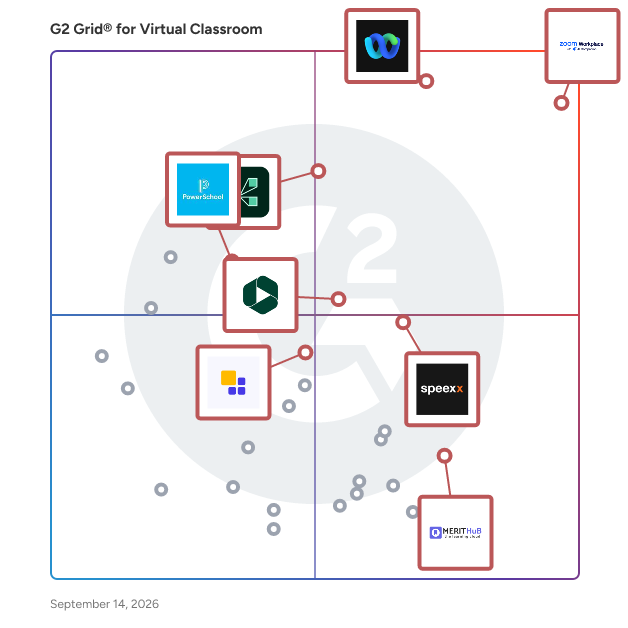
G2 Grid® for Virtual Classroom Software

G2 Grid® for Virtual Classroom Software plotting products by satisfaction and market presence

Highlighted products: Zoom Workplace, Webex Suite, Adobe Connect, Speexx, Panopto, MeritHub, PowerSchool Schoology Learning, and Class.

Underlying data: [Grid® JSON](https://www.g2.com/categories/virtual-classroom/grids.json?focus%5B%5D=zoom-workplace&focus%5B%5D=cisco-webex-suite&focus%5B%5D=adobe-connect&focus%5B%5D=speexx&focus%5B%5D=panopto&focus%5B%5D=merithub&focus%5B%5D=powerschool-schoology-learning&focus%5B%5D=class-technologies)

Koala Online Classroom

Koala Go is a virtual classroom built from the ground up for online tutoring with kids — the use case Zoom and Google Meet weren't designed for. Its signature shared browser feature lets tutors and students share the same web page in real time, so worksheets, games, and reading materials work without screen-share gymnastics or kids juggling tabs. Additional features include AI-generated class notes, class recording, scheduling, and B2B tutoring businesses. Backed by Y Combinator (W22). Built-in whiteboard. Trusted by independent tutors.

Average Rating: 5.0/5.0

Total Reviews: 1

Who Is the Company Behind Koala Online Classroom?

Who Uses This Product?

  • Company Size: 100% Small

What Are Recent G2 Reviews of Koala Online Classroom?

What Are G2 Users Discussing About Koala Online Classroom?

clickto

clickto is a Virtual Program Management and Operation Platform with a fully integrated Virtual Classroom. It was created to help you easily manage your online program. We've also eliminated the biggest headache for After School, Youth Movement, Summer Camps, Schools, Colleges, Universities that are looking to go virtual: one link for each student that moves them from room-to-room or class-to-class, reducing the user frustration of needing to keep a list of unique links for each class.

Who Is the Company Behind clickto?

Who Uses This Product?

  • Company Size: 100% Medium

COOL School Portal

The COOL platform is the base of a solution that helps teachers stay in control in the classroom. It saves time and is easy to use. It’s the homepage for your students. Here they can find all the online educational materials the teacher has selected for them. COOL applies the group layout from your Google console G Suite environment, so the right teachers are connected to the right groups and classes. You can use the platform in combination with different modules that enhance the learning experience for teachers and students. Choose the modules that fit you. Try it out: 60 days for free! The COOL Platform consists of, - COOL Picture log-in - COOL Monitoring - COOL Exam mode - COOL Plagiarism check COOL Picture log-in The Picture log-in module makes logging in easier for younger students. Their password consists of a combination of pictures. No need to remember the complicated number or letter combinations. An easy way to make the children use their own account instead of a group account, which is sometimes used as a quick fix so that they only have to remember one password that everyone knows. Using group accounts makes tracking individual progress difficult and is not compliant with privacy regulations. With the picture log-in, they have access to their own Google accounts and are also logged into the COOL platform. COOL Monitoring Keep track of your students: what are they working on? Where are they in the assignment? From the comfort of your own device, you can see the browser screens of your students. It gives you the opportunity to observe from distance and give direction during the process instead of after. Students can see on their screen when they are monitored. The tool comes with many handy functionalities, such as pushing a website to the devices of the whole class or to individuals. You can also block the screens when you want the attention of the classroom and close unwanted tabs. You can even make different or smaller groups from the students who are assigned to you as a teacher. This is convenient for pushing activities to students who need special attention or extra educational input. If you’ve used COOL Monitoring, you can check the browser history of your students up until seven days ago. The COOL admin of your school is able to consult a report about when which teacher was using COOL Monitoring and for which students. This provides the much-wanted transparency. COOL Exam mode This functionality is part of the COOL Monitoring module. That means that you can monitor students from a distance while they are in exam mode. COOL Exam mode makes sure that students can’t change tabs while taking a test. You can lock your students on the page of the test. They can’t open other tabs to find answers on the internet. You decide the amount of time they are locked. Use it for individual students or for the whole class with one click. COOL Plagiarism check Check the Google documents that your students are handing in through Google Classroom. The Google Classroom app is integrated into our COOL platform. As a teacher, you can check your students’ work by starting the plagiarism check. It will look for text matches online and the documents of your other students. You can check the same document three times over so you have the possibility to give feedback to your students and give the opportunity to improve the text. In the overview of the results, you’ll see what the percentage of plagiarism is and on which websites the matches are found. Try it out: 60 days for free!

Who Is the Company Behind COOL School Portal?

AI can help you find the answers. G2 helps you trust them.

Connect G2 to Claude or ChatGPT for answers grounded in G2's trusted reviews, comparisons, and pricing from real user insights.

How it works

HiLink Virtual Classroom

HiLink Virtual Classroom is a browser-based virtual classroom built for modern education and live learning experiences. Designed for educators, tutoring platforms, and training organizations, HiLink combines real-time collaboration tools with scalable infrastructure and AI-ready workflows. - Interactive whiteboard and collaborative classroom tools - Polls, quizzes, breakout rooms, and engagement features - Classroom moderation and permission controls - Recording, playback, and session recap capabilities - Browser-based experience with no download required - Optimized for large-scale live learning and tutoring environments HiLink Embedded Embed a fully customizable virtual classroom directly into your platform with HiLink’s API-first infrastructure. Build seamless live learning experiences without sending users to third-party meeting tools. - Fast and flexible API integration - White-label and customizable branding - Built for tutoring platforms, EdTech products, and live services - Rich interactive tools including whiteboard, screen sharing, breakout rooms, polls, recording, and more - Session analytics, attendance tracking, and operational insights - AI-ready infrastructure with transcription, summaries, captions, and workflow integrations - Scalable architecture for both interactive classrooms and large streaming sessions

Who Is the Company Behind HiLink Virtual Classroom?

  • Seller: HiLink
  • Year Founded: 2021
  • HQ Location: New York, US
  • LinkedIn® Page: www.linkedin.com
    33 employees on LinkedIn®

Impartus

"Impartus Live" is a Video Learning Platform, designed for education sector, for conducting interactive live online classes. Impartus Live has an in-built LMS and can also be integrated with the existing LMS of an institute or edtech company via APIs to provide high quality live online classes. This includes (i) virtual classroom; (ii) on-demand platform for viewing recordings; (iii) Analytics & Reports; and (iv) dedicated support and training services. Some of the benefits of Impartus Live are (i) high interactivity; (ii) mission critical reliability and security; (iii) low bandwidth performance; (iv) smooth on-boarding of teachers and students. Target Customer Segment of Impartus Live (Virtual Classroom): Universities, Coaching, Corporate Training, Edtech Companies.

Who Is the Company Behind Impartus?

Teamlilit

Teamlilit is tutoring management software for private tutors, tuition centres, and academies. Timetabling, attendance, student records, invoicing, and live online classes in one system. Invoices are generated from recorded sessions, so the hours you taught are the hours you bill. The classroom whiteboard has built-in maths equation support. GDPR compliant, European infrastructure. From €29/month.

Who Is the Company Behind Teamlilit?

VISO TeacherView

Radix VISO TeacherView provides teachers with the tools they need to have a seamless experience of a traditional physical classroom virtually, a cloud-based distance learning platform, combining classroom management and video conference capabilities with easy one-click access that is built to scale. Share your screen, video camera and whiteboard in lecturer mode or group collaboration, remotely monitor, view, control, assist and engage with students in real-time. Remote at home, local at school or hybrid classrooms, the platform can be used during emergency and routine, move to distance learning in a click of a button.

Who Is the Company Behind VISO TeacherView?

Emma Stein
ES
Researched and written by Emma Stein
Updated October 3, 2024