Best Unified Workspaces Software - Page 13

How Many Unified Workspaces Software Products Does G2 Track?

Total Products under this Category: 191

Category Stats (Sep 2026)

  • Average Rating: 4.59/5 (↓0.01 vs Aug 2026) The average rating of products in this category, based on all submitted ratings
  • Top Trending Product: TSplus (+0.04%) - Among all products in this category, TSplus recorded the largest rating increase compared to last month

Last updated: September 05, 2026

How Does G2 Rank Unified Workspaces Software Products?

Why You Can Trust G2's Software Rankings:

  • 30 Analysts and Data Experts
  • 59,600+ Authentic Reviews
  • 191+ Products
  • Unbiased Rankings

G2's software rankings are built on verified user reviews, rigorous moderation, and a consistent research methodology maintained by a team of analysts and data experts. Each product is measured using the same transparent criteria, with no paid placement or vendor influence. While reviews reflect real user experiences, which can be subjective, they offer valuable insight into how software performs in the hands of professionals. Together, these inputs power the G2 Score, a standardized way to compare tools within every category.

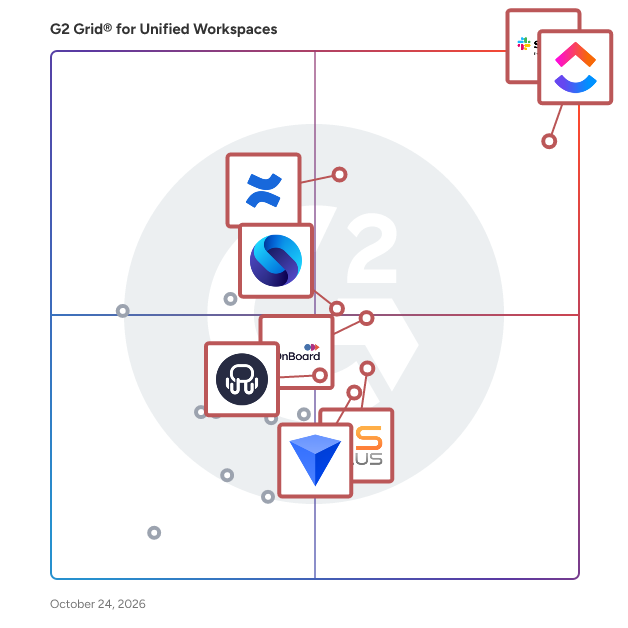
G2 Grid® for Unified Workspaces Software

G2 Grid® for Unified Workspaces Software plotting products by satisfaction and market presence

Highlighted products: Slack, ClickUp, Confluence, Shift, Workona, BlackBerry UEM, Rambox, and MangoApps.

Underlying data: [Grid® JSON](https://www.g2.com/categories/unified-workspaces/grids.json?focus%5B%5D=slack&focus%5B%5D=clickup&focus%5B%5D=confluence&focus%5B%5D=redbrick-shift&focus%5B%5D=workona&focus%5B%5D=blackberry-uem&focus%5B%5D=rambox&focus%5B%5D=mangoapps)

WApps

Run your entire business from one place with WApps. WApps was built to solve a simple problem: service businesses shouldn’t need a dozen different tools to manage their daily operations. Instead of using separate platforms for CRM, proposals, WhatsApp, tasks, appointments, and financial tracking, WApps brings everything together in one practical and connected workspace. With WApps, businesses can manage customer relationships, create and track proposals, organize appointments, collaborate on tasks, communicate through a shared inbox including WhatsApp, and keep track of their finances — all from a single platform. Built-in AI features also help teams automate repetitive work, move faster, and simplify everyday processes. Less switching between tools. Less operational chaos. More time to focus on your customers and grow your business. WApps, all your business management, in one ecosystem.

Who Is the Company Behind WApps?

WebCatalog Desktop

WebCatalog Desktop is our flagship product, built alongside Singlebox, a privacy-first multi-account browser, and Switchbar, a smart link handler that lets you choose which browser or profile to open links in—bringing even more flexibility and control to your digital workspace. WebCatalog Desktop is an all-in-one platform designed to help professionals and teams organize and manage all their web apps and accounts on Windows and macOS. It lets you transform any website into a standalone desktop app, eliminate browser tab overload, and easily switch between multiple accounts for the same service without constant logins. Each app runs in its own secure sandbox, safeguarding your data and preventing cross-site tracking. With unified notifications, customizable layouts, workspace grouping, and cross-platform sync, WebCatalog Desktop delivers a seamless, organized, and distraction-free digital workflow.

Who Is the Company Behind WebCatalog Desktop?

  • Seller: WebCatalog
  • Year Founded: 2020
  • HQ Location: San Francisco, US
  • LinkedIn® Page: www.linkedin.com
    10 employees on LinkedIn®

Wokay

Most SMB teams aren't struggling because they work badly. They're struggling because they work across too many tools, WhatsApp for clients, Slack/teams for chat, Asana/ClickUp for tasks, Jira/Freshdesk for tickets. Nothing connects. Work falls through the gaps. Wokay fixes that. A chat-first workspace where communication and work live in the same place, not integrated, actually the same place. See a message, spot an action, turn it into a tracked task in one tap without leaving the conversation. What's different from every project-first tool you've tried: most collaboration platforms start with tasks and bolt chat on. Wokay starts with conversation, the way teams actually work, and builds execution around it. Faster adoption, less context-switching, and work that stops falling through the cracks. Built for SMBs, agencies, and fast-moving teams of 5 to 150 people, specifically those done paying for Slack, ClickUp, and Freshdesk separately and looking for one tool that actually replaces all three. WHAT WOKAY LETS YOUR TEAM DO: Message to task in one tap: spot an action in a conversation and turn it into an assigned, tracked task without switching apps or losing context. Ripple: when a notification won't cut it, flash someone's screen for 10 seconds. Urgent messages get seen, immediately. Circle Back: pin any message to revisit later. Nothing important gets buried or forgotten. One accountable owner per task: assign responsibility, loop in collaborators, discuss inside the task itself. No ambiguity, no separate threads. Live team dashboard: every person, every project, real-time. No status meetings, no chasing. AI chat summarisation: missed a busy thread? Caught up in seconds, not scrolling. HOW TEAMS ARE USING IT: SMBs and agencies are replacing their entire stack, comms and execution, with Wokay. Teams find it organised and intuitive with no feature bloat. Adoption is fast because it feels like a chat tool they already know, not a project management system they have to learn. There's more under the hood: templates, automations, a media library, message scheduling, and saved message shortcuts. The kind of things you only discover when you're actually inside the product. WHAT'S NEXT: Ticketing system and Calendar scheduling launching next quarter, included free for everyone already on a paid plan. Flat pricing. Not per user. Ever. Teams switching from Slack + ClickUp + Freshdesk typically save 60–70% from day one. Don't take our word for it: "We've completely moved away from WhatsApp for internal communication since switching to Wokay. It's made collaboration effortless, organised, distraction-free, and built for real teamwork." - Head of Delivery, Digital Marketing Agency. "Before switching to Wokay, we were juggling ClickUp, Slack, and WhatsApp. Wokay brought all our work into one place. User-friendly, affordable, and the support team is incredibly prompt." - Founder, Advertising agency. Book a 30-min demo: cal.com/melody.wokay/30min or start your free trial: https://app.wokay.com/auth/signup wokay.com

Who Is the Company Behind Wokay?

WorkBOS

WorkBOS is a business operating system: the whole back office of a company running in one workspace, on one database, on one plan. That means projects and PMO with boards, timelines, portfolios and time tracking; a CRM with lead scoring, a sales pipeline, proposals, contracts and e-signature; HR and hiring from job posts and applicant tracking through onboarding, attendance, leave and appraisals; a payroll pay register; real double-entry accounting with a general ledger, chart of accounts, trial balance, invoicing, bills, credit notes, recurring billing and revenue recognition; a business phone system with numbers in 38 countries, a browser dialer, two-way SMS and voicemail; video meetings, forms and surveys, a client portal, a shared drive and a support desk. Because it is one database rather than a stack of integrations, a closed deal can create the project, payroll posts real journal entries to the ledger, and an invoice appears on the same customer record as the call that won it. One login, one bill, no connectors to maintain. Sitting across all of it is a conversational AI Chief of Staff. Ask it for something in plain language, such as onboarding a new client or chasing overdue invoices, and it turns the sentence into a reviewable plan across every module, delegating to specialist agents for operations, revenue, finance and people. The governance is the point. Every agent action is approve-first: the agent proposes, a person with the right permission approves, the whole trail lands in an append-only audit log that names its actor, and an executed action can be rolled back in one click. Money and payroll always wait for a human. Tenant isolation is enforced at the database with row-level security, with role-based access control and per-page create, edit and delete rules on top. Agencies and consultancies can run WorkBOS under their own brand, logo and custom domain, set their own pricing, and provision and bill unlimited client sub-accounts from a reseller console. What WorkBOS does not do, stated plainly because a buyer should find this out now rather than in month two: there is no email triage or inbox automation, no meeting transcription or AI notetaker, and no calendar auto-scheduling. Payroll is a pay register with admin-entered deductions, not statutory tax calculation or filing, so it does not replace a payroll provider in regulated jurisdictions. Phone numbers buy instantly in the US and Canada; other countries need regulatory paperwork. WorkBOS holds no SOC 2 or ISO 27001 certification today. Free for up to 5 users with no credit card. Pro is $12 per user per month. Published by Shahzad and Rainer LLC. Not to be confused with WorkOS, the developer API for enterprise SSO and SCIM; WorkBoss, field-service software for trades; WorkBoard, OKR software; or JobBOSS2, ECI Solutions' ERP for job shops and machine shops.

Who Is the Company Behind WorkBOS?

Workspace369

Workspace369 brings client relationships, requests, communication, scheduling, delivery, billing, accounting, files, AI, and automations into one operating system for service businesses.

Who Is the Company Behind Workspace369?

ZeroDesk

Who Is the Company Behind ZeroDesk?

Zest

Zest helps teams and individual professionals find information from any cloud service (Google Drive, Dropbox, Slack, GitHub, Zendesk...) in an instant, without having to switch apps or tabs. It is achieved with Zest's Information Finder Sidebar (Chrome Extension) and unified search that securely indexes all of your internal knowledge bases and cloud services. With Zest, teams can also manage work-critical information with the use of Collections. Each Collection has links to information around a specific purpose (i.e. Marketing Strategy Q4 2020). In order to keep the information up to date and valuable, Collection items can be verified or flagged by teammates so that the collection owner could update accordingly. Additionally, Zest uses an Artificial Intelligence component that securely analyzes the context of your messages on supported integrations (Gmail, Zendesk...) to proactively recommend information links that could help answer your questions. It helps teams eliminate shoulder tapping by surfacing required information before questions are even asked. Zest is a product for professionals that need to juggle a lot of information that's scattered all over the cloud fast, and we are constantly looking for innovative ways to make that even faster.

Who Is the Company Behind Zest?

  • Seller: Zest.is
  • Year Founded: 2018
  • HQ Location: Tel Aviv, IL
  • Twitter: @ZestisApp
    1,508 Twitter followers
  • LinkedIn® Page: www.linkedin.com
    3 employees on LinkedIn®
Neeraja Prakash
NP
Researched and written by Neeraja Prakash
Updated October 3, 2024