Top Free Spreadsheets Software - Page 2

How Many Spreadsheets Software Products Does G2 Track?

Total Products under this Category: 148

Category Stats (Sep 2026)

  • Average Rating: 4.41/5 The average rating of products in this category, based on all submitted ratings
  • Top Trending Product: Proton Workspace (+0.68%) - Among all products in this category, Proton Workspace recorded the largest rating increase compared to last month

Last updated: September 15, 2026

How Does G2 Rank Spreadsheets Software Products?

Why You Can Trust G2's Software Rankings:

  • 30 Analysts and Data Experts
  • 59,300+ Authentic Reviews
  • 148+ Products
  • Unbiased Rankings

G2's software rankings are built on verified user reviews, rigorous moderation, and a consistent research methodology maintained by a team of analysts and data experts. Each product is measured using the same transparent criteria, with no paid placement or vendor influence. While reviews reflect real user experiences, which can be subjective, they offer valuable insight into how software performs in the hands of professionals. Together, these inputs power the G2 Score, a standardized way to compare tools within every category.

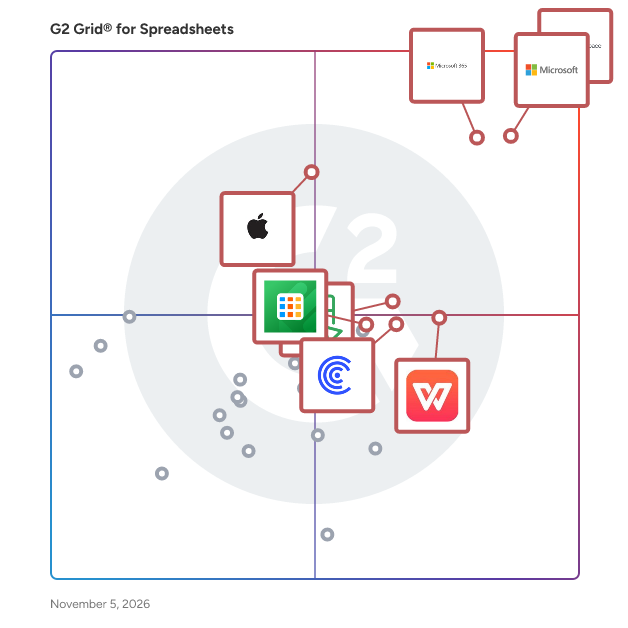
G2 Grid® for Spreadsheets Software

G2 Grid® for Spreadsheets Software plotting products by satisfaction and market presence

Highlighted products: Google Workspace, Microsoft Excel, Microsoft 365, Apple Numbers, WPS Spreadsheets, Zoho Sheet, Coefficient, and Detrics.

Underlying data: [Grid® JSON](https://www.g2.com/categories/spreadsheets/grids.json?focus%5B%5D=google-workspace&focus%5B%5D=microsoft-excel&focus%5B%5D=microsoft365&focus%5B%5D=apple-numbers&focus%5B%5D=wps-spreadsheets&focus%5B%5D=zoho-sheet&focus%5B%5D=coefficient&focus%5B%5D=detrics)

Proton Workspace

Proton Workspace is a business productivity and collaboration software suite that helps organizations manage communication, scheduling, files, documents, access, and internal collaboration, all with privacy-focused security controls. It is designed for businesses, distributed teams, startups, nonprofits, and regulated organizations seeking a single workspace for email, calendar, cloud storage, document collaboration, video meetings, password management, VPN access, and administrative controls. Proton positions it as an integrated business suite within the broader collaboration and secure workplace software category. Proton Workspace supports everyday business workflows, including company email and calendar management, secure file storage and sharing, document and spreadsheet collaboration, team meetings, credential management, and remote access protection. It can also support IT and operations teams that need centralized user administration, storage allocation, and policy enforcement across multiple workplace tools. According to Proton’s business materials, the suite brings together Proton Mail, Calendar, Drive, Docs, Sheets, Meet, Pass, VPN, and a private AI assistant in one subscription for business users. - Unified workspace for business operations: Combines encrypted email, calendar, cloud storage, document editing, spreadsheets, meetings, password management, and VPN services in one environment. - Privacy-focused architecture: Built around end-to-end encryption and zero-access encryption for core data types, which is relevant for teams handling sensitive communications, files, or credentials. - Team collaboration tools: Supports file sharing, permission controls, password-protected links, real-time document collaboration, spreadsheets, and video meetings for internal and external work. - Business administration features: Includes user management, storage allocation, support for custom email domains, and security settings for organizational deployment. - Use cases across secure work environments: Suitable for companies that need an alternative to standard office suites, especially where data protection, remote work security, and centralized tool management are priorities.

Average Rating: 4.6/5.0

Total Reviews: 32

How Do G2 Users Rate Proton Workspace?

  • Has the product been a good partner in doing business?: 10.0/10 (Category avg: 9.1/10)

Who Is the Company Behind Proton Workspace?

  • Seller: Proton AG
  • Company Website:
  • Year Founded: 2014
  • HQ Location: Plan-les-Ouates, Geneva, Switzerland
  • Twitter: @ProtonPrivacy
    363,085 Twitter followers
  • LinkedIn® Page: www.linkedin.com
    973 employees on LinkedIn®

Who Uses This Product?

  • Top Industries: Information Technology and Services
  • Company Size: 21% Small, 9% Medium

What Are Recent G2 Reviews of Proton Workspace?

JXL

What is JXL? JXL is a universal and intuitive spreadsheet-like issue editor and organizer that combines the power of Jira with the simplicity of Excel. Designed to simplify project management and enhance productivity, it allows users to manage Jira issues efficiently within customizable table views. Purpose The app facilitates issue editing, organization, and visualization in Jira, making it easier for teams to manage work at any scale and maintain alignment across teams and projects. Key Features - Spreadsheet-style issue management: Edit, organize, and manage Jira issues with the familiarity and ease of a spreadsheet interface. - Custom hierarchies: Create tailored hierarchies to group and structure your team’s work, enabling flexible organization at any scale. - Epic sum-ups and progress tracking: Visualize progress with epic sum-ups and custom grouping levels, providing a clear picture of team performance across projects. - Lightning-fast performance: Work with large datasets effortlessly using a highly responsive and efficient grid view. - All-in-one solution: Eliminate the need to export issues to external tools like Excel or Google Sheets by managing everything directly within Jira. Benefits to Users JXL for Jira empowers teams to manage issues more effectively, reducing the time spent on manual updates and improving organizational clarity. By combining the best aspects of spreadsheets and Jira’s powerful issue-tracking capabilities, it enhances productivity and enables users to stay focused on delivering results. Whether tracking progress, structuring tasks, or creating custom views, JXL is a must-have tool for efficient project management in Jira.

Average Rating: 4.3/5.0

Total Reviews: 11

How Do G2 Users Rate JXL?

  • Has the product been a good partner in doing business?: 9.4/10 (Category avg: 9.1/10)
  • Functions: 9.2/10 (Category avg: 8.8/10)
  • Addons: 8.3/10 (Category avg: 8.0/10)
  • Filtering: 8.9/10 (Category avg: 8.8/10)

Who Is the Company Behind JXL?

  • Seller: Appfire
  • Company Website:
  • Year Founded: 2005
  • HQ Location: Boston, Massachusetts
  • Twitter: @Appfire
    1,632 Twitter followers
  • LinkedIn® Page: www.linkedin.com
    727 employees on LinkedIn®

Who Uses This Product?

  • Company Size: 55% Small, 36% Medium

What Do G2 Reviewers Say About JXL?

AI-generated summary from verified user reviews

Pros
  • Users appreciate the Jira compatibility of JXL, simplifying ticket tracking with a familiar table format.
  • Users love the ease of use of JXL, making ticket tracking simple and efficient for teams transitioning from Excel.
  • Users value JXL's responsive support and appreciate its ability to streamline Jira with bulk editing features.
  • Users value JXL's responsive collaboration, appreciating how they consider ideas for ongoing product improvements.
  • Users love the customization options in JXL, making it easy to tailor views for diverse team needs.
Cons
  • Users find JXL lacking in missing features, such as inline editing and import capabilities, affecting usability.
  • Users find the pricing challenging as adding more users to JXL could become increasingly expensive.
  • Users experience slow performance with JXL, which hampers productivity during usage and affects overall satisfaction.
  • Users express concerns about the training required to effectively use JXL, impacting their overall experience.

What Are Recent G2 Reviews of JXL?

Sourcetable — AI spreadsheet & data analyst

Sourcetable is an AI spreadsheet and data platform that helps you do better, faster work. It's great for analyzing files, cleaning or enriching data, research, data visualizations, reporting, business intelligence, and much more. Sourcetable is a new kind of spreadsheet with all the same formulas and functions as Excel or Google sheets, as well as data connections to 100+ databases and applications, and helps you pair with the latest AI models to become more productive and data driven.

Average Rating: 4.5/5.0

Total Reviews: 11

How Do G2 Users Rate Sourcetable — AI spreadsheet & data analyst?

  • Has the product been a good partner in doing business?: 10.0/10 (Category avg: 9.1/10)

Who Is the Company Behind Sourcetable — AI spreadsheet & data analyst?

  • Seller: Sourcetable
  • Year Founded: 2019
  • HQ Location: San Francisco
  • Twitter: @SourcetableApp
    233 Twitter followers
  • LinkedIn® Page: www.linkedin.com
    6 employees on LinkedIn®

Who Uses This Product?

  • Company Size: 58% Medium, 25% Small

What Do G2 Reviewers Say About Sourcetable — AI spreadsheet & data analyst?

AI-generated summary from verified user reviews

Pros
  • Users value the ease of use of Sourcetable, appreciating its user-friendly interface and smooth navigation for data analysis.
  • Users value the AI assistant feature of Sourcetable, enhancing data analysis and providing a user-friendly experience.
  • Users highlight the powerful data visualization options in Sourcetable, enhancing their analysis and insights significantly.
  • Users love the AI capabilities of Sourcetable, enhancing data analysis and making visualization quick and effortless.
  • Users love the real-time collaboration feature of Sourcetable, enabling effortless data analysis and visualization for quick insights.
Cons
  • Users find that Sourcetable offers limited customization options, restricting their ability to fine-tune visualizations effectively.
  • Users feel that certain advanced customization features are lacking, limiting flexibility and design modification options.
  • Users note limited flexibility in advanced features and customization, which may hinder complex data analysis needs.
  • Users feel that the limited visualization options hinder their ability to fully customize and enhance their data presentation.
  • Users find that feeding dynamic data to Sourcetable can be challenging and complicates their experience.

What Are Recent G2 Reviews of Sourcetable — AI spreadsheet & data analyst?

Retable

Retable allows you to manage complex data in an organized and customized online database with its spreadsheet-like interface. It offers multiple views that provide real-time collaboration, data management, and simple reporting. Retable's real-time data management platform allows you to configure data from any device easily. It simplifies data management and collaboration with various column types and automation that can be created quickly without code. Retable gives the users control over data.

Average Rating: 4.5/5.0

Total Reviews: 11

How Do G2 Users Rate Retable?

  • Has the product been a good partner in doing business?: 10.0/10 (Category avg: 9.1/10)
  • Functions: 8.9/10 (Category avg: 8.8/10)
  • Addons: 8.1/10 (Category avg: 8.0/10)
  • Filtering: 8.9/10 (Category avg: 8.8/10)

Who Is the Company Behind Retable?

  • Seller: Retable Limited
  • Year Founded: 2021
  • HQ Location: London
  • Twitter: @retableio
    775 Twitter followers
  • LinkedIn® Page: www.linkedin.com
    8 employees on LinkedIn®

Who Uses This Product?

  • Company Size: 100% Small

What Do G2 Reviewers Say About Retable?

AI-generated summary from verified user reviews

Pros
  • Users find Retable to be super easy to use, enhancing team collaboration and saving time with customizable templates.
  • Users love the easy database creation and the benefits of REST API accessibility in Retable.
  • Users value the team collaboration features of Retable, finding it easy to use and time-saving with templates.
  • Users love the customizable templates in Retable, which enhance team collaboration and save time effectively.
  • Users appreciate the easy and worthwhile integrations of Retable, enhancing their experience with this powerful tool.
Cons
  • Users express concerns about the expensive pricing of Retable, which affects their overall satisfaction with the product.
  • Users experience frustration due to Internet dependency when Retable goes offline, halting work and productivity.
  • Users report frustrations with poor customer support, impacting their overall experience with Retable.

What Are Recent G2 Reviews of Retable?

Jspreadsheet

Jspreadsheet is a frontend data grid tool that deliver Spreadsheet Experiences to your Applications. Over 400 implemented excel-like formulas. A feature-rich data grid component that includes functions like cross worksheets, filtering, export to xlsx, import from xlsx, data binding, and more. In an agnostic platform, you’ve got all the flexibility to work with JavaScript, React, Angular, Vue, and Typescript. Jspreadsheet Data Grid gives you extensive documentation, excellent technical support, and the freedom to create custom plugins.

Average Rating: 4.8/5.0

Total Reviews: 3

How Do G2 Users Rate Jspreadsheet?

  • Functions: 9.2/10 (Category avg: 8.8/10)
  • Addons: 8.3/10 (Category avg: 8.0/10)
  • Filtering: 7.5/10 (Category avg: 8.8/10)

Who Is the Company Behind Jspreadsheet?

Who Uses This Product?

  • Company Size: 67% Small

What Do G2 Reviewers Say About Jspreadsheet?

AI-generated summary from verified user reviews

Pros
  • Users value the intuitive data analysis capabilities of Jspreadsheet, enhancing usability with a familiar spreadsheet interface.
  • Users appreciate the ease of use of Jspreadsheet, which simplifies managing and visualizing dynamic datasets effectively.
  • Users appreciate the easy integrations of Jspreadsheet, enjoying a straightforward setup with flexible multi-sheet support.
  • Users appreciate the intuitive structure of Jspreadsheet, enhancing usability and streamlining their data management tasks.
  • Users find the setup and integration process easy, appreciating the straightforward approach and helpful documentation.

What Are Recent G2 Reviews of Jspreadsheet?

Salesforce Excel Add-In by Devart

Devart Excel Add-in for Salesforce allows you to connect Microsoft Excel to Salesforce, quickly and easily load data from Salesforce to Excel, instantly refresh data in an Excel workbook from the database, edit these data, and save them back to Salesforce. It enables you to work with Salesforce data like with usual Excel worksheets, easily perform data cleansing and de-duplication, and apply all the Excel's powerful data processing and analysis capabilities to these data.

Average Rating: 4.7/5.0

Total Reviews: 3

How Do G2 Users Rate Salesforce Excel Add-In by Devart?

  • Has the product been a good partner in doing business?: 10.0/10 (Category avg: 9.1/10)
  • Functions: 10.0/10 (Category avg: 8.8/10)
  • Addons: 10.0/10 (Category avg: 8.0/10)
  • Filtering: 10.0/10 (Category avg: 8.8/10)

Who Is the Company Behind Salesforce Excel Add-In by Devart?

  • Seller: Devart
  • Year Founded: 1997
  • HQ Location: Wilmington, Delaware, USA
  • Twitter: @DevartSoftware
    1,736 Twitter followers
  • LinkedIn® Page: www.linkedin.com
    251 employees on LinkedIn®

Who Uses This Product?

  • Company Size: 67% Large, 33% Medium

What Do G2 Reviewers Say About Salesforce Excel Add-In by Devart?

AI-generated summary from verified user reviews

Pros
  • Users find Devart Excel Add-In for Salesforce to be incredibly easy to use, streamlining data management seamlessly.
  • Users enjoy the seamless integration and ease of use of Devart Excel Add-In for efficient Salesforce data management.
  • Users value the seamless integration of Devart's Salesforce Excel Add-In, enhancing productivity and simplifying data management.
  • Users find the setup ease of the Devart Salesforce Excel Add-In incredibly beneficial for quick data management.
  • Users find the data analysis capabilities essential for reporting and bulk updates, enhancing their workflow significantly.
Cons
  • Users find compatibility issues with the Salesforce Excel Add-In, limiting integration with other essential tools.
  • Users find the initial setup complex, especially those unfamiliar with API connections, making it challenging to configure.
  • Users highlight the high cost of the Devart Salesforce Excel Add-In, noting the absence of a free version.
  • Users find the initial learning curve challenging, but mastering the tool leads to a smoother experience.

What Are Recent G2 Reviews of Salesforce Excel Add-In by Devart?

Universal Excel Add-Ins by Devart

Expand your Excel capabilities with Devart Excel Add-ins! Our Devart Excel Add-in Universal Pack allows you to manage data of more than 20 cloud applications and databases from Excel as easy as with usual Excel worksheets. Get all the Excel Add-ins together with a discount of over 80% in comparison to buying them separately! If you need only Excel Add-ins for cloud apps, get Devart Excel Add-in Cloud Pack. And if you need only database data in Excel, order Devart Excel Add-in Database Pack.

Average Rating: 4.5/5.0

Total Reviews: 3

Who Is the Company Behind Universal Excel Add-Ins by Devart?

  • Seller: Devart
  • Year Founded: 1997
  • HQ Location: Wilmington, Delaware, USA
  • Twitter: @DevartSoftware
    1,736 Twitter followers
  • LinkedIn® Page: www.linkedin.com
    251 employees on LinkedIn®

Who Uses This Product?

  • Company Size: 67% Large, 33% Small

What Are Recent G2 Reviews of Universal Excel Add-Ins by Devart?

Tiller Money

Tiller Money is the only service that automatically imports your financial transactions into spreadsheets daily. Powerful Google Sheets templates to get you started. Human help if you get stuck. Spreadsheets are the most customizable tool for managing money, tracking spending, and building wealth.

Average Rating: 4.0/5.0

Total Reviews: 2

How Do G2 Users Rate Tiller Money?

  • Has the product been a good partner in doing business?: 10.0/10 (Category avg: 9.1/10)
  • Functions: 8.3/10 (Category avg: 8.8/10)
  • Addons: 5.0/10 (Category avg: 8.0/10)
  • Filtering: 8.3/10 (Category avg: 8.8/10)

Who Is the Company Behind Tiller Money?

  • Seller: Tiller Money
  • Year Founded: 2014
  • HQ Location: Seattle,
  • Twitter: @tillerhq
    203 Twitter followers
  • LinkedIn® Page: www.linkedin.com
    22 employees on LinkedIn®

Who Uses This Product?

  • Company Size: 100% Small

What Are Recent G2 Reviews of Tiller Money?

What Are G2 Users Discussing About Tiller Money?

Ajelix

Ajelix is an AI workspace that transforms how professionals complete data-driven projects, turning chat commands into executable results. Unlike session-based AI tools that start from scratch every time, Ajelix provides a persistent environment where your data, context, and project history remain ready to re-run, share, or embed into business workflows. Professionals in finance, operations, and marketing use it to generate working Excel files, VBA/Python scripts, interactive dashboards, apps, and reports simply by describing what they need. The platform merges multiple specialized AI models to handle everything from data analysis to code generation, eliminating the manual wrangling and technical backlogs that slow teams down. Founded in 2022 by Arturs (CEO) and Agnese (COO), Ajelix bootstrapped its way from a niche AI toolkit for spreadsheet users to serving over 300,000 professionals worldwide, evolving its product based entirely on customer-driven demand. The platform supports business-scale uploads, including spreadsheets, documents, CSVs, and 20+ other data sources, maintaining full context awareness across sessions. Users can ask the AI to build weekly KPI reports, forecast revenue, or automate inventory tracking, and receive deliverables they can use immediately, not just insights to interpret. Ajelix’s "thinking mode" tackles complex multi-step analysis, while its code interpreter generates and previews scripts and interactive apps ready to use in the display. Everything created becomes a reusable asset: templates, dashboards, and workflows that can be scheduled, updated with fresh data, and shared across teams without rebuilding from scratch. Ajelix solves the critical gap between having data and delivering finished projects. Most teams are overwhelmed with information but lack the time or technical resources to turn it into leadership-ready outputs. Traditional AI chatbots offer one-off answers that fade when the conversation ends; Ajelix builds a persistent library of actionable assets that scale with your business. This shift from "chatting about data" to "executing with data" means a revenue director can automate month-end reporting, an operations manager can deploy inventory apps without coding, and a marketing lead can generate presentation-ready campaign analysis in minutes. By democratizing technical execution while maintaining enterprise-grade security and GDPR compliance, Ajelix empowers domain experts to independently drive projects to completion, reducing dependency on engineering teams and accelerating time-to-decision across the organization.

Average Rating: 4.5/5.0

Total Reviews: 1

How Do G2 Users Rate Ajelix?

  • Has the product been a good partner in doing business?: 8.3/10 (Category avg: 9.1/10)
  • Functions: 10.0/10 (Category avg: 8.8/10)
  • Addons: 8.3/10 (Category avg: 8.0/10)
  • Filtering: 10.0/10 (Category avg: 8.8/10)

Who Is the Company Behind Ajelix?

Who Uses This Product?

  • Company Size: 100% Small

What Do G2 Reviewers Say About Ajelix?

AI-generated summary from verified user reviews

Cons
  • Users note the limited compatibility of Ajelix, as it primarily works with only Excel and Google Sheets.
  • Users find the Google dependency of Ajelix limiting, as it only works in Excel and Google Sheets.

What Are Recent G2 Reviews of Ajelix?

Boardwalk Digital Ledger

The Boardwalk Digital Ledger is a Low Code Application Platform for Enterprise Information Management & Applications The Boardwalk Digital Ledger platform eliminates high touch manual processes and delivers improved multi-party information exchanges, reduced business risk, and a richer data environment for predictive analytics. These benefits will result in freed up capital, improved cash flow, and better margins as well as stronger relationships across all business touch points.

Average Rating: 4.5/5.0

Total Reviews: 1

How Do G2 Users Rate Boardwalk Digital Ledger?

  • Functions: 10.0/10 (Category avg: 8.8/10)
  • Addons: 10.0/10 (Category avg: 8.0/10)
  • Filtering: 10.0/10 (Category avg: 8.8/10)

Who Is the Company Behind Boardwalk Digital Ledger?

Who Uses This Product?

  • Company Size: 100% Medium

What Are Recent G2 Reviews of Boardwalk Digital Ledger?

Formulas HQ

At Formulas HQ, we’ve harnessed the brilliance of AI to turbocharge your Spreadsheet mastery. Say goodbye to the days of grappling with complex formulas, VBA code, and scripts. We’re here to make your work smarter, not harder.

Average Rating: 5.0/5.0

Total Reviews: 1

How Do G2 Users Rate Formulas HQ?

  • Functions: 10.0/10 (Category avg: 8.8/10)
  • Addons: 10.0/10 (Category avg: 8.0/10)
  • Filtering: 10.0/10 (Category avg: 8.8/10)

Who Is the Company Behind Formulas HQ?

Who Uses This Product?

  • Company Size: 100% Small

What Are Recent G2 Reviews of Formulas HQ?

Layer

Layer is an add-on that equips finance teams with the tools to increase efficiency and data quality in their FP&A processes on top of Google Sheets. Share parts of your Google Sheets, monitor, review and approve changes, and sync data from different sources – all within seconds.

Average Rating: 5.0/5.0

Total Reviews: 1

Who Is the Company Behind Layer?

Who Uses This Product?

  • Company Size: 100% Small

What Are Recent G2 Reviews of Layer?

Spread

A product line that offers complete Excel-like spreadsheet components for .NET and JavaScript Developers - with zero dependencies on Microsoft Excel. - A Complete Spreadsheet Solution for .NET and JavaScript Developers - Easily and quickly deliver Excel-like spreadsheet experiences in .NET or JavaScript applications. - Create enterprise spreadsheets, advanced grids, dashboards, reports, data input forms, and much more with the comprehensive APIs - Leverage a powerful, high-speed calculation engine for your most complex calculations - Import, modify, and export complex Excel (.xlsx) spreadsheets - Develop in Visual Studio for WinForms, ASP.NET, and WPF with Spread.NET - SpreadJS has full support for React, Vue, Angular, and TypeScript

Average Rating: 3.5/5.0

Total Reviews: 1

How Do G2 Users Rate Spread?

  • Functions: 5.0/10 (Category avg: 8.8/10)
  • Addons: 8.3/10 (Category avg: 8.0/10)
  • Filtering: 8.3/10 (Category avg: 8.8/10)

Who Is the Company Behind Spread?

  • Seller: MESCIUS
  • Year Founded: 1980
  • HQ Location: Pittsburgh, PA
  • Twitter: @MESCIUS_inc
    3,846 Twitter followers
  • LinkedIn® Page: www.linkedin.com
    314 employees on LinkedIn®

Who Uses This Product?

  • Company Size: 100% Small

SQL Server Excel Add-In by Devart

Devart Excel Add-in for SQL Server allows you to connect Microsoft Excel to SQL Server, quickly and easily load data from SQL Server to Excel, instantly refresh data in an Excel workbook from the database, edit these data, and save them back to SQL Server. It enables you to work with SQL Server data like with usual Excel worksheets, easily perform data cleansing and de-duplication, and apply all the Excel's powerful data processing and analysis capabilities to these data.

Average Rating: 5.0/5.0

Total Reviews: 1

How Do G2 Users Rate SQL Server Excel Add-In by Devart?

  • Has the product been a good partner in doing business?: 10.0/10 (Category avg: 9.1/10)
  • Functions: 10.0/10 (Category avg: 8.8/10)
  • Addons: 5.0/10 (Category avg: 8.0/10)
  • Filtering: 10.0/10 (Category avg: 8.8/10)

Who Is the Company Behind SQL Server Excel Add-In by Devart?

  • Seller: Devart
  • Year Founded: 1997
  • HQ Location: Wilmington, Delaware, USA
  • Twitter: @DevartSoftware
    1,736 Twitter followers
  • LinkedIn® Page: www.linkedin.com
    251 employees on LinkedIn®

Who Uses This Product?

  • Company Size: 100% Small

What Do G2 Reviewers Say About SQL Server Excel Add-In by Devart?

AI-generated summary from verified user reviews

Pros
  • Users appreciate the easy installation and intuitive usage of SQL Server Excel Add-In, enhancing their data management experience.
  • Users appreciate the ease of use of the SQL Server Excel Add-In, quickly connecting to SQL tables and queries.
  • Users appreciate the easy integrations of SQL Server Excel Add-In, allowing quick connection to SQL tables and queries.
  • Users appreciate the ease of installation and user-friendly interface of the SQL Server Excel Add-In, streamlining connections to SQL tables.
Cons
  • Users find the Excel compatibility lacking, wishing for more control over data refresh and query placements.

What Are Recent G2 Reviews of SQL Server Excel Add-In by Devart?

TreeGrid SpreadSheet

TreeGrid SpreadSheet is an advanced JavaScript spreadsheet and data grid component for building powerful web applications with large datasets and Excel-like functionality. Developed by TreeGrid, the component combines spreadsheet, data grid, tree table, pivot table, and Gantt chart features in a single solution. It is designed for enterprise applications such as ERP, CRM, project management, scheduling, reporting, financial systems, and data analysis tools. TreeGrid SpreadSheet supports editable cells, formulas, sorting, filtering, grouping, pivoting, aggregation, hierarchical data, frozen rows and columns, drag-and-drop operations, and custom cell formatting. It is optimized for high performance and can efficiently work with very large datasets. The component provides extensive API customization, server-side integration, and flexible configuration options for developers building complex business applications. It can be integrated into modern JavaScript and web development environments. TreeGrid SpreadSheet is suitable for software vendors, SaaS platforms, enterprise systems, and developers who need a highly customizable spreadsheet and data management component for professional web applications.

Average Rating: 3.5/5.0

Total Reviews: 1

Who Is the Company Behind TreeGrid SpreadSheet?

Who Uses This Product?

  • Company Size: 100% Small
Neeraja Prakash
NP
Researched and written by Neeraja Prakash
Updated March 7, 2025