Best Remote Monitoring & Management (RMM) Software with ITIL Policy Compliance Capabilities

How Many Remote Monitoring & Management (RMM) Software Products Does G2 Track?

Total Products under this Category: 76

Category Stats (Sep 2026)

  • Average Rating: 4.55/5 The average rating of products in this category, based on all submitted ratings
  • Top Trending Product: MSP360 RMM (+0.65%) - Among all products in this category, MSP360 RMM recorded the largest rating increase compared to last month

Last updated: September 26, 2026

How Does G2 Rank Remote Monitoring & Management (RMM) Software Products?

Why You Can Trust G2's Software Rankings:

  • 30 Analysts and Data Experts
  • 18,400+ Authentic Reviews
  • 76+ Products
  • Unbiased Rankings

G2's software rankings are built on verified user reviews, rigorous moderation, and a consistent research methodology maintained by a team of analysts and data experts. Each product is measured using the same transparent criteria, with no paid placement or vendor influence. While reviews reflect real user experiences, which can be subjective, they offer valuable insight into how software performs in the hands of professionals. Together, these inputs power the G2 Score, a standardized way to compare tools within every category.

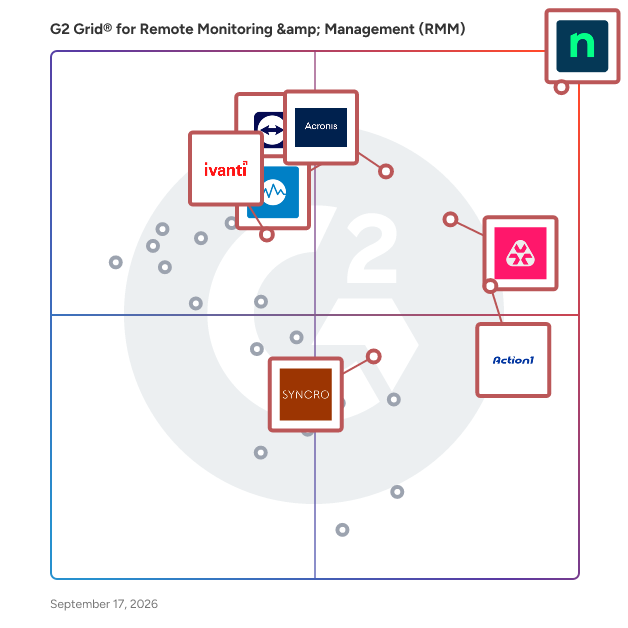
G2 Grid® for Remote Monitoring & Management (RMM) Software

G2 Grid® for Remote Monitoring & Management (RMM) Software plotting products by satisfaction and market presence

Highlighted products: NinjaOne, Remote Monitoring and Management, TeamViewer, Acronis Cyber Protect Cloud, Action1, Datto RMM, Ivanti Autonomous Endpoint Management, and Syncro.

Underlying data: [Grid® JSON](https://www.g2.com/categories/remote-monitoring-management-rmm/grids.json?focus%5B%5D=ninjaone&focus%5B%5D=remote-monitoring-and-management&focus%5B%5D=teamviewer&focus%5B%5D=acronis-cyber-protect-cloud&focus%5B%5D=action1&focus%5B%5D=datto-rmm&focus%5B%5D=ivanti-autonomous-endpoint-management&focus%5B%5D=syncro)

N-able N-central

Join the thousands of MSPs and IT professionals who use N-able™ N-central® to remotely monitor and manage devices and complex networks. Built with security in mind, N-central provides the visibility and efficiency you need to monitor more, provide great customer service, and scale your business. Key features include: • Monitor almost any device, including support for Windows, Linux, and macOS • Gain complete insight across your network and cloud services without the need for extra network monitoring software • Create automated patch management policies to ensure devices are up to date • Streamline your workflow with drag-and-drop scripting in automation manager—no need to write a line of code • Provide remote support across devices and platforms with the integrated Take Control feature • Integrate your existing PSA software or use N-able MSP Manager to manage tickets and billing • Manage security with integrated backup, EDR, AV, and disk encryption • Available as an on-premises or hosted cloud solution to fit your business N-central is designed to help you run your managed services business or internal IT department more efficiently, so you can focus on scaling operations.

Average Rating: 4.4/5.0

Total Reviews: 543

How Do G2 Users Rate N-able N-central?

  • Ease of Admin: 7.9/10 (Category avg: 8.9/10)
  • Device Management: 8.8/10 (Category avg: 9.3/10)
  • Service Management: 8.1/10 (Category avg: 8.5/10)
  • Remote Monitoring: 9.1/10 (Category avg: 9.3/10)

Who Is the Company Behind N-able N-central?

  • Seller: N-able
  • Company Website:
  • HQ Location: Morrisville, North Carolina
  • Twitter: @Nable
    15,859 Twitter followers
  • LinkedIn® Page: www.linkedin.com
    2,307 employees on LinkedIn®
  • Ownership: NYSE: NABL

Who Uses This Product?

  • Who Uses This: Director, Operations Manager
  • Top Industries: Information Technology and Services, Computer & Network Security
  • Company Size: 59% Small, 33% Medium

What Do G2 Reviewers Say About N-able N-central?

AI-generated summary from verified user reviews

Pros
  • Users appreciate the ease of use of N-able N-central, finding it intuitive for managing systems seamlessly.
  • Users value the customizable automation features of N-able N-central, enhancing control and efficiency in IT management.
  • Users value the customizable scripting options in N-able N-central, enhancing control and flexibility for IT management.
  • Users appreciate the solid remote access features of N-able N-central, enhancing system monitoring and management efficiency.
  • Users value the proactive monitoring capabilities of N-able N-central, enhancing efficiency without disrupting clients.
Cons
  • Users find the missing features, like chat and credential management, hinder efficiency and user experience.
  • Users often face feature issues that hinder efficiency, including bugs, connection problems, and inconsistent filtering.
  • Users express frustration over filter editing limitations and the cumbersome patching process in N-able N-central.
  • Users find the steep learning curve due to scattered documentation and lack of comprehensive guides challenging.
  • Users find the interface confusing, struggling with a steep learning curve and unwieldy settings management.

What Are Recent G2 Reviews of N-able N-central?

What Are G2 Users Discussing About N-able N-central?

ConnectWise Automate

ConnectWise Automate, formerly LabTech, is an IT management tool that helps deliver IT services at the speed of business. Our remote monitoring and management (RMM) platform provides powerful automation to discover & manage devices, monitor for problems, and automate action. Deliver streamlined reactive and proactive managed services, stop putting out fires, and start focusing on what matters most. See why over 5,500 partners worldwide chose ConnectWise Automate by visiting https://www.connectwise.com/software/automate or calling 877-522-8323.

Average Rating: 4.1/5.0

Total Reviews: 133

How Do G2 Users Rate ConnectWise Automate?

  • Ease of Admin: 7.2/10 (Category avg: 8.9/10)
  • Device Management: 9.4/10 (Category avg: 9.3/10)
  • Service Management: 8.8/10 (Category avg: 8.5/10)
  • Remote Monitoring: 9.4/10 (Category avg: 9.3/10)

Who Is the Company Behind ConnectWise Automate?

  • Seller: ConnectWise
  • Year Founded: 1982
  • HQ Location: Tampa, FL
  • Twitter: @ConnectWise
    14,926 Twitter followers
  • LinkedIn® Page: www.linkedin.com
    3,401 employees on LinkedIn®
  • Phone: 800-671-6898

Who Uses This Product?

  • Top Industries: Information Technology and Services, Computer & Network Security
  • Company Size: 66% Small, 32% Medium

What Do G2 Reviewers Say About ConnectWise Automate?

AI-generated summary from verified user reviews

Pros
  • Users value the customization and comprehensive features of ConnectWise Automate, enhancing their remote management experience.
  • Users love the convenient all-in-one asset management solution, finding it easy to implement and use daily.
  • Users value the customization capabilities of ConnectWise Automate, enhancing efficiency in managing numerous machines.
  • Users value the alert system in ConnectWise Automate, which efficiently manages ticket SLAs and updates.
  • Users appreciate the excellent customer support of ConnectWise Automate, which enhances their experience with the product.
Cons
  • Users find that the initial setup is time-consuming and requires strong admin oversight for optimal use.
  • Users feel the dated UI and lack of ease of use hinder their experience with ConnectWise Automate.
  • Users report that the agent reliability can be inconsistent, causing delays during reinstallation processes.
  • Users experience intermittent connection issues or site downtime, impacting their overall satisfaction with ConnectWise Automate.
  • Users experience significant bugs and breaking updates in ConnectWise Automate, complicating remote access and device management.

What Are Recent G2 Reviews of ConnectWise Automate?

What Are G2 Users Discussing About ConnectWise Automate?

Kaseya VSA

Kaseya VSA is an integrated IT systems management platform that can be leveraged seamlessly across IT disciplines to streamline and automate your IT services. Kaseya VSA integrates key management capabilities into a single platform. Kaseya VSA gives your IT Team the ability to automate hundreds of tasks and workflows; manage any device, anywhere, at anytime; and protects every endpoint with enhanced threat detection, automated patch management, and more. VSA capabilities include: Remote Monitoring & Control, Patch Management, Network Monitoring, AV/AM, Process Automation, Backup and more.

Average Rating: 4.0/5.0

Total Reviews: 314

How Do G2 Users Rate Kaseya VSA?

  • Ease of Admin: 7.9/10 (Category avg: 8.9/10)
  • Device Management: 8.3/10 (Category avg: 9.3/10)
  • Service Management: 7.9/10 (Category avg: 8.5/10)
  • Remote Monitoring: 8.6/10 (Category avg: 9.3/10)

Who Is the Company Behind Kaseya VSA?

  • Seller: Kaseya
  • Company Website:
  • Year Founded: 2000
  • HQ Location: Miami, FL
  • Twitter: @KaseyaCorp
    17,411 Twitter followers
  • LinkedIn® Page: www.linkedin.com
    5,483 employees on LinkedIn®

Who Uses This Product?

  • Who Uses This: Owner, CEO
  • Top Industries: Information Technology and Services, Computer & Network Security
  • Company Size: 52% Small, 42% Medium

What Do G2 Reviewers Say About Kaseya VSA?

AI-generated summary from verified user reviews

Pros
  • Users appreciate the ease of use of Kaseya VSA, enjoying its practical interface and efficient management tools.
  • Users love the seamless automation features in Kaseya VSA, enhancing their efficiency and productivity across tasks.
  • Users appreciate the seamless script execution and user-friendly interface of Kaseya VSA for efficient management.
  • Users appreciate the user-friendly interface of Kaseya VSA, which simplifies management and enhances administrative efficiency.
  • Users find Kaseya VSA's intuitive interface enhances their experience, making configuration and management seamless.
Cons
  • Users feel the missing features hinder Kaseya VSA, particularly a direct file transfer method and O365 management.
  • Users experience connection issues, finding the process cumbersome and encountering crashes, impacting their workflow significantly.
  • Users face connectivity issues with Kaseya VSA, slowing down their workflow and complicating remote sessions.
  • Users face remote access issues with Kaseya VSA, finding the connection process cumbersome and unreliable at times.
  • Users experience slow performance with Kaseya VSA, facing delays in loading and remote desk operations.

What Are Recent G2 Reviews of Kaseya VSA?

What Are G2 Users Discussing About Kaseya VSA?