Best PDF Editors - Page 28

How Many PDF Editors Products Does G2 Track?

Total Products under this Category: 426

Category Stats (Nov 2026)

  • Average Rating: 4.46/5 The average rating of products in this category, based on all submitted ratings
  • Top Trending Product: MobiPDF (+0.75%) - Among all products in this category, MobiPDF recorded the largest rating increase compared to last month

Last updated: November 01, 2026

How Does G2 Rank PDF Editors Products?

Why You Can Trust G2's Software Rankings:

  • 30 Analysts and Data Experts
  • 20,000+ Authentic Reviews
  • 426+ Products
  • Unbiased Rankings

G2's software rankings are built on verified user reviews, rigorous moderation, and a consistent research methodology maintained by a team of analysts and data experts. Each product is measured using the same transparent criteria, with no paid placement or vendor influence. While reviews reflect real user experiences, which can be subjective, they offer valuable insight into how software performs in the hands of professionals. Together, these inputs power the G2 Score, a standardized way to compare tools within every category.

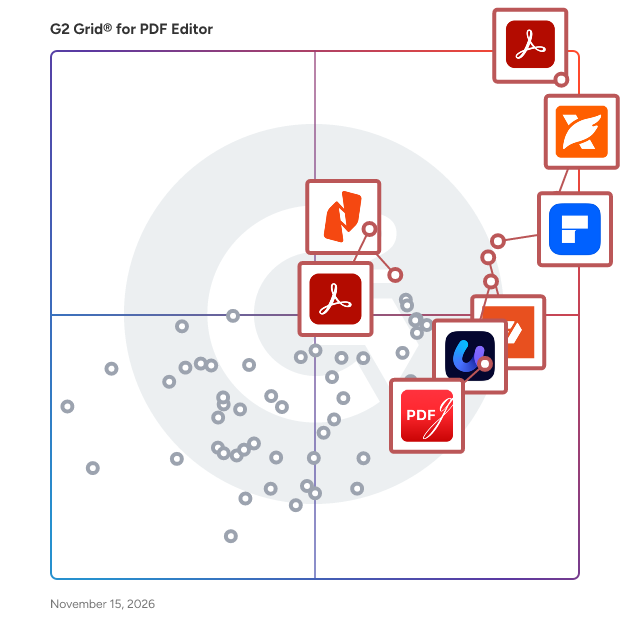
G2 Grid® for PDF Editors

G2 Grid® for PDF Editors plotting products by satisfaction and market presence

Highlighted products: Adobe Acrobat, Foxit PDF Editor, Wondershare PDFelement, pdfFiller, UPDF, Adobe PDF Pack, Nitro PDF, and PDFgear.

Underlying data: [Grid® JSON](https://www.g2.com/categories/pdf-editor/grids.json?focus%5B%5D=adobe-acrobat&focus%5B%5D=foxit-pdf-editor&focus%5B%5D=wondershare-wondershare-pdfelement&focus%5B%5D=pdffiller&focus%5B%5D=updf&focus%5B%5D=adobe-pdf-pack&focus%5B%5D=nitro-pdf&focus%5B%5D=pdfgear)

ToolsGround PDF Unlock Tool

Download ToolsGround ToolsGround PDF Unlock Tool and Removal multiple PDF files at a time. 100% safe unlocking of PDF files. Now, users can easily copy, edit and print the content of PDF documents. No need to possess technical skills to perform the task and a free PDF Unlock Tool version are also available for testing purpose. More Info:- https://www.toolsground.com/pdf-unlock-tool/

Who Is the Company Behind ToolsGround PDF Unlock Tool?

Total PST Repair

Total PST Repair Tool efficient to repair corrupted PST & perform recovery of deleted PST file items. It supports all editions of Outlook.

Who Is the Company Behind Total PST Repair?

TweakPDF

TweakPDF changes existing text in a PDF in the document's own font. It is built for freelancers, small businesses and office teams who need to correct a figure, date, name or typo in an invoice, contract, quote or report without the original source file. Upload a PDF, click the text you want to change and type. TweakPDF removes the original glyphs (no white box drawn over them) and writes the new text with the same embedded font, size, colour and baseline, so the page stays clean and the text remains selectable and searchable. Scanned PDFs are supported through OCR, and you can add a drawn or typed signature. Key features: - Edit existing PDF text in the original font - Works with scanned documents - Preview every change before download - Sign PDFs - Interface in 11 languages - Files are deleted automatically after 2 hours Runs in the browser on Windows, macOS, iPhone and Android with no install. Free plan: 3 downloads per month, no account needed to edit or preview. Pro: $6 per month.

Who Is the Company Behind TweakPDF?

  • Seller: TweakPDF
  • HQ Location: N/A
  • LinkedIn® Page: www.linkedin.com
    1 employees on LinkedIn®
  • Ownership: 55f09c2fc06145e42992a74b072d415e.jpg

AI can help you find the answers. G2 helps you trust them.

Connect G2 to Claude or ChatGPT for answers grounded in G2's trusted reviews, comparisons, and pricing from real user insights.

How it works

UsePDF

All-in-One Online PDF Editor & Converter UsePDF is a powerful, secure, and scalable all-in-one online PDF editor and PDF converter designed for professionals, businesses, and teams that need fast, accurate, and reliable document workflows in the cloud. It is a modern PDF software alternative that allows users to manage all PDF tasks from one intuitive platform, without downloading or installing any software. Advanced PDF Editing & Conversion Tools With UsePDF, users can edit PDF online and perform high-quality conversions such as PDF to Word, PDF to Excel, PDF to PowerPoint, PDF to JPG, PDF to PNG, PDF to TXT, and PDF to HTML, while preserving formatting, fonts, layouts, and structure. The platform also supports Word to PDF, Excel to PDF, image to PDF, and HTML to PDF, making it ideal for business documents, contracts, invoices, reports, and presentations. Additional tools include PDF compression, PDF merge, PDF split, PDF rotation, PDF page management, digital PDF signing, and PDF password protection, allowing users to handle complete PDF document management workflows in one place. Cloud-Based & Cross-Platform UsePDF works seamlessly across Windows, macOS, Linux, and mobile browsers, ensuring full cross-platform compatibility. It integrates directly with Google Drive, Dropbox, and OneDrive, enabling smooth cloud workflows, remote access, and efficient document handling for distributed teams and professionals working online. Fast processing speeds and professional output quality make UsePDF suitable for both everyday PDF tasks and high-volume business use. Security, Privacy & GDPR Compliance Security is a core pillar of UsePDF. The platform uses encrypted file transfers (HTTPS/TLS), automatic file deletion after processing, strict privacy controls, and GDPR-compliant infrastructure. Uploaded files are never reused, shared, or resold, making UsePDF a trusted solution for sensitive and confidential documents. Built for Professionals & Teams UsePDF is designed to scale from individual users and freelancers to organizations and enterprise teams. It offers a clean, modern interface with zero learning curve, flexible subscription plans, affordable trials, and reliable customer support. By replacing multiple standalone PDF tools with one unified solution, UsePDF helps users save time, reduce friction, and improve productivity. Why Choose UsePDF Whether you need a fast PDF to Word converter, a professional online PDF editor, a secure PDF compressor, or a complete cloud-based PDF solution, UsePDF delivers a powerful, efficient, and trustworthy experience. For users looking for a modern alternative to legacy PDF software and fragmented online tools, UsePDF stands out as a comprehensive, high-performance PDF platform built for today’s digital workflows and future growth.

Who Is the Company Behind UsePDF?
VellumPDF

VellumPDF is PDF software for organizations that cannot send client documents to an online service: law firms, fiduciaries and accounting firms, HR departments and medical practices. Every tool runs inside the browser, using WebAssembly, so no file is ever uploaded to a server, whether a provider's or the publisher's. Teams merge, split, compress, convert, sign, fill in forms, run OCR in more than a hundred languages and redact permanently, with no account, no quota and no watermark. The app installs on desktop and mobile and keeps working offline. The VellumPDF Cabinet license adds what a firm bound by professional secrecy needs around the tool: a written GDPR / Swiss FADP processing record confirming local processing, a version installable on the internal network, the firm's own branding and written support. VellumPDF is built in Switzerland and available in eleven languages.

Who Is the Company Behind VellumPDF?

VersaPDF

VersaPDF is a modern, privacy-first, 100% client-side PDF manipulation and productivity suite designed for businesses, teams, and professionals. Unlike traditional cloud-based PDF services, all file processing in VersaPDF is executed entirely in the user's browser using advanced client-side technology. Sensitive business documents and confidential data never leave the local device or get uploaded to third-party servers, ensuring maximum privacy and strict compliance with global data protection standards (such as GDPR). Key capabilities include: - Document Management: Merge, split, organize, rotate, extract, and remove PDF pages. - Advanced Editing: Crop pages, add page numbers, apply watermarks, and fill out interactive PDF forms. - Conversion Suite: Convert PDF to JPG/Markdown and JPG/HTML to PDF seamlessly. - Smart Utilities: In-browser OCR (text recognition), document comparison, digital signature, and direct scanner integration. VersaPDF delivers enterprise-grade PDF processing speed and security with zero installation and absolute confidentiality.

Who Is the Company Behind VersaPDF?

  • Seller: VersaPDF
  • HQ Location: N/A
  • LinkedIn® Page: www.linkedin.com
    1 employees on LinkedIn®
  • Ownership: 89daa5276b19a840dcd57cba9f13763a.png

VersaPDF Studio

VersaPDF Studio is a 100% private, visual all-in-one PDF workspace designed for professionals and individuals who prioritize data confidentiality and workflow speed. Running entirely inside the user's browser, VersaPDF Studio processes sensitive documents locally using client-side WebAssembly and modern PDF engines—ensuring zero files or telemetry data are ever transmitted to external cloud servers. Key Capabilities: • Complete Visual Page Organizer: Intuitive drag-and-drop page reordering, rotation, deletion, duplication, extraction, and batch reorganization. • Comprehensive PDF Utility Suite: Merge multiple documents, split large files into custom sections, add text/image watermarks, digital signatures, and annotations. • Permanent Redaction (Blackout): Securely black out sensitive information and metadata before sharing confidential files. • Zero Cloud Dependency: Fully functional offline with zero bandwidth cost, maximum security, and compliance with strict privacy standards (GDPR/HIPAA considerations).

Who Is the Company Behind VersaPDF Studio?

  • Seller: VersaPDF
  • HQ Location: N/A
  • LinkedIn® Page: www.linkedin.com
    1 employees on LinkedIn®
  • Ownership: 89daa5276b19a840dcd57cba9f13763a.png

Vertopal

Vertopal is an online platform for converting computer files to a variety of file formats. Our main goal is to provide the best conversion quality without needing to install third-party applications. Edit, optimize, and converting images, documents, spreadsheets, presentations, and eBooks were never so easy.

Average Rating: 5.0/5.0

Total Reviews: 1

Who Is the Company Behind Vertopal?

Who Uses This Product?

  • Company Size: 100% Medium, 100% Small

What Are Recent G2 Reviews of Vertopal?

ViceVersa PDF Lock and Unlock Software

The ViceVersa PDF Lock & Unlock Software is the safest solution for locking and unlocking PDF files without losing any data. Multiple PDF documents can be easily locked and unlocked without any data loss. This software works with all Windows OS versions like 11, 10, 8.1, 8, 7, XP, Vista, and others. It is simple to use for techy and non-techy users without hassle. This tool locks PDF files by creating new passes and unlocking several PDF files by removing passwords. This software is simple for anyone to use without the need for another email client users can easily lock PDF files and unlock PDF files. It efficiently exchanges PDF documents while maintaining the original file format for the main concept. Because of its lightweight and intuitive design, this tool can be used by anyone. The tool's free trial version allows users to test it out and analyze its features. Users can produce new PDF files with ease thanks to this application.

Who Is the Company Behind ViceVersa PDF Lock and Unlock Software?

Visual PDF

Free online tools to edit and create PDF files. Visual PDF allows its users to edit their PDF documents by duplicating, deleting, rotating, ordering or croping pages. They also can split a PDF, merge serveral PDFs into one, turn a PDF into images or turn images into images. Visual PDF also provides security features as signing a document, adding or removing a password.

Who Is the Company Behind Visual PDF?

WOK

Who Is the Company Behind WOK?

Neeraja Prakash
NP
Researched and written by Neeraja Prakash
Updated April 10, 2026