Top Free PCB Design Software

How Many PCB Design Software Products Does G2 Track?

Total Products under this Category: 76

Category Stats (Oct 2026)

  • Average Rating: 4.32/5 (↑0.01 vs Sep 2026) The average rating of products in this category, based on all submitted ratings
  • Top Trending Product: Flux (+11.12%) - Among all products in this category, Flux recorded the largest rating increase compared to last month

Last updated: October 01, 2026

How Does G2 Rank PCB Design Software Products?

Why You Can Trust G2's Software Rankings:

  • 30 Analysts and Data Experts
  • 3,800+ Authentic Reviews
  • 76+ Products
  • Unbiased Rankings

G2's software rankings are built on verified user reviews, rigorous moderation, and a consistent research methodology maintained by a team of analysts and data experts. Each product is measured using the same transparent criteria, with no paid placement or vendor influence. While reviews reflect real user experiences, which can be subjective, they offer valuable insight into how software performs in the hands of professionals. Together, these inputs power the G2 Score, a standardized way to compare tools within every category.

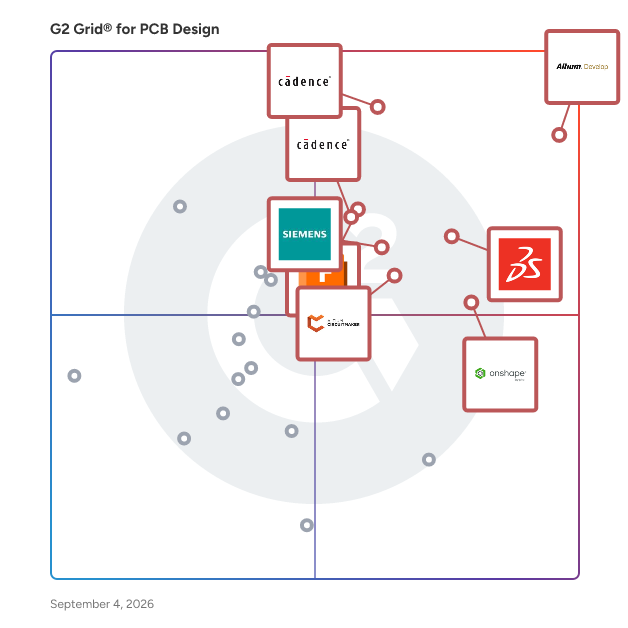
G2 Grid® for PCB Design Software

G2 Grid® for PCB Design Software plotting products by satisfaction and market presence

Highlighted products: Altium Develop, Sigrity X Platform, SOLIDWORKS, Onshape, Autodesk Fusion, Xpedition Standard, Allegro X PCB Designer, and Altium CircuitMaker.

Underlying data: [Grid® JSON](https://www.g2.com/categories/pcb-design/grids.json?focus%5B%5D=altium-develop&focus%5B%5D=sigrity-x-platform&focus%5B%5D=solidworks&focus%5B%5D=onshape&focus%5B%5D=autodesk-fusion&focus%5B%5D=xpedition-standard&focus%5B%5D=allegro-x-pcb-designer&focus%5B%5D=altium-circuitmaker)

Altium Develop

Altium Develop is a collaborative platform for electronic product development that connects requirements management (via Requirements Portal), ECAD design, supply chain, and manufacturing into a single, unified environment. Built on Altium Designer® and Altium 365®, it enables real-time collaboration across engineering, design, and operations teams, reducing delays caused by disconnected tools and file-based workflows. Designed for electronics teams and organizations managing complex PCB and hardware development, Altium Develop supports cross-functional collaboration throughout the entire product lifecycle. Through Requirements Portal, stakeholders can contribute to and review requirements in a centralized workspace, helping ensure alignment from definition through design and delivery. Key capabilities include: • Real-time collaboration: Shared workspace for ECAD design, reviews, and project coordination • Component and supply chain visibility: Access to live component data, pricing, and availability • Requirements management (Requirements Portal): Capture, review, and link product requirements to design decisions for end-to-end traceability • BOM and workflow management: Manage bill of materials, sourcing, and change processes in one platform • ECAD-MCAD co-design: Enable collaboration between electrical and mechanical teams By centralizing design data, workflows, and collaboration, Altium Develop improves visibility, reduces rework, and helps teams bring electronic products to market faster. The platform is particularly well suited for organizations looking to streamline PCB design processes, enhance collaboration, and scale development across distributed teams. Altium Develop is used by teams evaluating alternatives to tools like Autodesk Fusion, KiCad, Cadence OrCAD, and SOLIDWORKS for PCB design and collaborative electronics development, including requirements management for hardware and electronics systems.

Average Rating: 4.5/5.0

Total Reviews: 1,051

How Do G2 Users Rate Altium Develop?

  • Schematic editor: 9.2/10 (Category avg: 8.5/10)
  • PCB layout editing: 9.1/10 (Category avg: 8.5/10)
  • Quality of Support: 8.2/10 (Category avg: 8.5/10)
  • 3D modeling tools: 7.6/10 (Category avg: 8.0/10)

Who Is the Company Behind Altium Develop?

  • Seller: Altium
  • Company Website:
  • Year Founded: 1985
  • HQ Location: La Jolla, CA
  • Twitter: @altium
    9,901 Twitter followers
  • LinkedIn® Page: www.linkedin.com
    1,250 employees on LinkedIn®

Who Uses This Product?

  • Who Uses This: Electrical Engineer, Student
  • Top Industries: Electrical/Electronic Manufacturing, Automotive
  • Company Size: 59% Small, 29% Medium

What Do G2 Reviewers Say About Altium Develop?

AI-generated summary from verified user reviews

Pros
  • Users love the intuitive ease of use of Altium Develop, which greatly enhances their PCB design experience.
  • Users appreciate the powerful collaboration features of Altium Develop, streamlining teamwork and enhancing design efficiency.
  • Users appreciate the user-friendly interface and seamless integration of Altium Designer for efficient PCB design.
  • Users value the collaborative environment of Altium Develop, enhancing teamwork and efficiency during design and testing phases.
  • Users commend Altium Develop for its efficiency, significantly enhancing productivity and streamlining PCB design processes.
Cons
  • Users find the steep learning curve challenging, requiring significant time and effort to master Altium Develop.
  • Users find Altium Develop expensive, with high costs posing barriers for hobbyists and new learners in the ecosystem.
  • Users express the need for more editing options and tools, as current features feel limited and confusing.
  • Users find the complex interface of Altium Develop confusing, especially when navigating layers and settings.
  • Users experience slow performance issues, particularly with loading times and clunky interfaces, impacting productivity.

What Are Recent G2 Reviews of Altium Develop?

What Are G2 Users Discussing About Altium Develop?

Onshape

Onshape by PTC is the leading cloud-native CAD & PDM platform that runs on any device, anywhere-requiring zero IT. Onshape is for product design companies who are fed up with the errors, time waste, and hidden costs of outdated file-based CAD & PDM. Only Onshape: - Eliminates CAD crashes and never loses data - Enables secure, real-time collaboration - Tracks all activity and provides infinite restore - Has built-in PDM with branching and merging

Average Rating: 4.7/5.0

Total Reviews: 711

How Do G2 Users Rate Onshape?

  • Schematic editor: 1.7/10 (Category avg: 8.5/10)
  • PCB layout editing: 2.2/10 (Category avg: 8.5/10)
  • Quality of Support: 9.3/10 (Category avg: 8.5/10)
  • 3D modeling tools: 7.8/10 (Category avg: 8.0/10)

Who Is the Company Behind Onshape?

  • Seller: PTC
  • Company Website:
  • Year Founded: 1985
  • HQ Location: Boston, Massachusetts
  • Twitter: @PTC
    37,560 Twitter followers
  • LinkedIn® Page: www.linkedin.com
    8,226 employees on LinkedIn®

Who Uses This Product?

  • Who Uses This: Mechanical Engineer, Owner
  • Top Industries: Mechanical or Industrial Engineering, Design
  • Company Size: 78% Small, 17% Medium

What Do G2 Reviewers Say About Onshape?

AI-generated summary from verified user reviews

Pros
  • Users praise the ease of use in Onshape, finding it simple, fast, and accessible from any device.
  • Users value the collaboration features of Onshape, enabling seamless communication and real-time document access with their teams.
  • Users appreciate the online accessibility of Onshape, enabling work from any device without installation concerns.
  • Users appreciate the easy cloud-based access of Onshape, allowing seamless workflow and organization from any device.
  • Users value the cloud-based accessibility of Onshape, enabling work from anywhere on any device seamlessly.
Cons
  • Users note the missing features in Onshape compared to established CAD software, specifically in sheet metal and CAM options.
  • Users note a lack of features compared to Solidworks, impacting usability and collaboration potential.
  • Users find drawing issues in Onshape, citing limitations in annotation, exporting, and basic drawing functionalities.
  • Users experience internet dependency issues with Onshape, leading to frustration during slow or unstable connections.
  • Users note that Onshape has limited CAD features, particularly in sheet metal and drawing environments, affecting usability.

What Are Recent G2 Reviews of Onshape?

What Are G2 Users Discussing About Onshape?

Autodesk Fusion

Autodesk Fusion connects capabilities, data, and people across the entire product development lifecycle. Fusion provides you with CAD, CAM, CAE and PCB tools along with PLM/PDM and MES (manufacturing execution system) capabilities to facilitate seamless workflows across your entire organization. Key features: - 3D Design and Modeling: Autodesk Fusion offers a robust set of tools for creating 3D models and designs, making it ideal for product development and industrial design. - Manufacturing Integration: With Autodesk Fusion, you can design and manufacture products using the same platform, streamlining the process from concept to production. - Electronics Design: PCB design capabilities are integrated into the Autodesk Fusion platform, allowing for the creation of electronic components as part of the overall product design process. - Simulation and Analysis: Autodesk Fusion includes simulation tools to test and optimize designs before manufacturing, reducing the need for physical prototypes. - Cloud Collaboration: As a cloud-based platform, Autodesk Fusion enables seamless collaboration among design and engineering teams, regardless of location. - Generative Design: This feature allows you to input design goals and constraints, and Autodesk Fusion will generate multiple design options that meet these criteria. By integrating the entire product development process into one platform, Autodesk Fusion allows users to bring products to market faster and more efficiently.

Average Rating: 4.5/5.0

Total Reviews: 509

How Do G2 Users Rate Autodesk Fusion?

  • Schematic editor: 8.4/10 (Category avg: 8.5/10)
  • PCB layout editing: 8.5/10 (Category avg: 8.5/10)
  • Quality of Support: 8.4/10 (Category avg: 8.5/10)
  • 3D modeling tools: 9.1/10 (Category avg: 8.0/10)

Who Is the Company Behind Autodesk Fusion?

  • Seller: Autodesk
  • Company Website:
  • Year Founded: 1982
  • HQ Location: San Francisco
  • Twitter: @autodesk
    273,215 Twitter followers
  • LinkedIn® Page: www.linkedin.com
    15,757 employees on LinkedIn®

Who Uses This Product?

  • Who Uses This: Owner, Design Engineer
  • Top Industries: Mechanical or Industrial Engineering, Design
  • Company Size: 68% Small, 22% Medium

What Do G2 Reviewers Say About Autodesk Fusion?

AI-generated summary from verified user reviews

Pros
  • Users find Autodesk Fusion's ease of use advantageous for linking 3D printers and managing personal projects seamlessly.
  • Users appreciate the customizable toolbars and advanced modeling tools in Autodesk Fusion, enhancing productivity and design precision.
  • Users praise the design efficiency of Autodesk Fusion, as customizable tools and easy navigation enhance productivity.
  • Users commend the user-friendly interface and extensive capabilities of Autodesk Fusion 360, enhancing their design engineering experience.
  • Users find Autodesk Fusion’s ease of learning beneficial for product design, especially with prior CAD experience.
Cons
  • Users find difficult learning in Autodesk Fusion, making initial use challenging despite its smoother operation afterward.
  • Users face a challenging learning curve in Autodesk Fusion, complicating design adjustments and assembly processes.
  • Users face assembly difficulties due to limited customization options and complex timeline management when adjusting designs.
  • Users express frustration over missing features like real-time editing and easy adjustments, impacting their overall experience.
  • Users experience significant performance issues with Autodesk Fusion, including bugs, glitches, and slow processing.

What Are Recent G2 Reviews of Autodesk Fusion?

What Are G2 Users Discussing About Autodesk Fusion?

AI can help you find the answers. G2 helps you trust them.

Connect G2 to Claude or ChatGPT for answers grounded in G2's trusted reviews, comparisons, and pricing from real user insights.

How it works

Xpedition Standard

Xpedition Standard is a type of PCB (Printed Circuit Board) design solution specifically engineered to assist individual engineers and expanding teams in the electronics design industry. Built on Siemens’ robust Xpedition technology stack, this software integrates intelligent automation and collaborative workflows, enabling users to design, reuse, and efficiently release their projects to manufacturing. The primary goal of Xpedition Standard is to enhance productivity and scalability, allowing teams to work with confidence as they navigate the complexities of PCB design. Targeted at small to mid-sized engineering teams, Xpedition Standard serves as a bridge between entry-level tools that may limit growth and comprehensive enterprise solutions that can overwhelm smaller teams with unnecessary features. It offers professional-grade capabilities in a mid-tier package, ensuring that users have access to advanced functionalities without the associated costs and complexities of higher-tier solutions. This makes it an ideal choice for organizations looking to enhance their design processes while maintaining budgetary constraints. One of the key features of Xpedition Standard is its support for seamless collaboration across various domains, including electrical design (ECAD), mechanical design (MCAD), manufacturing, and sourcing. This integration allows distributed teams to work together more efficiently, minimizing costly handoffs and reducing the likelihood of rework. Additionally, the software provides flexible expansion options, enabling teams to incorporate advanced capabilities such as rigid-flex design, signal integrity analysis, and enhanced MCAD co-design as their projects evolve. This adaptability ensures that teams can meet increasing design challenges without the need for a complete upgrade. The user experience of Xpedition Standard is designed to be intuitive, with built-in automation that accelerates every stage of PCB development, from schematic capture to manufacturing preparation. The solution also includes integrated real-time component sourcing intelligence, which offers live insights into the supply chain. This feature helps reduce risks associated with component availability and enhances the overall reliability of designs. Xpedition Standard is suitable for a range of projects, from simple circuit boards to more intricate designs, delivering enterprise-grade results without the associated costs and complexities. By empowering growing teams to achieve shorter design cycles and higher first-pass success rates, Xpedition Standard provides a clear and efficient pathway to advanced and enterprise-level Xpedition tiers, all while ensuring data continuity and familiar workflows.

Average Rating: 4.5/5.0

Total Reviews: 13

How Do G2 Users Rate Xpedition Standard?

  • Schematic editor: 9.7/10 (Category avg: 8.5/10)
  • PCB layout editing: 10.0/10 (Category avg: 8.5/10)
  • Quality of Support: 9.7/10 (Category avg: 8.5/10)
  • 3D modeling tools: 6.0/10 (Category avg: 8.0/10)

Who Is the Company Behind Xpedition Standard?

Who Uses This Product?

  • Top Industries: Airlines/Aviation, Computer & Network Security
  • Company Size: 38% Small, 31% Large

What Do G2 Reviewers Say About Xpedition Standard?

AI-generated summary from verified user reviews

Pros
  • Users appreciate the seamless integration of Xpedition Standard, enhancing communication and efficiency across various software platforms.
  • Users admire the native 3D visualization of Xpedition Standard, enhancing early detection of mechanical issues for better designs.
  • Users appreciate the AI-driven automation in Xpedition Standard, which significantly enhances routing and layout efficiency.
  • Users appreciate the cloud collaboration tools of Xpedition Standard for efficient design reviews in distributed teams.
  • Users appreciate the seamless collaboration features of Xpedition Standard, enhancing team efficiency and design management.
Cons
  • Users find the licensing issues with Xpedition Standard restrictive, preferring a concurrent license model for better flexibility.
  • Users find Xpedition Standard has missing features compared to PADS Pro, impacting usability and functionality.

What Are Recent G2 Reviews of Xpedition Standard?

Altium CircuitMaker

Altium CircuitMaker is the best free-to-use schematic and PCB design tool for the Open Source Hardware community of designers, makers, hobbyists, students and professionals. CircuitMaker delivers powerful autorouting capabilities, hierarchical schematic entry, and Native 3D™ technology that's easily accessible and free to use.

Average Rating: 4.3/5.0

Total Reviews: 110

How Do G2 Users Rate Altium CircuitMaker?

  • Schematic editor: 8.8/10 (Category avg: 8.5/10)
  • PCB layout editing: 8.8/10 (Category avg: 8.5/10)
  • Quality of Support: 7.7/10 (Category avg: 8.5/10)
  • 3D modeling tools: 7.5/10 (Category avg: 8.0/10)

Who Is the Company Behind Altium CircuitMaker?

  • Seller: Altium
  • Company Website:
  • Year Founded: 1985
  • HQ Location: La Jolla, CA
  • Twitter: @altium
    9,901 Twitter followers
  • LinkedIn® Page: www.linkedin.com
    1,250 employees on LinkedIn®

Who Uses This Product?

  • Top Industries: Electrical/Electronic Manufacturing, Consumer Electronics
  • Company Size: 68% Small, 16% Large

What Do G2 Reviewers Say About Altium CircuitMaker?

AI-generated summary from verified user reviews

Pros
  • Users appreciate the ease of use and powerful tools of Altium CircuitMaker for efficient PCB design and development.
  • Users appreciate the wide range of intuitive features in Altium CircuitMaker, facilitating efficient PCB design and project collaboration.
  • Users love the intuitive interface of Altium CircuitMaker, making it easy for anyone to learn and design circuits.
  • Users value the robust library management capabilities of CircuitMaker, facilitating seamless component integration and project development.
  • Users value the seamless online collaboration with global teams, enhancing their PCB design and engineering experience.
Cons
  • Users report slow rendering times, particularly with large files, affecting efficiency during design processes.
  • Users find the complex interface of Altium CircuitMaker frustrating, hindering usability and complicating their design experience.
  • Users find the difficult learning process of Altium CircuitMaker challenging, particularly for beginners navigating its complex features.
  • Users find the limited features of Altium CircuitMaker restrictive, particularly in importing external footprints and file compatibility.
  • Users highlight missing features in Altium CircuitMaker, particularly in the component library and support functionalities.

What Are Recent G2 Reviews of Altium CircuitMaker?

What Are G2 Users Discussing About Altium CircuitMaker?

PADS Professional

PADS Professional PCB software is a comprehensive electronic design automation (EDA) software suite developed by Siemens Digital Industries Software, formerly Mentor Graphics. It provides advanced tools for designing, simulating, verifying, and manufacturing printed circuit boards (PCBs) and electronic systems.

Average Rating: 4.1/5.0

Total Reviews: 65

How Do G2 Users Rate PADS Professional?

  • Schematic editor: 8.2/10 (Category avg: 8.5/10)
  • PCB layout editing: 8.3/10 (Category avg: 8.5/10)
  • Quality of Support: 8.7/10 (Category avg: 8.5/10)
  • 3D modeling tools: 8.0/10 (Category avg: 8.0/10)

Who Is the Company Behind PADS Professional?

Who Uses This Product?

  • Top Industries: Electrical/Electronic Manufacturing, Design
  • Company Size: 56% Small, 36% Medium

What Do G2 Reviewers Say About PADS Professional?

AI-generated summary from verified user reviews

Pros
  • Users value the advanced design features of PADS Professional, enhancing efficiency and accuracy in PCB development.
  • Users value the advanced simulation tools of PADS Professional, enhancing design accuracy and streamlining hardware development.
  • Users value the comprehensive PCB design tools of PADS Professional, enhancing efficiency and collaboration in projects.
  • Users appreciate the design accuracy of PADS Professional, enhancing workflows and minimizing errors in PCB design.
  • Users value the comprehensive PCB design tools of PADS Professional, enhancing efficiency in high-speed and complex layouts.
Cons
  • Users find the complex interface of PADS Professional challenging, leading to a steep learning curve and reduced productivity.
  • Users find the difficult learning process of PADS Professional overwhelming, especially with its complex setup and interface.
  • Users find the steep learning curve of PADS Professional challenging, especially when navigating advanced features.
  • Users find the complex design process of PADS Professional to be slow and lacking essential features for advanced PCB designs.
  • Users report back-annotation problems and issues with the Decal Editor and constraints management in PADS Professional.

What Are Recent G2 Reviews of PADS Professional?

What Are G2 Users Discussing About PADS Professional?

NI Multisim

Multisim is industry standard SPICE simulation and circuit design software for analog, digital, and power electronics in education and research. Multisim integrates industry standard SPICE simulation with an interactive schematic environment to instantly visualize and analyze electronic circuit behavior. Multisim has an intuitive interface that helps educators reinforce circuit theory and improve retention of theory throughout engineering curriculum. Researchers and designers use Multisim to reduce PCB prototype iterations and save development costs by adding powerful circuit simulation and analyses to the design flow.

Average Rating: 4.3/5.0

Total Reviews: 42

How Do G2 Users Rate NI Multisim?

  • Schematic editor: 9.2/10 (Category avg: 8.5/10)
  • PCB layout editing: 7.8/10 (Category avg: 8.5/10)
  • Quality of Support: 8.3/10 (Category avg: 8.5/10)
  • 3D modeling tools: 6.7/10 (Category avg: 8.0/10)

Who Is the Company Behind NI Multisim?

  • Seller: NI
  • Year Founded: 1976
  • HQ Location: Austin, TX
  • Twitter: @NIglobal
    26,204 Twitter followers
  • LinkedIn® Page: www.linkedin.com
    8,041 employees on LinkedIn®
  • Ownership: NASDAQ: NATI

Who Uses This Product?

  • Top Industries: Electrical/Electronic Manufacturing
  • Company Size: 48% Small, 26% Large

What Are Recent G2 Reviews of NI Multisim?

What Are G2 Users Discussing About NI Multisim?

DipTrace

DipTrace is professional PCB design software by Novarm Limited, used by 30,000+ engineers worldwide — from Fortune 500 companies to independent designers. Features include interactive push-and-shove routing and editing — traces and components move fluidly with automatic rerouting — hierarchical multi-sheet schematics, IPC-compliant footprint generator, real-time 3D preview, and direct access to 2M+ components via SnapEDA integration. Supports multi-layer boards with copper pours, differential pairs, and high-speed design rules. Imports Eagle, Altium, KiCad, OrCAD, and other formats. Perpetual license — pay once, no subscription.

Average Rating: 4.3/5.0

Total Reviews: 44

How Do G2 Users Rate DipTrace?

  • Schematic editor: 8.6/10 (Category avg: 8.5/10)
  • PCB layout editing: 8.8/10 (Category avg: 8.5/10)
  • Quality of Support: 8.5/10 (Category avg: 8.5/10)
  • 3D modeling tools: 7.5/10 (Category avg: 8.0/10)

Who Is the Company Behind DipTrace?

  • Seller: DipTrace
  • Year Founded: 2002
  • HQ Location: Ukraine
  • Twitter: @DipTrace
    256 Twitter followers
  • LinkedIn® Page: www.linkedin.com
    1 employees on LinkedIn®

Who Uses This Product?

  • Top Industries: Electrical/Electronic Manufacturing, Automotive
  • Company Size: 61% Small, 22% Medium

What Are Recent G2 Reviews of DipTrace?

What Are G2 Users Discussing About DipTrace?

KiCad EDA

KiCad is an open source software suite for Electronic Design Automation (EDA). KiCad handles schematic capture, symbol and footprint library management, PCB Layout with Gerber output and 3d model generation. KiCad runs on Windows, Linux and macOS. KiCad is the most used EDA tool in the world.

Average Rating: 4.5/5.0

Total Reviews: 64

How Do G2 Users Rate KiCad EDA?

  • Schematic editor: 8.3/10 (Category avg: 8.5/10)
  • PCB layout editing: 8.0/10 (Category avg: 8.5/10)
  • Quality of Support: 7.9/10 (Category avg: 8.5/10)
  • 3D modeling tools: 6.5/10 (Category avg: 8.0/10)

Who Is the Company Behind KiCad EDA?

  • Seller: KiCad Project
  • Year Founded: 2019
  • HQ Location: Long Beach, US
  • Twitter: @kicad_pcb
    30,259 Twitter followers
  • LinkedIn® Page: www.linkedin.com
    7 employees on LinkedIn®

Who Uses This Product?

  • Who Uses This: Electrical Engineer
  • Top Industries: Electrical/Electronic Manufacturing, Consumer Electronics
  • Company Size: 83% Small, 14% Medium

What Do G2 Reviewers Say About KiCad EDA?

AI-generated summary from verified user reviews

Pros
  • Users find KiCad EDA very easy to use, allowing for quick prototyping and efficient design without cost.
  • Users value the vast library support in KiCad EDA, facilitating easy prototyping and quick updates.
  • Users value the cross-platform support of KiCad EDA, making it accessible across different operating systems.
  • Users value the fast updates and extensive library support provided by KiCad EDA, enhancing their design experience.
  • Users find KiCad EDA to be a user-friendly tool, making prototyping and learning enjoyable for beginners.
Cons
  • Users find the lack of cloud sync limiting, particularly for larger projects that need better collaboration tools.
  • Users criticize the inefficient autorouting in KiCad EDA, often encountering bugs that hinder their design processes.
  • Users struggle with library management when sharing designs among different stakeholders, leading to confusion and inefficiencies.
  • Users find the limited customization of KiCad EDA restrictive for larger projects and lacking in cloud sync features.
  • Users note the limited features of KiCad EDA compared to high-end alternatives, impacting advanced project capabilities.

What Are Recent G2 Reviews of KiCad EDA?

What Are G2 Users Discussing About KiCad EDA?

ETAP

ETAP® is a full spectrum analytical engineering software company specializing in the analysis, simulation, monitoring, control, optimization, and automation of electrical power systems. ETAP electrical engineering software offers the best and most comprehensive suite of integrated power system enterprise solution.

Average Rating: 4.3/5.0

Total Reviews: 20

How Do G2 Users Rate ETAP?

  • Quality of Support: 8.0/10 (Category avg: 8.5/10)

Who Is the Company Behind ETAP?

Who Uses This Product?

  • Company Size: 45% Large, 32% Medium

What Do G2 Reviewers Say About ETAP?

AI-generated summary from verified user reviews

Cons
  • Users report challenging licensing issues with ETAP, often experiencing unresponsive support and delays in the onboarding process.
  • Users feel frustrated with the limited support and responsiveness from ETAP representatives during the onboarding process.
  • Users experience poor navigation in ETAP's onboarding process, encountering unresponsive support and delays from sales representatives.

What Are Recent G2 Reviews of ETAP?

What Are G2 Users Discussing About ETAP?

DesignSpark PCB

DesignSpark PCB is a comprehensive printed circuit board (PCB) design software developed to cater to engineers and designers across various experience levels. It offers a robust platform for creating, testing, and finalizing PCB designs without imposing limitations on layers, connections, or schematic sizes. This flexibility ensures that users can undertake projects ranging from simple single-layer boards to complex multi-layered designs. One of the standout features of DesignSpark PCB is its unlimited schematic sheets and PCB layer count, allowing for intricate and expansive designs without constraints. The software supports seamless integration with mechanical design tools and SPICE simulators, facilitating a holistic design process that encompasses both electronic and mechanical aspects. Users can generate manufacturing plots, including Gerber and Excellon files, and produce essential reports such as Bills of Materials (BoM) and generic netlists, streamlining the transition from design to production. The Design Rule Check (DRC) functionality is integral to ensuring design accuracy and manufacturability. By verifying that designs adhere to predefined rules, DRC helps mitigate potential errors that could lead to costly manufacturing issues. Additionally, the software offers pre-plot checks to confirm correct layer selections before generating output files, further enhancing design reliability. For those seeking advanced capabilities, DesignSpark PCB paid subscriptions introduce features like serpentine routing, which is particularly beneficial for high-speed PCB designs requiring precise signal timing. The Archimedean spiral generator facilitates the creation of compact, frequency-independent antenna designs suitable for wide bandwidth wireless communication. An interactive BoM exporter outputs an HTML file with a clickable PCB layout and parts list, simplifying component identification during prototyping. Integration with SnapEDA.com provides users access to millions of CAD models for electronic components. This feature allows for easy searching, previewing, and insertion of schematic symbols and PCB footprints directly into projects, enhancing design efficiency. The software also supports blind and buried vias, essential for high-density PCB designs where space is limited, and differential pairs, which are crucial for maintaining signal integrity in high-quality audio and video applications. DesignSpark PCB is designed with user-friendliness in mind, featuring an intuitive interface that accommodates both novice designers and seasoned professionals. Its professional-grade tools, including unlimited layers and manufacturing-ready outputs, ensure that users have the resources needed to bring their designs to fruition. The software offers a free Explorer plan with no hidden fees, allowing users to start their design journey without financial commitment and upgrade to more advanced plans as needed. Community support is a cornerstone of the DesignSpark ecosystem. Users have access to a vibrant community where they can ask questions, access tutorials, and receive assistance from fellow engineers. This collaborative environment fosters continuous learning and problem-solving, enhancing the overall user experience. In summary, DesignSpark PCB provides a versatile and powerful platform for PCB design, offering a range of features that support the entire design process from conception to production. Its combination of flexibility, advanced tools, and community support makes it a valuable resource for engineers and designers aiming to create high-quality PCB designs efficiently.

Average Rating: 4.3/5.0

Total Reviews: 6

How Do G2 Users Rate DesignSpark PCB?

  • Schematic editor: 9.0/10 (Category avg: 8.5/10)
  • PCB layout editing: 8.3/10 (Category avg: 8.5/10)
  • Quality of Support: 9.0/10 (Category avg: 8.5/10)
  • 3D modeling tools: 7.7/10 (Category avg: 8.0/10)

Who Is the Company Behind DesignSpark PCB?

Who Uses This Product?

  • Company Size: 67% Small, 33% Large

What Are Recent G2 Reviews of DesignSpark PCB?

What Are G2 Users Discussing About DesignSpark PCB?

Flux

Flux is browser-based PCB design software (EDA) with a built-in AI copilot that works as a hardware co-designer. It generates schematics from natural-language prompts, selects and places components, routes traces, and runs design rule checks, taking a project from idea to manufacturable board in one tool. There is nothing to install: projects run in the browser with real-time multi-user collaboration. Core capabilities: - AI copilot for schematic generation, part selection, placement, routing, and design review, including full plan-to-layout workflows from a text prompt - Schematic capture and PCB layout with live design rule checks - Real-time collaboration: multiple engineers can work in the same project simultaneously - Component library with sourcing data, plus BOM and Gerber export for manufacturing - Import support for Altium and KiCad projects Flux is used by startups, hardware teams, and individual engineers as an alternative to desktop EDA tools such as Altium Designer and KiCad, and by teams migrating off Autodesk EAGLE after its retirement in June 2026. As of 2026, Flux has 1.1 million registered builders and 6.4 million projects. Pricing: paid plans from $20 to $158 per month, with AI features metered through compute credits included in each plan. Free 14 day trial to start.

Average Rating: 4.2/5.0

Total Reviews: 3

How Do G2 Users Rate Flux?

  • Schematic editor: 10.0/10 (Category avg: 8.5/10)
  • PCB layout editing: 10.0/10 (Category avg: 8.5/10)
  • Quality of Support: 10.0/10 (Category avg: 8.5/10)

Who Is the Company Behind Flux?

  • Seller: flux.ai
  • Company Website:
  • Year Founded: 2019
  • HQ Location: San Francisco, US
  • LinkedIn® Page: www.linkedin.com
    127 employees on LinkedIn®

Who Uses This Product?

  • Company Size: 100% Small

What Are Recent G2 Reviews of Flux?

elec calc

elec calc is a calculation software for the design of all types of high and low voltage architecture according to the corresponding national and/or international standards. Its user-friendly interface has been designed to bring flexibility and productivity to the design of your projects. The software will accompany you to ensure both the compliance and optimisation of your installation. Optimised power grid design With elec calc, accurately model your grid architecture to optimise the energy efficiency and reliability of your facilities. Accurate cable sizing Ensure the safety and performance of your electrical systems with cable cross-section calculations that take into account the latest standards and technologies.7 Intelligent Protective Device Selection Simplify your protective equipment selection with an ever-growing multi-manufacturer database for seamless and cost-effective integration. Rigorous Electrical Risk Assessment Accurately assess short-circuit currents, which are critical to the safety of your facilities, controlling risks and ensuring compliance with international safety standards. Features : - Exceptional Compute Performance - Simulation of all operating scenarios - If you draw it, it's calculated - State-of-the-art know-how - An accelerator for your international development - Precision saves money - A real time saver - Enhanced security - A multi-manufacturer catalogue - Easy editing, export and printing The guarantee of personalized assistance. We believe that the key to success for our users is not just our products, but the conjunction of our programs and services. In order to better meet your expectations, Trace Software has set up many services and offers you two levels of contracts; Silver or Gold to better meet your needs while supporting you over the long term. Trace Software solutions are professional programs with a large number of technical features. By subscribing to one of these service contracts, we are committed to supporting you throughout the use of the software and over the entire duration of the contract. They chose elec calc : "In elec calc, it is very easy to manage several operating modes on the same installation as well as several sources" - Study Manager "The elec calc tool is versatile with support for both high and low voltage in the same project, which is a strong point." Design Office Manager

Average Rating: 5.0/5.0

Total Reviews: 2

How Do G2 Users Rate elec calc?

  • Quality of Support: 10.0/10 (Category avg: 8.5/10)

Who Is the Company Behind elec calc?

  • Seller: Trace Software International
  • Year Founded: 1987
  • HQ Location: St Romain de Colbosc, FR
  • Twitter: @tracesoftware
    397 Twitter followers
  • LinkedIn® Page: www.linkedin.com
    88 employees on LinkedIn®
  • Phone: +33232794424

Who Uses This Product?

  • Company Size: 50% Large, 50% Medium

What Are Recent G2 Reviews of elec calc?

What Are G2 Users Discussing About elec calc?

XFdtd 3D Electromagnetic Simulation Software

XFdtd Electromagnetic Simulation Software is a full wave 3D EM solver for designing and analyzing complex, high-fidelity devices. XF leads the market in FDTD-based modeling and simulation. Why FDTD? The main benefit of the FDTD approach is the excellent scaling performance of the method as the problem size grows. As the number of unknowns increases, the FDTD approach quickly outpaces other methods in efficiency. FDTD has also been identified as the preferred method for performing electromagnetic simulations for biological effects from wireless devices. Applications Include: • Antenna Design and Placement • Automotive Radar • Biomedical EM Analysis • EMI/EMC Testing • Microwave Devices and Waveguides • Radar and Scattering • SAR Validation

Who Is the Company Behind XFdtd 3D Electromagnetic Simulation Software?

  • Seller: Remcom
  • Year Founded: 1994
  • HQ Location: State College, US
  • LinkedIn® Page: www.linkedin.com
    38 employees on LinkedIn®
Daniel Rivera
DR
Researched and written by Daniel Rivera
Updated March 5, 2025