Best Operating Systems - Page 6

How Many Operating Systems Products Does G2 Track?

Total Products under this Category: 146

Category Stats (Sep 2026)

  • Average Rating: 4.31/5 The average rating of products in this category, based on all submitted ratings
  • Top Trending Product: SUSE Multi-Linux Support (+3.13%) - Among all products in this category, SUSE Multi-Linux Support recorded the largest rating increase compared to last month

Last updated: September 01, 2026

How Does G2 Rank Operating Systems Products?

Why You Can Trust G2's Software Rankings:

  • 30 Analysts and Data Experts
  • 18,800+ Authentic Reviews
  • 146+ Products
  • Unbiased Rankings

G2's software rankings are built on verified user reviews, rigorous moderation, and a consistent research methodology maintained by a team of analysts and data experts. Each product is measured using the same transparent criteria, with no paid placement or vendor influence. While reviews reflect real user experiences, which can be subjective, they offer valuable insight into how software performs in the hands of professionals. Together, these inputs power the G2 Score, a standardized way to compare tools within every category.

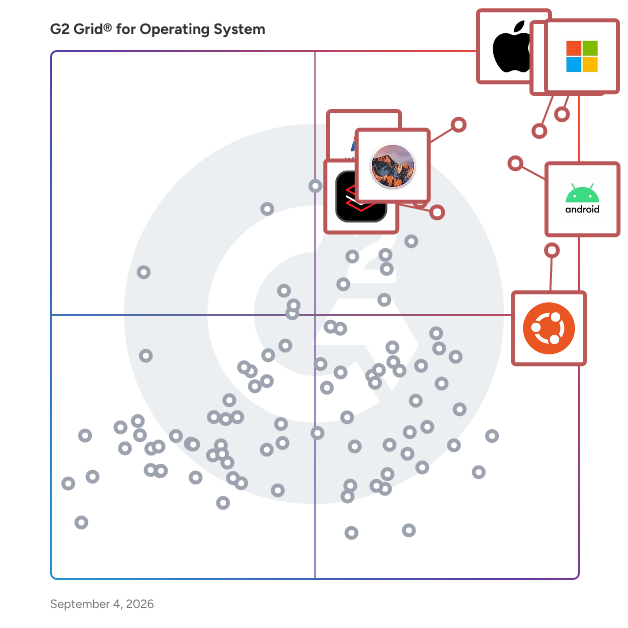
G2 Grid® for Operating Systems

G2 Grid® for Operating Systems plotting products by satisfaction and market presence

Highlighted products: Apple iOS, Windows 11, Chrome OS, Android, macOS Sierra, Ubuntu, Red Hat Enterprise Linux, and Windows 7.

Underlying data: [Grid® JSON](https://www.g2.com/categories/operating-system/grids.json?focus%5B%5D=apple-ios&focus%5B%5D=windows-11&focus%5B%5D=chrome-os&focus%5B%5D=android&focus%5B%5D=apple-macos-sierra&focus%5B%5D=ubuntu&focus%5B%5D=red-hat-enterprise-linux&focus%5B%5D=windows-7)

CopperheadOS

CopperheadOS is a secure Android built for encrypted and secure phones by a privacy focused company. Available as security-centric and privacy focused Google-free Android for the latest Pixel devices.

Average Rating: 4.1/5.0

Total Reviews: 18

How Do G2 Users Rate CopperheadOS?

  • Has the product been a good partner in doing business?: 8.3/10 (Category avg: 8.5/10)
  • Ease of Use: 8.3/10 (Category avg: 8.5/10)
  • Quality of Support: 8.3/10 (Category avg: 8.2/10)
  • Ease of Admin: 8.5/10 (Category avg: 8.5/10)

Who Is the Company Behind CopperheadOS?

  • Seller: Copperhead
  • Year Founded: 2015
  • HQ Location: Toronto, CA
  • Twitter: @CopperheadOS
    5,522 Twitter followers
  • LinkedIn® Page: www.linkedin.com
    5 employees on LinkedIn®

Who Uses This Product?

  • Company Size: 50% Medium, 33% Small

What Do G2 Reviewers Say About CopperheadOS?

AI-generated summary from verified user reviews

Pros
  • Users value the enhanced security and safety of CopperheadOS, providing peace of mind for sensitive communications.
  • Users value the strong focus on security and privacy in CopperheadOS, ensuring their data remains protected.
  • Users appreciate the strong focus on security and privacy in CopperheadOS, maintaining performance with essential features.
  • Users value the regular updates of CopperheadOS, enhancing security and ensuring optimal performance without bloat.
  • Users value the compatibility with alternative app stores, enhancing development for secure applications.
Cons
  • Users find the installation process difficult, particularly for non-technical users, making setup a significant challenge.
  • Users find the limited customization options of CopperheadOS restrictive compared to other custom ROMs, impacting user experience.
  • Users note the app incompatibility issue, as many mainstream applications do not function smoothly on CopperheadOS.
  • Users experience limited cloud integration with CopperheadOS, making it challenging to connect with popular storage options.
  • Users experience compatibility issues with CopperheadOS, finding it struggles to work with many Google apps and services.

What Are Recent G2 Reviews of CopperheadOS?

What Are G2 Users Discussing About CopperheadOS?

Talos OS

Talos Linux is an API Managed, declarative, minimal Linux for Kubernetes. Manage hundreds of systems like you’re managing one, whether on public cloud, virtualized platforms, bare metal, or at the edge. The same API-driven tools, everywhere.

Average Rating: 4.3/5.0

Total Reviews: 17

How Do G2 Users Rate Talos OS?

  • Has the product been a good partner in doing business?: 9.2/10 (Category avg: 8.5/10)
  • Ease of Use: 8.1/10 (Category avg: 8.5/10)
  • Quality of Support: 9.2/10 (Category avg: 8.2/10)
  • Ease of Admin: 9.2/10 (Category avg: 8.5/10)

Who Is the Company Behind Talos OS?

  • Seller: Sidero Labs
  • Year Founded: 2019
  • HQ Location: Santa Barbara, US
  • Twitter: @siderolabs
    1,906 Twitter followers
  • LinkedIn® Page: www.linkedin.com
    29 employees on LinkedIn®

Who Uses This Product?

  • Company Size: 53% Small, 18% Large

What Do G2 Reviewers Say About Talos OS?

AI-generated summary from verified user reviews

Pros
  • Users value the security and simplicity of Talos OS, enjoying its predictable and low-maintenance Kubernetes management.
  • Users value the easy management of Talos OS, benefiting from streamlined deployments and automated Kubernetes operations.
  • Users value the privacy-focused design of Talos OS, enhancing security and simplifying Kubernetes management effortlessly.
  • Users commend the reliable performance of Talos OS, ensuring consistency and minimizing maintenance in containerized environments.
  • Users value the purpose-built design of Talos OS, enhancing Kubernetes security and simplifying operations effectively.
Cons
  • Users find the limited customization options in Talos OS restrictive, particularly for non-standard Linux environments.
  • Users find the steep learning curve of Talos OS challenging, especially those unfamiliar with API-only management.
  • Users face limited support for legacy applications and struggle with a steep learning curve in Talos OS.
  • Users face a steep learning curve with Talos OS, making initial use and troubleshooting challenging for new teams.
  • Users face compatibility issues with hardware in Talos OS, demanding additional effort for seamless integration.

What Are Recent G2 Reviews of Talos OS?

What Are G2 Users Discussing About Talos OS?

BunsenLabs

BunsenLabs Linux is a distribution offering a light-weight and easily customizable Openbox desktop.The distribution consists of configuration and resource packages installed on top of Debian.

Average Rating: 4.3/5.0

Total Reviews: 12

How Do G2 Users Rate BunsenLabs?

  • Has the product been a good partner in doing business?: 8.3/10 (Category avg: 8.5/10)
  • Ease of Use: 8.5/10 (Category avg: 8.5/10)
  • Quality of Support: 8.3/10 (Category avg: 8.2/10)
  • Ease of Admin: 6.7/10 (Category avg: 8.5/10)

Who Is the Company Behind BunsenLabs?

Who Uses This Product?

  • Company Size: 46% Medium, 38% Small

What Are Recent G2 Reviews of BunsenLabs?

What Are G2 Users Discussing About BunsenLabs?

JupyterHub

JupyterHub is an open-source platform that enables multiple users to access and work with Jupyter Notebooks in a shared environment. It provides each user with an isolated workspace, allowing them to perform computational tasks without the need for individual installations. Designed for scalability and flexibility, JupyterHub is suitable for educational institutions, research teams, and organizations requiring collaborative data science environments. It can be deployed on various infrastructures, including cloud services and on-premises hardware, facilitating efficient management of resources and user access. Key Features and Functionality: - Multi-User Support: Allows simultaneous access for multiple users, each with their own isolated Jupyter Notebook environment. - Customizable Environments: Supports various kernels and interfaces, including Jupyter Notebook, JupyterLab, RStudio, and more, catering to diverse user needs. - Flexible Authentication: Integrates with multiple authentication protocols such as OAuth and GitHub, enabling secure and adaptable user access management. - Scalability: Deployable on modern container technologies and Kubernetes, JupyterHub can efficiently manage resources for small teams or large-scale infrastructures with thousands of users. - Portability: Being open-source, it can be deployed across various platforms, including cloud providers, virtual machines, or local hardware. Primary Value and User Solutions: JupyterHub addresses the challenge of providing a centralized, collaborative environment for data science and computational tasks. By offering a shared platform with individualized workspaces, it eliminates the complexities associated with setting up and maintaining separate environments for each user. This centralized approach enhances collaboration among teams, streamlines resource management for administrators, and ensures consistency across computational environments. Whether for educational purposes, research collaborations, or enterprise data science initiatives, JupyterHub facilitates efficient, scalable, and secure access to computational resources, empowering users to focus on their work without technical overhead.

Average Rating: 4.7/5.0

Total Reviews: 12

How Do G2 Users Rate JupyterHub?

  • Has the product been a good partner in doing business?: 9.4/10 (Category avg: 8.5/10)
  • Ease of Use: 8.8/10 (Category avg: 8.5/10)
  • Quality of Support: 8.1/10 (Category avg: 8.2/10)
  • Ease of Admin: 8.3/10 (Category avg: 8.5/10)

Who Is the Company Behind JupyterHub?

Who Uses This Product?

  • Company Size: 50% Medium, 33% Small

What Are Recent G2 Reviews of JupyterHub?

What Are G2 Users Discussing About JupyterHub?

Neptune

Neptune is a GNU/Linux distribution tailored for desktop users, built upon the stable foundation of Debian. It features the modern KDE Plasma desktop environment, offering a sleek and user-friendly interface. Neptune is designed to provide an elegant out-of-the-box experience, emphasizing multimedia capabilities and system flexibility. It includes a comprehensive suite of multimedia tools, codecs, and applications, enabling users to enjoy audio and video content seamlessly. Additionally, Neptune offers utilities like the USB Installer and Persistent Creator, facilitating the creation of live USB systems with persistent storage. By leveraging Debian's extensive repository, Neptune ensures access to a vast array of software while maintaining system stability and reliability. Key Features and Functionality: - KDE Plasma Desktop: Provides a modern, flexible, and elegant user interface. - Multimedia Focus: Pre-installed with a variety of multimedia tools, codecs, and applications for comprehensive audio and video support. - USB Tools: Includes utilities like the USB Installer and Persistent Creator for easy creation of live USB systems with persistent storage. - Debian-Based Stability: Built upon Debian Stable, ensuring a robust and reliable operating system. - Custom Repository: Maintains its own software repository to provide updates and additional applications. Primary Value and User Solutions: Neptune addresses the need for a stable, user-friendly Linux distribution with a strong emphasis on multimedia capabilities. It offers an elegant desktop experience out of the box, reducing the need for extensive customization. The inclusion of essential multimedia tools and codecs allows users to engage with various media formats effortlessly. Furthermore, Neptune's USB tools provide flexibility for users who require portable and persistent operating environments. By combining the reliability of Debian with a focus on multimedia and usability, Neptune serves as an ideal solution for users seeking a comprehensive and dependable desktop operating system.

Average Rating: 4.3/5.0

Total Reviews: 14

How Do G2 Users Rate Neptune?

  • Has the product been a good partner in doing business?: 10.0/10 (Category avg: 8.5/10)
  • Ease of Use: 8.1/10 (Category avg: 8.5/10)
  • Quality of Support: 7.9/10 (Category avg: 8.2/10)
  • Ease of Admin: 10.0/10 (Category avg: 8.5/10)

Who Is the Company Behind Neptune?

Who Uses This Product?

  • Company Size: 59% Small, 29% Large

What Do G2 Reviewers Say About Neptune?

AI-generated summary from verified user reviews

Pros
  • Users value the ease of use in Neptune, enhancing collaboration throughout the entire app development process.
  • Users love the easy installation of Neptune, enabling quick and seamless app development for all skill levels.
  • Users appreciate the user-friendly design of Neptune's platform, enabling swift app development for all skill levels.
Cons
  • Users find the compatibility issues challenging, especially in non-SAP environments that require extra customization efforts.
  • Users struggle with the high skill requirements for Neptune, finding it challenging without prior software experience.
  • Users find Neptune's usage difficulty challenging, especially for non-SAP users needing extra customization and integration.

What Are Recent G2 Reviews of Neptune?

What Are G2 Users Discussing About Neptune?

SCO UnixWare 7

SCO UnixWare 7 is a robust UNIX operating system designed to deliver high performance, scalability, and reliability on Intel processor-based servers. It serves as an ideal platform for businesses seeking to deploy mission-critical applications, offering a cost-effective alternative to proprietary midrange systems. With its advanced networking capabilities and support for diverse client environments, UnixWare 7 ensures seamless integration into existing infrastructures. Key Features and Functionality: - Scalability and Performance: Supports up to 32 CPUs and 64 GB of memory, providing near-linear scaling as resources are added. - Advanced Networking: Includes a high-performance TCP/IP subsystem with support for DHCP, Sendmail, and Netscape Communicator, facilitating efficient network communication. - Reliability and Availability: Features such as Hot Plug PCI, Multi-path I/O, and I2O enhance system availability and serviceability, ensuring continuous operation. - Security: Offers C2-level security capabilities with predefined profiles, robust auditing, and access control mechanisms to safeguard system integrity. - File and Print Services: Provides Windows (SMB) and Windows NT file and print services through SCO VisionFS, along with NFS support for seamless file sharing. Primary Value and User Solutions: UnixWare 7 addresses the critical needs of businesses requiring a dependable and scalable operating system for their enterprise applications. By leveraging the cost-effectiveness of Intel-based hardware, it offers a powerful yet economical solution for deploying and managing business-critical services. Its comprehensive networking support and compatibility with various client systems ensure smooth integration into diverse IT environments, while its advanced security and reliability features provide peace of mind for organizations operating in demanding, 24/7 settings.

Average Rating: 4.3/5.0

Total Reviews: 13

How Do G2 Users Rate SCO UnixWare 7?

  • Has the product been a good partner in doing business?: 8.7/10 (Category avg: 8.5/10)
  • Ease of Use: 7.9/10 (Category avg: 8.5/10)
  • Quality of Support: 8.3/10 (Category avg: 8.2/10)
  • Ease of Admin: 8.7/10 (Category avg: 8.5/10)

Who Is the Company Behind SCO UnixWare 7?

  • Seller: Xinuos
  • Year Founded: 2009
  • HQ Location: St Thomas, VI
  • Twitter: @Xinuos
    145 Twitter followers
  • LinkedIn® Page: www.linkedin.com
    8 employees on LinkedIn®

Who Uses This Product?

  • Company Size: 54% Small, 38% Large

What Do G2 Reviewers Say About SCO UnixWare 7?

AI-generated summary from verified user reviews

Pros
  • Users praise the scalability and multi-user capabilities of SCO UnixWare 7 for handling heavy workloads efficiently.
  • Users find SCO UnixWare 7 to be easy to use, enhancing their experience with its impressive scalability.
Cons
  • Users find the dated user interface of SCO UnixWare 7 frustrating and not up to modern standards.

What Are Recent G2 Reviews of SCO UnixWare 7?

What Are G2 Users Discussing About SCO UnixWare 7?

SparkyLinux

SparkyLinux is a lightweight, desktop-oriented operating system based on Debian, designed to provide a fast and customizable user experience. It offers a variety of desktop environments, including LXQt, MATE, Xfce, and KDE, catering to diverse user preferences. SparkyLinux is released multiple times per year to ensure users have access to the latest applications and system updates. Key Features and Functionality: - Multiple Editions: SparkyLinux provides several editions tailored to specific needs: - GameOver Edition: Aimed at gamers, featuring a vast collection of free and open-source games along with essential tools. - Rescue Edition: Equipped with a live system and numerous applications for recovering broken operating systems. - Multimedia Edition: Designed for audio, video, and web development tasks. - MinimalGUI and MinimalCLI Editions: Offer lightweight environments for users seeking minimalistic setups or advanced customization. - Rolling Release Option: In addition to the stable version, SparkyLinux offers a semi-rolling release based on Debian's testing branch, providing more up-to-date packages for users who prefer newer software versions. - Sparky APTus AppCenter: A user-friendly tool that simplifies package management, allowing easy installation and removal of applications. - Non-Free Remover: A utility that enables users to easily uninstall all 'contrib' and 'non-free' packages from the system, ensuring a fully open-source environment. - Persistence Support: Since 2023, SparkyLinux includes storage persistence for USB disk images, allowing users to save their work and system state during live sessions. Primary Value and User Solutions: SparkyLinux addresses the need for a versatile and efficient operating system that balances performance with ease of use. Its lightweight nature makes it suitable for older hardware, extending the lifespan of aging computers. The variety of editions ensures that users can select a version that aligns with their specific requirements, whether it's gaming, system recovery, multimedia production, or a minimalistic setup. By offering both stable and rolling release options, SparkyLinux caters to users who prioritize system stability as well as those who desire the latest software updates. The inclusion of tools like Sparky APTus AppCenter and Non-Free Remover enhances user control and customization, making system management straightforward and accessible.

Average Rating: 4.0/5.0

Total Reviews: 20

How Do G2 Users Rate SparkyLinux?

  • Has the product been a good partner in doing business?: 7.5/10 (Category avg: 8.5/10)
  • Ease of Use: 8.0/10 (Category avg: 8.5/10)
  • Quality of Support: 7.3/10 (Category avg: 8.2/10)
  • Ease of Admin: 8.3/10 (Category avg: 8.5/10)

Who Is the Company Behind SparkyLinux?

  • Seller: SparkyLinux
  • HQ Location: N/A
  • Twitter: @SparkyLinux
    2,012 Twitter followers
  • LinkedIn® Page: www.linkedin.com
    1 employees on LinkedIn®

Who Uses This Product?

  • Company Size: 65% Small, 20% Medium

What Do G2 Reviewers Say About SparkyLinux?

AI-generated summary from verified user reviews

Pros
  • Users appreciate the lightweight and stable nature of SparkyLinux, making it ideal for older hardware and efficiency.
  • Users praise SparkyLinux for its lightweight stability, making it ideal for both beginners and advanced users alike.
  • Users love the lightweight and fast performance of SparkyLinux, ensuring efficiency without sacrificing functionality.
  • Users commend the lightweight stability of SparkyLinux, providing efficiency and power without sacrificing performance.
  • Users appreciate the customization and personalization options in SparkyLinux, enhancing both beginner and advanced experiences.
Cons
  • Users find the bloatware issues from unnecessary preinstalled apps detract from the overall experience of SparkyLinux.
  • Users find the interface issues of SparkyLinux to be less polished compared to other distributions, impacting aesthetics.
  • Users find a lack of support in SparkyLinux due to limited documentation and a smaller community for troubleshooting.
  • Users find SparkyLinux has a poor UI/UX, lacking the visual polish and modern aesthetics of other distributions.

What Are Recent G2 Reviews of SparkyLinux?

What Are G2 Users Discussing About SparkyLinux?

Puppy

Puppy Linux is a family of Linux distributions meant for the home-user computers.

Average Rating: 4.0/5.0

Total Reviews: 16

How Do G2 Users Rate Puppy?

  • Has the product been a good partner in doing business?: 6.1/10 (Category avg: 8.5/10)
  • Ease of Use: 8.3/10 (Category avg: 8.5/10)
  • Quality of Support: 6.5/10 (Category avg: 8.2/10)
  • Ease of Admin: 7.9/10 (Category avg: 8.5/10)

Who Is the Company Behind Puppy?

  • Seller: Puppy
  • HQ Location: N/A
  • Twitter: @PuppyLinuxSr
    75 Twitter followers
  • LinkedIn® Page: www.linkedin.com
    1 employees on LinkedIn®

Who Uses This Product?

  • Top Industries: Computer Software
  • Company Size: 88% Small, 19% Medium

What Are Puppy's Pros and Cons?

Pros
  • Customization/Personalization (1 reviews)
  • Lightweight Size (1 reviews)
  • Speed/Performance (1 reviews)
Cons
  • Unfriendly Interface (1 reviews)

What Are Recent G2 Reviews of Puppy?

What Are G2 Users Discussing About Puppy?

CloudReady

CloudReady is the highly secure, fast, and modern operating system that runs on almost any hardware. Launched in February 2015, CloudReady garnered immediate attention by giving budget-strapped schools a way to turn old, slow computers into fast, reliable devices that deliver the same experience as a Chromebook. Several years and more than 1.2 million installs later, CloudReady is the OS of choice for innovative organizations and IT teams eager to embrace the future of computing and eliminate the hassle and expense of legacy operating systems. Thousands of schools, businesses, and consumers in 142 countries around the world use CloudReady daily via our Education, Enterprise, and Home Editions. With CloudReady, you can transform your computers so they’re secure, easy to manage, and never slow down. CloudReady gives you all the power of the web without the weight or risk of traditional operating systems. Based on Google’s Chromium OS (the same foundation as Chromebooks and Chrome OS), CloudReady provides unparalleled speed, simplicity, and security without hardware limitations, whether your computers are brand new or 10 years old. That’s why companies, non-profits, schools, and government agencies around the world use CloudReady to streamline and secure their devices when accessing web apps and VDI.

Average Rating: 4.5/5.0

Total Reviews: 28

How Do G2 Users Rate CloudReady?

  • Has the product been a good partner in doing business?: 8.9/10 (Category avg: 8.5/10)
  • Ease of Use: 8.8/10 (Category avg: 8.5/10)
  • Quality of Support: 8.4/10 (Category avg: 8.2/10)
  • Ease of Admin: 9.3/10 (Category avg: 8.5/10)

Who Is the Company Behind CloudReady?

  • Seller: Neverware
  • Year Founded: 2011
  • HQ Location: New York, New York
  • Twitter: @neverware
    2,832 Twitter followers
  • LinkedIn® Page: www.linkedin.com
    25 employees on LinkedIn®

Who Uses This Product?

  • Company Size: 55% Small, 29% Medium

What Do G2 Reviewers Say About CloudReady?

AI-generated summary from verified user reviews

Pros
  • Users appreciate the ease of use of CloudReady, making setup and installation quick and straightforward.
  • Users find easy installation of CloudReady a great advantage for transforming old computers into efficient devices.
  • Users value the easy setup of CloudReady, enjoying quick start and support from product specialists.
  • Users love the lightweight size of CloudReady, transforming old computers into fast, efficient devices for everyday tasks.
  • Users value the security features of CloudReady, ensuring safe and reliable access for their online activities.
Cons
  • Users express frustration over compatibility issues, notably the lack of support for Android apps and offline functionality.
  • Users find hardware limitations in CloudReady frustrating, with issues on older devices affecting Wi-Fi, sound, and touchpads.
  • Users are dissatisfied with the high cost of CloudReady, feeling it limits accessibility and value for money.
  • Users often find the lack of support for apps and offline functionality frustrating, limiting overall usability.
  • Users find the limited apps and lack of Google Play Store support frustrating, affecting functionality and flexibility.

What Are Recent G2 Reviews of CloudReady?

What Are G2 Users Discussing About CloudReady?

Parrot Security OS

Parrot Security OS is a free and open-source GNU/Linux distribution based on Debian, tailored for security experts, developers, and privacy-conscious users. It offers a comprehensive suite of tools for penetration testing, digital forensics, reverse engineering, and software development, all within a lightweight and flexible environment. Key Features and Functionality: - Extensive Toolset: Parrot Security OS includes over 600 tools for various cybersecurity operations, such as penetration testing, vulnerability assessment, and digital forensics. - Multiple Editions: The distribution offers several editions to cater to different user needs: - Security Edition: Designed for penetration testing and red team operations, providing a full arsenal of ready-to-use tools. - Home Edition: Aimed at daily use, privacy, and software development, with the option to manually install security tools as needed. - IoT Edition: Compatible with Raspberry Pi devices, suitable for embedded systems. - Docker Images: Pre-packaged Docker images for easy deployment in containerized environments. - Lightweight and Modular: Parrot Security OS is efficient even on older hardware, allowing users to select and install only the components they need. - Rolling Release Model: The system follows a rolling release model, ensuring users have access to the latest updates and features. - Privacy and Anonymity Tools: Built-in tools like AnonSurf, Tor, and I2P facilitate anonymous web browsing and enhance user privacy. Primary Value and User Solutions: Parrot Security OS provides a robust and versatile platform for cybersecurity professionals and enthusiasts. Its extensive toolset and modular design allow users to conduct comprehensive security assessments, develop software, and maintain privacy without the need for additional installations. The lightweight nature of the OS ensures optimal performance across a wide range of hardware, making it accessible to a broad user base. By integrating privacy-focused tools, Parrot Security OS addresses the growing need for secure and anonymous computing environments.

Average Rating: 4.4/5.0

Total Reviews: 57

How Do G2 Users Rate Parrot Security OS?

  • Has the product been a good partner in doing business?: 8.9/10 (Category avg: 8.5/10)
  • Ease of Use: 8.6/10 (Category avg: 8.5/10)
  • Quality of Support: 7.9/10 (Category avg: 8.2/10)
  • Ease of Admin: 8.2/10 (Category avg: 8.5/10)

Who Is the Company Behind Parrot Security OS?

  • Seller: Parrot Security OS
  • Year Founded: 2013
  • HQ Location: Palermo, Italy
  • Twitter: @ParrotSec
    24,473 Twitter followers
  • LinkedIn® Page: www.linkedin.com
    13 employees on LinkedIn®

Who Uses This Product?

  • Top Industries: Computer & Network Security, Information Technology and Services
  • Company Size: 70% Small, 18% Medium

What Do G2 Reviewers Say About Parrot Security OS?

AI-generated summary from verified user reviews

Pros
  • Users enjoy the lightweight size of Parrot Security OS, enabling smooth performance even on older hardware and VMs.
  • Users value the strong emphasis on privacy in Parrot Security OS, enhancing their security work and anonymity.
  • Users commend the lightweight and snappy performance of Parrot Security OS, making it ideal for low-end devices.
  • Users appreciate the user-friendly interface of Parrot Security OS, making it accessible for both professionals and enthusiasts.
  • Users value the powerful features of Parrot Security OS, appreciating its optimized tools for penetration testing and forensics.
Cons
  • Users report driver issues with Parrot Security OS, experiencing broken updates and inconsistent hardware support, particularly with Wi-Fi.
  • Users note the high skill requirements of Parrot Security OS, as it can be complex for beginners.
  • Users find Time-Consuming setup and configuration processes complicate their experience with Parrot Security OS.
  • Users face significant compatibility issues with Parrot Security OS, especially with updates affecting tool functionality.
  • Users experience hardware limitations as some WiFi monitoring devices are not supported due to the OS's lightweight nature.

What Are Recent G2 Reviews of Parrot Security OS?

What Are G2 Users Discussing About Parrot Security OS?

OpenIndiana

OpenIndiana is a community fork of the OpenSolaris operating system.

Average Rating: 4.2/5.0

Total Reviews: 10

How Do G2 Users Rate OpenIndiana?

  • Has the product been a good partner in doing business?: 9.4/10 (Category avg: 8.5/10)
  • Ease of Use: 8.2/10 (Category avg: 8.5/10)
  • Quality of Support: 8.0/10 (Category avg: 8.2/10)
  • Ease of Admin: 8.3/10 (Category avg: 8.5/10)

Who Is the Company Behind OpenIndiana?

  • Seller: OpenIndiana
  • HQ Location: N/A
  • Twitter: @openindiana
    2,279 Twitter followers
  • LinkedIn® Page: www.linkedin.com
    1 employees on LinkedIn®

Who Uses This Product?

  • Company Size: 50% Small, 40% Medium

What Do G2 Reviewers Say About OpenIndiana?

AI-generated summary from verified user reviews

Pros
  • Users enjoy the feature-rich platform of OpenIndiana, benefiting from its modern enhancements and robust application ecosystem.
  • Users value the rich app ecosystem of OpenIndiana, featuring professional applications for both servers and desktops.
  • Users value the excellent hardware support of OpenIndiana, enhancing compatibility and performance for modern systems.
Cons
  • Users struggle with the lack of support in OpenIndiana, facing difficulties in finding help and outdated resources.
  • Users report installation difficulties with outdated packages and complex manual processes, hindering their experience with OpenIndiana.
  • Users struggle with outdated technology, facing installation issues and complex manual processes in OpenIndiana.

What Are Recent G2 Reviews of OpenIndiana?

What Are G2 Users Discussing About OpenIndiana?

Pica8 PicOS

PicOS is a network operating system software for white box switches.

Average Rating: 4.2/5.0

Total Reviews: 11

How Do G2 Users Rate Pica8 PicOS?

  • Has the product been a good partner in doing business?: 8.3/10 (Category avg: 8.5/10)
  • Ease of Use: 7.6/10 (Category avg: 8.5/10)
  • Quality of Support: 8.3/10 (Category avg: 8.2/10)
  • Ease of Admin: 8.0/10 (Category avg: 8.5/10)

Who Is the Company Behind Pica8 PicOS?

  • Seller: Pica8
  • Year Founded: 2009
  • HQ Location: Palo Alto, California
  • Twitter: @pica8
    1,515 Twitter followers
  • LinkedIn® Page: www.linkedin.com
    19 employees on LinkedIn®

Who Uses This Product?

  • Company Size: 45% Medium, 36% Large

What Do G2 Reviewers Say About Pica8 PicOS?

AI-generated summary from verified user reviews

Pros
  • Users appreciate the easy management of Pica8 PicOS, valuing its flexibility and stability for network operations.
  • Users value the hardware compatibility of PicOS, allowing flexibility and stable performance across various systems.
  • Users value the hardware flexibility of Pica8 PicOS, allowing for better management and automation across diverse setups.
  • Users appreciate the flexibility and stability of Linux-based PicOS, enabling easier management and automation for networks.
  • Users find Pica8 PicOS to be stable and reliable, making it an excellent choice for everyday network management.
Cons
  • Users find the lack of support for PicOS challenging, making learning and troubleshooting more difficult.
  • Users find the skill requirements challenging, as learning PicOS can be difficult without clear documentation and support.

What Are Recent G2 Reviews of Pica8 PicOS?

What Are G2 Users Discussing About Pica8 PicOS?

Tails

Tails is a portable operating system designed to preserve privacy and anonymity. It enables users to use the internet anonymously and leave no trace unless explicitly desired. Tails can be run from a USB stick or DVD on almost any computer, ensuring that no data is stored on the local system. Key Features and Functionality: - Anonymity Online: All internet connections are routed through the Tor network, concealing the user's location and usage from surveillance and traffic analysis. - No Trace Left Behind: Tails operates independently of the computer's original operating system and does not write to the hard drive, ensuring that no evidence of its use is left behind. - Built-in Cryptographic Tools: It includes tools for encrypting files, emails, and instant messaging, providing secure communication channels. - Pre-configured Applications: Tails comes with a suite of applications pre-configured with security in mind, including a web browser, instant messaging client, email client, office suite, and more. Primary Value and User Solutions: Tails addresses the critical need for privacy and anonymity in the digital age. It is particularly valuable for journalists, activists, and individuals living under oppressive regimes, enabling them to communicate securely, access information freely, and protect their identities. By leaving no trace on the host computer and routing all internet traffic through Tor, Tails ensures that users can operate in a secure and private environment, mitigating risks of surveillance and data breaches.

Average Rating: 4.1/5.0

Total Reviews: 24

How Do G2 Users Rate Tails?

  • Has the product been a good partner in doing business?: 10.0/10 (Category avg: 8.5/10)
  • Ease of Use: 7.3/10 (Category avg: 8.5/10)
  • Quality of Support: 7.1/10 (Category avg: 8.2/10)
  • Ease of Admin: 9.2/10 (Category avg: 8.5/10)

Who Is the Company Behind Tails?

  • Seller: Ubuntu MATE
  • Year Founded: 2014
  • HQ Location: N/A
  • Twitter: @ubuntu_mate
    14,403 Twitter followers
  • LinkedIn® Page: www.linkedin.com
    1 employees on LinkedIn®

Who Uses This Product?

  • Company Size: 50% Small, 25% Medium

What Do G2 Reviewers Say About Tails?

AI-generated summary from verified user reviews

Pros
  • Users value Tails for its strong emphasis on privacy and anonymity, providing peace of mind in online activities.
  • Users find the easy setup of Tails convenient, enabling quick and hassle-free use of the OS on-the-go.
  • Users value the lightweight and portable design of Tails, enabling OS use on-the-go without leaving traces.
  • Users value the high compatibility of Tails, allowing flexible use across different devices without affecting main systems.
  • Users appreciate the security-focused features of Tails, enabling safe, portable, and easy-to-use privacy solutions.
Cons
  • Users experience performance issues with Tails, particularly slow speeds on older hardware and limitations in usability.
  • Users report a lack of support, making it challenging for non-technical individuals to navigate Tails effectively.
  • Users find the limited apps and store in Tails restricts functionality, making it less suitable for daily tasks.
  • Users find limited software options in Tails frustrating, especially for intensive or daily tasks on older systems.
  • Users feel that the UI/UX could be better, impacting their overall interaction with Tails.

What Are Recent G2 Reviews of Tails?

What Are G2 Users Discussing About Tails?

Minoca OS

Minoca OS is an open-source, general purpose operating system designed specifically for feature-rich embedded devices.

Average Rating: 4.0/5.0

Total Reviews: 11

How Do G2 Users Rate Minoca OS?

  • Has the product been a good partner in doing business?: 6.7/10 (Category avg: 8.5/10)
  • Ease of Use: 8.3/10 (Category avg: 8.5/10)
  • Quality of Support: 7.7/10 (Category avg: 8.2/10)
  • Ease of Admin: 4.2/10 (Category avg: 8.5/10)

Who Is the Company Behind Minoca OS?

  • Seller: Minoca
  • Year Founded: 2013
  • HQ Location: Menlo Park, US
  • LinkedIn® Page: www.linkedin.com
    1 employees on LinkedIn®

Who Uses This Product?

  • Company Size: 50% Medium, 42% Small

What Do G2 Reviewers Say About Minoca OS?

AI-generated summary from verified user reviews

Pros
  • Users appreciate the open-source model of Minoca OS, allowing for customization and development flexibility.
  • Users appreciate the straightforward design of Minoca OS, which enhances usability and makes navigation effortless.
  • Users find the easy navigation of Minoca OS enhances usability and overall experience while using the system.
  • Users appreciate the lightweight size of Minoca OS, making it ideal for resource-limited applications and embedded systems.
  • Users love the simplicity of use in Minoca OS, making their experience smooth and efficient.
Cons
  • Users struggle with the limited software ecosystem of Minoca OS, making it hard to access necessary applications.
  • Users face connectivity issues with Minoca OS when using multiple devices, which hampers their overall experience.
  • Users face significant driver issues, limiting the practicality and support of Minoca OS for general use.
  • Users express concerns about the lack of support, citing stagnant development and a small community for Minoca OS.

What Are Recent G2 Reviews of Minoca OS?

What Are G2 Users Discussing About Minoca OS?

Bodhi

Bodhi is a whole suite of libraries to help you create beautiful user interfaces with much less work than doing it the old fashioned way and fighting with traditional toolkits, not to mention a traditional window manager.

Average Rating: 4.6/5.0

Total Reviews: 14

How Do G2 Users Rate Bodhi?

  • Has the product been a good partner in doing business?: 6.7/10 (Category avg: 8.5/10)
  • Ease of Use: 8.6/10 (Category avg: 8.5/10)
  • Quality of Support: 7.9/10 (Category avg: 8.2/10)
  • Ease of Admin: 6.7/10 (Category avg: 8.5/10)

Who Is the Company Behind Bodhi?

  • Seller: Bodhi Linux
  • Year Founded: 2011
  • HQ Location: N/A
  • Twitter: @bodhi_linux
    31 Twitter followers
  • LinkedIn® Page: www.linkedin.com
    1 employees on LinkedIn®

Who Uses This Product?

  • Company Size: 50% Small, 36% Medium

What Are Recent G2 Reviews of Bodhi?

Shalaka Joshi
SJ
Researched and written by Shalaka Joshi
Updated March 5, 2025