Top Free Note-Taking Software - Page 3

How Many Note-Taking Software Products Does G2 Track?

Total Products under this Category: 191

Category Stats (Sep 2026)

  • Average Rating: 4.39/5 The average rating of products in this category, based on all submitted ratings
  • Top Trending Product: Mentalyc (+2.08%) - Among all products in this category, Mentalyc recorded the largest rating increase compared to last month

Last updated: September 15, 2026

How Does G2 Rank Note-Taking Software Products?

Why You Can Trust G2's Software Rankings:

  • 30 Analysts and Data Experts
  • 101,900+ Authentic Reviews
  • 191+ Products
  • Unbiased Rankings

G2's software rankings are built on verified user reviews, rigorous moderation, and a consistent research methodology maintained by a team of analysts and data experts. Each product is measured using the same transparent criteria, with no paid placement or vendor influence. While reviews reflect real user experiences, which can be subjective, they offer valuable insight into how software performs in the hands of professionals. Together, these inputs power the G2 Score, a standardized way to compare tools within every category.

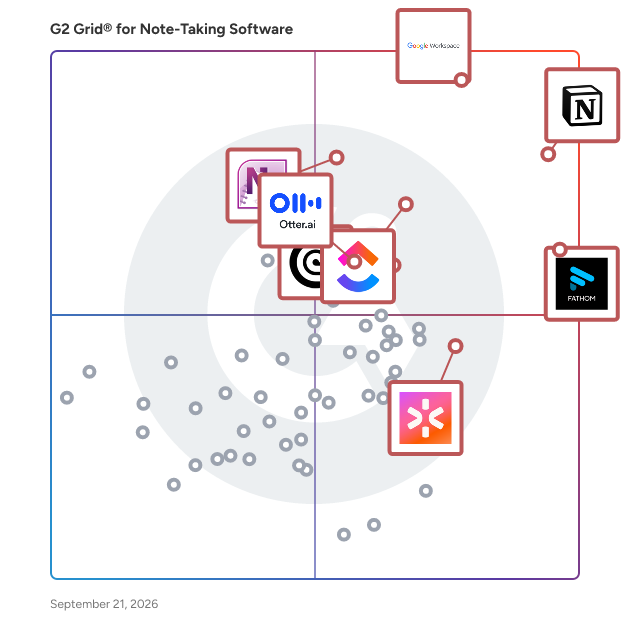
G2 Grid® for Note-Taking Software

G2 Grid® for Note-Taking Software plotting products by satisfaction and market presence

Highlighted products: Notion, Google Workspace, Fathom, ClickUp, Microsoft OneNote, Rev, CoRecruit (formerly Quil), and Otter.ai.

Underlying data: [Grid® JSON](https://www.g2.com/categories/note-taking-software/grids.json?focus%5B%5D=notion&focus%5B%5D=google-workspace&focus%5B%5D=fathom-video&focus%5B%5D=clickup&focus%5B%5D=microsoft-onenote&focus%5B%5D=rev&focus%5B%5D=corecruit-formerly-quil&focus%5B%5D=otter-ai)

One Slide - One Note

Amanote AI is an intelligent, in-course assistant designed to boost student engagement and comprehension by delivering contextual, real-time support directly within course materials. Integrated seamlessly into your LMS via LTI (e.g., Blackboard, Moodle), it understands the page or slide a student is viewing, ensuring accurate, verified answers every time. Educators retain full control over the AI — they can customize prompts, select which resources are included or excluded, and connect to trusted external sources like Wikipedia. No content is ever used to train AI models, protecting intellectual property, and all responses are source-cited so students can verify information. With installation in under 5 minutes, institutions see an immediate positive impact on student engagement with no extra training required. Amanote AI naturally integrates into students’ study habits, making it a quick win for any digital learning strategy. Key Benefits: Context-aware AI assistant embedded in course materials - Customizable behavior and content sources for instructors - Automatic source citations for every answer - Fast, zero-technical-overhead setup - Proven to drive organic student adoption

Average Rating: 4.4/5.0

Total Reviews: 16

How Do G2 Users Rate One Slide - One Note?

  • Has the product been a good partner in doing business?: 8.3/10 (Category avg: 9.1/10)
  • Quality of Support: 7.6/10 (Category avg: 8.5/10)
  • Ease of Use: 8.3/10 (Category avg: 8.9/10)

Who Is the Company Behind One Slide - One Note?

  • Seller: Amaplex Software
  • Year Founded: 2016
  • HQ Location: Toronto, Ontario
  • Twitter: @Amanote_EdTech
    50 Twitter followers
  • LinkedIn® Page: www.linkedin.com
    1 employees on LinkedIn®

Who Uses This Product?

  • Top Industries: Computer Software
  • Company Size: 50% Large, 31% Small

What Are Recent G2 Reviews of One Slide - One Note?

What Are G2 Users Discussing About One Slide - One Note?

Mentalyc

Mentalyc is an AI clinical documentation and therapy notes platform built specifically for psychotherapists, psychologists, counselors, and mental health professionals. Mentalyc automatically listens to therapy sessions or processes therapist inputs to generate structured, insurance-ready progress notes such as SOAP, DAP, GIRP, intake notes, treatment plans, custom templates and summaries in minutes. AI note-taking tools help reduce the administrative burden of translating session conversations into documentation, allowing clinicians to focus more on patient care. Designed for real clinical workflows, Mentalyc combines AI therapy note generation, transcription, and clinical intelligence features to help therapists save hours every week, reduce burnout, and improve documentation consistency. Key capabilities include: • AI Therapy Notes Generation - Automatically converts session audio, video, or text into high-quality clinical notes tailored to therapist writing style • Multiple Clinical Templates - Supports SOAP notes, DAP notes, BIRP/GIRP formats, intake documentation, treatment plans, and custom templates • Clinical Intelligence & Progress Tracking - Enables longitudinal tracking of client progress and treatment themes across sessions • HIPAA-Compliant & Privacy-First Architecture - Built for secure behavioral health documentation workflows • Flexible Documentation Modes - Works with live telehealth sessions, uploaded recordings, dictation, or manual summaries • EHR-Friendly Workflows - Easy export, copy-paste, or integration support for common therapy EHR systems Mentalyc is ideal for solo therapists, group practices, and behavioral health organizations seeking a modern AI scribe solution that goes beyond transcription and supports better clinical decision-making. By reducing documentation time and cognitive load, Mentalyc helps therapists stay present during sessions while maintaining accurate, compliant, and structured records.

Average Rating: 4.8/5.0

Total Reviews: 13

How Do G2 Users Rate Mentalyc?

  • Quality of Support: 8.9/10 (Category avg: 8.5/10)
  • Ease of Use: 8.3/10 (Category avg: 8.9/10)

Who Is the Company Behind Mentalyc?

Who Uses This Product?

  • Company Size: 88% Small, 6% Medium

What Are Recent G2 Reviews of Mentalyc?

Amplenote

Amplenote is an all-in-one productivity app that combines note-taking, task management, and calendar planning into a single, seamless platform. It helps you capture ideas, organize them with tags and folders, and turn them into actionable plans using its unique "Task Score" system to prioritize tasks by importance. Available on web, iOS, Android, and desktop, Amplenote ensures offline access, end-to-end encryption, and seamless integration across devices.

Average Rating: 4.9/5.0

Total Reviews: 8

How Do G2 Users Rate Amplenote?

  • Quality of Support: 9.4/10 (Category avg: 8.5/10)
  • Ease of Use: 8.9/10 (Category avg: 8.9/10)

Who Is the Company Behind Amplenote?

  • Seller: Amplenote
  • Year Founded: 2018
  • HQ Location: Seattle, US
  • Twitter: @amplenote
    4,839 Twitter followers
  • LinkedIn® Page: www.linkedin.com
    2 employees on LinkedIn®

Who Uses This Product?

  • Company Size: 25% Small, 13% Large

What Do G2 Reviewers Say About Amplenote?

AI-generated summary from verified user reviews

Pros
  • Users appreciate the ease of use of Amplenote, enjoying its user-friendly setup and seamless integrations for productivity.
  • Users value the seamless organization in Amplenote, enhancing productivity by integrating notes and tasks in one platform.
  • Users love the seamless integration of task management in Amplenote, enhancing productivity and simplifying daily organization.
  • Users love the seamless task and calendar integration in Amplenote, keeping everything organized in one place.
  • Users praise Amplenote's easy setup, enabling quick integration with tools like Google Calendar for streamlined productivity.
Cons
  • Users desire more features in Amplenote, particularly lamenting the lack of mobile functionality compared to the desktop version.
  • Users criticize the incomplete task management in Amplenote, finding the workflow unnecessarily complicated and inconvenient.
  • Users find the UI clutter in Amplenote challenging, impacting efficient organization and overall usability.
  • Users find the difficult setup of Amplenote's plugin integration frustrating, complicating the extension of its functionality.
  • Users find the inefficient task completion process in Amplenote disrupts their workflow and adds unnecessary steps.

What Are Recent G2 Reviews of Amplenote?

Logically

Logically.app (formerly Afforai) is an award winning, all-in-one workspace for collaborative researching and writing. Many institutions worldwide have partnered with Logically to provide their students and researchers with an easy-to-use platform to manage references, conduct literature reviews, annotate files, take notes, and write papers. Logically is used globally by over 100,000 students, faculty, and researchers, including many at leading universities. With Logically, many institutions and organizations can: Allow students, faculty, and staff access to Logically Document Writer, for collaborative scientific writing. Logically offers single-click citations, automatic bibliographies, and support for LaTeX, tables, code blocks, and more. This would help institutions save costs by replacing tools like Microsoft Word, Google Docs, Overleaf, etc. Provide students, faculty, and staff access to Logically Reference Manager, where they can organize and manage their references as they write papers. This would help institutions save costs by replacing tools like Zotero, Mendeley, and EndNote with Logically. Allow researchers to read and annotate their papers in Logically File Annotator, which would significantly accelerate their reading and literature review process, replacing more expensive tools like Adobe Acrobat. Let researchers access Logically Research Assistant, an AI-powered scientific tool to help conduct efficient, citation-backed literature reviews while maintaining academic integrity. This replaces less specialized tools such as ChatGPT or Gemini. Here is an example of a university partnering with Logically to provide access to better learning while tremendously saving costs: https://afforai.com/nau

Average Rating: 4.5/5.0

Total Reviews: 145

How Do G2 Users Rate Logically?

  • Has the product been a good partner in doing business?: 9.3/10 (Category avg: 9.1/10)
  • Quality of Support: 9.2/10 (Category avg: 8.5/10)
  • Ease of Use: 8.9/10 (Category avg: 8.9/10)

Who Is the Company Behind Logically?

Who Uses This Product?

  • Who Uses This: CEO, Director
  • Top Industries: Consulting, Marketing and Advertising
  • Company Size: 89% Small, 8% Medium

What Do G2 Reviewers Say About Logically?

AI-generated summary from verified user reviews

Pros
  • Users find Afforai to be an invaluable resource for researchers, streamlining citation, research organization, and knowledge sharing.
  • Users find Afforai's ease of use exceptional, facilitating effective summarization and research organization across various document types.
  • Users praise the versatile functionality of Logically, enhancing research and writing across various fields effectively.
  • Users love the user-friendly interface of Afforai, enhancing their research efficiency and overall experience.
  • Users find scientifically accurate results and useful citations in Afforai, making it a top choice for research.
Cons
  • Users wish for monthly usage limits instead of hourly, as current restrictions can hinder productivity and flexibility.
  • Users find the limited features of Logically, such as basic prompts and file handling, somewhat restrictive for advanced use.
  • Users report slow performance with Logically, noting delays in indexing and general latency issues.
  • Users note the limitations of AI models, including occasional inaccuracies and the need for prompt adjustment.
  • Users experience a small learning curve due to the abundance of features and occasional interface changes.

What Are Recent G2 Reviews of Logically?

Synology Office Suite

Synology Office Suite is a comprehensive on-prem productivity solution designed to help organizations embrace AI transformation, enhancing communication, streamlining workflows, and accelerating content creation. With a one-time purchase, it provides a cost-effective solution for organizations of all sizes. The suite brings user-friendly and intuitive tools including Synology Drive, Office, MailPlus, Chat, Calendar, Contacts, Note Station, and AI Console, making it easy for teams to get started. For more information please visit: https://www.synology.com/en-global/dsm/overview/productivity

Average Rating: 4.4/5.0

Total Reviews: 22

How Do G2 Users Rate Synology Office Suite?

  • Has the product been a good partner in doing business?: 8.9/10 (Category avg: 9.1/10)
  • Quality of Support: 9.2/10 (Category avg: 8.5/10)
  • Ease of Use: 8.4/10 (Category avg: 8.9/10)

Who Is the Company Behind Synology Office Suite?

  • Seller: Synology
  • Year Founded: 2000
  • HQ Location: Taiwan
  • Twitter: @Synology
    67,298 Twitter followers
  • LinkedIn® Page: www.linkedin.com
    993 employees on LinkedIn®

Who Uses This Product?

  • Company Size: 68% Small, 32% Medium

What Do G2 Reviewers Say About Synology Office Suite?

AI-generated summary from verified user reviews

Pros
  • Users find Synology Office Suite easy to use, enhancing daily collaboration and efficiency in small office environments.
  • Users appreciate the seamless integrations of Synology Office Suite, enhancing collaboration and data protection across various platforms.
  • Users enjoy the seamless team collaboration with Synology Office Suite, enhancing productivity through real-time document sharing and management.
  • Users appreciate the real-time collaboration features of Synology Office Suite, enhancing teamwork and document management effortlessly.
  • Users enjoy the easy-to-use collaboration tools of Synology Office Suite, enhancing productivity and workflow efficiency.
Cons
  • Users find the limited features of Synology Office Suite restrict its functionality compared to Office 365.
  • Users note the missing features in Synology Office Suite, impacting functionality and limiting complex task performance.
  • Users find Synology Office Suite lacking in features compared to competitors, impacting usability for complex tasks.
  • Users find the lack of advanced features in Synology Office Suite makes it a less viable solution compared to Office 365.
  • Users find the learning curve steep with Synology Office Suite, especially when transitioning from other office solutions.

What Are Recent G2 Reviews of Synology Office Suite?

Kroolo

Kroolo is a next-generation productivity platform powered by Agentic AI, designed to redefine how teams work, think, and create. Unlike traditional task managers, Kroolo is built to be proactive. It doesn't just help you organize work—it acts as your smart partner, driving your workflows forward with. The platform unifies projects, tasks, documents, conversations, OKRs, forms, and dashboards into one seamless ecosystem — eliminating the need for multiple disconnected tools. With multiple workspace views (list, Kanban, timeline, calendar, workload), real-time collaboration, and embedded insights, Kroolo adapts to every team’s workflow, across industries and sizes. Kroolo also excels in collaboration. It provides a central hub for team alignment with features like visual roadmaps, dynamic calendars, project timelines, and goal tracking—all enhanced by generative AI inputs. The platform's intuitive UX, combined with its smart suggestions and instant planning tools, makes it a must-have for forward-looking teams.

Average Rating: 4.6/5.0

Total Reviews: 20

How Do G2 Users Rate Kroolo?

  • Has the product been a good partner in doing business?: 9.6/10 (Category avg: 9.1/10)
  • Quality of Support: 8.2/10 (Category avg: 8.5/10)
  • Ease of Use: 8.8/10 (Category avg: 8.9/10)

Who Is the Company Behind Kroolo?

  • Seller: Kroolo
  • Year Founded: 2023
  • HQ Location: Singapore, SG
  • Twitter: @getkroolo
    49 Twitter followers
  • LinkedIn® Page: www.linkedin.com
    44 employees on LinkedIn®

Who Uses This Product?

  • Top Industries: Computer Software, Information Technology and Services
  • Company Size: 65% Small, 32% Medium

What Do G2 Reviewers Say About Kroolo?

AI-generated summary from verified user reviews

Pros
  • Users benefit from Kroolo's effective project management, seamlessly integrating tasks and enhancing overall productivity across various life aspects.
  • Users love the effective organization capabilities of Kroolo, seamlessly managing multiple projects and enhancing productivity.
  • Users value the seamless team collaboration in Kroolo, enhancing project management across all areas of life.
  • Users appreciate the time-saving features of Kroolo, allowing for efficient project management and quick insights.
  • Users find Kroolo's clean interface easy to navigate, enhancing focus and project organization effectively.
Cons
  • Users find the complexity of Kroolo overwhelming initially, but become more familiar with continued use.
  • Users find the learning curve steep for Kroolo initially, although familiarity improves navigation over time.
  • Users find Kroolo's interface initially difficult to navigate due to its complexity, especially for beginners.
  • Users find the limited features of Kroolo can cause confusion and complicate the navigation experience.
  • Users find Kroolo's app not particularly mobile-friendly, hindering easy access to updates and changes on the go.

What Are Recent G2 Reviews of Kroolo?

Outline

Outline is a feature-rich digital note-taking app available for Mac, iPad, and iPhone. It offers seamless compatibility with OneNote, allowing for easy import and export of notes. With the ability to annotate PDFs, add images, and organize notes with folders and tags, Outline provides a comprehensive solution for staying organized. Users have the flexibility to choose their preferred cloud storage or keep their notes locally. Elevate your note-taking skills and gain full control of your digital workspace with Outline.

Average Rating: 5.0/5.0

Total Reviews: 3

How Do G2 Users Rate Outline?

  • Has the product been a good partner in doing business?: 10.0/10 (Category avg: 9.1/10)
  • Quality of Support: 10.0/10 (Category avg: 8.5/10)
  • Ease of Use: 10.0/10 (Category avg: 8.9/10)

Who Is the Company Behind Outline?

Who Uses This Product?

  • Company Size: 67% Medium, 33% Small

What Are Recent G2 Reviews of Outline?

MyInfo 7

MyInfo is a personal information manager developed by Milenix Software. MyInfo collects, organizes, edit, stores, and retrieves personal-reference information like text documents, web snippets, e-mails, notes, and files from other applications. The latest version offers speed improvements, various perspectives from which to organize data trees, a modern user interface, multiple attachments per note, multiple sections per notebook and more. MyInfo uses both hierarchical, and folder-like structures along with tags, categories and other meta-information for organizing its content. MyInfo can import data from a range of third-party applications, including AskSam The software can be used as a free-form personal information manager, personal wiki, outliner, knowledge database, game master tool, GTD filing system. Overall, MyInfo is an outstanding tool for anyone who needs to organize notes, class or business material or documents, catalogue and search PDFs, write multi-chapter books or essays, and collect web-data.

Average Rating: 4.8/5.0

Total Reviews: 2

How Do G2 Users Rate MyInfo 7?

  • Has the product been a good partner in doing business?: 10.0/10 (Category avg: 9.1/10)
  • Quality of Support: 10.0/10 (Category avg: 8.5/10)
  • Ease of Use: 10.0/10 (Category avg: 8.9/10)

Who Is the Company Behind MyInfo 7?

Who Uses This Product?

  • Company Size: 67% Small, 33% Medium

What Are Recent G2 Reviews of MyInfo 7?

Nebo

Create beautiful notes and professional documents by hand, sketch ideas on a limitless canvas and annotate PDFs. Powered by the world's best AI handwriting recognition.

Average Rating: 4.5/5.0

Total Reviews: 2

How Do G2 Users Rate Nebo?

  • Quality of Support: 6.7/10 (Category avg: 8.5/10)
  • Ease of Use: 8.3/10 (Category avg: 8.9/10)

Who Is the Company Behind Nebo?

Who Uses This Product?

  • Company Size: 100% Medium, 50% Small

What Do G2 Reviewers Say About Nebo?

AI-generated summary from verified user reviews

Pros
  • Users appreciate the organization of handwritten notes in Nebo, making it easy to keep everything neatly arranged.
  • Users love the accuracy in handwriting recognition of Nebo, making note-taking and organization seamless.
  • Users appreciate the ease of use of Nebo, seamlessly converting handwriting into organized digital text and formats.
  • Users love the handwriting-to-digital text conversion, enabling organized notes and effortless exports to preferred formats.
  • Users value the versatility of Nebo, seamlessly converting various formats and supporting multiple languages for digital note management.
Cons
  • Users are disappointed by the missing features of Nebo, such as the absence of recent views and nested collections.
  • Users experience note-taking issues with messy handwriting, affecting clarity and requiring more mindful writing.

What Are Recent G2 Reviews of Nebo?

VoiceToNotes AI

VoiceToNotes AI is an AI-powered voice-to-text platform that transforms speech into clear, organized notes in real time. Designed for students, professionals, creators, and writers, it helps capture meetings, lectures, ideas, conversations, and daily thoughts with speed and accuracy. The platform includes AI transcription, grammar correction, smart rewriting, summaries, multilingual support, and customizable prompts to turn raw voice input into polished content effortlessly. VoiceToNotes also offers an integrated stories and novels experience, creating a seamless balance between productivity and creativity within a single platform.

Average Rating: 2.5/5.0

Total Reviews: 2

How Do G2 Users Rate VoiceToNotes AI?

  • Has the product been a good partner in doing business?: 10.0/10 (Category avg: 9.1/10)
  • Quality of Support: 5.8/10 (Category avg: 8.5/10)
  • Ease of Use: 7.5/10 (Category avg: 8.9/10)

Who Is the Company Behind VoiceToNotes AI?

Who Uses This Product?

  • Company Size: 100% Small

What Do G2 Reviewers Say About VoiceToNotes AI?

AI-generated summary from verified user reviews

Cons
  • Users find recording issues with VoiceToNotes AI, leading to lost audio and unreliable performance in critical situations.
  • Users find the recording limitations of VoiceToNotes AI frustrating, often resulting in lost notes and unreliable performance.
  • Users find the app's unreliable task management detrimental, often losing recordings and failing during crucial moments.

What Are Recent G2 Reviews of VoiceToNotes AI?

21Brains

The 21Brains Sourcing tool optimizes your sourcing and B2B sales processes. 21Brains runs in the cloud and in your pocket with the sourcing app. With 21Brains you get rid of all the Excel files and emails in your trading activities.

Average Rating: 4.5/5.0

Total Reviews: 1

Who Is the Company Behind 21Brains?

  • Seller: 21Brains
  • Year Founded: 2012
  • HQ Location: Shanghai, CN
  • Twitter: @21Brains
    43 Twitter followers
  • LinkedIn® Page: www.linkedin.com
    1 employees on LinkedIn®

Who Uses This Product?

  • Company Size: 100% Small

What Are Recent G2 Reviews of 21Brains?

What Are G2 Users Discussing About 21Brains?

Aloe.ai > Note Taking Ai Assistant for Meeting Notes

Aloe is a Swiss Army knife for taking notes since you can take notes by any combination of dictating, texting, emailing, recording, handwriting, rich text, and using a camera. Then, Aloe gathers context from each meeting, transcribes, and organizes the notes automatically. ‍ To provide you with perfect recall, Aloe connects meeting notes to your contacts and their companies, events in your calendar, documents discussed, places you've been, and your hashtags. If you use Salesforce.com or HubSpot CRM, no more wasting time manually creating activity records for each meeting in the CRM. Aloe connects your notes to Leads, Accounts, Contacts, and Opportunities, then sends the notes to your CRM account.

Average Rating: 4.0/5.0

Total Reviews: 1

How Do G2 Users Rate Aloe.ai > Note Taking Ai Assistant for Meeting Notes?

  • Quality of Support: 10.0/10 (Category avg: 8.5/10)
  • Ease of Use: 10.0/10 (Category avg: 8.9/10)

Who Is the Company Behind Aloe.ai > Note Taking Ai Assistant for Meeting Notes?

  • Seller: Aloe.ai
  • Year Founded: 2019
  • HQ Location: Mountain View, US
  • LinkedIn® Page: www.linkedin.com
    1 employees on LinkedIn®

Who Uses This Product?

  • Company Size: 100% Small

What Are Recent G2 Reviews of Aloe.ai > Note Taking Ai Assistant for Meeting Notes?

What Are G2 Users Discussing About Aloe.ai > Note Taking Ai Assistant for Meeting Notes?

checklist.gg

AI-driven Checklist Management Tool

Average Rating: 4.7/5.0

Total Reviews: 3

How Do G2 Users Rate checklist.gg?

  • Quality of Support: 7.5/10 (Category avg: 8.5/10)
  • Ease of Use: 10.0/10 (Category avg: 8.9/10)

Who Is the Company Behind checklist.gg?

  • Seller: checklist.gg
  • Year Founded: 2020
  • HQ Location: Middletown, US
  • Twitter: @checklistgg
    62 Twitter followers
  • LinkedIn® Page: www.linkedin.com
    20 employees on LinkedIn®

Who Uses This Product?

  • Company Size: 67% Small, 33% Medium

What Are Recent G2 Reviews of checklist.gg?

TackNote

**TackNote** is a Mac sticky-note app with a twist: every note **pins to the exact thing you're working in** — a specific window, browser tab, document, folder, chat, or task — and only appears when you're there. Switch away and it tucks out of sight; come back and it's waiting, right where you left it. No more desktops buried under stale stickies. The right note shows up in the right place, automatically. **What you get:** - Context-aware notes that follow your windows, tabs, and docs - TackBoard — a notebook-style board to organize everything - Checklists, voice notes, reminders, and projects - 12 themes, including real glass - Private notes locked behind Touch ID - Optional iCloud sync, encrypted with your own keys **Private by design.** Your notes live encrypted on your Mac — no account required. End-to-end encrypted and notarized by Apple, so there's nothing sketchy to trust. **Simple pricing.** Free 14-day trial, no card. Then a one-time **$24.99** — yours forever, no subscription. Works on up to 3 Macs. Ideal for anyone juggling multiple projects, research, or workflows who wants quick reference notes without drowning in a giant list.

Average Rating: 5.0/5.0

Total Reviews: 1

How Do G2 Users Rate TackNote?

  • Quality of Support: 10.0/10 (Category avg: 8.5/10)
  • Ease of Use: 10.0/10 (Category avg: 8.9/10)

Who Is the Company Behind TackNote?

Who Uses This Product?

  • Company Size: 100% Medium

What Are Recent G2 Reviews of TackNote?

Brainfo

Brainfo is an AI-native second brain that replaces a scattered productivity stack, Notion, Evernote, Obsidian, Google Docs, Todoist, and several AI tabs, with one calm, integrated workspace. It brings together everything knowledge workers need to think, write, and ship: - Notes, fast Google-Keep-style capture with checklists, colors, tags, and voice-to-text - Docs, block-based, real-time collaborative editor with version history and AI copilot - Bookmarks, visual link library for research and inspiration - Databases, relational, AI-enhanced structured data - Tasks & Goals, execution layer with reminders and OKR-style tracking - AI Chat Hub, switch between ChatGPT, Claude, Gemini, DeepSeek, GLM, Grok, and more on a single subscription; chat with your notes, files, and docs; convert any AI chat into a clean document with one click Built on Tiago Forte's CODE methodology (Capture, Organize, Distill, Express), Brainfo is ready out of the box, no blank pages, no plugin tinkering, no setup tax. Local-first architecture, real-time collaboration, GDPR-compliant. Cross-platform on Web, iOS, and Android. Customer content is never used to train AI models. A modern alternative to Notion, Evernote, Obsidian, Logseq, Anytype, Tana, Google Keep, and Google Docs.

Who Is the Company Behind Brainfo?

  • Seller: Brainfo
  • Year Founded: 2023
  • HQ Location: North York, ON
  • Twitter: @brainfo_ai
  • LinkedIn® Page: www.linkedin.com
    1 employees on LinkedIn®
Neeraja Prakash
NP
Researched and written by Neeraja Prakash
Updated March 3, 2025