# Best Help Authoring Tools (HAT) - Page 2

*By [Adam Crivello](https://research.g2.com/insights/author/adam-crivello)*


Help Authoring Tools (HAT) are programs designed to assist technical writers in designing, publishing, and maintaining software help documentation. The resulting text is used in explanation guides, manuals, and help files. They are aimed at reducing time and effort needed when creating assistance materials for employees and end users. Technical writers will use help authoring tools to create documents from start to finish. With the programs, they are able to write, edit, and export the documents to then be shared with editors, administrators, and other co-workers. Eventually, the help authoring tool will allow writers to publish the documentation digitally. Many of these products will import text in different file formats or [document creation](https://www.g2.com/categories/document-creation) software. Some products which do not posess build tools will need to intergate with[build automation](https://www.g2.com/categories/build-automation) tools to be viewed or used.

To qualify for inclusion in the Help Authoring Tools (HAT) category, a product must:

- Possess tools for editing text, data, or code
- Provide an input for source text
- Provide an output for help files
- Possess tools for adding indexes, content tables, or images
- Provide tools for interface customization


## How Many Help Authoring Tools (HAT) Products Does G2 Track?
**Total Products under this Category:** 55

### Category Stats (Jun 2026)
- **Average Rating**: 4.02/5 The average rating of products in this category, based on all submitted ratings
- **Top Trending Product**: Author-It (+1.64%) - Among all products in this category, Author-It recorded the largest rating increase compared to last month
*Last updated: June 25, 2026*


## How Does G2 Rank Help Authoring Tools (HAT) Products?

**Why You Can Trust G2's Software Rankings:**

- 30 Analysts and Data Experts
- 1,700+ Authentic Reviews
- 55+ Products
- Unbiased Rankings

G2's software rankings are built on verified user reviews, rigorous moderation, and a consistent research methodology maintained by a team of analysts and data experts. Each product is measured using the same transparent criteria, with no paid placement or vendor influence. While reviews reflect real user experiences, which can be subjective, they offer valuable insight into how software performs in the hands of professionals. Together, these inputs power the G2 Score, a standardized way to compare tools within every category.


## Which Help Authoring Tools (HAT) Is Best for Your Use Case?

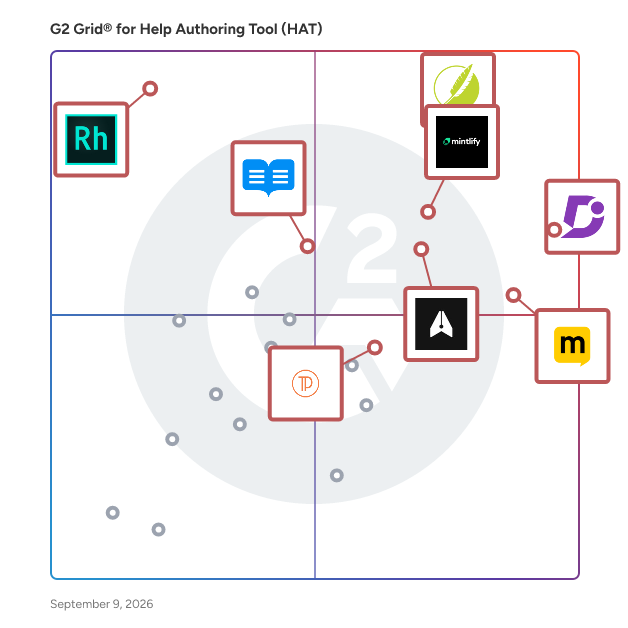
- **Leader:** [Document360](https://www.g2.com/products/document360/reviews)
- **Highest Performer:** [Docsie](https://www.g2.com/products/docsie/reviews)
- **Easiest to Use:** [Document360](https://www.g2.com/products/document360/reviews)
- **Top Trending:** [MadCap Flare](https://www.g2.com/products/madcap-flare/reviews)
- **Best Free Software:** [MadCap Flare](https://www.g2.com/products/madcap-flare/reviews)


---

**Sponsored**

### Stravito

Stravito is the Insights Intelligence Platform global leaders like Nestlé and Comcast trust to turn existing knowledge into confident, growth-driving decisions. Built for insights, marketing, and research teams, Stravito unifies knowledge in one secure space and pairs best-in-class AI with human expertise. Whether you’re deciding where to expand next, which innovation to pursue, or what message will resonate most with your customers, teams simply ask strategic questions, and Stravito AI Assistant delivers relevant, source-cited insights in seconds. AI Personas, powered by your brand’s segmentation studies, simulate real consumer perspectives so you can stress-test ideas in real-time. The outcome: faster, evidence-backed, commercially-impactful decisions.


[Visit website](https://www.g2.com/external_clickthroughs/record?secure%5Bad_program%5D=ppc&amp;secure%5Bad_slot%5D=category_product_list&amp;secure%5Bcategory_id%5D=317&amp;secure%5Bdisplayable_resource_id%5D=2038&amp;secure%5Bdisplayable_resource_type%5D=Category&amp;secure%5Bmedium%5D=sponsored&amp;secure%5Bplacement_reason%5D=neighbor_category&amp;secure%5Bplacement_resource_ids%5D%5B%5D=2038&amp;secure%5Bprioritized%5D=false&amp;secure%5Bproduct_id%5D=133525&amp;secure%5Bresource_id%5D=317&amp;secure%5Bresource_type%5D=Category&amp;secure%5Bsource_type%5D=category_page&amp;secure%5Bsource_url%5D=https%3A%2F%2Fwww.g2.com%2Fcategories%2Fhelp-authoring-tool-hat%3Fpage%3D2&amp;secure%5Btoken%5D=cde5f06da50a1bbeb179438280573e6c80bca53ec437355ac398ab31413176da&amp;secure%5Burl%5D=https%3A%2F%2Fwww.stravito.com%2Fai-personas%3Futm_source%3DG2%26utm_medium%3Dadvertising%26utm_campaign%3DG2_2026_02&amp;secure%5Burl_type%5D=custom_url)

---

## What Are the Top-Rated Help Authoring Tools (HAT) Products in 2026?
### 1. [EasyDocs](https://www.g2.com/products/easydocs/reviews)
EasyDocs is web-based software-as-a-service to create knowledge bases, helps docs and other documentation sites. EasyDocs includes a contend management system for authoring help articles, reliable infrastructure to host them and site customization tools to reflect your brand.


**Average Rating:** 4.5/5.0
**Total Reviews:** 2
**How Do G2 Users Rate EasyDocs?**

- **Ease of Use:** 9.2/10 (Category avg: 8.0/10)

**Who Is the Company Behind EasyDocs?**

- **Seller:** [EasyApps](https://www.g2.com/sellers/easyapps)
- **HQ Location:** N/A
- **LinkedIn® Page:** https://www.linkedin.com/company/27119442 (2 employees on LinkedIn®)

**Who Uses This Product?**
- **Company Size:** 50% Enterprise, 50% Mid-Market


#### What Are Recent G2 Reviews of EasyDocs?

**"[Hassle-free and easy to use with various features!](https://www.g2.com/survey_responses/easydocs-review-8423955)"**

**Rating:** 4.5/5.0 stars
*— Rutuja R.*

[Read full review](https://www.g2.com/survey_responses/easydocs-review-8423955)

---

**"[Best Content Management Tool](https://www.g2.com/survey_responses/easydocs-review-9499214)"**

**Rating:** 4.5/5.0 stars
*— Verified User in Accounting*

[Read full review](https://www.g2.com/survey_responses/easydocs-review-9499214)

---


### 2. [FAR HTML](https://www.g2.com/products/far-html/reviews)
FAR HTML is a collection of help authoring and file utilities. If you need to quickly manipulate HTML, XML, ASCII text files, or author help projects (HTML Help 1.x, MS Help 2.x, MS Help Viewer 1.x, Help Viewer 2.x and Uncompressed Web Help) then FAR will save you lots of time and money.


**Average Rating:** 4.0/5.0
**Total Reviews:** 2
**How Do G2 Users Rate FAR HTML?**

- **Ease of Use:** 9.2/10 (Category avg: 8.0/10)

**Who Is the Company Behind FAR HTML?**

- **Seller:** [The Helpware Group](https://www.g2.com/sellers/the-helpware-group)
- **HQ Location:** Melbourne, Australia
- **LinkedIn® Page:** https://www.linkedin.com/company/No-Linkedin-Presence-Added-Intentionally-By-DataOps (1 employees on LinkedIn®)

**Who Uses This Product?**
- **Company Size:** 50% Enterprise, 50% Small-Business


#### What Are Recent G2 Reviews of FAR HTML?

**"[All our product documentation will now be created with FARHTML going forward.](https://www.g2.com/survey_responses/far-html-review-9499737)"**

**Rating:** 4.5/5.0 stars
*— Riyas R.*

[Read full review](https://www.g2.com/survey_responses/far-html-review-9499737)

---


#### What Are G2 Users Discussing About FAR HTML?

- [What is FAR HTML used for?](https://www.g2.com/discussions/what-is-far-html-used-for)

### 3. [Anark](https://www.g2.com/products/anark/reviews)
Anark enables its customers to combine PLM and ERP data to generate role-specific engineering release, supply chain, manufacturing, inspection and field service/IIOT content for use throughout the extended enterprise and supply chain. Anark Core and MBEWeb support information-rich conversations between engineering and the downstream consumers of PLM and ERP data by delivering published content in the proper context of each enterprise process.


**Average Rating:** 4.0/5.0
**Total Reviews:** 1

**Who Is the Company Behind Anark?**

- **Seller:** [Anark](https://www.g2.com/sellers/anark)
- **Year Founded:** 2000
- **HQ Location:** Boulder, US
- **LinkedIn® Page:** https://www.linkedin.com/company/anark/ (43 employees on LinkedIn®)

**Who Uses This Product?**
- **Company Size:** 100% Mid-Market


#### What Are Recent G2 Reviews of Anark?

**"[Very user friendly and great customer service](https://www.g2.com/survey_responses/anark-review-4825376)"**

**Rating:** 4.0/5.0 stars
*— Verified User in Biotechnology*

[Read full review](https://www.g2.com/survey_responses/anark-review-4825376)

---


#### What Are G2 Users Discussing About Anark?

- [What is Anark used for?](https://www.g2.com/discussions/what-is-anark-used-for)

### 4. [BetterDocs](https://www.g2.com/products/betterdocs/reviews)
BetterDocs is an advanced documentation &amp; knowledge base plugin for WordPress that helps to improve your user experience and reduce support tickets. BetterDocs will help you to create &amp; organize your documentation page in a beautiful way that will make your visitors find any helpful article easily. It will facilitate your client to make faster decisions and get help on the spot by self-servicing instead of avoiding lengthy conversations. BetterDocs offer multiple ready templates to design your WordPress documentation site within a few minutes. In addition, you have complete freedom to customize the layout with ease. Features of BetterDocs 🔸 Stunning ready templated for the docs landing page 🔸 Translate single doc page with WPML 🔸 Create FAQ instantly 🔸 Interactive table of contents 🔸 In-built advanced search option 🔸 Advanced customization option 🔸 Fully compatible with Gutenberg editor 🔸 100% compatibility with Elementor page builder 🔸 Single doc template with Elementor 🔸 Docs archive template with Elementor 🔸 Instant answer bot to reduce support tickets (pro) 🔸 Insightful analytics to evaluate the performance (pro) 🔸 Create multiple knowledge base (pro) 🔸 Manage internal knowledge base (pro) 🔸 Design stunning multiple knowledge bases with Elementor (Pro)


**Average Rating:** 0.5/5.0
**Total Reviews:** 1
**How Do G2 Users Rate BetterDocs?**

- **Ease of Use:** 5.0/10 (Category avg: 8.0/10)
- **Ease of Admin:** 6.7/10 (Category avg: 8.6/10)
- **Has the product been a good partner in doing business?:** 0.0/10 (Category avg: 8.6/10)

**Who Is the Company Behind BetterDocs?**

- **Seller:** [BetterDocs](https://www.g2.com/sellers/betterdocs)
- **Year Founded:** 2012
- **HQ Location:** Mirpur DOHS, BD
- **LinkedIn® Page:** https://www.linkedin.com/company/11740270/ (62 employees on LinkedIn®)

**Who Uses This Product?**
- **Company Size:** 100% Small-Business


### 5. [Daux.io](https://www.g2.com/products/daux-io/reviews)
Daux.io is an documentation generator that uses a simple folder structure and Markdown files to create custom documentation on the fly. It helps you create great looking documentation in a developer friendly way.


**Average Rating:** 2.5/5.0
**Total Reviews:** 1
**How Do G2 Users Rate Daux.io?**

- **Ease of Use:** 6.7/10 (Category avg: 8.0/10)

**Who Is the Company Behind Daux.io?**

- **Seller:** [Daux.io](https://www.g2.com/sellers/daux-io)
- **HQ Location:** Lausanne
- **LinkedIn® Page:** https://www.linkedin.com/company/No-Linkedin-Presence-Added-Intentionally-By-DataOps (1 employees on LinkedIn®)

**Who Uses This Product?**
- **Company Size:** 100% Enterprise


#### What Are G2 Users Discussing About Daux.io?

- [What is Daux.io used for?](https://www.g2.com/discussions/what-is-daux-io-used-for)

### 6. [GenHelp](https://www.g2.com/products/genhelp/reviews)
GenHelp and GenHelp Pro are new generation tools to assist in documenting code and creating help files. They take source files and import them to produce a file that can be used to create several forms of documentation.


**Average Rating:** 4.0/5.0
**Total Reviews:** 1

**Who Is the Company Behind GenHelp?**

- **Seller:** [FraserSoft](https://www.g2.com/sellers/frasersoft)
- **HQ Location:** N/A
- **LinkedIn® Page:** https://www.linkedin.com/company/No-Linkedin-Presence-Added-Intentionally-By-DataOps (1 employees on LinkedIn®)

**Who Uses This Product?**
- **Company Size:** 100% Small-Business


#### What Are Recent G2 Reviews of GenHelp?

**"[GenHelp, help file generator](https://www.g2.com/survey_responses/genhelp-review-537973)"**

**Rating:** 4.0/5.0 stars
*— Verified User in Information Services*

[Read full review](https://www.g2.com/survey_responses/genhelp-review-537973)

---


#### What Are G2 Users Discussing About GenHelp?

- [What is GenHelp used for?](https://www.g2.com/discussions/genhelp-what-is-genhelp-used-for)
- [What is GenHelp used for?](https://www.g2.com/discussions/what-is-genhelp-used-for)

### 7. [HelpScribble](https://www.g2.com/products/helpscribble/reviews)
HelpScribble is a full-featured, easy-to-use help authoring tool for creating help files from start to finish. You can create WinHelp (.hlp) files, HTML Help (.chm) files, a printed manual and online documentation (on a web site) all from the same HelpScribble project.


**Average Rating:** 1.5/5.0
**Total Reviews:** 1
**How Do G2 Users Rate HelpScribble?**

- **Ease of Use:** 0.0/10 (Category avg: 8.0/10)

**Who Is the Company Behind HelpScribble?**

- **Seller:** [Just Great Software](https://www.g2.com/sellers/just-great-software)
- **HQ Location:** Phuket
- **LinkedIn® Page:** https://www.linkedin.com/company/just-great-software/about/

**Who Uses This Product?**
- **Company Size:** 100% Mid-Market


#### What Are G2 Users Discussing About HelpScribble?

- [What is HelpScribble used for?](https://www.g2.com/discussions/what-is-helpscribble-used-for)

### 8. [MagicManuals®](https://www.g2.com/products/magicmanuals/reviews)
MagicManuals® is a SaaS solution that enables suppliers to create user-friendly digital manuals for their products and provide them to customers as a self-service option. The award-winning solution (Red Dot Design Award, German Stevie Awards, to name a few) increases customer satisfaction, reduces costs and resources for the supplier, and provides the customer with access to all product-related information.


**Total Reviews:** 1
**How Do G2 Users Rate MagicManuals®?**

- **Ease of Use:** 0.0/10 (Category avg: 8.0/10)

**Who Is the Company Behind MagicManuals®?**

- **Seller:** [watchandbuild.com](https://www.g2.com/sellers/watchandbuild-com)
- **Year Founded:** 2021
- **HQ Location:** Berlin, DE
- **LinkedIn® Page:** http://www.linkedin.com/company/magicmanuals-by-watchandbuild-com-gmbh (3 employees on LinkedIn®)

**Who Uses This Product?**
- **Company Size:** 100% Small-Business


### 9. [WinCHM](https://www.g2.com/products/winchm/reviews)
WinCHM is a very easy-to-use and powerful help authoring tool. Not needing to learn hard, you can be master of creating professional and good looking HTML help(CHM), Web help, PDF manual and Word documents.


**Average Rating:** 2.0/5.0
**Total Reviews:** 1
**How Do G2 Users Rate WinCHM?**

- **Ease of Use:** 6.7/10 (Category avg: 8.0/10)

**Who Is the Company Behind WinCHM?**

- **Seller:** [Softany Software](https://www.g2.com/sellers/softany-software)
- **HQ Location:** N/A
- **LinkedIn® Page:** https://www.linkedin.com/company/No-Linkedin-Presence-Added-Intentionally-By-DataOps (1 employees on LinkedIn®)

**Who Uses This Product?**
- **Company Size:** 100% Mid-Market


#### What Are G2 Users Discussing About WinCHM?

- [What is WinCHM used for?](https://www.g2.com/discussions/what-is-winchm-used-for)

### 10. [adoc Studio](https://www.g2.com/products/adoc-studio/reviews)
adoc Studio is an integrated writing environment for Mac and iPad, functioning like an IDE but for writing technical documentation using the AsciiDoc markup language. Our software allows you to organize, write, and share texts effortlessly. - Manage texts, media, and other components of technical documentation with an intuitive structure. - Create extensive documents by dividing them into chapters and navigate even the most complex documentation with ease. - Write in the left-side editor and instantly preview in HTML or PDF. Add images, tables, references, formulas, and attributes seamlessly. - Display or hide text passages with our conditionals to export dedicated documents to several audiences. When ready, export your project into multiple formats (such as HTML and PDF) using CSS styles. - Customize and automate document exports, and work seamlessly on Mac, iPad, and iPhone, with cloud synchronization ensuring all participants stay updated.


**Who Is the Company Behind adoc Studio?**

- **Seller:** [ProjectWizards GmbH](https://www.g2.com/sellers/projectwizards-gmbh)
- **LinkedIn® Page:** https://www.linkedin.com/showcase/adoc-studio/


### 11. [Article-rewriter](https://www.g2.com/products/article-rewriter/reviews)
Being a writer isn&#39;t easy; every day, arriving with new ideas and words is a challenging process for article rewriter tools. Rewriting a text is a solution, but doing it again manually is essential. Our developers created this rewrite tool to help writers reduce their burden. Our tool is one of the neat essay rewrite tools that automatically make changes to the article in a human-like.


**Who Is the Company Behind Article-rewriter?**

- **Seller:** [Ikramul Hoque](https://www.g2.com/sellers/ikramul-hoque)
- **HQ Location:** N/A
- **LinkedIn® Page:** https://www.linkedin.com/company/No-Linkedin-Presence-Added-Intentionally-By-DataOps (1 employees on LinkedIn®)


### 12. [Bee](https://www.g2.com/products/bee-2025-04-28/reviews)
Bee is a compact, wearable AI personal assistant designed to seamlessly integrate into your daily life, enhancing productivity and memory retention. By continuously capturing and analyzing your conversations and activities, Bee builds a personalized knowledge base, offering timely summaries, insights, and reminders without demanding your attention.


**Who Is the Company Behind Bee?**

- **Seller:** [Bee](https://www.g2.com/sellers/bee-da937358-47bb-41b6-9578-89d1026e53a6)
- **Year Founded:** 2016
- **HQ Location:** N/A
- **LinkedIn® Page:** http://www.linkedin.com/company/bee-inclined (1 employees on LinkedIn®)


### 13. [Corilla](https://www.g2.com/products/corilla/reviews)
Corilla is a collaborative authoring and publishing tool for technical writers.


**Who Is the Company Behind Corilla?**

- **Seller:** [Corilla](https://www.g2.com/sellers/corilla)
- **Year Founded:** 2015
- **HQ Location:** Brisbane, AU
- **LinkedIn® Page:** https://www.linkedin.com/company/corilla (2 employees on LinkedIn®)


### 14. [Documentation Software](https://www.g2.com/products/documentation-software/reviews)
Clueso is an AI-powered documentation software designed to streamline the creation of professional-quality product videos and step-by-step guides. By transforming simple screen recordings into polished tutorials and help articles, Clueso enables teams to produce engaging content efficiently, eliminating the need for extensive manual effort or specialized skills.


**Who Is the Company Behind Documentation Software?**

- **Seller:** [Clueso](https://www.g2.com/sellers/clueso)
- **Year Founded:** 2023
- **HQ Location:** San Francisco, US
- **LinkedIn® Page:** https://www.linkedin.com/company/clueso (34 employees on LinkedIn®)


### 15. [Dokly](https://www.g2.com/products/dokly/reviews)
Dokly is a modern documentation platform built for developer teams who want professional docs without the complexity of static site generators or self-hosted solutions. What Dokly Does Dokly provides a browser-based editor where teams write documentation using MDX (Markdown + React components). Content publishes instantly to a hosted documentation site with your own subdomain or custom domain. Key Capabilities - AI assisted writing. - Browser-based MDX editor — No local setup required. Write docs with rich components like code blocks, callouts, tabs, and API references. - Instant publishing — Changes go live in seconds with automatic caching and CDN distribution. - Custom branding — Match your docs to your brand with custom domains, logos, and themes. - Built-in search — Fast client-side search across all documentation. - Analytics — Track page views and understand how users navigate your docs. - GitHub authentication — Secure team access with OAuth. Who Uses Dokly - Developer tools companies documenting APIs and SDKs - SaaS teams creating product documentation and help centers - Open source projects needing hosted docs Why Teams Choose Dokly Unlike static site generators, Dokly requires no build pipeline or deployment config. Unlike wikis, it produces polished public-facing documentation. Teams get the flexibility of MDX with the simplicity of a hosted platform.


**Who Is the Company Behind Dokly?**

- **Seller:** [Dokly](https://www.g2.com/sellers/dokly)
- **HQ Location:** N/A
- **LinkedIn® Page:** https://www.linkedin.com/company/No-Linkedin-Presence-Added-Intentionally-By-DataOps (1 employees on LinkedIn®)


### 16. [Doxter](https://www.g2.com/products/doxter/reviews)
Software for creating, organizing, and publishing technical documentation. Doxter aims to make creating &amp; publishing documentation faster and convenient. Work comfortably on your own, collaborate with your teammates, and perform your work for outer readers.


**Who Is the Company Behind Doxter?**

- **Seller:** [XB Software](https://www.g2.com/sellers/xb-software-44237bdf-9902-4f5f-9720-7ee8ff6dec47)
- **Year Founded:** 2008
- **HQ Location:** Warsaw, Poland
- **Twitter:** @xbsoftware (305 Twitter followers)
- **LinkedIn® Page:** http://www.linkedin.com/company/xbsoftware (144 employees on LinkedIn®)


### 17. [Driver](https://www.g2.com/products/driver/reviews)
Driver is an advanced AI-powered platform designed to automate the creation and maintenance of technical documentation. By leveraging large language models (LLMs), Driver comprehends complex codebases across various languages and frameworks, generating clear, contextual documentation tailored for both technical and non-technical audiences. This innovation significantly reduces the time and resources traditionally required for documentation, enabling teams to focus more on development and innovation.


**Who Is the Company Behind Driver?**

- **Seller:** [Driver](https://www.g2.com/sellers/driver)
- **Year Founded:** 2023
- **HQ Location:** N/A
- **LinkedIn® Page:** https://www.linkedin.com/company/driver-ai/ (516 employees on LinkedIn®)


### 18. [Ducky](https://www.g2.com/products/ducky/reviews)
Ducky is an AI-powered support platform designed to enhance customer support teams&#39; efficiency by providing instant, accurate answers to customer inquiries. By leveraging machine learning, Ducky enables support agents to resolve issues more effectively, reducing response times and improving customer satisfaction.


**Who Is the Company Behind Ducky?**

- **Seller:** [Ducky](https://www.g2.com/sellers/ducky)
- **HQ Location:** N/A
- **LinkedIn® Page:** https://www.linkedin.com/company/duckyml (6 employees on LinkedIn®)


### 19. [gobshelp](https://www.g2.com/products/gobshelp/reviews)
Smart Documentation with AI Vision. Documentation That Writes Itself gobshelp captures your workflow and creates step-by-step support documentation instantly. Perfect for all product and support teams.


**Who Is the Company Behind gobshelp?**

- **Seller:** [gobstech](https://www.g2.com/sellers/gobstech)
- **HQ Location:** N/A
- **LinkedIn® Page:** https://www.linkedin.com/company/gobstech/ (1 employees on LinkedIn®)


### 20. [Help Generator](https://www.g2.com/products/help-generator/reviews)
The Help Generator provides help authoring tools to create chm help files, browser based help and printed user documentation. The modern, Office style, help editing environment has many features to make you highly productive and guarantee quality output.


**Who Is the Company Behind Help Generator?**

- **Seller:** [Help Generator](https://www.g2.com/sellers/help-generator)
- **HQ Location:** N/A
- **LinkedIn® Page:** https://www.linkedin.com/company/No-Linkedin-Presence-Added-Intentionally-By-DataOps (1 employees on LinkedIn®)


### 21. [Helpinator](https://www.g2.com/products/helpinator/reviews)
Helpinator is a help authoring tool that allows you to create help files and documentation for your software in the following formats: CHM (HTMLHelp), PDF, WebHelp, QtHelp, JavaHelp, OracleHelp, EPUB, MOBI.


**Who Is the Company Behind Helpinator?**

- **Seller:** [Major Mind Software](https://www.g2.com/sellers/major-mind-software)
- **HQ Location:** N/A
- **Twitter:** @helpinator_com (13 Twitter followers)
- **LinkedIn® Page:** https://www.linkedin.com/company/major-mind-software (1 employees on LinkedIn®)


### 22. [HintEd Smart Manuals](https://www.g2.com/products/hinted-smart-manuals/reviews)
HintEd Smart Manuals are designed to help businesses manage their user manuals and improve their workflow. It provides an easy-to-use platform that simplifies the process of creating, editing, and sharing user manuals with employees, customers, and partners. With HintEd Smart Manuals, businesses of all sizes can streamline their manual management and ensure that their users always have access to up-to-date information.


**Who Is the Company Behind HintEd Smart Manuals?**

- **Seller:** [HintEd](https://www.g2.com/sellers/hinted)
- **Year Founded:** 2021
- **HQ Location:** Wilmington, US
- **Twitter:** @ed_hint (16 Twitter followers)
- **LinkedIn® Page:** https://www.linkedin.com/company/hintedme (8 employees on LinkedIn®)


### 23. [KroBase](https://www.g2.com/products/krobase/reviews)
Knowledge Base software with a one-time fee, WYSIWYG editor, customization and custom domain support.


**Who Is the Company Behind KroBase?**

- **Seller:** [KroBase](https://www.g2.com/sellers/krobase)
- **HQ Location:** N/A
- **LinkedIn® Page:** https://www.linkedin.com/company/No-Linkedin-Presence-Added-Intentionally-By-DataOps (1 employees on LinkedIn®)


### 24. [ManualFig.ai](https://www.g2.com/products/manualfig-ai/reviews)
ManualFig.ai is an AI workspace for creating clean, instruction-ready figures for product manuals, IFUs, assembly guides, support docs, and onboarding content. Teams can start from product photos, CAD screenshots, sketches, or procedure text, then generate step-by-step illustrations with labels, arrows, callouts, warnings, and a consistent documentation style. It helps technical writers, documentation teams, product managers, and support teams turn rough source material into polished manual visuals without rebuilding every figure from scratch.


**Who Is the Company Behind ManualFig.ai?**

- **Seller:** [ManualFig](https://www.g2.com/sellers/manualfig)
- **HQ Location:** N/A
- **LinkedIn® Page:** https://www.linkedin.com/company/No-Linkedin-Presence-Added-Intentionally-By-DataOps (1 employees on LinkedIn®)


### 25. [MkDocs](https://www.g2.com/products/mkdocs/reviews)
MkDocs is a fast, simple and downright gorgeous static site generator that&#39;s geared towards building project documentation. Documentation source files are written in Markdown, and configured with a single YAML configuration file.


**Average Rating:** 4.0/5.0
**Total Reviews:** 1
**How Do G2 Users Rate MkDocs?**

- **Ease of Use:** 10.0/10 (Category avg: 8.0/10)

**Who Is the Company Behind MkDocs?**

- **Seller:** [MkDocs](https://www.g2.com/sellers/mkdocs)
- **HQ Location:** N/A
- **Twitter:** @MkDocsProject (385 Twitter followers)
- **LinkedIn® Page:** https://www.linkedin.com/company/No-Linkedin-Presence-Added-Intentionally-By-DataOps (1 employees on LinkedIn®)

**Who Uses This Product?**
- **Company Size:** 100% Small-Business


#### What Are Recent G2 Reviews of MkDocs?

**"[Fast and simple static website generator](https://www.g2.com/survey_responses/mkdocs-review-688426)"**

**Rating:** 4.0/5.0 stars
*— Georges R.*

[Read full review](https://www.g2.com/survey_responses/mkdocs-review-688426)

---


#### What Are G2 Users Discussing About MkDocs?

- [What is MkDocs used for?](https://www.g2.com/discussions/mkdocs-what-is-mkdocs-used-for)
- [What is MkDocs used for?](https://www.g2.com/discussions/what-is-mkdocs-used-for)


## What Is Help Authoring Tools (HAT)?

[Development Software](https://www.g2.com/categories/development)

## What Software Categories Are Similar to Help Authoring Tools (HAT)?

- [Knowledge Base Software](https://www.g2.com/categories/knowledge-base-software)


---

## How Do You Choose the Right Help Authoring Tools (HAT)?

### What You Should Know About Help Authoring Tools (HAT)?

### What are Help Authoring Tools (HAT)?

Help authoring tools (HAT) are programs designed to assist technical writers in designing, publishing, and maintaining software help documentation. The resulting text is used in explanation guides, FAQs, manuals, and help files. They are aimed at reducing the time and effort needed when creating assistance materials for both employees and end users. Many help authoring tools (HAT) also provide the functionalities of [knowledge base software](https://www.g2.com/categories/knowledge-base), which allows technical writers to maintain and update a central knowledge base containing all software help text that they created about their product. This knowledge base, which is often a user-accessible web page or document, can be updated as soon as technical writers add new text or images. Despite being used by specialized technical writers, HATs are often considered development tools since they allow development teams to create and maintain help documentation for their existing software products and any new features that might be added.

Technical writers use help authoring tools to create software help documents and online help resources from start to finish. With these programs, they can write, edit, and export documents to be shared with editors, administrators, and other coworkers. Depending on the documentation tool used, creators can even design images or simply use a screen capture feature to supplement their software help text and enrich the user experience. When the documentation is in a user-ready state, the help authoring tool allows writers to publish the documentation digitally. In some cases, HATs also allow teams to manage other aspects of their customers’ self-help experiences. For example, some tools allow product teams to create and embed widgets at various points in the user journey, guiding the user towards a software help knowledge base if needed.

Most HATs allow technical writers to centralize their software help documentation in a single database, which can then be exported in various formats such as HTML, CHM help files, XML, PDFs, and more. Help authoring software also allows technical writers to use and update their pre-existing software program documentation by supporting various file types for import. This also provides flexibility for writers who prefer to use a separate writing tool outside of the HAT, as they can simply import the source text when it’s complete and use the HAT to design, publish, and maintain the finished product.

Ultimately, HATs help companies produce, add to, and manage a single source of truth for their users’ software help needs. By streamlining the writing process and providing useful features like content collaboration and file importing, HATs help teams produce technical documentation, content for faqs, help manuals, and more.

**What Does HAT Stand For?**

HAT stands for Help Authoring Tool. However, HATs can extend beyond documentation authoring to allow teams to manage various aspects of their customers’ software program self-help experiences. **&amp;nbsp;**

### What are the Common Features of Help Authoring Tools (HAT)?

The following are some core features within help authoring tools (HAT) that can help users create and maintain software help documentation:

**Text editing:** At their most basic, HATs provide text-editing functionality to create software help documentation. These editors will often include several features to make the help authoring process more efficient, such as templates, automated style and grammar suggestions, and more. In many cases, a HAT’s user interface will act as a full-fledged word processor.

**Code editing:** Many HATs include a code view that allows front-end web developers to manipulate help documentation webpages. This type of editing usually includes HTML, CSS, and JS code editing capabilities so that technical writers can create software documentation that lives in a web-based format as opposed to a text document. Some solutions also include features for HTML help and suggestions, allowing teams to build web pages more easily.

**WYSIWYG editing:** Many HATs provide WYSIWYG (what you see is what you get) editors, so technical writers without experience in front-end development can author and manage software documentation web pages via an intuitive visual user interface. These types of editors can also be helpful for quickly adding useful images to a product’s help documentation.

**File importing:** HATs allow technical writers to import source text or source code from various file formats, such as Microsoft Word documents, CHM files, HTML files, and more. The text and images from these source files can then be manipulated and managed within the HAT to produce the desired result for publication.

**Content management:** While HATs are used explicitly to author and manage software help documentation, they typically share similar features with [content management systems (CMS)](https://www.g2.com/categories/content-management). Like CMS tools, HATs allow users to manage, store, and track content projects from creation to publication. The key difference is that each content project is specifically related to software explanation guides, faqs, manuals, and help files.

**Templates and libraries:** Most HATs provide templates that provide base-level formatting and visual layouts for technical writers to work off of. These templates provide suggested layouts for various software help formats. Along with these templates, many HATs offer media libraries for authors to pull images, motion graphics, and more.

**Content collaboration:** Help authoring software allows multiple technical writers to work on the same guides and documents concurrently. This streamlines communication about projects and enables efficient productivity in a remote environment. HATs’ content collaboration capabilities include version control systems; meaning teams can keep track of historical changes and revert to older versions of their documentation when necessary.

### What are the Benefits of Help Authoring Tools (HAT)?

The common benefits of help authoring tools (HAT) include:

**Scalability:** Software providers must supplement their products with a lot of documentation to guide their users. From simple user guides to complex technical documentation for APIs, user knowledge management must be constantly considered and supported as a company adds to its product lines and features. HATs make this process scalable and manageable by both importing existing documentation and providing standardized tools for adding to that documentation.&amp;nbsp;

**Efficiency:** Most HATs centralize all of a company’s technical documentation, online help content, etc., to a single source. By storing all software help source files in a central database, HATs facilitate more efficient content reuse. Technical writers can manage, edit, and add to their existing documentation once, then use the HAT to choose where, when, and how that documentation is presented. In some cases, teams can even set conditional publishing standards so that different help documentation is shown to different users. This prevents teams from wasting time with repeated tasks, allowing them to focus on new documentation rather than manually managing existing content.&amp;nbsp;

**Better customer support:** HATs primarily boost a company’s ability to provide helpful documentation to its customers. By curating user-friendly documentation with clear elements like a table of contents, visual aids, and more, companies empower their users to self help rather than rely on customer support channels. Having thorough self-help systems in place saves companies time and mitigates costs related to supporting their customers.

### Who Uses Help Authoring Tools (HAT)?

**Technical writers:** Technical writers produce documentation to facilitate clear and thorough communication between two parties. They use HATs to create user manuals, tutorials, and other software help documentation for the benefit of their company’s employees and customers.&amp;nbsp;

**Developers:** Developers can use HATs to add helpful documentation to their consumer-facing software. A common use case for developers using HATs is API documentation, which guides other developers on how to properly interface with their API. Front-end developers building software help web pages can also utilize HATs and take advantage of their HTML help suggestions to tackle issues and solve problems with their design.

#### Software Related to Help Authoring Tools (HAT)

Related solutions that can be used together with help authoring tools (HAT) include:

[Knowledge base software:](https://www.g2.com/categories/knowledge-base) Knowledge base software stores and organizes information about businesses and their products, services, and processes in a central repository accessible by the rest of the organization. Businesses use knowledge bases to bring information from different sources, such as internal communications platforms or email software, into a self-serve digital library that acts as a single source of truth. HATs often interact with and add to a company’s help documentation stored in a central knowledge base.

[Enterprise content management (ECM) systems:](https://www.g2.com/categories/enterprise-content-management-ecm) Enterprise content management (ECM) systems help companies organize, manage, and distribute unstructured content such as documents, images, health or accounting records, surveys, product information, emails, and web pages. Companies use this software to store, track, edit, and collaborate on content creation and other information-related projects. In many ways, HATs are a more narrow version of a content management system.

### Challenges with Help Authoring Tools (HAT)

Software solutions can come with their own set of challenges.&amp;nbsp;

**File support:** Companies onboarding a new HAT must be mindful of the tool’s supported file types. If the tool can’t seamlessly import a company’s existing help documentation, then the company is faced with the frustrating task of repeating work. Given that technical help documentation is often formatted with specific layouts in mind, especially when dealing with web pages, the process of recreating that formatting can be particularly tedious. Buyers should be mindful of which file types a prospective HAT supports, such as CHM help files, HTML files, Markdown files, and more.

**Standardization:** One key element companies should strive to achieve when authoring help documentation is standardization. Employees and customers engaging with a company’s self-help systems should experience a consistent user journey to avoid confusion. A good HAT will help teams produce consistent technical writing via templates and customizable writing guidelines.&amp;nbsp;

**Learning curve:** Using a new HAT can come with a learning curve, especially for newer employees in technical writing. Choosing a HAT with a smooth learning curve is important so that the efficiency gained by using the tool isn’t canceled out by the effort involved in learning it.&amp;nbsp;

### How to Buy Help Authoring Tools (HAT)

#### Requirements Gathering (RFI/RFP) for Help Authoring Tools (HAT)

G2.com can assist buyers in finding the best help authoring tool (HAT), whether a buyer is searching for HATs for the first time or looking to replace legacy software.

Generally, the most important considerations are price, feature set, and file support. One of the primary purposes of HATs is to make software documentation management more convenient, so ensuring that the tool of choice can seamlessly import the company’s existing documentation is often essential. Using G2 reviews as a reference, buyers can determine the features that will best help them manage their software help documentation, ensuring a pain-free learning curve and comprehensive solution.&amp;nbsp;

After narrowing down a potential pool of products, teams can then apply further considerations for budget, requirements, and more. Using this approach, buyers can move forward in the buying process with confidence, referencing their checklist in conjunction with G2 scores to find the right solution for their needs.

#### Compare Help Authoring Tools (HAT) Products

**Create a long list**

Buyers should consider the many HAT solutions on the market. Some HATs include WYSIWYG functionality to provide technical writers with a non-developer solution to publishing web pages, while others shine in the hands of users proficient in HTML, CSS, and JavaScript. Buyers should consider options like these to produce a long list of potentially viable products.

**Create a short list**

Once a long list is created, buyers should employ a more granular approach to trim it down. Along with a matrix of must-have functionality and pricing, buyers can use G2 reviews to explore any potential advantages and disadvantages among the products they’re considering. With these factors in mind, buyers should narrow down their search to a list of three to five products.

**Conduct demos**

All software products on a company’s short list need to be investigated firsthand via demos to ensure that real-time functionality matches on-paper expectations. During demos, buyers should make inquiries based on the requirements gathering they’ve done prior; for example, one might ask to be walked through a HAT’s collaborative content management features to ensure the company’s needs will be met.&amp;nbsp;

#### Selection of Help Authoring Tools (HAT)

**Choose a selection team**

Companies of any size should try to involve the most relevant personas when beginning the HAT selection process. Large companies might have the resources to include individual team members to fill roles such as project manager, decision maker, and technical writer. Smaller companies can overlap roles to compensate for their relatively fewer employees.&amp;nbsp;

**Negotiation**

Some vendors offer HATs that can do far more than what the buyer requires, such as full-featured web design. While some vendors may only offer an all-or-nothing package, buyers who want to optimize spending should try to negotiate a fairly priced package, including only the functionalities that matter to them. For example, a product’s pricing page could show that the buyer’s must-have features are only included with an expensive all-in-one package, whereas a sales conversation may prove otherwise.&amp;nbsp;

**Final decision**

To conclude the process, performing a trial run with a small pool of technical writers or developers is essential. This will aid buyers in ensuring that their chosen HAT is easy to use, integrates well with existing workflows, and meets team members’ needs. If the HAT is received well and utilized often, the buyer’s selection is probably the right one. If not, it may be time to try another product from the short list.