# Best Enterprise Employee Scheduling Software - Page 2

*By [Jeffrey Lin](https://research.g2.com/insights/author/jeffrey-lin)*


Products classified in the overall Employee Scheduling category are similar in many regards and help companies of all sizes solve their business problems. However, enterprise business features, pricing, setup, and installation differ from businesses of other sizes, which is why we match buyers to the right Enterprise Business Employee Scheduling to fit their needs. Compare product ratings based on reviews from enterprise users or connect with one of G2&#39;s buying advisors to find the right solutions within the Enterprise Business Employee Scheduling category.

In addition to qualifying for inclusion in the Employee Scheduling Software category, to qualify for inclusion in the Enterprise Business Employee Scheduling Software category, a product must have at least 10 reviews left by a reviewer from an enterprise business.


## Top Employee Scheduling Software at a Glance
| # | Product | Rating | Best For | What Users Say |
|---|---------|--------|----------|----------------|
| 1 | [Rippling](https://www.g2.com/products/rippling/reviews) | 4.8/5.0 (11,545 reviews) | Unified HR, payroll, and scheduling administration | "[Smooth User Experience with Rippling](https://www.g2.com/survey_responses/rippling-review-11136743)" |
| 2 | [Connecteam](https://www.g2.com/products/connecteam/reviews) | 4.6/5.0 (3,491 reviews) | Mobile workforce scheduling and communication | "[Connecteam Review](https://www.g2.com/survey_responses/connecteam-review-10735494)" |
| 3 | [Homebase](https://www.g2.com/products/homebase/reviews) | 4.6/5.0 (537 reviews) | Hourly team scheduling and time tracking | "[Gorgeous Scheduling and Secure Team Communication That Boosts Efficiency](https://www.g2.com/survey_responses/homebase-review-13067764)" |
| 4 | [HROne](https://www.g2.com/products/uneecops-hrone/reviews) | 4.8/5.0 (2,061 reviews) | Centralized HR and attendance automation | "[On-time support &amp; easy access, email pay-slip automation can be improved](https://www.g2.com/survey_responses/hrone-review-10898412)" |
| 5 | [ADP Time and Labor Management](https://www.g2.com/products/adp-adp-time-and-labor-management/reviews) | 4.4/5.0 (158 reviews) | Time tracking with labor rule enforcement | "[ADP Makes Payroll and Workforce Management Easy](https://www.g2.com/survey_responses/adp-time-and-labor-management-review-12722127)" |
| 6 | [Paycom](https://www.g2.com/products/paycom/reviews) | 4.5/5.0 (4,594 reviews) | Employee self-service time and payroll access | "[Paycom Review 06.26.2026](https://www.g2.com/survey_responses/paycom-review-13036323)" |
| 7 | [Deputy](https://www.g2.com/products/deputy/reviews) | 4.6/5.0 (647 reviews) | Shift scheduling and timecard management | "[Simple, User-Friendly Interface for Time-Off Requests and Weekly Timecards](https://www.g2.com/survey_responses/deputy-review-12630419)" |
| 8 | [Mekari Talenta](https://www.g2.com/products/mekari-talenta/reviews) | 4.8/5.0 (30 reviews) | HR operations automation | "[Reliable Compliance and Seamless Attendance-to-Payroll Integration](https://www.g2.com/survey_responses/mekari-talenta-review-12606077)" |
| 9 | [Humanity Schedule by TCP](https://www.g2.com/products/humanity-schedule-by-tcp/reviews) | 4.3/5.0 (1,065 reviews) | — | "[Humanity Schedule Makes Creating and Adjusting Shifts Easy](https://www.g2.com/survey_responses/humanity-schedule-by-tcp-review-13090824)" |
| 10 | [Hubstaff](https://www.g2.com/products/hubstaff/reviews) | 4.4/5.0 (2,259 reviews) | Remote time tracking and activity visibility | "[Easy Time Tracking and Clear Productivity Visibility for Remote Teams](https://www.g2.com/survey_responses/hubstaff-review-12970854)" |

---
## What Are the Most Common Questions About Employee Scheduling Software?
*AI-generated · Last updated: May 26, 2026*
### What employee scheduling tools provide drag-and-drop shift planning?
Based on G2 reviews, employee scheduling buyers often look for tools that make schedule creation and edits feel quick and visual. Verified users mention that products in this category help managers assign, move, and update shifts without relying on spreadsheets or back-and-forth messages. Across recent reviews, common themes include easier schedule adjustments, better visibility into staff availability, and simpler communication when changes happen. According to verified users, these tools are especially useful when managers need to respond to callouts, overtime issues, or changing coverage needs while keeping teams informed through web and mobile access.


### How to choose a scheduling tool for hourly and part-time teams?
Based on G2 reviews, buyers choosing employee scheduling software for hourly and part-time teams should focus on tools that make availability, time tracking, and shift communication easy for both managers and staff. G2 reviewers mention that products work best when employees can quickly view schedules, request time off, swap shifts, and receive updates on mobile devices. According to verified users, useful platforms also reduce manual tracking by keeping hours, attendance, and payroll-related data in one place. Reviews also point to ease of setup, intuitive interfaces, and clear visibility into who is working when as important factors for teams with changing schedules and varied availability.


### Which platforms support compliance with labor laws and overtime rules?
Based on G2 reviews, several employee scheduling platforms are described by users as helping organizations manage overtime, labor rules, and scheduling compliance more consistently. Reviewers commonly mention alerts for overtime risk, visibility into worked hours, and scheduling controls that help reduce overstaffing or missed break issues. According to verified users, these tools are especially valuable when managers need to monitor attendance, approve timecards, and keep payroll data aligned with worked time. G2 reviewers also mention that some platforms are used to support compliance across multiple locations or more complex scheduling environments where labor policies and staffing rules are harder to manage manually.


### How to compare scheduling features across hospitality and healthcare sectors?
Based on G2 reviews, comparing scheduling tools across hospitality and healthcare starts with understanding how each environment handles coverage, shift changes, and employee communication. G2 reviewers in hospitality often mention labor cost visibility, shift swaps, and schedule updates for fast-changing demand. According to verified users in healthcare, buyers may need stronger support for role-specific staffing, more complex schedules, and reliable visibility into who is on duty. Reviews across both sectors consistently mention mobile access, attendance tracking, and easier coordination as important. G2 reviewers also point to setup simplicity and the ability to keep schedules, hours, and time-off requests organized in one place.


### Where to find scheduling software with labor cost forecasting?
Based on G2 reviews, buyers looking for scheduling software with labor cost forecasting often evaluate products that connect scheduling decisions with hours worked, staffing coverage, and budget visibility. Verified users mention tools that help managers compare schedules against labor goals, monitor staffing levels during peak periods, and make quicker adjustments when costs rise. G2 reviewers mention that forecasting features are especially useful in environments with changing demand, such as hospitality, retail, and service teams. According to verified users, products in this category can also help surface overtime trends, coverage gaps, and planned labor before payroll is finalized.


### Best employee scheduling software with mobile notifications and reminders?
Based on G2 reviews, Rippling stands out in this dataset because reviewers frequently mention mobile-friendly access to schedules, time tracking, approvals, and reminders in one place. According to verified users, employee scheduling software with mobile notifications and reminders is most valuable when staff can quickly see shifts, request changes, and stay updated without extra follow-up from managers. G2 reviewers mention that strong mobile access helps reduce missed shifts, improves visibility into schedule changes, and keeps employees informed in real time. Across recent reviews, buyers also look for simple navigation, reliable alerts, and the ability to manage hours, PTO, and attendance directly from a mobile device.

**Here are some of the top-rated products on G2:**

- [Rippling](https://www.g2.com/products/rippling/reviews) – used for viewing schedules, tracking hours, and handling time-off and approvals in one place
- [Homebase](https://www.g2.com/products/homebase/reviews) – helps teams get instant schedule updates, shift reminders, and mobile access for swaps and requests
- [Connecteam](https://www.g2.com/products/connecteam/reviews) – supports mobile-first scheduling, updates, forms, and communication for distributed teams


### Best scheduling tools for managing multiple locations and teams?
Based on G2 reviews, buyers managing multiple locations and teams often prioritize software that centralizes schedules, communication, and staffing visibility. Verified users mention that the best tools help managers see coverage across sites, coordinate updates quickly, and reduce the confusion that comes from juggling separate spreadsheets or apps. G2 reviewers mention benefits such as easier staff deployment, better visibility into who is working where, and stronger control over time tracking and labor planning. According to verified users, these platforms are especially helpful when organizations need one system to support scheduling, attendance, and day-to-day team coordination across dispersed workforces.

**Here are some of the top-rated products on G2:**

- [Rippling](https://www.g2.com/products/rippling/reviews) – used to manage employee schedules, availability, time tracking, and HR workflows across teams
- [Connecteam](https://www.g2.com/products/connecteam/reviews) – helps coordinate schedules, tasks, communication, and attendance across multiple locations
- [Homebase](https://www.g2.com/products/homebase/reviews) – supports schedule sharing, shift coverage, payroll-linked hours, and team communication in one system


### Where to buy employee scheduling software with attendance tracking?
Based on G2 reviews, buyers can evaluate employee scheduling software with attendance tracking directly through products reviewed on G2, where recent users describe how these tools combine schedules, clock-ins, worked hours, and time-off management. G2 reviewers mention that attendance tracking is especially helpful for reducing manual timesheets, correcting missed punches, and keeping payroll inputs more accurate. According to verified users, platforms in this category often bring together scheduling, clock-in and clock-out workflows, and attendance visibility in one place. Reviews also highlight the value of mobile access, easier manager approvals, and clearer records for daily workforce management.


### Who offers scheduling platforms with payroll integration?
Based on G2 reviews, a range of vendors in this category offer scheduling platforms that connect scheduling with payroll-related workflows. G2 reviewers mention that these tools help reduce duplicate entry by linking worked hours, timesheets, approvals, and payroll processing more closely. According to verified users, payroll integration is most valuable when managers can move from scheduling and attendance tracking into payroll preparation without relying on spreadsheets or manual exports. Reviews also mention that products with stronger payroll connections help improve accuracy, reduce time spent on corrections, and keep employees, managers, and payroll teams working from the same information.


### Which employee scheduling platforms support shift swaps and availability tracking?
Based on G2 reviews, employee scheduling platforms that support shift swaps and availability tracking are often valued for reducing manager back-and-forth while giving employees more control over their schedules. Verified users mention that the strongest tools make it easy to post availability, request time off, trade shifts, and keep schedule updates visible in real time. G2 reviewers mention that these capabilities are especially useful for hourly, part-time, and multi-location teams where coverage changes often. According to verified users, platforms with clear mobile access and intuitive schedule views help prevent confusion and make it easier to maintain appropriate staffing levels.


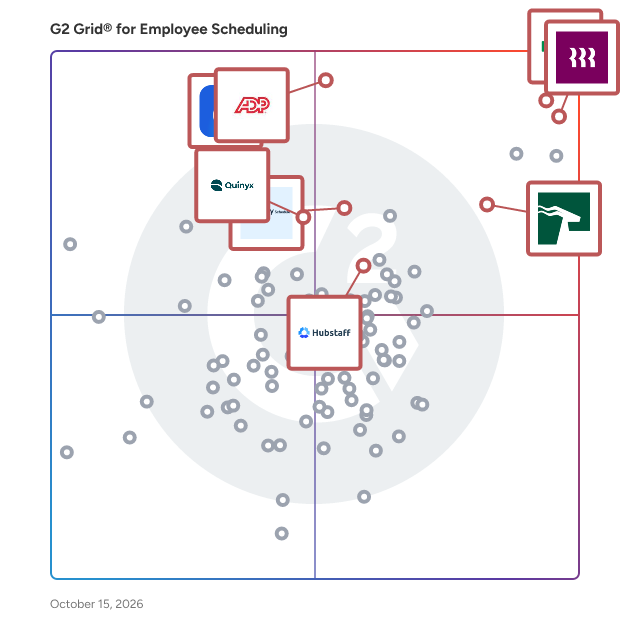
## G2 Grid® for Employee Scheduling Software
![G2 Grid® for Employee Scheduling Software plotting products by satisfaction and market presence](https://www.g2.com/categories/employee-scheduling-software/grids.png?focus%5B%5D=133052&focus%5B%5D=53090&focus%5B%5D=15988&focus%5B%5D=39666&focus%5B%5D=4663&focus%5B%5D=5349&focus%5B%5D=2917&focus%5B%5D=15680)
Highlighted products: ADP Time and Labor Management, Rippling, HROne, Quinyx, Dayforce, Hubstaff, Humanity Schedule by TCP, and Deputy.
Underlying data: [Grid® JSON](https://www.g2.com/categories/employee-scheduling-software/grids.json?focus%5B%5D=adp-adp-time-and-labor-management&amp;focus%5B%5D=rippling&amp;focus%5B%5D=uneecops-hrone&amp;focus%5B%5D=quinyx&amp;focus%5B%5D=dayforce&amp;focus%5B%5D=hubstaff&amp;focus%5B%5D=humanity-schedule-by-tcp&amp;focus%5B%5D=deputy&amp;segment=enterprise)


## How Many Employee Scheduling Software Products Does G2 Track?
**Total Products under this Category:** 307

### Category Stats (Jul 2026)
- **Average Rating**: 4.45/5 (↑0.01 vs Jun 2026) The average rating of products in this category, based on all submitted ratings
- **Top Trending Product**: G&amp;A Partners (+10.2%) - Among all products in this category, G&amp;A Partners recorded the largest rating increase compared to last month
*Last updated: July 13, 2026*


## How Does G2 Rank Employee Scheduling Software Products?

**Why You Can Trust G2's Software Rankings:**

- 30 Analysts and Data Experts
- 43,600+ Authentic Reviews
- 307+ Products
- Unbiased Rankings

G2's software rankings are built on verified user reviews, rigorous moderation, and a consistent research methodology maintained by a team of analysts and data experts. Each product is measured using the same transparent criteria, with no paid placement or vendor influence. While reviews reflect real user experiences, which can be subjective, they offer valuable insight into how software performs in the hands of professionals. Together, these inputs power the G2 Score, a standardized way to compare tools within every category.


---

**Sponsored**

### CorporateGift.com

We automate everything but the smile. Sales, Marketing, and the teams that rely on gifting to open doors use us to take the heavy lifting out of swag and gifting, turning complex operations into self-managed, automated, on-brand experiences. Our solution was formed around 3 pillars - a huge variety of products to ensure recipient satisfaction, advanced technology and automation (including integration to CRM&#39;s) for a seamless process control, and a team of experts ready to provide best practice and support to make sure every customer’s need is met.


[Visit website](https://www.g2.com/external_clickthroughs/record?secure%5Bad_program%5D=ppc&amp;secure%5Bad_slot%5D=category_product_list&amp;secure%5Bcategory_id%5D=1129&amp;secure%5Bchosen_at%5D=2026-07-13T08%3A40%3A06Z&amp;secure%5Bdisplayable_resource_id%5D=1946&amp;secure%5Bdisplayable_resource_type%5D=Category&amp;secure%5Bmedium%5D=sponsored&amp;secure%5Bplacement_reason%5D=retargeted_product&amp;secure%5Bplacement_resource_ids%5D%5B%5D=129559&amp;secure%5Bprioritized%5D=false&amp;secure%5Bproduct_id%5D=129559&amp;secure%5Bresource_id%5D=1129&amp;secure%5Bresource_type%5D=Category&amp;secure%5Bsource_type%5D=category_page&amp;secure%5Bsource_url%5D=https%3A%2F%2Fwww.g2.com%2Fcategories%2Femployee-scheduling-software%2Fenterprise%3Fpage%3D2&amp;secure%5Btoken%5D=f1118709b61a44b33732ad1009840fc3b3d73c87b5288963bc4b8c9f67c6216a&amp;secure%5Burl%5D=https%3A%2F%2Fcorporategift.com%3Futm_source%3Dg2.com%26utm_medium%3Dppc%26utm_campaign%3Dcategory%26utm_content%3Dhome&amp;secure%5Burl_type%5D=custom_url)

---


## What Is Employee Scheduling Software?

[HR Software](https://www.g2.com/categories/hr)

## What Software Categories Are Similar to Employee Scheduling Software?

- [Workforce Management Software](https://www.g2.com/categories/workforce-management)
- [Time Tracking Software](https://www.g2.com/categories/time-tracking-software)
- [Time &amp; Attendance Software](https://www.g2.com/categories/time-attendance)


---

## How Do You Choose the Right Employee Scheduling Software?

### What You Should Know About Employee Scheduling Software

### Employee Scheduling Software software buying insights at a glance

[Employee Scheduling Software](https://www.g2.com/categories/employee-scheduling-software) helps businesses build, update, and communicate employee schedules without relying on spreadsheets, group texts, or manual manager oversight. On G2, the category centers on tools that automate schedule creation and maintenance, give visibility into employee tasks, and let workers access schedules with self-service features such as messaging and shift swapping. As labor costs stay under scrutiny and teams become more distributed, this software is increasingly essential for organizations that need tighter [staffing](https://www.g2.com/categories/staffing) control, faster schedule changes, and better coordination across locations.

Common use cases include building recurring shift plans, handling time-off requests, giving employees mobile schedule access, coordinating shift swaps, reducing scheduling conflicts, and linking labor planning more closely to attendance and payroll workflows. Businesses benefit most when they use these tools to cut manual admin, respond faster to callouts or staffing changes, and give frontline teams one place to check shifts, punch in, and communicate.

Pricing is usually shaped by employee count, number of locations, and whether the product bundles broader [HR](https://www.g2.com/categories/core-hr) **,** [payroll](https://www.g2.com/categories/payroll) **,** or [workforce management](https://www.g2.com/categories/workforce-management) capabilities. On the category page, G2 shows both free-entry options and products with published pricing, which matches what I see in the review file: buyers are comparing everything from lighter-weight scheduling tools to broader workforce suites. In practice, total cost depends less on the schedule builder alone and more on whether a team needs compliance controls, reporting depth, mobile workflows, and integration with adjacent systems.

### Top 5 FAQs from software buyers:

- How do employee scheduling systems improve workforce coordination and staffing efficiency?
- What features should teams evaluate when choosing the best employee scheduling software?
- How well do employee scheduling tools integrate with payroll, HR, and time tracking systems?
- What level of automation do employee scheduling platforms offer for shifts, availability, and approvals?
- How scalable is employee scheduling software for businesses managing multiple locations or distributed teams?

G2’s top-rated Employee Scheduling software, based on verified reviews, includes [Rippling](https://www.g2.com/products/rippling/reviews) **,** [Connecteam](https://www.g2.com/products/connecteam/reviews) **,** [HROne](https://www.g2.com/products/uneecops-hrone/reviews) **,** and [Deputy](https://www.g2.com/products/deputy/reviews).

### What are the top-reviewed Employee Scheduling Software on G2?

[Rippling](https://www.g2.com/products/rippling/reviews)

- Number of Reviews: ​​761
- Satisfaction: 98
- Market Score: 90
- G2 score: 94

[Connecteam](https://www.g2.com/products/connecteam/reviews)

- Number of Reviews: 1,911
- Satisfaction: 99
- Market Score: 84
- G2 score: 92

[HROne](https://www.g2.com/products/uneecops-hrone/reviews)

- Number of Reviews: 933
- Satisfaction: 91
- Market Score: 76
- G2 score: 84

[Deputy](https://www.g2.com/products/deputy/reviews)

- Number of Reviews: 319
- Satisfaction: 72
- Market Score: 74
- G2 score: 73

[Homebase](https://www.g2.com/products/homebase/reviews)

- Number of Reviews: 210
- Satisfaction: 58
- Market Score: 81
- G2 score: 70

Satisfaction reflects user-reported ratings across factors such as ease of use, feature fit, and support quality. ([Source 2](https://www.g2.com/reports))

Market Presence scores are calculated based on review volume, third-party signals, and overall market visibility. ([Source 2](https://www.g2.com/reports))

G2 Score is a weighted composite of Satisfaction and Market Presence. ([Source 2](https://www.g2.com/reports))

Learn how G2 scores products. ([Source 1](https://documentation.g2.com/docs/research-scoring-methodologies?_gl=1*5vlk6s*_gcl_au*MTAwMzU5MzUxLjE3NjM0MTg0NzYuNjY0NTIxMTY0LjE3NjQ2MTc0NzcuMTc2NDYxNzQ3Nw..*_ga*NzY1MDU0NjE3LjE3NjM0NzQ3ODM.*_ga_MFZ5NDXZ5F*czE3NjYwODk1MTMkbzY3JGcxJHQxNzY2MDkyMjQyJGo1NyRsMCRoMA..))

### What I Often See in Employee Scheduling Software

#### Feedback Pros: What Users Consistently Appreciate

- **Seamless global payroll and compliance management for distributed teams**
- “_Rippling makes global employment feel simple and reliable. I work remotely in Asia for a U.S.-based company, and Rippling helps ensure I’m paid accurately and on time. Having payroll, HR, and global employment management in one system makes the whole process more transparent and much easier to manage. It’s particularly helpful for international employees because it streamlines cross-border payroll and compliance, providing both the company and employees with peace of mind. Overall, the platform is intuitive, efficient, and dependable.”_ - [Jeannie W.](https://www.g2.com/products/rippling/reviews/rippling-review-12491553), Rippling review
- **Cost-effective HR platform with engaging employee-centric features and recruitment tools**
- “_The best part of HROne is that it’s less costly and still provides all the features that other tools charge more for. This tool helps keep my organisation’s HR processes smooth. I’m currently using it, and one of the best things is that the team always stays up to date with trends. For example, during the India T20 World Cup, they created a scorecard you could play to earn rewards. This kind of activity makes employees feel more comfortable and motivated. Also, the recruitment portal in this tool is good.”_ - [Abhishek K.](https://www.g2.com/products/uneecops-hrone/reviews/hrone-review-12468514), HROne review
- **All-in-one workforce management with easy setup and daily operational efficiency**
- “_There are so many features to Homebase. Scheduling, onboarding, timesheets, and reporting. All very helpful for operations and labor reporting in a business. Was easy to set up, and is easy to use but thorough. Pricing for it is also very competitive to other systems. We use it daily, and it works exactly for what we need without major headaches. Also easy for employees on their end. Communication, scheduling, etc.”_ - [Emily E.](https://www.g2.com/products/homebase/reviews/homebase-review-12341315), Homebase review

#### Cons: Where Many Platforms Fall Short

- **Delayed task loading and grouped notifications can cause missed updates**
- “_When I open a task to update it, it takes a moment longer to load before I can type anything. One thing I have noticed is that notifications sometimes come in groups rather than one by one. If multiple tasks are updated close to each other, the alerts show together, and it is easy to miss a small detail unless I open the app and check properly.”_ - [Ishan S.](https://www.g2.com/products/connecteam/reviews/connecteam-review-12423368), Connecteam review
- **Limited mobile admin capabilities for complex scheduling and compliance tasks**
- “_What I dislike with Rippling&#39;s mobile apps is the lack of advanced administrative capabilities; currently, to resolve complex schedule management conflicts or compliance audits still require for a desktop version of the platform._” - [Imanda I.](https://www.g2.com/products/rippling/reviews/rippling-review-12489225), Rippling review
- **Extra navigation steps and learning curve for accessing settings and reports**
- “_Some workflows take a few extra clicks to complete, especially when navigating between modules. While the system is powerful, new users may need a short learning period to understand where certain settings or reports are located.”_ - [Priyanka T.](https://www.g2.com/products/uneecops-hrone/reviews/hrone-review-12356840), HROne review

### My Expert Takeaway on Employee Scheduling Software

Employee scheduling software delivers the most value when organizations treat it as a workforce coordination and operations system rather than just a scheduling tool. The strongest platforms combine schedule creation with availability management, time tracking, and mobile communication, allowing teams to manage staffing while maintaining visibility into day-to-day operations.

Review sentiment across the category is strong. In this dataset, employee scheduling software has an average star rating of 4.56, with strong usability signals including 6.41 Ease of Use, 6.36 Ease of Setup, and 6.36 Quality of Support. Likelihood to recommend is also high at 9.11 out of 10, indicating that buyers consistently see value once these tools are embedded into daily workflows.

Friction tends to appear as organizations scale usage or introduce more complex scheduling rules. Teams that struggle often underestimate the effort required to standardize availability, define permissions, and align scheduling with payroll and attendance workflows. High-performing teams approach employee scheduling with clear processes and consistent usage across managers and locations.

The best employee scheduling software balances simplicity with operational control. Strong platforms make it easy for employees to access schedules, swap shifts, and manage time off, while giving managers clear visibility into staffing coverage and workforce activity. As distributed teams and dynamic staffing models grow, employee scheduling software is becoming core operational infrastructure.

### Employee Scheduling Software FAQs

#### **What is the best employee scheduling software?**

The best employee scheduling software depends on whether you need lightweight shift planning or a broader workforce platform. On G2, tools like [Rippling](https://www.g2.com/products/rippling/reviews) **,** [Connecteam](https://www.g2.com/products/connecteam/reviews) **,** [HROne](https://www.g2.com/products/uneecops-hrone/reviews), [Buddy Punch](https://www.g2.com/products/buddy-punch/reviews), and [Homebase](https://www.g2.com/products/homebase/reviews) stand out because buyers consistently compare usability, mobile access, and scheduling flexibility.

#### **What is the best employee scheduling software for shift-based businesses?**

For shift-based businesses, tools like [Homebase](https://www.g2.com/products/homebase/reviews) **,** [Connecteam](https://www.g2.com/products/connecteam/reviews) **,** [Buddy Punch](https://www.g2.com/products/buddy-punch/reviews) **,** [7shifts](https://www.g2.com/products/7shifts/reviews) **,** and [Deputy](https://www.g2.com/products/deputy/reviews) are commonly evaluated because they combine recurring schedule creation, shift swaps, mobile alerts, and time-off handling while reducing manual scheduling work for managers.

#### **How to choose an employee scheduling software?**

Start with your scheduling complexity, number of locations, hourly staff volume, approval flows, and payroll dependencies. Then compare products like [Rippling](https://www.g2.com/products/rippling/reviews) **,** [Deputy](https://www.g2.com/products/deputy/reviews) **,** [Homebase](https://www.g2.com/products/homebase/reviews) **,** and [Connecteam](https://www.g2.com/products/connecteam/reviews) based on mobile usability, setup effort, reporting depth, and support quality, key drivers of adoption in your dataset.

#### **What are the top tools for managing staff rosters?**

The top tools for managing staff rosters are usually those that balance fast schedule creation with employee self-service. G2 leaders such as [Rippling](https://www.g2.com/products/rippling/reviews) **,** [Buddy Punch](https://www.g2.com/products/buddy-punch/reviews) **,** [HROne](https://www.g2.com/products/uneecops-hrone/reviews) **,** [Connecteam](https://www.g2.com/products/connecteam/reviews) **,** [Homebase](https://www.g2.com/products/homebase/reviews) **,** and [Deputy](https://www.g2.com/products/deputy/reviews) are frequently considered for their ability to streamline roster management.

#### **Which software is best for mobile workforce scheduling?**

For mobile-first teams, products like [Connecteam](https://www.g2.com/products/connecteam/reviews) **,** [Homebase](https://www.g2.com/products/homebase/reviews) **,** [Buddy Punch](https://www.g2.com/products/buddy-punch/reviews) **,** and [Deputy](https://www.g2.com/products/deputy/reviews) are strong options because they prioritize mobile apps for scheduling, clocking in, requesting time off, and receiving real-time updates, without relying on desktop access.

#### **Which is the best employee scheduling software for shift-based work?**

For shift-based work, solutions like [7shifts](https://www.g2.com/products/7shifts/reviews) **,** [Deputy](https://www.g2.com/products/deputy/reviews) **,** [Homebase](https://www.g2.com/products/homebase/reviews) **,** and [Connecteam](https://www.g2.com/products/connecteam/reviews) are often shortlisted because they handle high-volume roster changes, shift visibility, and swap workflows while keeping employee actions simple through mobile-friendly interfaces.

### Sources

1. [G2 Scoring Methodologies](https://documentation.g2.com/docs/research-scoring-methodologies?_gl=1*5ky9es*_gcl_au*MTY2NDg2MDY3Ny4xNzU1MDQxMDU4*_ga*MTMwMTMzNzE1MS4xNzQ5MjMyMzg1*_ga_MFZ5NDXZ5F*czE3NTUwOTkzMjgkbzQkZzEkdDE3NTUwOTk3NzYkajU3JGwwJGgw)
2. [G2 Winter 2026 Reports](https://company.g2.com/news/g2-winter-2026-reports)

Researched By: [Jeffrey Lin](https://research.g2.com/insights/author/jeffrey-lin)

**Last updated on March 18, 2026**


