Best E-Signature Software with Bulk Digital Signatures Capabilities - Page 2

How Many E-Signature Software Products Does G2 Track?

Total Products under this Category: 432

Category Stats (Aug 2026)

  • Average Rating: 4.59/5 (↑0.01 vs Jul 2026) The average rating of products in this category, based on all submitted ratings
  • Top Trending Product: Kinective SignPlus (+8.33%) - Among all products in this category, Kinective SignPlus recorded the largest rating increase compared to last month

Last updated: August 04, 2026

How Does G2 Rank E-Signature Software Products?

Why You Can Trust G2's Software Rankings:

  • 30 Analysts and Data Experts
  • 56,300+ Authentic Reviews
  • 432+ Products
  • Unbiased Rankings

G2's software rankings are built on verified user reviews, rigorous moderation, and a consistent research methodology maintained by a team of analysts and data experts. Each product is measured using the same transparent criteria, with no paid placement or vendor influence. While reviews reflect real user experiences, which can be subjective, they offer valuable insight into how software performs in the hands of professionals. Together, these inputs power the G2 Score, a standardized way to compare tools within every category.

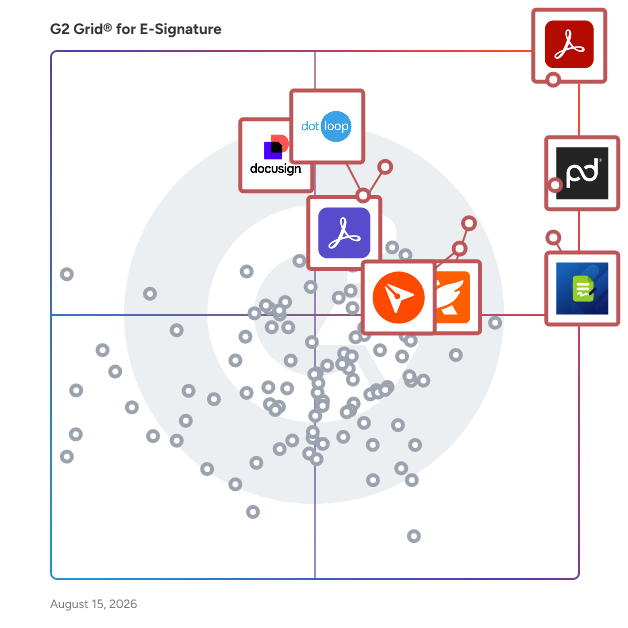
G2 Grid® for E-Signature Software

G2 Grid® for E-Signature Software plotting products by satisfaction and market presence

Highlighted products: Adobe Acrobat, PandaDoc, Jotform Sign, Foxit PDF Editor, Docusign, Adobe Acrobat Sign, BoldSign, and dotloop.

Underlying data: [Grid® JSON](https://www.g2.com/categories/e-signature/grids.json?focus%5B%5D=adobe-acrobat&focus%5B%5D=pandadoc&focus%5B%5D=jotform-sign&focus%5B%5D=foxit-pdf-editor&focus%5B%5D=docusign&focus%5B%5D=adobe-acrobat-sign&focus%5B%5D=boldsign&focus%5B%5D=dotloop)

Sponsored

Certyneo

Certyneo is a European electronic signature platform built for SMBs and professional teams. Sign, send, and manage legally binding documents in seconds — fully compliant with eIDAS (SES & AES), GDPR-native, and hosted in the EU. Unlike DocuSign or Yousign, Certyneo includes a built-in AI contract generator, letting you create any contract before signing it — all in one platform. Flat-rate pricing means no per-user fees, saving teams up to 70% vs. legacy solutions. Key features: eIDAS-compliant signatures, AI contract generation, audit trail, custom branding, REST API, multi-signatory workflows, and 10-year archiving.

Visit website

Oneflow

Oneflow is an AI-powered contract management platform that turns contracts into an operating system that drives revenue, compliance and operational efficiency. Contracts hold revenue, risk, and obligations, yet they rarely connect to daily workflows. Instead of static PDFs that lock away critical information, Oneflow turns every contract into an actionable asset that reveals opportunities, flags risks, and drives execution across teams so your business moves faster with full visibility. With Oneflow, teams can create, review, sign, and control contracts in one unified platform. Contracts are fully digital, collaborative, and always up to date.Contract data becomes an operational layer that automates workflows across teams, and gives full visibility into obligations, performance, and risk. AI is embedded across the platform to review contracts, extract key data, identify risks, and surface insights at scale. The platform enables you to: - Centralize all contracts, clauses, and obligations in a structured, searchable repository - Automate workflows, compliance checks, and data flows across your existing systems - Execute with full visibility into engagement, deadlines, and contract activity - Optimize using AI-driven portfolio analysis to improve decisions & performance over time With deep integrations into CRM, HR, and automation platforms, Oneflow ensures contracts are no longer disconnected from business processes. Instead, they become an operating system that drives revenue, reduces risk, and enables smarter decision-making. Whether you're in sales, HR, procurement, finance, or legal, Oneflow helps you move faster and stay in control.

Average Rating: 4.4/5.0

Total Reviews: 361

How Do G2 Users Rate Oneflow?

  • Has the product been a good partner in doing business?: 8.9/10 (Category avg: 9.2/10)
  • Performance and Reliability: 8.8/10 (Category avg: 9.0/10)
  • Enterprise Scalability: 8.4/10 (Category avg: 8.9/10)
  • Signature Document Creation: 8.5/10 (Category avg: 9.1/10)

Who Is the Company Behind Oneflow?

  • Seller: Oneflow
  • Year Founded: 2012
  • HQ Location: Stockholm, Stockholm County
  • Twitter: @oneflowcom
    261 Twitter followers
  • LinkedIn® Page: www.linkedin.com
    155 employees on LinkedIn®

Who Uses This Product?

  • Who Uses This: CEO, Konsultchef
  • Top Industries: Staffing and Recruiting, Computer Software
  • Company Size: 44% Small, 43% Medium

What Do G2 Reviewers Say About Oneflow?

AI-generated summary from verified user reviews

Pros
  • Users find Oneflow's ease of use exceptional, streamlining contract management and enhancing workflow efficiency effortlessly.
  • Users find Oneflow to be intuitive and easy to use, enhancing the contract management experience significantly.
  • Users find Oneflow to be an efficient tool that streamlines contract management and enhances workflow significantly.
  • Users appreciate the streamlined contract management of Oneflow, which simplifies processes and enhances overall efficiency.
  • Users commend the fast and accurate customer support from OneFlow, enhancing their overall experience with the product.
Cons
  • Users note a lack of missing features in Oneflow, particularly in customization and integrations that limit flexibility.
  • Users find the limited capabilities for document collaboration frustrating and desire better integration and automation features.
  • Users note the limited customization options in Oneflow, seeking more flexibility and integration features for better usability.
  • Users feel that Oneflow is quite expensive and lacks value due to the additional costs for promised functionalities.
  • Users find feature usability lacking in Oneflow compared to competitors, citing cumbersomeness and design issues.

What Are Recent G2 Reviews of Oneflow?

What Are G2 Users Discussing About Oneflow?

Secured Signing

Secured Signing's eSignature solution is designed to enhance the signing process by incorporating advanced security features such as AI-powered deepfake detection, ID Verification and live video verification. The platform allows users to not only sign documents but also to ensure the integrity, identity, and intent behind each signature, addressing the growing concerns of digital fraud in today’s online environment. Targeted towards businesses and organizations across various sectors, including recruitment, legal, finance, and government, Secured Signing provides a comprehensive signing experience that is both secure and compliant with global standards. The platform is particularly beneficial for industries that require stringent identity verification and regulatory adherence, making it an ideal choice for enterprises that prioritize data protection and compliance. Global Compliance & Security Standards: Our ISO 27001, SOC 2 (Type 1 & 2), HIPAA, GDPR, MISMO, FDA, and FAA-compliant designations ensure the highest level of data protection, privacy, and industry-specific regulatory adherence. Core Features • Live Verification & AI Deepfake Defense: Real-time identity verification during signing featuring Realify - our AI-driven deepfake detection, and a structured audit report. • Video Confirmation & Video Signing: Execute remote signings via live video meetings; includes identity verification, comprehension checks, and secure execution in a single session. • Multi-Layered Authentication: Robust signer validation through biometric ID verification with liveness checks, SMS 2FA, and SSO. • Advanced Audit Trail: Comprehensive, legally defensible records including timestamps, email logs, and IP addresses. • Data Integrity & Sovereignty: Documents are locked against alteration after the first signature. Choose your data residency with regional datacenters in the US, NZ, AUS, and UK. • Flexible eSignature Workflows: Customizable, scalable signing processes tailored to Recruitment, Legal, Notary, Government, Finance, and Enterprise sectors. • API-First Architecture: Built for seamless connectivity. Integrate directly with your tech stack or use our pre-built connectors. The platform is designed with flexibility in mind, offering customizable eSignature workflows that can be tailored to meet the specific needs of various industries. Its API-first architecture facilitates seamless integration with existing technology stacks, allowing organizations to connect directly or utilize pre-built connectors with popular applications such as Bullhorn, Jobadder, Actionstep, Tracker RMS, Salesforce, Microsoft SharePoint, Microsoft Word, and Clio. This adaptability, combined with its commitment to security and compliance, positions Secured Signing as a leading solution in the eSignature market, catering to the evolving demands of modern businesses.

Average Rating: 4.6/5.0

Total Reviews: 45

How Do G2 Users Rate Secured Signing?

  • Has the product been a good partner in doing business?: 9.6/10 (Category avg: 9.2/10)
  • Performance and Reliability: 9.1/10 (Category avg: 9.0/10)
  • Enterprise Scalability: 9.1/10 (Category avg: 8.9/10)
  • Signature Document Creation: 9.3/10 (Category avg: 9.1/10)

Who Is the Company Behind Secured Signing?

  • Seller: Secured Signing
  • Year Founded: 2009
  • HQ Location: Auckland, New Zealand
  • Twitter: @SecuredSigning
    341 Twitter followers
  • LinkedIn® Page: www.linkedin.com
    19 employees on LinkedIn®

Who Uses This Product?

  • Top Industries: Information Technology and Services, Staffing and Recruiting
  • Company Size: 67% Small, 24% Medium

What Do G2 Reviewers Say About Secured Signing?

AI-generated summary from verified user reviews

Pros
  • Users find Secured Signing to be very easy to use, streamlining the document signing process efficiently.
  • Users value the quick and helpful customer support from Secured Signing, enhancing their overall experience.
  • Users highlight the easy integration of Secured Signing with their CRM, enhancing efficiency and reducing manual tasks.
  • Users find the easy setup of Secured Signing great, enhancing efficiency and streamlining document management processes.
  • Users value the time-saving features of Secured Signing, enhancing efficiency and streamlining document management processes.
Cons
  • Users find difficult editing in Secured Signing due to limited flexibility and accuracy in form adjustments.
  • Users find form flexibility issues with Secured Signing, particularly in editing and customizing templates effectively.
  • Users experience copy-paste issues with Secured Signing, complicating form editing and template management tasks.
  • Users face challenges with cc'ing individuals in documents, which can hinder collaboration efforts.
  • Users experience layout issues with Secured Signing, as template editing and field flexibility are limited and cumbersome.

What Are Recent G2 Reviews of Secured Signing?

What Are G2 Users Discussing About Secured Signing?
Formstack Sign

Fast and secure digital signatures anywhere. Formstack Sign is a cloud-based electronic signature solution that helps small to large businesses collect e-signatures for document authorization, ensure privacy, and access the system across multiple devices. Offering a host of features, such as customizable templates, a drag-and-drop interface, electronic file conversion, signer redirection/referral, reusable forms, and more, the platform syncs with Google and Outlook to help users import contact information. Additionally, it allows users to personalize documents with custom fonts, branding, and colors. Formstack Sign enables users to create password-protected documents that can be signed via SMS/text messages. To ensure legal compliance, the solution includes an audit trail for all documentation. The product is available on a per-user per-month subscription, and support is extended via email and online helpdesk. Formstack Sign is an ideal digital signature solution for any industry, including: - Healthcare - Higher Education - Insurance - Financial Services - Government - Energy and Utilities Formstack Sign saves teams an average of 13 hours per week, giving them more time to focus on impactful work.

Average Rating: 4.8/5.0

Total Reviews: 404

How Do G2 Users Rate Formstack Sign?

  • Has the product been a good partner in doing business?: 9.5/10 (Category avg: 9.2/10)
  • Performance and Reliability: 9.4/10 (Category avg: 9.0/10)
  • Enterprise Scalability: 9.3/10 (Category avg: 8.9/10)
  • Signature Document Creation: 9.3/10 (Category avg: 9.1/10)

Who Is the Company Behind Formstack Sign?

  • Seller: Formstack, LLC
  • Company Website:
  • Year Founded: 2006
  • HQ Location: Fishers, IN
  • Twitter: @Formstack
    6,392 Twitter followers
  • LinkedIn® Page: www.linkedin.com
    219 employees on LinkedIn®

Who Uses This Product?

  • Who Uses This: Insurance Agent, Account Manager
  • Top Industries: Insurance, Higher Education
  • Company Size: 85% Small, 13% Medium

What Do G2 Reviewers Say About Formstack Sign?

AI-generated summary from verified user reviews

Pros
  • Users appreciate the intuitive and user-friendly interface of Formstack Sign, enhancing their document management experience.
  • Users value the time-saving automation of Formstack Sign, enabling quick form distribution and streamlined processes.
  • Users find Formstack Sign incredibly convenient for its intuitive use and seamless integration with other software.
  • Users appreciate the easy signing process with Formstack Sign, enhancing workflow and integration with other applications.
  • Users appreciate the ease of managing signatures with Formstack Sign, streamlining document distribution and saving time.
Cons
  • Users face form issues related to setup complexity, email recognition, and unmet functionality promises from sales support.
  • Users express frustration over email issues, particularly with sender names and delays due to shared email addresses.
  • Users desire better email management to streamline organization recognition and avoid delays with clients sharing email addresses.
  • Users face e-signature issues due to limits on merges, complicating an otherwise simple platform experience.
  • Users find the limited customization options in Formstack Sign restrict their ability to tailor the tool effectively.

What Are Recent G2 Reviews of Formstack Sign?

What Are G2 Users Discussing About Formstack Sign?

Concord

Concord delivers contract management for the 90% of agreements that don't need legal complexity. Founded in 2014, the company serves 1,500+ SMB and mid-market organizations (50-1,000 employees) across North America and Europe from offices in Austin and Paris. The platform combines contract creation, real-time collaboration, e-signature, and AI-powered review in a single workflow. Business users draft from templates, negotiate in-browser (no more Word attachments), and get AI review in 23 seconds instead of waiting days for legal. Post-signature, automated alerts handle renewals and obligations. Integration with Salesforce, HubSpot, and accounting systems eliminates double-entry. Concord addresses a simple reality: most contracts are routine business transactions that shouldn't require legal intervention. By enabling sales, procurement, and operations teams to self-serve standard agreements, customers reduce contract cycles by 75% on average. Setup takes days, not months. Training takes hours, not weeks. ROI is measured in weeks, not years. Languages Supported: All Concord is deliberately built for SMB/mid-market reality, not enterprise fantasy. While competitors chase Fortune 500 complexity, Concord removes features that slow businesses down. Result: a platform any business user can master in an afternoon. No consultants. No certifications. No 6-figure implementations. Just contract management that works like modern software should - simple, fast, and focused on business outcomes, not legal process. When 65% of our customers have no legal team, that simplicity isn't nice-to-have - it's survival.

Average Rating: 4.2/5.0

Total Reviews: 129

How Do G2 Users Rate Concord?

  • Has the product been a good partner in doing business?: 8.9/10 (Category avg: 9.2/10)
  • Performance and Reliability: 9.2/10 (Category avg: 9.0/10)
  • Enterprise Scalability: 9.4/10 (Category avg: 8.9/10)
  • Signature Document Creation: 8.4/10 (Category avg: 9.1/10)

Who Is the Company Behind Concord?

Who Uses This Product?

  • Top Industries: Computer Software, Information Technology and Services
  • Company Size: 44% Medium, 37% Small

What Do G2 Reviewers Say About Concord?

AI-generated summary from verified user reviews

Pros
  • Users find Concord's interface user-friendly, making the upload and signature process straightforward and efficient.
  • Users appreciate the user-friendly interface of Concord, enjoying its affordability and ease of document management.
  • Users appreciate the affordability of Concord, praising its user-friendly interface and unlimited document signatures.
  • Users value the affordable pricing of Concord, appreciating its simplicity and unlimited document signatures feature.
  • Users appreciate the affordability and user-friendly interface of Concord, making document signing hassle-free.
Cons
  • Users face frustrating delays in support responses, often waiting over a week for assistance with their issues.
  • Users experience insufficient resources, citing delays in support responses and a lack of helpful video tutorials.
  • Users report poor customer support, citing long response times and lack of instructional resources for platform usage.

What Are Recent G2 Reviews of Concord?

altaFlow

altaFlow generates custom docs with a click, integrates eSignatures, creates webforms, and more without coding. It’s the ultimate tool to simplify, automate, and elevate your workflows.

Average Rating: 4.5/5.0

Total Reviews: 56

How Do G2 Users Rate altaFlow?

  • Has the product been a good partner in doing business?: 9.3/10 (Category avg: 9.2/10)
  • Performance and Reliability: 8.2/10 (Category avg: 9.0/10)
  • Enterprise Scalability: 8.8/10 (Category avg: 8.9/10)
  • Signature Document Creation: 9.4/10 (Category avg: 9.1/10)

Who Is the Company Behind altaFlow?

  • Seller: airSlate
  • Company Website:
  • Year Founded: 2006
  • HQ Location: Brookline, Massachusetts
  • Twitter: @airSlate
    1,234 Twitter followers
  • LinkedIn® Page: www.linkedin.com
    798 employees on LinkedIn®

Who Uses This Product?

  • Top Industries: Financial Services, Higher Education
  • Company Size: 52% Medium, 41% Small

What Do G2 Reviewers Say About altaFlow?

AI-generated summary from verified user reviews

Pros
  • Users find altaFlow to be incredibly user-friendly, allowing for quick implementation and easy navigation.
  • Users highlight the excellent customer support of altaFlow, appreciating the prompt and knowledgeable assistance provided.
  • Users highlight the customizable document management features of altaFlow, enhancing workflow efficiency and collaboration.
  • Users find altaFlow's easy setup beneficial for quick implementation and effective daily use of the system.
  • Users find altaFlow to be intuitive and user-friendly, making implementation and navigation a breeze.
Cons
  • Users find performance issues with altaFlow, noting clunkiness and difficulties on older hardware affecting their experience.
  • Users experience bot issues leading to significant slowdowns and delays during complex workflow setups in altaFlow.
  • Users find the complexity of settings overwhelming, making it challenging to navigate the various products effectively.
  • Users find difficult editing a hassle, having to redo processes for any changes to sent documents.
  • Users find difficult navigation in altaFlow due to numerous products, complicating their understanding of functionalities.

What Are Recent G2 Reviews of altaFlow?

What Are G2 Users Discussing About altaFlow?

SigningHub

SigningHub by Ascertia is a complete e-signature and document workflow solution, available as a cloud service or as an on-premise product for when complete control of your documents is required. SigningHub adds essential digital trust to documents for enterprises, governments and Trust Service Providers (TSPs). It increases process efficiencies, eliminates paper costs and reduces risks. Ascertia’s award-winning SigningHub supports legally enforceable signatures that comply with all global electronic and digital signature laws and regulations and provides instant access for signing and approving documents from any device, anywhere. Official Website: https://www.signinghub.com/ Full Features: www.signinghub.com/features-comparison/ Free Trial: https://www.signinghub.com/

Average Rating: 4.3/5.0

Total Reviews: 22

How Do G2 Users Rate SigningHub?

  • Has the product been a good partner in doing business?: 8.2/10 (Category avg: 9.2/10)
  • Performance and Reliability: 8.3/10 (Category avg: 9.0/10)
  • Enterprise Scalability: 8.9/10 (Category avg: 8.9/10)
  • Signature Document Creation: 8.6/10 (Category avg: 9.1/10)

Who Is the Company Behind SigningHub?

  • Seller: Ascertia
  • Year Founded: 2001
  • HQ Location: Guildford, Surrey
  • Twitter: @Ascertia
    729 Twitter followers
  • LinkedIn® Page: www.linkedin.com
    217 employees on LinkedIn®

Who Uses This Product?

  • Top Industries: Information Technology and Services, Computer Software
  • Company Size: 54% Small, 42% Medium

What Are Recent G2 Reviews of SigningHub?

Signority

Signority is a leading eSignature and document workflow platform that enables businesses and government organizations to streamline digital transactions securely. As a proud member of the FileCloud family, Signority helps ensure International and Canadian regulatory compliance like GDPR, HIPAA, and PIPEDA and assists in complying with security and industry standards including SOC 2 and ISO. Our technology guarantees data sovereignty and protection, nonrepudiation, and legal traceability. Signority offers automated document signing tailored to customer processes, reducing human errors and helping customers navigate the complexities of digital transformation across various cloud environments.

Average Rating: 4.7/5.0

Total Reviews: 46

How Do G2 Users Rate Signority?

  • Has the product been a good partner in doing business?: 9.1/10 (Category avg: 9.2/10)
  • Performance and Reliability: 9.4/10 (Category avg: 9.0/10)
  • Enterprise Scalability: 9.3/10 (Category avg: 8.9/10)
  • Signature Document Creation: 8.9/10 (Category avg: 9.1/10)

Who Is the Company Behind Signority?

  • Seller: Signority
  • Year Founded: 2010
  • HQ Location: Ottawa, Canada
  • Twitter: @Signority
    1,490 Twitter followers
  • LinkedIn® Page: www.linkedin.com
    7 employees on LinkedIn®

Who Uses This Product?

  • Top Industries: Insurance, Marketing and Advertising
  • Company Size: 72% Small, 15% Medium

What Are Recent G2 Reviews of Signority?

What Are G2 Users Discussing About Signority?

MyDocSafe

MyDocSafe is a secure client and employee onboarding platform for all size of business. We empower companies to design, deploy and manage bespoke onboarding and hiring processes that combine secure e-forms, identity verification, electronic signature and payment processing. We save more than 50% of time and cost of those processes while improving service quality.

Average Rating: 3.9/5.0

Total Reviews: 15

How Do G2 Users Rate MyDocSafe?

  • Has the product been a good partner in doing business?: 8.3/10 (Category avg: 9.2/10)
  • Performance and Reliability: 5.0/10 (Category avg: 9.0/10)
  • Enterprise Scalability: 8.3/10 (Category avg: 8.9/10)
  • Signature Document Creation: 8.1/10 (Category avg: 9.1/10)

Who Is the Company Behind MyDocSafe?

  • Seller: MyDocSafe.com
  • Year Founded: 2013
  • HQ Location: Bedford, England
  • Twitter: @MyDocSafe
    1,343 Twitter followers
  • LinkedIn® Page: www.linkedin.com
    5 employees on LinkedIn®

Who Uses This Product?

  • Company Size: 88% Small, 13% Medium

What Are Recent G2 Reviews of MyDocSafe?

What Are G2 Users Discussing About MyDocSafe?