Best Construction Accounting Software - Page 2

How Many Construction Accounting Software Products Does G2 Track?

Total Products under this Category: 210

Category Stats (Nov 2026)

  • Average Rating: 4.33/5 (↑0.03 vs Oct 2026) The average rating of products in this category, based on all submitted ratings
  • Top Trending Product: Houzz Pro (+0.6%) - Among all products in this category, Houzz Pro recorded the largest rating increase compared to last month

Last updated: November 01, 2026

How Does G2 Rank Construction Accounting Software Products?

Why You Can Trust G2's Software Rankings:

  • 30 Analysts and Data Experts
  • 22,200+ Authentic Reviews
  • 210+ Products
  • Unbiased Rankings

G2's software rankings are built on verified user reviews, rigorous moderation, and a consistent research methodology maintained by a team of analysts and data experts. Each product is measured using the same transparent criteria, with no paid placement or vendor influence. While reviews reflect real user experiences, which can be subjective, they offer valuable insight into how software performs in the hands of professionals. Together, these inputs power the G2 Score, a standardized way to compare tools within every category.

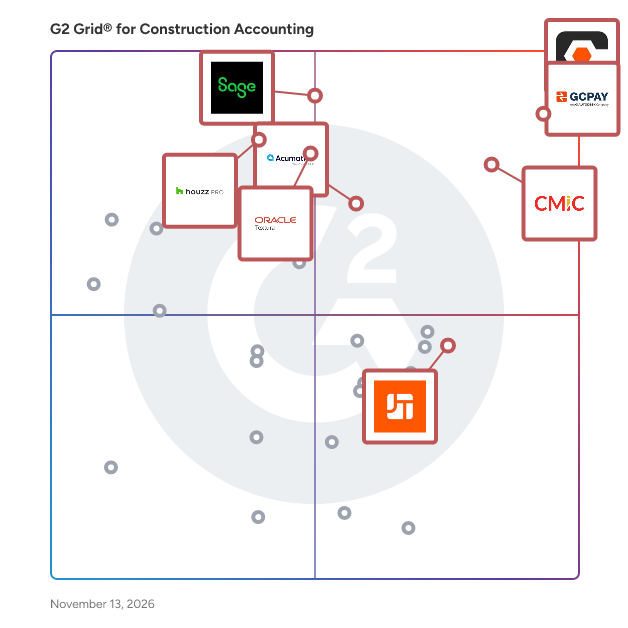
G2 Grid® for Construction Accounting Software

G2 Grid® for Construction Accounting Software plotting products by satisfaction and market presence

Highlighted products: Procore, GCPay, CMiC Platform, Sage Intacct, Oracle Textura Payment Management, Acumatica, Houzz Pro, and JobTread.

Underlying data: [Grid® JSON](https://www.g2.com/categories/construction-accounting-software/grids.json?focus%5B%5D=procore&focus%5B%5D=gcpay&focus%5B%5D=cmic-platform&focus%5B%5D=sage-intacct&focus%5B%5D=oracle-textura-payment-management&focus%5B%5D=acumatica&focus%5B%5D=houzz-pro&focus%5B%5D=jobtread)

Sage 300 Construction and Real Estate

Sage 300 Construction and Real Estate (CRE) is a comprehensive management solution tailored for the construction and real estate industries. It enables contractors, developers, and property managers to efficiently oversee projects and properties with precision and confidence. By integrating various facets of project management, accounting, and operations, Sage 300 CRE ensures streamlined workflows and enhanced collaboration across all project phases. Key Features and Functionality: - Project Management: Monitor project status, track costs, manage change orders, and ensure projects remain on schedule and within budget. - Accounting and Financials: Handle job costing, accounts payable and receivable, general ledger, and payroll, providing a solid financial foundation for your operations. - Document Management: Organize, store, and route essential documents such as contracts, invoices, and drawings, ensuring a clean audit trail and reducing risk. - Service Management: Optimize service dispatching, improve response times, and maintain tight control over service and preventive maintenance agreements. - Real Estate Management: Transform static lease documents into dynamic information sources, allowing for improved communication and flexible lease options. - Reporting and Analytics: Access over 1,400 prebuilt report formats and customizable reports to gain timely insights for better decision-making. Primary Value and Solutions Provided: Sage 300 CRE addresses the complexities inherent in construction and real estate management by offering an integrated platform that connects people, projects, processes, and properties. It enhances visibility into operations, mitigates risks associated with subcontractors and vendors, and facilitates real-time collaboration. By automating processes and providing accurate, up-to-date information, Sage 300 CRE empowers businesses to make informed decisions, improve efficiency, and maximize profitability.

Average Rating: 3.6/5.0

Total Reviews: 41

How Do G2 Users Rate Sage 300 Construction and Real Estate?

  • Ease of Use: 6.3/10 (Category avg: 8.5/10)
  • Ease of Admin: 7.4/10 (Category avg: 8.7/10)
  • Has the product been a good partner in doing business?: 7.9/10 (Category avg: 8.8/10)
  • Quality of Support: 7.1/10 (Category avg: 8.5/10)

Who Is the Company Behind Sage 300 Construction and Real Estate?

  • Seller: Sage Software
  • Year Founded: 1981
  • HQ Location: Newcastle
  • LinkedIn® Page: www.linkedin.com
    15,833 employees on LinkedIn®
  • Ownership: SGE.L
  • Phone: +1 (866) 996-7243

Who Uses This Product?

  • Top Industries: Construction, Accounting
  • Company Size: 52% Medium, 43% Small

What Do G2 Reviewers Say About Sage 300 Construction and Real Estate?

AI-generated summary from verified user reviews

Pros
  • Users value the customizability of Sage 300, enabling intuitive learning and adapting to various industry needs.
  • Users find Sage 300 Construction and Real Estate easy to learn, praising its intuitive interface and extensive capabilities.
  • Users find Sage 300 CRE to be intuitive and easy to learn, even without prior accounting software experience.
  • Users appreciate the vast range of capabilities in Sage 300 Construction and Real Estate, enhancing their project management efficiency.
Cons
  • Users report that the customer support is inadequate, often providing unhelpful resources instead of effective assistance.

What Are Recent G2 Reviews of Sage 300 Construction and Real Estate?

What Are G2 Users Discussing About Sage 300 Construction and Real Estate?

Jonas Enterprise Service & Construction Software

Jonas Construction Software is an all-in-one ERP built for mechanical, electrical, plumbing, HVAC and specialty contractors who run both construction projects and service work. Instead of juggling separate tools for accounting, job costing, payroll, service dispatch and project management, and re-entering the same hours and invoices in each, everything runs on one connected system. Project managers see real-time job costs against budget, so overruns show up while there is still time to act. Service teams dispatch, track and invoice work orders from the field on mobile. Meanwhile, accounting handles AP, AR, union and multi-rate payroll, and WIP reporting without spreadsheet workarounds. Contractors across Canada and the US use Jonas to protect margins, bill faster and make decisions based on current numbers instead of last month's. Whether you are outgrowing QuickBooks or replacing a patchwork of disconnected apps, Jonas gives your office and field teams one place to work.

Average Rating: 3.5/5.0

Total Reviews: 27

How Do G2 Users Rate Jonas Enterprise Service & Construction Software?

  • Ease of Use: 6.7/10 (Category avg: 8.5/10)
  • Ease of Admin: 6.0/10 (Category avg: 8.7/10)
  • Has the product been a good partner in doing business?: 6.3/10 (Category avg: 8.8/10)
  • Quality of Support: 6.8/10 (Category avg: 8.5/10)

Who Is the Company Behind Jonas Enterprise Service & Construction Software?

Who Uses This Product?

  • Top Industries: Construction
  • Company Size: 56% Medium, 37% Small

What Do G2 Reviewers Say About Jonas Enterprise Service & Construction Software?

AI-generated summary from verified user reviews

Pros
  • Users find the ease of use of Jonas Enterprise Service & Construction Software to be very convenient and straightforward.
  • Users appreciate the easy access to financial reporting, finding it convenient for all project needs.
  • Users appreciate the easy access to financial reporting, making analysis straightforward and efficient.
  • Users find the accessibility of Jonas Enterprise Service & Construction Software easy and straightforward for financial reporting analysis.
  • Users value the easy access to financial reporting for detailed analysis, enhancing their overall experience.
Cons
  • Users face limited integration options with Jonas Enterprise Service & Construction Software, impacting overall efficiency and usability.
  • Users find the limited integration to other software frustrating, impacting overall workflow and efficiency.
  • Users find the software clunky and not user-friendly, especially when troubleshooting various issues.
  • Users note that the poor integration with other software makes workflows less efficient and more challenging.

What Are Recent G2 Reviews of Jonas Enterprise Service & Construction Software?

CoConstruct

Construction management software for home builders and remodelers used by 100,000+ building professionals in residential construction.

Average Rating: 4.1/5.0

Total Reviews: 19

How Do G2 Users Rate CoConstruct?

  • Ease of Use: 9.0/10 (Category avg: 8.5/10)
  • Ease of Admin: 9.2/10 (Category avg: 8.7/10)
  • Has the product been a good partner in doing business?: 8.9/10 (Category avg: 8.8/10)
  • Quality of Support: 9.2/10 (Category avg: 8.5/10)

Who Is the Company Behind CoConstruct?

Who Uses This Product?

  • Top Industries: Construction
  • Company Size: 71% Small, 19% Medium

What Do G2 Reviewers Say About CoConstruct?

AI-generated summary from verified user reviews

Pros
  • Users value the cloud collaboration of CoConstruct, enhancing project management and customer communication remotely.
  • Users value the effective communication capabilities of CoConstruct, enhancing project management without needing to be on-site.
  • Users value the communication efficiency of CoConstruct, enabling effective project management without the need for on-site meetings.
  • Users value the efficient online coordination of CoConstruct, enhancing project management and remote communication with clients.
  • Users value the ease of use of CoConstruct, facilitating efficient online project management and seamless communication.
Cons
  • Users find a steep learning curve in CoConstruct, with multiple methods often leading to confusion and inefficiencies.
  • Users find the email overload challenging, struggling to manage multiple communication methods in CoConstruct.
  • Users note a significant learning curve, with multiple methods leading to confusion and inconsistent reporting.
  • Users find the inconsistency in training and processes frustrating, as it complicates learning and usability.
  • Users note a steep learning curve with CoConstruct, as multiple methods can complicate understanding and usage.

What Are Recent G2 Reviews of CoConstruct?

What Are G2 Users Discussing About CoConstruct?

AI can help you find the answers. G2 helps you trust them.

Connect G2 to Claude or ChatGPT for answers grounded in G2's trusted reviews, comparisons, and pricing from real user insights.

How it works

Vista

Trimble Vista is an Enterprise Resource Planning (ERP) solution purpose-built for contractors who demand complete operational visibility and rigorous financial control. Designed specifically to meet the unique, multi-layered requirements of general, specialty, and heavy civil contractors, Trimble Vista provides a centralized foundation that unifies back-office administration with active jobsite operations. Rather than forcing contractors into generic accounting processes, Vista delivers tailor-made tools crafted specifically for construction workflows, complex payroll requirements, and project lifecycles. Purpose-Built System of Record for Construction Financial Management At its core, Trimble Vista serves as a powerful system of record for construction financial management. Built to handle complex job-cost accounting, the system gives finance teams an unrivaled ability to drill down into deep layers of financial data—from high-level company profit-and-loss statements all the way down to individual line items, employee timecards, vendor invoices, and specific equipment cost codes. Connected Office-to-Field Workflows A major differentiator for Trimble Vista is its ability to establish seamless, connected workflows between office administrators and field personnel. By eliminating operational silos and manual double-entry, Vista ensures that data captured on the jobsite instantly updates back-office records. Through dedicated mobile applications, field supervisors, crews, and technicians can log daily jobsite activities, capture timecards, track equipment usage, process work orders, and submit field observations in real time. This bidirectional flow of information streamlines communication, reduces administrative friction, mitigates project risks, and drastically accelerates billing and payroll cycles. Highly Customizable Architecture to Meet Specific User Needs Beyond its core accounting capabilities, Trimble Vista stands out for its flexible architecture, which allows organizations to tailor the platform around their exact business processes. Rather than forcing contractors to adapt to rigid software constraints, Vista provides customizable data fields, user-defined forms, and configurable approval workflows across accounting, project management, and field operations. Teams can build custom entry screens, set automated notification rules, and establish company-specific governance controls. This high degree of adaptability ensures growing contractors can scale operations, automate unique administrative steps, and maintain established best-practice workflows as market demands evolve. Powerful Analytics and Reporting Trimble Vista equips executives and operations managers with powerful analytics and reporting tools. Featuring an extensive library of customizable reports, standard SQL-based reporting, and flexible BI integration, Vista transforms raw operational data into actionable business intelligence. Leaders can build customized dashboards, monitor key performance indicators (KPIs), analyze job profitability trends, and execute deep-dive inquiries across single or multi-company operations to make informed, data-driven business decisions. Key Capabilities & Features Detailed Construction Accounting: Vista’s core accounting modules feature powerful General Ledger, Accounts Payable, Accounts Receivable, Cash Management (with positive pay and credit card reconciliation), Fixed Asset depreciation, and specialized Time & Material (T&M) billing. Automatic Invoicing & Payment Solutions: Vista streamlines cash flow management through automated billing and integrated digital payment solutions. Contractors can automate progress billings, schedule invoice routing, and leverage modernized electronic payment solutions to accelerate payables and receivables. Trimble Pay, meanwhile, streamlines the flow of compliance and payment information between general contractors and subcontractors, making it fast and easy to collect accurate payments, lien waivers, billing Information, and compliance documents. Integrated Human Resources: Vista features an integrated HR management module that maintains a secure, centralized database for employee records, onboarding, benefits administration, and training certifications, linking HR data directly to payroll and job costing. Construction-Specific Smart Payroll: Vista’s Smart Payroll is an AI-powered feature that automates cumbersome payroll processes, including tracking real-time timecard transactions, checking compliance with FLSA/union/overtime rules, and flagging data entry errors for quick review before payroll processing. Document Management: Acting as a virtual filing cabinet, Vista’s paperless document management system digitizes and links critical records—such as invoices, contracts, safety forms, and submittals—directly to corresponding financial transactions and project records for instant retrieval. Project Management: Vista manages prime contracts, change orders, RFIs, and submittals with full operational transparency. Through direct integrations with ProjectSight, project managers and field teams collaborate effortlessly, aligning job budgets, field progress, and financial change orders in real time without data duplication. Subcontractor Management: Vista simplifies complex subcontractor relationships by streamlining subcontracts, change orders, retainage tracking, and compliance enforcement (such as insurance certificates and lien waivers) to protect contractors against unnecessary legal and financial exposure. Service Management: For contractors with service and maintenance divisions, Vista provides comprehensive service management tools. Features include intuitive dispatch boards, service agreement tracking, and mobile work order tools that empower field technicians to collect signatures, track parts, and trigger same-day customer billing. Inventory & Materials Management: Vista delivers native inventory and materials management tools that enable contractors to track jobsite material usage, manage warehouse inventory levels, monitor purchasing, and allocate real-time material costs accurately to specific jobs.

Average Rating: 4.0/5.0

Total Reviews: 135

How Do G2 Users Rate Vista?

  • Ease of Use: 7.4/10 (Category avg: 8.5/10)
  • Ease of Admin: 7.6/10 (Category avg: 8.7/10)
  • Has the product been a good partner in doing business?: 7.4/10 (Category avg: 8.8/10)
  • Quality of Support: 6.9/10 (Category avg: 8.5/10)

Who Is the Company Behind Vista?

  • Seller: Trimble
  • Year Founded: 1978
  • HQ Location: Sunnyvale, CA
  • LinkedIn® Page: www.linkedin.com
    18,122 employees on LinkedIn®
  • Ownership: NASDAQ
  • Total Revenue (USD mm): $3,147

Who Uses This Product?

  • Who Uses This: Controller, Accountant
  • Top Industries: Construction, Accounting
  • Company Size: 76% Medium, 17% Small

What Do G2 Reviewers Say About Vista?

AI-generated summary from verified user reviews

Pros
  • Users appreciate the customization features of Vista System, enabling tailored solutions for diverse business needs.
  • Users appreciate the user-friendly interface of Vista, allowing easy management of HR and accounting functions.
  • Users find Vista's budget management tools efficient and intuitive, significantly improving their overall workflow and productivity.
  • Users appreciate the collaboration efficiency of Vista, benefiting from quick support and customizable features.
  • Users appreciate the quick and responsive customer support provided by Vista, enhancing their overall experience.
Cons
  • Users find Vista to be silly expensive compared to alternatives, with disappointing ROI and unfair pricing practices.
  • Users express frustration over cumbersome processes that are complicated and hinder their overall experience with Vista.
  • Users feel the difficult customization options in Vista limit adaptability and hinder personalization for their individual needs.
  • Users find Vista to be silly expensive, with better alternatives available at much lower prices.
  • Users desire greater customization options in Vista, particularly for font sizes and dashboard personalization.

What Are Recent G2 Reviews of Vista?

What Are G2 Users Discussing About Vista?
Explorer Eclipse

Explorer Eclipse is a modern, all-in-one construction ERP (Enterprise Resource Planning) platform designed for contractors who need total visibility into their jobs, finances, and teams, without the complexity of disconnected systems or third-party bolt-ons. Tailored specifically for construction professionals, Eclipse combines construction accounting, project management, payroll, document workflows, real-time job costing, and business analytics in one unified, browser-based solution. Whether you’re managing a small firm or overseeing a large, multi-crew operation, Eclipse helps streamline processes, reduce risk, and drive profitability across your entire business. Why contractors choose Explorer Eclipse: Purpose-built for construction. Every feature is designed to reflect the way contractors actually work, from job costing to payroll to project control. Real-time job costing. Track labor, materials, equipment, and overhead as it happens. Get accurate, up-to-date visibility without waiting on batch reports. All core functions in one system. Accounting, payroll, project management, analytics, and document workflows are fully integrated. Flexible deployment options. Choose between cloud or on-premise deployment based on your company’s infrastructure. Access Eclipse from any browser, without remote desktop tools. Built for field and office teams. Connect jobsite and back-office teams with mobile access, real-time data, and streamlined communication. Strong API integrations. Eclipse works alongside the tools your business already uses, extending its capabilities through powerful, well-documented API connections. All your data in one place. The Eclipse Integrator add-on brings third-party data into Eclipse to give you a 360-degree view of your business in real time. No need for external reporting tools. Eclipse serves as the central hub for smarter construction management. From managing subcontractors and processing payroll to tracking budgets and staying ahead of change orders, Eclipse centralizes your most critical workflows. Its intuitive interface supports daily users, while powerful features give leaders the insight needed to make faster, more informed decisions. With real-time reporting, configurable dashboards, and full document control, Eclipse gives you the visibility you need to stay on top of every job, no matter how complex. The result is more insight, less chaos, and stronger margins. Explorer Eclipse helps construction companies simplify operations, scale with confidence, and deliver quality projects on time and within budget. Whether you're replacing outdated systems or preparing for growth, Eclipse is the ERP that grows with you.

Average Rating: 4.0/5.0

Total Reviews: 59

How Do G2 Users Rate Explorer Eclipse?

  • Ease of Use: 7.8/10 (Category avg: 8.5/10)
  • Ease of Admin: 7.7/10 (Category avg: 8.7/10)
  • Has the product been a good partner in doing business?: 8.5/10 (Category avg: 8.8/10)
  • Quality of Support: 7.5/10 (Category avg: 8.5/10)

Who Is the Company Behind Explorer Eclipse?

  • Seller: Explorer Software
  • Company Website:
  • Year Founded: 1984
  • HQ Location: North Vancouver, BC
  • LinkedIn® Page: www.linkedin.com
    59 employees on LinkedIn®

Who Uses This Product?

  • Top Industries: Construction, Accounting
  • Company Size: 68% Medium, 17% Small

What Do G2 Reviewers Say About Explorer Eclipse?

AI-generated summary from verified user reviews

Pros
  • Users value the ease of use of Explorer Eclipse, enhancing efficiency in reporting and data management.
  • Users appreciate the navigation ease of Explorer Eclipse, which simplifies accessing information and reduces manual workload.
  • Users appreciate the easy access of Explorer Eclipse, finding it quick to search and highly organized.
  • Users value the efficiency improvement of Explorer Eclipse, enhancing interdepartmental communication and reducing manual workload.
  • Users value the efficient organization of Explorer Eclipse, enabling quick information sharing across departments.
Cons
  • Users report slow performance with Explorer Eclipse, especially during large payroll processing, complicating their workflow.
  • Users find the difficult navigation of Explorer Eclipse frustrating, with a clunky interface that hinders usability.
  • Users frequently deal with bug issues that lead to crashes, freezes, and recurring error codes in Explorer Eclipse.
  • Users face a steep learning curve with Explorer Eclipse, compounded by a dated interface and poor documentation.
  • Users find data entry issues frustrating, particularly with cumbersome processes and lack of live review capabilities.

What Are Recent G2 Reviews of Explorer Eclipse?

What Are G2 Users Discussing About Explorer Eclipse?

Sage 100 Contractor

Sage 100 Contractor is a comprehensive construction management solution tailored for small to mid-sized contractors, including general contractors, specialty contractors, and home builders. It integrates essential business functions such as accounting, project management, estimating, and service management into a single, user-friendly platform. This integration provides real-time access to critical job cost and project information, enabling contractors to manage operations more effectively and make informed decisions. Key Features and Functionality: - Integrated Accounting: Combines accounts payable, accounts receivable, and general ledger into a unified system, streamlining financial management. - Detailed Job Costing: Tracks job costs in real-time, offering insights into profitability and ensuring projects remain within budget. - Project Management Tools: Provides tools for managing schedules, resources, and subcontractors, helping to keep projects on track. - Estimating and Bidding: Streamlines the estimating and bidding process, allowing contractors to generate accurate quotes quickly and efficiently. - Service Management: Manages service calls, work orders, and dispatching, facilitating prompt and efficient client service. - Payroll Processing: Simplifies payroll with integrated tools that handle time tracking, wage calculations, and tax compliance. Primary Value and User Solutions: Sage 100 Contractor addresses the unique challenges faced by construction businesses by centralizing and automating critical processes. It enhances operational efficiency, reduces manual data entry, and provides real-time insights into project status and financial health. By offering a comprehensive view of business operations, it empowers contractors to make timely, informed decisions, ultimately leading to increased profitability and successful project completion.

Average Rating: 3.8/5.0

Total Reviews: 24

How Do G2 Users Rate Sage 100 Contractor?

  • Ease of Use: 7.6/10 (Category avg: 8.5/10)
  • Ease of Admin: 6.3/10 (Category avg: 8.7/10)
  • Has the product been a good partner in doing business?: 6.7/10 (Category avg: 8.8/10)
  • Quality of Support: 7.3/10 (Category avg: 8.5/10)

Who Is the Company Behind Sage 100 Contractor?

  • Seller: Sage Software
  • Year Founded: 1981
  • HQ Location: Newcastle
  • LinkedIn® Page: www.linkedin.com
    15,833 employees on LinkedIn®
  • Ownership: SGE.L
  • Phone: +1 (866) 996-7243

Who Uses This Product?

  • Top Industries: Construction
  • Company Size: 67% Small, 33% Medium

What Do G2 Reviewers Say About Sage 100 Contractor?

AI-generated summary from verified user reviews

Pros
  • Users value the ease of use in Sage 100 Contractor, noting its straightforward navigation and seamless integration.
  • Users love the easy integrations of Sage 100 Contractor, appreciating its straightforward navigation and user-friendly applications.
  • Users value the navigation ease in Sage 100 Contractor, finding the application straightforward and user-friendly.
  • Users find that Sage 100 Contractor offers excellent project tracking when details are input accurately throughout the process.
  • Users value the effective tracking capabilities of Sage 100 Contractor for proper project management when details are meticulously entered.
Cons
  • Users find the setup of Sage 100 Contractor difficult, with a clunky interface and challenging change processes.
  • Users find Sage 100 Contractor to be not user-friendly, describing it as clunky and difficult for making changes.

What Are Recent G2 Reviews of Sage 100 Contractor?

What Are G2 Users Discussing About Sage 100 Contractor?

RedTeam

Choosing a Construction Management software is a crucial decision, so when you make a purchase it’s important to consider the software along with the support and resources, you’ll receive to use it effectively. RedTeam Flex not only offers top-of-the-line software, but we also provide extensive training and support to ensure you get the maximum benefit from our platform. When you choose RedTeam Flex, you’ll have the support you need to confidently manage your construction projects from start to finish. RedTeam Flex resources are available to help you, and your entire team via chat and support tickets, with the option for paid training sessions with dedicated training specialists.

Average Rating: 4.1/5.0

Total Reviews: 103

How Do G2 Users Rate RedTeam?

  • Ease of Use: 8.0/10 (Category avg: 8.5/10)
  • Ease of Admin: 8.2/10 (Category avg: 8.7/10)
  • Has the product been a good partner in doing business?: 8.5/10 (Category avg: 8.8/10)
  • Quality of Support: 8.5/10 (Category avg: 8.5/10)

Who Is the Company Behind RedTeam?

  • Seller: RedTeam Software
  • Company Website:
  • Year Founded: 2006
  • HQ Location: Orlando, FL
  • LinkedIn® Page: www.linkedin.com
    99 employees on LinkedIn®

Who Uses This Product?

  • Top Industries: Construction
  • Company Size: 81% Small, 18% Medium

What Are Recent G2 Reviews of RedTeam?

What Are G2 Users Discussing About RedTeam?

Buildern

Buildern is a comprehensive construction management software designed to streamline the complexities of both residential and commercial construction projects. It offers an all-in-one platform that integrates estimating, budgeting, project management, and communication tools, facilitating a seamless workflow for builders, contractors, and construction professionals. With its user-friendly interface, Buildern ensures that teams can efficiently manage every aspect of their projects, from pre-sales activities to day-to-day operations. Key Features and Functionality: - Estimating and Takeoff: Generate detailed and accurate estimates for materials, labor, and equipment using up-to-date cost data. The takeoff feature allows for precise measurement and quantity assessments directly from project plans. - Project Management: Assign tasks, track progress, and collaborate across teams with real-time visibility, reducing miscommunication and ensuring alignment from preconstruction to project closeout. - Scheduling: Develop and manage job schedules that reflect real construction timelines, assign responsibilities, and adjust milestones to keep projects on track. - Document Management: Centralize plans, specifications, revisions, and signed documents, controlling access by role and preventing version mix-ups. - Financial Management: Monitor job costs, margins, forecasts, and cash flow in real time through an integrated dashboard, enabling informed decision-making. - AI Billing: Automate billing tasks with AI-powered tools that match purchase orders, delivery records, and invoices, reducing errors and approval times. - Mobile App: Stay connected to projects from anywhere, allowing for file uploads, schedule checks, and team communication directly from mobile devices. Primary Value and Solutions Provided: Buildern addresses the common challenges faced by construction professionals, such as cost overruns, scheduling conflicts, and communication breakdowns. By offering a centralized platform that integrates various project management tools, Buildern enhances efficiency, reduces errors, and improves collaboration among all stakeholders. Its intuitive design ensures ease of use, allowing teams to focus on delivering quality construction projects on time and within budget. Additionally, Buildern's commitment to continuous improvement, with weekly feature releases and responsive support, ensures that the platform evolves to meet the ever-changing needs of the construction industry.

Average Rating: 4.9/5.0

Total Reviews: 23

How Do G2 Users Rate Buildern?

  • Ease of Use: 9.3/10 (Category avg: 8.5/10)
  • Ease of Admin: 9.4/10 (Category avg: 8.7/10)
  • Has the product been a good partner in doing business?: 10.0/10 (Category avg: 8.8/10)
  • Quality of Support: 9.7/10 (Category avg: 8.5/10)

Who Is the Company Behind Buildern?

  • Seller: Buildern
  • Year Founded: 2021
  • HQ Location: Glendale, US
  • LinkedIn® Page: www.linkedin.com
    28 employees on LinkedIn®

Who Uses This Product?

  • Top Industries: Construction
  • Company Size: 96% Small, 4% Medium

What Do G2 Reviewers Say About Buildern?

AI-generated summary from verified user reviews

Pros
  • Users commend Buildern for its efficiency improvement, significantly reducing setup time and enhancing project management operations.
  • Users value the efficient setup process and comprehensive features of Buildern, enhancing productivity and organization significantly.
  • Users greatly appreciate the exceptional customer support provided by Hmayak, highlighting his quick and effective responses.
  • Users appreciate the exceptional customer service of Buildern, highlighting prompt responses and effective solutions from support staff.
  • Users praise the excellent customer service of Buildern, highlighting quick responses and effective solutions from support.
Cons
  • Users wish for the missing feature of assigning different contacts to each Vendor for better management.

What Are Recent G2 Reviews of Buildern?

What Are G2 Users Discussing About Buildern?

AccuBuild

AccuBuild provides fully integrated, flexible Construction Business Management Software to help contractors gain a competitive advantage and confidently make faster, better decisions. We provide solutions to meet the needs of Executives, Accounting Staff, Project Managers, and Field Staff. Our tailored solutions reveal insights and strategies to improve your business performance and profitability.

Average Rating: 4.8/5.0

Total Reviews: 19

How Do G2 Users Rate AccuBuild?

  • Ease of Use: 9.2/10 (Category avg: 8.5/10)
  • Ease of Admin: 9.6/10 (Category avg: 8.7/10)
  • Has the product been a good partner in doing business?: 9.8/10 (Category avg: 8.8/10)
  • Quality of Support: 9.7/10 (Category avg: 8.5/10)

Who Is the Company Behind AccuBuild?

Who Uses This Product?

  • Top Industries: Construction
  • Company Size: 50% Medium, 50% Small

What Are Recent G2 Reviews of AccuBuild?

What Are G2 Users Discussing About AccuBuild?

FOUNDATION

FOUNDATION is powerful job costing construction accounting software that’s easy to use and provides the accounting and management tools you need to run a successful construction business.

Average Rating: 3.7/5.0

Total Reviews: 25

How Do G2 Users Rate FOUNDATION?

  • Ease of Use: 6.7/10 (Category avg: 8.5/10)
  • Ease of Admin: 8.3/10 (Category avg: 8.7/10)
  • Has the product been a good partner in doing business?: 9.7/10 (Category avg: 8.8/10)
  • Quality of Support: 8.3/10 (Category avg: 8.5/10)

Who Is the Company Behind FOUNDATION?

Who Uses This Product?

  • Top Industries: Construction
  • Company Size: 56% Small, 44% Medium

What Do G2 Reviewers Say About FOUNDATION?

AI-generated summary from verified user reviews

Pros
  • Users appreciate the budget management capabilities of FOUNDATION, enabling effective tracking of all project-related costs.
  • Users value the detailed reporting capabilities of FOUNDATION, enabling effective budget management and comprehensive project tracking.
  • Users value the extensive tracking capabilities of FOUNDATION, allowing efficient management of project costs and budgets.

What Are Recent G2 Reviews of FOUNDATION?

What Are G2 Users Discussing About FOUNDATION?

WERX

Werx Contractor Software 30 DAY FREE TRIAL! No credit card required. Plans as low as $49/m. Elevate your business with WERX, the ultimate management solution for efficient project handling—from detailed estimating to streamlined payments. Empower your operations with features like real-time time tracking, AIA-Style billing, and flexible budgeting. Our integration with QuickBooks Online and Stripe ensures accuracy and fast payments. Enhance project transparency, boost cash flow, and focus on what matters most: growing your business and winning more bids.

Average Rating: 4.4/5.0

Total Reviews: 14

How Do G2 Users Rate WERX?

  • Ease of Use: 9.2/10 (Category avg: 8.5/10)
  • Ease of Admin: 8.9/10 (Category avg: 8.7/10)
  • Has the product been a good partner in doing business?: 9.2/10 (Category avg: 8.8/10)
  • Quality of Support: 9.3/10 (Category avg: 8.5/10)

Who Is the Company Behind WERX?

  • Seller: WERX
  • Year Founded: 2016
  • HQ Location: Georgetown, US
  • LinkedIn® Page: www.linkedin.com
    5 employees on LinkedIn®

Who Uses This Product?

  • Top Industries: Construction
  • Company Size: 50% Small, 50% Medium

What Do G2 Reviewers Say About WERX?

AI-generated summary from verified user reviews

Pros
  • Users value the ease of use of WERX, appreciating its intuitive dashboard and organized system for project management.
  • Users value the enhanced efficiency of WERX, streamlining organization, communication, and task management all in one platform.
  • Users find great value for money with WERX, appreciating its comprehensive tools at a competitive price.
  • Users appreciate the efficient tracking features of WERX, which streamline management tasks and enhance productivity.
  • Users find WERX user-friendly and effective, enhancing project management and simplifying workflows with valuable features.
Cons
  • Users find WERX to be expensive, especially given its current limitations and evolving features that disrupt workflows.
  • Users find the limited customization options in WERX hinder their ability to tailor reports and estimates effectively.
  • Users find WERX has limited reporting capabilities, which affects customization and complicates project management for larger teams.
  • Users note that poor reporting features limit customization and hinder efficiency, especially with larger projects.
  • Users find that WERX has access limitations, lacking customization options and experiencing slow performance with larger files.

What Are Recent G2 Reviews of WERX?

Evision

EVision is a contract management software that helps your projects come to completion on time by giving you control of your commercial, financial, and operational processes and data.

Average Rating: 4.5/5.0

Total Reviews: 12

How Do G2 Users Rate Evision?

  • Ease of Use: 9.0/10 (Category avg: 8.5/10)
  • Ease of Admin: 7.3/10 (Category avg: 8.7/10)
  • Has the product been a good partner in doing business?: 7.1/10 (Category avg: 8.8/10)
  • Quality of Support: 8.1/10 (Category avg: 8.5/10)

Who Is the Company Behind Evision?

  • Seller: Eque2
  • Year Founded: 2013
  • HQ Location: Maidenhead, GB
  • LinkedIn® Page: www.linkedin.com
    196 employees on LinkedIn®

Who Uses This Product?

  • Company Size: 38% Medium, 38% Small

What Are Recent G2 Reviews of Evision?

What Are G2 Users Discussing About Evision?

Access Coins

Access Coins Evo is an all-in-one, construction-specific ERP system with built-in AI that understands how construction works. It delivers real-time intelligence, automated workflows and smarter decisions for construction and MEP companies across the US, UK, Ireland, and Australia. For over 40 years, Access Coins has helped construction businesses manage margins, mitigate risk and deliver jobs successfully. Unlike generic ERP tools, Access Coins is purpose-built by construction experts and recognizes the workflows, terminology and challenges unique to construction and specialty contractors - job costing, certified payroll, union rates, prevailing wage, and cost-to-complete are native, not bolted on. Access Coins unifies your financials, projects, service operations, payroll, and field data into a single, secure platform -eliminating disconnected systems and scattered spreadsheets. Purpose-built for MEP contractors who need real-time visibility, automated compliance, and the power to run complex operations simply. Benefits of Access Coins: - AI built for construction - role-specific AI assistants for Financial Controllers, Project Managers and Service Dispatchers deliver instant answers, proactive alerts and actionable forecasts based on your real project data. - Visibility that saves cost- track costs and job financials live instead of waiting for month-end reports, know your exact cash position now, with 50+ intelligent alerts monitoring your business 24/7 - Eliminate the office-to-field silo - capture time, materials, and daily reports from the field on mobile devices - updating payroll, job costing, and billing automatically in real-time. -Smarter decisions, faster - advanced construction analytics and AI-powered forecasting help you spot cost patterns, stay ahead of risks and deliver jobs on budget -Payroll and compliance automation - certified payroll, union dues, prevailing wage, and Davis-Bacon compliance all automated and included in every bundle -Service and Construction in one system - transition seamlessly between service work orders and construction job costs — no duplicate data entry, no separate platforms, no missed billable hours. Total customer profitability, visible in one view. -Secure and scalable - cloud-hosted with full audit trails, operating securely within your Access Coins environment

Average Rating: 3.7/5.0

Total Reviews: 15

How Do G2 Users Rate Access Coins?

  • Ease of Use: 7.1/10 (Category avg: 8.5/10)
  • Ease of Admin: 8.3/10 (Category avg: 8.7/10)
  • Has the product been a good partner in doing business?: 7.1/10 (Category avg: 8.8/10)
  • Quality of Support: 6.4/10 (Category avg: 8.5/10)

Who Is the Company Behind Access Coins?

  • Seller: The Access Group
  • Company Website:
  • Year Founded: 1991
  • HQ Location: Loughborough, Leicestershire
  • LinkedIn® Page: www.linkedin.com
    7,358 employees on LinkedIn®

Who Uses This Product?

  • Top Industries: Construction
  • Company Size: 44% Medium, 31% Large

What Are Recent G2 Reviews of Access Coins?

What Are G2 Users Discussing About Access Coins?

Planyard

Planyard makes construction financials incredibly easy. All of our workflows are designed by construction professionals who want to ditch the spreadsheet, get rid of duplicate data entry, and simplify their work lives. With Planyard, management enjoys a real-time overview of portfolio financials, giving them the peace of mind to focus on growing the business. Why construction teams choose Planyard: * Speed: It typically takes just 1-2 hours to get started as your next project begins. * Accuracy: Standardized cost estimating and quoting, budget management and forecasting without manual errors. * Automation: Streamline subcontractor billing, pay applications, and RFQs. * Connectivity: Seamlessly sync with Xero, QuickBooks, Sage, and MYOB. Stop wasting days every month on manual admin. Get real-time oversight of your project profitability and scale your business with software built for the job site, not just the office.

Average Rating: 4.7/5.0

Total Reviews: 12

How Do G2 Users Rate Planyard?

  • Ease of Use: 8.9/10 (Category avg: 8.5/10)
  • Ease of Admin: 8.3/10 (Category avg: 8.7/10)
  • Has the product been a good partner in doing business?: 8.3/10 (Category avg: 8.8/10)
  • Quality of Support: 9.4/10 (Category avg: 8.5/10)

Who Is the Company Behind Planyard?

  • Seller: Planyard
  • Year Founded: 2018
  • HQ Location: Tallinn, Estonia
  • LinkedIn® Page: www.linkedin.com
    5 employees on LinkedIn®

Who Uses This Product?

  • Top Industries: Construction
  • Company Size: 92% Small, 8% Medium

What Are Recent G2 Reviews of Planyard?

What Are G2 Users Discussing About Planyard?

4castplus

What is this product?: 4castplus provides performance-driven Project Cost Management software for construction contractors worldwide. Organizations can get free of outdated, inefficient spreadsheet solutions for managing construction projects, and move forward into an integrated cloud platform where multiple disciplines share data and workflows in real-time to deliver projects on budget, on time and with exacting precision. Contractors maximize profitability by letting the software do much of the heavy-lifting and time-consuming work so that professionals can spend time on the high-value work of successful execution of projects. Built to integrate data seamlessly with your ERP finance system, 4castplus gives your finance team the assurance that project financial data is controlled, secure and in total harmony with your accounting system. We deliver true one-touch enterprise information that connects your business from the construction Jobsite to project management to finance. Key Features include: Project Controls, Project Procurement, Jobsite Cost Tracking, Forecasting, Construction Estimating, Contract Management, Labor Time Tracking, Change Orders, Client Billing, Project Management, Portfolio Management, and Labor Resource Management

Average Rating: 4.0/5.0

Total Reviews: 48

How Do G2 Users Rate 4castplus?

  • Ease of Use: 8.0/10 (Category avg: 8.5/10)
  • Ease of Admin: 8.3/10 (Category avg: 8.7/10)
  • Has the product been a good partner in doing business?: 9.4/10 (Category avg: 8.8/10)
  • Quality of Support: 8.6/10 (Category avg: 8.5/10)

Who Is the Company Behind 4castplus?

  • Seller: 4CastPlus
  • Company Website:
  • HQ Location: Calgary, Alberta
  • LinkedIn® Page: www.linkedin.com
    17 employees on LinkedIn®

Who Uses This Product?

  • Top Industries: Oil & Energy, Construction
  • Company Size: 63% Medium, 14% Small

What Do G2 Reviewers Say About 4castplus?

AI-generated summary from verified user reviews

Pros
  • Users love the ease of use of 4castplus, highlighting its user-friendly interface and seamless integration with other products.
  • Users value the budget management capabilities of 4castplus, ensuring precise tracking and control over project spending.
  • Users find easy integrations with products like QuickBooks and Microsoft Dynamics enhance their project management experience.
  • Users value the robust analytical and reporting tools of 4castplus, enhancing project management with integrated insights.
  • Users appreciate the easy integration capabilities of 4castplus, facilitating a seamless project management experience across different systems.
Cons
  • Users note that update issues with cost codes can hinder the performance of 4castplus despite its valuable features.
  • Users note that initial navigation can be challenging, highlighting poor navigation as a concern with 4castplus.

What Are Recent G2 Reviews of 4castplus?

What Are G2 Users Discussing About 4castplus?

Neya Kumaresan
NK
Researched and written by Neya Kumaresan
Updated March 7, 2025