# Best Classroom Messaging Software - Page 3

  *By [Emma Stein](https://research.g2.com/insights/author/emma-stein)*

   Classroom messaging software facilitates communication between parents and school administrators. These solutions are primarily used for communication between K–12 educators and parents. The teacher can send correspondences about assignments, upcoming activities and excursions, and any information they deem pertinent. Once the message is sent, teachers can usually track whether a parent has read a given message sent via the application.

Classroom messaging software eliminates communication barriers or difficulties between teachers and parents. These solutions enable two-way communication and the exchange of multimedia messages between parents and teachers, maintaining the school and home balance.

Solutions in the classroom messaging category often contain [classroom management software](https://www.g2crowd.com/categories/classroom-management) functionality, although there are several standalone messaging applications. Classroom messaging software often integrates with [learning management systems](https://www.g2crowd.com/categories/learning-management-system-lms) and certain [student information systems](https://www.g2.com/categories/student-information-systems-sis).

To qualify for inclusion in the Classroom Messaging category, a product must:

- Include multimedia messaging options
- Provide mass messaging and push notifications
- Facilitate two-way parent-teacher messaging
- Sync messages to multiple platforms, including email


## Category Overview

**Total Products under this Category:** 59


## Trust & Credibility Stats

**Why You Can Trust G2's Software Rankings:**

- 30 Analysts and Data Experts
- 3,100+ Authentic Reviews
- 59+ Products
- Unbiased Rankings

G2's software rankings are built on verified user reviews, rigorous moderation, and a consistent research methodology maintained by a team of analysts and data experts. Each product is measured using the same transparent criteria, with no paid placement or vendor influence. While reviews reflect real user experiences, which can be subjective, they offer valuable insight into how software performs in the hands of professionals. Together, these inputs power the G2 Score, a standardized way to compare tools within every category.


## Best Classroom Messaging Software At A Glance

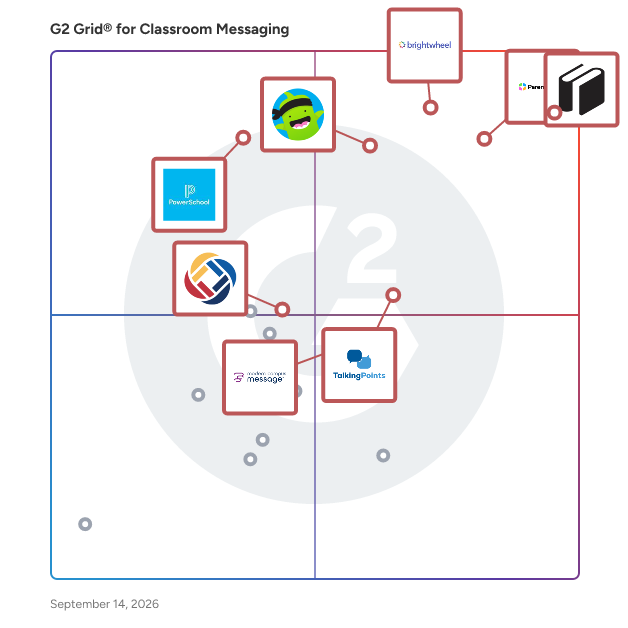
- **Leader:** [SchoolStatus](https://www.g2.com/products/schoolstatus/reviews)
- **Highest Performer:** [Modern Campus Message (Formerly Signal Vine)](https://www.g2.com/products/modern-campus-message-formerly-signal-vine/reviews)
- **Easiest to Use:** [SchoolStatus](https://www.g2.com/products/schoolstatus/reviews)
- **Top Trending:** [ParentSquare](https://www.g2.com/products/parentsquare/reviews)
- **Best Free Software:** [Illumine](https://www.g2.com/products/illumine-labs-pvt-ltd-illumine/reviews)


## Top-Rated Products (Ranked by G2 Score)
### 1. [School Robins](https://www.g2.com/products/school-robins/reviews)
  Like email but more organised! School Robins is a great tool for gathering information from staff in your school.


**Seller Details:**

- **Seller:** [EduKey](https://www.g2.com/sellers/edukey-ddc0dec0-5555-4369-8a4f-3f67e0a22ccc)
- **Year Founded:** 2010
- **HQ Location:** Fishguard, GB
- **LinkedIn® Page:** https://www.linkedin.com/company/edukey-education/?originalSubdomain=uk (10 employees on LinkedIn®)


### 2. [SchoolsBuddy](https://www.g2.com/products/schoolsbuddy/reviews)
  Created in 2013 and now part of the Faria Education Group, SchoolsBuddy is an innovative cloud-based extra-curricular management system used by over 200 schools in more than 35 countries to manage complex activities programmes, online payments, events, trips, sports teams, bookings and sign-ups. SchoolsBuddy also has dedicated modules for parent teacher conferences and transport lists. Users benefit from built-in parent communications and personalised calendars. Integrating directly with your MIS data, SchoolsBuddy’s simple and clear interface for staff, parents and students, along with full mobile apps, ensures easy uptake and adoption of the system. Schools across the world report increased efficiency for staff, transforming and simplifying admin tasks while saving money by consolidating multiple systems into a single platform.


**Seller Details:**

- **Seller:** [Faria Education Group](https://www.g2.com/sellers/faria-education-group-89e9dfe5-f34d-4178-b1b3-8e8910e7d16a)
- **Year Founded:** 2006
- **HQ Location:** London, GB
- **Twitter:** @FariaEduGroup (128 Twitter followers)
- **LinkedIn® Page:** https://www.linkedin.com/company/fariaedu/ (308 employees on LinkedIn®)


### 3. [School Signals](https://www.g2.com/products/school-signals/reviews)
  School Signals Overview Basic Company Information Location:&amp;nbsp;Based in Denton, Texas Market:&amp;nbsp;Serves Pre-K to 12th-grade schools across the USA (both public and private institutions) History:&amp;nbsp;Founded in 2025 to address gaps in school communication, providing a next-generation platform that simplifies and streamlines interactions between schools and families Size:&amp;nbsp;A growing SaaS company specializing in school communication and engagement solutions Key Features &amp; Functionality School Signals is an all-in-one communication platform for schools, offering: •&amp;nbsp;School Feed&amp;nbsp;– A centralized space for announcements and communication •&amp;nbsp;AI-Powered Communication: AI Assist, AI Monitor, AI Translate • Parent-Teacher Conference (PTC) Signup System&amp;nbsp;– Easy scheduling, cancellations, and rescheduling •&amp;nbsp;Custom Online Forms&amp;nbsp;– Fully integrated with parent accounts •&amp;nbsp;Classroom News &amp; Alerts&amp;nbsp;– Instant notifications for important updates •&amp;nbsp;Chat Messaging&amp;nbsp;– Available to enhance reach •&amp;nbsp;Event RSVP &amp; Volunteering Management&amp;nbsp;– Streamlined coordination of school events and volunteer opportunities • School Calendar management •&amp;nbsp;Groups and Committees management (for parents, staff and board) •&amp;nbsp;Photo Galleries • Resources Management •&amp;nbsp;Privacy Controls&amp;nbsp;– Submission privacy settings for administrators • Desktop + Mobile app (Apple App Store &amp; Google Play Primary Value &amp; Problem Solved School Signals eliminates communication barriers between schools and families by providing a&amp;nbsp;centralized, flexible, and efficient&amp;nbsp;platform. It solves: Missed communications&amp;nbsp;– Ensures parents stay informed without the clutter of multiple systems and apps Scheduling headaches&amp;nbsp;– Simplifies PTC signups, event RSVPs, and volunteering coordination Fragmented systems&amp;nbsp;– Consolidates various school communication needs into one platform Customer support: Customer support via chat to all users. VIP support to School Administrators via phone. Help Center with AI driven fast answers. Three tier plans to meet your needs.


**Seller Details:**

- **Seller:** [School Signals](https://www.g2.com/sellers/school-signals)
- **Year Founded:** 2024
- **HQ Location:** Denton, US
- **LinkedIn® Page:** https://www.linkedin.com/company/schoolsignals/ (2 employees on LinkedIn®)
- **Ownership:** LLC
- **Phone:** 888-884-2346


### 4. [Schoolvoice](https://www.g2.com/products/schoolvoice/reviews)
  Schoolvoice is a smart school communication platform that helps schools engage parents with actionable messages, secure chat, stories, and Ai real-time reporting—all in one easy-to-use app.


**Seller Details:**

- **Seller:** [Schoolvoice](https://www.g2.com/sellers/schoolvoice)
- **Year Founded:** 2019
- **HQ Location:** Abu Dhabi, AE
- **LinkedIn® Page:** https://www.linkedin.com/company/schoolvoice (57 employees on LinkedIn®)


### 5. [Sdui](https://www.g2.com/products/sdui/reviews)
  Sdui offers schools a central overall concept for the exchange between teachers, parents and pupils. The app simplifies communication and creates a long-term basis for the digital future - simple and GDPR-compliant.


**Seller Details:**

- **Seller:** [Sdui](https://www.g2.com/sellers/sdui)
- **Year Founded:** 2018
- **HQ Location:** Koblenz, DE
- **LinkedIn® Page:** https://www.linkedin.com/company/sdui/ (122 employees on LinkedIn®)


### 6. [Sentral Parents](https://www.g2.com/products/sentral-parents/reviews)
  The Sentral Parent app has been designed for parents to be more informed and in control of information. This app makes it very easy to monitor and manage all aspects of your child’s education and interaction with the school.


**Seller Details:**

- **Seller:** [Global Payments](https://www.g2.com/sellers/global-payments)
- **Year Founded:** 1967
- **HQ Location:** Atlanta, US
- **Twitter:** @GlobalPayInc (6,004 Twitter followers)
- **LinkedIn® Page:** https://www.linkedin.com/company/global-payments/ (24,709 employees on LinkedIn®)
- **Ownership:** NYSE:GPN


### 7. [SkoolBag](https://www.g2.com/products/skoolbag/reviews)
  A solution to manage attendance, exams, financials, courses, and more.


**Seller Details:**

- **Seller:** [Inside Idea](https://www.g2.com/sellers/inside-idea)
- **HQ Location:** N/A
- **Twitter:** @Skoolbag (6 Twitter followers)
- **LinkedIn® Page:** https://www.linkedin.com/company/No-Linkedin-Presence-Added-Intentionally-By-DataOps (1 employees on LinkedIn®)


### 8. [Student Support Time](https://www.g2.com/products/student-support-time/reviews)
  Complete solution for academic intervention and enrichment programs.


**Seller Details:**

- **Seller:** [Level8Creative](https://www.g2.com/sellers/level8creative)
- **Year Founded:** 2014
- **HQ Location:** Minneapolis, US
- **Twitter:** @Level8Create (4 Twitter followers)
- **LinkedIn® Page:** https://www.linkedin.com/company/level8creative/ (2 employees on LinkedIn®)


### 9. [XACROS](https://www.g2.com/products/xacros-xacros/reviews)
  XACROS connects school communities by strengthening teacher, student and parent relationships.


**Seller Details:**

- **Seller:** [XACROS](https://www.g2.com/sellers/xacros)
- **Year Founded:** 2019
- **HQ Location:** Kampala, UG
- **LinkedIn® Page:** https://www.linkedin.com/company/xacrosug (1 employees on LinkedIn®)


## Parent Category

[Education Software](https://www.g2.com/categories/education)


---

## Buyer Guide

### What You Should Know About Classroom Messaging Software

### What is Classroom Messaging Software?

Classroom messaging software enables communication between teachers, parents and students, including mass messaging and sending images. Classroom messaging is most often used with students in K—12. As classroom sizes grow, it’s difficult for teachers to have clear, consistent communication with parents. Classroom messaging capabilities make that much easier. Teachers can send individual and mass messages, include images, and can track if a message has been read. Classroom messaging is a common feature in [classroom management software](https://www.g2.com/categories/classroom-management), but also exists as stand-alone platforms. They allow teachers to run their classrooms how they want.

Key Benefits of Classroom Messaging Software

- Allows teachers to keep consistent communication with parents and students
- Supports sharing multimedia messages
- Keeps messages sent by teachers in one place for quick access
- Keeps teachers’ personal contact information private

### Why Use Classroom Messaging Software?

Classroom messaging software is the best way to inform parents about their students’ progress and ensure students receive important information in and out of the classroom. Classroom messaging software lets teachers keep up with all the communication necessary to ensure students succeed; it saves time for teachers, allowing seamless communication with parents. Most classroom messaging software operates similarly to a texting conversation. Teachers not only share individual updates, but can also give further clarity to students and parents by providing images of projects. Both enable parents to engage further with students outside of school. The ultimate goal of classroom messaging software is to give teachers seamless access to communicate with students’ guardians, and is a prime example of [how software can benefit the classroom](https://learn.g2.com/software-benefit-classroom).

Classroom messaging tools can send out mass alerts to students. This helps teachers save time planning class trips, and ensures all students come prepared to class. Most classroom messaging software allows private messages in case there are any questions regarding announcements.

### Who Uses Classroom Messaging Software?

The people that use classroom messaging software are predictable — anyone involved in a classroom in some capacity are the standard users of classroom messaging software. Teachers, students, and parents all benefit from the streamlined communication these products offer.

**Teachers —** Classroom messaging software is almost always used by teachers as a way to keep in contact with parents and students.

**Parents —** Many busy parents rely on classroom messaging software to stay informed about what their student is doing and where they might need help. This also gives parents a place to reach out to teachers with questions or concerns.

**Students —** Students can receive mass messages from teachers about upcoming classroom activities, as well as emergency alerts.

### Classroom Messaging Software Features

Classroom messaging software will generally have the following features to optimize communication for teachers.

**Direct messaging —** Classroom messaging software is mainly used for messaging between teachers, students, and families. The ability to direct message will come with any classroom messaging software.

**Multimedia message sharing —** Classroom messaging software allows users to share photos, videos, and other media with families while they aren’t in the classroom.

**Mass messaging —** One of the most important features of classroom messaging tools is the ability to send mass messages to students and families. This is useful when a teacher needs to quickly relay information to an entire classroom.

**Push notifications —** Classroom messaging software ensures everyone sees messages by sending push notifications to recipients. Many classroom messaging platforms include the ability to see if messages have been delivered and read. This is an important feature for teachers; they can see which students and parents need to be followed up with.

#### Additional Classroom Messaging Features

Quite a few classroom messaging tools include the following features. These added features give teachers even more opportunity to communicate.

**Multi-channel notifications —** Everyone has their own preferred method of communication. Classroom messaging software can send notifications on multiple platforms including voice, text, email, and web notifications.

**Volunteer sign ups —** Some classroom messaging tools include a feature that lets students and parents sign up for volunteer opportunities. This enables educators to keep track of chaperone sign ups or classroom presentations.

**Integration capabilities —** Not all classroom messaging tools offer integration. Some let users sync messages on multiple platforms including email. Some even integrate with [classroom management software](https://www.g2.com/categories/classroom-management) and [learning management systems (LMS)](https://www.g2.com/categories/learning-management-system-lms).

### Potential Issues with Classroom Messaging Software

**Unfiltered communication —** One issue that has emerged with classroom messaging software is parents messaging teachers, occasionally aggressively, outside of school hours. This depends on the parent, and can easily be solved — or at least heavily curbed — by setting boundaries and expectations when introducing the technology.

### Software and Services Related to Classroom Messaging Software

Classroom messaging software is part of a larger ecosystem of [education software](https://www.g2.com/categories/education). Some can integrate with different educational software, enabling teachers to keep all their tools in one place.

[**Classroom management software**](https://www.g2.com/categories/classroom-management) **—** Many classroom messaging tools include integration capability with classroom management software. Additionally, many classroom management solutions include features that allow teachers and students to exchange private messages during lessons, but this does at times exclude the ability to message parents directly.


