Best Business VPN Software for Small Business

How Many Business VPN Software Products Does G2 Track?

Total Products under this Category: 198

Category Stats (Oct 2026)

  • Average Rating: 4.39/5 The average rating of products in this category, based on all submitted ratings
  • Top Trending Product: Tailscale (+0.43%) - Among all products in this category, Tailscale recorded the largest rating increase compared to last month

Last updated: October 01, 2026

How Does G2 Rank Business VPN Software Products?

Why You Can Trust G2's Software Rankings:

  • 30 Analysts and Data Experts
  • 3,000+ Authentic Reviews
  • 198+ Products
  • Unbiased Rankings

G2's software rankings are built on verified user reviews, rigorous moderation, and a consistent research methodology maintained by a team of analysts and data experts. Each product is measured using the same transparent criteria, with no paid placement or vendor influence. While reviews reflect real user experiences, which can be subjective, they offer valuable insight into how software performs in the hands of professionals. Together, these inputs power the G2 Score, a standardized way to compare tools within every category.

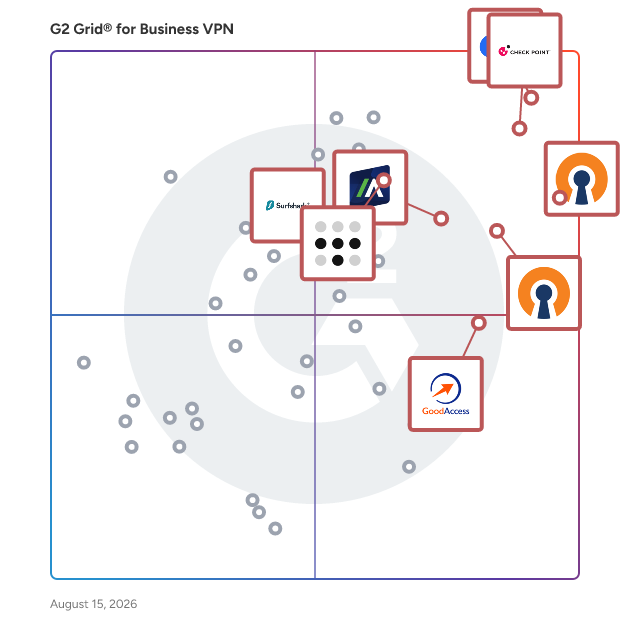
G2 Grid® for Business VPN Software

G2 Grid® for Business VPN Software plotting products by satisfaction and market presence

Highlighted products: OpenVPN Access Server, Tailscale, OpenVPN CloudConnexa, Check Point Remote Access VPN, GoodAccess, Surfshark, Zscaler Private Access, and Absolute Secure Access.

Underlying data: [Grid® JSON](https://www.g2.com/categories/business-vpn/grids.json?focus%5B%5D=openvpn-access-server&focus%5B%5D=tailscale&focus%5B%5D=openvpn-cloudconnexa&focus%5B%5D=check-point-remote-access-vpn&focus%5B%5D=goodaccess&focus%5B%5D=surfshark&focus%5B%5D=zscaler-private-access&focus%5B%5D=absolute-secure-access&segment=small-business)

OpenVPN Access Server

OpenVPN Access Server is a self-hosted VPN server application that provides organizations with secure remote access to their private network, applications, and data. Built as business VPN software, it can be deployed in the cloud or on-premises, giving companies a flexible VPN for business teams that are remote, hybrid, or in-office. Because it runs on infrastructure you control, it's easily one of the best business VPN and best VPN for business picks for organizations that want a genuine VPN service for business without long-term vendor lock-in, whether you're a growing team looking for a VPN for small business or a larger organization that needs an enterprise VPN with high availability and clustering. Positioned as a remote access VPN, or simply a VPN for remote access, Access Server layers in essential zero trust network access (ZTNA) capabilities: granular permissions, least-privilege enforcement, and verification that connections come from trusted devices and locations. This makes it a strong secure remote access VPN choice for protecting sensitive data and isolating SaaS applications from the open internet. It also supports site-to-site VPN connections, extending your business network securely to remote offices. For deployment, Access Server offers real flexibility as VPN server hosting: pre-configured images are available for AWS, Google Cloud, Microsoft Azure, DigitalOcean, Oracle Cloud, and IBM Cloud, giving you a cloud VPN service option, or you can run it as an on-premises VPN on your own hardware. Whether you prefer a fully managed VPN experience or hands-on control, Access Server can function as a VPN-as-a-service through your infrastructure provider, and it pairs an intuitive Admin Web UI, REST/XML-RPC API, and command-line tools with strong security: built-in X.509 PKI, SAML/LDAP/RADIUS authentication, multi-factor authentication, and AES-256-GCM encryption. The result is one of the more complete VPN solutions for businesses that need scalable, cost-effective, and genuinely secure connectivity as they grow.

Average Rating: 4.5/5.0

Total Reviews: 354

G2 Deal: 20% Off OpenVPN Access Server Subscription

Sign up for OpenVPN Access Server today and upgrade by purchasing a subscription with promo code G2DEAL26 and you'll get 20% off your business subscription on either your next month or your next year (your choice).

View this exclusive G2 deal

How Do G2 Users Rate OpenVPN Access Server?

  • Has the product been a good partner in doing business?: 8.8/10 (Category avg: 8.9/10)
  • Multi-Device Usage: 9.1/10 (Category avg: 9.0/10)
  • Live Customer Support: 7.7/10 (Category avg: 8.3/10)
  • Protocol Choices: 8.2/10 (Category avg: 8.5/10)

Who Is the Company Behind OpenVPN Access Server?

  • Seller: OpenVPN
  • Company Website:
  • Year Founded: 2002
  • HQ Location: Pleasanton, CA
  • Twitter: @OpenVPN
    20,209 Twitter followers
  • LinkedIn® Page: www.linkedin.com
    171 employees on LinkedIn®

Who Uses This Product?

  • Who Uses This: IT Manager, CTO
  • Top Industries: Information Technology and Services, Computer Software
  • Company Size: 48% Small, 44% Medium

What Do G2 Reviewers Say About OpenVPN Access Server?

AI-generated summary from verified user reviews

Pros
  • Users find OpenVPN Access Server to be super easy to use after setup, complementing its seamless functionality and support.
  • Users find the easy setup of OpenVPN Access Server a breeze, facilitating rapid deployment and strong security features.
  • Users value the high security of OpenVPN Access Server, ensuring reliable remote access and compliance with cybersecurity standards.
  • Users value the easy installation of OpenVPN Access Server, enjoying its intuitive setup and user-friendly interface.
  • Users highlight the ease of installation and usability of OpenVPN Access Server for efficient VPN management.
Cons
  • Users find the configuration process complex on OpenVPN Access Server, especially for those unfamiliar with Linux.
  • Users find the pricing structure unfair, especially when forced to purchase more licenses than needed.
  • Users find the OpenVPN Access Server to have a lack of features, especially compared to other enterprise VPN options.
  • Users experience connectivity issues with OpenVPN Access Server, often requiring multiple retries to establish a connection.
  • Users face a steep learning curve with OpenVPN Access Server due to complex setup and confusing documentation.

What Are Recent G2 Reviews of OpenVPN Access Server?

Tailscale

Tailscale is a modern, secure, zero-trust connectivity platform. It provides an easy and fast way to securely connect from and to any device or service, anywhere. Built on the WireGuard® protocol, Tailscale enables organizations to create secure mesh networks that communicate between devices and services without the complexities and centralized gateway bottlenecks associated with legacy VPN and networking solutions. Tailscale’s modern identity-native approach allows for end-to-end security, ensuring that data remains protected as it travels between endpoints. Tailscale is built for: IT and platform teams migrating off legacy VPNs Security engineers enforcing privileged access Developers connecting services across cloud, on-prem, and hybrid environments Teams securing AI infrastructure and agentic workloads Key use cases for Tailscale include: - Enabling secure remote access for employees - Enabling secure AI infrastructure access - Managing access to regulated environments - Reducing standing access to sensitive systems - Replacing legacy VPNs that may be cumbersome and less secure - Connecting various software-as-a-service (SaaS) applications and developer workloads By leveraging Tailscale, organizations can streamline their networking operations, reduce the attack surface, and enhance overall security posture. Why make the switch? Setup in minutes, not weeks — no VPN concentrators or firewall rules to manage Automatic key rotation — no manual cert or key management Manage connectivity and privileged access through the same admin console Easy tools consolidation - no need for additional heavyweight PAM tools Works with your identity provider — Okta, Google Workspace, Azure AD, whatever you've already got Fast — WireGuard's lightweight encryption beats legacy VPN throughput

Average Rating: 4.6/5.0

Total Reviews: 31

How Do G2 Users Rate Tailscale?

  • Has the product been a good partner in doing business?: 9.2/10 (Category avg: 8.9/10)
  • Multi-Device Usage: 9.9/10 (Category avg: 9.0/10)
  • Live Customer Support: 8.3/10 (Category avg: 8.3/10)
  • Protocol Choices: 8.3/10 (Category avg: 8.5/10)

Who Is the Company Behind Tailscale?

  • Seller: Tailscale
  • Company Website:
  • Year Founded: 2019
  • HQ Location: Toronto, Ontario
  • Twitter: @tailscale
    32,313 Twitter followers
  • LinkedIn® Page: www.linkedin.com
    366 employees on LinkedIn®

Who Uses This Product?

  • Top Industries: Computer Software, Information Technology and Services
  • Company Size: 61% Small, 32% Medium

What Do G2 Reviewers Say About Tailscale?

AI-generated summary from verified user reviews

Pros
  • Users commend Tailscale for its exceptional ease of use, appreciating the straightforward setup and seamless device connections.
  • Users love the seamless device connectivity of Tailscale, effortlessly accessing their home network from anywhere.
  • Users commend the easy installation of Tailscale, facilitating remote access and seamless connectivity among devices.
  • Users praise the easy setup of Tailscale, highlighting simplicity and smooth installation with comprehensive documentation.
  • Users praise Tailscale for its strong security measures, enabling safe and seamless peer-to-peer device connections.
Cons
  • Users face access issues with Tailscale, struggling to authenticate and connect devices effectively, particularly under strict network conditions.
  • Users find the teams plan pricing too high, especially as the number of users increases over time.
  • Users find complex configuration cumbersome for large-scale networks, making it less ideal for advanced setups.
  • Users experience connectivity issues, facing occasional blockouts and login challenges that disrupt their access.
  • Users face challenges with firewall issues that hinder device authentication, especially in restricted networks like China.

What Are Recent G2 Reviews of Tailscale?

OpenVPN CloudConnexa

CloudConnexa is a cloud-delivered zero trust network access (ZTNA) and secure access service edge (SASE) platform that provides organizations with secure, policy-based access to private networks, applications, and resources. As a single-vendor SASE solution built with small and midsize businesses (SMBs) in mind, CloudConnexa combines ZTNA, secure web gateway capabilities, and built-in threat protection into one cloud-delivered service, without the cost or complexity of stitching together point products from multiple ZTNA vendors or ZTNA providers. For organizations evaluating zero trust network access solutions, CloudConnexa stands out among ZTNA solutions by pairing continuous, identity-based zero trust access with a fully managed Wide-area Private Cloud (WPC) spanning 30+ global points of presence, delivering zero trust remote access and zero trust application access to private apps and networks without ever exposing them to the public internet. Granular zero trust access control lets administrators define exactly which users and groups can reach specific hosts, networks, and applications, while built-in IDS/IPS (Cyber Shield), content filtering, and device posture checks extend zero trust network security and zero trust cloud security across every connection, reducing attack surface and blocking common cyber threats before they reach your environment. CloudConnexa also functions as a network access control solution, enforcing device posture, location context, and passwordless authentication policies before any connection is established, with SSO, SCIM provisioning, and multi-factor authentication further hardening identity verification. Because CloudConnexa is delivered entirely as a service, it removes the up-front hardware investment associated with many legacy SASE vendors, giving SMBs predictable SASE pricing and an all-in-one alternative to piecing together separate ZTNA and networking tools. For growing businesses that need enterprise-grade zero trust security without enterprise-level overhead, CloudConnexa delivers ZTNA and SASE in a single, easy-to-manage platform.

Average Rating: 4.6/5.0

Total Reviews: 129

G2 Deal: 20% Off OpenVPN CloudConnexa Subscription

Sign up for CloudConnexa today and upgrade by purchasing a subscription with promo code G2DEAL26 and you'll get 20% off your subscription.

View this exclusive G2 deal

How Do G2 Users Rate OpenVPN CloudConnexa?

  • Has the product been a good partner in doing business?: 9.3/10 (Category avg: 8.9/10)
  • Multi-Device Usage: 9.2/10 (Category avg: 9.0/10)
  • Live Customer Support: 8.3/10 (Category avg: 8.3/10)
  • Protocol Choices: 8.3/10 (Category avg: 8.5/10)

Who Is the Company Behind OpenVPN CloudConnexa?

  • Seller: OpenVPN
  • Company Website:
  • Year Founded: 2002
  • HQ Location: Pleasanton, CA
  • Twitter: @OpenVPN
    20,209 Twitter followers
  • LinkedIn® Page: www.linkedin.com
    171 employees on LinkedIn®

Who Uses This Product?

  • Who Uses This: CTO
  • Top Industries: Computer Software, Information Technology and Services
  • Company Size: 47% Small, 46% Medium

What Do G2 Reviewers Say About OpenVPN CloudConnexa?

AI-generated summary from verified user reviews

Pros
  • Users commend the outstanding customer support of OpenVPN CloudConnexa, praising their prompt and friendly assistance.
  • Users find OpenVPN CloudConnexa's ease of use exceptional, with intuitive configurations and easy installations even for beginners.
  • Users commend the robust security features of OpenVPN CloudConnexa, ensuring safe connections and reliable management.
  • Users appreciate the ease of configuration and integration with multiple connectivity features and excellent support.
  • Users love the secure access provided by OpenVPN CloudConnexa, enabling seamless connections for distributed teams and devices.
Cons
  • Users express concern over the expensive pricing model, especially for teams with multiple devices and endpoints.
  • Users often face connection issues that require patience and can complicate overall user experience with OpenVPN CloudConnexa.
  • Users experience complex configuration issues, especially with advanced networking concepts that can confuse new users.
  • Users find the difficult learning curve challenging due to advanced networking concepts and complex UI navigation.
  • Users often face connectivity issues that require patience to resolve, impacting their overall experience with the service.

What Are Recent G2 Reviews of OpenVPN CloudConnexa?

AI can help you find the answers. G2 helps you trust them.

Connect G2 to Claude or ChatGPT for answers grounded in G2's trusted reviews, comparisons, and pricing from real user insights.

How it works

Check Point Remote Access VPN

Check Point Remote Access VPN is an enterprise-grade solution that enables secure and seamless remote access to corporate networks and resources for employees working remotely or traveling. It ensures the privacy and integrity of sensitive information through multi-factor authentication, endpoint compliance scanning, and encryption of all transmitted data. Key Features and Functionality: - Secure Remote Access: Provides full IPsec VPN connectivity, ensuring strong authentication, data integrity, and confidentiality. - Multi-Factor Authentication Support: Offers comprehensive authentication options, including username/password, SecurID, RADIUS Challenge/Response, CAPI software and hardware tokens, and P12 certificates. - Endpoint Compliance Scanning: Verifies that client devices comply with the organization's security policies, blocking non-compliant connections to the network. - Seamless User Experience: Features VPN Auto-Connect and logoff when corporate resources are needed and upon network roaming, ensuring a hassle-free experience for users. - Integrated Management: Allows configuration of policies and viewing of VPN events from a single console, streamlining administration. Primary Value and User Solutions: Check Point Remote Access VPN addresses the critical need for secure remote connectivity, enabling employees to access corporate resources safely from any location. By implementing robust security measures such as multi-factor authentication and endpoint compliance scanning, it mitigates risks associated with remote work, including data breaches and unauthorized access. The solution's seamless integration and user-friendly experience enhance productivity while maintaining stringent security standards, making it an essential tool for organizations with remote or traveling employees.

Average Rating: 4.5/5.0

Total Reviews: 95

How Do G2 Users Rate Check Point Remote Access VPN?

  • Has the product been a good partner in doing business?: 9.2/10 (Category avg: 8.9/10)
  • Multi-Device Usage: 9.0/10 (Category avg: 9.0/10)
  • Live Customer Support: 9.1/10 (Category avg: 8.3/10)
  • Protocol Choices: 8.7/10 (Category avg: 8.5/10)

Who Is the Company Behind Check Point Remote Access VPN?

Who Uses This Product?

  • Top Industries: Information Technology and Services, Computer & Network Security
  • Company Size: 68% Medium, 28% Large

What Do G2 Reviewers Say About Check Point Remote Access VPN?

AI-generated summary from verified user reviews

Pros
  • Users appreciate the secure and reliable connections offered by Check Point Remote Access VPN for seamless internet access.
  • Users value the high-level security of Check Point Remote Access VPN, ensuring safe and reliable remote access.
  • Users appreciate the robust encryption of Check Point Remote Access VPN, ensuring secure data transmission and protection for remote connections.
  • Users appreciate the ease of use of Check Point Remote Access VPN for simple, secure remote access.
  • Users value the strong security of Check Point Remote Access VPN, ensuring safe remote access and data protection.
Cons
  • Users find the complex configuration of Check Point Remote Access VPN challenging, especially during initial setup and troubleshooting.
  • Users face complex setup challenges with Check Point Remote Access VPN, hindering quick implementation and ease of use.
  • Users note the high cost of Check Point Remote Access VPN compared to other solutions, affecting budget considerations.
  • Users find the learning curve steep for Check Point Remote Access VPN, complicating initial setup and management.
  • Users find troubleshooting issues with Check Point Remote Access VPN complex and time-consuming, especially for newcomers.

What Are Recent G2 Reviews of Check Point Remote Access VPN?

What Are G2 Users Discussing About Check Point Remote Access VPN?

Surfshark

Surfshark is a privacy protection company offering a seamless VPN with a strong focus on security. It offers intuitive apps for all devices, thousands of IP addresses in more than 65 locations, and 3200+ bare-metal servers. Surfshark VPN is an ideal solution for small businesses or big families as it offers unlimited simultaneous connections per each account. On top of that, it’s one of the few VPN providers that had a successful independent audit and has received a seal of approval from the AV-TEST, an independent IT-security institute.

Average Rating: 4.0/5.0

Total Reviews: 22

How Do G2 Users Rate Surfshark?

  • Has the product been a good partner in doing business?: 1.7/10 (Category avg: 8.9/10)
  • Multi-Device Usage: 9.0/10 (Category avg: 9.0/10)
  • Live Customer Support: 7.5/10 (Category avg: 8.3/10)
  • Protocol Choices: 8.1/10 (Category avg: 8.5/10)

Who Is the Company Behind Surfshark?

  • Seller: Surfshark Ltd.
  • Year Founded: 2018
  • HQ Location: Vilnius
  • Twitter: @surfshark
    22,043 Twitter followers
  • LinkedIn® Page: www.linkedin.com
    511 employees on LinkedIn®

Who Uses This Product?

  • Company Size: 82% Small, 14% Medium

What Do G2 Reviewers Say About Surfshark?

AI-generated summary from verified user reviews

Cons
  • Users experience connectivity issues with Surfshark, noting it sometimes fails to connect promptly.

What Are Recent G2 Reviews of Surfshark?

What Are G2 Users Discussing About Surfshark?

Zscaler Private Access

Zscaler Private Access (ZPA) is a cloud-based zero trust solution that securely connects users to private applications hosted in public clouds, data centers, or on-premises environments without relying on traditional VPNs or exposing them to the internet. Built on the principles of zero trust, ZPA ensures that users are authenticated and authorized before granting access, providing application-specific access rather than exposing the network. With AI-powered segmentation and identity-based policies, ZPA minimizes the attack surface, makes applications invisible to the internet, and prevents lateral movement. By simplifying access, reducing IT complexity, and improving user experience, ZPA supports modern hybrid work while delivering unmatched scalability and performance. Key Features and Benefits: • Minimize the Attack Surface: Private applications are hidden behind the Zero Trust Exchange, making them invisible and unreachable. Users connect to apps, not the network. • Eliminate Lateral Movement: Least-privileged access allows one-to-one user-to-application connections, avoiding network-wide exposure. • Deliver Exceptional User Experience & Boost Hybrid Workforce Productivity: Fast, direct access to apps via 160+ global points of presence ensures low latency and no backhauling, boosting productivity. • Accelerate Zero Trust Journey with AI-powered User-to-app Segmentation: AI/ML generates custom app segmentation recommendations, simplifying user-to-app segmentation. • Prevent Compromised Users, Insider Threats & Advanced Attackers: Comprehensive protection for private apps with OWASP Top 10 prevention, inline inspection, advanced threat protection, and data loss prevention. • Extend Zero Trust to All Applications: Enable secure remote access for legacy network connected applications such as VOIP and server-to-client applications, and extranet applications hosted in business partner or vendor networks. • Ensure Business Continuity and High Availability: ZPA Private Service Edge caches policies for zero trust access during internet outages, allowing for secure connectivity and business continuity. • Reduce Cost & Operational Complexity: Replaces legacy VPNs, simplifying management and cutting hardware and operational costs. Accelerate M&A time-to-value without having to integrate networks.

Average Rating: 4.4/5.0

Total Reviews: 142

How Do G2 Users Rate Zscaler Private Access?

  • Has the product been a good partner in doing business?: 9.2/10 (Category avg: 8.9/10)
  • Multi-Device Usage: 7.8/10 (Category avg: 9.0/10)
  • Protocol Choices: 6.7/10 (Category avg: 8.5/10)

Who Is the Company Behind Zscaler Private Access?

  • Seller: Zscaler
  • Company Website:
  • Year Founded: 2008
  • HQ Location: San Jose, California
  • Twitter: @zscaler
    17,676 Twitter followers
  • LinkedIn® Page: www.linkedin.com
    9,150 employees on LinkedIn®

Who Uses This Product?

  • Top Industries: Information Technology and Services, Computer Software
  • Company Size: 43% Large, 30% Medium

What Do G2 Reviewers Say About Zscaler Private Access?

AI-generated summary from verified user reviews

Pros
  • Users appreciate the enhanced security of Zscaler Private Access, minimizing exposure to threats and protecting sensitive applications.
  • Users value the ease of use with Zscaler Private Access, simplifying management and enhancing productivity effortlessly.
  • Users value the secure and fast access to internal applications, ensuring a seamless experience without traditional VPN limitations.
  • Users value the fast and reliable VPN efficiency of Zscaler Private Access, enjoying hassle-free application level access.
  • Users appreciate the reliable performance of Zscaler Private Access, enjoying seamless and secure access to applications.
Cons
  • Users frequently face connection issues with Zscaler Private Access, experiencing random disconnections and performance inconsistencies.
  • Users often face frustrating error handling with Zscaler, leading to confusion and disruptions in connectivity.
  • Users often experience slow loading times with Zscaler Private Access, leading to frustration during network transitions.
  • Users find the pricing steep, particularly for smaller organizations, impacting their budget and decision-making.
  • Users report frustrating slow internet issues with Zscaler Private Access, especially during peak usage times.

What Are Recent G2 Reviews of Zscaler Private Access?

What Are G2 Users Discussing About Zscaler Private Access?

GoodAccess

GoodAccess is a cybersecurity platform (SASE/SSE) that empowers medium-sized enterprises to easily implement Zero Trust Architecture (ZTA) in their infrastructure, regardless of its complexity or scale. By leveraging a Low-Code/No-Code approach, GoodAccess delivers a hardware-free, rapid deployment solution within hours or days, allowing companies to enhance their security without the need for in-house IT experts. Our platform ensures seamless integration with modern SaaS/cloud applications as well as legacy systems, protecting critical assets for remote and hybrid workforces. GoodAccess serves businesses with 50-5000 employees across diverse industries, particularly those adopting multi-cloud and SaaS environments. What does GoodAccess do? GoodAccess protects the customer’s infrastructure under one zero-trust umbrella, regardless of how complex, heterogeneous, or widespread it is. It is a good fit for companies supporting full-remote or hybrid modes of work using both company-issued and employees’ own devices. The low-code/no-code, cloud-based SASE platform allows medium-sized businesses to create and manage zero trust architecture easily. In today’s cybersecurity landscape, this is an essential part of any medium-sized organization’s security, and a highly effective enabler of regulatory compliance. The GoodAccess platform combines several latest technologies to tackle the most pressing cybersecurity challenges of today. ✅ Remote access and BYOD—Device security enforcement with device inventory and posture checks. ✅ Multi-factor authentication (MFA)---Unified MFA solution for all critical systems, including legacy applications. ✅ Identity-based access control (IAM/FwaaS)---Zero-Trust Architecture enabling control of all access by identity (SSO/SCIM). ✅ Network encryption and segmentation—Segmentation at maximum granularity radically reduces the attack surface. ✅ Full control and visibility—Security logs and reports from across the entire organization with SIEM integration. What makes GoodAccess unique? GoodAccess stands out by its usability-first design. It is an all-SaaS, zero-hardware platform that fits any infrastructure to deliver network-based Zero-Trust Architecture (SDP) without the need for an IT expert on staff. Our key uniquenesses include: ✅ Simplicity—Low-code/no-code/no-hardware platform for medium-sized organizations. ✅ Market-leading deployment time—GoodAccess takes hours to days to deploy. ✅ Infrastructure-agnostic—Deployable over any existing infrastructure. ✅ Easy management—No certified IT experts needed. ✅ Zero Trust on network layer—Allows for simple integration of legacy applications. ✅ Based in the EU—Ideal cybersecurity provider for NIS2 compliance. Interested in giving GoodAccess a shot? Book a Free Demo: https://calendar.goodaccess.com/meetings/eva-hisemova Start your Free Trial: https://app.goodaccess.com/free-trial/

Average Rating: 4.7/5.0

Total Reviews: 165

How Do G2 Users Rate GoodAccess?

  • Has the product been a good partner in doing business?: 9.4/10 (Category avg: 8.9/10)
  • Multi-Device Usage: 9.3/10 (Category avg: 9.0/10)
  • Live Customer Support: 8.5/10 (Category avg: 8.3/10)
  • Protocol Choices: 8.9/10 (Category avg: 8.5/10)

Who Is the Company Behind GoodAccess?

  • Seller: Goodaccess
  • Company Website:
  • Year Founded: 2009
  • HQ Location: Usti nad Labem, Czech Republic, Europe
  • LinkedIn® Page: www.linkedin.com
    24 employees on LinkedIn®

Who Uses This Product?

  • Who Uses This: CTO, CEO
  • Top Industries: Information Technology and Services, Computer Software
  • Company Size: 76% Small, 24% Medium

What Do G2 Reviewers Say About GoodAccess?

AI-generated summary from verified user reviews

Pros
  • Users find GoodAccess very easy to use, with a reliable installation process and a simple, effective GUI.
  • Users appreciate the user-friendly interface of GoodAccess, enhancing productivity with reliable and efficient VPN connectivity.
  • Users value the reliability of GoodAccess, ensuring consistent performance and peace of mind for daily operations.
  • Users praise the excellent customer support of GoodAccess, noting prompt responses and friendly assistance for all queries.
  • Users praise the easy setup of GoodAccess, enabling swift and reliable connections for enhanced productivity.
Cons
  • Users find GoodAccess to be little bit expensive, especially due to the rigid user license structure.
  • Users experience connection issues, including disconnections and slow internet speed, affecting the overall VPN performance.
  • Users experience access issues with GoodAccess, often needing to restart their systems to regain connection.
  • Users find the limited location options of GoodAccess restrictive, affecting access to specific regional content.
  • Users experience connectivity issues with GoodAccess, leading to frequent disconnections and frustration during use.

What Are Recent G2 Reviews of GoodAccess?

What Are G2 Users Discussing About GoodAccess?

Absolute Secure Access

Absolute Secure Access (formerly NetMotion by Absolute) is one of the company’s core product lines, which was added through the acquisition of NetMotion in July 2021. The product portfolio provides resilient network connectivity for users to securely access critical resources in the public cloud, private data centers, and on-premises. These products allow users to transition from traditional VPN to a resilient Zero Trust approach, without impairing productivity or admin controls. Absolute Secure Access encompasses three products: • Absolute VPN provides security and confidentiality for data in motion by means of encryption and access controls. It also offers benefits to the end user, such as making tunnel and network sessions resilient and optimizing streaming video and audio. • Absolute ZTNA provides a software-defined perimeter via Zero Trust Network Access, creating a context-based, logical access boundary around an application or set of applications – wherever they're hosted. It shields applications from the Internet, making them invisible to unauthorized users. Access policies are enforced at the endpoint, avoiding latency and any data transgression. • Absolute Insights™ for Network offers diagnostic and experience monitoring capabilities across endpoints and network, allowing organizations to proactively monitor, investigate, and remediate end user performance issues quickly and at scale, even on networks that are not company-owned or managed

Average Rating: 4.7/5.0

Total Reviews: 225

How Do G2 Users Rate Absolute Secure Access?

  • Has the product been a good partner in doing business?: 9.2/10 (Category avg: 8.9/10)
  • Multi-Device Usage: 8.9/10 (Category avg: 9.0/10)
  • Live Customer Support: 8.8/10 (Category avg: 8.3/10)
  • Protocol Choices: 8.6/10 (Category avg: 8.5/10)

Who Is the Company Behind Absolute Secure Access?

  • Seller: Absolute Security
  • Company Website:
  • Year Founded: 1993
  • HQ Location: British Columbia, Canada
  • Twitter: @absolutecorp
    3,903 Twitter followers
  • LinkedIn® Page: www.linkedin.com
    1,256 employees on LinkedIn®

Who Uses This Product?

  • Who Uses This: IT Director, System Administrator
  • Top Industries: Law Enforcement, Government Administration
  • Company Size: 62% Medium, 25% Large

What Do G2 Reviewers Say About Absolute Secure Access?

AI-generated summary from verified user reviews

Pros
  • Users commend the ease of use of Absolute Secure Access, appreciating its flexible functionality and user-friendly interface.
  • Users value the connectivity stability of Absolute Secure Access, enabling seamless transitions between networks without disconnections.
  • Users appreciate the reliable and easy-to-manage secure access of Absolute Secure Access, enhancing their remote work experience.
  • Users find the VPN efficiency of Absolute Secure Access enhances performance, even under challenging network conditions.
  • Users praise the reliability of Absolute Secure Access, benefiting from seamless connections and effective threat management.
Cons
  • Users face access issues due to domain field confusion and poor integration support, leading to frustrating experiences.
  • Users find the initial setup and policy configuration complex, leading to a steep learning curve for effective use.
  • Users find the complex implementation process challenging, particularly during setup and policy configuration.
  • Users find the expensive pricing of Absolute Secure Access to be a significant drawback for its overall value.
  • Users find integration issues challenging, as it complicates access to advanced features and support during setup.

What Are Recent G2 Reviews of Absolute Secure Access?

What Are G2 Users Discussing About Absolute Secure Access?

Check Point SASE

The internet is the new corporate network, leading organizations to transition to their network security to Secure Access Service Edge (SASE). However, current solutions break the user experience with slow connections and complex management. Check Point SASE is a game-changing solution that delivers 10x faster internet security, SaaS Security, and full mesh Zero Trust Access and optimized SD-WAN performance—all with an emphasis on streamlined management. Combining innovative on-device and cloud-delivered network protections, Check Point SASE offers a local browsing experience with tighter security and privacy, and an identity-centric zero trust access policy that accommodates everyone: employees, BYOD and third parties. Its SD-WAN solution unifies industry-leading threat prevention with optimized connectivity, automated steering for over 10,000 applications and seamless link failover for uninterrupted web conferencing. Using Check Point SASE, business can build a secure corporate network over a private global backbone in less than an hour. The service is managed from a unified console and is backed by an award-winning global support team that has you covered 24/7.

Average Rating: 4.5/5.0

Total Reviews: 225

How Do G2 Users Rate Check Point SASE?

  • Has the product been a good partner in doing business?: 8.8/10 (Category avg: 8.9/10)
  • Multi-Device Usage: 9.2/10 (Category avg: 9.0/10)
  • Live Customer Support: 8.7/10 (Category avg: 8.3/10)
  • Protocol Choices: 8.9/10 (Category avg: 8.5/10)

Who Is the Company Behind Check Point SASE?

Who Uses This Product?

  • Top Industries: Information Technology and Services, Computer & Network Security
  • Company Size: 47% Medium, 33% Small

What Do G2 Reviewers Say About Check Point SASE?

AI-generated summary from verified user reviews

Pros
  • Users value the comprehensive security provided by Check Point SASE for distributed workforces and safe connections.
  • Users find Check Point SASE to offer ease of use with seamless integration and centralized management for remote access.
  • Users value the secure yet high-performing access of Check Point SASE, enjoying seamless management and reliability.
  • Users appreciate the comprehensive security provided by Check Point SASE, enhancing protection for distributed workforces.
  • Users find Check Point SASE to be highly reliable, ensuring seamless and easy secure access without significant issues.
Cons
  • Users find the complex implementation of Check Point SASE challenging, especially during initial setup and policy configuration.
  • Users find the complex configuration challenging, particularly during initial setup and policy adjustments.
  • Users often face a complex setup process with Check Point SASE, making implementation challenging for newcomers.
  • Users find the licensing costs too high, leading to challenges in justifying the value of features.
  • Users note a steep learning curve with Check Point SASE, making initial setup challenging for some.

What Are Recent G2 Reviews of Check Point SASE?

What Are G2 Users Discussing About Check Point SASE?

Netgate pfSense

pfSense® Plus software is the world’s most trusted firewall. The software has garnered the respect and adoration of users worldwide - installed well over three million times. Made possible by open source technology. Made into a robust, reliable, dependable product by Netgate.

Average Rating: 4.7/5.0

Total Reviews: 318

How Do G2 Users Rate Netgate pfSense?

  • Has the product been a good partner in doing business?: 9.2/10 (Category avg: 8.9/10)
  • Multi-Device Usage: 9.2/10 (Category avg: 9.0/10)
  • Live Customer Support: 8.1/10 (Category avg: 8.3/10)
  • Protocol Choices: 9.3/10 (Category avg: 8.5/10)

Who Is the Company Behind Netgate pfSense?

  • Seller: Netgate
  • Year Founded: 2002
  • HQ Location: Austin, US
  • Twitter: @NetgateUSA
    8,683 Twitter followers
  • LinkedIn® Page: www.linkedin.com
    117 employees on LinkedIn®

Who Uses This Product?

  • Who Uses This: Network Engineer
  • Top Industries: Information Technology and Services, Computer & Network Security
  • Company Size: 68% Small, 26% Medium

What Do G2 Reviewers Say About Netgate pfSense?

AI-generated summary from verified user reviews

Pros
  • Users value the ease of use of Netgate pfSense, appreciating its intuitive interface and comprehensive support documentation.
  • Users value the customizability of Netgate pfSense, enabling tailored configurations for various networking needs.
  • Users find the easy setup of Netgate pfSense highly effective, enabling quick and straightforward configuration for admins.
  • Users value the control and flexibility of Netgate pfSense, finding it reliable and user-friendly for all networking needs.
  • Users value the robust security of Netgate pfSense, finding it reliable and flexible for various networking needs.
Cons
  • Users find the complex configuration challenging initially, requiring technical knowledge and time to understand advanced features.
  • Users find the difficult learning curve of Netgate pfSense challenging, especially for those new to networking.
  • Users find the expertise required can make the learning curve steep, especially for those new to networking.
  • Users find the high resource usage of Netgate pfSense can be unintuitive and demanding on hardware resources.
  • Users feel there are integration issues with Netgate pfSense, affecting security and support for the CE edition.

What Are Recent G2 Reviews of Netgate pfSense?

What Are G2 Users Discussing About Netgate pfSense?

Twingate

Twingate is a secure remote access solution for an organization’s private applications, data, and environments, whether they are on-premise or in the cloud. Built to make the lives of DevOps teams, IT/infrastructure teams, and end users easier, it replaces outdated business VPNs which were not built to handle a world in which "work from anywhere" and cloud-based assets are increasingly the norm. Twingate’s modern zero trust-based approach to securing remote access focuses on improving security, while not compromising on usability and maintainability. Twingate distinguishes itself from other solutions in the following ways: - Software-only solution can be deployed alongside existing solutions in minutes, without requiring changes to existing infrastructure. - Enables least privilege access at the application level without requiring networks to be re-architected. - Centralized admin console, coupled with extensive logging capabilities, provides control and visibility over an enterprise’s entire network. - Scales up to support more users and resources without burdening IT teams with network segmentation projects or buying new hardware. - Client agents can be set up by users without IT support, are always on, and do not require user interaction once enabled. - User internet connectivity is improved due to split tunneling, no backhauling, and an intelligent client agent that handles authorization and routing activities on device.

Average Rating: 4.6/5.0

Total Reviews: 80

How Do G2 Users Rate Twingate?

  • Has the product been a good partner in doing business?: 9.3/10 (Category avg: 8.9/10)
  • Multi-Device Usage: 9.4/10 (Category avg: 9.0/10)
  • Live Customer Support: 7.0/10 (Category avg: 8.3/10)
  • Protocol Choices: 5.0/10 (Category avg: 8.5/10)

Who Is the Company Behind Twingate?

  • Seller: Twingate Inc.
  • HQ Location: Redwood City, California
  • Twitter: @TwingateHQ
    2,391 Twitter followers
  • LinkedIn® Page: www.linkedin.com
    89 employees on LinkedIn®

Who Uses This Product?

  • Top Industries: Information Technology and Services, Computer & Network Security
  • Company Size: 53% Medium, 42% Small

What Do G2 Reviewers Say About Twingate?

AI-generated summary from verified user reviews

Pros
  • Users highlight Twingate's robust security and versatility, ensuring secure access for developers and efficient performance.
  • Users find Twingate's ease of use impressive, praising its simple setup and seamless resource access.
  • Users value the seamless device connectivity of Twingate, facilitating easy access and management of resources securely.
  • Users commend Twingate for its high-level security, offering reliable and versatile connectivity for various setups.
  • Users value Twingate's secure access, enabling effortless resource sharing while maintaining robust security and performance.
Cons
  • Users report performance issues with Twingate, particularly regarding complex configurations and deployment on macOS and Windows.
  • Users report significant update issues with Twingate, particularly affecting deployment and overall usability across devices.
  • Users find Twingate's configuration complexity frustrating, particularly for enterprise deployments across various operating systems.
  • Users find Twingate's complex implementation troublesome, especially regarding deployment and configuration across various platforms.
  • Users find Twingate's complex setup challenging, especially for enterprise deployment across multiple MDMs and OS.

What Are Recent G2 Reviews of Twingate?

What Are G2 Users Discussing About Twingate?

Cisco Secure Client

Cisco AnyConnect Secure Mobility Client is a comprehensive endpoint security solution that provides secure and seamless remote access to corporate networks for users across various devices and platforms. By integrating advanced VPN capabilities with robust security features, AnyConnect ensures that employees can connect to enterprise resources from anywhere, maintaining productivity without compromising security. Key Features and Functionality: - Secure VPN Access: Supports SSL and IPsec IKEv2 protocols, offering encrypted connections for remote users to access corporate resources securely. - Broad Platform Support: Compatible with multiple operating systems, including Windows, macOS, Linux, iOS, Android, and Chrome OS, facilitating diverse device connectivity. - Always-On Intelligent VPN: Automatically selects the optimal network access point and adapts tunneling protocols to ensure continuous and efficient connectivity. - Endpoint Compliance and Posture Enforcement: Integrates with Cisco Identity Services Engine (ISE) to assess device compliance and enforce security policies across wired, wireless, and VPN environments. - Network Visibility Module (NVM): Provides detailed insights into endpoint application usage and network behavior, aiding in the detection of anomalies and potential threats. - Web Security Integration: Offers built-in modules for web security, either through on-premise Cisco Web Security Appliance or cloud-based Cisco Cloud Web Security, protecting users from web-based threats. - Per-App VPN: Allows administrators to specify which applications can access the VPN, enhancing security by limiting exposure to corporate resources. Primary Value and User Solutions: Cisco AnyConnect Secure Mobility Client addresses the critical need for secure, reliable, and user-friendly remote access in today's mobile and diverse work environments. By providing a unified security solution that encompasses VPN access, endpoint compliance, and network visibility, AnyConnect enables organizations to: - Enhance Security Posture: Implement consistent security policies and compliance checks across all devices and connection types, reducing the risk of data breaches and unauthorized access. - Improve User Productivity: Offer seamless and uninterrupted access to corporate resources, allowing employees to work efficiently from any location without technical hindrances. - Simplify IT Management: Utilize a single client to manage multiple security services, streamlining deployment, monitoring, and maintenance processes for IT administrators. In summary, Cisco AnyConnect Secure Mobility Client delivers a robust and integrated approach to secure remote access, ensuring that organizations can maintain operational continuity while safeguarding their digital assets.

Average Rating: 4.5/5.0

Total Reviews: 340

How Do G2 Users Rate Cisco Secure Client?

  • Has the product been a good partner in doing business?: 9.2/10 (Category avg: 8.9/10)
  • Multi-Device Usage: 9.4/10 (Category avg: 9.0/10)
  • Live Customer Support: 6.7/10 (Category avg: 8.3/10)
  • Protocol Choices: 10.0/10 (Category avg: 8.5/10)

Who Is the Company Behind Cisco Secure Client?

  • Seller: Cisco
  • Year Founded: 1984
  • HQ Location: San Jose, CA
  • Twitter: @Cisco
    720,366 Twitter followers
  • LinkedIn® Page: www.linkedin.com
    95,294 employees on LinkedIn®
  • Ownership: NASDAQ:CSCO

Who Uses This Product?

  • Who Uses This: Software Engineer
  • Top Industries: Information Technology and Services, Computer Software
  • Company Size: 57% Large, 35% Medium

What Do G2 Reviewers Say About Cisco Secure Client?

AI-generated summary from verified user reviews

Pros
  • Users appreciate the exceptional security of Cisco Secure Client, providing peace of mind while working remotely.
  • Users value the ease of use of Cisco Secure Client, appreciating its simple configuration and quick connectivity.
  • Users value the seamless remote access offered by Cisco Secure Client, enhancing productivity from any location.
  • Users praise the reliability of Cisco Secure Client, enjoying seamless and stable VPN access from anywhere.
  • Users value the remote functionality of Cisco Secure Client, ensuring secure and efficient VPN access from anywhere.
Cons
  • Users report remote access issues with Cisco Secure Client, requiring frequent reconnects and experiencing lost website access.
  • Users report slow performance with Cisco Secure Client, noting lengthy connection times and occasional drops during heavy network use.
  • Users express frustration with authentication issues due to frequent log-in requirements, making daily access cumbersome and insecure.
  • Users experience frequent restart issues, requiring software restarts to maintain a stable connection throughout the day.
  • Users find the user interface design poor, feeling outdated and clunky, making navigation frustrating and unintuitive.

What Are Recent G2 Reviews of Cisco Secure Client?

What Are G2 Users Discussing About Cisco Secure Client?

Windscribe

Windscribe is much more than a VPN. It's a desktop application and browser extension that work in conjunction to protect your online privacy, unblock websites, and remove ads and trackers from your everyday browsing.

Average Rating: 4.5/5.0

Total Reviews: 64

How Do G2 Users Rate Windscribe?

  • Has the product been a good partner in doing business?: 8.3/10 (Category avg: 8.9/10)
  • Multi-Device Usage: 9.4/10 (Category avg: 9.0/10)
  • Live Customer Support: 8.7/10 (Category avg: 8.3/10)
  • Protocol Choices: 8.7/10 (Category avg: 8.5/10)

Who Is the Company Behind Windscribe?

  • Seller: Windscribe
  • Year Founded: 2016
  • HQ Location: Toronto, CA
  • Twitter: @windscribecom
    210,952 Twitter followers
  • LinkedIn® Page: www.linkedin.com
    44 employees on LinkedIn®

Who Uses This Product?

  • Top Industries: Information Technology and Services, Computer Software
  • Company Size: 56% Small, 28% Medium

What Do G2 Reviewers Say About Windscribe?

AI-generated summary from verified user reviews

Pros
  • Users value Windscribe for its effective privacy protection, enabling access to blocked sites while ensuring anonymous surfing.
  • Users value Windscribe's cross-platform compatibility, enjoying seamless connectivity across multiple devices and platforms.
  • Users value the multiple device connectivity of Windscribe, enhancing their VPN experience across various platforms.
  • Users find Windscribe's ease of use impressive, appreciating the simple setup and seamless access to blocked sites.
  • Users love the easy setup of Windscribe, making it simple to get started on any device.
Cons
  • Users experience connectivity issues with Windscribe, often connecting to unexpected locations instead of their chosen ones.
  • Users dislike the limited free access to locations, often feeling compelled to purchase the paid version for better options.
  • Users express frustration over the limited location options in Windscribe's free version, often requiring an upgrade for better access.
  • Users experience slow connection issues with Windscribe's free version, often requiring an upgrade for better performance.
  • Users experience a slow speed with Windscribe's automatic connection, affecting data transfer efficiency.

What Are Recent G2 Reviews of Windscribe?

What Are G2 Users Discussing About Windscribe?

Norton VPN

Norton Secure VPN is a comprehensive virtual private network service designed to enhance online privacy and security across multiple devices, including PCs, Macs, smartphones, tablets, and smart TVs. By encrypting internet connections, it safeguards personal information from cyber threats, especially on public Wi-Fi networks. Users can access their favorite content globally while maintaining anonymity, thanks to features like IP masking and a strict no-log policy. With user-friendly applications and robust security measures, Norton Secure VPN offers a seamless and protected online experience. Key Features and Functionality: - High-Speed Connectivity: Delivers download and upload speeds up to twice as fast as the average VPN, ensuring smooth browsing and streaming experiences. - Global Server Access: Provides over 100 server locations worldwide, including 25 cities in 18 U.S. states, allowing users to change their virtual location and access content across borders. - Advanced Privacy Protections: Features such as Kill Switch, IP Rotation, and Double VPN enhance user anonymity and prevent privacy exposure. - AI-Powered Threat Detection: Utilizes artificial intelligence to detect and block scams, phishing attempts, and malware in real-time. - No-Log Policy: Ensures that user activities are not tracked, logged, or stored, maintaining complete privacy. - Ad Blocker: Reduces unwanted ads for a cleaner browsing experience. - Multi-Device Compatibility: Supports up to 10 devices, including PCs, Macs, Android and iOS devices, Google TV, and Apple TV. Primary Value and User Solutions: Norton Secure VPN addresses the critical need for online privacy and security by encrypting internet connections, thereby protecting sensitive data from cyber threats, especially on unsecured public Wi-Fi networks. It enables users to access geo-restricted content by changing their virtual location, ensuring a seamless and unrestricted online experience. The service's no-log policy and advanced privacy features provide peace of mind, knowing that online activities remain confidential. With high-speed connections and multi-device support, Norton Secure VPN offers a reliable and user-friendly solution for individuals seeking to safeguard their digital presence.

Average Rating: 4.2/5.0

Total Reviews: 25

How Do G2 Users Rate Norton VPN?

  • Has the product been a good partner in doing business?: 8.3/10 (Category avg: 8.9/10)
  • Multi-Device Usage: 8.0/10 (Category avg: 9.0/10)
  • Live Customer Support: 7.8/10 (Category avg: 8.3/10)
  • Protocol Choices: 8.3/10 (Category avg: 8.5/10)

Who Is the Company Behind Norton VPN?

  • Seller: Gen Digital
  • Year Founded: 2022
  • HQ Location: Tempe, Arizona
  • Twitter: @GenDigitalInc
    4,481 Twitter followers
  • LinkedIn® Page: www.linkedin.com
    3,497 employees on LinkedIn®
  • Ownership: NASDAQ: GEN

Who Uses This Product?

  • Company Size: 56% Small, 24% Large

What Do G2 Reviewers Say About Norton VPN?

AI-generated summary from verified user reviews

Pros
  • Users appreciate the configuration automation of Norton VPN, enjoying its seamless integration and ease of use.
  • Users find Norton VPN offers ease of connection with its intuitive setup, perfect for non-tech-savvy individuals.
  • Users appreciate the intuitive and user-friendly setup of Norton VPN, making it ideal for non-tech-savvy individuals.
Cons
  • Users feel that Norton VPN has limited features, lacking customization options for advanced security and performance needs.
  • Users experience slow performance with Norton VPN, impacting activities like downloading large files and gaming.
  • Users experience slow speed with Norton VPN, hindering activities like downloading large files and gaming effectively.

What Are Recent G2 Reviews of Norton VPN?

What Are G2 Users Discussing About Norton VPN?

NordLayer

NordLayer is a toggle-ready network security platform that helps businesses connect, protect, detect, and respond to cyber threats. Built on NordVPN standards, it ensures a secure and reliable connection to the internet and private company resources. NordLayer is designed for modern businesses of all sizes, offering cutting-edge business VPN, Zero Trust Network Access (ZTNA), advanced threat protection, and threat intelligence. It helps companies meet regulatory compliance requirements and enhance cyber resilience while remaining hardware-free, scalable, and adaptable to any work model. With user-centered security and intuitive deployment, NordLayer integrates easily into any existing infrastructure, ensuring best-in-the-market protection for remote, hybrid, and on-premises teams. -- Looking for a partnership? The NordLayer Partner Program helps MSPs, resellers, and agents grow their businesses with high profit margins, dedicated training, 24/7 technical support, and no upfront investment. Learn more: nordlayer.com/partner-program

Average Rating: 4.3/5.0

Total Reviews: 126

How Do G2 Users Rate NordLayer?

  • Has the product been a good partner in doing business?: 8.5/10 (Category avg: 8.9/10)
  • Multi-Device Usage: 8.9/10 (Category avg: 9.0/10)
  • Live Customer Support: 8.3/10 (Category avg: 8.3/10)
  • Protocol Choices: 8.4/10 (Category avg: 8.5/10)

Who Is the Company Behind NordLayer?

  • Seller: Nord Security
  • Company Website:
  • Year Founded: 2012
  • HQ Location: Global
  • Twitter: @NordPass
    9,488 Twitter followers
  • LinkedIn® Page: www.linkedin.com
    2,009 employees on LinkedIn®

Who Uses This Product?

  • Who Uses This: CTO
  • Top Industries: Computer Software, Information Technology and Services
  • Company Size: 56% Small, 34% Medium

What Do G2 Reviewers Say About NordLayer?

AI-generated summary from verified user reviews

Pros
  • Users value the ease of use of NordLayer, benefiting from straightforward setup and flexible configuration options.
  • Users highlight the setup ease of NordLayer, praising its intuitive configuration and comprehensive documentation.
  • Users love the easy access NordLayer provides, simplifying secure connections and management for remote teams.
  • Users value the easy management of NordLayer, enabling simple user access and streamlined connectivity for teams.
  • Users find the easy setup of NordLayer highly beneficial, allowing for quick and straightforward configuration.
Cons
  • Users experience performance issues with slow connection times and limited troubleshooting capabilities, impacting usability and efficiency.
  • Users express frustration over limited features, particularly regarding admin controls and advanced security options in NordLayer.
  • Users experience connection issues with NordLayer, often facing slow connections and occasional drops despite strong internet.
  • Users experience complex configuration challenges with NordLayer, feeling restricted by limited options and slow support responses.
  • Users express frustration with the complex setup of NordLayer, especially for advanced configurations and support responses.

What Are Recent G2 Reviews of NordLayer?

What Are G2 Users Discussing About NordLayer?

Brandon Summers-Miller
BS
Researched and written by Brandon Summers-Miller
Updated