  # Best Bookmark Manager Software - Page 2

  *By [Nana Serwah Nkrahene](https://research.g2.com/insights/author/nana-nkrahene)*

   Bookmark manager software saves and organizes web content and websites so users can refer to it later. Bookmark managers will either work alongside, or inside of, a web browser, allowing users to save web content and return to it later without opening another application. Often, bookmarks are also presented at the forefront of the browser to ensure saved content isn’t forgotten or misplaced. Professionals from all backgrounds use bookmark managers to save and store content, putting it at their fingertips when they need it.

Some bookmark managers are intended for specific browsers, but many will either offer browser-specific extensions or are completely browser agnostic.

To qualify for inclusion within the Bookmark Manager category, a product must:

- Provide users with a button or widget to instantly save web content 
- Save and organize bookmarked web content 
- Allow users to search for previously tagged content 
- Work alongside or inside of a web browser 


## Category Overview

**Total Products under this Category:** 63

  
## Trust & Credibility Stats

**Why You Can Trust G2's Software Rankings:**

- 30 Analysts and Data Experts
- 1,700+ Authentic Reviews
- 63+ Products
- Unbiased Rankings

G2's software rankings are built on verified user reviews, rigorous moderation, and a consistent research methodology maintained by a team of analysts and data experts. Each product is measured using the same transparent criteria, with no paid placement or vendor influence. While reviews reflect real user experiences, which can be subjective, they offer valuable insight into how software performs in the hands of professionals. Together, these inputs power the G2 Score, a standardized way to compare tools within every category.

  
## Best Bookmark Manager Software At A Glance

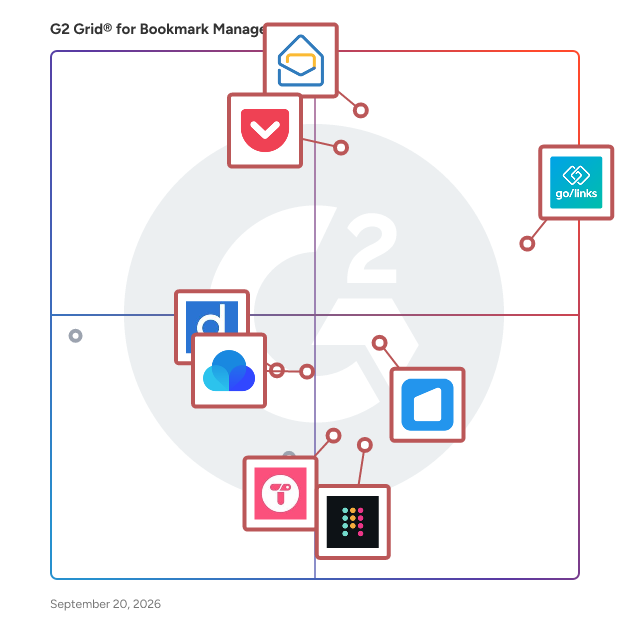
- **Leader:** [Zoho Mail](https://www.g2.com/products/zoho-mail/reviews)
- **Highest Performer:** [start.me](https://www.g2.com/products/start-me/reviews)
- **Easiest to Use:** [GoLinks](https://www.g2.com/products/golinks/reviews)
- **Top Trending:** [GoLinks](https://www.g2.com/products/golinks/reviews)
- **Best Free Software:** [GoLinks](https://www.g2.com/products/golinks/reviews)

  
---

**Sponsored**

### Stacklist

Stacklist is more than just a link-in-bio tool; it’s your all-in-one digital marketing hub. Designed for creators, entrepreneurs, multi-hyphenate curators, and businesses, Stacklist empowers you to curate, organize, and share your content seamlessly. Key Features: Unified Profiles: Combine all your links, content, and services into a single, customizable profile. Organized Stacks: Group related content into ‘Stacks’ for easy navigation and a cleaner presentation. AI-Powered Search: Quickly locate saved links and content with intelligent search capabilities. Cross-Platform Access: Manage your profile on iOS, Android, and major web browsers. Custom Branding: Personalize your profile with custom URLs, themes, and QR codes. Whether you’re a podcaster, real estate agent, or content creator, Stacklist helps you present your digital presence professionally and efficiently.


[Visit website](https://www.g2.com/external_clickthroughs/record?secure%5Bad_program%5D=ppc&amp;secure%5Bad_slot%5D=category_product_list&amp;secure%5Bcategory_id%5D=1582&amp;secure%5Bdisplayable_resource_id%5D=1582&amp;secure%5Bdisplayable_resource_type%5D=Category&amp;secure%5Bmedium%5D=sponsored&amp;secure%5Bplacement_reason%5D=page_category&amp;secure%5Bplacement_resource_ids%5D%5B%5D=1582&amp;secure%5Bprioritized%5D=false&amp;secure%5Bproduct_id%5D=1454410&amp;secure%5Bresource_id%5D=1582&amp;secure%5Bresource_type%5D=Category&amp;secure%5Bsource_type%5D=category_page&amp;secure%5Bsource_url%5D=https%3A%2F%2Fwww.g2.com%2Fcategories%2Fbookmark-manager%3Fpage%3D2&amp;secure%5Btoken%5D=2e1226a4ed1d387971c6682d227fc97599ca260a9b344d7bfeb926bea2be19e7&amp;secure%5Burl%5D=https%3A%2F%2Fwww.stacklist.app&amp;secure%5Burl_type%5D=product_website)

---

  ## Top-Rated Products (Ranked by G2 Score)
### 1. [Dropmark](https://www.g2.com/products/dropmark/reviews)
  Dropmark enables users to share links, files, and notes; organize them into collections;and manage the audience visibility for them.


  **Average Rating:** 4.0/5.0
  **Total Reviews:** 2


**Seller Details:**

- **Seller:** [Dropmark](https://www.g2.com/sellers/dropmark)
- **HQ Location:** London, GB
- **Twitter:** @dropmark (4,041 Twitter followers)
- **LinkedIn® Page:** https://www.linkedin.com/company/dropmark/ (2 employees on LinkedIn®)

**Reviewer Demographics:**
  - **Company Size:** 100% Mid-Market, 50% Enterprise


### 2. [Full Sort](https://www.g2.com/products/full-sort/reviews)
  Full Sort is a central Internet interface that individuals and teams use throughout the day. Important Internet destinations are one click away with an identical interface on all devices including phone, tablet and desktop computers. Teams may share and store important bookmarks privately or with the public.


  **Average Rating:** 5.0/5.0
  **Total Reviews:** 2

**User Satisfaction Scores:**

- **Quality of Support:** 10.0/10 (Category avg: 8.7/10)
- **Syncing:** 10.0/10 (Category avg: 8.9/10)
- **Broswer Agnostic:** 10.0/10 (Category avg: 9.0/10)


**Seller Details:**

- **Seller:** [Nexventure](https://www.g2.com/sellers/nexventure)
- **HQ Location:** N/A
- **LinkedIn® Page:** https://www.linkedin.com/company/No-Linkedin-Presence-Added-Intentionally-By-DataOps (1 employees on LinkedIn®)

**Reviewer Demographics:**
  - **Company Size:** 50% Enterprise, 50% Small-Business


### 3. [GGather](https://www.g2.com/products/ggather/reviews)
  GGather is a bookmark manager with just the right mix of features and the most intuitive user experience.


  **Average Rating:** 5.0/5.0
  **Total Reviews:** 2

**User Satisfaction Scores:**

- **Quality of Support:** 10.0/10 (Category avg: 8.7/10)
- **Syncing:** 10.0/10 (Category avg: 8.9/10)
- **Tags:** 10.0/10 (Category avg: 8.8/10)
- **Broswer Agnostic:** 10.0/10 (Category avg: 9.0/10)


**Seller Details:**

- **Seller:** [GGather](https://www.g2.com/sellers/ggather)
- **Year Founded:** 2017
- **HQ Location:** N/A
- **LinkedIn® Page:** https://www.linkedin.com/company/ggather/ (1 employees on LinkedIn®)

**Reviewer Demographics:**
  - **Company Size:** 250% Mid-Market, 50% Small-Business


### 4. [LinkEmu](https://www.g2.com/products/linkemu/reviews)
  LinkEmu is a cloud-based bookmark management platform designed to help users efficiently save, organize, and share their favorite websites and online resources. By creating personalized libraries and categories, users can streamline their browsing experience and enhance productivity. LinkEmu&#39;s intuitive interface and versatile features make it suitable for both individual users and collaborative teams. Key Features and Functionality: - Bookmark Organization: Create and manage libraries to categorize bookmarks, making it easy to locate and access saved websites. - One-Click Bookmarking: Utilize the LinkEmu browser extension to quickly save web pages with a single click, simplifying the bookmarking process. - Import Existing Bookmarks: Easily import bookmarks from browsers like Chrome and Firefox, allowing for seamless integration and organization. - Collaborative Sharing: Share curated bookmark collections with team members or the public, facilitating collaboration and resource sharing. - Cross-Device Accessibility: Access your bookmarks from any device with internet connectivity, ensuring your resources are always within reach. - Podcast Integration: Save and listen to your favorite podcasts directly within the platform, consolidating your media consumption. - Project Management Tools: For Pro and Business plan users, access advanced project management features to organize tasks and resources effectively. Primary Value and User Solutions: LinkEmu addresses the common challenge of managing and accessing numerous online resources by providing a centralized platform for bookmark organization. Its collaborative features enhance team productivity by ensuring all members have access to the same curated information. The platform&#39;s cross-device compatibility and intuitive design reduce time spent searching for resources, allowing users to focus on their tasks. Additionally, the integration of project management tools and podcast curation offers a comprehensive solution for both personal and professional use.


  **Average Rating:** 3.0/5.0
  **Total Reviews:** 2

**User Satisfaction Scores:**

- **Quality of Support:** 4.2/10 (Category avg: 8.7/10)
- **Syncing:** 5.0/10 (Category avg: 8.9/10)
- **Tags:** 6.7/10 (Category avg: 8.8/10)
- **Broswer Agnostic:** 6.7/10 (Category avg: 9.0/10)


**Seller Details:**

- **Seller:** [Pale Fire Creative](https://www.g2.com/sellers/pale-fire-creative)
- **HQ Location:** Nashville, TN
- **Twitter:** @MovingProApp
- **LinkedIn® Page:** https://www.linkedin.com/company/No-Linkedin-Presence-Added-Intentionally-By-DataOps (1 employees on LinkedIn®)

**Reviewer Demographics:**
  - **Company Size:** 100% Small-Business


### 5. [Linkish](https://www.g2.com/products/linkish/reviews)
  Linkish helps youy watch youtube/vimeo videos, listen to soundcloud audio, see images, read articles and visit website links and much more right from one dashboard, while saving your links in an encrypted form


  **Average Rating:** 4.5/5.0
  **Total Reviews:** 2

**User Satisfaction Scores:**

- **Quality of Support:** 10.0/10 (Category avg: 8.7/10)
- **Syncing:** 8.3/10 (Category avg: 8.9/10)
- **Tags:** 8.3/10 (Category avg: 8.8/10)
- **Broswer Agnostic:** 8.3/10 (Category avg: 9.0/10)


**Seller Details:**

- **Seller:** [Wapology India](https://www.g2.com/sellers/wapology-india)
- **HQ Location:** noida, IN
- **LinkedIn® Page:** https://www.linkedin.com/company/linkish/ (2 employees on LinkedIn®)

**Reviewer Demographics:**
  - **Company Size:** 100% Small-Business


### 6. [session buddy](https://www.g2.com/products/session-buddy/reviews)
  Session Buddy is a unified browser tab and bookmark management tool.


  **Average Rating:** 2.3/5.0
  **Total Reviews:** 2


**Seller Details:**

- **Seller:** [Session Buddy](https://www.g2.com/sellers/session-buddy)
- **Year Founded:** 2011
- **HQ Location:** Denver, US
- **LinkedIn® Page:** http://www.linkedin.com/company/session-buddy (1 employees on LinkedIn®)

**Reviewer Demographics:**
  - **Company Size:** 50% Small-Business


#### Pros & Cons


**Cons:**

- Browser Extension Issues (1 reviews)
- Poor Customer Support (1 reviews)
- Search Functionality (1 reviews)

### 7. [Speed Dial 2](https://www.g2.com/products/speed-dial-2/reviews)
  Easily save and organize your favorite websites and quickly access your bookmarks and browsing history. Available for Google Chrome and Firefox.


  **Average Rating:** 4.5/5.0
  **Total Reviews:** 2

**User Satisfaction Scores:**

- **Syncing:** 10.0/10 (Category avg: 8.9/10)
- **Broswer Agnostic:** 10.0/10 (Category avg: 9.0/10)


**Seller Details:**

- **Seller:** [Speed Dial 2](https://www.g2.com/sellers/speed-dial-2)
- **HQ Location:** N/A
- **Twitter:** @speeddial2 (2,691 Twitter followers)
- **LinkedIn® Page:** https://www.linkedin.com/company/speed-dial-2/ (2 employees on LinkedIn®)

**Reviewer Demographics:**
  - **Company Size:** 50% Small-Business


### 8. [Vhumo Bookmark Manager](https://www.g2.com/products/vhumo-bookmark-manager/reviews)
  With Vhumo Bookmark Manager, organize your favorite websites into personal categories and access them from all devices, wherever you are. You can import bookmarks from other systems and share them on the platform with your confirmed contacts. Vhumo can be customized and used via smartphone, notebook, tablet or desktop, ProgressiveWebApp or extension for the most common browsers.


  **Average Rating:** 4.3/5.0
  **Total Reviews:** 2

**User Satisfaction Scores:**

- **Quality of Support:** 8.3/10 (Category avg: 8.7/10)
- **Syncing:** 9.2/10 (Category avg: 8.9/10)
- **Tags:** 8.3/10 (Category avg: 8.8/10)
- **Broswer Agnostic:** 8.3/10 (Category avg: 9.0/10)


**Seller Details:**

- **Seller:** [Vhumo](https://www.g2.com/sellers/vhumo)
- **HQ Location:** N/A
- **LinkedIn® Page:** https://www.linkedin.com/company/No-Linkedin-Presence-Added-Intentionally-By-DataOps (1 employees on LinkedIn®)

**Reviewer Demographics:**
  - **Company Size:** 100% Small-Business


### 9. [Basket](https://www.g2.com/products/basket/reviews)
  Basket is your place to quickly save and organize stories you find interesting on web


  **Average Rating:** 5.0/5.0
  **Total Reviews:** 1

**User Satisfaction Scores:**

- **Quality of Support:** 10.0/10 (Category avg: 8.7/10)
- **Syncing:** 10.0/10 (Category avg: 8.9/10)
- **Tags:** 10.0/10 (Category avg: 8.8/10)
- **Broswer Agnostic:** 10.0/10 (Category avg: 9.0/10)


**Seller Details:**

- **Seller:** [Basket](https://www.g2.com/sellers/basket)
- **Year Founded:** 2014
- **HQ Location:** Arlington, US
- **Twitter:** @ConnectBasket (228 Twitter followers)
- **LinkedIn® Page:** https://www.linkedin.com/company/basket-savings/ (62 employees on LinkedIn®)

**Reviewer Demographics:**
  - **Company Size:** 100% Mid-Market


### 10. [BookmarkManager.com](https://www.g2.com/products/bookmarkmanager-com/reviews)
  BookmarkManager.com is a privacy-focused bookmark manager. Use advanced tagging for easy organization and quick link rediscovery. 🔹 Exclusive Tags 🔹 Free Text Search 🔹 Synced across all Platforms and Devices 🔹 Light and Dark Theme 🔹 Privacy and Security


  **Average Rating:** 5.0/5.0
  **Total Reviews:** 1

**User Satisfaction Scores:**

- **Syncing:** 10.0/10 (Category avg: 8.9/10)
- **Tags:** 10.0/10 (Category avg: 8.8/10)
- **Broswer Agnostic:** 10.0/10 (Category avg: 9.0/10)


**Seller Details:**

- **Seller:** [Kevin Schmidt](https://www.g2.com/sellers/kevin-schmidt)
- **HQ Location:** N/A
- **LinkedIn® Page:** https://www.linkedin.com/company/No-Linkedin-Presence-Added-Intentionally-By-DataOps (1 employees on LinkedIn®)

**Reviewer Demographics:**
  - **Company Size:** 100% Small-Business


### 11. [Fetching](https://www.g2.com/products/fetching/reviews)
  Fetching is a bookmarking app that keeps track of all the pages that has been visited.


  **Average Rating:** 4.0/5.0
  **Total Reviews:** 1


**Seller Details:**

- **Seller:** [A Very Fetching](https://www.g2.com/sellers/a-very-fetching)
- **HQ Location:** N/A
- **LinkedIn® Page:** https://www.linkedin.com/company/No-Linkedin-Presence-Added-Intentionally-By-DataOps (1 employees on LinkedIn®)

**Reviewer Demographics:**
  - **Company Size:** 100% Small-Business


### 12. [Launch.menu](https://www.g2.com/products/launch-menu/reviews)
  A cloud based service to curate and share your bookmarks.


  **Average Rating:** 4.5/5.0
  **Total Reviews:** 1

**User Satisfaction Scores:**

- **Quality of Support:** 10.0/10 (Category avg: 8.7/10)
- **Tags:** 10.0/10 (Category avg: 8.8/10)
- **Broswer Agnostic:** 8.3/10 (Category avg: 9.0/10)


**Seller Details:**

- **Seller:** [launch.menu](https://www.g2.com/sellers/launch-menu)
- **HQ Location:** N/A
- **LinkedIn® Page:** https://www.linkedin.com/company/No-Linkedin-Presence-Added-Intentionally-By-DataOps (1 employees on LinkedIn®)

**Reviewer Demographics:**
  - **Company Size:** 100% Mid-Market


### 13. [Linkman](https://www.g2.com/products/linkman/reviews)
  Linkman is a bookmark manager that efficiently organizes large numbers of bookmarks. Linkman directly integrates with Google Chrome, Firefox, Internet Explorer, Opera browsers, and supports many other browsers.


  **Average Rating:** 5.0/5.0
  **Total Reviews:** 1

**User Satisfaction Scores:**

- **Quality of Support:** 10.0/10 (Category avg: 8.7/10)


**Seller Details:**

- **Seller:** [Outertech](https://www.g2.com/sellers/outertech)
- **HQ Location:** Coburg, de
- **Twitter:** @outertech (2,095 Twitter followers)
- **LinkedIn® Page:** http://www.linkedin.com/company/outertech (1 employees on LinkedIn®)

**Reviewer Demographics:**
  - **Company Size:** 100% Small-Business


### 14. [Markme](https://www.g2.com/products/markme/reviews)
  Markme is a site where it is easy to create bookmarks that are stored online to a profile. People are able to easily follow your links, while interacting with them in many ways.


  **Average Rating:** 4.0/5.0
  **Total Reviews:** 1

**User Satisfaction Scores:**

- **Quality of Support:** 6.7/10 (Category avg: 8.7/10)
- **Syncing:** 6.7/10 (Category avg: 8.9/10)
- **Tags:** 8.3/10 (Category avg: 8.8/10)
- **Broswer Agnostic:** 10.0/10 (Category avg: 9.0/10)


**Seller Details:**

- **Seller:** [Markme](https://www.g2.com/sellers/markme)
- **Year Founded:** 2019
- **HQ Location:** N/A
- **LinkedIn® Page:** http://www.linkedin.com/company/markme (1 employees on LinkedIn®)

**Reviewer Demographics:**
  - **Company Size:** 200% Mid-Market


#### Pros & Cons

**Pros:**

- Ease of Use (2 reviews)
- Useful (2 reviews)
- Features (1 reviews)
- Navigation Ease (1 reviews)
- Search Functionality (1 reviews)

**Cons:**

- Limited Features (1 reviews)
- Link Management (1 reviews)
- Poor Visibility (1 reviews)

### 15. [myfavs.in](https://www.g2.com/products/myfavs-in/reviews)
  Browser extensions lets you save images, text, videos and webpages with one click. Easily drag and drop bookmarks from the category to a another category or sub category. Myfavs features a special viewer (and reader for articles) that allows you to have seamless experience.


  **Average Rating:** 4.0/5.0
  **Total Reviews:** 1

**User Satisfaction Scores:**

- **Syncing:** 10.0/10 (Category avg: 8.9/10)
- **Tags:** 8.3/10 (Category avg: 8.8/10)
- **Broswer Agnostic:** 10.0/10 (Category avg: 9.0/10)


**Seller Details:**

- **Seller:** [myfavs.in](https://www.g2.com/sellers/myfavs-in)
- **Year Founded:** 2017
- **HQ Location:** Bangalore, IN
- **Twitter:** @myfavs_in (5 Twitter followers)
- **LinkedIn® Page:** http://www.linkedin.com/company/myfavs-in (2 employees on LinkedIn®)

**Reviewer Demographics:**
  - **Company Size:** 100% Mid-Market, 100% Small-Business


### 16. [Showcase](https://www.g2.com/products/showcase-showcase/reviews)
  Showcase lets you store all of your content — Tweets, websites, Instagram posts, YouTube videos, articles, TikToks, images — all together in one platform. No more bookmarking content on 10 different platforms only for it to be completely buried and never found again. Store everything together with ease, share pages with people, and collaborate with friends to create anything from your 2025 moodboard to a shared hub of information about a topic.


  **Average Rating:** 5.0/5.0
  **Total Reviews:** 1

**User Satisfaction Scores:**

- **Quality of Support:** 10.0/10 (Category avg: 8.7/10)
- **Syncing:** 10.0/10 (Category avg: 8.9/10)
- **Tags:** 10.0/10 (Category avg: 8.8/10)
- **Broswer Agnostic:** 10.0/10 (Category avg: 9.0/10)


**Seller Details:**

- **Seller:** [Showcase](https://www.g2.com/sellers/showcase)
- **HQ Location:** N/A
- **LinkedIn® Page:** https://www.linkedin.com/company/No-Linkedin-Presence-Added-Intentionally-By-DataOps (1 employees on LinkedIn®)

**Reviewer Demographics:**
  - **Company Size:** 100% Small-Business


#### Pros & Cons

**Pros:**

- Ease of Use (1 reviews)
- Organization (1 reviews)
- Shareability (1 reviews)
- User Interface (1 reviews)


### 17. [Side Copilot](https://www.g2.com/products/side-copilot/reviews)
  Side Space is an AI-powered vertical tab management extension designed to help users organize and manage browser tabs efficiently in a side panel. As a browser productivity tool, Side Space caters to users who frequently deal with large numbers of tabs, including professionals, students, and researchers. By leveraging artificial intelligence, the extension simplifies tab organization, enhances multitasking, and boosts browsing efficiency. Side Space integrates directly into supported browsers to provide a streamlined way to manage open tabs. Users can access their tabs in a neatly arranged vertical side panel, making it easier to locate, group, and navigate through them. The AI-driven features add a layer of smart organization by automatically grouping tabs based on content, context, or user-defined criteria. Key Features of Side Space: - AI-Powered Grouping: Automatically groups tabs based on themes or patterns, saving time and reducing the cognitive load of manual organization. - Customizable Spaces: Users can create dedicated spaces for specific projects, tasks, or interests, keeping their tabs logically separated. - Cloud Sync: Tabs and spaces are synced across devices, ensuring users can access their organized browsing setup from anywhere. - Resource Management: Includes features to suspend unused tabs, reducing memory usage and improving browser performance. - User-Friendly Design: A clean, vertical interface that integrates seamlessly with your browser, making it intuitive and non-intrusive. Use Cases: - Work Productivity: Manage tabs for different work projects or tasks without losing track of important resources. - Research and Study: Organize research materials and references into logical groups for easy access. - Casual Browsing: Keep personal and hobby-related tabs separate from work or other commitments. Side Space fits into the category of browser extensions aimed at productivity and organization, providing users with a powerful tool to streamline their online activities. It’s especially useful for those who handle dozens of tabs simultaneously and need an effective way to manage them without compromising browser performance. With its combination of AI and practical features, Side Space transforms chaotic browsing into an orderly experience.


  **Average Rating:** 4.5/5.0
  **Total Reviews:** 1

**User Satisfaction Scores:**

- **Quality of Support:** 10.0/10 (Category avg: 8.7/10)
- **Broswer Agnostic:** 10.0/10 (Category avg: 9.0/10)


**Seller Details:**

- **Seller:** [Side Space](https://www.g2.com/sellers/side-space)
- **HQ Location:** N/A
- **Twitter:** @sidecopilot (88 Twitter followers)
- **LinkedIn® Page:** https://www.linkedin.com/company/No-Linkedin-Presence-Added-Intentionally-By-DataOps (1 employees on LinkedIn®)

**Reviewer Demographics:**
  - **Company Size:** 100% Small-Business


#### Pros & Cons

**Pros:**

- Time-saving (1 reviews)


### 18. [Stacks](https://www.g2.com/products/stacks-stacks/reviews)
  Stacks isn’t just another productivity tool—it’s your digital command center. Built for creators, founders, and high-achievers, Stacks transforms the chaos of links, notes, and ideas into a powerhouse of organization. No more scattered tabs, forgotten inspirations, or lost momentum. 🔗 Save everything. Capture links, media, and insights in a snap. 🚀 Find it instantly. AI-powered search makes recall effortless. 🔥 Act fast. Automate workflows, collaborate, and stay ahead. Stacks isn’t just about storing information—it’s about owning it, using it, and winning with it. Whether you’re curating content, managing projects, or building the next big thing, Stacks is designed to keep you moving at the speed of now. Stop drowning in bookmarks and scattered resources. Start stacking your wins. Dominate your workflow with Stacks.


  **Average Rating:** 4.5/5.0
  **Total Reviews:** 1

**User Satisfaction Scores:**

- **Quality of Support:** 6.7/10 (Category avg: 8.7/10)


**Seller Details:**

- **Seller:** [Stacks](https://www.g2.com/sellers/stacks-fd04e5bf-9920-4e7b-9fc0-7a3551e3e7d1)
- **Year Founded:** 2022
- **HQ Location:** Mumbai, IN
- **LinkedIn® Page:** https://www.linkedin.com/company/betterstacks (7 employees on LinkedIn®)

**Reviewer Demographics:**
  - **Company Size:** 100% Small-Business


#### Pros & Cons

**Pros:**

- Centralization (1 reviews)
- Convenience (1 reviews)
- Customization (1 reviews)
- Easy Setup (1 reviews)
- Folder Management (1 reviews)

**Cons:**

- Integration Difficulty (1 reviews)
- Integration Issues (1 reviews)
- Learning Difficulty (1 reviews)
- Limited Features (1 reviews)

### 19. [Swipebucket](https://www.g2.com/products/swipebucket/reviews)
  We are Swipebucket! Your easy solution to swipe, save and organize EVERYTHING. When we launched our company our mission was to simplify the way everyone manages and stores web content. If you are like me and you browse the internet a lot, just to save an ad, a video clip, an interesting article or a recipe you usually forget about later, then this app was MADE for you!


  **Average Rating:** 5.0/5.0
  **Total Reviews:** 1

**User Satisfaction Scores:**

- **Syncing:** 10.0/10 (Category avg: 8.9/10)
- **Tags:** 10.0/10 (Category avg: 8.8/10)
- **Broswer Agnostic:** 8.3/10 (Category avg: 9.0/10)


**Seller Details:**

- **Seller:** [Swipebucket](https://www.g2.com/sellers/swipebucket)
- **HQ Location:** N/A
- **LinkedIn® Page:** https://www.linkedin.com/company/No-Linkedin-Presence-Added-Intentionally-By-DataOps (1 employees on LinkedIn®)

**Reviewer Demographics:**
  - **Company Size:** 100% Small-Business


### 20. [TabsFolders](https://www.g2.com/products/tabsfolders/reviews)
  Capture, Organize and Share thousands of tabs in seconds. #TabLyfe TabsFolders lets you save, manage, synchronize, and share bookmarks at lightning fast speed. TabsFolders sees your countless tabs and raises you one easy-to-use tool that organizes all the information you need. As soon as you add the extension to your browser, you’re on your way to peak internet efficiency. Using TabsFolders’ drag-and-drop interface, you can store and manage thousands of bookmarks. With neatly organized folders and subfolders, you can always find the link you need in seconds. Let’s say you have all your research for a blog post in a folder, you can double-click on it and have all the tabs quickly open in a new window. Boom! You’re ready to get to work. You’ll also be able to easily add/remove tabs while the folder is open on your browser by clicking the save button. You can also drag-and-drop multiple tabs between open windows or to saved folders. These folders—and tabs within folders—can be moved, renamed, and duplicated, just like files on your computer or Drive! You can show off your newfound efficiency by sharing bookmarks with your team or across browsers with just a couple clicks. Plus, with TabsFolders, bookmarks are synchronized across browsers, so it doesn’t matter what browser you saved the link on or what browser your co-worker is using. There’s also a few additional perks like a side-by-side folder view that lets you drag and drop with ease, a Trash Folder that can catch any folders that were accidentally deleted, and the ability to customize keyboard shortcuts for all main TabsFolders functions. With a never ending internet to browse, it’s no wonder you’ve got tabs on tabs on tabs. But it’s time to break free from that #tablife with one time-saving tool.


  **Average Rating:** 3.5/5.0
  **Total Reviews:** 1

**User Satisfaction Scores:**

- **Syncing:** 8.3/10 (Category avg: 8.9/10)
- **Tags:** 8.3/10 (Category avg: 8.8/10)


**Seller Details:**

- **Seller:** [TabsFolders](https://www.g2.com/sellers/tabsfolders)
- **Year Founded:** 2014
- **HQ Location:** Toronto, CA
- **LinkedIn® Page:** http://www.linkedin.com/company/tabsfolders (1 employees on LinkedIn®)

**Reviewer Demographics:**
  - **Company Size:** 100% Small-Business


### 21. [Tagpacker](https://www.g2.com/products/tagpacker/reviews)
  Tagpacker is a free tool to save, organize, and share your favourite links.


  **Average Rating:** 4.5/5.0
  **Total Reviews:** 1

**User Satisfaction Scores:**

- **Quality of Support:** 5.0/10 (Category avg: 8.7/10)
- **Syncing:** 10.0/10 (Category avg: 8.9/10)
- **Tags:** 8.3/10 (Category avg: 8.8/10)
- **Broswer Agnostic:** 10.0/10 (Category avg: 9.0/10)


**Seller Details:**

- **Seller:** [CREX IT](https://www.g2.com/sellers/crex-it)
- **Year Founded:** 2014
- **HQ Location:** N/A
- **LinkedIn® Page:** http://www.linkedin.com/company/tagpacker (1 employees on LinkedIn®)

**Reviewer Demographics:**
  - **Company Size:** 100% Enterprise


### 22. [TeamSync Bookmarks](https://www.g2.com/products/teamsync-bookmarks/reviews)
  TeamSync Bookmarks enables users to share and manage bookmarks across a team or friends in real-time. Share, manage, and sync anything with a URL in group folders that you create. Then, invite friends, family, coworkers, or teammates to your shared bookmark. How can you use TeamSync Bookmarks? Here is how some people are using it \* Onboard new team members so they have immediate access to the most important online websites and tools \* Keep team members current with new tools and sites by immediately sharing it with them in their browser \* Plan trips and events with friends and family Pricing - https://teamsyncbookmarks.com/#pricing Firefox version: https://addons.mozilla.org/en-US/firefox/addon/teamsync-bookmarks/ Slack integration: https://teamsyncbookmarks.com/#integrations (Beta) Features -- Have multiple group folders that you can share with different friends and team members -- Turn on an admin capability so you are the only one who can add or delete bookmarks -- Password protect your bookmark folders -- Easily add friends and team members to shared bookmark folders This is a great tool for on-boarding new team members, sharing frequently-used research websites, and ensuring team-wide awareness of online tools and research sources. TeamSync Bookmarks is actively being developed. Learn more about the extension at teamsyncbookmarks.com.


  **Total Reviews:** 1

**User Satisfaction Scores:**

- **Quality of Support:** 0.0/10 (Category avg: 8.7/10)
- **Syncing:** 0.0/10 (Category avg: 8.9/10)
- **Broswer Agnostic:** 1.7/10 (Category avg: 9.0/10)


**Seller Details:**

- **Seller:** [TeamSync Bookmarks](https://www.g2.com/sellers/teamsync-bookmarks)
- **Year Founded:** 2017
- **HQ Location:** San Jose, US
- **LinkedIn® Page:** http://www.linkedin.com/company/teamsyncbookmarks (1 employees on LinkedIn®)

**Reviewer Demographics:**
  - **Company Size:** 100% Small-Business


### 23. [Tefter.io](https://www.g2.com/products/tefter-io/reviews)
  Get your team on the same page faster with lightning-speed access to all your important links, from any device and Slack


  **Average Rating:** 4.5/5.0
  **Total Reviews:** 1

**User Satisfaction Scores:**

- **Quality of Support:** 10.0/10 (Category avg: 8.7/10)
- **Syncing:** 10.0/10 (Category avg: 8.9/10)
- **Tags:** 10.0/10 (Category avg: 8.8/10)
- **Broswer Agnostic:** 10.0/10 (Category avg: 9.0/10)


**Seller Details:**

- **Seller:** [Tefter.io](https://www.g2.com/sellers/tefter-io)
- **HQ Location:** N/A
- **LinkedIn® Page:** http://www.linkedin.com/company/tefter-io (1 employees on LinkedIn®)

**Reviewer Demographics:**
  - **Company Size:** 100% Mid-Market


### 24. [Thinkery](https://www.g2.com/products/thinkery/reviews)
  Thinkery is a lightweight tool for storing notes, bookmarks, todos, organized through hashtags and bookmarks are stored in full-text runs on Android and iOS app.


  **Average Rating:** 3.8/5.0
  **Total Reviews:** 4

**User Satisfaction Scores:**

- **Quality of Support:** 10.0/10 (Category avg: 8.7/10)


**Seller Details:**

- **Seller:** [appstretto](https://www.g2.com/sellers/appstretto)
- **HQ Location:** N/A
- **Twitter:** @thinkeryme (178 Twitter followers)
- **LinkedIn® Page:** https://www.linkedin.com/company/appstretto (2 employees on LinkedIn®)

**Reviewer Demographics:**
  - **Company Size:** 50% Enterprise, 50% Small-Business


### 25. [Trunker](https://www.g2.com/products/trunker/reviews)
  Trunker is a content production planner. It is an easy and intuitive content production scheduler that allows you to distribute and track content creation. With Trunker you assign articles, videos, slideshows, images, or audio files to a team of in-house or freelance producers who get notified through the app or by email when a piece of content is assigned to them. As the administrator, you can designate which production capabilities each team member has, so you can assign articles only to writers or images, only to designers for example. The website panel allows you to register all your websites allowing you to keep track of the production for each website and keep your ideal content mix for each one. Content submitted by producers follows an approval process before it is available for publishing, keeping communication with your team, and reflecting in their app only the progress of their work, while administrators have the whole picture. Easy and intuitive Project management and task remainder are also available to assign additional activities to your team members like link creation or any other content related jobs. When content is already published, it can be posted to Facebook, Twitter, and LinkedIn, to notify your followers about your brand new piece of content and in the case of articles, you can get AI automatically generated descriptions and tags to make this promotion a matter of seconds.


  **Average Rating:** 5.0/5.0
  **Total Reviews:** 1

**User Satisfaction Scores:**

- **Quality of Support:** 10.0/10 (Category avg: 8.7/10)


**Seller Details:**

- **Seller:** [Audaxia](https://www.g2.com/sellers/audaxia)
- **HQ Location:** N/A
- **LinkedIn® Page:** https://www.linkedin.com/company/No-Linkedin-Presence-Added-Intentionally-By-DataOps (1 employees on LinkedIn®)

**Reviewer Demographics:**
  - **Company Size:** 100% Small-Business


## Parent Category

[Collaboration &amp; Productivity Software](https://www.g2.com/categories/collaboration-productivity)


