Best AI Note-Taking Software - Page 3

How Many AI Note-Taking Software Products Does G2 Track?

Total Products under this Category: 527

Category Stats (Oct 2026)

  • Average Rating: 4.51/5 The average rating of products in this category, based on all submitted ratings
  • Top Trending Product: Recall (+1.46%) - Among all products in this category, Recall recorded the largest rating increase compared to last month

Last updated: October 22, 2026

How Does G2 Rank AI Note-Taking Software Products?

Why You Can Trust G2's Software Rankings:

  • 30 Analysts and Data Experts
  • 110,700+ Authentic Reviews
  • 527+ Products
  • Unbiased Rankings

G2's software rankings are built on verified user reviews, rigorous moderation, and a consistent research methodology maintained by a team of analysts and data experts. Each product is measured using the same transparent criteria, with no paid placement or vendor influence. While reviews reflect real user experiences, which can be subjective, they offer valuable insight into how software performs in the hands of professionals. Together, these inputs power the G2 Score, a standardized way to compare tools within every category.

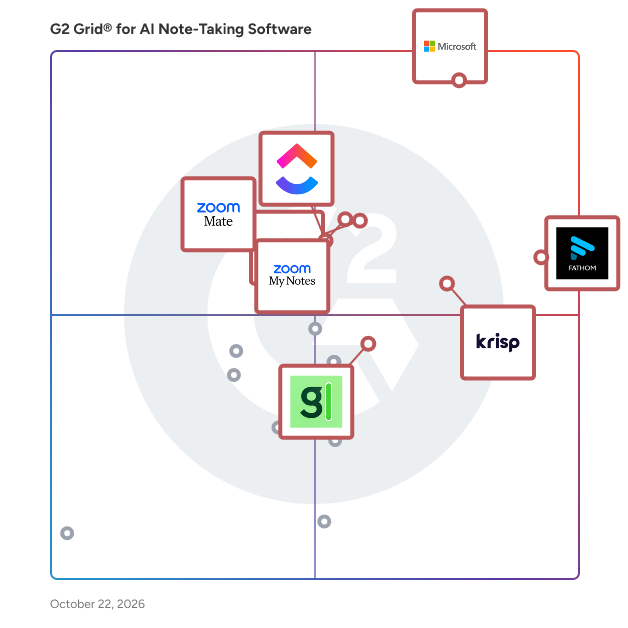
G2 Grid® for AI Note-Taking Software

G2 Grid® for AI Note-Taking Software plotting products by satisfaction and market presence

Highlighted products: Microsoft Teams, Fathom, Krisp, Slack, Zoom My Notes, ClickUp, Granola, and ZoomMate.

Underlying data: [Grid® JSON](https://www.g2.com/categories/ai-note-taking-software/grids.json?focus%5B%5D=microsoft-teams&focus%5B%5D=fathom-video&focus%5B%5D=krisp&focus%5B%5D=slack&focus%5B%5D=zoom-my-notes&focus%5B%5D=clickup&focus%5B%5D=granola&focus%5B%5D=zoommate)

Tactiq

Tactiq is an AI-powered tool designed to enhance meeting productivity by providing real-time transcription and automated summaries. By integrating with platforms like Google Meet, Zoom, and Microsoft Teams, Tactiq captures live speech and converts it into accurate text, ensuring that no detail is missed during discussions. Leveraging OpenAI's technology, it generates concise summaries, extracts key action items, and organizes meeting insights, allowing teams to focus on collaboration without the distraction of manual note-taking. Key Features and Functionality: - Real-Time Transcription: Tactiq offers live speech-to-text conversion during meetings, supporting over 30 languages, which is particularly beneficial for international teams. - AI-Generated Summaries: Utilizing advanced AI, Tactiq distills lengthy meeting transcripts into concise summaries, highlighting key points and decisions made during the session. - Action Item Extraction: The tool identifies and assigns action items to relevant participants, streamlining follow-ups and ensuring accountability. - Speaker Identification: Tactiq detects and labels speakers, providing clarity on who contributed specific insights or decisions. - Integration with Productivity Tools: Users can export transcripts and summaries to platforms like Google Docs, Notion, Slack, and more, facilitating seamless collaboration and documentation. - Custom AI Prompts: Users can create and save custom AI prompts to generate specific meeting outputs, enhancing the relevance and utility of the summaries. Primary Value and User Solutions: Tactiq addresses the common challenges of manual note-taking and information overload in meetings. By automating transcription and summarization, it saves time, reduces the risk of missing critical information, and enhances team alignment. The tool's ability to extract actionable items and integrate with existing workflows ensures that meetings lead to tangible outcomes, boosting overall productivity and efficiency.

Average Rating: 4.2/5.0

Total Reviews: 17

Who Is the Company Behind Tactiq?

  • Seller: tactiq
  • Year Founded: 2020
  • HQ Location: Sydney, AU
  • Twitter: @TactiqHQ
    792 Twitter followers
  • LinkedIn® Page: www.linkedin.com
    20 employees on LinkedIn®

Who Uses This Product?

  • Top Industries: Information Technology and Services
  • Company Size: 82% Small, 12% Medium

What Do G2 Reviewers Say About Tactiq?

AI-generated summary from verified user reviews

Pros
  • Users value the ease of use of Tactiq, benefiting from effortless meeting summaries and time-saving transcripts.
  • Users love the easy recording feature of Tactiq, enabling efficient capturing and summarizing of Google Meet discussions.
  • Users find Tactiq's automated transcripts invaluable for capturing and summarizing Google Meet discussions efficiently.
  • Users appreciate the time-saving automation of Tactiq, enabling efficient capture and summarization of meetings.
  • Users appreciate the time-saving automated transcripts of Tactiq, enhancing clarity and follow-up efficiency in meetings.
Cons
  • Users experience accuracy issues with Tactiq, particularly with non-native English speakers affecting transcript reliability.
  • Users find Tactiq's clunky interface and inaccuracy frustrating, reporting difficulties with cancellation and integration.
  • Users find the inaccuracy of Tactiq frustrating, compounded by difficult cancellation and disconnection processes.
  • Users face significant integration issues with Tactiq, leading to frustrating experiences when managing their accounts and settings.
  • Users experience frustratingly long waiting times for account cancellations and support, impacting their overall satisfaction with Tactiq.

What Are Recent G2 Reviews of Tactiq?

What Are G2 Users Discussing About Tactiq?

Coworker

Coworker is an enterprise AI platform that routes each task to the right model with the right context. Teams get frontier-quality outputs at about 82% lower cost per task, and run roughly 5x more inference per dollar than they would on direct Claude or OpenAI consumption. Overview. Coworker is built for companies whose AI usage is growing faster than their AI budget. As frontier model adoption has scaled, customers face a tradeoff between slowing down adoption and cutting headcount to control spend. Coworker takes a different approach. It routes across open and frontier models and pairs each task with persistent organizational context, which cuts cost per task without giving up output quality. Coworker works alongside the tools teams already use. Customers connect their stack with no-code OAuth and Coworker starts building organizational context right away. About a minute after sign-up, users see a summary of their work, a map of their key collaborators, three to five role-tuned agents, and a suggested first task. Key Features. Intelligent Model Routing sends each task to the model that can handle it most efficiently. Meeting summaries go to lower-cost models like Kimi K2.6 (about $1.71 per million tokens), while data analysis and other complex work go to frontier models like Claude Opus 4 (about $10 per million tokens). Cost per task is fully visible to customers. OM1 Organizational Memory is a persistent memory layer that learns how each customer's company operates: people, projects, customers, processes, and workflows follow every task, no matter which model runs it, and that context is portable across models, so customers don't have to re-onboard when new models ship. Chat Mode is a fast, conversational interface for questions, lookups, summaries, and exploratory work, with simple visualizations rendered in a text canvas. Build Mode turns any chat thread into formatted deliverables like PDFs, spreadsheets, dashboards, and interactive artifacts, keeping full context from Chat Mode so customers can go from exploring an idea to a finished deliverable without starting over. Agent Builder sets up role-tuned agents at onboarding, and customers can build additional agents to automate recurring work across their connected systems. Self-Serve Onboarding lets you sign up, OAuth your tools, and get value in about a minute, with no sales-led implementation required. Use Cases. Sales teams use Coworker for account and prospect research, deal health, context-aware follow-ups, objection handling, and call coaching grounded in CRM and meeting data. Customer Success teams get health scoring across product usage, tickets, and meeting sentiment, plus early churn signals, automated QBR prep, and less repetitive CS workload. Engineering and Product teams get customer feedback and bug themes pulled together, release notes drafted for them, PR review help, and docs, FAQs, and incident summaries sourced from GitHub, Jira, Slack, and internal docs. Leadership and Operations get real-time visibility into team priorities, project status, blockers, and people-management context without chasing updates across five tools. For Internal Knowledge, Coworker answers policy and process questions from the customer's actual Notion, Drive, Confluence, and Slack history. Integrations. Coworker connects to existing tools with no-code OAuth, including Slack, Gmail, and Google Calendar for communication; HubSpot, Salesforce, and Gong for revenue and CRM; GitHub, Jira, and Linear for engineering and product; Google Drive, Notion, and Confluence for docs and knowledge; and Zendesk and Intercom for support. The more sources customers connect, the richer OM1 gets and the better Coworker's outputs become. Pricing. Coworker offers a self-serve plan with usage-based pricing, plus team and enterprise tiers for larger deployments. See coworker.ai for current pricing. Security and Compliance. Coworker is SOC 2 Type 2, CASA Tier 2, and GDPR compliant, independently audited across 193 tests and 20 controls. Customer data is partitioned at the network level and Coworker does not train models on customer data. The platform respects the underlying permissions of every connected app, so users only see what they already have access to in the source system. Admins can whitelist non-sensitive data to specific groups when it makes sense to break down silos. Why Customers Choose Coworker. About 82% lower cost per task than direct frontier model consumption, roughly 5x more inference for the same monthly AI spend, persistent organizational memory across all models, self-serve onboarding with value in about a minute, per-task cost visibility, SOC 2 Type 2, CASA Tier 2, and GDPR compliance, and works alongside existing tools with no migrations required.

Average Rating: 4.9/5.0

Total Reviews: 12

Who Is the Company Behind Coworker?

  • Seller: Coworker.ai
  • Company Website:
  • Year Founded: 2024
  • HQ Location: San Francisco, US
  • Twitter: @coworkerapp
    497 Twitter followers
  • LinkedIn® Page: www.linkedin.com
    30 employees on LinkedIn®

Who Uses This Product?

  • Company Size: 67% Medium, 33% Small

What Are Recent G2 Reviews of Coworker?

Decisions AI

Decisions turns meetings into results. Built natively for Microsoft 365 and Teams, Decisions is an AI-powered meeting management platform that gives every meeting structure before, clarity during, and follow-through after — without leaving Teams, Outlook, or changing how your organization already works. Most organizations lose alignment in the gaps between meetings: decisions scattered across chat threads, action items forgotten, no clear record of what was actually agreed. Decisions solves this by connecting the full meeting lifecycle: AI-built agendas, real-time facilitation tools, AI-generated summaries, decision logs, and task follow-up synced automatically to Microsoft Planner and To Do. Whether it's a project team tracking milestones, a leadership team aligning on strategy, or a board running a formal governance process, Decisions adapts to the meeting, structuring agendas, capturing decisions, and keeping every follow-up visible and accountable across the organization. Because Decisions runs natively inside your Microsoft 365 tenant, your meeting data never leaves your environment. No third-party bots join your calls, and nothing is stored outside your control. Decisions is SOC 2 Type II and ISO 27001:2022 certified, built for enterprise IT and security requirements from day one. Decisions is trusted by 5,000+ organizations worldwide, from Fortune 500s to 10-person non-profits and beyond. If your organization is ready to make every meeting count, it's time to try Decisions.

Average Rating: 4.4/5.0

Total Reviews: 397

Who Is the Company Behind Decisions AI?

  • Seller: Decisions AI
  • Company Website:
  • Year Founded: 2016
  • HQ Location: Oslo, NO
  • Twitter: @decisions
    466 Twitter followers
  • LinkedIn® Page: www.linkedin.com
    75 employees on LinkedIn®

Who Uses This Product?

  • Who Uses This: Executive Assistant, Project Manager
  • Top Industries: Hospital & Health Care, Information Technology and Services
  • Company Size: 39% Small, 36% Medium

What Do G2 Reviewers Say About Decisions AI?

AI-generated summary from verified user reviews

Pros
  • Users appreciate the ease of use of Decisions AI, benefiting from its intuitive agenda builder and reliable support.
  • Users value the efficient agenda management by Decisions AI, enhancing meeting organization and preparation significantly.
  • Users find the detailed note-taking capabilities of Decisions AI invaluable for effective meeting analysis and agenda management.
  • Users appreciate the accurate summary and identification of action items in Decisions AI, enhancing team meeting management.
  • Users appreciate the efficiency of Decisions AI, benefiting from seamless integrations and advanced decision-making features.
Cons
  • Users find the meeting management tools complex and unintuitive, making it challenging for smaller teams to effectively use them.
  • Users struggle with a learning curve for setup, often finding features difficult to locate and use effectively.
  • Users experience AI inaccuracy, noting that dictation can be off and improvements are needed for better correction control.
  • Users express frustration with slow synchronization and cluttered task management in Decisions AI, highlighting integration challenges.
  • Users find the limited functionality of Decisions AI restricts their ability to efficiently organize and utilize the tool.

What Are Recent G2 Reviews of Decisions AI?

AI can help you find the answers. G2 helps you trust them.

Connect G2 to Claude or ChatGPT for answers grounded in G2's trusted reviews, comparisons, and pricing from real user insights.

How it works

Glitter AI

Glitter AI is an innovative tool designed to transform any process into a comprehensive, step-by-step guide within seconds. By recording your actions and narration, Glitter AI automatically generates detailed documentation, complete with transcribed text and annotated screenshots. This facilitates the creation of onboarding materials, training guides, and standard operating procedures (SOPs) with remarkable efficiency. Key Features and Functionality: - Versatile Capture Options: Utilize the desktop application or browser extension to record processes across various platforms, including desktop applications and web-based tools. - AI-Powered Transcription and Editing: The platform transcribes spoken instructions in real-time, allowing for easy editing of both text and accompanying visuals. - Video-to-Guide Conversion: Convert existing videos, such as meeting recordings or live demonstrations, into structured guides by identifying key moments and translating them into written steps. - Multilingual Support: Supports 99 languages, enabling users to create guides in their native language or translate content as needed. - Flexible Sharing and Exporting: Share guides via public or private links, export to formats like PDF, HTML, or Markdown, and embed documentation into various platforms. Primary Value and User Solutions: Glitter AI addresses the challenge of time-consuming documentation by automating the creation of clear, concise guides. This empowers organizations to enhance employee onboarding, streamline customer support, and standardize critical processes, ultimately reducing errors and improving productivity. By simplifying the documentation process, Glitter AI allows teams to focus more on their core tasks and less on manual documentation efforts.

Average Rating: 4.8/5.0

Total Reviews: 2

Who Is the Company Behind Glitter AI?

Who Uses This Product?

  • Company Size: 100% Small

What Are Recent G2 Reviews of Glitter AI?

Hedy AI

Hedy is an AI meeting assistant for teams that helps every person while the conversation is still going, not just after it ends. It listens on each person's own device, so no bot joins the call, and it suggests questions to ask, points out gaps, and keeps track of decisions as the meeting moves along. When the session ends, you get a transcript, a summary, detailed notes, and to-dos with due dates. Hedy for Teams (2 to 200 seats) adds Team Topics. The sessions your team chooses to share become a shared context that anyone on the team can ask Hedy about, so a new hire can pick up a client's whole history in one sitting. Seats and billing run from one admin dashboard, and admins never see private sessions. Enterprise plans for 200+ seats add SSO/SAML, SCIM provisioning, admin audit logs, and the option to run AI analysis on your own models or entirely on your team's devices. Speech recognition runs on the device, and Hedy doesn't store meeting audio by default. Cloud AI analysis happens in memory and is never used to train models, and each organization picks whether its data lives in the US or the EU. On Apple Silicon Macs, Windows PCs with a capable GPU, iPhone 15 Pro and later, and M-series or A17 Pro iPads, Local AI Processing can run the whole analysis on the device, even offline. Hedy has completed a SOC 2 Type I examination and an independent HIPAA assessment. Session types tune Hedy to the meeting, whether that's a client call, a negotiation, a recruiting interview, or a coaching conversation, and you can write your own. Hedy works in 30+ languages on iPhone, iPad, Android, Mac, Windows, Apple Watch, and the web, and custom vocabulary keeps names and industry terms spelled right. Hedy connects to Zapier, Make, n8n, ActivePieces, viaSocket, and Pabbly, and has a REST API, webhooks, and an MCP server for Claude and other AI assistants. Recap emails, share links, and Markdown, CSV, or JSON export get notes to whoever needs them. Individuals can start free with 5 hours a month.

Average Rating: 5.0/5.0

Total Reviews: 2

Who Is the Company Behind Hedy AI?

  • Seller: Hedy AI
  • Year Founded: 2024
  • HQ Location: Portland, US
  • LinkedIn® Page: www.linkedin.com
    3 employees on LinkedIn®

Who Uses This Product?

  • Company Size: 100% Small

What Are Recent G2 Reviews of Hedy AI?

PatientNotes

PatientNotes helps healthcare practitioners spend less time on documentation and more time with patients. Built for medical professionals, clinicians, specialists, and allied health, PatientNotes turns session audio into structured clinical notes, letters, and summaries in seconds. Unlike other AI scribes, PatientNotes is built from the ground-up to transcribe and document in your own personal style and format. Rather than forcing every practitioner into the same generic template, PatientNotes writes in your own style and formatting. Your phrasing, your structure, your level of detail, the way you'd actually write it yourself. We support SOAP and other clinical templates, DSM coding, multi-language notes and letters, and custom prompt building, so we fit into the way a practice already works rather than asking practitioners to change how they document care. PatientNotes means less time reclaimed from evenings and weekends, more consistent documentation across a team, and more presence in the room with patients (without ever taking the clinical judgment out of professional hands).

Average Rating: 4.8/5.0

Total Reviews: 2

Who Is the Company Behind PatientNotes?

Who Uses This Product?

  • Company Size: 100% Small

What Are Recent G2 Reviews of PatientNotes?

Voicenotes

Voicenotes is the #1 best-rated meeting notetaker, and one of the first AI notetakers ever built. It records, transcribes, and summarizes your meetings, so you can stay fully present in every conversation. Voicenotes works with or without a meeting bot, and is used for both in-person and online meetings. Our mobile app is consistently ranked among the best meeting notetaker apps for in-person and online recording. Record directly from your device with no bot joining the call, or send a bot when you need one. It captures meetings across Zoom, Microsoft Teams, Google Meet, and Slack, as well as conversations happening in the room. What you get: Automatic meeting detection. Voicenotes detects when a meeting starts in any app and is ready to record. Real-time transcription in 100+ languages. Follow along live with speaker labels, and jump to any moment with timestamps. Summaries in seconds. Get an overview, key takeaways, and action items even before you leave the meeting. Ask AI anything. Helpful during the meeting and after. Query a single meeting or your entire library of notes. "What did we decide about pricing last month?" Get an answer with sources. Dictate in any app. Hold a key and speak. Voicenotes types for you at 120+ words per minute, anywhere on your Mac. Share with a link. Send summaries and transcripts to teammates who missed the meeting, or invite your whole team. Voicenotes is SOC 2 Type II compliant, and your notes are never used to train AI models. Available on Mac, iOS, Android, web, and even smartwatches. Trusted by 1M+ professionals, from founders and product teams to doctors, lawyers, and researchers.

Average Rating: 5.0/5.0

Total Reviews: 4

Who Is the Company Behind Voicenotes?

  • Seller: Voicenotes
  • Company Website:
  • HQ Location: San Francisco, US
  • LinkedIn® Page: www.linkedin.com
    7 employees on LinkedIn®

Who Uses This Product?

  • Company Size: 100% Small

What Are Recent G2 Reviews of Voicenotes?

Ask Your PDF

AskYourPDF is an AI-powered platform designed to revolutionize how users interact with PDF documents. By enabling conversational engagement, it allows users to ask questions, extract key insights, and summarize content directly from their documents. This tool is particularly beneficial for students, researchers, and professionals who need to efficiently navigate and comprehend extensive or complex PDFs. Key Features and Functionality: - Conversational Interaction: Engage in dynamic conversations with your PDFs, asking questions and receiving immediate, context-aware responses. - Document Summarization: Quickly generate concise summaries, distilling essential information from lengthy documents. - Knowledge Base Integration: Chat with multiple documents simultaneously by organizing them into structured knowledge bases, facilitating comprehensive information gathering. - Advanced Writing Assistance: Generate essays and articles with valid citations, enhancing the quality and credibility of your writing. - Automated Source Finding: Automatically locate and reference sources for AI-generated text, ensuring content is backed by credible information. - Chrome Extension Access: Interact with PDFs directly within your browser, enhancing convenience and workflow efficiency. - OCR Support: Extract text from scanned documents or images, making all content searchable and interactive. Primary Value and User Solutions: AskYourPDF addresses the challenge of efficiently extracting and understanding information from PDF documents. By transforming static files into interactive resources, it saves users significant time and effort in data retrieval and comprehension. The platform's AI capabilities streamline workflows, enhance productivity, and support informed decision-making by providing quick access to relevant information. Whether for academic research, professional analysis, or personal use, AskYourPDF empowers users to interact with their documents in a more meaningful and efficient manner.

Average Rating: 4.5/5.0

Total Reviews: 1

Who Is the Company Behind Ask Your PDF?

Who Uses This Product?

  • Company Size: 200% Small

What Are Recent G2 Reviews of Ask Your PDF?

Capacities

Capacities is a versatile note-taking and knowledge management application designed to help users organize and connect their thoughts in a natural, intuitive manner. By moving away from traditional folder-based systems, Capacities introduces an object-oriented approach, allowing users to create and link various content types such as people, books, meetings, and projects. This method fosters a dynamic network of ideas, enhancing creativity and productivity. Key Features and Functionality: - Custom Object Types: Users can define their own object types with specific properties, tailoring the system to their unique needs. - Templating: Streamline workflows by creating templates for frequently used content structures, facilitating faster and more consistent note creation. - Page Layouts: Choose from various layouts—profile, encyclopedia, index card, or standard page—to present content in the most effective format. - Powerful, Block-Based Editor: Utilize a flexible editor that supports toggles, lists, headings, and markdown-based shortcuts for efficient content creation. - Media Integration: Enrich notes with images, tweets, files, audio, and embeds to create comprehensive and engaging content. - Full-Text Search: Quickly locate information across all notes with a robust search function. - Contextual Backlinks and Tagging: Establish rich connections between notes using backlinks and tags, creating a cohesive network of ideas. - Block Linking: Link to individual blocks within notes, allowing for content reuse and enhanced interconnectivity. - AI Assistant: Leverage an integrated AI assistant to interact dynamically with content, ask questions, and generate new ideas. - Mobile App: Access and edit notes on the go with a companion mobile app, ensuring productivity across devices. Primary Value and User Solutions: Capacities addresses the challenges of information overload and disorganized note-taking by providing a structured yet flexible environment for knowledge management. Its object-based system mirrors natural thought processes, enabling users to build a personalized network of information. This approach not only enhances the organization of ideas but also uncovers hidden connections, fostering deeper understanding and innovation. By integrating powerful tools like AI assistance and customizable templates, Capacities empowers users to transform the vast influx of daily information into a coherent and actionable knowledge base.

Average Rating: 4.0/5.0

Total Reviews: 1

Who Is the Company Behind Capacities?

Who Uses This Product?

  • Company Size: 100% Small

What Are Recent G2 Reviews of Capacities?

Chatprd

ChatPRD is an AI-powered platform designed to assist product managers and their teams in transforming ideas into comprehensive product requirements efficiently. By leveraging advanced AI capabilities, ChatPRD streamlines the creation of Product Requirements Documents (PRDs), user stories, and technical specifications, enabling teams to focus on innovation and rapid development. Key Features and Functionality: - AI Documentation: Quickly generate detailed PRDs, user stories, and technical specs using AI that understands product management nuances. - Workflow Integration: Seamlessly connect with tools like Slack, Linear, Notion, and Google Drive to maintain existing workflows. - Team Collaboration: Facilitate real-time collaboration with features that allow document sharing, feedback collection, and iterative development. - IDE Integration: Access ChatPRD directly within development environments such as VS Code and Cursor through Model Context Protocol (MCP) integration. - Security and Privacy: Ensure data protection with enterprise encryption, compliance with GDPR and CCPA, and strict access controls. Primary Value and User Solutions: ChatPRD addresses the common challenges product managers face, such as time-consuming documentation, misalignment between product and engineering teams, and maintaining consistency across projects. By automating the documentation process and integrating with existing tools, ChatPRD enhances productivity, ensures alignment, and accelerates product development cycles. Its AI-driven insights and real-time collaboration features empower teams to deliver high-quality products efficiently.

Average Rating: 5.0/5.0

Total Reviews: 1

Who Is the Company Behind Chatprd?

Who Uses This Product?

  • Company Size: 100% Large

What Are Recent G2 Reviews of Chatprd?

Clipto.AI

Clipto.AI is an advanced AI-powered transcription and media asset management platform designed to streamline the process of converting audio and video content into accurate, searchable text. With support for over 99 languages and a transcription accuracy rate of 99%, Clipto.AI caters to a diverse range of users, including journalists, researchers, content creators, and business professionals. Its intuitive interface and robust features enable users to efficiently manage and repurpose their media assets, enhancing productivity and content accessibility. Key Features and Functionality: - Highly Accurate Transcription: Achieve precise and reliable transcriptions of audio and video files, ensuring clarity and accuracy for every project. - Multilingual Support: Transcribe content in over 99 languages, facilitating global reach and inclusivity. - Flexible Import Options: Upload local files, import media links from platforms like YouTube, or record content directly for transcription. - Speaker Identification: Automatically detect and label multiple speakers within your media files, enhancing the organization and readability of transcripts. - AI-Generated Summaries: Generate concise summaries of transcriptions, allowing for quick review and extraction of key points. - Global Translation: Effortlessly translate transcripts into multiple languages, ensuring content accessibility for a worldwide audience. - Versatile Exporting Solutions: Export transcripts in various formats, including SRT, VTT, TXT, and project files compatible with Final Cut and Premiere, facilitating seamless integration into content creation workflows. Primary Value and User Solutions: Clipto.AI addresses the challenges associated with manual transcription and media management by offering an automated, accurate, and efficient solution. Users benefit from significant time savings, enhanced content organization, and the ability to repurpose media assets with ease. The platform's multilingual capabilities and translation features break down language barriers, making content accessible to a broader audience. By integrating advanced AI technologies, Clipto.AI empowers users to focus on content creation and analysis, rather than the labor-intensive tasks of transcription and data management.

Average Rating: 1.0/5.0

Total Reviews: 1

Who Is the Company Behind Clipto.AI?

Who Uses This Product?

  • Company Size: 100% Small

Mem

Mem is the world's only self-organizing workspace.

Average Rating: 2.3/5.0

Total Reviews: 3

Who Is the Company Behind Mem?

  • Seller: Mem Labs
  • Year Founded: 2019
  • HQ Location: Los Altos Hills, US
  • LinkedIn® Page: www.linkedin.com
    68 employees on LinkedIn®

Who Uses This Product?

  • Company Size: 67% Small, 33% Medium

What Do G2 Reviewers Say About Mem?

AI-generated summary from verified user reviews

Pros
  • Users appreciate the ease of use of Mem, facilitating immediate updates and organized notes for clients.
  • Users benefit from the efficiency of Mem, enabling quick organization and immediate updates for seamless client communication.
Cons
  • Users highlight the limited integrations with other platforms, which diminishes Mem's functionality and appeal.
  • Users report extremely poor customer service and lack of integrations, making Mem a frustrating experience overall.

What Are Recent G2 Reviews of Mem?

Mem.ai

Mem.ai is an AI-powered productivity platform designed to streamline note-taking, knowledge management, and team collaboration. By leveraging artificial intelligence, Mem.ai automatically organizes and connects your notes, making information retrieval effortless and enhancing overall productivity. Key Features and Functionality: - AI-Powered Organization: Mem.ai intelligently categorizes and links your notes based on events, topics, and people, eliminating the need for manual organization. - Smart Search: Utilize advanced AI-driven search capabilities to quickly locate specific notes using natural language queries and powerful filters. - Mem Chat: An AI assistant that interacts with your notes, answering questions, summarizing content, and generating new material based on your existing knowledge base. - Related Notes: Automatically suggests connections between similar notes, helping you discover and rediscover relevant information. - AI-Powered Collections: Creates adaptive groupings of related notes, allowing for flexible organization without rigid folder structures. - Real-Time Collaboration: Share and edit notes with team members in real time, fostering seamless collaboration. - Multi-Platform Support: Access your notes across web, iOS, and desktop applications, with offline functionality ensuring availability anytime. Primary Value and User Solutions: Mem.ai addresses the common challenges of information overload and disorganized note-taking by providing an intelligent, self-organizing workspace. It enhances productivity by automating the categorization and retrieval of information, reducing the time spent searching for notes. For teams, Mem.ai facilitates efficient collaboration through shared access and real-time editing, ensuring that all members are aligned and informed. By integrating AI-driven features, Mem.ai transforms the way individuals and teams manage knowledge, making it more accessible, connected, and actionable.

Average Rating: 4.0/5.0

Total Reviews: 1

Who Is the Company Behind Mem.ai?

  • Seller: Mem Labs
  • Year Founded: 2019
  • HQ Location: Los Altos Hills, US
  • LinkedIn® Page: www.linkedin.com
    68 employees on LinkedIn®

Who Uses This Product?

  • Company Size: 100% Medium

What Are Recent G2 Reviews of Mem.ai?

NoteAI

NoteAI is an advanced AI-powered note-taking application designed to enhance productivity and streamline the process of capturing, organizing, and retrieving information. Leveraging cutting-edge artificial intelligence, NoteAI offers users an intuitive platform to create, manage, and access their notes efficiently. Key Features and Functionality: - AI-Driven Organization: Automatically categorizes and tags notes based on content, making retrieval seamless. - Voice-to-Text Conversion: Transcribes spoken words into accurate text notes, facilitating hands-free note-taking. - Smart Search: Utilizes natural language processing to deliver precise search results, even with vague queries. - Cross-Device Synchronization: Ensures notes are updated and accessible across all user devices in real-time. - Collaborative Tools: Allows multiple users to edit and comment on notes simultaneously, enhancing teamwork. - Integration Capabilities: Seamlessly connects with popular productivity tools and platforms for a unified workflow. Primary Value and User Solutions: NoteAI addresses the common challenges of information overload and disorganized note management by providing an intelligent system that adapts to user needs. Its AI-driven features save time, reduce manual effort, and improve the accuracy of note-taking. By offering a centralized and organized repository for notes, NoteAI enhances productivity, supports effective collaboration, and ensures critical information is always within reach.

Average Rating: 5.0/5.0

Total Reviews: 1

Who Is the Company Behind NoteAI?

Who Uses This Product?

  • Company Size: 100% Medium

What Are Recent G2 Reviews of NoteAI?

Sembly AI

Sembly SaaS solution that enables managers and teams to records, transcribes and generates smart meeting summaries with meeting minutes. Works with Zoom, Google Meet and Microsoft Teams. Sembly is available in English & 42+ languages across Web, iOS & Android mobile apps. The smartest AI meeting assistant that helps easily review & share meeting takeaways, meeting records and transcriptions. Turns your meetings into searchable text, highlights key discussion moments, creates notes and summaries.

Average Rating: 4.6/5.0

Total Reviews: 46

Who Is the Company Behind Sembly AI?

  • Seller: Sembly AI
  • Year Founded: 2019
  • HQ Location: New York City, US
  • Twitter: @sembly_ai
    387 Twitter followers
  • LinkedIn® Page: www.linkedin.com
    21 employees on LinkedIn®

Who Uses This Product?

  • Who Uses This: CEO
  • Top Industries: Computer Software
  • Company Size: 72% Small, 20% Medium

What Do G2 Reviewers Say About Sembly AI?

AI-generated summary from verified user reviews

Pros
  • Users highlight the efficiency of AI note-taking in Sembly, significantly enhancing productivity during meetings and lectures.
  • Users love the efficient AI note-taking of Sembly, seamlessly summarizing meetings quickly across all platforms.
  • Users praise the efficient AI note-taking that outperforms human capabilities in summarizing meetings swiftly.
  • Users love the easy integrations with Sembly AI, allowing seamless use across all platforms and consistent note-taking.
  • Users find the meeting summaries feature of Sembly AI invaluable for recording and outlining lectures effortlessly.
Cons
  • Users report AI inaccuracy as meetings are sometimes broken down incorrectly and critical information can be lost.
  • Users face editing issues with Sembly AI, such as bugs leading to lost meetings and lack of export options.
  • Users find the high subscription cost increases significantly with additional team members, making it less affordable.
  • Users find the inadequate search functionality frustrating, especially its inability to search through emails effectively.
  • Users find Sembly AI's inadequate summarization frustrating, wishing for better handling of long meetings without losing important context.

What Are Recent G2 Reviews of Sembly AI?

What Are G2 Users Discussing About Sembly AI?

Shalaka Joshi
SJ
Researched and written by Shalaka Joshi
Updated April 9, 2026