Speechara
Who Is the Company Behind Speechara?
- Seller: Speechara
- HQ Location: N/A
-
LinkedIn® Page: www.linkedin.com
1 employees on LinkedIn®
Total Products under this Category: 253
Last updated: November 01, 2026
Why You Can Trust G2's Software Rankings:
G2's software rankings are built on verified user reviews, rigorous moderation, and a consistent research methodology maintained by a team of analysts and data experts. Each product is measured using the same transparent criteria, with no paid placement or vendor influence. While reviews reflect real user experiences, which can be subjective, they offer valuable insight into how software performs in the hands of professionals. Together, these inputs power the G2 Score, a standardized way to compare tools within every category.
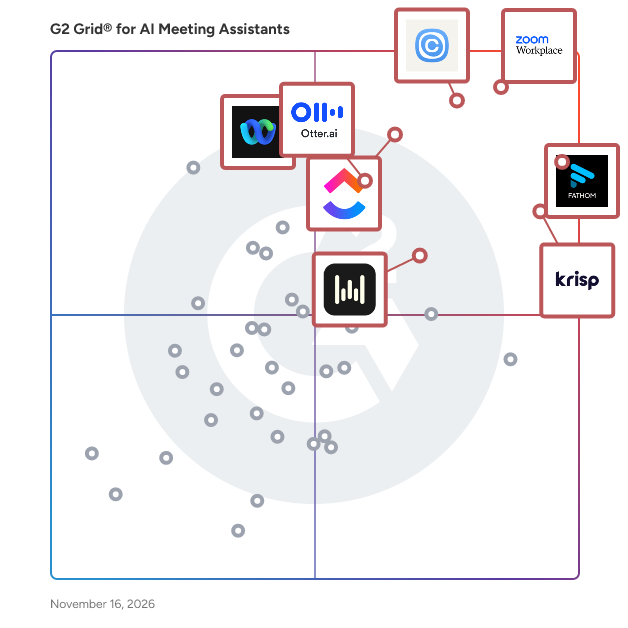
Highlighted products: Zoom Workplace, Fathom, Calendly, Krisp, ClickUp, Webex Suite, Otter.ai, and Wispr Flow Notetaker.
Underlying data: [Grid® JSON](https://www.g2.com/categories/ai-meeting-assistants/grids.json?focus%5B%5D=zoom-workplace&focus%5B%5D=fathom-video&focus%5B%5D=calendly&focus%5B%5D=krisp&focus%5B%5D=clickup&focus%5B%5D=cisco-webex-suite&focus%5B%5D=otter-ai&focus%5B%5D=wispr-flow-notetaker)
What is Subanana? Subanana is an AI-powered speech-to-text platform built for content creators, businesses, and teams who need fast, accurate subtitles, transcriptions, and live captions across 80+ languages. Trusted by over 100,000 users and teams — and the most widely adopted AI subtitle and transcription tool in Hong Kong — Subanana turns spoken content into polished, actionable text in minutes. Subtitling Made Simple Subanana generates precise AI subtitles from YouTube links, uploaded video/audio files, or in-app recordings. Its built-in subtitle editor lets users review and adjust text and timecodes directly in the browser, then export in multiple formats including SRT, DOCX, CSV, and TXT. Users can also download videos with subtitles already embedded — no post-production software required. Meeting & Interview Transcription For professionals and remote teams, Subanana transcribes meetings and interviews with automatic speaker identification. Users can upload recordings, paste a YouTube link, record directly, or connect their Google Calendar to schedule a recording bot for Google Meet and Microsoft Teams calls. Beyond verbatim transcripts, Subanana's AI generates meeting summaries, action items, and chapter highlights — giving teams a complete, searchable record of every conversation. Users can also chat with the AI to instantly locate key details within their meetings. Live Transcription & Translation Subanana enables real-time speech-to-text captioning for conferences, multilingual events, and cross-border collaboration. Audio is transcribed and translated live, with bilingual content displayed side by side on Subanana's web and mobile interface. Attendees can join via QR code to follow along on their own devices. Transcription and translation results are saved for later review, while audio is never stored — keeping sensitive conversations private. Why Teams Choose Subanana Subanana delivers up to 99% accuracy as reported by users, with the team continuously benchmarking the latest AI models on a weekly basis. The platform supports free and paid plans — free users can process the first 15 minutes of any file, while subscribers unlock files up to 15 GB, watermark-free exports, and up to 4K video output. Paid plans start at $9/month with no commitment — cancel anytime. Whether you're a YouTuber adding multilingual subtitles, a team documenting every meeting, or an event organizer captioning a live conference, Subanana is the all-in-one AI platform that turns speech into content.
Connect G2 to Claude or ChatGPT for answers grounded in G2's trusted reviews, comparisons, and pricing from real user insights.
What is Summary AI? Summary AI is an AI note taker and meeting assistant that helps professionals and students record, transcribe, translate, and summarize meetings, conversations, lectures, interviews, calls, and recordings. It turns spoken content and uploaded files into searchable transcripts, organized notes, key points, decisions, and action items, so you can spend less time taking notes and more time focusing on the conversation. AI Meeting Notes Summary AI helps you capture meetings and conversations without manually writing everything down. - Record meetings, interviews, calls, lectures, and conversations - Capture meetings on Zoom, Google Meet, Microsoft Teams and Apple Watch - Get real-time transcription as people speak - Generate structured meeting notes and meeting minutes - Capture key points, decisions, and action items - Search transcripts and use timestamps to find specific moments - Translate conversations in real time across 120+ languages - Ask questions about your recordings and notes with AI Chat - Share summaries after a meeting - Transcription for Audio & Video Turn recordings into searchable text and get more from your content without listening to everything again. -Transcribe audio recordings into text - Transcribe video files and spoken content - Convert voice recordings to written notes - Upload audio and video files - Search transcripts to quickly find information - Generate summaries from long recordings - AI Summaries for Your Content Get the important information from long recordings and documents without going through everything from beginning to end. Summary AI can summarize: - Meetings and conversations - Audio recordings - Videos - PDFs - Documents Use AI Chat to ask questions about your content, clarify information, or find specific answers from your recordings and uploaded files. Built for Work, Study & Everyday Use - For professionals: Record team meetings, client calls, interviews, and one-on-ones while staying focused on the conversation. - For students: Record lectures and classes, create searchable transcripts, generate summaries, and return to specific moments with timestamps. - For everyday use: Capture phone calls, voice notes, ideas, conversations, and in-person meetings wherever they happen. Record Across Devices - Apple Watch: Start and control recordings directly from your Apple Watch - Record conversations, lectures, calls, and voice notes - Access your summaries across multiple devices - Keep recordings and notes easy to revisit - One App for Notes, Transcription & Summaries Summary AI brings AI note-taking, meeting notes, transcription, translation, and AI summarization together in one app. Record. Transcribe. Translate. Summarize. Share.
SyntaxCue is a desktop application designed to assist software engineers during technical interviews, focusing on coding and system design discussions. It operates by capturing system audio from interview calls, transcribing the conversation locally on the user's machine, and providing real-time answer suggestions using the user's own OpenAI or Anthropic API key. This approach ensures that audio data remains on the user's device, enhancing privacy and security. The application functions seamlessly with popular video conferencing platforms such as Zoom, Google Meet, and Microsoft Teams, as it listens to system audio without the need for a bot to join the call. The transcription process is performed on-device, utilizing the whisper.cpp model, which means that audio data is processed in memory and never written to disk or transmitted elsewhere, except when sending the transcribed text to the user's chosen LLM provider for generating responses. Key features of SyntaxCue include: - **Local Transcription**: All audio is transcribed locally on the user's machine, ensuring that sensitive information does not leave the device. - **Bring Your Own Key (BYOK)**: Users supply their own OpenAI or Anthropic API key, allowing them to control their model usage and associated costs directly. - **One-Time Purchase**: SyntaxCue is available for a one-time fee, eliminating the need for recurring subscriptions. - **Platform Compatibility**: The application supports both macOS and Windows operating systems. - **Screen-Share Exclusion**: An optional feature that, when enabled, prevents the hint window from appearing in the user's screen-share or recording stream, maintaining privacy during interviews. - **No Account Requirement**: Users are not required to create an account, and the application does not include telemetry, ensuring user data remains private. - **Language Settings**: A single interview-language setting governs both speech recognition and the language of the generated answers, simplifying configuration. In terms of pricing, SyntaxCue offers a straightforward model: - **One-Time Purchase**: The application is available for a one-time fee of $79, providing users with a 6-month license. There is no auto-renewal; users can manually purchase again if they wish to continue using the application after the license period. - **Refund Policy**: A 14-day refund policy is in place, allowing users to request a refund within two weeks of purchase without the need to provide proof of a software defect. By focusing on local processing, user-controlled API integration, and a simple pricing structure, SyntaxCue aims to provide a secure and efficient tool for software engineers navigating the challenges of technical interviews.
tacite.app is AI software that generates summaries of calls, video conferences, and meetings. The software captures key points, documents decisions, assigns actions with deadlines, and flags follow-ups. Reports are delivered via email after each interaction. The platform supports telephone calls, video conferences, and in-person meetings. Data is processed in France under RGPD compliance. Audio recordings and transcriptions are destroyed after summaries are created. For telephone calls, the software operates through a conference call setup where participants are informed of the AI's presence at the beginning of the call. Participants can exclude the AI if desired. The software can be configured to integrate with sales, CRM, support, project tracking, and team management systems. Usage limits can be applied based on the computational cost of generating each report.
Talksy is an AI meeting assistant built in Brazil for teams that work in Portuguese. It joins Zoom, Google Meet and Microsoft Teams calls automatically from your calendar, transcribes with models trained natively on Brazilian Portuguese rather than translated from English, and delivers an executive summary, action items with owners and CRM updates within about a minute of the call ending. Data sovereignty is the core differentiator. Talksy runs on infrastructure located in Brazil and has been LGPD compliant since day one. Customer data is never used to train AI models, data is encrypted with AES-256 in transit and at rest, the bot joins as a visible participant so every attendee knows the call is being recorded, and retention windows are configured by the customer. Key capabilities: - Automatic recording and transcription on Zoom, Google Meet and Microsoft Teams, with support for 50+ languages and native Brazilian Portuguese - AI meeting notes and executive summaries delivered to Slack and email - Action items with owners and deadlines, plus sentiment analysis - Sami, a conversational assistant that answers questions about any past meeting over WhatsApp - CRM, Slack and calendar integrations, so the bot joins every scheduled call with no manual setup - Weekly insights and role-based dashboards for sales managers, executive leadership and customer success - Enterprise tier: self-hosted and sovereign deployment, SSO, granular access control by area and role, dedicated bot concurrency, MCP server and custom integrations, SLA and assisted onboarding Pricing: Free plan with 5 meetings per month, Pro from R$47.90 per month billed annually, Power from R$79.90 per month billed annually, and Enterprise on request. No credit card required to start. Talksy is operated by BianCode (BianCode Desenvolvimento de Softwares Ltda), a software company based in Vitoria, Espirito Santo, Brazil. Em portugues: Talksy e o assistente de reunioes com IA feito no Brasil. O bot entra sozinho nas calls do Zoom, Meet e Teams a partir da sua agenda e devolve resumo executivo, action items com donos e CRM atualizado em cerca de um minuto depois da reuniao, em portugues de verdade, com dado hospedado no Brasil e conformidade LGPD nativa.
TheNotesOfSally is an AI meeting assistant that turns Google Meet, Microsoft Teams and Zoom meetings, recorded calls, voice notes and audio files into structured minutes: summary, decisions, action items with owners, risks and open questions. It is built for teams who mix French, Arabic, English and Moroccan Darija in the same meeting, with a dedicated Darija speech model and published accuracy benchmarks. Transcription and the language model run on the company's own servers in Europe; meeting content is never used to train models. Reports export to PDF, Word or Excel and sync to Notion, Slack, Google Drive, HubSpot, Salesforce, Pipedrive and other tools. Free plan: 60 minutes per month.
Your AI follow-up assistant for calls, meetings, and in-person conversations Tovel captures your calls and meetings, then turns them into action items, CRM records, and calendar events. No bot joins your call.
TrailerCast is the buyer-facing layer for SMB sales teams. Built specifically for sales teams under 50 reps who need conversation intelligence without the enterprise price tag, TrailerCast records and transcribes every sales call, generates AI-powered summaries and follow-ups, and creates branded Buyer Spaces — interactive deal rooms that buyers actually open and engage with throughout the deal cycle. Where traditional conversation intelligence platforms focus on internal coaching and call review, TrailerCast extends the value of every recorded conversation outward — turning sales calls into buyer-facing assets through cloned voice recaps, Mutual Action Plans, and shareable Buyer Spaces that surface engagement signals directly to your reps and CRM. Key features include: AI call recording and summarization, Buyer Spaces (deal rooms), cloned voice recaps, Mutual Action Plans, deal analytics and engagement signals, and native integrations with HubSpot and Salesforce. Designed for the SMB sales motion — fast onboarding, transparent pricing, and a product that pays for itself within the first month of use.
TranscribeNext is an AI transcription platform that turns audio, video, and meeting recordings into searchable, editable transcripts with speaker labels, summaries, and action items. Upload a file or connect your calendar and let TranscribeNext join Zoom, Google Meet, and Microsoft Teams calls automatically. Transcription runs about 12x faster than real time, so a one-hour recording is typically ready in around five minutes. Accuracy reaches 99% on clear audio (99.5% on paid plans) across more than 100 languages, including English, Spanish, French, German, Portuguese, Chinese, Japanese, Arabic, Hindi, and Russian. What you get with every transcript: - Automatic speaker recognition and labeling for up to 20 speakers - AI summaries, meeting minutes, action items, and key quotes - AI chat to ask questions about any recording - Translation into multiple languages - An editor with timestamps, highlights, comments, and team sharing - Export to PDF, DOCX, TXT, SRT, VTT, and JSON, or directly to Google Docs, Google Drive, and Microsoft Word Supported formats include MP3, WAV, M4A, AAC, FLAC, OGG, WMA, MP4, and WebM, with files up to 5 GB and 8 hours long on the Premium plan. Who uses TranscribeNext: business and remote teams documenting meetings; podcasters and video creators producing show notes, captions, and subtitles; researchers and students transcribing interviews and lectures; customer success and sales teams capturing calls; and legal teams building records from recorded proceedings. Security and privacy: data is protected with 256-bit encryption in transit and at rest, the service is GDPR compliant, files can be auto-deleted on a schedule you set, and customer content is never used to train generalized AI models. Plans start free with 3 files per day and 5-minute previews. Plus is $99.99 per year ($8.33/month) for 20 files per day and full transcription with AI features. Premium is $149.99 per year ($12.49/month) for unlimited daily files, 8-hour recordings, calendar integration, and 1 TB of storage. Monthly billing is available at $19.99 and $29.99. Every paid plan can be cancelled at any time and comes with a 30-day money-back guarantee.
TroveBrief is an AI notetaker that doesn’t stop at the summary. Most notetakers hand you a recap and leave the follow-through to you. TroveBrief records the meeting, pulls out what was decided and who owes what, and puts it straight into a workspace where tasks, notes and your calendar already live. AI meeting notetaker. A lightweight Windows desktop agent captures your Zoom, Microsoft Teams and Google Meet calls with no bot joining the meeting. Your microphone and the meeting audio are recorded separately, and recording stops when you mute. Each meeting becomes a structured summary with open items, action items and scheduling suggestions, and every item links back to the moment in the transcript where it came up. You can also chat with your meeting notes to find answers fast. Task and project management. Action items from meetings flow directly into your task list, so nothing gets lost between “I’ll send that over” and done. Manage work with subtasks, tags, status stages, recurring tasks, effort estimates, file attachments and search. “I owe” and “I’m owed” views show every commitment in both directions, and team workspaces let you share work with owner, admin and member roles. Notes. A full rich-text notes app, with tables, code blocks, tags, version history and comments. Link notes to tasks, share them with teammates, and export to Markdown, TXT, DOCX or PDF. Meeting notes and personal notes sit side by side and are searchable together. Calendar agent. Book, reschedule or cancel events in plain English on your connected Google Calendar or Outlook. “Set up a 30-minute call with my sales team on Thursday” is all it needs. It suggests a time when you don’t give one and always asks you to confirm before booking. It also checks whether you’re the organiser before changing an event, and accounts for teammates’ availability and time zones. Privacy by design. Transcription and summarisation run on self-hosted open models, not a third-party AI API.
