AI-Generated Results
Finding matches…
Recoveryfix CSV Merger is a specialized software utility designed to combine multiple CSV files into a single, consolidated file. This tool provides an efficient solution for users who need to merge scattered data from various CSV files into one unified dataset.
Key Features:
Merge multiple files: Combine numerous CSV files into a single comprehensive file
Flexible merging options: Merge files vertically (append rows) or horizontally (add columns)
Header handling: Intelligently manages duplicate headers when merging files
Data integrity: Preserves original data formatting and structure during the merge process
Selective merging: Choose specific files or folders containing CSV files to merge
Preview functionality: View file contents before merging to ensure accuracy
Large file support: Handles merging of files regardless of their size
Not seeing what you're looking for?
Dive deeper into "UFile" on G2 AI

CSV files may be converted with the use of dependable and trustworthy software called Sysinfo CSV to vCard converter. Users of the program may quickly convert both single files and groups of files with it. Users of the CSV to vCard converter program may see specific CSV file contacts in the preview window. It shows the scan CSV file and gives users the ability to add and delete it from the software's preview screen. Users can also map the table data and vCard data of both files. A wonderful tool for converting CSV to VCF or vCard files is the CSV converter. The program has a special function that unifies all of the contacts in the CSV file into a single file.
The software is designed with a unique feature that creates a single file for all contacts of the CSV file. Also, users can create a single vCard or VCF file for all data of selected CSV files. Different applications support different vCard versions. But Aryson CSV to vCard Converter tool permits the users to save their resultant VCF files into
🔐 FolSec – File Server Management & Security Platform
FolSec is an enterprise File Server Management and Security platform designed to centralize control, monitoring, and governance of file systems across organizations. It enables IT and security teams to manage file access permissions, track user activities, and protect sensitive data through continuous auditing and intelligent security controls.
The platform provides deep visibility into file server environments by monitoring all file-level operations such as read, write, delete, move, and permission changes. It helps organizations eliminate permission sprawl, enforce least-privilege access, and maintain compliance with internal security policies and regulations.
FolSec integrates with Active Directory to synchronize users and groups, ensuring consistent identity-based access control across file systems.
Key capabilities include:
Centralized file server permission management (NTFS-based controls)
Full file activity auditing (who accessed, modified, deleted files and when)
Real-time file monitoring and logging
File permission reporting and access matrix visibility
Detection of suspicious behaviors (mass deletion, ransomware-like activity, abnormal access patterns)
File classification and lifecycle insights (inactive, duplicate, and aging files)
Alerting and automated response actions for security incidents
Active Directory integration for identity synchronization and access mapping
In addition, FolSec includes Secure File Sharing capabilities, allowing organizations to share files internally and externally with controlled permissions, time-based access, and full audit tracking.
Designed for enterprise IT and security teams, FolSec strengthens file infrastructure security, reduces operational complexity, and provides full transparency and control over sensitive data stored across file servers.

Users can easily convert their Apple Mail files into PST files using manual methods or they can use its program. But using the manual conversion methods takes more time. Therefore users must use this Mailvita Apple Mail to PST Converter application to convert Apple Mail files into PST format instantly and efficiently. Therefore, using the app is a smart solution to convert Apple Mail files into PST format. While it is easy to convert Apple Mail files into PST format using the app but some people prefer to use manual techniques to convert Apple Mail files into PST format. By using the app users have multiple email clients so that their Apple Mail files can be converted. It is preferred to use this Apple Mail to PST Converter tool for converting Apple files properly and efficiently. The app supports the conversion of Apple Mail files in just a few steps. Additionally, users can select the files they want to convert to PST format. The general application supports easy and simple conversion of files and keeps file formatting as it is. The integrity of the files is also maintained as they are throughout the entire file conversion process. Users shouldn't install any third-party application other than this program as this amazing tool is a standalone application and supports direct conversion of Apple Mail files to PST format. Any Apple Mail file size can be converted by the app as the app supports the conversion of small Apple Mail files.
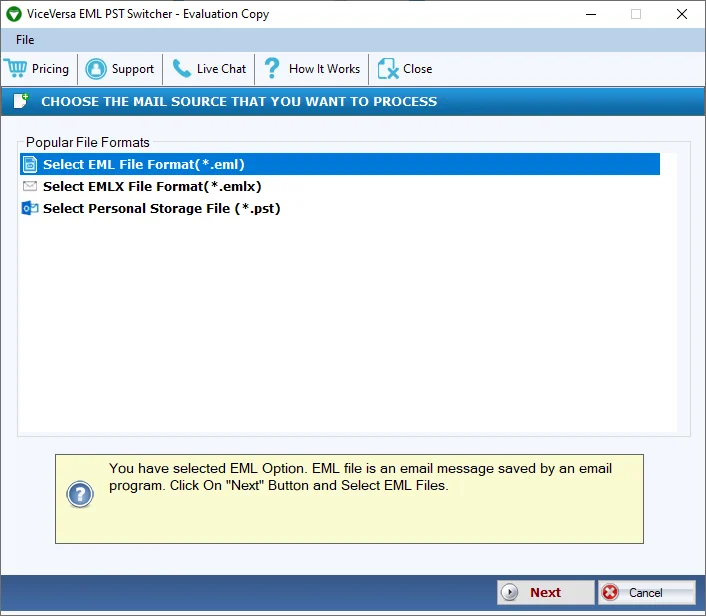
A professional option is the ViceVersa EML to PST & PST to EML Switcher, which effectively and simply switches PST files to EML format and EML files to PST files. Because of its easy-to-use interface, this application is the safest option for both experienced and novice users. This software makes it simple to switch ANSI and UNICODE PST files to EML files. All data is preserved during conversion procedures. It quickly and hassle-free switches numerous PST files to EML format and EML files to PST format. It offers users a demo version. With no size restrictions, it switches EML files to PST files and PST to EML formats. Consequently, the tool offers a quick way to switch Outlook PST files to EML files or EML files to PST files without erasing any data. Email clients that support EML include Microsoft Entourage, Mozilla Thunderbird, IncrediMail, Apple Mail, SeaMonkey, and WLM.

iBoysoft MagicMenu is a versatile and user-friendly Mac right-click enhancer designed to empower Mac users to customize their right-click menus on macOS, thereby boosting productivity at work. This utility allows users to augment the right-click context menu with a variety of functionalities including new file creation, file transfer, quick access to an item, complete app uninstallation, file launching with various apps, duplicate file detection, similar photo cleanup, file compression, image conversion, screen capture, permanent file deletion, file path copying, and more. Specifically, iBoysoft MagicMenu offers the following capabilities: - Easily generate diverse types of new files (including TXT, RTF, Doc, XLS, WPS, PPT, Keynote, Markdown, Numbers, Pages, etc.) with a single right-click. - Add a folder shortcut to the Copy/Move To menu and quickly copy/move files to a target location with a simple right-click. - Right-click to access frequently used files, applications, and webpages quickly. - Thoroughly uninstall unwanted applications and their related files. - Locate and clean up duplicate files. - Detect and delete similar photos. - Convert images of various formats to PNG, JPG, or WEBP. - Support for additional features, including file compression, screen capture, screen recording, file path copying, private file hiding, etc.

The ViceVersa PST Split and Merge Software is a professional and easy way to split large Outlook PST files into several PST files and merge an infinite number of PST files into one PST file. An expert way to swiftly split or combine PST files without erasing data. Even if you are not technical, this software is easy to use. Windows operating system versions 11, 10, 8, 8.1, 7, XP, Vista, and others are all supported. It can split a PST file into multiple PST files and combine an infinite number of PST files into a single PST file without erasing any data, regardless of the size of the PST file. One of the best methods for dividing huge PST files into many PST files is to use the software. Users can install it and test out the free trial version because it is lightweight. Email clients are not necessary for splitting and merging large PST files. This application supports all MS Outlook versions, such as 2021, 2019, 2016, 2013, 2010, 2007, 2003, and 2000. All Outlook file formats, including ANSI and UNICODE, are supported.

TierPoint offers Cloud to Cloud Recovery DRaaS and Server to Cloud Recovery DRaaS.

The ViceVesa PST to MBOX & MBOX to PST Switcher is the safest method for switching unlimited Outlook PST files to MBOX format and MBOX files to PST files without wasting time. It is a lightweight application, users can install it with ease and test the software for free before evaluating it. It works with all versions of Windows OS, including 11, 10, 8, 7, XP, and others. It switches multiple MBOX files to PST files and PST files to MBOX formats quickly. Therefore, the software offers a quick way to switch Outlook PST files to MBOX files or MBOX files to PST files. This application is lightweight and easy to use, so anyone can install it. The MBOX format can be used with any email client that supports it, including Microsoft Entourage, Mozilla Thunderbird, IncrediMail, Apple Mail, SeaMonkey, WLM, and others. It switches Outlook PST files that are ANSI or UNICODE PST files to MBOX files. Technical and non-technical users will find this application easy to use.

MacSonik PDF Encryption Tool for Mac is an ideal tool to protect the unprotected PDF file to ensure the security of it. This software helps the users if they want to limit the number of other users who can access PDF files. It enables password Encryption to the PDF file. Therefore, users who have the password can access the file. It has the unique feature of enabling password encryption for both Users and Owners Passwords to Mac PDF files. This utility can encrypt multiple PDF files for Mac all at once and also by maintaining the data integrity. By securing your PDF file from password Encryption, users can also prevent data from modification. As users who have the required password can only access the file, the software helps you to avoid any editing or omitting to your precious PDF files. Users can also change the password of an encrypted PDF file for Mac by using the MacSonik PDF Encryption Software. As you add files, you will see the Change Password for protected PDF files option. Tick the option to enable this feature. It is also the most safe and reliable tool to encrypt the PDF files for Mac. It does not damage users file content or attachments and leaks your valuable information. It also does not alter the original file content while encrypting the Mac PDF files. This software is very widely compatible with all the major versions of Apple Mac versions including the latest Catalina. Furthermore, it supports all the versions of the PDF files generated by different Adobe Readers. One of the advanced features is that users can choose the level of encryption. The level of encryption determines the degree of enabled security parameters. As you choose the higher level, no one can easily decrypt the PDF files for Mac.

Renamify is a versatile file renaming tool designed to streamline the process of organizing and managing files across various platforms. It offers a user-friendly interface that allows users to rename multiple files simultaneously, saving time and reducing manual effort. With Renamify, users can apply consistent naming conventions, add prefixes or suffixes, and replace or remove specific text within file names. The software supports a wide range of file types and integrates seamlessly with popular operating systems, making it an essential tool for professionals and individuals who handle large volumes of files.
Key Features and Functionality:
- Batch Renaming: Rename multiple files at once, applying uniform naming patterns to enhance organization.
- Customizable Naming Rules: Create and apply specific rules, such as adding dates, numbers, or custom text to file names.
- Preview Changes: View a preview of the new file names before applying changes to ensure accuracy.
- Undo Functionality: Easily revert changes if needed, providing flexibility and control over the renaming process.
- Support for Various File Types: Compatible with a wide array of file formats, including documents, images, and multimedia files.
- Cross-Platform Compatibility: Available for multiple operating systems, ensuring accessibility for a broad user base.
Primary Value and User Solutions:
Renamify addresses the common challenge of managing and organizing large collections of files by providing an efficient and reliable renaming solution. It eliminates the tedious task of manually renaming files, reducing the risk of errors and inconsistencies. By automating the renaming process, Renamify enhances productivity, ensures uniformity in file naming conventions, and simplifies file management tasks for users across various industries.

Cigati OST Converter utility is one of the most advanced and powerful utilities that can convert Offline OST file to PST, MBOX, EML & MSG formats successfully. It is one of the fastest and safest OST conversion into the Outlook PST files. The utility can transfer your attachments like the emails, calendars, contacts, tasks, journals, notes, etc. from your OST files into the PST file format. The utility is embedded with the advanced feature of data integrity and auto-search option. Data inside your files and the folders remain the same and software helps in maintaining the hierarchy of the items present in your Office OST files. Cigati OST Converter is also able to convert the files that are in good condition, it can also convert the OST files that are corrupted after recovering it with the utmost accuracy. With this utility, the user can easily convert the Offline OST files into the PST and other file formats. This utility takes no time to convert the OST files into the PST one or the other file format. Many users are afraid of unprotected conversions means data loss at the time of the conversion, So if you are also one of them then do not worry about this problem if you are using the Cigati Solutions company product. The tool takes very little time to convert your OST files in the desired file format and the process is fully secured. There is an option provided in this utility that if a user wants to save the multiple files in a single run into the most acceptance formats like the PST, MSG, DBX, MBOX, and Archive format. There is an option in the utility in which the preview option is available so that the user can preview the OST file mailbox. So many times users encrypt the OST files to secure their crucial data and in some cases, they forget their password and unable to open that data files again. In such cases, users are required to take the help of the OST to PST converter to open encrypted files again. The demo version of this utility is also available.
The professional solution for hassle-free vCard to PST and PST to vCard file switching is the ViceVersa vCard to PST & PST to vCard Switcher. Because of its ease of use, anyone can use this software without worrying about losing any data. All Windows OS versions, including 11, 10, 8, 7, XP, and others, can use it. Without file size limitations, it switches unlimited vCard files to Outlook PST files and Outlook PST files to vCard formats. It is lightweight and offers a free test version to all users, anyone can install this application. It saves time by swiftly switching Outlook PST files to vCard files or vCard files to PST files. It switches any tye Outlook files UNICODE and ANSI PST files to vCard files without error. All techy and non-techy users will find this software easy to use.

Tsend Pro is a secure file transfer solution designed to facilitate the sending and receiving of large files with ease and compliance. It enables users to share files of any size and type securely, ensuring data protection and adherence to regulations.
Key Features and Functionality:
- Large File Transfers: Send files up to 10 GB per transfer without size limitations.
- Secure Access: Protect file access with password protection and set validity periods to encourage timely downloads.
- User-Friendly Interface: Send files in just two clicks, with recipients able to access them without a TransfertPro account.
- File Requests: Easily collect files from team members or external parties through file deposit requests.
- Integration: Utilize plugins for Windows and Outlook to send files directly from your desktop or email client.
- Customization: Personalize the interface by adding your organization's logo and background image.
Primary Value and User Solutions:
Tsend Pro addresses the challenges of securely transferring large files by providing a compliant, user-friendly platform. It ensures data security through password protection and customizable validity periods, while its integration capabilities with Windows and Outlook streamline workflows. The ability to request files from others simplifies collaboration, making Tsend Pro an essential tool for organizations needing reliable and secure file transfer solutions.

Cigati VCF Split and Merge Tool is a kind of tool that can split VCF files of any large-sized file without causing any loss of data or information. It has no file size limitations. It's completely secure and reliable. This software can also merge any number of VCF files without corrupting the data. Therefore it should be on the top priority list for those who need to split and merge the vCard files. It's an ideal software and it helps the users to manage the VCF files easily. Apart from merging and splitting the files this tool also helps the users to save the files into their preferred locations, which means users can save their data files according to their selected folders, and if the users forget to do so the get files automatically get saved and appear on the desktop in a folder by default. Cigati VCF Split and Merge Tool can split and merge any size of vCard or VCF files. Users can select the files accordingly and can make the split or merge accordingly without any limitations of file size. This software also supports various versions of VCF files. Users can split or merge any type of VCF or vCard irrespective of their updates and also the converted VCF files can easily be compatible with all kinds of platforms and users can have access and can share them from every device that supports the virtual card. This software is the safest software in breaking or joining the VCF files without getting files corrupted or being damaged. Cigati VCF Split and Merge Tool is widely compatible and runs on all the updated and lower versions of the Windows operating systems. Its simple and smooth Graphical Users Interface makes the work easy for both the technical and non-technical users without causing any kind of hindrance. This software also has a demo version where it provides 50 free VCF files merging and splitting facility to analyze the software before buying its full version.

Aryson OLM Converter Tool is a professional Mac OLM File Exporter that helps to migrate or convert emails from Mac OLM file into Gmail, Yahoo, Hotmail, IMAP, Thunderbird, Zimbra, Office 365 & Live Exchange Server. The Mac OLM Converter software allows us to save the mailboxes from Mac Outlook OLM File as PST, MSG, EMLX, EML, MBOX, PDF, and other file formats. It maintains the hierarchy of OLM file mailboxes after conversion into other file formats. With the help of OLM File Converter software, users can directly import OLM file into Office 365, and Live Exchange Server without any data loss. It offers to directly migrate mailboxes for Mac OLM file into Gmail, Yahoo, Hotmail, IMAP, and Thunderbird without any hassle. This software helps to print the mailboxes of the OLM file as PDF and HTML file formats. It also converts OLM file to PST file format without MS Outlook installation. Aryson OLM Converter software offers a demo version that allows users to migrate up to 50 items per folder for free.

NetDrive is a software solution that enables users to mount various cloud storage services and remote servers as local drives on their computers. By integrating seamlessly with platforms like Google Drive, Dropbox, OneDrive, and protocols such as WebDAV and FTP, NetDrive allows users to manage remote files directly through their operating system's file explorer, facilitating a familiar and efficient workflow.
Key Features and Functionality:
- Access Remote Files as Local Files: Interact with cloud storage and remote servers as if they were local drives, using Windows Explorer or macOS Finder.
- File Browser: Open, download, rename, and delete remote files without mounting them, providing quick and efficient file management.
- Background Uploading: Upload files to remote storage in the background, reducing system overhead and improving efficiency, especially when handling multiple small files.
- Team Drive: Configure and publish shared drives for team members, ensuring consistent drive configurations and streamlined collaboration.
- File Lock: Lock files, including Microsoft Office documents, to prevent overwriting or deletion by other users, ensuring data integrity during collaborative work.
- Multi-User File Lock for Microsoft Office Files: When one user is editing an Office file, others can only open it in read-only mode, preventing simultaneous edits and potential conflicts.
- Mount Storage Without Login on Windows: Configure drives to mount automatically at system boot without requiring user login, facilitating access for system services and background processes.
- Force Refresh Folder: Manually refresh folders to retrieve the latest file list from the server, ensuring up-to-date access to remote files.
Primary Value and User Solutions:
NetDrive simplifies the management of multiple cloud storage services and remote servers by integrating them into the local file system. This integration allows users to access and manage remote files with the same ease as local files, eliminating the need for multiple client applications or web interfaces. By providing features like file locking and team drives, NetDrive enhances collaborative workflows, ensuring data consistency and security. Its background uploading and automatic mounting capabilities improve productivity by reducing manual intervention and system overhead. Overall, NetDrive offers a unified, efficient, and secure solution for accessing and managing remote storage resources.

JNPMEDI Inc. is a South Korean technology company founded in 2020, that develops and services ‘MavenClinicalCloud’, a SaaS (software as a service) for clinical trial operation and data management.
We are leading the digital transformation of the clinical trials industry to achieve patient-centric, cost-efficient, and timely studies, allowing the delivery of life-saving medication and devices to patients in need.
The 3 key differentiators of our solution are:
•Modular and Sponsor value-centered pricing structure data transaction-based pricing along with a modular design enables a true pay-as-you-go pricing structure for a 30-40% reduction in CDMS pricing
•In-house Building for a timely, tailored, and flexible solution onboarding by Maven Consulting Team reduces build time by 20-30% while allowing full customization and connection to third-party tools
and solutions
•Inspection-ready, secure, and compliant global standards tamper-proof data protection with a patented blockchain-based QMS (quality management system) that is ISO-certified and 21 CFR Part
11-compliant

Dynbox is an AI-powered file organization platform designed to streamline the management of both cloud-based and local files. By integrating with your existing storage solutions, Dynbox enables you to interact with your files through a conversational AI interface, allowing for efficient organization, search, and automation. Whether you're looking to move, rename, clean, or search files, Dynbox's AI handles these tasks seamlessly, learning and improving with your feedback. With a strong emphasis on user control and privacy, Dynbox ensures that you have the final say in all actions, and your data remains secure.
Key Features and Functionality:
- AI-Powered File Management: Engage with your files using a chat interface to perform tasks such as moving, renaming, cleaning, and searching.
- Semantic Search: Utilize advanced vector search to find files based on their actual meaning, enhancing retrieval accuracy.
- Automated Sorting: Set up rules to automatically sort files in the background, keeping your storage organized without manual intervention.
- Cloud Integration: Connect seamlessly with existing cloud storage services, enabling centralized file management.
- Privacy-Focused: Maintain control over which files the AI can access, with a commitment to not storing your files on Dynbox servers.
Primary Value and User Solutions:
Dynbox addresses the common challenges of file clutter and disorganization by providing an intelligent, automated solution for file management. It saves users time and effort by automating routine tasks, enhancing search capabilities, and ensuring files are organized efficiently. By leveraging AI, Dynbox adapts to user preferences, offering a personalized and secure approach to file organization.

Right-click a new file in Windows and see which program created it.
Windows doesn't keep a record of which program created a file. CapyWatcher runs in the background and records every new file in the folders you choose: the program that created it, the program that started that one, the user and the time. When a file turns up and you wonder where it came from, the answer is already there.
It's made for people who run AI coding agents such as Claude Code, Codex or Cursor, for Windows power users with mystery files, and for anyone who wants to know which installer, game, download or script put a file on their computer.
WHO CREATED THIS FILE
Right-click one new file or several in a tracked folder and select "CapyWatcher: who created this file?". Each file gets its own answer: the program that created it, the program that started that one, its folder, the user and the time. You can also look up a file from inside the app, or drop files and folders on its window.
AI AGENTS
A file written by node.exe or cargo.exe also names the program that started it, such as claude.exe. So you can see what your AI agent wrote and where. Like git blame, for new files.
HISTORY
Start from a program and see every file it created. Search by path, program and user, filter by program, parent process, user and time, and export what History shows to CSV. Hide a process that creates files all day, and History leaves it out.
DELETE ALERTS AND FOLDER LOCKS
Turn on a tracked folder's bell, and a Windows notification says which program deleted files and how many, with a button to stop it. Lock a folder, and nothing can delete, move or rename its files until you unlock it. A program running as administrator can remove the lock, and CapyWatcher puts it back within 2 seconds and tells you.
WHAT'S USING THIS FILE
Right-click a file or folder to see each program using it, with its icon, name and user. Close a program from there, or stop it if it doesn't close.
IN THE EXPLORER MENU
Right-click a file, folder or drive for the CapyWatcher submenu: show it in History, track or stop tracking it, lock or unlock a folder and turn its delete alerts on or off. On Windows 11 it's under Show more options.
ANY DRIVE, USB AND NETWORK DRIVES TOO
Track folders on any drive in your computer, on a USB drive or pendrive, or on a network drive or share you add. On a network drive, CapyWatcher records what programs on your computer do there, and offers delete alerts but no lock. When someone on another computer creates, renames or deletes a file in a folder you share, History shows their address and name.
FILES PER FOLDER
See how many files were created and deleted in each tracked folder: today, over 7 or 30 days, or since tracking began.
RENAMES KEEP THEIR RECORD
A download renamed when it finishes still names the browser that saved it.