AI-Generated Results
Finding matches…
The only task tracking tool you'll ever need.
NativeTasks helps streamline projects, sprints, tasks, and bug tracking. It’s built for high-performance teams that value simplicity & effectiveness.
NativeTasks is a simple tool for helping you manage your tasks in an easy way. You can simply add your project and build folders & tasks around it. Invite your colleagues and manage your projects like a pro!
Few possible uses of NativeTasks:
- Tasks management
- Bug tracking
- Users feedback tracking
- Features request tracking
- Software project management
- Notepad
- School project management
What features do we provide?
- Dashboard & Admin Panel
- Fully customisable tasks structure
- Unlimited users
- Email notifications
- Secure File Upload
- Reports section
- Google Sheet integration
- Slack, Discord, Google Analytics & Facebook Pixel integrations
- Export data to .CSV
- Tutorials and templates
Task management is key to success for every product / team. Advanced tracking tool helps you in the process of improving your service or product. If you value simplicity & effectiveness then NativeTasks was created for you.
Not seeing what you're looking for?
Dive deeper into "NotePlan" on G2 AI
AI Chat Exporter is a privacy-first conversation portability and export tool for moving discussions across leading AI platforms, including ChatGPT, Claude, Google Gemini, DeepSeek, Perplexity, Copilot, and NotebookLM. All extraction, formatting, LaTeX rendering, and image generation occur locally on your device with zero telemetry or remote tracking.
Key Capabilities:
- Multi-Format Export: Save structured chats to Markdown, JSON, HTML, Word-compatible DOC, PDF, and PNG with code blocks, tables, and LaTeX math intact.
- Cross-Model Continuation: Transfer entire conversation histories between different AI platforms to switch models seamlessly while preserving context and turn order.
- PKM Integration: Export directly into personal knowledge management workflows, including Obsidian, Logseq, Bear, NotePlan, and Drafts.
Open-source and available for Chrome, Firefox, Edge and other gecko / chromium based browsers.

CaseGuard Studio is a powerful, on-premise redaction software designed to help organizations protect sensitive information across video, audio, document, and image files—all from a single, easy-to-use interface. Whether working online or fully offline, CaseGuard provides a secure, local solution trusted by legal professionals, law enforcement, and government agencies.
With advanced AI automation, CaseGuard can instantly detect and redact faces, license plates, notepads, screens, and other identifiable objects in videos and images. In audio and document files, the platform supports automatic detection and removal of over 30 categories of personally identifiable information (PII) and protected health information (PHI).
From redaction and transcription to translation in 100+ languages, CaseGuard simplifies compliance with data privacy laws—saving users hours of manual work. Handle all your redaction needs in minutes with one secure, AI-powered platform.

NodeLand offers a unique blend of mind-mapping and note-taking functionalities. It transforms how ideas are captured and organized by connecting every note into dynamic mind maps. Nodeland’s AI assistant helps understand, expand, and retain information.

Boost your productivity and turn meetings and conversations into actionable insights with note-taking devices developed by PLAUD.AI: the PLAUD NOTE and PLAUD NotePin. Record, transcribe, and summarize, empowered by advanced AI features.
ChatGPT Notepad is an innovative application designed to enhance productivity by integrating advanced AI capabilities into a user-friendly notepad interface. This tool allows users to compose, edit, and manage text documents while leveraging the power of ChatGPT to generate ideas, provide suggestions, and assist with content creation. By combining traditional note-taking functionalities with AI-driven insights, ChatGPT Notepad streamlines the writing process for professionals, students, and creatives alike.
Key Features and Functionality:
- AI-Powered Assistance: Utilizes ChatGPT to offer real-time suggestions, corrections, and content generation, enhancing the quality and efficiency of writing tasks.
- User-Friendly Interface: Provides a clean and intuitive design, ensuring a seamless writing experience without unnecessary distractions.
- Versatile Note Management: Supports organization of notes through folders, tags, and search functionalities, making information retrieval quick and effortless.
- Cross-Platform Accessibility: Ensures that notes are synchronized across multiple devices, allowing users to access and edit their content anytime, anywhere.
- Secure Data Handling: Implements robust security measures to protect user data, ensuring privacy and confidentiality.
Primary Value and User Solutions:
ChatGPT Notepad addresses the common challenges of writer's block, content organization, and time management by integrating AI assistance directly into the note-taking process. Users benefit from immediate feedback and suggestions, leading to improved writing quality and productivity. The application's organizational tools help manage large volumes of information efficiently, while cross-platform support ensures that users can work seamlessly across different devices. By combining traditional note-taking with advanced AI capabilities, ChatGPT Notepad offers a comprehensive solution for individuals seeking to enhance their writing and organizational skills.

OfficeView Pro is a network version of an in-out board with a fully integrated messaging system. Employees see the whereabouts of co-workers at a glance of their screen. OfficeView Pro includes an option to automatically change your status to 'Out' after 8 hours of inactivity, provision for the administrator to remotely control any user settings, administrative control over which options each user is allowed to change, a free column on the main screen for additional information, such as, telephone numbers or extensions, a pop-up screen for each employee to display information such as telephone numbers, titles and a notepad, and comprehensive on-line help.

One-Stop AI App Platform.
Your Work & Research Assistant.
Latest AI models for Chat, Search Engine, Notepad, Document Analyzer and Image Generation on a single platform at an affordable price.

The research tool to last you a lifetime.
- AI generated summaries for any webpage or PDF
- Keywords and themes extracted for a document
- Smart search to find related as well as exact matches
- AI-powered note generation
- AI-powered question answering
- Figure and table extraction
- Notepad
- Citation management and reference generation
- Suggested reading
- Highlights & Annotations
- Document management and file storage
Made for IELTS trainers and institutes, IELTS LMS is a simple but powerful tool to Practice Listening, Reading with instant results, and Band Calculation on the spot. Keep and improve your student's performance graph with instant results on the spot with Spacetree IELTS LMS.
WordPress Integration makes it easy to install and manage.
Features Highlights:
1 Computer-Based IELTS/Entrance Test Interface
2. Practice Content: 150+ IELTS Mock Test
3. Adding/Editing New Tests
4. Live Classes: Zoom Integration
5. Doubt Discussion: Community Features (New)
6. Refer and Earn (Affiliate Program)
7. Payment Gateway Integration
8 100% Customization
9. Security features like one device Login and Disable copy content
10. Hubspot CRM Integration
11. Upload Video/ Assignments/ Notes
And Many More…
LMS Features
READING/LISTENING MODULES:
IELTS Official Test like Navigation Experience with all the useful features ( with Highlighter, Notepad for highlighting text with different colors)
Customizable Result Showing page for every student. Display all the correct answers, Pre Recorded Video of difficult questions, and Band Score Calculator OR ‘Live Discussion With Trainer’ Button. Customized buttons as per your need.
Light mode/Dark Mode for a better viewing experience for your students. Full-screen view without any distractions with eye soothing tools.
View Questions for self-evaluation to check the correct/incorrect answers whenever your student wants to check the answers.
Start any test at a fixed time of the day or let them start at their own timing. Whatever, Whenever you want.
Play/Pause button during practice mode or Just continuous playback of the Listening Test Audio. Again as per your requirement. Activate/Deactivate this function.
WRITING MODULE
Manual Checking of the Writing task 1 or 2 for detailed feedback.
Upload the sheet after writing on the paper OR typing option with word counter. Physical classroom experience and direct commenting on submitted sheets without leaving the dashboard.
Simple distraction-free interface to focus only on writing the task.
SPEAKING MODULE ( ONE CLICK LIVE SESSION)
Hassle-free one-click LIVE SESSIONS on your IELTS portal without sharing meeting ID/passwords every time.
No need to install any apps on your student’s devices.
Just Schedule and conduct Live Sessions on your portal.
Integration with a world-class platform (Zoom) for smooth Video conversations.
STUDENT DASHBOARD TO TRACK THE PROGRESS :
Student dashboard to track the progress of every test performed in the class all the tests, scores, and detailed statistics reports are always saved here.

Provizual is a visual inspection and quality control management tool built for construction teams working on ground up construction projects. It replaces spreadsheets and notepads with a visual drawing-based system where teams can track inspection status, request inspections, and identify delays directly on project plans. Provizual automates the collection of city and municipal inspection information, giving field teams, subcontractors, and owners, real-time visibility into compliance and progress from a single, centralized tool.


WP SitePlan is a specialized WordPress maintenance and support company designed to help business owners, agencies, and freelancers manage their websites without the technical headache. For nearly a decade, the platform has offered a range of "care plans"—including Essentials, Professional, and Enterprise tiers—that cover critical tasks such as daily off-site backups, core and plugin updates, security monitoring, and performance optimization. Beyond basic maintenance, they provide "Help Desk Support" for quick site edits and a "Creative Service Suite" for ongoing design and development needs, effectively acting as an outsourced technical team to ensure WordPress sites remain secure, fast, and up to date.
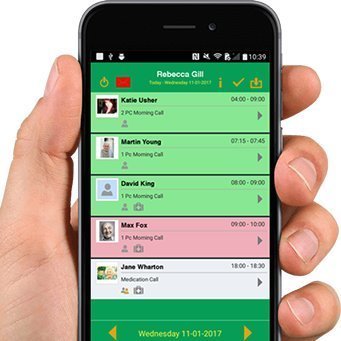
OnePlan is a simple but comprehensive software system designed to eliminate the endless paperwork required to operate your business successfully.

NoteLinker bridges the gap between where you think (Notion) and where you report (HubSpot). It takes the content of your Notion pages and automatically logs them as "Notes" on the HubSpot Activity Timeline of the correct contact.
OnePlan is a cloud-based event site planning platform that simplifies the design and management of events of all sizes. OnePlan offers a map-first, to-scale planning environment that enables organizers to visualize, customize, and collaborate on every aspect of their event layout—from infrastructure and crowd control to workforce and traffic management. The platform supports both solo planners and teams, with features like drag-and-drop object placement, and an ability to import floor plans and layers. Users can plan with centimeter-level accuracy, export data for reporting, and share view-only links for stakeholder collaboration.

ToolVerse / ToolVerse Hub kya hai?
1. AI‑tool aggregator
Kuch sites jaise ToolverseAI curated AI tools provide karti hain — developers, designers, aur users ke liye productivity aur workflow enhance karne ke liye selected tools ki list pasaand‑shuda hoti hai .
2. General online utility suite
“A number of free online tools” jaise daily tasks ke liye calculators, converters (currency, units), hash generators, QR‑code, password‑generator, JSON formatter, color‑converter, etc. ToolVerse.tools per ye “100% free, fast, secure” available hain, bina login ke . Isi tarah ek blogspot version "ToolVerse Hub" basic tools ka set provide karta hai (text formatting, QR, password generator, notepad, etc.) .
3. Toolverses.quaint versions
“Toolverse-hub” AI‑powered writing, image‑gen, and code‑assist tools ke bundles dikhata hai with ratings like AI Writer Pro, ImageGen AI, CodeAssist AI

The Secured Developers Windows Community Windows on 2012 R2 is a pre-configured Amazon Machine Image (AMI) designed to provide developers with a secure and efficient Windows Server 2012 R2 environment on AWS. This AMI comes equipped with essential development tools and applications, enabling developers to quickly set up and manage their development environments without the overhead of manual configurations.
Key Features and Functionality:
- Pre-Installed Development Tools: The AMI includes popular development applications such as Notepad++ and Android Studio, offering a ready-to-use platform for various development tasks.
- Secure Environment: Configured with security best practices, the AMI ensures a safe development environment, reducing vulnerabilities and enhancing compliance.
- Optimized Performance: Tailored for AWS infrastructure, the AMI provides optimized performance for development workloads, ensuring efficient resource utilization.
Primary Value and Problem Solved:
This AMI addresses the challenge of setting up a secure and efficient development environment by offering a pre-configured Windows Server 2012 R2 instance with essential tools. It eliminates the need for manual installations and configurations, allowing developers to focus on coding and testing. Additionally, by providing a secure and optimized environment, it reduces the risk of security breaches and performance issues, thereby enhancing productivity and operational efficiency.