# Best Cloud File Storage Software - Page 8

*By [Rachana Hasyagar](https://research.g2.com/insights/author/rachana-hasyagar)*


Cloud file storage software facilitates the storage of unstructured data and information on the file level. These tools organize information in logical formats specified through folders and access paths. File storage systems support in-place updates and the storage of file system metadata.

Companies use cloud file storage tools to create organized cloud-based file systems and simplify storage management processes. These tools are less scalable than [block storage software](https://www.g2.com/categories/block-storage) systems, but significantly simplify the processes of organizing and structuring information systems.

To qualify for inclusion in the Cloud File Storage category, a product must:

- Store back up and unstructured file data
- Create a simplified file-based storage system
- Be offered by cloud service providers


## Top Cloud File Storage Software at a Glance
| # | Product | Rating | Best For | What Users Say |
|---|---------|--------|----------|----------------|
| 1 | [Veeam Data Platform](https://www.g2.com/products/veeam-data-platform/reviews) | 4.6/5.0 (684 reviews) | Immutable cloud-tiered VM backup and recovery | "[Easy-to-Manage Backups with Fast, Reliable Recovery](https://www.g2.com/survey_responses/veeam-data-platform-review-13144301)" |
| 2 | [LucidLink](https://www.g2.com/products/lucidlink/reviews) | 4.5/5.0 (776 reviews) | Streaming-native cloud storage for large-file collaboration | "[Fast, Seamless Collaboration with LucidLink—Feels Like a Native File System](https://www.g2.com/survey_responses/lucidlink-review-13088764)" |
| 3 | [NetApp ONTAP Data Management Software](https://www.g2.com/products/netapp-ontap-data-management-software/reviews) | 4.4/5.0 (79 reviews) | Hybrid cloud data protection with ONTAP-native replication | "[Simple, Reliable Data Management with Powerful Snapshots, Replication, and Efficiency](https://www.g2.com/survey_responses/netapp-ontap-data-management-software-review-12226092)" |
| 4 | [Assembly](https://www.g2.com/products/assemblysoftware/reviews) | 4.7/5.0 (322 reviews) | Per-client branded portal file sharing | "[Quick, Seamless Onboarding with Time-Saving Rules, Billing, and Client Communication](https://www.g2.com/survey_responses/assembly-review-13086271)" |
| 5 | [Amazon Elastic File System (Amazon EFS)](https://www.g2.com/products/amazon-elastic-file-system-amazon-efs/reviews) | 4.3/5.0 (52 reviews) | AWS-native shared NFS across EC2 instances | "[EFS provides unparalleled performance speed and flexibility.  Has no limit on storage size.](https://www.g2.com/survey_responses/amazon-elastic-file-system-amazon-efs-review-9204130)" |
| 6 | [Evergreen//One: Storage as-a-Service](https://www.g2.com/products/evergreen-one-storage-as-a-service/reviews) | 4.7/5.0 (36 reviews) | Zero-downtime cloud storage scaling with subscription pricing | "[Perfect Solution for Storage managament](https://www.g2.com/survey_responses/evergreen-one-storage-as-a-service-review-8743279)" |
| 7 | [Nasuni](https://www.g2.com/products/nasuni/reviews) | 4.5/5.0 (61 reviews) | Global file access with unified cloud caching | "[Easy to Understand and Set Up](https://www.g2.com/survey_responses/nasuni-review-12005901)" |
| 8 | [Resilio Active Everywhere](https://www.g2.com/products/resilio-active-everywhere/reviews) | 4.6/5.0 (57 reviews) | P2P large-file sync across distributed sites | "[Fast, Reliable Peer-to-Peer File Syncing with Resilio](https://www.g2.com/survey_responses/resilio-active-everywhere-review-13124558)" |
| 9 | [Tresorit](https://www.g2.com/products/tresorit/reviews) | 4.5/5.0 (256 reviews) | Zero-knowledge encrypted file sync and sharing | "[Keeping Important Work Files and Shared Resources Better Organized and Easier to Access](https://www.g2.com/survey_responses/tresorit-review-12881466)" |
| 10 | [Playbook Cloud Storage](https://www.g2.com/products/playbook-playbook-cloud-storage/reviews) | 4.5/5.0 (62 reviews) | — | "[Stable, Affordable DAM with Responsive Support and Smooth Collaboration](https://www.g2.com/survey_responses/playbook-cloud-storage-review-12821443)" |


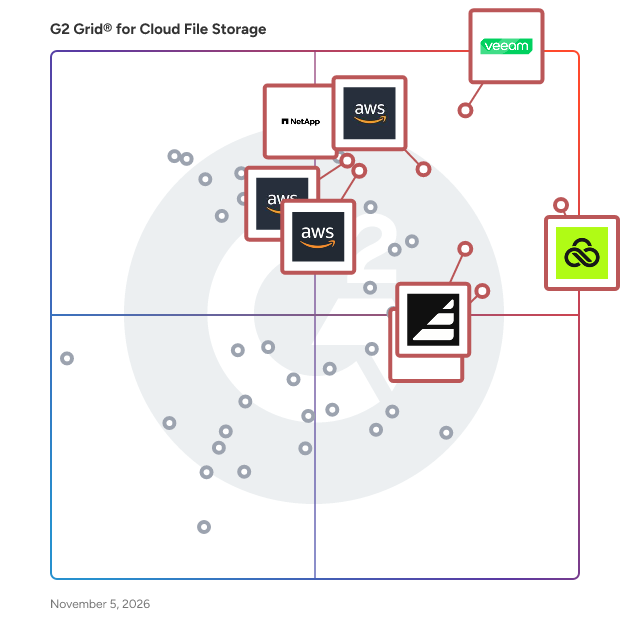
## G2 Grid® for Cloud File Storage Software
![G2 Grid® for Cloud File Storage Software plotting products by satisfaction and market presence](https://www.g2.com/categories/cloud-file-storage/grids.png?focus%5B%5D=7374&focus%5B%5D=108736&focus%5B%5D=65521&focus%5B%5D=139051&focus%5B%5D=66624&focus%5B%5D=20191&focus%5B%5D=65241&focus%5B%5D=20629)
Highlighted products: Veeam Data Platform, LucidLink, NetApp ONTAP Data Management Software, Assembly, Evergreen//One: Storage as-a-Service, Amazon Elastic File System (Amazon EFS), Nasuni, and Tresorit.
Underlying data: [Grid® JSON](https://www.g2.com/categories/cloud-file-storage/grids.json?focus%5B%5D=veeam-data-platform&amp;focus%5B%5D=lucidlink&amp;focus%5B%5D=netapp-ontap-data-management-software&amp;focus%5B%5D=assemblysoftware&amp;focus%5B%5D=evergreen-one-storage-as-a-service&amp;focus%5B%5D=amazon-elastic-file-system-amazon-efs&amp;focus%5B%5D=nasuni&amp;focus%5B%5D=tresorit)


## How Many Cloud File Storage Software Products Does G2 Track?
**Total Products under this Category:** 132

### Category Stats (Jul 2026)
- **Average Rating**: 4.41/5 The average rating of products in this category, based on all submitted ratings
- **Top Trending Product**: TeraBox (+5.01%) - Among all products in this category, TeraBox recorded the largest rating increase compared to last month
*Last updated: July 26, 2026*


## How Does G2 Rank Cloud File Storage Software Products?

**Why You Can Trust G2's Software Rankings:**

- 30 Analysts and Data Experts
- 4,000+ Authentic Reviews
- 132+ Products
- Unbiased Rankings

G2's software rankings are built on verified user reviews, rigorous moderation, and a consistent research methodology maintained by a team of analysts and data experts. Each product is measured using the same transparent criteria, with no paid placement or vendor influence. While reviews reflect real user experiences, which can be subjective, they offer valuable insight into how software performs in the hands of professionals. Together, these inputs power the G2 Score, a standardized way to compare tools within every category.


---

**Sponsored**

### Tresorit

Tresorit is a secure content collaboration platform designed to help individuals and organizations store, sync, and share sensitive information while prioritizing privacy. This comprehensive solution integrates encrypted storage, file sharing, collaboration tools, data rooms, and e-signatures into a single product family. Trusted by thousands of organizations worldwide, Tresorit is part of Swiss Post and serves as a privacy-first alternative to mainstream cloud tools, particularly for teams managing confidential files, regulated data, or client-facing work. At the heart of Tresorit is its commitment to zero-knowledge, end-to-end encryption. This means that files are encrypted on the user&#39;s device before being uploaded, and the encryption keys remain inaccessible to Tresorit itself. As a result, the platform cannot read customer content, ensuring that sensitive information remains protected even in the event of infrastructure compromise. Tresorit&#39;s cryptographic design choices are specifically intended to prevent data leakage through content matching or server-side visibility, providing users with peace of mind regarding their data security. Tresorit SecureCloud serves as an encrypted workspace that facilitates both internal collaboration and external exchanges. It supports secure file storage, syncing, and team collaboration while maintaining user-friendly workflows. The platform offers personal and business plans, with personal use functioning as an encrypted vault for sensitive documents and business use providing a secure workspace that emphasizes IT control, governance, and collaboration. This dual approach caters to a wide range of users, from individuals to large organizations. The Tresorit Drive experience allows users to access encrypted content through familiar interfaces such as Windows File Explorer and macOS Finder. This feature includes “cloud-only” access, which prevents the need to store all files locally, thus enhancing efficiency while maintaining centralized control. Administrators have the capability to take action if a device is lost or compromised, such as revoking access and unlinking the device to mitigate risks. For secure external sharing, Tresorit FileSharing offers robust access control features. Users can protect sharing links with expiration rules, passwords, watermarks, and restrictions on downloading or printing, all while benefiting from detailed activity tracking and auditing. Additionally, Tresorit integrates seamlessly into email workflows like Outlook and Gmail, helping to minimize the risks associated with sending sensitive attachments. For structured client collaboration, Tresorit Engage provides customizable, encrypted data rooms that support ongoing projects, role-based access control, and granular permissions, making it particularly useful for industries such as legal, finance, and consulting. Tresorit also enhances its offerings with Tresorit eSign, which combines document signing with encrypted file handling, supporting EU-qualified electronic signatures for high-trust workflows. Tresorit Email Encryption allows users to send encrypted emails directly from Outlook, ensuring secure communication without imposing complex setups on recipients. On the compliance front, Tresorit boasts strong security validation and certifications, including ISO 27001:2022 and Common Criteria EAL4+, while also supporting compliance with frameworks like GDPR and HIPAA. With data residency options across multiple regions, organizations can align their storage locations with legal and governance requirements, further solidifying Tresorit&#39;s position as a trusted solution for secure content collaboration.


[Visit website](https://www.g2.com/external_clickthroughs/record?secure%5Bad_program%5D=ppc&amp;secure%5Bad_slot%5D=category_product_list&amp;secure%5Bcategory_id%5D=1430&amp;secure%5Bchosen_at%5D=2026-07-26T18%3A47%3A37Z&amp;secure%5Bdisplayable_resource_id%5D=2232&amp;secure%5Bdisplayable_resource_type%5D=Category&amp;secure%5Bmedium%5D=sponsored&amp;secure%5Bplacement_reason%5D=neighbor_category&amp;secure%5Bplacement_resource_ids%5D%5B%5D=2232&amp;secure%5Bprioritized%5D=false&amp;secure%5Bproduct_id%5D=20629&amp;secure%5Bresource_id%5D=1430&amp;secure%5Bresource_type%5D=Category&amp;secure%5Bsource_type%5D=llm_category_page&amp;secure%5Bsource_url%5D=https%3A%2F%2Fwww.g2.com%2Fcategories%2Fcloud-file-storage&amp;secure%5Btoken%5D=ce76d2a17f68cccdc3fe4783703e7a7e5e76fdb41af3d6646ec17ef0b894911b&amp;secure%5Burl%5D=https%3A%2F%2Ftresorit.com&amp;secure%5Burl_type%5D=company_website)

---


## What Is Cloud File Storage Software?

[IT Infrastructure Software](https://www.g2.com/categories/it-infrastructure)

## What Software Categories Are Similar to Cloud File Storage Software?

- [Cloud Content Collaboration Software](https://www.g2.com/categories/cloud-content-collaboration)
- [Hybrid Cloud Storage Solutions](https://www.g2.com/categories/hybrid-cloud-storage-solutions)
- [Block Storage Software](https://www.g2.com/categories/block-storage)
- [Client Portal Software](https://www.g2.com/categories/client-portal)


---

## How Do You Choose the Right Cloud File Storage Software?

### What You Should Know About Cloud File Storage Software

### What is Cloud File Storage Software?

Cloud file storage is an approach to storing unstructured data, such as docs, videos, and images, hierarchically in directories and folders that can be accessed across servers. Cloud file storage software provides a way to access files, edit, save, delete, and share these files in a secure, fast, and reliable manner. With the growing adoption of cloud computing, the need for secure cloud storage options also grows.&amp;nbsp;

Cloud file storage software stores files on cloud servers or virtual machines. Users can access files through application program interfaces (APIs), portals, mobile apps, or web browsers in real time.

Storing and retrieving information from the cloud is relatively easier and faster because of its simpler hierarchical storage structure. However, it is less scalable than other secure cloud storage options, such as object storage. These tools can store a few million files but cannot go beyond that, while object storage provides unlimited storage capacity.

#### What Types of Cloud File Storage Software Exist?

Two main types of cloud file storage software are:

**Managed cloud file storage**

This is a fully managed cloud file storage service option where the vendor manages the installation, licensing, maintenance, and troubleshooting of storage and provides scalable storage options. But they can be expensive.

**Do-it-yourself (DIY) cloud file storage**

This is the type of storage service where the vendor provides the storage space on their servers while the user has to set up the storage system, define the structure, and manage their file storage system. While this is a cost-effective option, configuring the storage system can be time consuming and error prone, leading to potential security risks. **&amp;nbsp;**

### What are the Common Features of Cloud File Storage Software?

The following are some core features of cloud file storage software:

**Availability:** The cloud storage service provides redundancy and disaster recovery plans. Any breakdown in the storage server does not lead to loss of files or latency.

**Security:** The best cloud storage services ensure that file access and file sharing are encrypted to ensure data protection. Some vendors might provide safety features like two-factor authentication to ensure the right access and notifications during a breach.&amp;nbsp;

**Compatibility:** It integrates with other apps without the need for many configurations or additional codes.

**Shareability:** It allows users to share files with authorized users and assign permissions as per requirements. It also ensures file syncing and file versioning to enable smooth collaboration.

### What are the Benefits of Cloud File Storage Software?

**Accessibility:** Cloud file storage software store files in virtual machines that can be easily accessed from anywhere, through mobile apps, web browsers, portals, etc., on demand.&amp;nbsp;

**Controlled access:** Users can set up privileges and access controls to ensure confidentiality of sensitive data is maintained, file sharing is secure, and only people with the right permissions can access the files.&amp;nbsp;

**Flexibility:** Integrating a cloud file storage system with existing apps is easy, and it can be easily installed and maintained. This makes it easy to store a wide variety of unstructured data, including files in development environments, docs, media files, and data repositories.

**No need to own data centers:** Cloud storage solutions provide companies with data storage capacity, allowing them to store information without worrying about the underlying infrastructure or its configuration and maintenance.

### Who Uses Cloud File Storage Software?

**Development teams:** Development teams use it to store and share workflows and other files in the dev environment.

**Analytics teams:** Analytics teams handle lots of data that they need to be able to store and access easily. Cloud file storage is a low-cost option for such teams.

**Teams across the organization:** Various teams use this software to share content among themselves, enabling better collaboration.&amp;nbsp;

### What are the Alternatives to Cloud File Storage Software?

Alternatives to cloud file storage software can replace this type of software, either partially or completely:

[Object storage solutions](https://www.g2.com/categories/object-storage): Object storage is a way of storing unstructured data, such as docs and media. It tags each bundle of data with metadata for easy retrieval. The advantage of object storage is its unlimited storage capability. But the disadvantage is that it is expensive and slower than cloud file storage.

[Block storage software](https://www.g2.com/categories/block-storage): Block storage systems divide large files into blocks, tag them with unique identifiers, and store them in a more accessible manner. While cloud file storage is preferred for lower volumes of data, block storage is preferred when the volumes are high.

#### Software Related to Cloud File Storage Software

Related solutions that can be used together with cloud file storage include:

[Cloud file security software](https://www.g2.com/categories/cloud-file-security) **:** Cloud file security software secures files in SaaS apps. It provides access control and encryption to secure sensitive data when it moves around the cloud.

[Managed file transfer (MFT) software](https://www.g2.com/categories/managed-file-transfer-mft) **:** This allows secure and efficient data transfer within the network. It automates data transfer processes and provides visibility into files in transit.

### Challenges with Cloud File Storage Software

Software solutions can come with their own set of challenges.&amp;nbsp;

**Scalability:** While cloud file storage solutions work well for a smaller number of files or small businesses, it is not scalable beyond a few million records.&amp;nbsp;

**Availability:** While cloud file storage providers try to ensure the files are always accessible, unforeseeable outages can make files inaccessible if the right disaster recovery plans are not in place.

**Compliance:** While vendors provide some security measures, achieving end-to-end data protection, compliance, and security in cloud file storage can be difficult.

### Which Companies Should Buy Cloud File Storage Software?

Companies that exchange information or deal with a lot of data in their organizations and require a safe and inexpensive way to share that information can opt for cloud file storage services. Companies across industries can use cloud file storage for their cloud storage needs.

### How to Buy Cloud File Storage Software

### Requirements Gathering (RFI/RFP) for Cloud File Storage Software

Companies planning to buy the best cloud file storage software should assess the size of storage requirements, pricing, and business plans before buying the software.&amp;nbsp;

#### Compare Cloud File Storage Software Products

**Create a long list**

Buyers need to identify features and use cases that they need from their cloud file storage software and start with a large pool of software providers. They must then evaluate the pros and cons of each product.

**Create a short list**

Shortlists help cross reference the results of initial vendor evaluations with buyer reviews on third-party review sites such as[G2.com](http://www.g2.com), which will help the buyer narrow in on a list with three to five products. From there, buyers can compare pricing and features to determine the best fit.

**Conduct demos**

Companies should demo all of the products on their shortlist. During demos, buyers should ask specific questions about the functionalities and use cases they care about most. For example, one might ask for a demo of how the tool would enforce access control during file transfer or what disaster recovery measures are in place.

#### Selection of Cloud File Storage Software

**Choose a selection team**

Regardless of a company’s size, involving the most relevant personnel is crucial during the software selection process. The team should include relevant company stakeholders who can use the software, scrutinize it, and check whether it will meet the organization’s requirements. The individuals responsible for the day-to-day use of cloud file storage software must be a part of the selection team.&amp;nbsp;

**Negotiation**

The pricing of the software varies based on the features offered, the number of instances, and the number of users. While some cloud file storage vendors might provide free options up to certain usage levels, others might have paid plans based on usage or number of users. More often than not, the price and specifications mentioned on the vendor’s pricing page can be negotiated. Negotiation on implementation, support, and other professional services are also crucial. Buyers should ensure they’ll receive adequate support to get the product up and running.

**Final decision**

Before deciding to purchase the software, testing it for a short period is advisable. The day-to-day users of the software are the best individuals to perform this test. They can use and analyze the software product&#39;s capabilities and offer valuable feedback. In most cases, software service providers offer a short-term product trial. If the selection team is satisfied with what the software offers, buyers can proceed with the purchase or contracting process.