# Best Vector Graphics Software - Page 3

*By [Neeraja Prakash](https://research.g2.com/insights/author/neeraja-prakash)*


Vector graphics software enables users to design and adjust computer images using geometric and mathematical commands, departing from drawing software&#39;s typical clicks and strokes.

These vector images maintain quality even when scaled indefinitely. They are commonly used to create detailed illustrations for the web, games, and other multimedia applications.

To qualify for inclusion in the Vector Graphics category, a product must:

- Provide vector imaging tools and editing options
- Allow users to export files into one or more file types


## How Many Vector Graphics Software Products Does G2 Track?
**Total Products under this Category:** 63

### Category Stats (Jul 2026)
- **Average Rating**: 4.39/5 The average rating of products in this category, based on all submitted ratings
- **Top Trending Product**: XFCut Pro (+6.25%) - Among all products in this category, XFCut Pro recorded the largest rating increase compared to last month
*Last updated: July 04, 2026*


## How Does G2 Rank Vector Graphics Software Products?

**Why You Can Trust G2's Software Rankings:**

- 30 Analysts and Data Experts
- 10,300+ Authentic Reviews
- 63+ Products
- Unbiased Rankings

G2's software rankings are built on verified user reviews, rigorous moderation, and a consistent research methodology maintained by a team of analysts and data experts. Each product is measured using the same transparent criteria, with no paid placement or vendor influence. While reviews reflect real user experiences, which can be subjective, they offer valuable insight into how software performs in the hands of professionals. Together, these inputs power the G2 Score, a standardized way to compare tools within every category.


## Which Vector Graphics Software Is Best for Your Use Case?

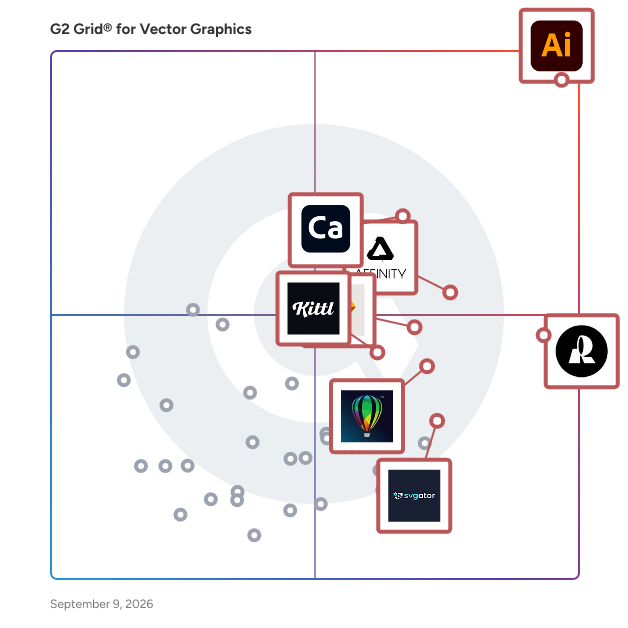
- **Leader:** [Adobe Illustrator](https://www.g2.com/products/adobe-illustrator/reviews)
- **Highest Performer:** [Recraft](https://www.g2.com/products/recraft/reviews)
- **Easiest to Use:** [Affinity Designer](https://www.g2.com/products/affinity-designer/reviews)
- **Top Trending:** [Recraft](https://www.g2.com/products/recraft/reviews)
- **Best Free Software:** [Adobe Illustrator](https://www.g2.com/products/adobe-illustrator/reviews)


---

**Sponsored**

### Canvas X Draw

canvasxdraw is a precision 2D technical illustration platform built for engineers, patent professionals, technical writers, and researchers who demand accuracy that &quot;close enough&quot; simply can&#39;t deliver. With over 20 years in the industry, canvasxdraw is the all-in-one 2D workspace that eliminates the need to juggle multiple tools — combining vector graphics, raster integration, smart annotations, and automated dimensioning in a single, focused environment. What Makes canvasxdraw Different Most design tools are built for creatives. canvasxdraw is built for technical professionals. While competitors chase 3D rendering and generalist workflows, canvasxdraw doubles down on the specialized 2D capabilities that matter to engineers, patent drawers, and cartographers: · 0.035-micron drawing accuracy — a CAD-lite precision engine inside an intuitive modern interface · 2,000+ symbol libraries with built-in IEEE, ANSI, and USPTO-compliant templates · Smart annotations and callouts that stay connected when objects move · Native CAD import/export — open and edit AutoCAD files without leaving your 2D workflow. Who Uses canvasxdraw · Patent Drawers: Clean vector lines and intelligent callouts for USPTO-compliant utility patent drawings · Technical Writers/Illustrators: Rapidly produce assembly, maintenance, and repair illustrations for technical manuals · Cartographers: Visualize and annotate complex geospatial data with precision · Researchers: Translate findings into publication-ready visuals that meet peer-reviewed journal standards. Key Features · Linear, chain, and baseline dimensioning with automatic calculation · Seamless vector + raster integration in a single document · High-resolution export to PDF, print-ready raster, and clean vector formats · Technical-first UI designed to feel natural to engineers, not just artists Pricing &amp; Access canvasxdraw is a Product-Led Growth company — no sales calls, no procurement delays. · Free Trial — full access, no credit card required · Annual Subscription — always on the latest version · Perpetual License — one-time purchase, own it forever The Bottom Line canvasxdraw gives technical professionals 100% of the 2D tools they need — and none of the 3D complexity they don&#39;t. From blank page to finished technical schematic in a single afternoon.


[Visit website](https://www.g2.com/external_clickthroughs/record?secure%5Bad_program%5D=ppc&amp;secure%5Bad_slot%5D=category_product_list&amp;secure%5Bcategory_id%5D=573&amp;secure%5Bchosen_at%5D=2026-07-04T21%3A27%3A39Z&amp;secure%5Bdisplayable_resource_id%5D=573&amp;secure%5Bdisplayable_resource_type%5D=Category&amp;secure%5Bmedium%5D=sponsored&amp;secure%5Bplacement_reason%5D=page_category&amp;secure%5Bplacement_resource_ids%5D%5B%5D=573&amp;secure%5Bprioritized%5D=false&amp;secure%5Bproduct_id%5D=90227&amp;secure%5Bresource_id%5D=573&amp;secure%5Bresource_type%5D=Category&amp;secure%5Bsource_type%5D=category_page&amp;secure%5Bsource_url%5D=https%3A%2F%2Fwww.g2.com%2Fcategories%2Fvector-graphics&amp;secure%5Btoken%5D=49863be38dfbbf5b111d9f4ca47baf99a45b1c4ed31742c0a567e130fdd87ea7&amp;secure%5Burl%5D=https%3A%2F%2Fvectorgfx.net%2F&amp;secure%5Burl_type%5D=custom_url)

---

## What Are the Top-Rated Vector Graphics Software Products in 2026?
### 1. [Pointorama](https://www.g2.com/products/pointorama/reviews)
Pointorama is an AI-powered indoor mapping software that automates point cloud processing into precise floor plans, elevation drawings, and 3D visualizations. Designed for speed, accuracy and ease of use, Pointorama streamlines workflows for surveyors, architects, and facility managers—delivering results faster and with minimal effort.


**Average Rating:** 4.5/5.0
**Total Reviews:** 2

**Who Is the Company Behind Pointorama?**

- **Seller:** [Pointorama](https://www.g2.com/sellers/pointorama)
- **HQ Location:** N/A
- **LinkedIn® Page:** https://www.linkedin.com/company/No-Linkedin-Presence-Added-Intentionally-By-DataOps (1 employees on LinkedIn®)

**Who Uses This Product?**
- **Company Size:** 50% Mid-Market, 50% Small-Business


#### What Are Pointorama's Pros and Cons?

**Pros:**

- Accuracy (1 reviews)
- AI Integration (1 reviews)
- Ease of Learning (1 reviews)
- Efficiency Improvement (1 reviews)

**Cons:**

- Difficulty for Beginners (1 reviews)
- Learning Curve (1 reviews)


### What Do G2 Reviewers Say About Pointorama?
*AI-generated summary from verified user reviews*

**Pros:**

- Users praise the **accuracy** of Pointorama, transforming 3D scans into professional floor plans quickly and efficiently.
- Users appreciate the **fast and accurate AI integration** of Pointorama, significantly speeding up the floor plan creation process.
- Users praise the **ease of learning** with Pointorama, allowing quick and efficient creation of floor plans.
- Users are impressed by the **efficiency improvement** of Pointorama, significantly speeding up floor plan creation.

**Cons:**

- Users find the **learning curve challenging** for beginners, especially with advanced settings in Pointorama.
- Users find the **learning curve challenging** , particularly if they are new to point cloud processing, but it improves over time.

#### What Are Recent G2 Reviews of Pointorama?

**"[Impressive AI Tool for Fast and Accurate Floor Plans](https://www.g2.com/survey_responses/pointorama-review-11791605)"**

**Rating:** 5.0/5.0 stars
*— Anmol U.*

[Read full review](https://www.g2.com/survey_responses/pointorama-review-11791605)

---

**"[Pointorama Speeds Point Cloud Processing with Powerful CAD/BIM Exports](https://www.g2.com/survey_responses/pointorama-review-12924832)"**

**Rating:** 4.0/5.0 stars
*— Verified User in Oil &amp; Energy*

[Read full review](https://www.g2.com/survey_responses/pointorama-review-12924832)

---


### 2. [SVGs.app](https://www.g2.com/products/svgs-app/reviews)
Stop hunting for icons that almost fit. SVGs.app uses AI to generate unique, production-ready vector graphics from simple text prompts in seconds. Choose from curated styles like “Notion Style” or “Minimal Outline,” get perfectly consistent SVGs, and download them instantly. Publish to the community and earn credits when your designs get likes. Turn ideas into professional, scalable graphics for websites, apps, and presentations. Fast, easy, and on-brand.


**Average Rating:** 4.8/5.0
**Total Reviews:** 2

**Who Is the Company Behind SVGs.app?**

- **Seller:** [SVGS APP](https://www.g2.com/sellers/svgs-app)
- **HQ Location:** N/A
- **LinkedIn® Page:** https://www.linkedin.com/company/No-Linkedin-Presence-Added-Intentionally-By-DataOps (1 employees on LinkedIn®)

**Who Uses This Product?**
- **Company Size:** 100% Small-Business


#### What Are SVGs.app's Pros and Cons?

**Pros:**

- Affordable (2 reviews)
- Ease of Learning (1 reviews)
- Ease of Use (1 reviews)
- Features (1 reviews)
- Online Support (1 reviews)

**Cons:**

- Subscription Model (1 reviews)
- Vector Issues (1 reviews)


### What Do G2 Reviewers Say About SVGs.app?
*AI-generated summary from verified user reviews*

**Pros:**

- Users appreciate the **affordable pricing** of SVGs.app, which enhances accessibility and supports flexible usage for all.
- Users find the **ease of learning** invaluable, enabling quick illustrations and effective use of style presets.
- Users value the **ease of use** of SVGs.app, finding it simple to implement even without design skills.
- Users value the **style presets and affordability** of SVGs.app, enabling quick learning and consistent visuals.
- Users appreciate the **helpful online support** of SVGs.app, which enhances their overall experience with the product.

**Cons:**

- Users find the **usage credit-based model** restrictive, especially when needing frequent manual refinements for vectors.
- Users find the **credit-based limitations** restrictive, especially if manual refinement in vector editing is occasionally necessary.

#### What Are Recent G2 Reviews of SVGs.app?

**"[Affordable, Consistent Visuals with Easy-to-Use Style Presets](https://www.g2.com/survey_responses/svgs-app-review-11921970)"**

**Rating:** 4.5/5.0 stars
*— Dharani K.*

[Read full review](https://www.g2.com/survey_responses/svgs-app-review-11921970)

---

**"[Effortless Design for All Skill Levels with Flexible, Affordable Pricing](https://www.g2.com/survey_responses/svgs-app-review-12080445)"**

**Rating:** 5.0/5.0 stars
*— Verified User in Manufacturing*

[Read full review](https://www.g2.com/survey_responses/svgs-app-review-12080445)

---


### 3. [Vectorize Image](https://www.g2.com/products/vectorize-image/reviews)
Easily convert raster images into clean, scalable SVG files for professional use. Whether you&#39;re creating logos, preparing designs for printing, or generating SVGs for Cricut and laser cutting, our AI vectorizer delivers precise and editable results. Built for real-world use cases, this tool helps you turn images into production-ready vector graphics quickly and efficiently.


**Average Rating:** 4.3/5.0
**Total Reviews:** 2

**Who Is the Company Behind Vectorize Image?**

- **Seller:** [PhotoArtAI](https://www.g2.com/sellers/photoartai)
- **HQ Location:** N/A
- **LinkedIn® Page:** https://www.linkedin.com/company/No-Linkedin-Presence-Added-Intentionally-By-DataOps (2 employees on LinkedIn®)

**Who Uses This Product?**
- **Company Size:** 100% Small-Business


#### What Are Recent G2 Reviews of Vectorize Image?

**"[Effortless Vectorization with Room for Customization](https://www.g2.com/survey_responses/vectorize-image-review-12715558)"**

**Rating:** 4.0/5.0 stars
*— Tyler C.*

[Read full review](https://www.g2.com/survey_responses/vectorize-image-review-12715558)

---

**"[Fast, High-Quality Raster-to-Vector Conversion with an Easy Interface](https://www.g2.com/survey_responses/vectorize-image-review-13041759)"**

**Rating:** 4.5/5.0 stars
*— Dharamveer p.*

[Read full review](https://www.g2.com/survey_responses/vectorize-image-review-13041759)

---


### 4. [XFCut Pro](https://www.g2.com/products/xfcut-pro/reviews)
XFCut Software, Inc. offers a vinyl cutter software plug-in compatible with CorelDRAW and Adobe Illustrator, designed to streamline the design-to-production workflow for users. The software supports over 700 cutting machine models, providing precise control for vinyl cutters and cutting plotters, and features intuitive tools for both beginners and professionals. Intended clients include sign makers and graphic design professionals seeking effective and user-friendly cutting solutions. XFCut has gained a loyal global customer base, boasting over 500,000 users in more than 80 countries.


**Average Rating:** 4.3/5.0
**Total Reviews:** 2

**Who Is the Company Behind XFCut Pro?**

- **Seller:** [XFCut Software](https://www.g2.com/sellers/xfcut-software-6b55eee1-c584-4017-a21e-819c7d178dd0)
- **HQ Location:** N/A
- **LinkedIn® Page:** https://www.linkedin.com/company/No-Linkedin-Presence-Added-Intentionally-By-DataOps (1 employees on LinkedIn®)

**Who Uses This Product?**
- **Company Size:** 50% Mid-Market, 50% Small-Business


#### What Are Recent G2 Reviews of XFCut Pro?

**"[Handy Adobe Plugin That Fits Right Into Your Workflow](https://www.g2.com/survey_responses/xfcut-pro-review-12524028)"**

**Rating:** 4.0/5.0 stars
*— Ahmed A.*

[Read full review](https://www.g2.com/survey_responses/xfcut-pro-review-12524028)

---

**"[Precision Editing with Seamless Integration](https://www.g2.com/survey_responses/xfcut-pro-review-12942257)"**

**Rating:** 4.5/5.0 stars
*— JEREMIAH J.*

[Read full review](https://www.g2.com/survey_responses/xfcut-pro-review-12942257)

---


### 5. [Easy Cut Studio for Windows](https://www.g2.com/products/easy-cut-studio-for-windows/reviews)
Easy Cut Studio is the all-in-one design, print and cut software that allows you to cut any design, SVG images, TrueType font, vinyl, decals, stickers, labels, stencils, display graphics, and signs you want using your vinyl cutting plotter. The software can import various file formats but also provides a full set of drawing and editing tools to create your own designs for printing and cutting. Easy Cut Studio has many advanced features to make your sign cutting with ease, such as contour cutting, node editing, create lattices, cut preview, weld shapes together, make rhinestone templates, convert raster images (including BMP, PNG, GIF, JPG, etc.) to SVG for cutting, objects/text on path, stencil function, working with layers, and so on. It includes support cut to over 800 vinyl cutter makes and models, including Roland, Graphtec, GCC, VEVOR, Mutoh, Mimaki, LOKLiK, Siser, Secabo, Summa, ANAgraph Express, UKCutter, USCutter, PixMax, JinKa, Liyu, Ioline, Tenneth, Creation PCut, Refine, KASA, OmniSign Plus, Helo, Saga, SSK, Redsail, SignMax, KNK, SkyCut, Rabbit, Jaguar, MUSE, Signkey, Foison, Workhorse, ROHS, DGI, Vicsign, E-Cut, Silhouette, HP, Gerber FasTrack, KASA, MYCut, JiaChen, YingHe, Vinyl Express and etc. New drivers for all the latest printers, engravers, vinyl cutters, and cutting plotters. fully compatible with Windows 11


**Average Rating:** 5.0/5.0
**Total Reviews:** 1

**Who Is the Company Behind Easy Cut Studio for Windows?**

- **Seller:** [EasyCut Studio](https://www.g2.com/sellers/easycut-studio)
- **HQ Location:** N/A
- **Twitter:** @easycutstudio (89 Twitter followers)
- **LinkedIn® Page:** https://www.linkedin.com/company/No-Linkedin-Presence-Added-Intentionally-By-DataOps (1 employees on LinkedIn®)

**Who Uses This Product?**
- **Company Size:** 100% Mid-Market


#### What Are Easy Cut Studio for Windows's Pros and Cons?

**Pros:**

- Ease of Use (1 reviews)
- Efficiency Improvement (1 reviews)
- Graphic Design (1 reviews)
- User Interface (1 reviews)


### What Do G2 Reviewers Say About Easy Cut Studio for Windows?
*AI-generated summary from verified user reviews*

**Pros:**

- Users value the **ease of use** of Easy Cut Studio, finding it efficient for complex vinyl graphic projects.
- Users find the **efficiency improvement** in design and cutting with Easy Cut Studio truly enhances their workflow.
- Users love the **efficiency of designing and cutting vinyl graphics** with Easy Cut Studio for complex projects.
- Users praise the **user-friendly interface** of Easy Cut Studio, enhancing efficiency in designing and cutting vinyl graphics.


#### What Are Recent G2 Reviews of Easy Cut Studio for Windows?

**"[Easy Cut Studio: A Reliable Tool for Vector Cutting Workflows](https://www.g2.com/survey_responses/easy-cut-studio-for-windows-review-11751523)"**

**Rating:** 5.0/5.0 stars
*— Nishanth S.*

[Read full review](https://www.g2.com/survey_responses/easy-cut-studio-for-windows-review-11751523)

---


### 6. [Super Vectorizer](https://www.g2.com/products/super-vectorizer/reviews)
Super Vectorizer Pro precisely Convert PNG, JPG 70+ Image formats to SVG, AI, PDF, DXF Vector.


**Average Rating:** 4.5/5.0
**Total Reviews:** 1

**Who Is the Company Behind Super Vectorizer?**

- **Seller:** [Effectmatrix](https://www.g2.com/sellers/effectmatrix)
- **HQ Location:** N/A
- **LinkedIn® Page:** https://www.linkedin.com/company/No-Linkedin-Presence-Added-Intentionally-By-DataOps (1 employees on LinkedIn®)

**Who Uses This Product?**
- **Company Size:** 100% Small-Business


#### What Are Recent G2 Reviews of Super Vectorizer?

**"[Great UX and a Smooth, Easy Learning Curve](https://www.g2.com/survey_responses/super-vectorizer-review-12703873)"**

**Rating:** 4.5/5.0 stars
*— Mike G.*

[Read full review](https://www.g2.com/survey_responses/super-vectorizer-review-12703873)

---


### 7. [SVGsmith](https://www.g2.com/products/svgsmith/reviews)
SVGsmith is the ultimate browser-based tool for converting raster images (PNG, JPEG) and PDFs into pristine, optimized SVG icons in mere seconds. Designed specifically for FileMaker developers, icon designers, and design agencies, SVGsmith eliminates the need for complex software like Adobe Illustrator, streamlining your workflow. Our cutting-edge technology ensures 100% FileMaker-compatible SVGs, featuring professional Bézier curves and accurate multi-color extraction. Beyond individual conversions, SVGsmith offers powerful batch processing capabilities, allowing you to transform multiple images simultaneously. Experience unparalleled security and convenience with a completely browser-based platform that poses zero data upload risk. Say goodbye to manual tracing and complicated vectorization processes. Start your journey to effortless SVG creation today with a free 7-day trial – no credit card required.


**Average Rating:** 3.5/5.0
**Total Reviews:** 1
**How Do G2 Users Rate SVGsmith?**

- **Ease of Admin:** 6.7/10 (Category avg: 8.5/10)

**Who Is the Company Behind SVGsmith?**

- **Seller:** [SVGsmith](https://www.g2.com/sellers/svgsmith)
- **HQ Location:** N/A
- **LinkedIn® Page:** https://www.linkedin.com/company/No-Linkedin-Presence-Added-Intentionally-By-DataOps (1 employees on LinkedIn®)

**Who Uses This Product?**
- **Company Size:** 100% Mid-Market


### 8. [Vectorize Image - AI SVG Converter](https://www.g2.com/products/vectorize-image-ai-svg-converter/reviews)
Free AI Vectorize Image to SVG Online. Convert JPG, PNG, or WebP files into clean, scalable vector graphics in seconds. Our tool automatically detects edges, shapes, and colors to generate high-quality SVG files. Perfect for logos, illustrations, printing, Cricut projects, and professional design work.


**Average Rating:** 3.5/5.0
**Total Reviews:** 1

**Who Is the Company Behind Vectorize Image - AI SVG Converter?**

- **Seller:** [PhotoArtAI](https://www.g2.com/sellers/photoartai)
- **HQ Location:** N/A
- **LinkedIn® Page:** https://www.linkedin.com/company/No-Linkedin-Presence-Added-Intentionally-By-DataOps (2 employees on LinkedIn®)

**Who Uses This Product?**
- **Company Size:** 100% Small-Business


### 9. [XYRIS](https://www.g2.com/products/xyris/reviews)
Xyris is your ultimate tool for crafting high-performance animated SVG graphics. With a super intuitive interface, it empowers creators of all skill levels to design captivating animations effortlessly.


**Average Rating:** 5.0/5.0
**Total Reviews:** 1

**Who Is the Company Behind XYRIS?**

- **Seller:** [Laplacio](https://www.g2.com/sellers/laplacio)
- **HQ Location:** N/A
- **LinkedIn® Page:** https://www.linkedin.com/company/laplacio/ (1 employees on LinkedIn®)

**Who Uses This Product?**
- **Company Size:** 100% Mid-Market, 100% Small-Business


#### What Are XYRIS's Pros and Cons?

**Pros:**

- Ease of Use (2 reviews)
- Efficiency Improvement (1 reviews)
- Intuitive (1 reviews)
- Quality (1 reviews)
- Variety (1 reviews)

**Cons:**

- Learning Curve (1 reviews)
- Limited Options (1 reviews)
- Performance Issues (1 reviews)


### What Do G2 Reviewers Say About XYRIS?
*AI-generated summary from verified user reviews*

**Pros:**

- Users praise the **ease of use** of XYRIS, noting its straightforward setup and user-friendly interface for technical illustration.
- Users enjoy the **efficiency improvement** of XYRIS, as it accelerates documentation processes and enhances control over details.
- Users appreciate the **intuitive design** of XYRIS, enhancing control and streamlining their documentation process significantly.
- Users value the **user-friendly quality** of XYRIS, enhancing productivity and control in technical illustration tasks.
- Users love the **flexibility in animation** with Xyris, finding its minimalist interface simple and effective for creativity.

**Cons:**

- Users note a **steep learning curve** for advanced features, which can hinder the overall user experience.
- Users feel that XYRIS has **limited export options** , impacting versatility for common industry formats like Lottie or GIF.
- Users report **performance issues** with XYRIS, particularly during large assemblies, causing unexpected shutdowns with complex tasks.

#### What Are Recent G2 Reviews of XYRIS?

**"[Easy to use for my animation projects with ready-to-use templates](https://www.g2.com/survey_responses/xyris-review-12710295)"**

**Rating:** 5.0/5.0 stars
*— Nicolo G.*

[Read full review](https://www.g2.com/survey_responses/xyris-review-12710295)

---


### 10. [AI Refiner](https://www.g2.com/products/ai-refiner/reviews)
AI refine copywriting, images, and layer, perfect vector conversion


**Who Is the Company Behind AI Refiner?**

- **Seller:** [Refore AI](https://www.g2.com/sellers/refore-ai)
- **HQ Location:** N/A
- **LinkedIn® Page:** https://www.linkedin.com/company/No-Linkedin-Presence-Added-Intentionally-By-DataOps (1 employees on LinkedIn®)


### 11. [Photo Variants](https://www.g2.com/products/photo-variants/reviews)
Photo Variants is a photo editing software designed specifically for Windows users who want to take their photo editing skills to the next level. With a plethora of features that allow you to adjust, edit, and retouch your photos, Photo Variants is a game-changer for both amateur and professional photographers alike. Why Choose Photo Variants? 1. User-Friendly Interface Photo Variants boasts an intuitive interface that makes it easy for users of all skill levels to navigate. Whether you’re a seasoned pro or a beginner, you can quickly find the tools you need to create stunning images. 2. Comprehensive Editing Tools From basic adjustments like brightness and contrast to advanced retouching capabilities, Photo Variants offers everything you need to enhance your photos. You can effortlessly remove blemishes, smooth skin, and even change backgrounds with just a few clicks. 3. Stunning Effects and Filters Transform your photos into works of art with Photo Variants’ extensive library of effects and filters. Whether you want to create a vintage look or add a modern touch, the possibilities are endless. You can experiment with various styles to find the perfect one for your project. 4. Raster and Vector Graphics Integration One of the standout features of Photo Variants is its ability to handle both raster and vector graphics. This means you can not only edit photos but also create graphic design elements from scratch. Add text, logos, or custom shapes to your images and make them truly unique. 5. Customizable Templates Save time and enhance your workflow with Photo Variants’ customizable templates.


**Average Rating:** 5.0/5.0
**Total Reviews:** 1

**Who Is the Company Behind Photo Variants?**

- **Seller:** [Photo Variants](https://www.g2.com/sellers/photo-variants)
- **HQ Location:** N/A
- **LinkedIn® Page:** https://www.linkedin.com/company/No-Linkedin-Presence-Added-Intentionally-By-DataOps (1 employees on LinkedIn®)

**Who Uses This Product?**
- **Company Size:** 100% Enterprise


#### What Are Recent G2 Reviews of Photo Variants?

**"[Evaluation](https://www.g2.com/survey_responses/photo-variants-review-11330658)"**

**Rating:** 5.0/5.0 stars
*— Juliana C.*

[Read full review](https://www.g2.com/survey_responses/photo-variants-review-11330658)

---


### 12. [Screenshot to Figma](https://www.g2.com/products/screenshot-to-figma/reviews)
Convert UI screenshots to Figma, perfectly vectorized


**Who Is the Company Behind Screenshot to Figma?**

- **Seller:** [DemoWay](https://www.g2.com/sellers/demoway)
- **HQ Location:** N/A
- **LinkedIn® Page:** https://www.linkedin.com/company/No-Linkedin-Presence-Added-Intentionally-By-DataOps (1 employees on LinkedIn®)


### 13. [Sivi AI](https://www.g2.com/products/sivi-ai/reviews)
Sivi is a Large Design Model that generates ads, banners, social posts, thumbnails, and graphic designs from a text prompt. Describe what you need, and Sivi produces a fully layered, editable design with your brand colors, fonts, and logo applied automatically. No templates. No manual resizing. Every design is built element by element, not generated as a flat image. Output in any size, including custom and all standard IAB ad dimensions. Supports 72+ languages natively. Available as an API for automated workflows, an SDK for embedding a design studio into your product, and an MCP server for AI agent integrations. Used by marketers, agencies, and developers who need production-ready creative at scale without a design bottleneck. Free to try.


**Average Rating:** 5.0/5.0
**Total Reviews:** 2
**How Do G2 Users Rate Sivi AI?**

- **Ease of Admin:** 6.7/10 (Category avg: 8.5/10)

**Who Is the Company Behind Sivi AI?**

- **Seller:** [HelloSivi Software Labs](https://www.g2.com/sellers/hellosivi-software-labs)
- **Year Founded:** 2019
- **HQ Location:** Bengaluru, IN
- **Twitter:** @sivi_ai (116 Twitter followers)
- **LinkedIn® Page:** https://www.linkedin.com/company/sivi-ai/ (28 employees on LinkedIn®)

**Who Uses This Product?**
- **Company Size:** 100% Small-Business


#### What Are Sivi AI's Pros and Cons?

**Pros:**

- Creativity (1 reviews)
- Free Services (1 reviews)


### What Do G2 Reviewers Say About Sivi AI?
*AI-generated summary from verified user reviews*

**Pros:**

- Users applaud the **creativity of Sivi AI** in transforming text into engaging visual content easily and efficiently.
- Users appreciate the **free services** of Sivi AI, enabling content creation without any cost.


#### What Are Recent G2 Reviews of Sivi AI?

**"[Convert text to visual display design with Sivi AI.](https://www.g2.com/survey_responses/sivi-ai-review-8495194)"**

**Rating:** 5.0/5.0 stars
*— Sofia L.*

[Read full review](https://www.g2.com/survey_responses/sivi-ai-review-8495194)

---

**"[AI-Powered Design. Quick and allows to edit.](https://www.g2.com/survey_responses/sivi-ai-review-12688353)"**

**Rating:** 5.0/5.0 stars
*— Ganesh K.*

[Read full review](https://www.g2.com/survey_responses/sivi-ai-review-12688353)

---


## What Is Vector Graphics Software?

[Graphic Design Software](https://www.g2.com/categories/graphic-design)


---

## How Do You Choose the Right Vector Graphics Software?

### What You Should Know About Vector Graphics Software

### What is vector graphics software?

Vector graphics software enables users to craft detailed and high-quality illustrated images. Unlike pixel-based images, vector images are constructed using algorithms to create a series of lines, ensuring infinite scalability without losing quality. This makes vector graphics particularly well-suited for businesses designing logos or intricate illustrations.

The premium quality of vector images prevents pixelation, a common issue in raster images created with pixels instead of vectors. Vector graphics are typically saved in file formats such as Encapsulated PostScript (EPS), Adobe Illustrator Artwork (AI), and Scalable Vector Graphic (SVG), with EPS being the most prevalent format.

### What are the common features of vector graphics software?

Vector graphics software comes with a wide range of different features that vary by tool and use case. Some core features of vector graphics software include:

- Image editing: Vector graphics software enables users to create graphics by combining shapes, lines, and colors. Users can scale down for small images like logos or larger designs, adjusting gradients and colors within the platform. The software also offers customizable tools such as brush styles and sizes to meet the designer&#39;s needs.
- Typography tools: These tools allow users to edit fonts in their designs. Vector graphics software supports the creation of new fonts or the utilization of existing ones, providing flexibility in text customization.
- Design templates: Designers can leverage pre-built templates as a foundation or a source of inspiration for their images. Templates cover a range of elements, from logo shapes to stock images, streamlining the design process.
- Image previews: Vector graphics software allows users to preview changes before finalizing, ensuring that modifications align with the designer&#39;s vision. Previews are valuable for assessing the overall impact of edits on the image.
- Image history: Many platforms feature image history, enabling users to revisit previous versions of an image. This functionality proves beneficial when designers explore new ideas and decide to make changes at various stages of the design process.
- File export: Users can export images in different formats, including standard vector formats like EPS and SVG, PDF, PNG, and JPG. This versatility in file export ensures compatibility with diverse applications and platforms.

### What are the benefits of vector graphics software?

Various options exist within vector graphics software, each presenting distinct advantages and disadvantages. Exploring these types allows companies to tailor their choices based on specific preferences and requirements.

- [Scalability](https://www.g2.com/glossary/scalability): Vector graphics allow for stretching without losing quality, maintaining a clean and exact appearance at any size due to their mathematical vector relationships.
- Small file size: Despite high-quality output, vector graphics produce files with a small size. This ensures easy and quick uploads without compromising image quality, offering illustration artists the best of both worlds.
- Easy to edit: Vector files are easily editable, enabling users to quickly change relationships between points, swap colors, or modify line shapes. This flexibility is advantageous in iterative design processes.
- Easy to load: Smaller file sizes make it effortless to port and load vector files onto different devices and programs, contributing to seamless accessibility.
- Easy to duplicate: Creating clones of vector images and copying specific features from one graphic to another is a straightforward process, enhancing efficiency in design workflows.
- Precision: The ability to scale vector graphics up or down ensures a precise look and feel, maintaining accuracy in design elements.
- Infinite resolution: Vector graphics boast unlimited resolution, allowing users to zoom in indefinitely while preserving image quality. This is achieved through the reliance on coordinates instead of pixels.
- Intuitive designs: Based on lines, vector graphics provide an intuitive platform for creating illustrations, mimicking the natural drawing process on paper.
- Easy to manipulate: Vector graphics are easily manipulated with precision. Designers can move, scale, skew, rotate, or invert elements effortlessly, enhancing overall flexibility in design creation and modification.

### Who uses vector graphics software?

- Logo designers: When crafting logos, professionals find great value in the precision of vector graphics software. This specialized tool ensures logos are sharp, free from blur, and can be scaled without sacrificing image quality—an essential aspect in effectively representing a brand.
- Illustration artists: Those with a penchant for illustration often turn to vector graphics software as a reliable, creative companion. Its appeal lies in the seamless scaling and blur-free canvas it provides, allowing artists to create vibrant and smooth illustrations with precision.
- Typographers: For typographers, vector graphics software is a must-have. This powerful tool facilitates the careful design and editing of fonts, ensuring that typography within vector images maintains its quality and scalability.
- Poster designers: In poster design, vector graphics software takes center stage. Its application ensures the creation of high-quality posters that remain consistent even when enlarged for print. This makes them ideal for various projects, such as marketing, art, decor, and film.
- Website design: Vector art finds its place in crafting visually appealing websites. From logos and icons to layout and illustrations, vector graphics software plays a crucial role in website design. UI designers leverage its capabilities, and web developers often outsource vector graphics services to enhance their projects.
- Billboard design: The importance of vector graphics software becomes evident in billboard design. This tool is instrumental in maintaining image quality as graphics are enlarged, eliminating the risk of pixelation typical in raster graphics.
- Video game design: In video game design, professionals leverage the power of vector graphics for artwork. The scalability and quality retention offered by vector graphics software contribute significantly to the immersive visual gaming experience.
- Graphic designers: Vector graphics software remains the preferred choice for graphic designers. Its scalability enables seamless viewing of objects of any size and allows it to export graphics in various file formats without compromising quality.
- Bloggers: Bloggers looking to enhance the visual appeal of their content often turn to vector graphics software. The interactive tools within the software facilitate color matching, typography selection, and more, elevating the overall aesthetics of their blogs.
- Digital marketers: In [digital marketing](https://www.g2.com/glossary/digital-marketing-definition), vector graphics become integral to strategies aimed at beautifying websites. The software&#39;s unique ability to compact graphic designs without compromising quality is especially beneficial for digital marketing efforts.

### Vector graphics software pricing

Price and subscription models can differ significantly among various vector graphics software options. Opting for a one-time purchase entails a higher initial cost, but it ensures a fixed price and grants indefinite access. However, this choice may restrict access to specific software versions, excluding regular updates.

On the other hand, some vendors present a subscription model for their vector design software. This model offers a lower upfront cost, with users making regular monthly or annual payments. Subscribers typically enjoy access to software updates, allowing them to utilize the latest version without incurring extra charges.

The cost of vector graphics software is diverse and depends on factors such as features, the provider, and the required level of service. Prices can range from free with limited features to monthly subscriptions, contingent on the scale and complexity of the project.

### Software and services related to vector graphics software

Several other tools are similar to or work well alongside vector graphics tools:

- [Desktop publishing software](https://www.g2.com/categories/desktop-publishing): Vector graphics software users have the flexibility to export their designs seamlessly into desktop publishing tools for integration into newsletters, brochures, or other physical materials, ensuring a smooth transition from digital creation to tangible prints.
- [Diagramming software](https://www.g2.com/categories/diagramming): Tools often leverage vector graphics to create large, intricate diagrams and charts. While many diagramming tools provide built-in vector editors, importing vector graphics enhances flexibility, allowing users to integrate pre-existing visual elements seamlessly into their diagrams.
- [Application and web development software](https://www.g2.com/categories/application-development-platforms): Vector graphics are crucial in application and web development, where adaptability is key. Given the diversity of screen sizes and device types, vector graphics ensure that web apps and the accompanying graphics maintain quality and coherence across various platforms.
- [Computer-aided design (CAD) software](https://www.g2.com/categories/general-purpose-cad): CAD programs consistently rely on vector files for manufacturing, engineering, and design purposes due to their inherent scalability and ease of editing through mathematical formulas. The precision vector graphics offer is precious in the meticulous processes involved in CAD applications.

### Challenges with vector graphics software

- Image detail limitations: Unlike raster graphics, vector graphics cannot be edited by each pixel within the image, limiting detailed rendering to solid colors and gradient color schemes.
- Less detail: Vector files need help handling complex images, such as photographs, that require intricate color shading and blending, a capability that raster files excel in.
- Skill and time requirements: Creating vector files can demand more skill and time than other graphic formats, potentially posing challenges for users seeking efficient workflows.
- Limited browser support: Vector graphics encounter less support on web browsers than raster graphics, potentially limiting their accessibility and display across various online platforms.
- Inconsistency: Vector images may exhibit variations from one application to another, influenced by factors like compatibility between rendering and creating applications, leading to inconsistencies in appearance.

### Which companies should buy vector graphics software?

Companies and professionals in various sectors can benefit from investing in vector graphics software. Specifically, the following entities may find it particularly valuable:

- Marketing and advertising agencies: In marketing and advertising, vector graphics software is vital for creating impactful visuals. The software&#39;s scalability and precision are crucial in designing sharp logos that define brand identity, crafting high-quality posters for compelling campaigns, and ensuring consistent visual experiences in digital marketing materials.
- Manufacturing and engineering companies: Integrating vector graphics software is essential for manufacturing and engineering firms. It is commonly used in CAD programs and provides the precision and scalability necessary for detailed designs. Additionally, it proves invaluable in generating graphics for presentations and technical documentation, aligning visual communication with the precision demanded by engineering processes.
- Gaming and entertainment companies: In gaming and entertainment, vector graphics software is a cornerstone for creating stunning visuals. Used extensively in video game design, it ensures scalable and high-quality artwork. Moreover, it is instrumental in producing graphics for promotional materials, websites, and interactive elements, meeting the diverse visual demands of this industry.

### How to choose the best vector graphics software

Choosing vector graphics software depends on needs, preferences, and work. The following sections cover buyers&#39; steps to find suitable vector graphics software.

#### Identify business needs and priorities

In setting goals for choosing vector graphics software, it&#39;s crucial to clearly define the specific design features and capabilities needed to align with project objectives.

Buyers must consider the desired user-friendliness, match the skill level, and determine a budget that accommodates financial constraints, clarifying whether a one-time purchase or subscription model is more suitable. Additionally, they should identify the file formats commonly used in the industry, ensuring the chosen software supports these formats.

#### Choose the necessary technology and features

When evaluating features, it&#39;s vital to assess the software&#39;s drawing tools, editing options, and any specialized functionalities to ensure they meet design requirements. Buyers must consider scalability and resolution handling capabilities, especially if projects involve resizing graphics.

Evaluating how well the software integrates with other tools in the toolkit to enhance the overall design process is crucial. Buyers should look for software with robust customer support, tutorials, and an active user community to assist when needed.

#### Review vendor vision, roadmap, viability, and support

When evaluating the vendor, buyers must investigate whether they provide regular updates, indicating ongoing support and improvement that aligns with evolving design needs. They should use trial versions or free options to test the software&#39;s functionality and assess its suitability for the workflow.

Buyers can research the vendor&#39;s reputation in the design community by reading reviews and testimonials from other users. They must also verify that the software is compatible with the computer system, including the operating system and hardware specifications.

#### Evaluate the deployment and purchasing model

Buyers must determine their budget and explore the pricing models of different vector graphics software options, comparing one-time purchase costs with subscription models.

It&#39;s important to consider whether the pricing structure is flexible enough to accommodate financial constraints and assess the value each pricing model provides, considering factors such as regular updates, customer support, and scalability.

#### Put it all together

In conclusion, buyers should select vector graphics software that aligns with design goals, provides essential features, and fits within budget constraints. They must prioritize an intuitive interface suited to their skill level and choose a vendor committed to regular updates for sustained project support.

Opting for software with a robust user community, dependable support, and abundant learning resources is recommended for an enhanced overall experience.

### Vector graphics software trends

- 2D animation convenience: After designing a vector image with vector graphics software, the usual process involves moving it to a 2D animation tool for animation. However, a shift is happening, with many tools now including 2D animation features within the platform. This means users don&#39;t have to switch between different tools to animate a graphic in 2D.
- The growing role of artificial intelligence: Artificial intelligence (AI) is becoming more widespread, impacting various industries and people&#39;s daily lives. [AI is expected to play a significant role](https://research.g2.com/insights/development-trends-2024) in shaping human experiences as technology progresses.
- Cloud-based solutions: The popularity of cloud-based vector graphics software persists. These tools support collaboration, version control, and easy project access from different devices, making teamwork more efficient.
- Cross-platform compatibility: Vector graphics software is increasingly designed to work across multiple platforms, such as desktops, tablets, and mobile devices. This ensures a smooth transition between devices for users.

_Researched and written by_ [_Priya Patel_](https://research.g2.com/insights/author/priya-patel)

_Reviewed and edited by_ [_Jigmee Bhutia_](https://in.linkedin.com/in/jigmeebhutia1408)


