# Best Building Design and Building Information Modeling (BIM) Software

*By [Daniel Rivera](https://research.g2.com/insights/author/daniel-rivera)*


Building design and building information modeling (BIM) software includes computer-aided design (CAD software) products used commonly within the architecture and construction industries. Many of these products offer tools and libraries specifically targeted toward architectural design and construction, including mechanical, electrical, and plumbing (MEP) and building information modeling (BIM). BIM software offers a model-based process for designing and managing buildings and infrastructures, going beyond construction drawings to generate a digital representation of the functional properties of a facility. Other products in this category may be used for a range of CAD purposes beyond architectural design, but their rankings within this grid focus exclusively on their use as a tool in building design.

To qualify for inclusion in the Building Design and Building Information Modeling (BIM) category, a product must:

- Provide 2D or 3D computer-aided design tools specifically targeted for architectural design and construction 
- Include collaboration functionality that allows multiple team members to work on the same project model at the same time 
- Offer tools to optimize building performance with performance data and advanced analysis engines 

For more information about general-purpose CAD products, which include a broad range of 2D and 3D drafting and modeling tools, see our [General-Purpose CAD software](https://www.g2.com/categories/general-purpose-cad) category. For additional information about product and machine design tools, see our [Product and Machine Design software](https://www.g2.com/categories/product-and-machine-design) category, and for more information about civil engineering design products, see our [Civil Engineering Design software](https://www.g2.com/categories/civil-engineering-design) category.


## Top Building Design and Building Information Modeling (BIM) Software at a Glance
| # | Product | Rating | Best For | What Users Say |
|---|---------|--------|----------|----------------|
| 1 | [AutoCAD](https://www.g2.com/products/autocad/reviews) | 4.4/5.0 (1,836 reviews) | Precise 2D drafting with cross-discipline DWG coordination | "[AutoCAD Delivers Precision Drafting and Professional, Productive Workflows](https://www.g2.com/survey_responses/autocad-review-13040322)" |
| 2 | [Revit](https://www.g2.com/products/revit/reviews) | 4.6/5.0 (917 reviews) | Parametric BIM authoring with cross-discipline coordination | "[Work in all dimensions at once, without interruptions](https://www.g2.com/survey_responses/revit-review-12948431)" |
| 3 | [SketchUp](https://www.g2.com/products/sketchup/reviews) | 4.5/5.0 (1,297 reviews) | Rapid conceptual massing with client-ready visualization | "[SketchUp Makes 3D Modeling Fast, Approachable, and Easy to Present](https://www.g2.com/survey_responses/sketchup-review-13033539)" |
| 4 | [Revizto](https://www.g2.com/products/revizto/reviews) | 4.6/5.0 (238 reviews) | Federated BIM clash detection with issue-tracking automation | "[Fast, Smooth BIM Coordination—Even on Lower-End Hardware](https://www.g2.com/survey_responses/revizto-review-12930620)" |
| 5 | [Navisworks](https://www.g2.com/products/navisworks/reviews) | 4.5/5.0 (185 reviews) | Federated multi-discipline clash detection and coordination | "[Navisworks Makes Clash Detection Fast and Crystal Clear](https://www.g2.com/survey_responses/navisworks-review-12536367)" |
| 6 | [Edificius](https://www.g2.com/products/edificius/reviews) | 4.4/5.0 (63 reviews) | Unified BIM authoring with ACCA ecosystem integration | "[Essential for Architectural Design in BIM](https://www.g2.com/survey_responses/edificius-review-12936159)" |
| 7 | [Revit LT](https://www.g2.com/products/revit-lt/reviews) | 4.0/5.0 (43 reviews) | Affordable BIM authoring for single-discipline architectural documentation | "[Cost-Effective Revit LT for Easy On-the-Go Design Viewing](https://www.g2.com/survey_responses/revit-lt-review-12463335)" |
| 8 | [Vectorworks Architect](https://www.g2.com/products/vectorworks-architect/reviews) | 4.3/5.0 (233 reviews) | Integrated 2D-to-3D BIM documentation for architects | "[VectorWorks works for a Naval Architect](https://www.g2.com/survey_responses/vectorworks-architect-review-12349876)" |
| 9 | [AutoCAD Plant 3D](https://www.g2.com/products/autocad-plant-3d/reviews) | 4.5/5.0 (40 reviews) | P&amp;ID and piping isometrics with BIM integration | "[Reliable Validation Tools for Accurate, Standards-Compliant Process Diagrams](https://www.g2.com/survey_responses/autocad-plant-3d-review-12977433)" |
| 10 | [Archicad](https://www.g2.com/products/archicad/reviews) | 4.6/5.0 (285 reviews) | Architect-native BIM modeling with integrated documentation | "[Archicad: Integrated 2D/3D Workflow That Saves Time and Ensures Consistency](https://www.g2.com/survey_responses/archicad-review-13047324)" |


## How Many Building Design and Building Information Modeling (BIM) Software Products Does G2 Track?
**Total Products under this Category:** 144

### Category Stats (Jul 2026)
- **Average Rating**: 4.25/5 (↑0.01 vs Jun 2026) The average rating of products in this category, based on all submitted ratings
- **Top Trending Product**: Octave Facets Electrical (Intergraph Smart Electrical) (+8.33%) - Among all products in this category, Octave Facets Electrical (Intergraph Smart Electrical) recorded the largest rating increase compared to last month
*Last updated: July 01, 2026*


## How Does G2 Rank Building Design and Building Information Modeling (BIM) Software Products?

**Why You Can Trust G2's Software Rankings:**

- 30 Analysts and Data Experts
- 6,600+ Authentic Reviews
- 144+ Products
- Unbiased Rankings

G2's software rankings are built on verified user reviews, rigorous moderation, and a consistent research methodology maintained by a team of analysts and data experts. Each product is measured using the same transparent criteria, with no paid placement or vendor influence. While reviews reflect real user experiences, which can be subjective, they offer valuable insight into how software performs in the hands of professionals. Together, these inputs power the G2 Score, a standardized way to compare tools within every category.


## Which Building Design and Building Information Modeling (BIM) Software Is Best for Your Use Case?

- **Leader:** [AutoCAD](https://www.g2.com/products/autocad/reviews)
- **Highest Performer:** [Catenda Hub](https://www.g2.com/products/catenda-hub/reviews)
- **Easiest to Use:** [AutoCAD](https://www.g2.com/products/autocad/reviews)
- **Top Trending:** [cmBuilder.io](https://www.g2.com/products/cmbuilder-io/reviews)
- **Best Free Software:** [AutoCAD](https://www.g2.com/products/autocad/reviews)


---

**Sponsored**

### cmBuilder.io

cmBuilder democratizes 4D construction site logistics with fast &amp; easy cloud-based workflows, powerful sequencing simulation capabilities, and unparalleled real-time collaboration.


[Visit website](https://www.g2.com/external_clickthroughs/record?secure%5Bad_program%5D=ppc&amp;secure%5Bad_slot%5D=category_product_list&amp;secure%5Bcategory_id%5D=292&amp;secure%5Bchosen_at%5D=2026-07-01T16%3A27%3A35Z&amp;secure%5Bdisplayable_resource_id%5D=292&amp;secure%5Bdisplayable_resource_type%5D=Category&amp;secure%5Bmedium%5D=sponsored&amp;secure%5Bplacement_reason%5D=page_category&amp;secure%5Bplacement_resource_ids%5D%5B%5D=292&amp;secure%5Bprioritized%5D=false&amp;secure%5Bproduct_id%5D=1324845&amp;secure%5Bresource_id%5D=292&amp;secure%5Bresource_type%5D=Category&amp;secure%5Bsource_type%5D=category_page&amp;secure%5Bsource_url%5D=https%3A%2F%2Fwww.g2.com%2Fcategories%2Fbuilding-design-and-building-information-modeling-bim&amp;secure%5Btoken%5D=9c0747c2415ccd32278d6a44809a995c9b79b3b248471a6d2e0295fa285fd6f8&amp;secure%5Burl%5D=https%3A%2F%2Fwww.cmbuilder.io%2Fconstruction-site-simulation%3Futm_campaign%3DG2_ppc%26utm_source%3Dg2%26utm_medium%3Dreview-site&amp;secure%5Burl_type%5D=custom_url)

---

## What Are the Top-Rated Building Design and Building Information Modeling (BIM) Software Products in 2026?
### 1. [AutoCAD](https://www.g2.com/products/autocad/reviews)
Accelerate your creativity with Autodesk® AutoCAD®. Experience the fastest release yet with performance enhancements and innovative capabilities that save you time with every DWG™ file. Unlock new insights and automations powered by Autodesk AI. Access AutoCAD on desktop, web, or mobile to capture, share, and review ideas on the go. Manage design data with Autodesk Docs integrations to deploy Connected Support Files and incorporate revisions with Markup Import and Markup Assist. And tailor AutoCAD to your needs with specialized toolsets, custom AutoLISP routines, and third-party apps. Great design starts here. Get started with the 2D and 3D design software trusted by millions.


**Average Rating:** 4.4/5.0
**Total Reviews:** 1,836
**How Do G2 Users Rate AutoCAD?**

- **Quality of Support:** 8.2/10 (Category avg: 8.3/10)
- **Sequence Steps:** 8.2/10 (Category avg: 7.8/10)
- **Editing:** 8.8/10 (Category avg: 7.9/10)
- **AI Text Summarization:** 7.1/10 (Category avg: 7.0/10)

**Who Is the Company Behind AutoCAD?**

- **Seller:** [Autodesk](https://www.g2.com/sellers/autodesk)
- **Company Website:** https://www.autodesk.com
- **Year Founded:** 1982
- **HQ Location:** San Francisco
- **Twitter:** @autodesk (273,215 Twitter followers)
- **LinkedIn® Page:** https://www.linkedin.com/company/autodesk/ (15,352 employees on LinkedIn®)

**Who Uses This Product?**
- **Who Uses This:** Architect, Designer
- **Top Industries:** Architecture &amp; Planning, Civil Engineering
- **Company Size:** 46% Small-Business, 34% Mid-Market


#### What Are AutoCAD's Pros and Cons?

**Pros:**

- Ease of Use (180 reviews)
- Drawing (115 reviews)
- Features (72 reviews)
- 3D Modeling (70 reviews)
- Detailed Engineering Drawings (65 reviews)

**Cons:**

- Expensive (65 reviews)
- Learning Curve (48 reviews)
- High Cost (45 reviews)
- Difficult Learning (44 reviews)
- High Hardware Requirements (42 reviews)


### What Do G2 Reviewers Say About AutoCAD?
*AI-generated summary from verified user reviews*

**Pros:**

- Users find AutoCAD **easy to use** , appreciating its precision, flexibility, and extensive toolset for engineering and design tasks.
- Users praise AutoCAD for its **precision and professional standards** , enhancing their design skills and future career prospects.
- Users appreciate the **precision and reliability** of AutoCAD for creating accurate engineering drawings and designs.
- Users value the **precision and reliability** of AutoCAD for effective 2D and 3D drafting and design tasks.
- Users appreciate the **detailed engineering drawings** produced by AutoCAD, enhancing both learning and professional design capabilities.

**Cons:**

- Users find AutoCAD&#39;s **high subscription cost** a major barrier for students and small businesses, limiting accessibility.
- Users frequently face a **steep learning curve** with AutoCAD, making it challenging for newcomers to begin using the software.
- Users are concerned about the **high cost** of AutoCAD, which poses challenges for freelancers and small businesses.
- Users find the **steep learning curve** of AutoCAD challenging, especially for newcomers struggling to grasp its complexities.
- Users face **high hardware requirements** for AutoCAD, needing powerful PCs for smooth operation and increased costs.

#### What Are Recent G2 Reviews of AutoCAD?

**"[AutoCAD Delivers Precision Drafting and Professional, Productive Workflows](https://www.g2.com/survey_responses/autocad-review-13040322)"**

**Rating:** 5.0/5.0 stars
*— Muzammil M.*

[Read full review](https://www.g2.com/survey_responses/autocad-review-13040322)

---

**"[AutoCAD Made Iterating on 2D Drawings Easy with Layers, Blocks, and Object Snap](https://www.g2.com/survey_responses/autocad-review-13054450)"**

**Rating:** 4.5/5.0 stars
*— Aashu  J.*

[Read full review](https://www.g2.com/survey_responses/autocad-review-13054450)

---


#### What Are G2 Users Discussing About AutoCAD?

- [What is AutoCAD Architecture used for?](https://www.g2.com/discussions/what-is-autocad-architecture-used-for) - 2 comments, 2 upvotes
- [What is AutoCAD Mechanical used for?](https://www.g2.com/discussions/autocad-mechanical-what-is-autocad-mechanical-used-for) - 1 comment
- [What is AutoCAD Map 3D used for?](https://www.g2.com/discussions/autodesk-map-3d-what-is-autocad-map-3d-used-for) - 1 comment
- [Which software is useful for mechanical engineers?](https://www.g2.com/discussions/which-software-is-useful-for-mechanical-engineers) - 1 comment
- [How do I draw a road map in AutoCAD?](https://www.g2.com/discussions/how-do-i-draw-a-road-map-in-autocad)

### 2. [Revit](https://www.g2.com/products/revit/reviews)
Autodesk® Revit® software is built for Building Information Modeling (BIM), helping professionals design, build, and maintain higher-quality, more energy-efficient buildings. Using the information-rich models created with Autodesk Revit software, architects, engineers, and construction firms can collaborate to make more-informed decisions earlier in the design process to deliver projects more efficiently. Any design changes made in Revit models are automatically updated throughout the model, keeping designs and documentation coordinated and more reliable. Autodesk Revit includes features for architectural design, mechanical, electrical, and plumbing, structural engineering, and construction, providing a comprehensive solution for the entire building project team. Revit pricing starts at $290.00 per month, per user. Revit does offer a free trial. Flexible subscription options available. Talk to sales at: Call: (818) 639-7755


**Average Rating:** 4.6/5.0
**Total Reviews:** 917
**How Do G2 Users Rate Revit?**

- **Quality of Support:** 7.8/10 (Category avg: 8.3/10)
- **Sequence Steps:** 8.1/10 (Category avg: 7.8/10)
- **Editing:** 8.6/10 (Category avg: 7.9/10)
- **AI Text Summarization:** 6.0/10 (Category avg: 7.0/10)

**Who Is the Company Behind Revit?**

- **Seller:** [Autodesk](https://www.g2.com/sellers/autodesk)
- **Year Founded:** 1982
- **HQ Location:** San Francisco
- **Twitter:** @autodesk (273,215 Twitter followers)
- **LinkedIn® Page:** https://www.linkedin.com/company/autodesk/ (15,352 employees on LinkedIn®)
- **Ownership:** NASDAQ:ADSK

**Who Uses This Product?**
- **Who Uses This:** BIM Manager, Architect
- **Top Industries:** Architecture &amp; Planning, Construction
- **Company Size:** 42% Mid-Market, 39% Small-Business


#### What Are Revit's Pros and Cons?

**Pros:**

- 3D Modeling (15 reviews)
- Collaboration (14 reviews)
- Ease of Use (12 reviews)
- Features (12 reviews)
- Drawing (11 reviews)

**Cons:**

- Slow Performance (9 reviews)
- Performance Issues (8 reviews)
- Revit Compatibility (8 reviews)
- Expensive (6 reviews)
- Large File Handling (6 reviews)


### What Do G2 Reviewers Say About Revit?
*AI-generated summary from verified user reviews*

**Pros:**

- Users value the **3D modeling capabilities** of Revit, significantly enhancing project visualization and overall design efficiency.
- Users value the **real-time collaboration** features of Revit, enhancing coordination and minimizing errors across disciplines.
- Users find **Revit&#39;s ease of use** enhances efficiency with simultaneous 2D and 3D capabilities, promoting collaboration and saving time.
- Users find Revit&#39;s **3D design capabilities and numerous plugins** invaluable for enhancing efficiency and collaboration in projects.
- Users highly value Revit for its **three-dimensional designing capability** , enhancing visualization and efficiency in their projects.

**Cons:**

- Users often experience **slow performance** with Revit, particularly when handling larger projects or files.
- Users experience **performance issues** with Revit, facing slowdowns and challenges with larger projects and file management.
- Users face challenges due to **Revit&#39;s lack of backward compatibility** , complicating file management across different versions.
- Users find Revit to be **expensive** , especially when using multiple Autodesk products, but it offers significant benefits.
- Users experience **slow performance with large files** in Revit, causing frustration during complex project management.

#### What Are Recent G2 Reviews of Revit?

**"[Work in all dimensions at once, without interruptions](https://www.g2.com/survey_responses/revit-review-12948431)"**

**Rating:** 5.0/5.0 stars
*— Ricardo N.*

[Read full review](https://www.g2.com/survey_responses/revit-review-12948431)

---

**"[Revit’s Connected Model Makes BIM Coordination Fast and Error-Free](https://www.g2.com/survey_responses/revit-review-13040317)"**

**Rating:** 5.0/5.0 stars
*— Muzammil M.*

[Read full review](https://www.g2.com/survey_responses/revit-review-13040317)

---


#### What Are G2 Users Discussing About Revit?

- [What is Revit used for?](https://www.g2.com/discussions/what-is-revit-used-for) - 2 comments
- [Which is better Sketchup or Revit?](https://www.g2.com/discussions/which-is-better-sketchup-or-revit) - 4 comments, 1 upvote
- [What kind of design program is Revit?](https://www.g2.com/discussions/what-kind-of-design-program-is-revit) - 2 comments
- [Is revit a BIM software?](https://www.g2.com/discussions/is-revit-a-bim-software) - 2 comments, 1 upvote
- [What is Revit software used for?](https://www.g2.com/discussions/what-is-revit-software-used-for)

### 3. [SketchUp](https://www.g2.com/products/sketchup/reviews)
SketchUp helps architects and designers turn their ideas into reality with simple, powerful 3D modeling software. Whether your design is massive or miniature, we&#39;ll be with you every step of the way. Sketch it, share your vision, refine concepts, and bring them into the real world. Owned by Trimble Inc., an entrepreneurial company focused on leveraging technology to change how the world works, SketchUp is intuitive and interoperable. From the ability to create stunning renderings, to powerful sharing and presentation tools, it&#39;s easy to see why professionals trust SketchUp to build their ideas.


**Average Rating:** 4.5/5.0
**Total Reviews:** 1,297
**How Do G2 Users Rate SketchUp?**

- **Quality of Support:** 8.1/10 (Category avg: 8.3/10)
- **Sequence Steps:** 7.9/10 (Category avg: 7.8/10)
- **Editing:** 8.5/10 (Category avg: 7.9/10)
- **AI Text Summarization:** 6.1/10 (Category avg: 7.0/10)

**Who Is the Company Behind SketchUp?**

- **Seller:** [Trimble](https://www.g2.com/sellers/trimble)
- **Year Founded:** 1978
- **HQ Location:** Sunnyvale, CA
- **Twitter:** @TrimbleCorpNews (12,061 Twitter followers)
- **LinkedIn® Page:** https://www.linkedin.com/company/5160/ (10,997 employees on LinkedIn®)
- **Ownership:** NASDAQ

**Who Uses This Product?**
- **Who Uses This:** Architect, Designer
- **Top Industries:** Architecture &amp; Planning, Design
- **Company Size:** 75% Small-Business, 18% Mid-Market


#### What Are SketchUp's Pros and Cons?

**Pros:**

- Ease of Use (15 reviews)
- 3D Modeling (10 reviews)
- Ease of Learning (9 reviews)
- Intuitive (8 reviews)
- Drawing (7 reviews)

**Cons:**

- Poor Rendering Quality (6 reviews)
- Expensive (5 reviews)
- Slow Performance (5 reviews)
- Limited Rendering Capabilities (4 reviews)
- Performance Issues (4 reviews)


### What Do G2 Reviewers Say About SketchUp?
*AI-generated summary from verified user reviews*

**Pros:**

- Users praise the **ease of use** in SketchUp, making 3D modeling simple and straightforward for all.
- Users love the **intuitive 3D modeling** in SketchUp, making it quick and easy for diverse design projects.
- Users appreciate the **ease of learning** with SketchUp, making 3D modeling straightforward and accessible for all.
- Users praise the **intuitive design** of SketchUp, making 3D modeling easy and enjoyable for everyone.
- Users highlight the **intuitive drawing capabilities** of SketchUp, enabling quick and accurate 2D and 3D design.

**Cons:**

- Users find the **poor rendering quality** limits SketchUp&#39;s effectiveness for professional and detailed CAD work.
- Users find SketchUp to be **expensive** , with ongoing costs that frustrate those seeking effective design solutions.
- Users are frustrated by **slow performance** of SketchUp, especially when handling larger models and complex projects.
- Users find **limited rendering capabilities** in SketchUp hinder advanced projects, compromising detail and professional quality.
- Users report **performance issues** with SketchUp, particularly when handling large or complex models, leading to frustrating lag.

#### What Are Recent G2 Reviews of SketchUp?

**"[SketchUp: Designers’ Ultimate &quot;Ideation Engine&quot;](https://www.g2.com/survey_responses/sketchup-review-12704602)"**

**Rating:** 5.0/5.0 stars
*— Jayant G.*

[Read full review](https://www.g2.com/survey_responses/sketchup-review-12704602)

---

**"[SketchUp Makes 3D Modeling Fast, Approachable, and Easy to Present](https://www.g2.com/survey_responses/sketchup-review-13033539)"**

**Rating:** 5.0/5.0 stars
*— Muzammil M.*

[Read full review](https://www.g2.com/survey_responses/sketchup-review-13033539)

---


#### What Are G2 Users Discussing About SketchUp?

- [What is SketchUp used for?](https://www.g2.com/discussions/what-is-sketchup-used-for) - 3 comments

### 4. [Revizto](https://www.g2.com/products/revizto/reviews)
Revizto is revolutionizing collaboration across the AECO industry. Helping architects, engineers, contractors, and owners deliver projects on time and on budget, without risk or waste. Revizto enables the people behind the world’s most important structures to do their best work. We connect architects, engineers, contractors, and owners through one shared 2D and 3D environment across the entire building lifecycle. By uniting teams from concept through completion, Revizto drives maximum collaboration, clarity, and results. Designed for professionals across the AECO industry, Revizto serves as a centralized Collaboration Hub where all project stakeholders can communicate, coordinate, and resolve issues in real time. The platform is especially powerful for large-scale, complex projects where alignment across multiple disciplines is critical. From airports and hospitals to data centers and other critical infrastructure, Revizto helps teams stay connected and informed, ensuring everyone is working from the same source of truth. Revizto’s intuitive interface allows users to visualize and interact with coordinated 2D sheets and 3D models in real time, making it easier to identify clashes, track issues, and resolve risks early in the design and construction process. Automated clash detection and robust issue tracking enable teams to assign responsibilities, monitor progress, and maintain accountability. This reduces rework, delays, and costly errors later in the project lifecycle. Built on a gaming engine, Revizto’s technology is purposefully engineered to withstand construction’s toughest conditions and most complex projects. The platform is fast, stable, and reliable, working seamlessly wherever teams need it, whether in the office or on site, across desktop, tablet, or mobile devices. As a cloud-based solution, Revizto ensures that every stakeholder has access to the most up-to-date project information, regardless of location. This flexibility supports today’s increasingly distributed teams while maintaining data integrity, security, and project continuity. Trusted by leading firms including Jacobs, AECOM, AtkinsRéalis, Skanska, and Stantec, Revizto is redefining how the built world collaborates. Backed by Summit Partners and headquartered in Lausanne, Switzerland, with team members across the globe, Revizto continues to transform the way critical infrastructure is designed and delivered, building a world that is made to last.


**Average Rating:** 4.6/5.0
**Total Reviews:** 238
**How Do G2 Users Rate Revizto?**

- **Quality of Support:** 8.6/10 (Category avg: 8.3/10)
- **Sequence Steps:** 5.6/10 (Category avg: 7.8/10)
- **Editing:** 5.8/10 (Category avg: 7.9/10)
- **AI Text Summarization:** 4.8/10 (Category avg: 7.0/10)

**Who Is the Company Behind Revizto?**

- **Seller:** [Revizto](https://www.g2.com/sellers/revizto)
- **Company Website:** https://revizto.com
- **Year Founded:** 2010
- **HQ Location:** Lausanne, Switzerland
- **Twitter:** @REVIZTO (9,157 Twitter followers)
- **LinkedIn® Page:** https://www.linkedin.com/company/3813166/ (213 employees on LinkedIn®)

**Who Uses This Product?**
- **Who Uses This:** BIM Manager, VDC Manager
- **Top Industries:** Construction, Architecture &amp; Planning
- **Company Size:** 49% Mid-Market, 32% Enterprise


#### What Are Revizto's Pros and Cons?

**Pros:**

- Ease of Use (104 reviews)
- Collaboration (74 reviews)
- Features (66 reviews)
- Issue Management (55 reviews)
- Team Collaboration (51 reviews)

**Cons:**

- Missing Features (33 reviews)
- Lack of Features (23 reviews)
- Functionality Issues (18 reviews)
- Inadequate Tools (18 reviews)
- Learning Curve (16 reviews)


### What Do G2 Reviewers Say About Revizto?
*AI-generated summary from verified user reviews*

**Pros:**

- Users praise the **ease of use** of Revizto, appreciating its simple setup and effective workflow integration.
- Users appreciate the **effective collaboration** features of Revizto, enhancing communication and streamlining project workflows.
- Users value Revizto for its **centralized communication** and seamless management of 3D models and issues.
- Users value Revizto for its **effective issue management** , enhancing BIM coordination and streamlining communication across teams.
- Users highlight the **ease of collaboration** in Revizto, allowing teams to work effectively across various projects.

**Cons:**

- The **missing features** in Revizto, such as quantity takeoff and integration issues, hinder user experience and data accuracy.
- Users report a **lack of intuitive features** in Revizto, making it hard for new users to effectively navigate.
- Users report **functionality issues** with Revizto, particularly with larger models and a complicated user interface.
- Users find the **tools inadequate** , especially for clash detection and drawing integration, limiting their workflow efficiency.
- Users find the **learning curve steep** due to unclear icons and limited instructional resources, leading to frustration.

#### What Are Recent G2 Reviews of Revizto?

**"[Fast, Smooth BIM Coordination—Even on Lower-End Hardware](https://www.g2.com/survey_responses/revizto-review-12930620)"**

**Rating:** 5.0/5.0 stars
*— Matteo G.*

[Read full review](https://www.g2.com/survey_responses/revizto-review-12930620)

---

**"[Revizto, not Revitzo](https://www.g2.com/survey_responses/revizto-review-12931373)"**

**Rating:** 4.0/5.0 stars
*— Jason L.*

[Read full review](https://www.g2.com/survey_responses/revizto-review-12931373)

---


#### What Are G2 Users Discussing About Revizto?

- [What is Revizto 5?](https://www.g2.com/discussions/what-is-revizto-5)
- [Is Revizto cloud based?](https://www.g2.com/discussions/is-revizto-cloud-based)
- [Why use Revizto?](https://www.g2.com/discussions/why-use-revizto)
- [What does Revizto do?](https://www.g2.com/discussions/what-does-revizto-do)

### 5. [Navisworks](https://www.g2.com/products/navisworks/reviews)
Autodesk Navisworks is a comprehensive project review and coordination software designed to enhance Building Information Modeling (BIM) workflows. It enables construction and design teams to integrate, analyze, and visualize complex 3D models, facilitating improved project delivery and collaboration. Key Features and Functionality: - Model Integration: Combine design and construction data into a single, federated model, allowing for a holistic project view. - Clash Detection: Identify and resolve clashes and interferences before construction begins, reducing on-site issues and rework. - 4D and 5D Simulation: Animate and interact with model objects to simulate construction schedules (4D) and cost analysis (5D), aiding in project planning and management. - Quantification: Extract material quantities from 2D or 3D designs, facilitating accurate cost estimation and resource planning. - Collaboration Tools: Integrate with Autodesk Construction Cloud to keep project teams connected, enabling issue tracking and resolution within the model environment. Primary Value and User Solutions: Navisworks addresses the challenges of coordinating multidisciplinary design data by providing a unified platform for model aggregation and analysis. By detecting potential issues early through clash detection and simulation, it minimizes costly construction delays and rework. The software&#39;s integration capabilities enhance team collaboration, ensuring all stakeholders are aligned throughout the project lifecycle. Ultimately, Navisworks improves project predictability, efficiency, and overall quality.


**Average Rating:** 4.5/5.0
**Total Reviews:** 185
**How Do G2 Users Rate Navisworks?**

- **Quality of Support:** 8.5/10 (Category avg: 8.3/10)
- **Sequence Steps:** 8.0/10 (Category avg: 7.8/10)
- **Editing:** 6.7/10 (Category avg: 7.9/10)
- **AI Text Summarization:** 4.6/10 (Category avg: 7.0/10)

**Who Is the Company Behind Navisworks?**

- **Seller:** [Autodesk](https://www.g2.com/sellers/autodesk)
- **Year Founded:** 1982
- **HQ Location:** San Francisco
- **Twitter:** @autodesk (273,215 Twitter followers)
- **LinkedIn® Page:** https://www.linkedin.com/company/autodesk/ (15,352 employees on LinkedIn®)
- **Ownership:** NASDAQ:ADSK

**Who Uses This Product?**
- **Who Uses This:** BIM Engineer, Senior Engineer
- **Top Industries:** Construction, Civil Engineering
- **Company Size:** 50% Mid-Market, 27% Enterprise


#### What Are Navisworks's Pros and Cons?

**Pros:**

- Collaboration (7 reviews)
- Ease of Use (3 reviews)
- 3D Modeling (2 reviews)
- Ease of Access (2 reviews)
- Helpful (2 reviews)

**Cons:**

- Learning Curve (3 reviews)
- Difficult Learning (2 reviews)
- Difficult Navigation (2 reviews)
- Limited Features (2 reviews)
- Slow Performance (2 reviews)


### What Do G2 Reviewers Say About Navisworks?
*AI-generated summary from verified user reviews*

**Pros:**

- Users value the **effective collaboration** tools in Navisworks, enhancing coordination and clash detection for complex projects.
- Users find Navisworks to be exceptionally **easy to use** , making it accessible for beginners and enhancing efficiency.
- Users value the **efficient 3D model integration** in Navisworks, simplifying clash detection and enhancing project coordination.
- Users appreciate the **ease of access** to Navisworks, benefiting from the free version for effective model reviews.
- Users find Navisworks extremely **helpful for clash detection** , enhancing project execution and communication effectively.

**Cons:**

- Users struggle with the steep **learning curve** of Navisworks, facing challenges in navigation and an unintuitive interface.
- Users face a **difficult learning curve** with Autodesk Navisworks, as its interface is not beginner-friendly and feels outdated.
- Users struggle with the **difficult navigation** in Navisworks, finding it hard to adapt and manage larger models effectively.
- Users find the **limited features** of Autodesk Navisworks restrictive, particularly for advanced animations and usability.
- Users often experience **slow performance** with Navisworks, especially when handling large models, impacting productivity.

#### What Are Recent G2 Reviews of Navisworks?

**"[Navisworks Makes Clash Detection Fast and Crystal Clear](https://www.g2.com/survey_responses/navisworks-review-12536367)"**

**Rating:** 5.0/5.0 stars
*— Pilla T.*

[Read full review](https://www.g2.com/survey_responses/navisworks-review-12536367)

---

**"[Makes Complex 3D Coordination and Clash Detection Surprisingly Manageable](https://www.g2.com/survey_responses/navisworks-review-12366727)"**

**Rating:** 5.0/5.0 stars
*— Abinesh T.*

[Read full review](https://www.g2.com/survey_responses/navisworks-review-12366727)

---


#### What Are G2 Users Discussing About Navisworks?

- [What is Navisworks used for?](https://www.g2.com/discussions/what-is-navisworks-used-for) - 2 comments
- [How much does navisworks cost?](https://www.g2.com/discussions/how-much-does-navisworks-cost) - 1 comment
- [What is the difference between Revit and Navisworks?](https://www.g2.com/discussions/what-is-the-difference-between-revit-and-navisworks) - 1 comment
- [What is Navisworks Manage?](https://www.g2.com/discussions/what-is-navisworks-manage) - 1 comment
- [What is the use of Navisworks?](https://www.g2.com/discussions/what-is-the-use-of-navisworks)

### 6. [Edificius](https://www.g2.com/products/edificius/reviews)
Edificius is a professional 3D BIM building design software for architects, engineers, and AEC professionals, combining architectural modeling, landscape design, MEP systems, documentation, cost estimation, and advanced visualization in a single platform. It streamlines the design workflow, reduces errors, and enhances collaboration across disciplines. Core Capabilities Integrated 3D/BIM Design: Generate fully coordinated plans, 3D models, sections, elevations, construction details, and project documentation from a single source model. Architecture &amp; Renovation: Parametric modeling of new and existing buildings, automatically updating all views when changes are made. Interoperability: Supports DWG/DXF, IFC (buildingSMART-certified), SketchUp®, Blender®, Rhino/Grasshopper®. Interior &amp; Landscape Design: Design interiors, gardens, outdoor spaces, and terrain using imported maps or point clouds. MEP &amp; Historic Building Design: Model mechanical, electrical, plumbing systems, and historic buildings (HBIM), ensuring spatial coordination and regulatory compliance. Automatic BOQs &amp; Cost Estimation: Dynamic bills of quantities and cost estimates that update as the project evolves. Real-Time Rendering &amp; VR: Integrated photorealistic rendering and immersive virtual reality walkthroughs for client presentations and design validation. AI Architecture Generator – usBIM.codesign AI AI-Powered Design: Transform sketches, 3D models, or photos into professional architectural ideas and photorealistic renderings in seconds. Intelligent Enrichment: Automatically add furniture, lighting, and finishes while preserving existing spatial elements. Customizable Styles: Experiment with modern, classic, minimalist, industrial, or other design styles and adapt them to client preferences. Virtual Staging &amp; Collaboration: Generate immersive, staged environments for marketing or client review and share them online for interactive feedback. Seamless Integration: Works directly with Edificius and other CAD/BIM software, allowing AI-driven concept exploration without a steep learning curve. Why Professionals Choose Edificius Edificius offers an all-in-one BIM and AI design platform that accelerates workflows, enhances creativity, reduces costs, and improves client communication. By combining integrated BIM, real-time rendering, virtual reality, and AI-assisted architecture generation, Edificius empowers AEC professionals to deliver accurate, visually compelling, and innovative projects efficiently.


**Average Rating:** 4.4/5.0
**Total Reviews:** 63
**How Do G2 Users Rate Edificius?**

- **Quality of Support:** 9.0/10 (Category avg: 8.3/10)
- **Sequence Steps:** 8.6/10 (Category avg: 7.8/10)
- **Editing:** 9.3/10 (Category avg: 7.9/10)
- **AI Text Summarization:** 8.3/10 (Category avg: 7.0/10)

**Who Is the Company Behind Edificius?**

- **Seller:** [ACCA Software](https://www.g2.com/sellers/acca-software)
- **Year Founded:** 1989
- **HQ Location:** Bagnoli Irpino, IT
- **Twitter:** @ACCAsoftware (2,088 Twitter followers)
- **LinkedIn® Page:** https://www.linkedin.com/company/3234479 (167 employees on LinkedIn®)

**Who Uses This Product?**
- **Top Industries:** Architecture &amp; Planning, Civil Engineering
- **Company Size:** 30% Small-Business, 3% Mid-Market


#### What Are Edificius's Pros and Cons?

**Pros:**

- Ease of Use (5 reviews)
- Drawing (4 reviews)
- Rendering (4 reviews)
- 3D Modeling (3 reviews)
- BIM Integration (3 reviews)

**Cons:**

- 3D Modeling Issues (2 reviews)
- Missing Features (2 reviews)
- App Stability (1 reviews)
- Data Loss (1 reviews)
- Difficult Navigation (1 reviews)


### What Do G2 Reviewers Say About Edificius?
*AI-generated summary from verified user reviews*

**Pros:**

- Users commend Edificius for its **user-friendly interface** , simplifying project creation and enhancing presentation clarity.
- Users commend Edificius for its **intuitive and efficient drawing capabilities** , streamlining workflow and enhancing design focus.
- Users value the **real-time rendering** feature of Edificius, which simplifies presentations and enhances client understanding.
- Users praise the **intuitive interface and seamless workflow** of Edificius for efficient 3D modeling and documentation.
- Users praise the **intuitive BIM integration** of Edificius, enhancing workflow with seamless 3D to 2D capabilities and robust support.

**Cons:**

- Users find the **3D modeling issues** with Edificius frustrating, especially with complex and sloping roof designs.
- Users find the **missing features** in Edificius, like quick access tools, hinder their efficiency and transition from 2D CAD.
- Users experience significant **app stability issues** with Edificius, leading to a less appealing software performance overall.
- Users find the **data loss issue** frustrating when incompatible 3D objects fail to open in Edificius.
- Users find **difficult navigation** challenging in Edificius, particularly with sloping roofs and floor level assignments.

#### What Are Recent G2 Reviews of Edificius?

**"[Edificius, beyond BIM](https://www.g2.com/survey_responses/edificius-review-12217095)"**

**Rating:** 5.0/5.0 stars
*— Christian D.*

[Read full review](https://www.g2.com/survey_responses/edificius-review-12217095)

---

**"[Essential for Architectural Design in BIM](https://www.g2.com/survey_responses/edificius-review-12936159)"**

**Rating:** 5.0/5.0 stars
*— Chiara A.*

[Read full review](https://www.g2.com/survey_responses/edificius-review-12936159)

---


### 7. [Revit LT](https://www.g2.com/products/revit-lt/reviews)
Experience intuitive Building Information Modeling (BIM) with Revit LT™ software. Produce high-quality 3D architectural designs and documentation using BIM software that uses a coordinated, model-based environment.


**Average Rating:** 4.0/5.0
**Total Reviews:** 43
**How Do G2 Users Rate Revit LT?**

- **Quality of Support:** 7.5/10 (Category avg: 8.3/10)
- **Sequence Steps:** 8.4/10 (Category avg: 7.8/10)
- **Editing:** 8.2/10 (Category avg: 7.9/10)

**Who Is the Company Behind Revit LT?**

- **Seller:** [Autodesk](https://www.g2.com/sellers/autodesk)
- **Year Founded:** 1982
- **HQ Location:** San Francisco
- **Twitter:** @autodesk (273,215 Twitter followers)
- **LinkedIn® Page:** https://www.linkedin.com/company/autodesk/ (15,352 employees on LinkedIn®)
- **Ownership:** NASDAQ:ADSK

**Who Uses This Product?**
- **Top Industries:** Architecture &amp; Planning, Construction
- **Company Size:** 43% Small-Business, 32% Mid-Market


#### What Are Recent G2 Reviews of Revit LT?

**"[Feature-Rich BIM Tool That Streamlines Costs and Timelines](https://www.g2.com/survey_responses/revit-lt-review-12910933)"**

**Rating:** 4.5/5.0 stars
*— Deepak K.*

[Read full review](https://www.g2.com/survey_responses/revit-lt-review-12910933)

---

**"[Cost-Effective Revit LT for Easy On-the-Go Design Viewing](https://www.g2.com/survey_responses/revit-lt-review-12463335)"**

**Rating:** 4.0/5.0 stars
*— Abdallah S.*

[Read full review](https://www.g2.com/survey_responses/revit-lt-review-12463335)

---


#### What Are G2 Users Discussing About Revit LT?

- [Can Revit LT open Revit files?](https://www.g2.com/discussions/can-revit-lt-open-revit-files)
- [What are the limitations of Revit LT?](https://www.g2.com/discussions/what-are-the-limitations-of-revit-lt)
- [What is the differences between Revit and Revit LT?](https://www.g2.com/discussions/what-is-the-differences-between-revit-and-revit-lt) - 1 comment
- [What can Revit LT do?](https://www.g2.com/discussions/what-can-revit-lt-do)

### 8. [Vectorworks Architect](https://www.g2.com/products/vectorworks-architect/reviews)
Built to showcase your skill and creativity, Vectorworks Architect allows you to sketch, model, and document in a fully integrated workflow with the world’s most design-centric BIM solution. With superior 2D graphics, 3D modeling, and visualization tools, Architect is built to deliver absolute creative expression and maximum efficiency.


**Average Rating:** 4.3/5.0
**Total Reviews:** 233
**How Do G2 Users Rate Vectorworks Architect?**

- **Quality of Support:** 8.5/10 (Category avg: 8.3/10)
- **Sequence Steps:** 6.7/10 (Category avg: 7.8/10)
- **Editing:** 7.8/10 (Category avg: 7.9/10)

**Who Is the Company Behind Vectorworks Architect?**

- **Seller:** [Vectorworks, Inc.](https://www.g2.com/sellers/vectorworks-inc)
- **Company Website:** https://www.vectorworks.net/
- **Year Founded:** 1985
- **HQ Location:** Columbia, Maryland
- **Twitter:** @Vectorworks (10,997 Twitter followers)
- **LinkedIn® Page:** https://www.linkedin.com/company/vectorworks-inc/ (322 employees on LinkedIn®)

**Who Uses This Product?**
- **Who Uses This:** Owner, President
- **Top Industries:** Architecture &amp; Planning, Design
- **Company Size:** 83% Small-Business, 9% Mid-Market


#### What Are Vectorworks Architect's Pros and Cons?

**Pros:**

- Ease of Use (13 reviews)
- Features (12 reviews)
- Drawing (11 reviews)
- Intuitive (7 reviews)
- Client Support (6 reviews)

**Cons:**

- 3D Modeling Issues (4 reviews)
- Difficult Learning (4 reviews)
- Limited Features (4 reviews)
- Missing Features (4 reviews)
- Steep Learning Curve (4 reviews)


### What Do G2 Reviewers Say About Vectorworks Architect?
*AI-generated summary from verified user reviews*

**Pros:**

- Users find Vectorworks Architect to be **intuitive and easy to use** , especially on smaller projects, enhancing their design experience.
- Users admire the **graphic capabilities** and extensive features of Vectorworks Architect, enhancing their design flexibility and efficiency.
- Users commend the **intuitive drawing interface** of Vectorworks Architect, enhancing their design workflow and visual quality.
- Users find Vectorworks Architect highly **intuitive** , enabling effortless design development with robust tools and seamless workflows.
- Users value the **exceptional client support** from Vectorworks, ensuring swift assistance and effective problem resolution.

**Cons:**

- Users find **3D modeling issues** in Vectorworks Architect, experiencing limitations and difficulties with the available tools.
- Users find learning Vectorworks Architect **difficult** due to unclear instructions and the adjustment from familiar software.
- Users find the **limited features** frustrating, as essential tools lack proper development and customization options.
- Users experience **missing features** in Vectorworks Architect, such as inadequate renovation tools and limited 3D capabilities.
- Users struggle with a **steep learning curve** in Vectorworks Architect, making the transition challenging compared to familiar software.

#### What Are Recent G2 Reviews of Vectorworks Architect?

**"[VectorWorks works for a Naval Architect](https://www.g2.com/survey_responses/vectorworks-architect-review-12349876)"**

**Rating:** 5.0/5.0 stars
*— John H.*

[Read full review](https://www.g2.com/survey_responses/vectorworks-architect-review-12349876)

---

**"[Great Potential &amp; Flexability](https://www.g2.com/survey_responses/vectorworks-architect-review-11418435)"**

**Rating:** 4.0/5.0 stars
*— Patrick V.*

[Read full review](https://www.g2.com/survey_responses/vectorworks-architect-review-11418435)

---


#### What Are G2 Users Discussing About Vectorworks Architect?

- [What do you recommend for architects considering Vectorworks Architect for building design?](https://www.g2.com/discussions/what-do-you-recommend-for-architects-considering-vectorworks-architect-for-building-design)
- [What is Vectorworks Architect used for?](https://www.g2.com/discussions/what-is-vectorworks-architect-used-for)
- [What is Vectorworks Design Suite used for?](https://www.g2.com/discussions/what-is-vectorworks-design-suite-used-for)

### 9. [AutoCAD Plant 3D](https://www.g2.com/products/autocad-plant-3d/reviews)
AutoCAD® P&amp;ID software helps designers and engineers quickly create and edit P&amp;IDs with familiar AutoCAD in-context editing tools.


**Average Rating:** 4.5/5.0
**Total Reviews:** 40
**How Do G2 Users Rate AutoCAD Plant 3D?**

- **Quality of Support:** 8.7/10 (Category avg: 8.3/10)
- **Sequence Steps:** 8.5/10 (Category avg: 7.8/10)
- **Editing:** 8.6/10 (Category avg: 7.9/10)
- **AI Text Summarization:** 8.3/10 (Category avg: 7.0/10)

**Who Is the Company Behind AutoCAD Plant 3D?**

- **Seller:** [Autodesk](https://www.g2.com/sellers/autodesk)
- **Year Founded:** 1982
- **HQ Location:** San Francisco
- **Twitter:** @autodesk (273,215 Twitter followers)
- **LinkedIn® Page:** https://www.linkedin.com/company/autodesk/ (15,352 employees on LinkedIn®)
- **Ownership:** NASDAQ:ADSK

**Who Uses This Product?**
- **Top Industries:** Oil &amp; Energy, Construction
- **Company Size:** 40% Mid-Market, 35% Small-Business


#### What Are AutoCAD Plant 3D's Pros and Cons?

**Pros:**

- Customization (1 reviews)
- Design Development (1 reviews)
- Drawing (1 reviews)
- Layout Design (1 reviews)
- Modeling (1 reviews)

**Cons:**

- Missing Features (2 reviews)
- 3D Modeling Issues (1 reviews)
- High Memory Usage (1 reviews)
- Slow Processing (1 reviews)
- Software Bugs (1 reviews)


### What Do G2 Reviewers Say About AutoCAD Plant 3D?
*AI-generated summary from verified user reviews*

**Pros:**

- Users value the **customization options** in AutoCAD Plant 3D, enhancing accuracy and adherence to design standards.
- Users value the **accurate process diagram production** with standards implementation, enhancing design validation and customization.
- Users commend AutoCAD Plant 3D for its **excellent and user-friendly P&amp;ID creation** , especially for oil and gas piping layouts.
- Users value the **excellent and friendly layout design** for P&amp;ID creation, especially in the oil and gas industry.
- Users find that **AutoCAD Plant 3D simplifies the modeling process** , making it significantly easier for piping design tasks.

**Cons:**

- Users find **missing features** in AutoCAD Plant 3D, requiring additional software for comprehensive design validation and execution.
- Users find that **3D modeling issues** limit the execution of designs, requiring additional software for validation.
- Users experience **high memory usage** with AutoCAD Plant 3D, leading to slow layout generation and performance issues.
- Users report that the **slow processing** of AutoCAD Plant 3D significantly impacts performance and efficiency during layout generation.
- Users often find **software bugs** in AutoCAD Plant 3D that make using object enablers difficult and frustrating.

#### What Are Recent G2 Reviews of AutoCAD Plant 3D?

**"[Reliable Validation Tools for Accurate, Standards-Compliant Process Diagrams](https://www.g2.com/survey_responses/autocad-plant-3d-review-12977433)"**

**Rating:** 5.0/5.0 stars
*— Abdalla A.*

[Read full review](https://www.g2.com/survey_responses/autocad-plant-3d-review-12977433)

---

**"[Process diagram creation](https://www.g2.com/survey_responses/autocad-plant-3d-review-10331057)"**

**Rating:** 4.5/5.0 stars
*— Ofonime  W.*

[Read full review](https://www.g2.com/survey_responses/autocad-plant-3d-review-10331057)

---


#### What Are G2 Users Discussing About AutoCAD Plant 3D?

- [What is AutoCAD Plant 3D used for?](https://www.g2.com/discussions/autocad-plant-3d-what-is-autocad-plant-3d-used-for) - 1 comment
- [How do I add equipment to Plant 3d in AutoCAD?](https://www.g2.com/discussions/how-do-i-add-equipment-to-plant-3d-in-autocad)
- [How do you make a P&amp;ID in AutoCAD 3d?](https://www.g2.com/discussions/how-do-you-make-a-p-id-in-autocad-3d)
- [What is AutoCAD Plant 3d?](https://www.g2.com/discussions/what-is-autocad-plant-3d)
- [What is AutoCAD plant 3d used for?](https://www.g2.com/discussions/what-is-autocad-plant-3d-used-for)

### 10. [Archicad](https://www.g2.com/products/archicad/reviews)
Archicad is a Building Information Modeling (BIM) software platform developed by Graphisoft. It’s designed for architects, designers, engineers, and other AEC professionals. Archicad is available natively on both Windows and macOS, empowering professionals to design, model, visualize, document, and collaborate on projects of any size—from initial concept through construction. Archicad is ideal for architects, designers, engineers, and other AEC professionals who want to streamline building design, modeling, documentation, collaboration, and visualization using BIM workflows. - Archicad is widely adopted by architectural firms, solo practitioners, construction professionals, and BIM managers seeking efficient design processes and reliable project coordination.​ - Students and educators also benefit from Archicad’s free educational licensing for learning and teaching BIM principles.​ Whether working independently or as part of a team, Archicad supports projects of all sizes and stages—from initial concept development through construction, making it a preferred solution for anyone looking to excel in digital building design. Archicad provides a comprehensive suite of architectural and MEP toolsets: - Parametric building elements: Wall, Slab, Roof, Column, and Beam tools automatically adjust and maintain relationships between building components for seamless design updates.​ - Intelligent objects: Easily customizable Doors, Windows, Stairs, Railings, and Curtain Walls support advanced modeling and design flexibility.​ - Structural modeling: Native tools for modeling and analyzing load-bearing elements, plus real-time updating and automatic creation of a Structural Analytical Model for coordination with engineers.​ - MEP feature set: Design, model, and document mechanical, electrical, and plumbing systems using built-in parametric objects, clash detection, and unified collaboration workflows.​ Archicad’s integrated environment enables architects and engineers to collaborate, with automatic documentation and seamless transitions from concept to construction. Archicad enables efficient team collaboration using BIMcloud: - Real-time teamwork: Multiple users can work on the same model simultaneously, with changes synchronized automatically and version management handled in the cloud.​ - Conflict reduction: Automated sync and smart notifications help minimize conflicts and version issues during design development.​ - Distributed collaboration: BIMcloud connects teams across offices and disciplines, supporting both internal and cross-company workflows.​ This setup streamlines project delivery and ensures all team members stay up-to-date throughout every project stage.


**Average Rating:** 4.6/5.0
**Total Reviews:** 285
**How Do G2 Users Rate Archicad?**

- **Quality of Support:** 8.3/10 (Category avg: 8.3/10)
- **Sequence Steps:** 7.5/10 (Category avg: 7.8/10)
- **Editing:** 8.8/10 (Category avg: 7.9/10)
- **AI Text Summarization:** 6.0/10 (Category avg: 7.0/10)

**Who Is the Company Behind Archicad?**

- **Seller:** [GRAPHISOFT](https://www.g2.com/sellers/graphisoft)
- **Company Website:** https://www.graphisoft.com
- **Year Founded:** 1982
- **HQ Location:** Budapest, Hungary
- **Twitter:** @GRAPHISOFT (8,630 Twitter followers)
- **LinkedIn® Page:** https://www.linkedin.com/company/14044/ (913 employees on LinkedIn®)

**Who Uses This Product?**
- **Who Uses This:** Architect, Principal
- **Top Industries:** Architecture &amp; Planning, Construction
- **Company Size:** 86% Small-Business, 11% Mid-Market


#### What Are Archicad's Pros and Cons?

**Pros:**

- Ease of Use (52 reviews)
- 3D Modeling (35 reviews)
- Features (32 reviews)
- Design Efficiency (29 reviews)
- Intuitive (29 reviews)

**Cons:**

- Missing Features (30 reviews)
- Library Issues (16 reviews)
- Limited Library (16 reviews)
- Limited Modeling Capabilities (15 reviews)
- Inadequate Tools (14 reviews)


### What Do G2 Reviewers Say About Archicad?
*AI-generated summary from verified user reviews*

**Pros:**

- Users find Archicad to be **extremely intuitive** , facilitating seamless 2D and 3D modeling with excellent support.
- Users praise the **intuitive design and seamless 2D/3D functionality** of Archicad, enhancing their architectural workflows.
- Users praise Archicad for its **user-friendly design tools** , making it ideal for both small and large projects.
- Users value the **design efficiency** of Archicad, enhancing project management and client presentations seamlessly.
- Users appreciate the **intuitive tools** in Archicad, which streamline workflows and enhance creativity in design.

**Cons:**

- Users note the absence of **essential site modification features** in ArchiCAD, impacting efficiency and creativity.
- Users find the **bulky libraries and long loading times** detract from the Archicad experience and efficiency.
- Users find the **limited library of features** in ArchiCAD hampers their design flexibility and efficiency.
- Users find the **limited modeling capabilities** of ArchiCAD hinder their workflow and require excessive manual effort for design tasks.
- Users face challenges with **inadequate tools** in Archicad, hindering efficiency and complicating project management.

#### What Are Recent G2 Reviews of Archicad?

**"[Centralized Workflow with Powerful BIM Capabilities](https://www.g2.com/survey_responses/archicad-review-12701477)"**

**Rating:** 4.5/5.0 stars
*— Lorna M.*

[Read full review](https://www.g2.com/survey_responses/archicad-review-12701477)

---

**"[Archicad: Integrated 2D/3D Workflow That Saves Time and Ensures Consistency](https://www.g2.com/survey_responses/archicad-review-13047324)"**

**Rating:** 4.5/5.0 stars
*— Muzammil M.*

[Read full review](https://www.g2.com/survey_responses/archicad-review-13047324)

---


#### What Are G2 Users Discussing About Archicad?

- [What is Archicad used for?](https://www.g2.com/discussions/what-is-archicad-used-for) - 1 comment

### 11. [STAAD.Pro](https://www.g2.com/products/staad-pro/reviews)
Perform comprehensive analysis and design for any size or type of structure faster than ever before using the new STAAD.Pro CONNECT Edition. Simplify your BIM workflow by using a physical model in STAAD.Pro that is automatically converted into the analytical model for your structural analysis. Share synchronized models with confidence for multi-discipline team collaboration and, most importantly, deliver safe, cost-effective designs. Because every firm has different needs, there are three flexible STAAD.Pro options: • STAAD.Pro – The most basic STAAD option including FEM analysis and physical modeling • STAAD.Pro Advanced – Adds faster, more advanced and complex analysis • Structural Enterprise WorkSuite – The most popular structural applications in a single a cost-effective license Confidently design steel, concrete, timber, aluminum, and cold-formed steel structures anywhere in the world using over 90 included international design codes, regardless of which STAAD option you choose. • Automatically convert your physical model into an analytical model to streamline your workflow. • Improve multi-discipline team collaboration through broad interoperability with Bentley desktop and cloud and mobile applications like OpenBuildings Designer, AutoPIPE, Revit, and Tekla. • Optimize concrete and steel BIM workflows with the full integration of physical members and surfaces. • Run many design alternatives in parallel with STAAD’s cloud services and view the results in clear, graphical side-by-side comparisons. • Design for high-seismic regions or everyday conditions, using Finite Element analysis. • View and edit models of any size from mobile devices.


**Average Rating:** 4.4/5.0
**Total Reviews:** 72
**How Do G2 Users Rate STAAD.Pro?**

- **Quality of Support:** 8.4/10 (Category avg: 8.3/10)
- **Sequence Steps:** 8.8/10 (Category avg: 7.8/10)
- **Editing:** 8.0/10 (Category avg: 7.9/10)
- **AI Text Summarization:** 3.3/10 (Category avg: 7.0/10)

**Who Is the Company Behind STAAD.Pro?**

- **Seller:** [Bentley Systems](https://www.g2.com/sellers/bentley-systems)
- **Year Founded:** 1984
- **HQ Location:** Exton, PA
- **Twitter:** @BentleySystems (17,564 Twitter followers)
- **LinkedIn® Page:** https://www.linkedin.com/company/4929/ (5,621 employees on LinkedIn®)
- **Ownership:** NASDAQ: BSY

**Who Uses This Product?**
- **Who Uses This:** Structural Engineer
- **Top Industries:** Civil Engineering, Construction
- **Company Size:** 56% Small-Business, 35% Mid-Market


#### What Are STAAD.Pro's Pros and Cons?

**Pros:**

- Ease of Use (3 reviews)
- Design Development (2 reviews)
- Ease of Access (2 reviews)
- Drawing (1 reviews)
- Ease of Learning (1 reviews)

**Cons:**

- High Memory Usage (1 reviews)
- Inaccuracy Issues (1 reviews)
- Learning Curve (1 reviews)
- Missing Features (1 reviews)
- Poor Interface Design (1 reviews)


### What Do G2 Reviewers Say About STAAD.Pro?
*AI-generated summary from verified user reviews*

**Pros:**

- Users appreciate the **user-friendly interface and easy setup** of STAAD.Pro, simplifying complex structural designs efficiently.
- Users appreciate the **user-friendly graphical modeling** in STAAD.Pro, simplifying complex structural design processes significantly.
- Users value the **ease of access** in STAAD.Pro, appreciating its user-friendly interface and straightforward installation process.
- Users appreciate the **user-friendly graphical modeling** of STAAD.Pro, which simplifies the design of complex structures.
- Users value the **ease of learning** in STAAD.Pro, enabling quick and efficient design processes with minimal intervention.

**Cons:**

- Users find the **inaccuracy issues** in plate result interpretation challenging, suggesting improved viewing options for clarity.
- Users feel that STAAD.Pro&#39;s **poor interface design** makes it less intuitive and harder to navigate effectively.

#### What Are Recent G2 Reviews of STAAD.Pro?

**"[Streamlined Structural Analysis, User-Friendly Interface](https://www.g2.com/survey_responses/staad-pro-review-5469871)"**

**Rating:** 4.5/5.0 stars
*— Subham D.*

[Read full review](https://www.g2.com/survey_responses/staad-pro-review-5469871)

---

**"[Competent and User-Friendly for Complex Structures](https://www.g2.com/survey_responses/staad-pro-review-12090248)"**

**Rating:** 4.0/5.0 stars
*— Kaushik M.*

[Read full review](https://www.g2.com/survey_responses/staad-pro-review-12090248)

---


#### What Are G2 Users Discussing About STAAD.Pro?

- [What are the limitations of STAAD Pro software program?](https://www.g2.com/discussions/what-are-the-limitations-of-staad-pro-software-program)
- [What are the benefits of STAAD pro?](https://www.g2.com/discussions/what-are-the-benefits-of-staad-pro)
- [What is STAAD Pro software used for?](https://www.g2.com/discussions/what-is-staad-pro-software-used-for)
- [What are the features of STAAD pro?](https://www.g2.com/discussions/what-are-the-features-of-staad-pro)

### 12. [Catenda Hub](https://www.g2.com/products/catenda-hub/reviews)
What is Catenda Hub? Catenda Hub is a cloud-based Common Data Environment (CDE) and BIM collaboration platform that allows AECO (Architecture, Engineering, Construction, and Operations) professionals to manage project data, 3D models, and communication within a unified interface. The software serves as a central repository for all project-related information, facilitating structured data exchange between architects, engineers, contractors, and asset owners. By utilizing a browser-based environment, the platform enables stakeholders to access, visualize, and coordinate complex building information models (BIM) without requiring specialized local hardware. The solution is primarily used for design coordination, construction management, and the handover of digital assets to facility management. Key Capabilities and Frameworks OpenBIM Standards Support: The platform is built on open standards, including IFC (Industry Foundation Classes) for model data and BCF (BIM Collaboration Format) for issue management, ensuring interoperability between different software vendors. ISO19650 Compliance: It provides tools for advanced document control, including versioning and approval workflows, to support information management standards throughout the asset lifecycle. Integrated Issue Tracking: Users can identify, assign, and monitor project discrepancies directly within the 3D model environment, creating an auditable trail of communication. Centralized Document Management: The system hosts 2D drawings, 3D models, and supporting documentation in a single location to ensure all participants work from the most recent information. Cross-Platform Accessibility: As a web-based solution, it allows for real-time data access across desktop and mobile devices, bridging the gap between office-based design teams and site-based construction crews. Catenda Hub functions as a bridge between various technical disciplines, allowing for the federation of multiple models into a single view. This consolidation helps project teams identify spatial conflicts and coordination gaps during the pre-construction phase. Additionally, the platform’s API-first approach allows for integration with other industry-standard tools, authoring and validation software, and various cloud storage providers, to maintain a continuous data flow across the project lifecycle. By structuring communication through BCF, the software replaces disconnected email chains with actionable, location-based data points, which improves the speed of decision-making and project transparency.


**Average Rating:** 4.4/5.0
**Total Reviews:** 28
**How Do G2 Users Rate Catenda Hub?**

- **Quality of Support:** 8.9/10 (Category avg: 8.3/10)
- **Sequence Steps:** 3.6/10 (Category avg: 7.8/10)
- **Editing:** 2.5/10 (Category avg: 7.9/10)
- **AI Text Summarization:** 0.7/10 (Category avg: 7.0/10)

**Who Is the Company Behind Catenda Hub?**

- **Seller:** [Catenda](https://www.g2.com/sellers/catenda)
- **Company Website:** https://catenda.no/
- **Year Founded:** 2009
- **HQ Location:** Oslo, NO
- **LinkedIn® Page:** https://www.linkedin.com/company/catenda-as/ (45 employees on LinkedIn®)

**Who Uses This Product?**
- **Top Industries:** Construction, Architecture &amp; Planning
- **Company Size:** 45% Small-Business, 42% Mid-Market


#### What Are Catenda Hub's Pros and Cons?

**Pros:**

- Ease of Use (10 reviews)
- Features (4 reviews)
- Collaboration (3 reviews)
- Customer Support (3 reviews)
- Helpful (3 reviews)

**Cons:**

- Complexity (2 reviews)
- Expensive (2 reviews)
- Missing Features (2 reviews)
- Poor Interface Design (2 reviews)
- Slow Performance (2 reviews)


### What Do G2 Reviewers Say About Catenda Hub?
*AI-generated summary from verified user reviews*

**Pros:**

- Users appreciate the **ease of use** of Catenda Hub, seamlessly integrating communication and model information for efficiency.
- Users appreciate the **real-time collaboration** features of Catenda Hub, enhancing communication and project efficiency seamlessly.
- Users value the **real-time collaboration** in Catenda Hub, enhancing communication and reducing rework across projects.
- Users value the **quick and helpful customer support** of Catenda Hub, enhancing their overall experience significantly.
- Users value the **user-friendly interface** and quick customer support of Catenda Hub, enhancing their overall productivity.

**Cons:**

- Users find the **complexity of Catenda Hub** overwhelming, hindering effective management and follow-up on construction sites.
- Users find the **pricing model steep** , especially for small teams and less complex projects, affecting perceived value.
- Users express frustration over **missing features** , like the lack of a QR-code maker for easy document access.
- Users find the **poor interface design** of Catenda Hub frustrating, leading to underutilization of its features.
- Users express frustration with the **slow performance** of Catenda Hub, especially when handling large models and uploads.

#### What Are Recent G2 Reviews of Catenda Hub?

**"[Fluid interface, responsive support, and flexible pricing](https://www.g2.com/survey_responses/catenda-hub-review-11845652)"**

**Rating:** 4.5/5.0 stars
*— Rémi H.*

[Read full review](https://www.g2.com/survey_responses/catenda-hub-review-11845652)

---

**"[Catenda Hub: A Strong Platform for BIM Coordination and Traceable Communication](https://www.g2.com/survey_responses/catenda-hub-review-12930967)"**

**Rating:** 4.0/5.0 stars
*— Daniël v.*

[Read full review](https://www.g2.com/survey_responses/catenda-hub-review-12930967)

---


#### What Are G2 Users Discussing About Catenda Hub?

- [What is Bimsync used for?](https://www.g2.com/discussions/what-is-bimsync-used-for)

### 13. [cmBuilder.io](https://www.g2.com/products/cmbuilder-io/reviews)
cmBuilder democratizes 4D construction site logistics with fast &amp; easy cloud-based workflows, powerful sequencing simulation capabilities, and unparalleled real-time collaboration.


**Average Rating:** 4.9/5.0
**Total Reviews:** 27
**How Do G2 Users Rate cmBuilder.io?**

- **Quality of Support:** 9.9/10 (Category avg: 8.3/10)
- **Sequence Steps:** 9.4/10 (Category avg: 7.8/10)
- **Editing:** 8.1/10 (Category avg: 7.9/10)
- **AI Text Summarization:** 10.0/10 (Category avg: 7.0/10)

**Who Is the Company Behind cmBuilder.io?**

- **Seller:** [CadMakers](https://www.g2.com/sellers/cadmakers)
- **Company Website:** https://cadmakers.com/
- **Year Founded:** 2014
- **HQ Location:** Burnaby
- **LinkedIn® Page:** https://www.linkedin.com/company/cadmakers/ (69 employees on LinkedIn®)

**Who Uses This Product?**
- **Top Industries:** Construction
- **Company Size:** 56% Mid-Market, 26% Enterprise


#### What Are cmBuilder.io's Pros and Cons?

**Pros:**

- Ease of Use (8 reviews)
- Construction Management (6 reviews)
- Customer Support (5 reviews)
- Intuitive (5 reviews)
- Features (4 reviews)

**Cons:**

- Expensive (2 reviews)
- Lack of Realism (2 reviews)
- Limited Accessibility (2 reviews)
- Limited Customization (2 reviews)
- Slow Performance (2 reviews)


### What Do G2 Reviewers Say About cmBuilder.io?
*AI-generated summary from verified user reviews*

**Pros:**

- Users find cmBuilder.io to be remarkably **intuitive and easy to use** , enhancing their overall construction project management experience.
- Users value the **efficient project planning** of cmBuilder.io, enhancing collaboration with teams and improving site management.
- Users commend the **exceptional customer support** from cmBuilder, highlighting their responsiveness and tailored training efforts.
- Users find cmBuilder.io to be **incredibly intuitive** , making it easy for anyone to use and learn quickly.
- Users rave about the **intuitive interface** and extensive resource library of cmBuilder.io, enhancing the construction planning experience.

**Cons:**

- Users find CMBuilder to be **expensive** , especially for small companies needing access to essential features and resources.
- Users note a **lack of realism** in cmBuilder.io due to browser limitations affecting rendering and model precision.
- Users note the **limited accessibility** of cmBuilder.io for advanced rendering, impacting its adoption by smaller companies.
- Users find **limited customization** options in cmBuilder.io, wishing for enhanced tools and editing capabilities for better realism.
- Users experience **slow performance** during loading, especially with large models, which can lead to occasional frustration.

#### What Are Recent G2 Reviews of cmBuilder.io?

**"[Amazing tool for construction development](https://www.g2.com/survey_responses/cmbuilder-io-review-10187958)"**

**Rating:** 5.0/5.0 stars
*— Jazz P.*

[Read full review](https://www.g2.com/survey_responses/cmbuilder-io-review-10187958)

---

**"[Easy-to-Use, High-Impact Live Updates for More Efficient Meetings](https://www.g2.com/survey_responses/cmbuilder-io-review-12835889)"**

**Rating:** 5.0/5.0 stars
*— Verified User in Construction*

[Read full review](https://www.g2.com/survey_responses/cmbuilder-io-review-12835889)

---


### 14. [Tekla Structures](https://www.g2.com/products/tekla-structures/reviews)
Tekla Structures is the most constructible structural software for BIM. With it, you can create, combine, manage and share accurate multi-material 3D models full of construction information.


**Average Rating:** 4.5/5.0
**Total Reviews:** 59
**How Do G2 Users Rate Tekla Structures?**

- **Quality of Support:** 8.2/10 (Category avg: 8.3/10)
- **Sequence Steps:** 8.1/10 (Category avg: 7.8/10)
- **Editing:** 8.4/10 (Category avg: 7.9/10)

**Who Is the Company Behind Tekla Structures?**

- **Seller:** [Trimble](https://www.g2.com/sellers/trimble)
- **Year Founded:** 1978
- **HQ Location:** Sunnyvale, CA
- **Twitter:** @TrimbleCorpNews (12,061 Twitter followers)
- **LinkedIn® Page:** https://www.linkedin.com/company/5160/ (10,997 employees on LinkedIn®)
- **Ownership:** NASDAQ

**Who Uses This Product?**
- **Top Industries:** Civil Engineering, Construction
- **Company Size:** 48% Small-Business, 41% Mid-Market


#### What Are Recent G2 Reviews of Tekla Structures?

**"[Tekla Structures: The Advance of BIM](https://www.g2.com/survey_responses/tekla-structures-review-8148164)"**

**Rating:** 5.0/5.0 stars
*— Joanna Maree M.*

[Read full review](https://www.g2.com/survey_responses/tekla-structures-review-8148164)

---

**"[Great 3D Modeling Tool That Helps Me Get Work Done](https://www.g2.com/survey_responses/tekla-structures-review-12550220)"**

**Rating:** 5.0/5.0 stars
*— Ahmed M.*

[Read full review](https://www.g2.com/survey_responses/tekla-structures-review-12550220)

---


#### What Are G2 Users Discussing About Tekla Structures?

- [What is Tekla Structures used for?](https://www.g2.com/discussions/what-is-tekla-structures-used-for) - 1 comment
- [What is Tekla structural designer?](https://www.g2.com/discussions/what-is-tekla-structural-designer)
- [How much does Tekla structural designer cost?](https://www.g2.com/discussions/how-much-does-tekla-structural-designer-cost) - 1 comment
- [Is Tekla structure free?](https://www.g2.com/discussions/is-tekla-structure-free) - 1 comment
- [What is Tekla software used for?](https://www.g2.com/discussions/what-is-tekla-software-used-for)

### 15. [Civil 3D](https://www.g2.com/products/civil-3d/reviews)
Autodesk® Civil 3D® software is a civil engineering design and documentation solution that supports Building Information Modeling (BIM) workflows on civil infrastructure projects, including roads and highways, rail, site development, airports, and water. Civil 3D helps civil infrastructure professionals improve project delivery, reduce risk, errors, and omissions, and respond faster to project changes. Additionally, users can streamline time-consuming tasks such as corridor design, (road and rail), intersection design, parcel layout, site grading, and piping design with specific tools and customizable design standards.&amp;nbsp; Civil 3D pricing starts at $275.00 per month, per user. Civil 3D does offer a free trial. Flexible subscription options available. Talk to sales at: (818) 797-9909


**Average Rating:** 4.4/5.0
**Total Reviews:** 289
**How Do G2 Users Rate Civil 3D?**

- **Quality of Support:** 7.4/10 (Category avg: 8.3/10)
- **Sequence Steps:** 8.3/10 (Category avg: 7.8/10)
- **Editing:** 8.8/10 (Category avg: 7.9/10)
- **AI Text Summarization:** 5.6/10 (Category avg: 7.0/10)

**Who Is the Company Behind Civil 3D?**

- **Seller:** [Autodesk](https://www.g2.com/sellers/autodesk)
- **Year Founded:** 1982
- **HQ Location:** San Francisco
- **Twitter:** @autodesk (273,215 Twitter followers)
- **LinkedIn® Page:** https://www.linkedin.com/company/autodesk/ (15,352 employees on LinkedIn®)
- **Ownership:** NASDAQ:ADSK

**Who Uses This Product?**
- **Who Uses This:** Civil Engineer, Project Manager
- **Top Industries:** Civil Engineering, Construction
- **Company Size:** 43% Mid-Market, 31% Small-Business


#### What Are Civil 3D's Pros and Cons?

**Pros:**

- Design Development (2 reviews)
- Tools (2 reviews)
- Customization (1 reviews)
- Designing Software (1 reviews)
- Geolocation Mapping (1 reviews)

**Cons:**

- Large File Handling (2 reviews)
- App Stability (1 reviews)
- Data Loss (1 reviews)
- Export Issues (1 reviews)
- High Hardware Requirements (1 reviews)


### What Do G2 Reviewers Say About Civil 3D?
*AI-generated summary from verified user reviews*

**Pros:**

- Users find Civil 3D to be an **exceptional tool** for site development and designing civil works with ease.
- Users appreciate the **customizable tools** in Civil 3D, enhancing efficiency in grading, drainage, and design processes.
- Users value the **customization options** in Civil 3D that enhance design speed and accuracy for civil engineering projects.
- Users value the **road design and feature line modelling functions** in Civil 3D for their precision and ease of use.
- Users value the **precision of georeferenced points** in Civil 3D, ensuring accurate location for construction projects.

**Cons:**

- Users find the **performance issues with large file sizes** frustrating, affecting their workflow and causing significant delays.
- Users report that **app stability** suffers when using multiple grading tools in Civil 3D, leading to frequent crashes.
- Users often face **data loss issues** with Civil 3D, particularly when files fail to save during use.
- Users face **export issues** with Civil 3D, needing manual copy/paste to external software for analysis.
- Users face **high hardware requirements** for Civil 3D, which can lead to crashes and unsaved files during heavy use.

#### What Are Recent G2 Reviews of Civil 3D?

**"[Civil 3D - Great product to speed up Civil Engineering workflow](https://www.g2.com/survey_responses/civil-3d-review-12676121)"**

**Rating:** 5.0/5.0 stars
*— Joseph L.*

[Read full review](https://www.g2.com/survey_responses/civil-3d-review-12676121)

---

**"[Civil 3D Supercharges Civil Design with Powerful, Time-Saving Automation](https://www.g2.com/survey_responses/civil-3d-review-13040320)"**

**Rating:** 4.5/5.0 stars
*— Muzammil M.*

[Read full review](https://www.g2.com/survey_responses/civil-3d-review-13040320)

---


#### What Are G2 Users Discussing About Civil 3D?

- [What is Civil 3D used for?](https://www.g2.com/discussions/civil-3d-what-is-civil-3d-used-for) - 1 comment
- [Is Civil 3d free for students?](https://www.g2.com/discussions/is-civil-3d-free-for-students) - 2 comments
- [Is Civil 3d a BIM?](https://www.g2.com/discussions/is-civil-3d-a-bim) - 2 comments
- [What is new in Civil 3d?](https://www.g2.com/discussions/what-is-new-in-civil-3d) - 1 comment
- [What can civil 3d do?](https://www.g2.com/discussions/what-can-civil-3d-do) - 1 comment

### 16. [Tekla Tedds](https://www.g2.com/products/tekla-tedds/reviews)
Tekla Tedds is powerful software developed to meet the needs of the structural engineering workflow and designed to help you automate your repetitive structural calculations. Choose from one or more of our regularly updated calculation libraries or write your own, and create professional documentation every time. Combine your structural calculations with 2D frame analysis.


**Average Rating:** 4.3/5.0
**Total Reviews:** 37
**How Do G2 Users Rate Tekla Tedds?**

- **Quality of Support:** 8.2/10 (Category avg: 8.3/10)
- **Sequence Steps:** 8.5/10 (Category avg: 7.8/10)
- **Editing:** 8.4/10 (Category avg: 7.9/10)

**Who Is the Company Behind Tekla Tedds?**

- **Seller:** [Trimble](https://www.g2.com/sellers/trimble)
- **Year Founded:** 1978
- **HQ Location:** Sunnyvale, CA
- **Twitter:** @TrimbleCorpNews (12,061 Twitter followers)
- **LinkedIn® Page:** https://www.linkedin.com/company/5160/ (10,997 employees on LinkedIn®)
- **Ownership:** NASDAQ

**Who Uses This Product?**
- **Top Industries:** Civil Engineering, Construction
- **Company Size:** 51% Small-Business, 32% Mid-Market


#### What Are Recent G2 Reviews of Tekla Tedds?

**"[Reliable](https://www.g2.com/survey_responses/tekla-tedds-review-5430119)"**

**Rating:** 5.0/5.0 stars
*— Armand R.*

[Read full review](https://www.g2.com/survey_responses/tekla-tedds-review-5430119)

---

**"[Flexible BIM Software](https://www.g2.com/survey_responses/tekla-tedds-review-6806829)"**

**Rating:** 4.5/5.0 stars
*— Piyush L.*

[Read full review](https://www.g2.com/survey_responses/tekla-tedds-review-6806829)

---


#### What Are G2 Users Discussing About Tekla Tedds?

- [Is Tekla BIM a software?](https://www.g2.com/discussions/tekla-tedds-is-tekla-bim-a-software)
- [Is Tekla BIM a software?](https://www.g2.com/discussions/is-tekla-bim-a-software)
- [Can Tekla do structural analysis?](https://www.g2.com/discussions/can-tekla-do-structural-analysis)
- [What is tedds?](https://www.g2.com/discussions/what-is-tedds)
- [What is Tekla tedds used for?](https://www.g2.com/discussions/what-is-tekla-tedds-used-for)

### 17. [AutoCAD MEP](https://www.g2.com/products/autocad-mep/reviews)
AutoCAD® MEP software helps you draft, design, and document building systems.


**Average Rating:** 4.3/5.0
**Total Reviews:** 187
**How Do G2 Users Rate AutoCAD MEP?**

- **Quality of Support:** 8.3/10 (Category avg: 8.3/10)
- **Sequence Steps:** 8.4/10 (Category avg: 7.8/10)
- **Editing:** 8.6/10 (Category avg: 7.9/10)
- **AI Text Summarization:** 8.2/10 (Category avg: 7.0/10)

**Who Is the Company Behind AutoCAD MEP?**

- **Seller:** [Autodesk](https://www.g2.com/sellers/autodesk)
- **Year Founded:** 1982
- **HQ Location:** San Francisco
- **Twitter:** @autodesk (273,215 Twitter followers)
- **LinkedIn® Page:** https://www.linkedin.com/company/autodesk/ (15,352 employees on LinkedIn®)
- **Ownership:** NASDAQ:ADSK

**Who Uses This Product?**
- **Who Uses This:** Executive Engineer, Senior Engineer
- **Top Industries:** Construction, Design
- **Company Size:** 49% Mid-Market, 27% Enterprise


#### What Are AutoCAD MEP's Pros and Cons?

**Pros:**

- BIM Integration (1 reviews)
- Drawing (1 reviews)
- Features (1 reviews)
- Library (1 reviews)
- Plugins (1 reviews)

**Cons:**

- Difficult Modifications (1 reviews)
- Inadequate Tools (1 reviews)
- Learning Curve (1 reviews)
- Update Issues (1 reviews)


### What Do G2 Reviewers Say About AutoCAD MEP?
*AI-generated summary from verified user reviews*

**Pros:**

- Users value the **BIM integration** in AutoCAD MEP, simplifying electrical design with automated features and enhanced workflows.
- Users commend AutoCAD MEP for its **multiple drafting methods** and useful automation features, enhancing efficiency and ease of use.
- Users value the **advanced automation features** of AutoCAD MEP, enhancing efficiency in drafting electrical plans.
- Users value the **extensive library of symbols** in AutoCAD MEP, streamlining the drafting process for electrical plans.
- Users appreciate the **advanced BIM features** in AutoCAD MEP, enhancing efficiency and simplifying electrical drafting tasks.

**Cons:**

- Users find **difficult modifications** in AutoCAD MEP frustrating, as adjustments take time and disrupt established workflows.
- Users express frustration with **inadequate tools** that complicate setup and disrupt workflow in AutoCAD MEP.
- Users struggle with the **steep learning curve** of AutoCAD MEP due to frequent changes and new features in each version.
- Users express frustration with **update issues** that disrupt familiarity and require tedious adjustment to new features and interfaces.

#### What Are Recent G2 Reviews of AutoCAD MEP?

**"[4.4/5](https://www.g2.com/survey_responses/autocad-mep-review-9191987)"**

**Rating:** 5.0/5.0 stars
*— Pranav Nithin R.*

[Read full review](https://www.g2.com/survey_responses/autocad-mep-review-9191987)

---

**"[A foundational tool for electrical engineers — powerful, flexible, and still evolving](https://www.g2.com/survey_responses/autocad-mep-review-12402386)"**

**Rating:** 5.0/5.0 stars
*— Walter J.*

[Read full review](https://www.g2.com/survey_responses/autocad-mep-review-12402386)

---


#### What Are G2 Users Discussing About AutoCAD MEP?

- [What is AutoCAD MEP used for?](https://www.g2.com/discussions/what-is-autocad-mep-used-for)
- [What is the difference between AutoCAD and Autocad MEP?](https://www.g2.com/discussions/what-is-the-difference-between-autocad-and-autocad-mep) - 1 comment
- [What are the main features of AutoCAD?](https://www.g2.com/discussions/autocad-mep-what-are-the-main-features-of-autocad)
- [How do I create a MEP in AutoCAD?](https://www.g2.com/discussions/how-do-i-create-a-mep-in-autocad)
- [What is MEP in AutoCAD?](https://www.g2.com/discussions/what-is-mep-in-autocad) - 1 comment

### 18. [Trimble Connect](https://www.g2.com/products/trimble-trimble-connect/reviews)
Trimble Connect for HoloLens utilizes mixed reality for project coordination by providing precise alignment of holographic data on the job site, enabling workers to review their models overlaid in the context of the physical environment.


**Average Rating:** 4.4/5.0
**Total Reviews:** 23
**How Do G2 Users Rate Trimble Connect?**

- **Quality of Support:** 8.3/10 (Category avg: 8.3/10)
- **Sequence Steps:** 8.2/10 (Category avg: 7.8/10)
- **Editing:** 8.9/10 (Category avg: 7.9/10)
- **AI Text Summarization:** 8.9/10 (Category avg: 7.0/10)

**Who Is the Company Behind Trimble Connect?**

- **Seller:** [Trimble](https://www.g2.com/sellers/trimble)
- **Year Founded:** 1978
- **HQ Location:** Sunnyvale, CA
- **Twitter:** @TrimbleCorpNews (12,061 Twitter followers)
- **LinkedIn® Page:** https://www.linkedin.com/company/5160/ (10,997 employees on LinkedIn®)
- **Ownership:** NASDAQ

**Who Uses This Product?**
- **Top Industries:** Construction
- **Company Size:** 57% Small-Business, 35% Mid-Market


#### What Are Trimble Connect's Pros and Cons?

**Pros:**

- Customer Support (1 reviews)
- Helpful (1 reviews)

**Cons:**

- Software Instability (1 reviews)
- Training Deficiency (1 reviews)


### What Do G2 Reviewers Say About Trimble Connect?
*AI-generated summary from verified user reviews*

**Pros:**

- Users appreciate the **effective customer support** of Trimble Connect, ensuring seamless communication between office and field teams.
- Users value the **helpful coordination** between office and field, ensuring quality and accuracy in installations.

**Cons:**

- Users often face **software instability** with Trimble Connect, experiencing occasional crashes and unresponsive tech support.
- Users face frequent **training deficiencies** , leading to difficulties in effectively utilizing Trimble Connect&#39;s features and support.

#### What Are Recent G2 Reviews of Trimble Connect?

**"[A Strong Common Data Environment for Smooth Project Collaboration](https://www.g2.com/survey_responses/trimble-connect-review-12831625)"**

**Rating:** 4.0/5.0 stars
*— obaro A.*

[Read full review](https://www.g2.com/survey_responses/trimble-connect-review-12831625)

---

**"[Keeps Office and Field Aligned for Quality, Correct Installations](https://www.g2.com/survey_responses/trimble-connect-review-12303811)"**

**Rating:** 4.5/5.0 stars
*— Joel P.*

[Read full review](https://www.g2.com/survey_responses/trimble-connect-review-12303811)

---


### 19. [Autodesk Architecture, Engineering &amp; Construction Collection](https://www.g2.com/products/autodesk-architecture-engineering-construction-collection/reviews)
Integrated BIM tools for building design, civil infrastructure, and construction. Get access to a set of integrated tools that equip you to meet any project challenge – now and in the future. Use powerful BIM and CAD workflows enabled by a comprehensive set of software and services to deliver your best work and stay competitive. Why a collection? • Be ready for anything with a full set of BIM tools Get an essential set of tools, including Revit and AutoCAD, at a great price. And with access to over a dozen more tools, you can try new workflows or projects. • Easier software and license management Eliminate the headache of managing multiple product licenses. Get insights on product use. Easily download, install, and use as many products within the collection as you want, whenever you like. • Access the latest and previous releases Ensure software compatibility with all team members by accessing previous versions when you need them. Stay current with the latest releases. Deploy updates whenever you want. • Choose access for individuals or teams Choose between subscriptions that provide single-user access for an individual or give teams permission to share licenses with multi-user access.


**Average Rating:** 4.6/5.0
**Total Reviews:** 24
**How Do G2 Users Rate Autodesk Architecture, Engineering &amp; Construction Collection?**

- **Quality of Support:** 8.3/10 (Category avg: 8.3/10)
- **Sequence Steps:** 6.4/10 (Category avg: 7.8/10)
- **Editing:** 8.3/10 (Category avg: 7.9/10)

**Who Is the Company Behind Autodesk Architecture, Engineering &amp; Construction Collection?**

- **Seller:** [Autodesk](https://www.g2.com/sellers/autodesk)
- **Year Founded:** 1982
- **HQ Location:** San Francisco
- **Twitter:** @autodesk (273,215 Twitter followers)
- **LinkedIn® Page:** https://www.linkedin.com/company/autodesk/ (15,352 employees on LinkedIn®)
- **Ownership:** NASDAQ:ADSK

**Who Uses This Product?**
- **Top Industries:** Architecture &amp; Planning
- **Company Size:** 40% Mid-Market, 36% Enterprise


#### What Are Recent G2 Reviews of Autodesk Architecture, Engineering &amp; Construction Collection?

**"[A great software collection for Architects!](https://www.g2.com/survey_responses/autodesk-architecture-engineering-construction-collection-review-5321553)"**

**Rating:** 5.0/5.0 stars
*— Verified User in Architecture &amp; Planning*

[Read full review](https://www.g2.com/survey_responses/autodesk-architecture-engineering-construction-collection-review-5321553)

---

**"[Autodesk AEC Collection Review](https://www.g2.com/survey_responses/autodesk-architecture-engineering-construction-collection-review-4869063)"**

**Rating:** 4.5/5.0 stars
*— Marcin S.*

[Read full review](https://www.g2.com/survey_responses/autodesk-architecture-engineering-construction-collection-review-4869063)

---


#### What Are G2 Users Discussing About Autodesk Architecture, Engineering &amp; Construction Collection?

- [What is the difference between AutoCAD Architecture and Autodesk Revit Architecture?](https://www.g2.com/discussions/what-is-the-difference-between-autocad-architecture-and-autodesk-revit-architecture)
- [What is AEC?](https://www.g2.com/discussions/what-is-aec)
- [What is included in Autodesk AEC collection?](https://www.g2.com/discussions/what-is-included-in-autodesk-aec-collection)
- [What is Architecture Engineering &amp; Construction collection?](https://www.g2.com/discussions/what-is-architecture-engineering-construction-collection)

### 20. [SolidWorks Electrical 3D](https://www.g2.com/products/solidworks-electrical-3d/reviews)
SOLIDWORKS Electrical 3D is a comprehensive software solution that seamlessly integrates 2D electrical schematics with 3D mechanical models, facilitating real-time, bidirectional collaboration between electrical and mechanical design teams. This integration enables designers to accurately place electrical components within the 3D model, automatically route wires, cables, and harnesses, and determine optimal lengths, all while maintaining synchronization between design and documentation. By bridging the gap between electrical and mechanical design, SOLIDWORKS Electrical 3D enhances accuracy, reduces errors, and accelerates the product development process. Key Features and Functionality: - Electrical Design in 3D CAD: Integrate 2D electrical schematics into 3D models, allowing for precise placement and routing of electrical components within the mechanical design. - Multi-wire Auto-routing: Utilize advanced routing technology to automate the routing of wires, cables, and harnesses, adhering to design rules and segregation requirements. - Real-time Collaboration: Enable multiple users to work concurrently on the same project with synchronized data, fostering efficient collaboration between electrical and mechanical teams. - Design Planning and Visualization: Create virtual &quot;design-in-place&quot; electrical systems, simplifying harness development and reducing errors through accurate 3D visualization. - 3D Electrical Cabinet Design: Design and layout electrical cabinets in 3D, ensuring component fit and compliance with design constraints, while generating detailed manufacturing documentation. Primary Value and Problem Solving: SOLIDWORKS Electrical 3D addresses the challenges of integrating electrical and mechanical designs by providing a unified platform that ensures consistency and accuracy across disciplines. It eliminates the need for manual updates and reduces the risk of errors associated with disconnected design processes. By automating routine tasks and enabling real-time collaboration, the software significantly shortens development cycles, reduces the need for physical prototypes, and accelerates time-to-market. This leads to cost savings, improved product quality, and enhanced innovation capabilities for design teams.


**Average Rating:** 4.4/5.0
**Total Reviews:** 32
**How Do G2 Users Rate SolidWorks Electrical 3D?**

- **Quality of Support:** 8.3/10 (Category avg: 8.3/10)
- **Sequence Steps:** 8.8/10 (Category avg: 7.8/10)
- **Editing:** 9.2/10 (Category avg: 7.9/10)
- **AI Text Summarization:** 8.3/10 (Category avg: 7.0/10)

**Who Is the Company Behind SolidWorks Electrical 3D?**

- **Seller:** [Solidworks](https://www.g2.com/sellers/solidworks)
- **Year Founded:** 1993
- **HQ Location:** Waltham, MA
- **Twitter:** @SOLIDWORKS (178,616 Twitter followers)
- **LinkedIn® Page:** https://www.linkedin.com/showcase/solidworks/
- **Ownership:** EPA: DSY

**Who Uses This Product?**
- **Top Industries:** Electrical/Electronic Manufacturing
- **Company Size:** 39% Mid-Market, 39% Small-Business


#### What Are SolidWorks Electrical 3D's Pros and Cons?

**Pros:**

- BIM Integration (1 reviews)
- Collaboration (1 reviews)
- Easy Integrations (1 reviews)
- Intuitive (1 reviews)
- Rendering (1 reviews)

**Cons:**

- High Hardware Requirements (1 reviews)
- Learning Curve (1 reviews)
- Licensing Cost (1 reviews)
- Limited Customization (1 reviews)
- Slow Performance (1 reviews)


### What Do G2 Reviewers Say About SolidWorks Electrical 3D?
*AI-generated summary from verified user reviews*

**Pros:**

- Users value the **seamless BIM integration** of SolidWorks Electrical 3D, enhancing design accuracy and collaboration efficiency.
- Users value the **seamless integration** of electrical and mechanical design in SolidWorks Electrical 3D, enhancing collaboration and efficiency.
- Users value the **seamless integration** of electrical and mechanical design in SolidWorks Electrical 3D, enhancing efficiency and accuracy.
- Users enjoy the **intuitive interface** of SolidWorks Electrical 3D, facilitating seamless updates and design validation.
- Users enjoy the **seamless integration** of electrical and mechanical design, enhancing accuracy and efficiency in their projects.

**Cons:**

- Users find that SolidWorks Electrical 3D has **high hardware requirements** that can hinder performance with large assemblies.
- Users find the **learning curve** steep, especially during initial setup and when managing complex projects.
- Users find the **licensing costs too high** for small to medium teams, impacting accessibility and budget.
- Users note the **limited customization** options in SolidWorks Electrical 3D, making component management challenging and time-consuming.
- Users notice the **slow performance** of SolidWorks Electrical 3D, particularly with large assemblies or complex wiring projects.

#### What Are Recent G2 Reviews of SolidWorks Electrical 3D?

**"[3D CAD software to integrate electrical design with mechanical design process](https://www.g2.com/survey_responses/solidworks-electrical-3d-review-8199885)"**

**Rating:** 5.0/5.0 stars
*— Dr. Sharad P.*

[Read full review](https://www.g2.com/survey_responses/solidworks-electrical-3d-review-8199885)

---

**"[Seamless Electrical-Mechanical Integration, but Demands High Resources and Learning](https://www.g2.com/survey_responses/solidworks-electrical-3d-review-11878810)"**

**Rating:** 4.5/5.0 stars
*— Bhimsen T.*

[Read full review](https://www.g2.com/survey_responses/solidworks-electrical-3d-review-11878810)

---


#### What Are G2 Users Discussing About SolidWorks Electrical 3D?

- [What is SolidWorks Electrical 3D used for?](https://www.g2.com/discussions/what-is-solidworks-electrical-3d-used-for) - 2 comments

### 21. [Tekla Structural Designer](https://www.g2.com/products/tekla-structural-designer/reviews)
Tekla Structural Designer is an integrated 3D structural analysis and design software tailored for structural engineers working with multi-material buildings. It streamlines the entire design process by combining analysis and design into a single, seamless workflow, enabling engineers to deliver safe, efficient, and optimized designs more rapidly. Key Features and Functionality: - Unified Modeling Environment: Utilizes a single model for both analysis and design, eliminating the need for multiple software tools and ensuring consistency throughout the project. - Automated Loading and Analysis: Features an automated wind loading engine and intelligent floor loading capabilities, simplifying the application of loads and enhancing analysis accuracy. - Comprehensive Design Capabilities: Supports the design of reinforced concrete and steel structures, including composite elements and components with stiffeners or web openings, adhering to various international design codes. - Seamless BIM Integration: Facilitates effortless collaboration with other project stakeholders by integrating with BIM software such as Tekla Structures and Autodesk Revit, allowing for efficient model synchronization and data exchange. - Detailed Documentation: Automatically generates precise, up-to-date documentation, including calculation reports, material take-offs, and drawings, ensuring all project information is current and accurate. Primary Value and User Solutions: Tekla Structural Designer addresses the challenges faced by structural engineers by providing a comprehensive solution that enhances productivity, accuracy, and collaboration. By automating complex tasks such as load calculations and design iterations, it reduces manual effort and minimizes the potential for errors. The software&#39;s integration with BIM platforms ensures seamless communication between engineers, architects, and fabricators, leading to more coordinated and efficient project execution. Ultimately, Tekla Structural Designer empowers engineers to deliver high-quality, code-compliant designs more quickly, improving client satisfaction and project profitability.


**Average Rating:** 4.3/5.0
**Total Reviews:** 12
**How Do G2 Users Rate Tekla Structural Designer?**

- **Quality of Support:** 8.3/10 (Category avg: 8.3/10)
- **Sequence Steps:** 8.6/10 (Category avg: 7.8/10)
- **Editing:** 7.7/10 (Category avg: 7.9/10)
- **AI Text Summarization:** 6.7/10 (Category avg: 7.0/10)

**Who Is the Company Behind Tekla Structural Designer?**

- **Seller:** [Trimble](https://www.g2.com/sellers/trimble)
- **Year Founded:** 1978
- **HQ Location:** Sunnyvale, CA
- **Twitter:** @TrimbleCorpNews (12,061 Twitter followers)
- **LinkedIn® Page:** https://www.linkedin.com/company/5160/ (10,997 employees on LinkedIn®)
- **Ownership:** NASDAQ

**Who Uses This Product?**
- **Top Industries:** Civil Engineering
- **Company Size:** 42% Mid-Market, 42% Small-Business


#### What Are Tekla Structural Designer's Pros and Cons?

**Pros:**

- 3D Visualization (1 reviews)
- Collaboration (1 reviews)
- Drawing (1 reviews)
- Ease of Use (1 reviews)
- Features (1 reviews)

**Cons:**

- 3D Modeling Issues (1 reviews)
- Limited Customization (1 reviews)
- Missing Features (1 reviews)
- Plugin Issues (1 reviews)


### What Do G2 Reviewers Say About Tekla Structural Designer?
*AI-generated summary from verified user reviews*

**Pros:**

- Users value the **3D visualization** feature of Tekla Structural Designer for its user-friendliness and efficient collaboration.
- Users value the **easy collaboration** features of Tekla Structural Designer, enhancing teamwork and project efficiency.
- Users value the **inbuilt parameters and collaborative capabilities** of Tekla Structural Designer for enhanced modeling efficiency.
- Users find Tekla Structural Designer **easy to use** , enabling quick updates and seamless collaboration with teams.
- Users appreciate the **inbuilt parameters and collaborative features** of Tekla Structural Designer for an enhanced user experience.

**Cons:**

- Users face **3D modeling issues** that complicate smaller projects and hinder efficiency despite the software&#39;s advanced features.
- Users find **limited customization** options in Tekla Structural Designer, struggling to meet unique project requirements.
- Users find **missing features** in Tekla Structural Designer, complicating customization for unique project requirements.
- Users face **weld and macro issues** with Tekla Structural Designer, making it challenging for detailed modeling tasks.

#### What Are Recent G2 Reviews of Tekla Structural Designer?

**"[Smart Tool For 3D modeling to drafting Work With Amazing plugins.](https://www.g2.com/survey_responses/tekla-structural-designer-review-7067694)"**

**Rating:** 4.5/5.0 stars
*— Sagar V.*

[Read full review](https://www.g2.com/survey_responses/tekla-structural-designer-review-7067694)

---

**"[Tekla Structures Review](https://www.g2.com/survey_responses/tekla-structural-designer-review-8761947)"**

**Rating:** 4.5/5.0 stars
*— Justin V.*

[Read full review](https://www.g2.com/survey_responses/tekla-structural-designer-review-8761947)

---


### 22. [Vectorworks Landmark](https://www.g2.com/products/vectorworks-landmark/reviews)
Transform your design, modeling, and presentation workflows with Vectorworks Landmark, the industry-leading landscape-focused BIM software solution made specifically for landscape architects and designers. With intelligent objects, powerful databases, and flexible documentation features, Landmark streamlines integrated 2D and 3D landscape-specific sustainable BIM workflows all in one application.


**Average Rating:** 4.4/5.0
**Total Reviews:** 55
**How Do G2 Users Rate Vectorworks Landmark?**

- **Quality of Support:** 8.7/10 (Category avg: 8.3/10)
- **Sequence Steps:** 7.4/10 (Category avg: 7.8/10)
- **Editing:** 8.3/10 (Category avg: 7.9/10)

**Who Is the Company Behind Vectorworks Landmark?**

- **Seller:** [Vectorworks, Inc.](https://www.g2.com/sellers/vectorworks-inc)
- **Company Website:** https://www.vectorworks.net/
- **Year Founded:** 1985
- **HQ Location:** Columbia, Maryland
- **Twitter:** @Vectorworks (10,997 Twitter followers)
- **LinkedIn® Page:** https://www.linkedin.com/company/vectorworks-inc/ (322 employees on LinkedIn®)

**Who Uses This Product?**
- **Who Uses This:** Landscape Architect, Owner
- **Top Industries:** Architecture &amp; Planning, Design
- **Company Size:** 69% Small-Business, 18% Mid-Market


#### What Are Vectorworks Landmark's Pros and Cons?

**Pros:**

- Ease of Use (16 reviews)
- 3D Visualization (11 reviews)
- Drawing (7 reviews)
- Features (7 reviews)
- Tools (7 reviews)

**Cons:**

- Learning Curve (14 reviews)
- Difficult Learning (10 reviews)
- Poor Usability (6 reviews)
- Complexity (5 reviews)
- Inadequate Tools (5 reviews)


### What Do G2 Reviewers Say About Vectorworks Landmark?
*AI-generated summary from verified user reviews*

**Pros:**

- Users find the **ease of use** in Vectorworks Landmark enhances their design workflow and overall project management.
- Users rave about the **impressive 3D visualization capabilities** of Vectorworks Landmark, enhancing project presentations and flexibility.
- Users value the **powerful parametric tools** in Vectorworks Landmark, enhancing efficiency in landscape design and drafting.
- Users value the **integrated parametric/BIM tools** in Vectorworks Landmark for seamless design and efficient workflows.
- Users value the **versatile planting tools** and excellent 3D rendering that enhance their landscape design experience.

**Cons:**

- Users struggle with the **steep learning curve** of Vectorworks Landmark, requiring significant time and training to become proficient.
- Users find the **difficult learning curve** of Vectorworks Landmark hampers proficiency and accessibility for new users.
- Users face **poor usability** in Vectorworks Landmark, struggling with the interface&#39;s complexity and lack of clear information.
- Users find the **complexity** of Vectorworks Landmark overwhelming, as multiple methods can confuse and slow down their workflow.
- Users struggle with **inadequate tools** in Vectorworks Landmark, finding some features limited and support lacking when needed.

#### What Are Recent G2 Reviews of Vectorworks Landmark?

**"[Vectorworks Landmark: Powerful Landscape Design with Seamless 2D/3D and Planting Tools](https://www.g2.com/survey_responses/vectorworks-landmark-review-12349749)"**

**Rating:** 5.0/5.0 stars
*— Scot  F.*

[Read full review](https://www.g2.com/survey_responses/vectorworks-landmark-review-12349749)

---

**"[Vectorworks Landmark One Workflow for 2D/3D Landscape Design and Documentation](https://www.g2.com/survey_responses/vectorworks-landmark-review-13052809)"**

**Rating:** 4.5/5.0 stars
*— Muzammil M.*

[Read full review](https://www.g2.com/survey_responses/vectorworks-landmark-review-13052809)

---


#### What Are G2 Users Discussing About Vectorworks Landmark?

- [What is Vectorworks Landmark used for?](https://www.g2.com/discussions/what-is-vectorworks-landmark-used-for) - 1 comment

### 23. [DataCAD](https://www.g2.com/products/datacad/reviews)
DataCAD is a professional-level Architectural CADD program for design, presentation, and documentation. DataCAD is one of the few software applications that are developed specifically for Architects, and it is the only CADD software ever to be endorsed by the American Institute of Architects (ca. 1987). Originally developed by an architectural firm more than 30 years ago, DataCAD is one of the stalwarts of the CAD industry.


**Average Rating:** 4.8/5.0
**Total Reviews:** 63
**How Do G2 Users Rate DataCAD?**

- **Quality of Support:** 9.4/10 (Category avg: 8.3/10)
- **Editing:** 8.8/10 (Category avg: 7.9/10)

**Who Is the Company Behind DataCAD?**

- **Seller:** [DataCAD](https://www.g2.com/sellers/datacad)
- **Year Founded:** 1984
- **HQ Location:** Simsbury, CT
- **Twitter:** @DATACAD_LLC (18 Twitter followers)
- **LinkedIn® Page:** https://www.linkedin.com/company/1394937/ (7 employees on LinkedIn®)

**Who Uses This Product?**
- **Who Uses This:** Owner, President
- **Top Industries:** Architecture &amp; Planning, Construction
- **Company Size:** 56% Small-Business, 3% Enterprise


#### What Are Recent G2 Reviews of DataCAD?

**"[Datacad has been my go to software for construction documents for over 24 years.](https://www.g2.com/survey_responses/datacad-review-4721342)"**

**Rating:** 4.0/5.0 stars
*— Josh H.*

[Read full review](https://www.g2.com/survey_responses/datacad-review-4721342)

---

**"[Architectural software for Civil and Structural Engineering](https://www.g2.com/survey_responses/datacad-review-19347)"**

**Rating:** 5.0/5.0 stars
*— Val P.*

[Read full review](https://www.g2.com/survey_responses/datacad-review-19347)

---


#### What Are G2 Users Discussing About DataCAD?

- [What does Datacad do?](https://www.g2.com/discussions/what-does-datacad-do)
- [How much is DataCAD?](https://www.g2.com/discussions/how-much-is-datacad)
- [What is the company for DataCAD?](https://www.g2.com/discussions/what-is-the-company-for-datacad) - 1 comment
- [Is DataCAD good?](https://www.g2.com/discussions/is-datacad-good)

### 24. [ALLPLAN](https://www.g2.com/products/allplan/reviews)
Allplan Architecture is object-oriented 3D design software. Allplan Architecture supports architects and designers from presentation of the initial draft to the production of working drawings and detailed design layouts, as well as construction cost planning.


**Average Rating:** 4.4/5.0
**Total Reviews:** 21
**How Do G2 Users Rate ALLPLAN?**

- **Quality of Support:** 7.5/10 (Category avg: 8.3/10)
- **Sequence Steps:** 8.3/10 (Category avg: 7.8/10)
- **Editing:** 7.7/10 (Category avg: 7.9/10)

**Who Is the Company Behind ALLPLAN?**

- **Seller:** [Nemetschek Group](https://www.g2.com/sellers/nemetschek-group)
- **Year Founded:** 1963
- **HQ Location:** München, DE
- **Twitter:** @nemetschekgroup (1,558 Twitter followers)
- **LinkedIn® Page:** https://www.linkedin.com/company/nemetschekgroup/ (4,533 employees on LinkedIn®)
- **Ownership:** ETR: NEM

**Who Uses This Product?**
- **Top Industries:** Architecture &amp; Planning, Civil Engineering
- **Company Size:** 80% Small-Business, 16% Mid-Market


#### What Are Recent G2 Reviews of ALLPLAN?

**"[Still having its positive sides but quickly being replaced by other software.](https://www.g2.com/survey_responses/allplan-review-4510542)"**

**Rating:** 4.0/5.0 stars
*— Mira B.*

[Read full review](https://www.g2.com/survey_responses/allplan-review-4510542)

---

**"[20 Years with Allplan](https://www.g2.com/survey_responses/allplan-review-4421042)"**

**Rating:** 5.0/5.0 stars
*— Carlo B.*

[Read full review](https://www.g2.com/survey_responses/allplan-review-4421042)

---


### 25. [Newforma Konekt](https://www.g2.com/products/newforma-konekt/reviews)
Newforma Konekt is the industry’s premier web-based, cloud-hosted Project Information Management platform, providing a central location for your project record. Stop wasting your time and putting your company at risk because of lost or misfiled information. Newforma Konekt gives AECO project teams worldwide access to their complete project data. It unifies conversations, project files, action items, and contractual workflows into a single cloud-hosted platform while at the same time providing a history of the project from conception to completion.


**Average Rating:** 4.3/5.0
**Total Reviews:** 32
**How Do G2 Users Rate Newforma Konekt?**

- **Quality of Support:** 8.9/10 (Category avg: 8.3/10)
- **Sequence Steps:** 7.1/10 (Category avg: 7.8/10)
- **Editing:** 7.3/10 (Category avg: 7.9/10)
- **AI Text Summarization:** 6.1/10 (Category avg: 7.0/10)

**Who Is the Company Behind Newforma Konekt?**

- **Seller:** [Newforma](https://www.g2.com/sellers/newforma)
- **Company Website:** https://www.newforma.com
- **Year Founded:** 2003
- **HQ Location:** Manchester, NH
- **LinkedIn® Page:** https://www.linkedin.com/company/30975/ (35 employees on LinkedIn®)

**Who Uses This Product?**
- **Top Industries:** Construction, Architecture &amp; Planning
- **Company Size:** 61% Mid-Market, 30% Enterprise


#### What Are Newforma Konekt's Pros and Cons?

**Pros:**

- Ease of Use (3 reviews)
- Efficiency Improvement (3 reviews)
- Collaboration (2 reviews)
- Document Management (2 reviews)
- Ease of Access (2 reviews)

**Cons:**

- Difficult Learning (1 reviews)
- Difficult Navigation (1 reviews)
- Missing Features (1 reviews)
- Not Intuitive (1 reviews)
- Poor Interface Design (1 reviews)


### What Do G2 Reviewers Say About Newforma Konekt?
*AI-generated summary from verified user reviews*

**Pros:**

- Users appreciate the **ease of use** of Newforma Konekt, finding it simple to set up and efficient for project management.
- Users highlight the **efficiency improvement** in project management, appreciating streamlined processes and easy access to essential files.
- Users appreciate the **collaboration features** of Newforma Konekt, enhancing teamwork and communication across projects seamlessly.
- Users value the **strong search capability** of Newforma Konekt, streamlining access to project-related information effortlessly.
- Users value the **ease of access** with Newforma Konekt, enjoying its speed and flexibility for documentation and training.

**Cons:**

- Users find the **difficult learning curve** of Newforma Konekt frustrating, especially for those without prior experience.
- Users find the **difficult navigation** of Newforma Konekt cumbersome, particularly in accessing comments and attachments efficiently.
- Users note the **missing features** from Newforma Project Center, indicating a need for crucial functionalities like teams and meetings.
- Users find the **user interface not intuitive** , especially for novices needing additional training to navigate effectively.
- Users find the **poor interface design** of Newforma Konekt cumbersome, complicating navigation and document viewing.

#### What Are Recent G2 Reviews of Newforma Konekt?

**"[Effortless Setup, Powerful Project Management](https://www.g2.com/survey_responses/newforma-konekt-review-12260301)"**

**Rating:** 5.0/5.0 stars
*— Terry J.*

[Read full review](https://www.g2.com/survey_responses/newforma-konekt-review-12260301)

---

**"[Boosts Construction Visibility and Helps Prevent Cost Overruns](https://www.g2.com/survey_responses/newforma-konekt-review-12723203)"**

**Rating:** 4.5/5.0 stars
*— Konjengbam  M.*

[Read full review](https://www.g2.com/survey_responses/newforma-konekt-review-12723203)

---


#### What Are G2 Users Discussing About Newforma Konekt?

- [Who owns BIM Track?](https://www.g2.com/discussions/who-owns-bim-track)
- [Does BIM Track work with Navisworks Freedom?](https://www.g2.com/discussions/does-bim-track-work-with-navisworks-freedom)
- [How does BIM Track work?](https://www.g2.com/discussions/how-does-bim-track-work)
- [What is BIM tracker?](https://www.g2.com/discussions/what-is-bim-tracker)


## What Is Building Design and Building Information Modeling (BIM) Software?

[CAD Software](https://www.g2.com/categories/cad)

## What Software Categories Are Similar to Building Design and Building Information Modeling (BIM) Software?

- [Urban Planning and Design Software](https://www.g2.com/categories/urban-planning-and-design)
- [Autodesk Construction Cloud Integration Partners](https://www.g2.com/categories/autodesk-construction-cloud-integration-partners)
- [Architectural Rendering Software](https://www.g2.com/categories/architectural-rendering)


---

## How Do You Choose the Right Building Design and Building Information Modeling (BIM) Software?

### What You Should Know About BIM Software

### What is Building Information Modeling (BIM) Software?

Before building information modeling (BIM) software became common, designing buildings and other structures was dependent on 2D drawings. Various departments would have to pass these drawings back and forth between each other. A BIM tool allows users to generate and manage digital representations of the characteristics and functions of building structures. In addition, BIM software provides information such as spatial relationships, light analysis, and geographic information. This process can also break down the actual building parts to piece together how they fit into one structure. These elements can include walls, columns, windows, doors, stairs, and more.

This data can be extracted, networked to, or exchanged to facilitate decision making regarding the specific building or structure the user is designing. For example, a user can manipulate this information to understand these elements’ behavior before building construction begins.

The attributes within these elements can perform actions as specific as automatically selecting and ordering new materials, along with providing cost estimates. The data within BIM tools helps extract various views from a model of a building, and these images are always consistent.

With BIM software, users can increase productivity and efficiency in creating 2D and 3D drawings and models, easily alter designs, improve accuracy, precision, and control in drafting and design, and detect and avoid conflicts to reduce rework. The software also helps to enable communication and collaboration between designers and with clients.

**What Does BIM Stand For?**

BIM stands for building information modeling,the process of creating and managing information and data for a built environment. Since it can take years to build a structure, it takes lots of data and information to make it become a reality. BIM helps users manage all of the design and construction information and collaborate with stakeholders in order to finish the project more efficiently. **&amp;nbsp;**

### What are the Common Features of Building Information Modeling (BIM) Software?

BIM technology offers several features to support the design and building of large structures. Most tools support a multidiscipline design process for a number of different types of structures. Not all products will contain the same feature sets, but the following are common examples across many BIM solutions:

**Collaboration** : Projects that require BIM solutions have many different moving parts with multiple stakeholders, so frequent communication is a must. Every BIM tool should have a feature that enables collaborative workflows among teams.. Collaboration features may include functionality such as real-time notifications and cross-platform communications.

**Visualize:** Since BIM tools give users the ability to design their structure in 3D, a BIM platform will likely have the ability to visualize outside elements such as how sunlight will hit a building or how energy efficient the building is, and detect any potential clashes in the system or structure. This knowledge ensures the structure created runs at peak performance.

**Sequence steps** : Each phase of the construction project is planned out with models and even submodels. BIM software enables users to sequence out these steps with the specific materials and crews needed for every individual phase of the process. Some BIM tools even allow users to animate the steps of the building process.

**Document storage or data management** : When it comes to the design and construction of a building or large structure, different teams will contribute various documents to the project. This might include drawings, customer requirements, phasing plans, and more. BIM solutions should be able to store all this information within the platform and allow multiple users to access it.

**Cloud rendering** : Cloud rendering helps produce realistic 3D visualizations of a building without integrating any special rendering hardware.

**Mechanical, electrical, and plumbing (MEP) fabrication detailing**: A number of BIM products offer MEP fabrication detailing—the ability to create an intricate model of whichever MEP system needs to be integrated into the building. Users can specify the fabrication configuration and load services needed, and should be able to create the model.

**Import or export 2D sheets** : As 3D designing is becoming the standard, it may become increasingly difficult to design in 2D. However, some BIM solutions offer the option to import or export 2D sheets into the platform, so that users can design as needed and potentially update these 2D designs to 3D.

### What are the Benefits of Building Information Modeling (BIM) Software?

BIM solutions have completely changed the way buildings are designed. The introduction of software into this process gives users a number of benefits that manual design cannot offer.

**Design quickly:** Before BIM software, the building design process involved a lot of manual drawings. These solutions enable designers to draft up a BIM model far quicker than by hand. Digital models also include more information than what is in a drawing set. Ultimately, by facilitating a quicker design process, BIM software saves firms money and labor.

**Design anywhere:** The majority of BIM solutions are cloud based, which means that users have access to a project&#39;s details from any device. Multiple project members can sign on from any location as well.

**Avoid clashes** : BIM software can detect clashing elements, such as electrical conduits or ductwork that run into a beam. Repairing the damage from clashes can be very costly. BIM tools have the ability to identify potential issues before they happen.

**Capture reality** : One of the foremost advantages of this software is BIM’s ability to accurately capture reality. BIM solutions can integrate with tools that offer mapping and provide precise images of the earth. Users then have the option to include aerial imagery and digital elevation with the models of their buildings. They can even include laser scans of existing site infrastructure.

**Reduce building design errors** : As BIM software takes away manual design, it also takes away a significant amount of human error. These tools help identify problems early on in the design and building processes.

**Improve collaboration across the organization** : Sharing digital information modeling for buildings is far easier than passing drawing sets back and forth between colleagues. The cloud-based model of many BIM solutions also means that colleagues working on different parts of the design and building process can access BIM models anywhere, at any time. As many colleagues as needed can review and mark up the model before the building is erected.

**Simulate and visualize elements of a building** : BIM software has visualization capabilities to assess how certain elements can impact a building, such as sunlight during different seasons or the structure’s energy performance. These solutions apply rules based on physics to provide guidance for engineers and other team members involved in building the structure.

**Sequence the steps of the building process** : Constructing a building is an incredibly detailed process. Each part of this progression is a sequence of steps, materials, and building crews. BIM technology can animate this entire process, facilitate all of these steps, and deliver a path to the end result.

**Give a perfect presentation of a building:** It’s important clients get a preview of the building being designed. BIM software enables communication of the project scope, steps, and outcome. And as BIM can render images in 3D, businesses can give clients the most realistic view of the building possible.

### Who Uses Building Information Modeling (BIM) Software?

BIM is geared toward those designing buildings. However, many distinct roles contribute to the design and construction of these buildings, from planning internal systems to the outside structure of the building. BIM software can benefit those in a variety of career fields.

**Infrastructure** : BIM isn’t just for constructing buildings. It can be used to create large structures, such as bridges and ports. BIM can be used in these instances the same way it is for constructing buildings, namely integrating the plan, design, build, and phases of a project. BIM in infrastructure projects can ensure that any large structure is resilient to external circumstances, such as weather, before being constructed.

**BIM construction** : BIM software is commonly used in the construction industry. These solutions facilitate collaboration within any team involved in the process and the ability to gather aerial views of the building structure. Laying the groundwork digitally, BIM in the construction industry ultimately gives a more productive worksite.

**MEP** : BIM software offers a suite of tools to help those in the MEP industry design and estimate mechanical, electrical, and plumbing systems quickly and accurately. These platforms reduce risk and waste, driving better MEP fabrication. BIM solutions also assist in the installation process to ensure these systems fit seamlessly with the rest of the structure they are a part of.

**Plant design** : BIM solutions allow users to design intelligent structures and create piping and instrumentation diagrams that will support factory operations. Whether the plant being designed specializes in water treatment, food and beverage, or oil and gas, a BIM tool should have the functionality to create designs in any of these disciplines.

**Structural engineering** : Another common use for BIM software is by structural engineers. Users in this field utilize BIM tools to improve the structure of buildings to ensure they are as strong and resilient as possible. Structural engineers can streamline workflows to connect design to detailing, minimize errors, and improve the quality of the building structure before it is constructed.

**Architecture** : BIM solutions allow architects to bring their most creative ideas to life by providing support throughout their whole design process. BIM solutions provide tools that maintain model fidelity at every stage of the architectural design process. This means that insight can be gained early on in this process to meet clients’ requirements to deliver the project they need.

#### Software Related to Building Information Modeling (BIM) Software

A few vertical industry software solutions revolving around functions such as building, design, and installation should work in conjunction with BIM technology. While some individual products may not integrate with one another, the end goal of these software categories is very similar.

[Construction management software](https://www.g2.com/categories/construction-management): This software allows users to oversee offsite construction crews and follow along with their progress. Along with managing the project, other features may include punch lists, time tracking, expense management, and more. Some construction management tools may already offer BIM capabilities. But for those solutions that don’t offer those functionalities, BIM should be able to fill in the gaps.

[Architecture software](https://www.g2.com/categories/architecture): These tools assist architects in visualizing, creating, and viewing building design documents. Architecture software can also help schedule, plan, and execute construction drawings for a project, with the collection of 2D design tools this type of software typically offers. BIM solutions can enhance the offerings of this software due to its 3D modeling capabilities and integrations. Some architecture software solutions may offer these 3D functionalities, but for those that don’t, BIM visualization provides the ability to generate more complex designs.

### Challenges with Building Information Modeling (BIM) Software

BIM software solutions can come with their own set of challenges. Some of the most common issues and challenges buyers may run into are:

**Incompatibility with construction partners:** BIM is not the universal standard in the construction industry yet, and a number of other tools can be used to create building models. There is a possibility that contractors may not utilize BIM software to create buildings and therefore won’t be able to use the models.

**Lack of expertise** : BIM is a relatively new technology that is developing quickly. So, there are a limited number of BIM software experts. Implementing a BIM solution on a project might require investment in additional training and support.

**Legal ramifications** : It is currently unclear where the ownership of BIM data falls. Whether it needs to be protected through copyright laws is also yet to be determined. When someone other than the original creator of a model contributes to the work, licensing issues may come up. As there are many people involved in the design and construction of a building or large structure, this can potentially cause issues.

**Cost** : Moving to BIM software is not a cheap task. Not only do buyers have to pay for the tool itself, but they will likely need to invest in training or consulting. It will likely pay off in the long run, but the upfront cost may be a hit to the firm initially, especially if the business is small.

### Which Companies Should Buy Building Information Modeling (BIM) Software?

Building information modeling software mainly serves the industries of architecture, engineering and construction. These are the industries that most commonly work on building the physical environment and as such, must collaborate with lots of data to go from conception to construction. While these are the most common fields that utilize BIM, below we will explore the types of companies within these fields that should pursue BIM software:

**Large and mid-market architecture, engineering and construction (AEC) businesses:**&amp;nbsp; The most common adopters of BIM software are large and mid-market AEC businesses. These are generally businesses with 1000+ employees that have multiple teams involved in the planning, design and execution of constructing buildings. These companies generally have the budget to purchase plenty of licenses for their workers, and this allows them to have multiple collaborators involved in one project.

### How to Buy Building Information Modeling (BIM) Software

#### Requirements Gathering (RFI/RFP) for Building Information Modeling (BIM) Software

Requirements gathering for BIM software is critical to ensure that the business is implementing a product that meets all of their needs. To do so, businesses must evaluate their critical needs. For example, some businesses may view strong rendering features as a necessity, while other businesses may be more focused on collaboration features.&amp;nbsp;

#### Compare Building Information Modeling (BIM) Software Products

**Create a long list**

Long lists are created by eliminating software options that do not provide critical functionality. To make a long list for BIM software, a buyer should look at the following functionalities and price and deem which products provide the necessary functionality:

- Collaboration and work sharing capabilities
- File interoperability&amp;nbsp;
- Rendering features
- Document storage
- Strong general computer-aided design (CAD) capabilities
- Drawing tools
- Project and task management
- Collision detection
- Sequence steps&amp;nbsp;
- MEP fabrication detailing

**Create a short list**

Once a buyer has narrowed down their list from the following functionality above, it’s then important to get even more specific requirements. Below are some of the even more critical features to take into consideration:

**File interoperability:** Having files that support a wide range of exchange formats might be something that is critical to project collaboration and sharing. File interoperability gives customers the freedom to switch from one product to another while keeping the data intact after the transfer. An example might be if a team regularly exchanges data with plant design solutions or transfers data to production. If a company is working with multiple file types then this will be important to consider.

**Specific CAD capabilities:** If a company works in the fields of MEP, then it’s important to choose a BIM product that allows for MEP fabrication detailing, HVAC design, electrical design, etc. Likewise, for companies in the construction or structural engineering sector, it will be important to find a BIM product that offers specific features that cater to a particular industry.

**Conduct demos**

Demos are one of the most important stages in the buying journey. This allows a buyer to sit through an actual product demo and see if the product matches all of the requirements. To make sure the demo runs smoothly, users must ensure that the vendor has all of the requirements beforehand so they can showcase their features properly. Some of the use cases that a business should ask the vendor to showcase are:

**Workflows:** The most critical feature to showcase is workflow functionality. How does the solution offer better workflow management for BIM projects? Can users share projects easily? Are there simple functions for content management? This is critical as this is the core requirement for purchasing BIM software.

**Ease of file sharing:** During a demo, it’s important to get the seller to showcase file sharing capabilities. Vendors may claim they have simple file sharing that can translate files over from one software to another, but having them showcase these abilities and the overall ease of file transfer will ensure that these are strong capabilities.

#### Selection of Building Information Modeling (BIM) Software

**Choose a selection team**

BIM software is going to most often be used by project designers as well as managers who oversee these teams of project designers. Job roles that should be included in the selection process are project designer, BIM manager, model manager, content creation specialist, discipline BIM coordinators, and other project specific roles.

**Negotiation**

When negotiating during the purchasing stage, it is advisable to always start small in terms of licenses and functionality. Licenses will always be the biggest cost within any purchase, and oftentimes, companies purchase additional licenses or features in a product that they don’t necessarily need. During this negotiation, vendors will try to convince buyers that they can offer discounts on more functionality or licenses if they buy in bulk, but most businesses don’t need this. If businesses end up needing a few more licenses down the road, they can always add as need be.&amp;nbsp;

In addition to this, the selection team should always strive to have implementation and ongoing support fees included in the cost. BIM software is not easy to learn. Before purchasing, buyers must ensure that the vendor offers regular training or even online training options to help new users onboard quickly. This way, if any ongoing support is needed, businesses can always contact their customer success or support representative.

**Final decision**

After the negotiation stage is conducted, the final decision requires buy-in from everyone on the selection team. It’s important to ensure that all requirements are met and the final decision is supported by all stakeholders.
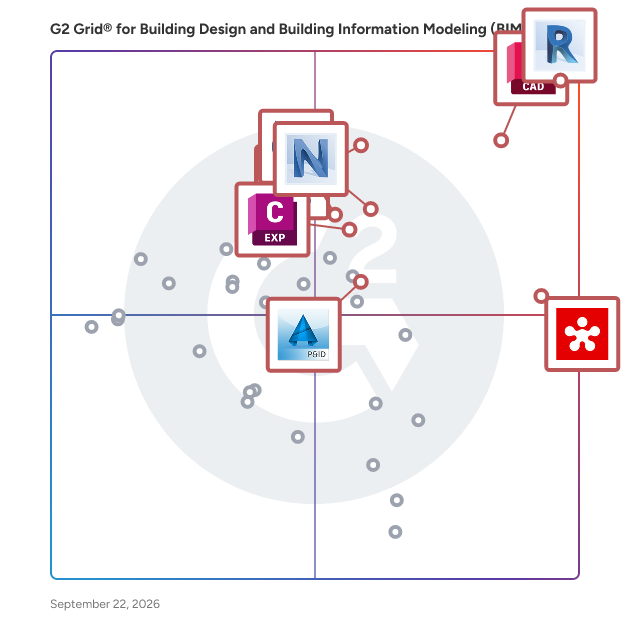
### What Does Building Information Modeling (BIM) Software Cost?

There are a variety of factors that will play into both the upfront and ongoing cost of BIM software. For upfront costs, a business needs to pay for setup, any custom integrations, and training. Additionally, there is the consideration of what level of functionality or which tier the buyer would like to purchase. Some BIM software will charge more based on the number of features purchased.

The ongoing cost is the subscription cost to actually use the software. Many BIM software options are usually run on a subscription model which means users need to pay a monthly or yearly rate to use the software. The subscription model is generally set up as a per-user model and will ultimately be the biggest cost. As stated previously, to limit the upfront cost, it’s important to pay for a limited number of licenses right away as buyers still need to figure out if the software will ultimately be the best choice for their company. In terms of hard numbers, there is BIM software for as little as $80 per user on a monthly basis, whereas some go up to $350 per user per month.

#### Return on Investment (ROI)&amp;nbsp;

Below is the breakdown of the estimated time to ROI according to the BIM product review data on G2 as of May 4, 2021:

- 32% of buyers see an ROI in 6 months or less
- 30% of buyers see an ROI in 7-12 months
- 9 % of buyers see an ROI in 13-24 months
- 8% of buyers see an ROI from 24-36 months
- 4% of buyers see an ROI in 48+ months&amp;nbsp;
- 12% of buyers haven’t realized a full payback yet

### Building Information Modeling (BIM) Software Trends

**AR, VR, and BIM:** AR and VR has already begun to seep into the installation field, and for good reason. VR gives users the ability to study extensive 3D models in a whole new way. As AR merges the real world with a virtual environment, users can test to see how a piece fits into the whole of a building, and anticipate clashes early. These capabilities are already huge advantages to BIM users, as they allow users to see their designs from a fresh perspective. They will become more of an asset as AR and VR continues to develop rapidly.

**Internet of things (IoT) and BIM:** Intelligent objects are becoming increasingly more common in homes—so much so that it is expected that IoT will completely change the way that installers and modelers work. BIM tools can house data on IoT applications within the structure being built and make sure it is entirely up to date. This means that designing the building can be done with ready-to-deliver products that come straight to the building site.

**4D, 5D, and 6D BIM:** While many BIM users have been transitioning to 3D platforms, 4D, 5D, and 6D are already on their way. 4D BIM models provide a visualization of the construction schedule. 5D and 6D BIM add costs and materials to existing 3D BIM models. These new versions of BIM will also add details such as aesthetics, thermal properties, and acoustics to maximize a user’s ROI.

**3D printing and BIM:** 3D printing has been making big moves in the construction industry, showing great potential for creating incredibly accurate building elements quickly with minimal waste. BIM and 3D printing are a perfect match as prototypes can be made with BIM software and then passed along to a construction crew.