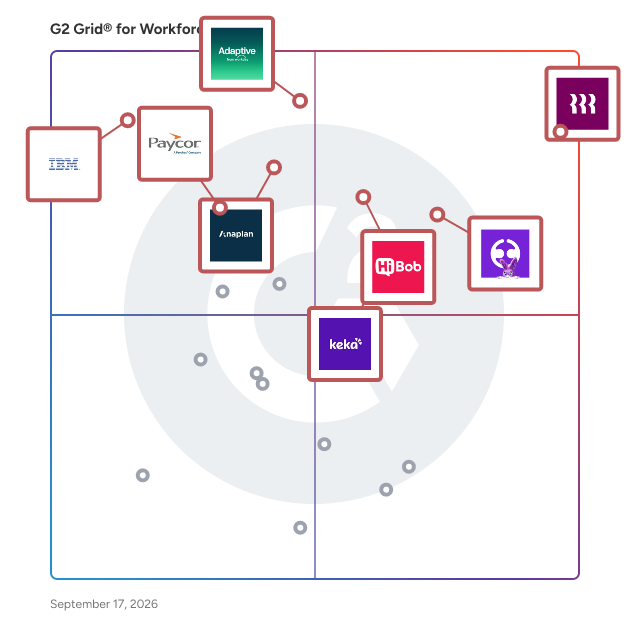
# Best Enterprise Workforce Planning Software

  *By [Neya Kumaresan](https://research.g2.com/insights/author/neya-kumaresan)*

   Products classified in the overall Workforce Planning category are similar in many regards and help companies of all sizes solve their business problems. However, enterprise business features, pricing, setup, and installation differ from businesses of other sizes, which is why we match buyers to the right Enterprise Business Workforce Planning to fit their needs. Compare product ratings based on reviews from enterprise users or connect with one of G2&#39;s buying advisors to find the right solutions within the Enterprise Business Workforce Planning category.

In addition to qualifying for inclusion in the Workforce Planning Software category, to qualify for inclusion in the Enterprise Business Workforce Planning Software category, a product must have at least 10 reviews left by a reviewer from an enterprise business.


## Category Overview

**Total Products under this Category:** 31


## Trust & Credibility Stats

**Why You Can Trust G2's Software Rankings:**

- 30 Analysts and Data Experts
- 22,200+ Authentic Reviews
- 31+ Products
- Unbiased Rankings

G2's software rankings are built on verified user reviews, rigorous moderation, and a consistent research methodology maintained by a team of analysts and data experts. Each product is measured using the same transparent criteria, with no paid placement or vendor influence. While reviews reflect real user experiences, which can be subjective, they offer valuable insight into how software performs in the hands of professionals. Together, these inputs power the G2 Score, a standardized way to compare tools within every category.


---

**Sponsored**

### Functionly

Functionly is a workforce design platform that unifies people data across HR, finance, and business systems to visualize your current org and plan what’s next. Map roles, accountabilities, and matrix structures, compare future-state scenarios, and collaborate in real time to align strategy to execution — enabling companies to adapt quickly, all in one self-serve platform. • DYNAMIC ORG CHART: Create your org chart instantly via CSV or integrations. • INTEGRATIONS: Keep your org data updated and unified across business systems. • AI &amp; TEMPLATES: Accelerate your org design with AI assistance and templates. • GROUPS &amp; GOALS: Set your operating model with top-down goal setting. • ACCOUNTABILITIES: Track executive ownership for critical corporate priorities. • ROLES &amp; DOTTED-LINES: Clarify matrix team dynamics with dotted-line reporting. • INTERACTIVE DESIGN: Design your org with drag-and-drop, colors, layouts, and more. • SCENARIOS: Plan and compare your current and future-state organization. • FORECASTS: Model headcount costs with ease to view budget impacts. • CHANGE PLANNING: Track org changes with control and delegate action with ease. • ORGANIZATIONAL INSIGHTS: Get instant insights on spend, gaps, and overlaps. • REAL-TIME COLLABORATION: Get your team engaged and aligned with collaboration tools. • SHARING &amp; EXPORTS: Share links, embed, or export, and control what’s shown. • SECURITY &amp; CONTROLS: Limit access to sensitive data; all data is SOC2 Type II-backed. • PARTNER WORKSPACES: Manage multiple workspaces to support different clients. Whether you&#39;re scaling, restructuring, or downsizing, Functionly helps leadership teams align and adapt their org structure at every stage — transforming a slow, consultant-led process into a fast, flexible, and collaborative capability built for the AI era. Visit www.functionly.com for more info.


[Visit website](https://www.g2.com/external_clickthroughs/record?secure%5Bad_program%5D=ppc&amp;secure%5Bad_slot%5D=category_product_list&amp;secure%5Bcategory_id%5D=1006516&amp;secure%5Bdisplayable_resource_id%5D=1006516&amp;secure%5Bdisplayable_resource_type%5D=Category&amp;secure%5Bmedium%5D=sponsored&amp;secure%5Bplacement_reason%5D=page_category&amp;secure%5Bplacement_resource_ids%5D%5B%5D=1006516&amp;secure%5Bprioritized%5D=false&amp;secure%5Bproduct_id%5D=115665&amp;secure%5Bresource_id%5D=1006516&amp;secure%5Bresource_type%5D=Category&amp;secure%5Bsource_type%5D=category_page&amp;secure%5Bsource_url%5D=https%3A%2F%2Fwww.g2.com%2Fcategories%2Fworkforce-planning%3Fpage%3D3&amp;secure%5Btoken%5D=9b8a4dd180eb36ba1fb5700a678a65aa198883ce29d9e9d13060f6ec1c3a37f0&amp;secure%5Burl%5D=https%3A%2F%2Fwww.functionly.com&amp;secure%5Burl_type%5D=company_website)

---

## Top-Rated Products (Ranked by G2 Score)
### 1. [Anaplan](https://www.g2.com/products/anaplan/reviews)
  Anaplan is the only scenario planning and analysis platform designed to optimize decision-making in today’s complex business environment so that enterprises can outpace their competition and the market. By building connections and collaboration across organizational silos, the platform intelligently surfaces key insights — so businesses can make the right decisions, right now.​ More than 2,400 of the world’s best brands continually optimize their decision-making by planning with Anaplan. G2 categories include: Corporate Performance Management, Budgeting &amp; Forecasting, Compensation Management, Financial Close, Sales &amp; Ops Planning, Sales Performance Management, Sales Planning, Supply Chain Planning, and Workforce Management.


  **Average Rating:** 4.6/5.0
  **Total Reviews:** 392

**User Satisfaction Scores:**

- **Ease of Setup:** 8.1/10 (Category avg: 8.4/10)
- **Ease of Admin:** 8.4/10 (Category avg: 8.7/10)
- **Quality of Support:** 8.1/10 (Category avg: 8.8/10)
- **How long did it take to go live?:** 8.5/10 (Category avg: 2.9/10)


**Seller Details:**

- **Seller:** [Anaplan](https://www.g2.com/sellers/anaplan)
- **Company Website:** https://www.anaplan.com
- **Year Founded:** 2006
- **HQ Location:** Miami, FL
- **Twitter:** @anaplan (21,806 Twitter followers)
- **LinkedIn® Page:** https://www.linkedin.com/company/anaplan/ (2,831 employees on LinkedIn®)

**Reviewer Demographics:**
  - **Who Uses This:** Manager, Senior Consultant
  - **Top Industries:** Information Technology and Services, Financial Services
  - **Company Size:** 51% Enterprise, 34% Mid-Market


#### Pros & Cons

**Pros:**

- Ease of Use (99 reviews)
- Flexibility (89 reviews)
- Features (86 reviews)
- Efficiency (62 reviews)
- Planning (58 reviews)

**Cons:**

- Limitations (44 reviews)
- Missing Features (39 reviews)
- Learning Curve (32 reviews)
- Performance Issues (30 reviews)
- Lack of Features (29 reviews)

### 2. [Rippling](https://www.g2.com/products/rippling/reviews)
  Streamline your business with Rippling’s all-in-one platform for HR, IT, payroll, and spend management. Effortlessly manage the entire employee lifecycle, from hiring to benefits administration. Automate HR tasks, ensure compliance, and streamline approvals. Enjoy timely payroll, real-time financial visibility, and dynamic spend policies. Simplify IT with device management, software access, and compliance monitoring, all from one dashboard. Rippling empowers your business to save time, reduce costs, and enhance efficiency, allowing you to focus on growth. Experience the power of unified management with Rippling today.


  **Average Rating:** 4.8/5.0
  **Total Reviews:** 10,933

**User Satisfaction Scores:**

- **Ease of Setup:** 9.3/10 (Category avg: 8.4/10)
- **Ease of Admin:** 9.0/10 (Category avg: 8.7/10)
- **Quality of Support:** 9.3/10 (Category avg: 8.8/10)
- **How long did it take to go live?:** 0.7/10 (Category avg: 2.9/10)


**Seller Details:**

- **Seller:** [Rippling](https://www.g2.com/sellers/rippling)
- **Company Website:** https://www.rippling.com
- **Year Founded:** 2016
- **HQ Location:** San Francisco, CA
- **Twitter:** @Rippling (12,205 Twitter followers)
- **LinkedIn® Page:** https://www.linkedin.com/company/17988315/ (6,941 employees on LinkedIn®)

**Reviewer Demographics:**
  - **Who Uses This:** Software Engineer, Account Executive
  - **Top Industries:** Computer Software, Information Technology and Services
  - **Company Size:** 55% Mid-Market, 29% Small-Business


#### Pros & Cons

**Pros:**

- Ease of Use (6961 reviews)
- Intuitive (5164 reviews)
- Simple (4558 reviews)
- User Interface (3806 reviews)
- Easy Access (3656 reviews)

**Cons:**

- Missing Features (1239 reviews)
- Not User-Friendly (886 reviews)
- Learning Curve (856 reviews)
- Limited Features (841 reviews)
- Improvement Needed (820 reviews)

### 3. [IBM Planning Analytics](https://www.g2.com/products/ibm-planning-analytics/reviews)
  IBM Planning Analytics is an AI-powered integrated planning solution that automates your planning, budgeting, and forecasting processes, enabling real-time analysis on a single governed platform. Eliminate manual models, spot risks sooner, and make decisions that keep your numbers ahead of the trends. Designed for finance and business operations leaders across Finance, Supply Chain, HR, Marketing, Sales, and beyond, IBM Planning Analytics helps eliminate inefficient and error-prone planning processes by connecting financial and operational plans. Automate data integration, analysis, and collaboration for greater agility across the business. Key Capabilities: Integrated Planning: Connect financial and operational plans using a governed source of truth under a single license, unifying teams and accelerating planning cycles. Performance Tracking: Monitor, analyze, and communicate performance with interactive dashboards, personalized reports, and a native spreadsheet experience for trusted, real-time insights. AI-Powered Forecasting: Improve speed and accuracy of forecasts with built-in AI, enabling smarter scenario modeling and predictive insights. Collaborative Decision-Making: Increase participation and streamline workflows by lowering the skill barrier with a generative AI assistant, driving faster, more informed decisions. Bring collaborative, AI-powered business planning to your organization starting at $825/month for 5 users.


  **Average Rating:** 4.4/5.0
  **Total Reviews:** 223

**User Satisfaction Scores:**

- **Ease of Setup:** 7.4/10 (Category avg: 8.4/10)
- **Ease of Admin:** 7.9/10 (Category avg: 8.7/10)
- **Quality of Support:** 8.0/10 (Category avg: 8.8/10)
- **How long did it take to go live?:** 7.7/10 (Category avg: 2.9/10)


**Seller Details:**

- **Seller:** [IBM](https://www.g2.com/sellers/ibm)
- **Company Website:** https://www.ibm.com/us-en
- **Year Founded:** 1911
- **HQ Location:** Armonk, NY
- **Twitter:** @IBM (709,390 Twitter followers)
- **LinkedIn® Page:** https://www.linkedin.com/company/1009/ (324,553 employees on LinkedIn®)

**Reviewer Demographics:**
  - **Who Uses This:** Financial Analyst
  - **Top Industries:** Information Technology and Services, Financial Services
  - **Company Size:** 51% Enterprise, 36% Mid-Market


#### Pros & Cons

**Pros:**

- Efficiency (35 reviews)
- Planning Efficiency (34 reviews)
- Analytics (31 reviews)
- Ease of Use (30 reviews)
- Forecasting Accuracy (30 reviews)

**Cons:**

- Learning Curve (29 reviews)
- Learning Difficulty (19 reviews)
- User Difficulty (19 reviews)
- Difficult Learning (16 reviews)
- Complexity (15 reviews)

### 4. [Workday Adaptive Planning](https://www.g2.com/products/workday-adaptive-planning/reviews)
  At Workday, we’re powering a new generation of intelligent planning. Driving business agility in an uncertain world, Workday Adaptive Planning’s AI-powered platform helps people gain insights, collaborate, and make smarter decisions, faster. Powerful modeling and analytics for any size organization, yet so easy for anybody who plans. Our planning cloud application enables organizations of all sizes to adapt to a changing world and shifting business conditions with confidence and agility. Workday ranks #1 in customer satisfaction in independent industry surveys from leading market analysts such as Gartner, Forrester, and BPM Partners.


  **Average Rating:** 4.3/5.0
  **Total Reviews:** 301

**User Satisfaction Scores:**

- **Ease of Setup:** 7.4/10 (Category avg: 8.4/10)
- **Ease of Admin:** 8.0/10 (Category avg: 8.7/10)
- **Quality of Support:** 8.1/10 (Category avg: 8.8/10)
- **How long did it take to go live?:** 6.7/10 (Category avg: 2.9/10)


**Seller Details:**

- **Seller:** [Workday](https://www.g2.com/sellers/workday)
- **Company Website:** https://www.workday.com
- **Year Founded:** 2005
- **HQ Location:** Pleasanton, CA
- **Twitter:** @Workday (52,271 Twitter followers)
- **LinkedIn® Page:** https://www.linkedin.com/company/17719/ (23,943 employees on LinkedIn®)

**Reviewer Demographics:**
  - **Who Uses This:** Financial Analyst, Senior Financial Analyst
  - **Top Industries:** Computer Software, Information Technology and Services
  - **Company Size:** 58% Mid-Market, 33% Enterprise


#### Pros & Cons

**Pros:**

- Ease of Use (13 reviews)
- Efficiency (11 reviews)
- Capabilities (8 reviews)
- Features (8 reviews)
- Planning (8 reviews)

**Cons:**

- Complexity (5 reviews)
- Complex Setup (5 reviews)
- Learning Difficulty (5 reviews)
- Steep Learning Curve (5 reviews)
- Difficult Customization (4 reviews)

### 5. [HiBob HRIS](https://www.g2.com/products/hibob-hris/reviews)
  Bob is the HR platform that simplifies people management and modernizes the work experience for every employee—driving engagement, culture, and productivity. Bob is configurable for the way you operate—onsite, remote, or hybrid work. It empowers HR and managers to increase performance and retention, leading to healthier and more productive teams. With Bob, you can streamline your core HR processes such as onboarding, performance management, and compensation management using automated workflows to increase your efficiency, cover all touchpoints, and save precious time. Bob provides real-time quantifiable data that can inform strategic decisions that impact the bottom line. Bob helps dynamic companies bring out the best in their employees. HiBob’s dedicated teams across the US, UK, Europe, Israel, and Australia are working every day to serve over 1,400 modern, fast-growing, mid-sized businesses.


  **Average Rating:** 4.5/5.0
  **Total Reviews:** 2,254

**User Satisfaction Scores:**

- **Ease of Setup:** 8.3/10 (Category avg: 8.4/10)
- **Ease of Admin:** 8.6/10 (Category avg: 8.7/10)
- **Quality of Support:** 8.6/10 (Category avg: 8.8/10)
- **How long did it take to go live?:** 2.1/10 (Category avg: 2.9/10)


**Seller Details:**

- **Seller:** [HiBob](https://www.g2.com/sellers/hibob)
- **Company Website:** https://www.hibob.com
- **Year Founded:** 2015
- **HQ Location:** New York
- **Twitter:** @HiBob_HR (4,201 Twitter followers)
- **LinkedIn® Page:** https://www.linkedin.com/company/7586104/ (2,018 employees on LinkedIn®)

**Reviewer Demographics:**
  - **Who Uses This:** HR Manager, Head of People
  - **Top Industries:** Information Technology and Services, Computer Software
  - **Company Size:** 77% Mid-Market, 14% Small-Business


#### Pros & Cons

**Pros:**

- Ease of Use (847 reviews)
- Intuitive (512 reviews)
- User Interface (508 reviews)
- Features (460 reviews)
- Helpful (455 reviews)

**Cons:**

- Missing Features (399 reviews)
- Limited Features (302 reviews)
- Limited Customization (274 reviews)
- Integration Issues (172 reviews)
- Not User-Friendly (158 reviews)


## Parent Category

[HR Software](https://www.g2.com/categories/hr)


## Related Categories

- [Performance Management Software](https://www.g2.com/categories/performance-management)
- [Workforce Management Software](https://www.g2.com/categories/workforce-management)
- [FP&amp;A Software](https://www.g2.com/categories/fp-a-financial-planning-analysis)
- [Core HR Software](https://www.g2.com/categories/core-hr)
- [HR Analytics Software](https://www.g2.com/categories/hr-analytics)
- [Time &amp; Attendance Software](https://www.g2.com/categories/time-attendance)
- [Org Chart Software](https://www.g2.com/categories/org-chart)


---

## Buyer Guide

### What You Should Know About Workforce Planning Software

### Workforce planning software buying insights at a glance

[Workforce planning software](https://www.g2.com/categories/workforce-planning) helps organizations **forecast staffing needs, align hiring plans with budgets, and maintain visibility into workforce costs** as teams grow. These platforms allow HR, finance, and operations leaders to model headcount changes, evaluate compensation impact, and track organizational structure in a centralized system rather than managing workforce decisions across disconnected spreadsheets.

Across G2 reviews, buyers often describe workforce planning systems as tools that bring structure to hiring requests, role approvals, and staffing forecasts. Instead of reconciling multiple documents or email threads, teams use these solutions to manage workforce planning workflows in one place and maintain clearer alignment between hiring plans and business priorities.&amp;nbsp;

As organizations scale, these tools also help leadership teams understand how workforce changes affect budgets, reporting structures, and long-term staffing strategies.

Pricing for workforce planning solutions typically varies based on implementation scope, number of users, integration requirements, and whether the software is part of a broader [HR](https://www.g2.com/categories/hr) or [financial planning platform](https://www.g2.com/categories/fp-a-financial-planning-analysis).

### Top 5 FAQs from software buyers

- How does workforce planning software improve headcount forecasting and workforce cost planning?
- What capabilities should I evaluate when selecting workforce planning software?
- How well do workforce planning tools integrate with HRIS, payroll, and financial planning systems?
- How do workforce planning platforms support scenario planning and workforce analytics?
- How scalable is workforce planning software for multi-department or multi-location organizations?

G2&#39;s top-rated Workforce Planning Software, based on verified reviews, includes [Rippling](https://www.g2.com/products/rippling/reviews), [HiBob HRIS](https://www.g2.com/products/hibob-hris/reviews), [Anaplan](https://www.g2.com/products/anaplan/reviews), [Keka](https://www.g2.com/products/keka/reviews), and [Deel Payroll](https://www.g2.com/products/deel-payroll/reviews).

### What are the top-reviewed workforce planning software on G2?

[Rippling](https://www.g2.com/products/rippling/reviews)

- Number of Reviews: 11,648
- Satisfaction: 100
- Market Presence: 95
- G2 Score: 97

[HiBob HRIS](https://www.g2.com/products/hibob-hris/reviews)

- Number of Reviews: 2,045
- Satisfaction: 69
- Market Presence: 80
- G2 Score: 75

[Anaplan](https://www.g2.com/products/anaplan/reviews)

- Number of Reviews: 427
- Satisfaction: 44
- Market Presence: 83
- G2 Score: 64

[Keka](https://www.g2.com/products/keka/reviews)

- Number of Reviews: 1,682
- Satisfaction: 64
- Market Presence: 58
- G2 Score: 61

[Deel Payroll](https://www.g2.com/products/deel-payroll/reviews)

- Number of Reviews: 11,868
- Satisfaction: 63
- Market Presence: 50
- G2 Score: 56

**Satisfaction** reflects user-reported ratings, including ease of use, support, and feature fit. ([Source 2](https://www.g2.com/reports))

**Market Presence** scores combine review and external signals that indicate market momentum and footprint. ([Source 2](https://www.g2.com/reports))

**G2 Score** is a weighted composite of Satisfaction and Market Presence. ([Source 2](https://www.g2.com/reports))

Learn how G2 scores products. ([Source 1](https://documentation.g2.com/docs/research-scoring-methodologies?_gl=1*5vlk6s*_gcl_au*MTAwMzU5MzUxLjE3NjM0MTg0NzYuNjY0NTIxMTY0LjE3NjQ2MTc0NzcuMTc2NDYxNzQ3Nw..*_ga*NzY1MDU0NjE3LjE3NjM0NzQ3ODM.*_ga_MFZ5NDXZ5F*czE3NjYwODk1MTMkbzY3JGcxJHQxNzY2MDkyMjQyJGo1NyRsMCRoMA..))

### What I often see in Workforce Planning Software

#### Feedback Pros: What Users Consistently Appreciate

• **Centralized headcount tracking replacing spreadsheet-based workforce planning processes**

_“What I like best about Rippling is the platform’s ability to bring multiple HR functions together in one system. It provides a centralized place to manage employee data, payroll, and other HR operations, which helps streamline processes and improve efficiency. The interface is user-friendly, and the system allows for good visibility into employee information and workflows. Additionally, the flexibility in configuration and reporting makes it easier to manage HR operations and adapt the system to organizational needs.”_

- [Rippling review](https://www.g2.com/products/rippling/reviews/rippling-review-12458250), Aarthee S.

• **Scenario modeling for hiring plans, compensation impact, and budget forecasting**

_“Anaplan is robust in bringing diverse operations together for easier planning, including supply, sales, and finance, among others. The app has remarkable scenario-modeling capabilities, and it keeps updating based on the analytics conducted. It also offers multi-dimensional models that handle large enterprises and ensure efficiency. In addition, the app is cloud-based, with secure and governable systems that support smooth coordination and collaboration.”_

- [Anaplan review](https://www.g2.com/products/anaplan/reviews/anaplan-review-12230750), Samantha L.

• **Shared visibility into workforce data across HR, finance, and leadership teams**

_“HiBob is strong because it consolidates core HR processes (employee data, time off, onboarding, performance) into one intuitive platform, with flexible workflows and automations that reduce manual effort. The modern UI drives high adoption, while reporting and analytics give leadership clear visibility into key people metrics for faster, data-driven decisions.”_

- [HiBob HRIS review](https://www.g2.com/products/hibob-hris/reviews/hibob-hris-review-12355120), Angelos C.

#### Cons: Where Many Platforms Fall Short

• **Advanced configuration required for complex approval flows and planning rules**

_“The first weakness I have identified with Rippling is that some processes, such as multi-step approvals or intricate rules on payroll, are not easily customized. In the process of attempting to configure certain workflows, this could necessitate additional testing so that we can verify that everything is fine. The frequency of use is also high, and even minor errors during configuration can paralyze HR operations in the meantime.”_

- [Rippling review](https://www.g2.com/products/rippling/reviews/rippling-review-12467905), Richard F.

• **Custom reporting and dashboards sometimes require additional setup effort**

_“Anaplan&#39;s main challenges are its learning curve and the complexity of large models, which can take time and expertise to manage. Integrations with some third-party tools can also require extra setup. The initial setup of Anaplan can be challenging, especially for teams new to connected planning. Building models, configuring drivers, and integrating with other systems takes time and sometimes requires guidance from Anaplan specialists.”_

- [Anaplan review](https://www.g2.com/products/anaplan/reviews/anaplan-review-12226017), Faga K.

• **Customer support responsiveness or resolution speed varies across implementations**

_“I don&#39;t like the payroll processing and customer support because they&#39;re very slow. We don&#39;t have enough flexibility in terms of the payroll process, and customer support is really bad; it takes 6-7 days to respond.”_

- [Keka review](https://www.g2.com/products/keka/reviews/keka-review-12319596), Tushar A.

### My Expert Takeaway on Workforce Planning Software in 2026

While reviewing the feedback across this dataset, I noticed that many organizations adopt workforce planning software after their hiring processes become too complex to manage in spreadsheets. Reviewers say these platforms help track open roles, plan staffing, and understand workforce costs clearly.

Another pattern I saw in the reviews is how often these tools sit at the intersection of HR and financial planning. Teams regularly mention connecting these platforms with HRIS tools, [payroll systems](https://www.g2.com/categories/payroll), and financial planning software so leadership can evaluate hiring decisions alongside budget impact. When workforce planning tools are integrated into these systems, they tend to become a central reference point for staffing discussions rather than just a reporting layer.

Industry distribution in the dataset suggests that adoption is especially strong in technology and IT services companies, where rapid hiring cycles make structured planning more important. At the same time, reviewers from healthcare, insurance, and other regulated industries emphasize the value of workforce planning solutions for managing staffing levels, maintaining compliance requirements, and ensuring operational continuity.

One recurring challenge in the reviews is the complexity of implementation when organizations move from informal planning methods to a structured system. Several reviewers note that setting up approval paths, reporting views, and workforce planning models requires careful planning. From what I observed in the feedback, teams that establish these processes early tend to adopt the software more smoothly.&amp;nbsp;

Once those foundations are in place, the best workforce planning software supports more informed hiring decisions and better alignment between staffing plans and business growth.

### Workforce Planning Software FAQs

#### What AI tools are useful for workforce planning?

AI in workforce planning tools supports headcount forecasting, workforce cost modeling, and hiring scenario simulations. These features assist HR and finance leaders in evaluating staffing plans before hiring. Examples of AI-enabled workforce planning tools:

- [Anaplan](https://www.g2.com/products/anaplan/reviews): Used by enterprise teams to run predictive workforce models and evaluate hiring scenarios alongside financial planning.
- [Workday Adaptive Planning](https://www.g2.com/products/workday-adaptive-planning/reviews): Provides workforce forecasting and scenario modeling that helps HR and finance teams anticipate hiring needs and workforce costs.
- [IBM Planning Analytics](https://www.g2.com/products/ibm-planning-analytics/reviews): Supports AI-driven analytics for workforce planning, allowing organizations to analyze staffing demand and optimize workforce allocation.

#### What are the best workforce planning tools?

Leading workforce planning tools help organizations project staffing requirements, manage headcount strategies, and align workforce decisions with financial objectives. Commonly used workforce planning platforms include:

- [Anaplan](https://www.g2.com/products/anaplan/reviews): Enterprise planning platform that connects workforce planning with financial and operational planning.
- [Rippling](https://www.g2.com/products/rippling/reviews): Combines workforce planning with HR, payroll, and employee lifecycle management.
- [HiBob HRIS](https://www.g2.com/products/hibob-hris/reviews): Offers workforce analytics and organizational planning tools for growing companies.

#### What is the most affordable workforce planning software for SMBs?

SMBs typically choose workforce planning tools that are easy to implement and combine workforce planning with HR management. [Affordable workforce planning platforms often used by SMBs](https://www.g2.com/categories/workforce-planning/small-business) include:

According to **G2 market segment data** , several workforce planning platforms have strong adoption among small businesses:

- [Rippling](https://www.g2.com/products/rippling/reviews) _(31% small business users):_ Combines workforce planning, HR, payroll, and IT management, appealing to SMBs seeking a unified platform.
- [HiBob HRIS](https://www.g2.com/products/hibob-hris/reviews) _(12% small business users):_ Designed for growing organizations needing workforce analytics, headcount visibility, and planning tools.
- [Workday Adaptive Planning](https://www.g2.com/products/workday-adaptive-planning/reviews) _(10% small business users):_ Offers workforce forecasting and budgeting tools to align staffing with financial plans.

#### What is the top-rated workforce planning platform for enterprises?

Enterprise organizations typically choose workforce planning platforms that support large-scale workforce modeling, financial alignment, and multi-department planning.

Based on **G2 enterprise usage data** , [commonly adopted platforms include](https://www.g2.com/categories/workforce-planning/enterprise):

- [Anaplan](https://www.g2.com/products/anaplan/reviews) _(61% enterprise users):_ Enterprise connected planning platform used for complex workforce modeling across departments and global teams.
- [IBM Planning Analytics](https://www.g2.com/products/ibm-planning-analytics/reviews) _(45% enterprise users):_ Advanced analytics platform that supports workforce forecasting and enterprise planning scenarios.
- [Rippling](https://www.g2.com/products/rippling/reviews) _(5% enterprise users):_ Workforce management platform that integrates HR, payroll, and workforce data into a centralized planning system.

#### Which solution supports multi-location workforce planning?

Multi-location workforce planning tools help organizations model staffing across regions, departments, and business units. Tools commonly used for multi-location workforce planning include:

- [Anaplan](https://www.g2.com/products/anaplan/reviews): Allows companies to plan workforce needs across multiple regions and organizational structures.
- [Workday Adaptive Planning](https://www.g2.com/products/workday-adaptive-planning/reviews): Supports workforce forecasting across global offices and distributed teams.
- [Rippling](https://www.g2.com/products/rippling/reviews): Provides workforce visibility across distributed teams while integrating employee and payroll data.

#### Sources

- [G2 Scoring Methodologies](https://documentation.g2.com/docs/research-scoring-methodologies?_gl=1*5ky9es*_gcl_au*MTY2NDg2MDY3Ny4xNzU1MDQxMDU4*_ga*MTMwMTMzNzE1MS4xNzQ5MjMyMzg1*_ga_MFZ5NDXZ5F*czE3NTUwOTkzMjgkbzQkZzEkdDE3NTUwOTk3NzYkajU3JGwwJGgw)
- [G2 Winter 2026 Reports](https://company.g2.com/news/g2-winter-2026-reports)

Researched By: [Jeffrey Lin](https://research.g2.com/insights/author/jeffrey-lin)

Last updated on March 12, 2026


