Top Free Work Management Software - Page 8

How Many Work Management Software Products Does G2 Track?

Total Products under this Category: 245

Category Stats (Nov 2026)

  • Average Rating: 4.51/5 (↑0.01 vs Oct 2026) The average rating of products in this category, based on all submitted ratings
  • Top Trending Product: Semsto (+11.11%) - Among all products in this category, Semsto recorded the largest rating increase compared to last month

Last updated: November 01, 2026

How Does G2 Rank Work Management Software Products?

Why You Can Trust G2's Software Rankings:

  • 30 Analysts and Data Experts
  • 149,800+ Authentic Reviews
  • 245+ Products
  • Unbiased Rankings

G2's software rankings are built on verified user reviews, rigorous moderation, and a consistent research methodology maintained by a team of analysts and data experts. Each product is measured using the same transparent criteria, with no paid placement or vendor influence. While reviews reflect real user experiences, which can be subjective, they offer valuable insight into how software performs in the hands of professionals. Together, these inputs power the G2 Score, a standardized way to compare tools within every category.

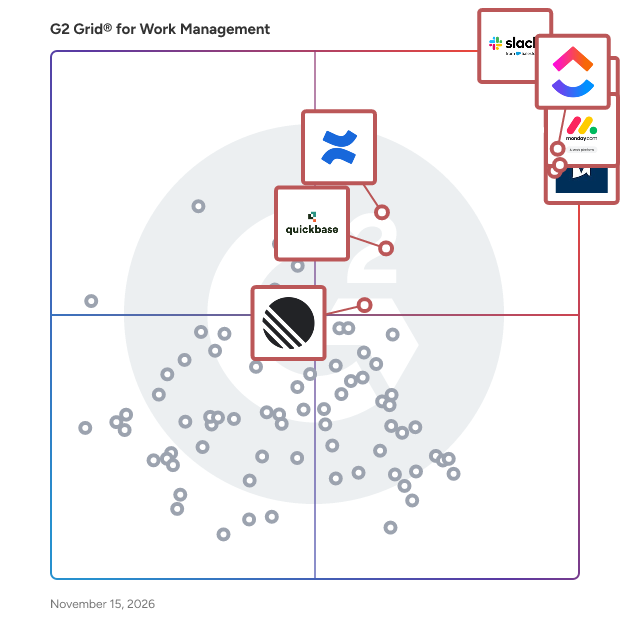
G2 Grid® for Work Management Software

G2 Grid® for Work Management Software plotting products by satisfaction and market presence

Highlighted products: Slack, ClickUp, Asana, monday AI Work Platform, Smartsheet, Confluence, Quickbase, and Linear.

Underlying data: [Grid® JSON](https://www.g2.com/categories/work-management/grids.json?focus%5B%5D=slack&focus%5B%5D=clickup&focus%5B%5D=asana&focus%5B%5D=monday-com&focus%5B%5D=smartsheet&focus%5B%5D=confluence&focus%5B%5D=quickbase&focus%5B%5D=linear)

Fantasktic

Fantasktic es tu negocio entero en un solo lugar. Llevar una empresa hoy obliga a tener media docena de aplicaciones abiertas a la vez: una para los proyectos, otra para el correo, otra para firmar, otra para hablar con el equipo, otra para las redes. Cada una con su cuota, su contraseña y tus datos repartidos en mil sitios. Fantasktic las junta en una sola app. Organizas tu trabajo como mejor te encaje: en tabla, kanban, calendario, mapa o pizarra. Tus clientes, tus correos, tus documentos y las conversaciones del equipo viven al lado de cada proyecto, así que nada se escribe dos veces. Y lo repetitivo se hace solo. Cuando un proyecto cambia de estado, el equipo recibe el aviso y el cliente su correo, sin que nadie tenga que acordarse. Como todo pasa por el mismo sitio, la inteligencia artificial no ve trocitos sueltos: ve tu negocio entero y trabaja de verdad para ti. Sirve para cualquier empresa, agencia o profesional, porque se adapta a tu forma de trabajar. Y tiene versiones especializadas para productoras audiovisuales y para música. Empiezas con una base y añades solo los módulos que necesitas.

Who Is the Company Behind Fantasktic?

ftrack

ftrack Studio is the Academy Award-winning project management and collaboration platform that transforms the complexity of media production into a streamlined, creative-first workflow. With a media-aware pipeline that keeps production efficient, real-time insights that drive informed decisions, and a scalable system that adapts to business growth, ftrack helps teams work smarter and deliver projects on time, every time. Built for creative teams, ftrack provides one source of truth to align stakeholders, speed up collaboration, and eliminate bottlenecks. Its workflow automation, production tracking, and enterprise-grade security ensure teams stay focused on what matters most: fueling creativity, producing exceptional work, and growing their business. -- ftrack’s key capabilities 🎨 Artist-friendly, media-aware project management • Designed for creative workflows – ftrack’s intuitive interface prioritizes media and visuals, making it easier for artists to focus on their work. • Task and resource management – Plan, assign, and track thousands of tasks with clear workload visibility and priority-based task management. • Flexible project planning – Gantt charts, milestone tracking, and automated deadline reminders help teams coordinate and adjust schedules efficiently. • Customizable dashboards & views – Organize project information in ways that fit your team’s workflow. 🤝 Collaboration, communication & review tools • Centralized collaboration – Keep global teams aligned with shared production tracking, messaging, and version history. • Integrated media review – Frame-accurate annotations, synchronized feedback, and approval workflows streamline creative iteration. • Real-time production insights – Track progress, budgets, and resource allocation with detailed analytics and forecasting tools. 🔗 Pipeline integration, automation & security • Pipeline connectivity – Open API and integrations with industry-standard creative tools support unique workflows. • Workflow automation – Reduce admin overhead with custom automations and webhook-triggered actions. • Enterprise-level security – SOC2 compliance, SAML-based SSO, and two-factor authentication ensure data protection. 📈 Scalability & dedicated support • Adaptable for any team size – Supports everything from small studios to large-scale productions with millions of project entries. • Reliable performance – Scalable infrastructure ensures efficient organization and workflow execution. • Proactive customer support – Access expert guidance, training resources, and workflow consultations to optimize efficiency.

Average Rating: 4.7/5.0

Total Reviews: 10

How Do G2 Users Rate ftrack?

  • Has the product been a good partner in doing business?: 9.2/10 (Category avg: 9.1/10)

Who Is the Company Behind ftrack?

  • Seller: Backlight
  • Company Website:
  • Year Founded: 2021
  • HQ Location: Boston, Massachusetts
  • LinkedIn® Page: www.linkedin.com
    287 employees on LinkedIn®

Who Uses This Product?

  • Top Industries: Animation
  • Company Size: 58% Medium, 33% Small

What Do G2 Reviewers Say About ftrack?

AI-generated summary from verified user reviews

Pros
  • Users value the user-friendly collaboration of ftrack, finding it superior for seamless teamwork and effective communication.
  • Users find ftrack to be an easy-to-use collaborative tool, enhancing video editing and motion graphics workflows effectively.
  • Users value the user-friendly collaboration tools of ftrack, which enhance teamwork and streamline projects effectively.
  • Users value the user-friendly interface of ftrack, praising its simplicity and effective collaboration features.
  • Users praise the user-friendly interface of ftrack, enhancing collaboration for both editors and clients.
Cons
  • Users experience the inability to allocate resources effectively, leading to challenges in task management and participant estimations.

What Are Recent G2 Reviews of ftrack?

What Are G2 Users Discussing About ftrack?
GQueues

GQueues is the leading task manager built specifically for teams on Google Workspace. Collaborate with your team and keep work moving forward with its intuitive design and familiar interface. GQueues has deep integrations with Google Calendar, Gmail, Google Drive, Google Contacts and Chrome making your team more efficient, less stressed, and more organized.

Average Rating: 4.8/5.0

Total Reviews: 34

How Do G2 Users Rate GQueues?

  • Has the product been a good partner in doing business?: 9.2/10 (Category avg: 9.1/10)

Who Is the Company Behind GQueues?

  • Seller: GQueues
  • Company Website:
  • Year Founded: 2009
  • HQ Location: Chicago, IL
  • LinkedIn® Page: www.linkedin.com
    1 employees on LinkedIn®

Who Uses This Product?

  • Who Uses This: Owner
  • Top Industries: Information Technology and Services
  • Company Size: 79% Small, 15% Medium

What Are Recent G2 Reviews of GQueues?

What Are G2 Users Discussing About GQueues?

AI can help you find the answers. G2 helps you trust them.

Connect G2 to Claude or ChatGPT for answers grounded in G2's trusted reviews, comparisons, and pricing from real user insights.

How it works

Integrate

Integrate is the first real-time, cross-boundary project management platform built for complex and classified programs in government and defense technology. Ultra-secure and AI-native by design, Integrate connects teams, organizations, classification levels, and networks through one continuously synchronized schedule with precision access, spanning organizational and security boundaries including NIPRNet, SIPRNet, and JWICS. Users, teams, and partners operate from the same reality instead of conflicting, out-of-date snapshots. Backed by world-class investors including FPV Ventures, Integrate already works with dozens of customers and partners, including the U.S. Space Force.

Average Rating: 3.8/5.0

Total Reviews: 2

Who Is the Company Behind Integrate?

Who Uses This Product?

  • Company Size: 67% Small, 33% Medium

What Do G2 Reviewers Say About Integrate?

AI-generated summary from verified user reviews

Pros
  • Users appreciate the ease of use of Integrate, finding scheduling simple, intuitive, and stress-free.
  • Users love the easy integration of Integrate, making scheduling simple and efficient with a clean interface.
  • Users love the easy integrations of Integrate, making scheduling simple and minimizing conflicts effectively.
  • Users adore the easy setup of Integrate, finding scheduling to be simple and intuitive.
  • Users love the intuitive interface of Integrate, which simplifies scheduling and enhances efficiency with ease.
Cons
  • Users find the complexity of Integrate challenging, especially due to the absence of bulk editing options.
  • Users find the limited features of Integrate, such as the absence of bulk editing and recurring shift templates, frustrating.
  • Users notice the missing features like bulk editing and recurring shift templates, limiting their workflow efficiency.
  • Users find the interface not intuitive, especially due to missing bulk editing and recurring shift templates.
  • Users are frustrated by the lack of bulk editing and recurring shift templates, which limits their efficiency with Integrate.

What Are Recent G2 Reviews of Integrate?

KiteSuite

KiteSuite is a type of work management and collaboration software designed to help users effectively manage tasks, enhance communication, and streamline project workflows. This comprehensive platform integrates various tools that facilitate project planning, team collaboration, and performance tracking, making it suitable for organizations of all sizes looking to improve their operational efficiency. Targeted at teams and organizations that require a cohesive approach to project management, KiteSuite is particularly beneficial for project managers, team leaders, and remote teams. It addresses the need for a centralized platform where team members can collaborate in real-time, share documents, and track progress on tasks. With its versatile features, KiteSuite supports a wide range of use cases, from managing simple tasks to overseeing complex projects that involve multiple stakeholders. One of the standout features of KiteSuite is its interactive Kanban boards, which allow users to visualize their workflows and manage tasks effectively. This visual representation helps teams prioritize work and monitor progress at a glance. Additionally, KiteSuite includes robust communication tools such as chat functionality, enabling team members to discuss projects and share updates instantly. The document-sharing feature further enhances collaboration by allowing users to access and edit files in a centralized location, reducing the time spent searching for important documents. KiteSuite also offers time tracking capabilities, which help teams monitor how much time is spent on various tasks and projects. This feature is particularly useful for organizations that bill clients based on hours worked or those seeking to optimize their resource allocation. Automation tools within KiteSuite streamline repetitive tasks, allowing teams to focus on higher-value activities. Custom reporting options enable users to generate insights tailored to their specific needs, providing valuable data that can inform decision-making processes. Overall, KiteSuite serves as an all-in-one solution for work management, designed to enhance team productivity and optimize workflows. By integrating essential tools for task management, communication, documentation, and reporting, KiteSuite empowers teams to collaborate more effectively and achieve their project goals with greater efficiency.

Who Is the Company Behind KiteSuite?

Who Uses This Product?

  • Company Size: 100% Small

What Are Recent G2 Reviews of KiteSuite?

Octaved Flow

Work Management and Business Management Software with deep time tracking capabilities and reporting to keep tabs on time spent, project progress and workloads. In-context communication features ensure that your team stays on track and task related files and documents are always where you expect them to be.

Who Is the Company Behind Octaved Flow?

omniWorks

Lets make your Business collaborating and communicating, engaging, and scaling. omniWorks is Omnibasis's powerful work management solution that enables businesses and professionals, large and small, with powerful work automation and personalization features. omniWorks is a visual and intuitive platform where teams can plan, track, and organize their work in a centralized and customizable manner. Using omniWorks, we bring together all Omnibasis solutions with mobile friendly tasks management, as well as a rich feature set that includes project templates, workflow management, automation, detailed tracking, analytics and intuitive user interface. Intuitive Work Management What you see is what you get resource and work management with drag & drop features allows you to plan and manage resources and work done in place without any knowledge of coding. Workflow Automation The best automation is personal, gives signers the option to delegate or decline the signature request and provide a reason why. Seamless Resource Management Enable efficient allocation, tracking, and optimization of resources, including personnel, time, and assets, to ensure tasks and projects are completed effectively and within constraints. Detailed Tracking and Analytics Detailed insights to help you learn about your projects, resource assignments and how they doing with your tasks so you can get a better insight in the status of the work.

Who Is the Company Behind omniWorks?

Raq.com

Raq.com is a business workspace for teams and AI agents. Keep the AI agent you already use, whether that's Claude, ChatGPT, Codex or Grok. Connect it to Raq.com once and it can work across 75+ business tools: Task Board, Project Base, CRM, Form Builder, E-Sign, Help Desk, Team Comms, Client Portal, Automations, Site Uptime, and AI image, video, writing and document tools. What it creates is saved in your account, so your team and their agents work from the same files with the same permissions. One subscription covers every tool, so you spend less on separate subscriptions. Custom Tools are included, and websites can be built and hosted on Raq.com too. Raq.com also has its own agent, Supercomputer, plus Nature Work and Orchestrator for running and reviewing long coding-agent sessions. Core AI text and chat requests use Zero Data Retention endpoints by default. Free trial, no credit card. Made by Vu AI Ltd in the UK.

Average Rating: 5.0/5.0

Total Reviews: 1

Who Is the Company Behind Raq.com?

  • Seller: Raq.com
  • Year Founded: 2026
  • HQ Location: Knowle, Solihull, United Kingdom
  • LinkedIn® Page: www.linkedin.com
    1 employees on LinkedIn®

Who Uses This Product?

  • Company Size: 100% Small

What Do G2 Reviewers Say About Raq.com?

AI-generated summary from verified user reviews

Pros
  • Users find Raq.com to be easy to use, effectively aiding filmmakers in managing grants and opportunities.
  • Users find Raq.com to be easy to implement, helping them efficiently manage grants and professional opportunities.
  • Users find Raq.com easy to use for tracking grants and opportunities, enhancing their filmmaking projects effectively.

What Are Recent G2 Reviews of Raq.com?

Teamgrid.ai

TeamGrid is an AI-powered, chat-driven employee productivity and work tracking platform for remote and hybrid teams. It eliminates manual timesheets and intrusive monitoring by analyzing work patterns through simple conversations. Ask questions in plain language to get instant insights on work hours, attendance, focus time, and productivity trends. TeamGrid delivers non-intrusive visibility with clear dashboards and actionable reports for managers, founders, and HR teams.

Who Is the Company Behind Teamgrid.ai?

Tempo Portfolio Manager

These days companies need to be more flexible than ever, ready to adapt in fast-paced environments and seize new opportunities. When priorities and work are constantly changing, so should your project plans. LiquidPlanner is a transformative project management solution for teams that want to plan, predict, and perform beyond expectations. It’s a new way to align your people, projects and priorities to ensure the right people are working on the right things at the right time. Predictive scheduling dynamically adapts to change and manages uncertainty, so you always know in real-time when work will be done. With the power of planning intelligence, LiquidPlanner enables teams to deliver and optimize projects with confidence. Rated the best software for complex projects by PC Magazine, smarter planning is a click away. Get your free account today at liquidplanner.com.

Who Is the Company Behind Tempo Portfolio Manager?

  • Seller: Tempo
  • Year Founded: 2015
  • HQ Location: Boston, US
  • LinkedIn® Page: www.linkedin.com
    383 employees on LinkedIn®

Who Uses This Product?

  • Top Industries: Information Technology and Services, Higher Education
  • Company Size: 235% Small, 105% Medium

Trogster

Trogster is a proof-of-work app for small businesses with field teams. It lets managers see the work being done on every job without driving to each site. Workers install the free Trogster app on Android or iPhone and link it to your account with a 9-digit code. No IT setup is needed. For each job they capture photos, video, voice notes, written notes and labels. Every record is automatically stamped with the time, GPS location and the device it came from. Managers set rules for each task, such as required photo counts, mandatory notes and labels. The app won't let a worker submit until those rules are met. All records land in a searchable web dashboard. You can filter by worker, task, date or label, and show customers timestamped proof when a dispute comes up. Trogster is built for electricians, plumbers, painters, handymen, landscapers, builders, security and patrol companies, property inspectors, couriers, facilities teams, or anyone requiring proof of work from their teams. Pricing starts at US$15 per month for 3 devices, with a 14-day free trial and no credit card required.

Who Is the Company Behind Trogster?

Workup

Workup is an all-in-one operations platform built for small professional services teams. It brings together people management, project delivery, and time tracking in one place, so you can run client work without juggling spreadsheets and disconnected tools. Most small teams end up stitching together a project tool, an HR tool, a time tracker, and a mess of documents and spreadsheets. That creates duplicated admin, inconsistent data, and poor visibility into what is happening across the business. Workup solves that by centralising the day-to-day operational workflow and making it easy to see who is doing what, on which projects, and how time is being spent. What Workup helps you do - Plan and deliver client work with projects, tasks, owners, due dates, and status tracking - Track time against projects and tasks to improve visibility, accountability, and project profitability - Manage your team with lightweight people management features, including leave and absence tracking - Improve operational visibility with simple, structured data in one system, rather than scattered across tools Key capabilities - Project and task management: organise work by project, break down deliverables into tasks, assign owners, set due dates, and track progress. - Time tracking: log time against projects and tasks, understand billable vs non-billable effort, and get clearer insight into where time is going. - People management: manage basic employee information and leave requests in the same platform your team uses to deliver work. - Centralised workspace: keep operational information in one system to reduce admin and improve consistency across the business. Who Workup is for Workup is designed for small teams, typically 5 to 50 people, who deliver work through projects. Common use cases include: - Agencies and consultancies - B2B service providers - Small digital and creative businesses - Startups delivering client projects It is especially useful for teams who have outgrown spreadsheets and basic task tools, but do not want the complexity and cost of enterprise systems.

Who Is the Company Behind Workup?

  • Seller: Workup
  • Year Founded: 2021
  • HQ Location: Birmingham, GB
  • LinkedIn® Page: www.linkedin.com
    8 employees on LinkedIn®
Subhransu Sahu
SS
Researched and written by Subhransu Sahu
Updated April 9, 2026