Top Free Work Management Software - Page 7

How Many Work Management Software Products Does G2 Track?

Total Products under this Category: 245

Category Stats (Nov 2026)

  • Average Rating: 4.51/5 (↑0.01 vs Oct 2026) The average rating of products in this category, based on all submitted ratings
  • Top Trending Product: Semsto (+11.11%) - Among all products in this category, Semsto recorded the largest rating increase compared to last month

Last updated: November 01, 2026

How Does G2 Rank Work Management Software Products?

Why You Can Trust G2's Software Rankings:

  • 30 Analysts and Data Experts
  • 149,800+ Authentic Reviews
  • 245+ Products
  • Unbiased Rankings

G2's software rankings are built on verified user reviews, rigorous moderation, and a consistent research methodology maintained by a team of analysts and data experts. Each product is measured using the same transparent criteria, with no paid placement or vendor influence. While reviews reflect real user experiences, which can be subjective, they offer valuable insight into how software performs in the hands of professionals. Together, these inputs power the G2 Score, a standardized way to compare tools within every category.

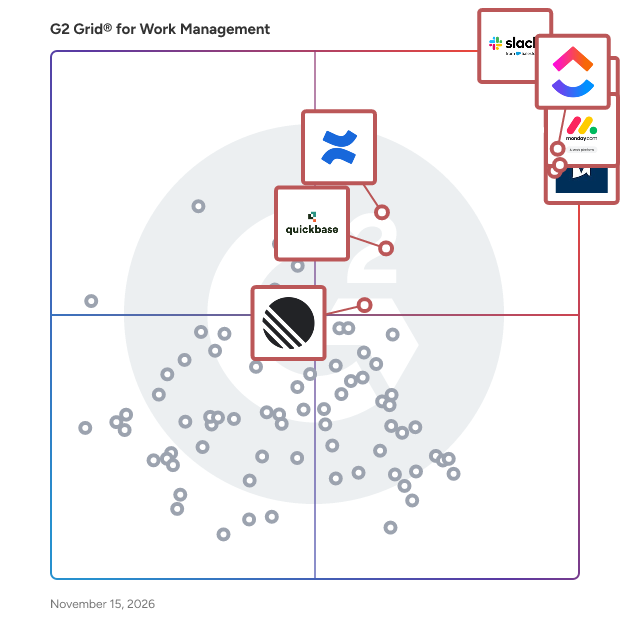
G2 Grid® for Work Management Software

G2 Grid® for Work Management Software plotting products by satisfaction and market presence

Highlighted products: Slack, ClickUp, Asana, monday AI Work Platform, Smartsheet, Confluence, Quickbase, and Linear.

Underlying data: [Grid® JSON](https://www.g2.com/categories/work-management/grids.json?focus%5B%5D=slack&focus%5B%5D=clickup&focus%5B%5D=asana&focus%5B%5D=monday-com&focus%5B%5D=smartsheet&focus%5B%5D=confluence&focus%5B%5D=quickbase&focus%5B%5D=linear)

Humanture

Humanture is a company operations system designed for small, distributed teams. It provides a centralized structure to manage employee and contractor records, documents, assets, and internal workflows. The system includes functionality for managing employee information, storing and tracking contracts and documents, handling time off requests and approvals, assigning and monitoring company equipment, and managing basic expense submissions. It also supports operational workflows such as onboarding and internal approval processes. Humanture provides visibility into operational status by highlighting missing or incomplete data, such as unassigned managers, missing documents, or expiring contracts. This allows teams to maintain accurate records and track internal operations without relying on multiple tools or manual systems.

Average Rating: 5.0/5.0

Total Reviews: 1

How Do G2 Users Rate Humanture?

  • Has the product been a good partner in doing business?: 10.0/10 (Category avg: 9.1/10)

Who Is the Company Behind Humanture?

Who Uses This Product?

  • Company Size: 100% Small

What Are Recent G2 Reviews of Humanture?

Matilda Workspace

The All-New All-In-One Workspace for Modern Teams Embracing the concept of a unified workspace, Matilda brings a powerful suite of best-in-class apps together in one place, allowing teams across the globe to connect, create, coordinate, and delight their customers effortlessly. With its mission to simplify technology, Matilda empowers organisations to do more with less, making it an essential tool for startups to Fortune 500 companies alike. Key Features: -Powerful Apps Included: Matilda comes packed with a suite of powerful applications including Docs, Projects, Tables, Chat, Customers, and Copilot, ensuring that teams have all the tools they need to succeed. - Create with Ease: With Docs, teams can co-edit in real time, making document creation and coordination seamless. This feature aims to replace Google Docs, Notion, and Coda, by providing a more integrated and efficient experience. - Streamlined Project Management: Matilda's Projects feature allows for effortless management and tracking of every aspect of your projects. With capabilities like auto-scheduling, it's designed to replace tools like Jira, Trello, and Asana. - Advanced Data Management: Although Tables are coming soon, they promise to redefine data handling by syncing data from hundreds of sources or creating new collections, aiming to replace tools like Airtable, Notion, and Segment. - Seamless Communication: Chat brings all team communication into one place, integrated across projects, tasks, and docs, providing an alternative to Slack and MS Teams. - Customer Relationship Management: The soon-to-be-released Customers feature will allow teams to effortlessly track leads and manage customer interactions in one streamlined interface, aiming to replace Salesforce and Hubspot. - AI-Powered Assistance: Copilot offers custom AI assistants to help automate and streamline workflows, aiming to replace AI tools like ChatGPT and Google Bard. Conclusion: Matilda Workspace stands out as an all-encompassing solution that not only promises to streamline and simplify the way teams work but also embraces the future with its AI-powered capabilities and commitment to sustainability. Whether you’re managing projects, coordinating with your team, handling customer relationships, or leveraging AI for automation, Matilda Workspace provides an intuitive, powerful, and adaptable platform for every kind of team to thrive. Try Matilda today and experience the future of work, designed to help you deliver projects on time, every time.

Average Rating: 4.7/5.0

Total Reviews: 14

How Do G2 Users Rate Matilda Workspace?

  • Has the product been a good partner in doing business?: 9.7/10 (Category avg: 9.1/10)

Who Is the Company Behind Matilda Workspace?

Who Uses This Product?

  • Company Size: 80% Small, 20% Medium

What Do G2 Reviewers Say About Matilda Workspace?

AI-generated summary from verified user reviews

Pros
  • Users love the customizable tables and AI-powered Copilot of Matilda Workspace, enhancing productivity and project management.
  • Users praise Matilda’s seamless team collaboration, highlighting its customizable features and AI integration that enhance productivity.
  • Users highlight the ease of use of Matilda Workspace, enhancing productivity and teamwork for collaborative projects.
  • Users find the comprehensive project management tools of Matilda Workspace enhance collaboration and productivity for their teams.
  • Users admire the task management capabilities of Matilda Workspace, praising its customization and seamless integration for productivity.
Cons
  • Users notice missing features in Matilda Workspace, but anticipate future updates to enhance functionality.
  • Users note a lack of features in Matilda Workspace, seeking more options to justify a transition from existing tools.
  • Users report tiny bugs in Matilda Workspace, but the team effectively addresses them and values user feedback.
  • Users find the learning curve challenging for some team members, despite the helpful integrated onboarding support.
  • Users feel that while Matilda Workspace is effective, there is a lack of customization options that limits flexibility.

What Are Recent G2 Reviews of Matilda Workspace?

MeMate

MeMate is an all-in-one business management software designed to help Australian small and medium-sized businesses work smarter, not harder. It combines essential tools — like quoting, project management, profitability tracking, time tracking, internal communication, and a company calendar — into one simple, powerful platform. With MeMate, businesses can streamline operations, improve team collaboration, track profitability in real time, and reduce the chaos of managing multiple systems.

Average Rating: 5.0/5.0

Total Reviews: 1

How Do G2 Users Rate MeMate?

  • Has the product been a good partner in doing business?: 10.0/10 (Category avg: 9.1/10)
  • Insights: 10.0/10 (Category avg: 8.6/10)

Who Is the Company Behind MeMate?

Who Uses This Product?

  • Company Size: 100% Small

What Are Recent G2 Reviews of MeMate?

AI can help you find the answers. G2 helps you trust them.

Connect G2 to Claude or ChatGPT for answers grounded in G2's trusted reviews, comparisons, and pricing from real user insights.

How it works

One24

A complete software program created to enhance and streamline different IT organizational operations

Average Rating: 5.0/5.0

Total Reviews: 1

How Do G2 Users Rate One24?

  • Has the product been a good partner in doing business?: 10.0/10 (Category avg: 9.1/10)

Who Is the Company Behind One24?

Who Uses This Product?

  • Company Size: 100% Medium

What Do G2 Reviewers Say About One24?

AI-generated summary from verified user reviews

Cons
  • Users face integration issues with One24, as it lacks connectivity with other platforms.

What Are Recent G2 Reviews of One24?

Teamogy

Teamogy is all-in-one cloud system for those who want to have their company in order. It allows you to have fully overview about capacity planning and time tracking. Teamogy connects internal teams and supports collaboration and communications inside the company. It lets your team work anytime and from anywhere.

Average Rating: 5.0/5.0

Total Reviews: 1

How Do G2 Users Rate Teamogy?

  • Has the product been a good partner in doing business?: 10.0/10 (Category avg: 9.1/10)

Who Is the Company Behind Teamogy?

Who Uses This Product?

  • Company Size: 100% Small

What Are Recent G2 Reviews of Teamogy?

Timewax

Timewax is project and resource planning software. We want to help organizations get a better handle on time by enabling them to plan better. It will save you time. When you use Timewax you'll no longer need spreadsheets, endless meetings, emails and phone calls. Everybody is up-to-date any time anywhere. It improves project delivery. You assign the right people to the right projects at the right time. Simply by drag and drop. This improves the quality of work and speeds up projects. It increases utilization. With fewer idle resources and minimizing peaks and troughs will increase the utilization of your employees. This will drive up your revenue and profits.

Average Rating: 4.5/5.0

Total Reviews: 1

Who Is the Company Behind Timewax?

  • Seller: Timewax B.V.
  • Year Founded: 2007
  • HQ Location: Amsterdam (Amsterdam, Netherlands), NL
  • LinkedIn® Page: www.linkedin.com
    19 employees on LinkedIn®

Who Uses This Product?

  • Company Size: 100% Medium

What Are Recent G2 Reviews of Timewax?

What Are G2 Users Discussing About Timewax?

vPlan

vPlan is a visual work management and productivity platform that helps organisations plan work, manage capacity, structure workflows and keep teams aligned in one central environment. Built for teams in project management, manufacturing, field service, construction, engineering and business services, vPlan is planning software that connects planning with execution. Teams can plan projects, orders and recurring work in Kanban, calendar, list and timeline views, while keeping real-time insight into capacity, workload, deadlines and progress. With vPlan, organisations can allocate employees, teams and other resources based on availability and capacity, manage dependencies, automate recurring processes, track time, collaborate on tasks and analyse performance. This makes it easier to spot bottlenecks early, balance workloads and adjust the planning when priorities change. vPlan also connects with ERP, accounting, HR and other business software, including Exact, AFAS, Simplicate, SAP Business One and many other systems. Integrations, Zapier, Make and an open API help organisations reduce duplicate data entry and connect planning with their existing processes. By combining workflow management, visual planning, project management, capacity planning, resource management and team collaboration in one platform, vPlan gives teams a clear overview of what needs to be done, who is responsible, when work is due and whether enough capacity is available. vPlan helps organisations work with more structure, make better use of their capacity and get more work done.

Average Rating: 3.5/5.0

Total Reviews: 1

Who Is the Company Behind vPlan?

  • Seller: vPlan
  • Year Founded: 2017
  • HQ Location: Rijssen, NL
  • LinkedIn® Page: www.linkedin.com
    34 employees on LinkedIn®

Who Uses This Product?

  • Company Size: 100% Small

Workdeck

An Artificial Intelligence driven platform for running the complete digitized workplace and proving onsite, remote and hybrid team with one intuitive touchpoint for being productive from anywhere. Integrated tools for: • Management of Projects / Services • Task execution • Resource Planning • Financials • Document Repositories • Communication (chat, instant messaging) • Calendars • Leave Management • Time recording • Purchases and Expense Management • Travel Management • Integrated with Google (G-Suite) and Microsoft Office 365 • Web and smartphone applications

Average Rating: 4.5/5.0

Total Reviews: 2

How Do G2 Users Rate Workdeck?

  • Has the product been a good partner in doing business?: 10.0/10 (Category avg: 9.1/10)
  • Planning: 10.0/10 (Category avg: 9.0/10)
  • Procedures: 10.0/10 (Category avg: 8.5/10)

Who Is the Company Behind Workdeck?

Who Uses This Product?

  • Company Size: 50% Medium, 50% Small

What Are Recent G2 Reviews of Workdeck?

Worklenz

Worklenz is an open-source project management platform designed to streamline workflows and enhance team collaboration. Our intuitive interface offers robust features such as task management, time tracking, and resource allocation, enabling teams to efficiently plan, execute, and monitor projects. With customizable dashboards and real-time analytics, Worklenz provides actionable insights to drive informed decision-making. Our cloud-based solution ensures seamless accessibility across devices, fostering productivity and flexibility. Whether you're managing a small team or overseeing complex projects, Worklenz adapts to your needs, delivering a scalable and user-friendly experience. Key Features: - Open-Source Platform: Customize and extend functionalities to suit your organization's unique requirements. - Task Management: Organize and prioritize tasks with ease. - Time Tracking: Monitor time spent on tasks to optimize efficiency. - Resource Allocation: Assign resources effectively to balance workloads. - Customizable Dashboards: Tailor your workspace to focus on what's important. - Real-Time Analytics: Access up-to-date data for informed decision-making. - Cloud-Based Access: Work from anywhere, on any device. Experience the future of project management with Worklenz, where innovation meets simplicity.

Average Rating: 5.0/5.0

Total Reviews: 1

Who Is the Company Behind Worklenz?

Who Uses This Product?

  • Company Size: 100% Small

What Do G2 Reviewers Say About Worklenz?

AI-generated summary from verified user reviews

Pros
  • Users admire the simple and intuitive UI of Worklenz, making it easy for team collaboration and efficiency.
  • Users love the intuitive UI of Worklenz, finding it incredibly easy and helpful for their teams.
  • Users appreciate the simple and intuitive UI of Worklenz, making everyday tasks easier for team members.
  • Users love the simple and intuitive UI of Worklenz, which greatly enhances their team collaboration experience.
Cons
  • Users face integration issues with Worklenz, specifically lacking GitHub connectivity, though an update is promising.
  • Users experience a lack of integrations with GitHub but anticipate upcoming feature additions from the founder.
  • Users note the limited integrations with platforms like GitHub, but anticipate upcoming improvements from the founder.

What Are Recent G2 Reviews of Worklenz?

4ga Boards

4ga Boards is a modern project management tool that combines simplicity with functionality. With an intuitive kanban boards system, it allows you to easily visualize tasks, track progress, and prioritize what matters most. 4ga Boards is open source and free for self-hosting, giving you complete control over your data. This ensures transparency, eliminates dependency on third-party servers, and makes it a cost-effective solution for businesses and individuals alike. Features: Elegant Dark Mode Simultaneous management of card and board Enchanced Markdown Editor Adjustable Boards View (hide unused lists and toogle sidebar visibility) Power-user shortcuts Google SSO User Permission System Card Covers Cards DueDate & Memberships Subtasks for Cards Tasks DueDate & Memberships Customizable Labels Fitler Cards/Boards/Projects Import from Trello Export to csv

Who Is the Company Behind 4ga Boards?

Who Uses This Product?

  • Company Size: 100% Small

What Are Recent G2 Reviews of 4ga Boards?

Addness

Addness is a "company brain" where your team and AI work from the same context. Goals, today's to-dos, meeting notes, chat and documents live in one place, and any MCP-compatible AI (Claude Code, Codex, Cursor and more) can read them, do the work, and write results back to the goal - so you never have to re-explain your business to AI again. Key features: a goal tree that links company goals down to today's to-dos, each with an ideal state; connect any MCP-compatible AI; a meeting bot and screen-recording transcripts saved to goals; per-goal chat and comments; team activity at a glance; templates and routines that AI runs daily or weekly; shared knowledge so every AI works the same way; Slack, GitHub and calendar integrations.

Who Is the Company Behind Addness?

AiWorkk - AI Work Management

AiWorkk is an AI-powered work management and project management platform that helps teams organize projects, manage tasks, collaborate, and track work from anywhere. Bring your projects, tasks, workflows, team communication, files, and business data together in one visual workspace. Whether you're managing a project, tracking a sales pipeline, organizing client work, or simply keeping your team on schedule, AiWorkk gives you the flexibility to manage work your way. With customizable boards, multiple project views, real-time dashboards, team collaboration, and built-in AI assistance, AiWorkk helps you spend less time organizing work and more time getting it done. ◆ MANAGE PROJECTS AND TASKS ◆ VISUALIZE WORK YOUR WAY ◆ COLLABORATE WITH YOUR TEAM ◆ REAL-TIME PROJECT DASHBOARDS ◆ WORK SMARTER WITH AI ◆ BUILD FLEXIBLE BUSINESS WORKFLOWS ◆ CREATE CUSTMIZED FORMS ◆ CREATE DOCUMENTS, ARTICLES ◆ ONE PLATFORM FOR YOUR WORK

Who Is the Company Behind AiWorkk - AI Work Management?

BusyVault

BusyVault is a cloud-based team communication software and project workspace that organizes business conversations, project files and checklists into channels and nested subchannels. It is designed for agencies, design and video teams, startups, remote teams and other small and mid-sized businesses that discuss large files with colleagues and clients and need a clear next step after each discussion. In many team chat tools, a project is spread across a general channel, a cloud-drive link, a task list and a private message. Feedback loses its connection to the file, and decisions become hard to find. BusyVault gives each project its own place: a workspace holds channels, each channel can hold subchannels for workstreams such as design, delivery or client feedback, and every channel and subchannel keeps its own message history and files. Teams upload the asset, discuss it beside an in-app preview and record the agreed changes in a checklist inside the conversation. Key capabilities: - Channels and nested subchannels: a three-layer structure (workspace, channel, subchannel) for multi-project and client work. - Project files with previews and resumable uploads: interrupted uploads resume after the connection returns, single files of up to ~100 GB are supported subject to available storage, originals are kept without compression, and formats such as video and Microsoft Office files preview in the app. - Checklists in the conversation: discussions become visible next steps the team can tick off, alongside polls, voice notes, tasks and tickets. - Controlled access and sharing: role-based permissions, two-factor authentication and external share links that can expire and be revoked at any time. - Included storage per paid account: Basic includes 25 GiB and Pro includes 100 GiB, with additional storage billed per GiB. BusyVault uses business accounts registered with an email address rather than personal phone numbers. It runs as a hosted web app with English and Polish interfaces; native iPhone, iPad and Mac releases are in testing. Pricing is published per paid account in USD, excluding tax. Basic costs $9 per month or $86 per year, and Pro costs $30 per month or $288 per year. Additional storage costs $0.03 per GiB per month. One subscription does not cover a whole team, so each paid account should be counted when budgeting. A 3-day trial with 10 GiB of storage is available; it is not a permanent free plan. As a Slack alternative or Microsoft Teams alternative, BusyVault suits teams that want files, conversations and next actions in one structured project workspace. Teams that rely on Slack's broad app ecosystem, or on the integration of Microsoft Teams with Microsoft 365, may prefer to stay with those platforms, or run one project in BusyVault first and compare the results. BusyVault pricing (USD per paid account, excluding tax): - Basic: $9 per month or $86 per year, 25 GiB included storage - Pro: $30 per month or $288 per year, 100 GiB included storage - Extra storage: $0.03 per GiB per month, rounded up to a whole GiB - Trial: 3 days with 10 GiB of storage (not a permanent free plan) One subscription covers one paid account, not a whole team. Frequently asked questions about BusyVault Q: Is BusyVault a Slack alternative? A: BusyVault is an alternative for teams that use Slack mainly for project conversations around files and want the file, the discussion and the next action in one structured workspace. It offers channels with nested subchannels, checklists inside the conversation, resumable uploads and included storage per paid account. It does not replicate Slack's broad app marketplace, Slack Connect shared channels or Workflow Builder, and it does not provide automatic migration of a Slack workspace. Teams whose processes depend on specific Slack integrations should list those integrations first and check whether BusyVault's incoming webhooks, or the REST API available to Pro customers on request, can cover them. A practical approach is to run one real project in BusyVault during the 3-day trial while the rest of the team stays on Slack, then compare the results. Q: How does BusyVault compare with Slack on files, storage, message history and pricing? A: Slack's help center states that members and guests can add files up to 1 GB in size. BusyVault supports single uploads of up to ~100 GB, subject to the storage available on the account, and interrupted uploads resume. On message history, Slack Free shows the last 90 days of messages and files and deletes data older than one year, while Slack's paid plans, such as Pro, include full message history, so compare paid plans with paid plans. BusyVault bills per paid account: Basic includes 25 GiB for $9/month or $86/year, Pro includes 100 GiB for $30/month or $288/year, and extra storage costs $0.03 per GiB per month. Slack includes huddles, canvases, lists and a large integration ecosystem that BusyVault does not replicate. Check each vendor's current pricing page before deciding. Q: How does BusyVault compare with Microsoft Teams? A: Microsoft Teams is part of Microsoft 365 and connects chat with meetings, Outlook, SharePoint, OneDrive and co-editing in Word, Excel and PowerPoint. For organizations already licensed for Microsoft 365, those connections are a real strength. BusyVault is a focused project communication workspace: channels and nested subchannels, files with previews and resumable uploads, checklists in the conversation and included storage per paid account. It does not include an office suite or an email service, and it is priced separately from any Microsoft licence. BusyVault can serve as a Microsoft Teams alternative for small businesses and project teams that do not need the wider Microsoft 365 suite. When comparing costs, separate the chat tool from the email, document editing, storage and compliance services the business will continue to use. Q: Can BusyVault handle large files, and are uploads resumable? A: Yes. BusyVault is designed for teams that share large project files inside the conversation. Single files of up to ~100 GB can be uploaded; the practical limit also depends on server configuration, the storage available on the account and connection conditions. Uploads use the TUS resumable upload protocol, so an interrupted upload continues after the network returns instead of starting again. Files are kept in their original quality without compression, and common formats, including video and Microsoft Office files such as XLSX, can be previewed in the app without downloading. Storage counts against the account allowance of 25 GiB on Basic or 100 GiB on Pro. Before an upload that needs extra space, BusyVault shows a cost estimate at $0.03 per GiB per month for confirmation. Q: How do nested subchannels and in-chat checklists work? A: BusyVault uses three levels: workspace, channel and subchannel. A workspace can represent a company, agency or client; a channel represents a project or topic; and subchannels separate workstreams such as design, development or client feedback. Each subchannel has its own message stream, file history and webhook address, and team members switch between subchannels with tabs. Checklists are added inline in the conversation. Items can be assigned to people, ticked off as work progresses and keep a history of changes, so the result of a discussion is visible next to the messages and files that led to it. For larger follow-ups, BusyVault also offers tasks with due dates and tickets with priority, assignee and status. A quick filter shows files, polls, checklists and voice notes in a channel without running a search. Q: Can I share files with clients who do not have a BusyVault account? A: Yes. BusyVault can create external share links for files. A link can have an expiry period, for example 3 days, the recipient can open it without creating a BusyVault account, and the sender can revoke the link at any time. This helps agencies, freelancers and video or design teams deliver large files to clients who are not members of the workspace. Before sending a link, check its access settings and expiry date, and keep the source file for production use. For ongoing collaboration with a client, a dedicated client channel or subchannel with suitable roles keeps feedback and next steps beside the file. Confirm the external-access options your organization needs during the trial, especially if client files contain personal or confidential data. Q: How long is the BusyVault free trial, and is there a free plan? A: BusyVault offers a 3-day trial with 10 GiB of storage. It is a time-limited trial, not a permanent free plan. The documentation states that no credit card is needed to create the trial account. If the account is not upgraded to Basic or Pro within 3 days, the free account and its data are deleted automatically, so export anything you need before the trial ends. Because the trial includes 10 GiB of storage, test files must fit within that allowance; to test a very large file, plan the test on a paid account. After the trial, Basic costs $9 per month or $86 per year and Pro costs $30 per month or $288 per year per paid account, with prices in USD excluding tax.

Who Is the Company Behind BusyVault?
Who Uses This Product?

  • Company Size: 100% Small

What Are Recent G2 Reviews of BusyVault?

Conductor

Conductor® is an enterprise-grade, AI-powered transformation platform that creates harmony from strategy through execution, delivering KPI/benefits tracking, accountability, and governance on your terms.

Average Rating: 4.5/5.0

Total Reviews: 2

How Do G2 Users Rate Conductor?

  • Has the product been a good partner in doing business?: 9.2/10 (Category avg: 9.1/10)

Who Is the Company Behind Conductor?

  • Seller: Sensei Labs
  • Year Founded: 2015
  • HQ Location: Toronto, CA
  • LinkedIn® Page: linkedin.com
    43 employees on LinkedIn®

Who Uses This Product?

  • Company Size: 100% Large

What Do G2 Reviewers Say About Conductor?

AI-generated summary from verified user reviews

Pros
  • Users find Conductor's ease of use and customization features to be essential for streamlining their workflows effectively.
  • Users value the outstanding customer care and support from Conductor, enhancing their experience and workflow efficiency.
  • Users love the customizability of Conductor, making it easy to tailor to their company's unique needs.
  • Users value the ease of customization in Conductor, allowing them to tailor the tool to their unique needs.
  • Users value the efficiency of Conductor, enjoying seamless access and synchronization across global initiatives.
Cons
  • Users find the manual effort in Excel comparison tedious, wishing for easier updates across multiple projects.
  • Users find the manual data entry cumbersome, wishing for automation to alleviate repetitive update tasks.
  • Users find the linking of tasks and milestones to be inadequate, affecting their project management efficiency.
  • Users find the manual effort for project updates cumbersome, preferring automated syncing to ease the process.
  • Users find the time-consuming updates tedious due to manual syncing across multiple projects and templates.

What Are Recent G2 Reviews of Conductor?

Droova

Droova is an all-in-one workspace for CRM, project management, and client portals that helps teams manage their entire workflow in one place. It allows businesses to capture and manage leads, convert them into projects, track tasks and progress, and collaborate with clients - all without switching between multiple tools. With built-in CRM pipelines, project tracking, task management, and a fully integrated client portal, Droova replaces fragmented software stacks and centralizes work into a single, streamlined system. Designed for service teams, consultancies, and growing businesses, Droova makes it easier to manage operations, improve visibility, and deliver projects from start to finish. Learn more: https://droova-workflow.com/

Who Is the Company Behind Droova?

Subhransu Sahu
SS
Researched and written by Subhransu Sahu
Updated April 9, 2026