Floutwork
The smart browser for work
Who Is the Company Behind Floutwork?
- Seller: Floutwork
- HQ Location: Ponte Vedra, US
-
LinkedIn® Page: www.linkedin.com
1 employees on LinkedIn®
Total Products under this Category: 191
Last updated: September 05, 2026
Why You Can Trust G2's Software Rankings:
G2's software rankings are built on verified user reviews, rigorous moderation, and a consistent research methodology maintained by a team of analysts and data experts. Each product is measured using the same transparent criteria, with no paid placement or vendor influence. While reviews reflect real user experiences, which can be subjective, they offer valuable insight into how software performs in the hands of professionals. Together, these inputs power the G2 Score, a standardized way to compare tools within every category.

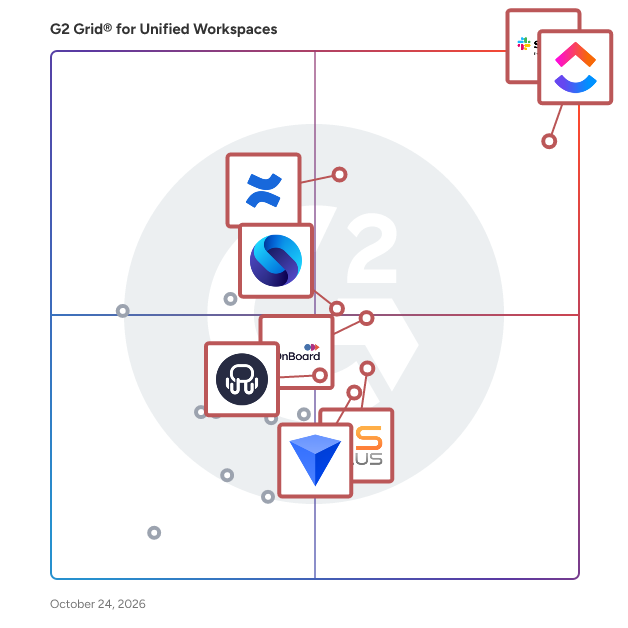
Highlighted products: Slack, ClickUp, Confluence, Shift, Workona, BlackBerry UEM, Rambox, and MangoApps.
Underlying data: [Grid® JSON](https://www.g2.com/categories/unified-workspaces/grids.json?focus%5B%5D=slack&focus%5B%5D=clickup&focus%5B%5D=confluence&focus%5B%5D=redbrick-shift&focus%5B%5D=workona&focus%5B%5D=blackberry-uem&focus%5B%5D=rambox&focus%5B%5D=mangoapps)
The smart browser for work
FlowCoach AI is an AI-powered Life Operating System (Life OS) and productivity platform designed to help professionals, entrepreneurs, students, and teams turn goals into consistent execution. Unlike traditional task managers that focus only on organizing work, FlowCoach AI combines AI coaching, task management, habit tracking, goal planning, calendar intelligence, productivity analytics, and a personal Second Brain into a single platform. The result is a unified system that helps users stay focused, build productive routines, and make measurable progress toward their goals. FlowCoach AI helps users manage tasks, projects, habits, notes, schedules, and priorities while receiving personalized AI guidance tailored to their objectives and behavior. Multiple AI coaching personas provide customized support for motivation, accountability, strategic planning, productivity improvement, and personal development. Key capabilities include: • AI Productivity Coaching • Goal Management and Tracking • Habit Building and Streak Tracking • AI-Powered Daily Planning • Calendar Sync and Smart Scheduling • Personal Second Brain and Knowledge Management • Productivity Analytics and Insights • Task and Project Management • Team Collaboration Features • Integrations with Gmail, Outlook, Slack, Microsoft Teams, Zoom, Jira, Asana, Trello, Calendly, and more FlowCoach AI is designed for knowledge workers, founders, consultants, creators, managers, students, and organizations looking to improve focus, productivity, accountability, and execution. Whether managing personal goals or coordinating team initiatives, FlowCoach AI provides the tools and AI assistance needed to reduce overwhelm, improve decision-making, and achieve meaningful results. By combining planning, coaching, productivity systems, and intelligent automation, FlowCoach AI helps users plan smarter, stay organized, and execute consistently. Plan smarter. Live better.
GoFox is an AI-powered CRM platform that brings sales, marketing, customer support, communication, and business operations together in one unified system. It helps businesses manage customer relationships, automate repetitive work, improve team collaboration, and deliver personalized experiences throughout the customer journey. Instead of relying on separate tools, spreadsheets, emails, and disconnected customer records, teams can use GoFox to manage their daily activities from one place. The platform provides a complete view of leads, contacts, companies, conversations, deals, campaigns, support requests, tasks, and activities. This makes customer information easier to access, update, and share across departments. GoFox is designed for businesses that want a flexible and affordable CRM without unnecessary complexity. Sales, marketing, and support teams can use the platform to organize their work, automate routine processes, and respond to customers more effectively. Its AI-powered capabilities help users save time, create content, understand customer interactions, and make informed decisions using reliable business data. GoFox provides sales teams with the tools they need to capture leads, manage contacts, track deals, and maintain a consistent sales process. The platform helps representatives understand where every opportunity stands and which action should be taken next. Lead Management allows businesses to collect, organize, assign, and track prospects throughout the sales cycle. Teams can record important details, monitor activities, schedule follow-ups, and move qualified leads into the appropriate pipeline. The 360-degree Contact View brings customer information, communication history, notes, tasks, deals, appointments, and support interactions into one organized profile. Representatives can quickly understand a customer's history before making a call, sending an email, or following up on an opportunity. Company Management also helps users connect multiple contacts, deals, conversations, and activities to the correct organization. Deal Management and Pipeline Kanban tools provide a clear view of active sales opportunities. Teams can organize deals by stage, update progress, record expected values, and identify opportunities that require immediate attention. Managers can monitor pipeline activity, evaluate performance, and improve sales visibility across the organization. Lead Scoring helps teams prioritize prospects based on their interest, engagement, or potential business value. Assignment Rules can automatically direct new leads to the appropriate representatives, while Auto-Promote Rules help move qualified leads through the sales process when predefined conditions are met. Lead Buckets make it easier to organize and manage prospects based on the team's workflow. GoFox supports important sales activities such as tasks, appointments, reminders, notes, documents, products, quotes, proposals, and invoices. These connected tools help representatives manage their work without switching between multiple platforms. Appointment Scheduling helps teams coordinate meetings with prospects and customers, while Calendar tools keep calls, follow-ups, and other activities visible. Sales Automation helps businesses reduce repetitive work. Teams can create workflows for lead assignment, follow-up reminders, notifications, record updates, approvals, and routine sales activities. This allows representatives to spend more time building relationships and closing deals. AI-powered sales workflows assist with everyday processes, while AI Email Templates help users prepare relevant messages quickly. Email Sequences can maintain consistent communication with leads and customers over time. Sales dashboards and reports give teams a clear understanding of performance. Businesses can review lead activity, deal progress, pipeline value, conversions, revenue opportunities, and representative performance. These insights help managers identify problems, recognize opportunities, and make better decisions. GoFox includes built-in telephony features that help teams manage customer calls within the CRM. Click-to-Call allows users to contact customers directly from their records, while the Floating Dial Pad makes calling available from different areas of the platform. Inbound CTI can display relevant customer information when a call is received, helping representatives understand who is calling before answering. Call Recording allows authorized teams to review conversations for training, quality monitoring, and future reference. Additional features include an Auto Dialer, Voicemail Drops, Call Scripts, Post-Call Automation, and Virtual PBX capabilities. Integrations with providers such as Twilio, Exotel, RingCentral, JustCall, MightyCall, Aircall, and SIP Trunk services help businesses create an organized calling process. Connecting calls with CRM records gives sales and support teams a more complete communication history. GoFox provides marketing tools that help businesses plan campaigns, engage audiences, generate leads, and measure results. Marketing teams can organize customer information and use it to create more relevant communication across different channels. Email Marketing tools allow businesses to prepare and send campaigns, newsletters, announcements, promotional messages, and follow-up emails to selected audiences. Email Tracking helps teams understand engagement and monitor important campaign activity. Multichannel Campaigns allow businesses to coordinate communication across different customer touchpoints. Instead of treating every channel separately, teams can create connected experiences based on customer interests, actions, and stages in the buying journey. Marketing Automation reduces manual campaign work. Teams can build workflows that automatically send messages, update records, assign tasks, notify employees, or trigger follow-up actions when specific conditions are met. Lists and customer segments help marketers organize audiences using relevant criteria, making it easier to deliver targeted communication instead of sending the same message to every contact. GoFox helps businesses capture potential customers through AI Landing Pages, an AI Form Builder, website engagement tools, and other lead generation features. Teams can create landing pages for campaigns, products, services, events, downloads, and special offers. Forms can be used for contact requests, demo bookings, registrations, feedback, subscriptions, and lead capture. Submitted information can be added directly to the CRM, reducing manual data entry. Website engagement tools help businesses interact with visitors at important moments. Push Notifications, Exit Intent messages, Site Messages, and Free Live Chat can encourage visitors to take action, ask questions, or share their contact details. Web Analytics provides insights into visitor behavior, helping marketing and sales teams understand interests, identify valuable pages, and improve follow-up communication. Marketing Dashboards bring important campaign information into a clear and organized view. Teams can monitor campaign activity, engagement, lead generation, and other marketing metrics without manually combining information from different sources. Marketing Reports help businesses evaluate results and understand which activities contribute to better outcomes. Teams can use these insights to improve targeting, messaging, timing, and resource allocation. CRM Analytics connects customer and business information across sales, marketing, and support. Decision-makers can review overall performance, identify trends, and discover areas that require attention. Custom dashboards and reports can help different teams focus on the measurements that matter to their responsibilities. GoFox includes social media tools that help businesses manage customer engagement across social channels. Social CRM connects social interactions with customer profiles, giving teams more context before responding. Social Listening helps businesses monitor relevant conversations, mentions, and feedback so they can better understand what audiences are saying about their brand, products, services, or industry. Social Media Management and the Social Suite help users plan, organize, and manage social content from a central location. Businesses can coordinate their social activities and maintain consistent communication across channels. Connecting social engagement with CRM data creates a more complete understanding of customer interests and interactions. GoFox provides customer support tools that help businesses manage inquiries, organize tickets, and respond efficiently. The Help Desk creates a structured system for receiving, assigning, tracking, and resolving customer requests. Tickets can include contact information, communication history, priority, status, assigned team members, labels, and other relevant details. Ticket Labels help teams categorize requests, while HelpDesk Groups ensure that inquiries reach the appropriate support team. Workflows can automate ticket assignment, notifications, escalations, status changes, and follow-up tasks. This reduces manual coordination and helps teams provide more consistent support. Free Live Chat allows businesses to communicate with website visitors and customers in real time. Representatives can answer questions, provide assistance, and guide visitors without requiring them to leave the website. The AI Chatbot can respond to common questions and provide immediate help when employees are unavailable. It can manage routine requests while allowing human representatives to focus on conversations that require personal attention. Knowledge Base and Help Center tools allow businesses to publish useful articles, instructions, frequently asked questions, and troubleshooting information. Customers can find answers independently and get reliable support at any time.
HubWorx provides company updates, chat, documents, tasks, and connects your existing systems in one place, with AI built in to help people find what they need in seconds. Most organisations don't struggle because they lack technology. They struggle because their systems are everywhere. Updates in one tool. Chat in another. Documents lost in folders. AI nowhere to be seen or simply bolted on the side. HubWorx brings it back together. Some organisations use HubWorx to replace their intranet. Others use it to simplify the tools they already rely on. Either way, people spend less time searching and more time doing their best work.
Ikuna is a macOS productivity app that lets you save and reopen complete workspaces, including apps, browser tabs, window layouts, focus modes, and multi-monitor setups. Everything returns to where you left it in under three seconds. The app also tracks how often you switch between tasks and helps you identify your most productive focus periods. You can personalize each workspace with wallpapers, playlists, and other cues, while Focus Shield helps keep distractions out when you need to concentrate. Ikuna is built around a simple idea: switching tasks takes a mental toll. By making it easier to leave one project and return to another, it helps you stay focused without losing your place. Ikuna works on macOS 13 and later. The free plan includes up to four workspaces, while the Pro plan includes unlimited workspaces and advanced features. All data stays on your Mac.