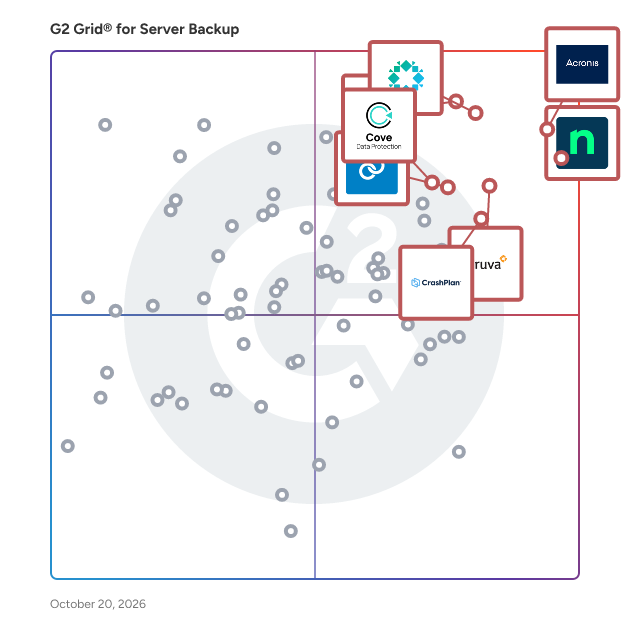
# Best Server Backup Software - Page 7

*By [Tian Lin](https://research.g2.com/insights/author/tian-lin)*


Server backup software is used to ensure the information stored or processed through server hardware remains intact in case of mechanical failure or user error. These solutions store the information processed by the server in a remote location, a remote cloud, or on some other on-premises hardware device. Companies use server backup software to prevent data loss in disaster scenarios as well as to ensure their business data or customer business data remains available.

Server backup tools differ from other backup technology in that they communicate directly with the server and operate solely to store its information.

To qualify for inclusion in the Server Backup category, a product must:

- Store server data in a remote location or on additional in-house servers
- Directly connect servers to backup storage devices
- Support enterprise-level server backup


## Top Server Backup Software at a Glance
| # | Product | Rating | Best For | What Users Say |
|---|---------|--------|----------|----------------|
| 1 | [Acronis Cyber Protect Cloud](https://www.g2.com/products/acronis-cyber-protect-cloud/reviews) | 4.7/5.0 (1,333 reviews) | Unified backup and cybersecurity from one agent | "[Simplifying Security, Backup, and Management in One Platform](https://www.g2.com/survey_responses/acronis-cyber-protect-cloud-review-12997399)" |
| 2 | [NinjaOne](https://www.g2.com/products/ninjaone/reviews) | 4.7/5.0 (4,277 reviews) | Server backup inside unified RMM console | "[Super Easy and Effective - Loved my Experience!](https://www.g2.com/survey_responses/ninjaone-review-9229992)" |
| 3 | [Veeam Data Platform](https://www.g2.com/products/veeam-data-platform/reviews) | 4.6/5.0 (680 reviews) | VM-native backup with immutable instant recovery | "[Rock-Solid Backups and Instant Recovery That Just Work](https://www.g2.com/survey_responses/veeam-data-platform-review-12936526)" |
| 4 | [Druva Data Security Cloud](https://www.g2.com/products/druva-data-security-cloud/reviews) | 4.7/5.0 (724 reviews) | Infrastructure-free server backup with immutable air-gapping | "[Simple, Cloud-Native Backups with Strong Ransomware Protection](https://www.g2.com/survey_responses/druva-data-security-cloud-review-12647066)" |
| 5 | [Rubrik](https://www.g2.com/products/rubrik/reviews) | 4.5/5.0 (267 reviews) | — | "[Organised, Informative, and a Strong Shift Toward Cyber Resilience](https://www.g2.com/survey_responses/rubrik-review-12940696)" |
| 6 | [Datto SIRIS](https://www.g2.com/products/kaseya-datto-siris/reviews) | 4.6/5.0 (275 reviews) | Server image backup with instant virtualization | "[Reliable Backup and Disaster Recovery with Robust Ransomware Protection](https://www.g2.com/survey_responses/datto-siris-review-12857742)" |
| 7 | [Azure Backup](https://www.g2.com/products/azure-backup/reviews) | 4.4/5.0 (75 reviews) | Azure-native VM and workload backup | "[Seamless Azure Integration with Reliable Backups and Competitive Pricing](https://www.g2.com/survey_responses/azure-backup-review-12691097)" |
| 8 | [Cove Data Protection](https://www.g2.com/products/cove-data-protection/reviews) | 4.5/5.0 (422 reviews) | Cloud-first server backup with infrastructure-free DR | "[Simple To Use, Works Like It Should](https://www.g2.com/survey_responses/cove-data-protection-review-12813286)" |
| 9 | [NAKIVO Backup &amp; Replication](https://www.g2.com/products/nakivo-backup-replication/reviews) | 4.7/5.0 (323 reviews) | NAS-native agentless VM and server backup | "[Straightforward GUI with Helpful AI and Support](https://www.g2.com/survey_responses/nakivo-backup-replication-review-12818351)" |
| 10 | [IDrive Online and SaaS Backup, Object Storage e2](https://www.g2.com/products/idrive-online-and-saas-backup-object-storage-e2/reviews) | 4.4/5.0 (1,939 reviews) | Multi-device server backup with NAS-native integration | "[Seamless Off-Site Backups with Smooth Incremental Automation](https://www.g2.com/survey_responses/idrive-online-and-saas-backup-object-storage-e2-review-12939889)" |

---
## What Are the Most Common Questions About Server Backup Software?
*AI-generated · Last updated: May 26, 2026*
### What platform provides backup verification and testing features?
Based on G2 reviews, backup verification and testing features are most often mentioned in products that help teams confirm backups are usable before an incident occurs. According to verified users, Datto SIRIS stands out for screenshot verification and bootability checks, while Acronis Cyber Protect Cloud reviewers mention tested restoration, scheduled disaster recovery testing, and easier backup validation. G2 reviewers also mention HYCU for straightforward backup validation workflows that give teams confidence in recovery readiness. Buyers looking for server backup software with validation features should focus on products reviewers describe as easy to test, simple to monitor, and dependable when restores are needed.


### Which tool supports server backup for compliance-heavy industries?
Based on G2 reviews, several server backup software options are used in environments with compliance, retention, and audit needs. According to verified users, Druva Data Security Cloud is frequently associated with compliance workflows, including retention, governance, audit support, and secure cloud-based protection. G2 reviewers also mention Acronis Cyber Protect Cloud for encryption, access controls, audit logs, and compliance support, while Redstor users highlight regulated data storage and reporting. For teams in compliance-heavy industries, reviewers consistently value centralized visibility, secure offsite retention, and reporting that makes it easier to demonstrate backup status and recovery readiness without adding major operational overhead.


### What is the most affordable server backup software for SMBs?
Based on G2 reviews, affordability for SMBs is usually tied to ease of deployment, lower operational overhead, and comments about competitive pricing rather than published price points. According to verified users, Acronis Cyber Protect Cloud is often described as competitively priced or cost-effective for smaller businesses, while Datto SIRIS reviewers note it can work well for SMB backup and business continuity. G2 reviewers also mention Veeam Data Platform as a strong fit for smaller environments, though some users still note cost considerations. Buyers comparing affordable server backup software should look for products reviewers say are easy to manage, require less maintenance, and reduce downtime without adding unnecessary complexity.

**Here are some of the top-rated products on G2:**

- [Acronis Cyber Protect Cloud](https://www.g2.com/products/acronis-cyber-protect-cloud/reviews) – often used by SMBs and MSPs for centralized backup, disaster recovery, and security in one platform
- [Datto SIRIS](https://www.g2.com/products/kaseya-datto-siris/reviews) – highlighted for SMB backup, business continuity, and quick recovery during outages
- [Veeam Data Platform](https://www.g2.com/products/veeam-data-platform/reviews) – used for reliable backups and recovery across smaller virtual and server environments


### What platform integrates server backup with disaster recovery tools?
Based on G2 reviews, several platforms combine server backup with disaster recovery capabilities in a single experience. G2 reviewers mention Acronis Cyber Protect Cloud for bringing backup, disaster recovery, and security together in one console, which helps reduce tool sprawl. According to verified users, Datto SIRIS is also frequently praised for pairing reliable backups with local or cloud virtualization for recovery during outages. Veeam Data Platform reviewers mention replication, disaster recovery orchestration, and quick restore workflows as important strengths. For buyers, the strongest options are the ones reviewers say simplify both protection and recovery without forcing teams to switch between disconnected products.


### What is the top-rated server backup platform for enterprises?
Based on G2 reviews, Acronis Cyber Protect Cloud appears most consistently in recent enterprise-oriented server backup feedback and is the strongest single winner by review volume in this dataset. According to verified users, it is used for backups, disaster recovery, ransomware protection, Microsoft 365 protection, and centralized multi-client management. G2 reviewers mention easy deployment, strong recovery workflows, and an all-in-one approach that combines backup with broader protection needs. Reviewers do note tradeoffs such as interface complexity, reporting limitations, or licensing questions, but the recurring theme is broad coverage for complex environments. For enterprise buyers, users describe it as especially valuable when teams want one platform for backup, DR, and operational visibility.

**Here are some of the top-rated products on G2:**

- [Acronis Cyber Protect Cloud](https://www.g2.com/products/acronis-cyber-protect-cloud/reviews) – used by enterprises and MSPs for backup, DR, and centralized protection across workloads
- [Veeam Data Platform](https://www.g2.com/products/veeam-data-platform/reviews) – chosen for enterprise backup, replication, and recovery across virtual, physical, and cloud environments
- [Druva Data Security Cloud](https://www.g2.com/products/druva-data-security-cloud/reviews) – valued for centralized, cloud-native backup and governance across distributed environments


### Which vendor offers ransomware protection in server backups?
Based on G2 reviews, ransomware protection is a recurring theme across several server backup software vendors. According to verified users, Acronis Cyber Protect Cloud is frequently described as combining backup with anti-ransomware and broader cybersecurity controls in one platform. G2 reviewers also mention Veeam Data Platform for immutable, ransomware-resistant backup options, while Druva Data Security Cloud is praised for immutable and air-gapped protections. Datto SIRIS and Rubrik reviews also highlight ransomware recovery readiness and protected restore paths. Buyers focused on ransomware resilience should prioritize vendors reviewers say offer secure backups, fast recovery, and confidence that clean recovery points will still be available after an attack.


### Which server backup solution offers the fastest recovery times?
Based on G2 reviews, recovery speed is one of the most discussed buying factors in this category. According to verified users, Veeam Data Platform is repeatedly praised for fast restores, near-instant recovery, and rapid VM recovery across different environments. G2 reviewers also mention Datto SIRIS for near-instant virtualization during outages and Acronis Cyber Protect Cloud for quick restores and business continuity after failures or ransomware events. Recovery performance often depends on workload type and deployment model, but reviewers consistently favor solutions that make full-system, VM, and file-level recovery straightforward. For buyers, the best fit is usually the one users say reduces downtime from hours to minutes.


### Which vendor provides real-time incremental backups?
Based on G2 reviews, products associated with continuous or incremental protection include several vendors, but Datto SIRIS stands out because reviewers regularly describe frequent recovery points, image-based backups, and rapid restore workflows built for continuity. According to verified users, Acronis Cyber Protect Cloud and MSP360 Backup are also used for ongoing backup schedules and automated protection, while Macrium and GoodSync reviews reference regular incremental or nearline backup workflows. G2 reviewers suggest the best choice depends on whether you need real-time style protection for servers, endpoints, or hybrid infrastructure. Buyers should focus on vendors users describe as automated, dependable, and easy to recover from when changes happen frequently.


### What is the best server backup platform for hybrid environments?
Based on G2 reviews, Acronis Cyber Protect Cloud is the strongest fit for hybrid environments in this dataset because reviewers repeatedly describe protecting on-prem, cloud, virtual, and Microsoft 365 workloads from one platform. According to verified users, it helps consolidate backup, recovery, and security across mixed infrastructure, which reduces management complexity. G2 reviewers also mention Veeam Data Platform and Druva Data Security Cloud as strong options for hybrid and cloud-connected environments, with emphasis on unified management and flexible recovery. For buyers comparing server backup software for hybrid use, reviewers consistently value broad workload coverage, centralized visibility, and simpler administration across distributed systems.

**Here are some of the top-rated products on G2:**

- [Acronis Cyber Protect Cloud](https://www.g2.com/products/acronis-cyber-protect-cloud/reviews) – supports mixed on-prem, cloud, virtual, and SaaS backup needs from one console
- [Veeam Data Platform](https://www.g2.com/products/veeam-data-platform/reviews) – used for hybrid backup and recovery across physical, virtual, and cloud environments
- [Druva Data Security Cloud](https://www.g2.com/products/druva-data-security-cloud/reviews) – chosen for cloud-native protection across endpoints, servers, and hybrid workloads


### Which solution supports multi-location backup storage?
Based on G2 reviews, multi-location backup storage is commonly associated with solutions that combine local and offsite copies or support multiple storage targets. According to verified users, Acronis Cyber Protect Cloud supports cloud and on-prem backup use cases, while Datto SIRIS is often highlighted for local appliance backups plus cloud replication. G2 reviewers also mention HYCU for local and cloud backups and MSP360 Backup for flexible cloud and local storage choices. Buyers evaluating server backup software for multi-location coverage should look for products reviewers say make it easy to keep secondary copies offsite, protect distributed environments, and recover data even if one site becomes unavailable.


## How Many Server Backup Software Products Does G2 Track?
**Total Products under this Category:** 178

### Category Stats (Jun 2026)
- **Average Rating**: 4.32/5 The average rating of products in this category, based on all submitted ratings
- **Top Trending Product**: Rubrik (+1.29%) - Among all products in this category, Rubrik recorded the largest rating increase compared to last month
*Last updated: June 24, 2026*


## How Does G2 Rank Server Backup Software Products?

**Why You Can Trust G2's Software Rankings:**

- 30 Analysts and Data Experts
- 17,400+ Authentic Reviews
- 178+ Products
- Unbiased Rankings

G2's software rankings are built on verified user reviews, rigorous moderation, and a consistent research methodology maintained by a team of analysts and data experts. Each product is measured using the same transparent criteria, with no paid placement or vendor influence. While reviews reflect real user experiences, which can be subjective, they offer valuable insight into how software performs in the hands of professionals. Together, these inputs power the G2 Score, a standardized way to compare tools within every category.


## Which Server Backup Software Is Best for Your Use Case?

- **Leader:** [Acronis Cyber Protect Cloud](https://www.g2.com/products/acronis-cyber-protect-cloud/reviews)
- **Highest Performer:** [UpdraftPlus](https://www.g2.com/products/updraftplus/reviews)
- **Easiest to Use:** [Druva Data Security Cloud](https://www.g2.com/products/druva-data-security-cloud/reviews)
- **Top Trending:** [NinjaOne](https://www.g2.com/products/ninjaone/reviews)
- **Best Free Software:** [IDrive Online and SaaS Backup, Object Storage e2](https://www.g2.com/products/idrive-online-and-saas-backup-object-storage-e2/reviews)


---

**Sponsored**

### Axcient x360Recover

Axcient x360Recover is the most reliable, flexible and cost-effective business continuity and disaster recovery (BCDR) solution for MSPs and the SMBs they serve. With x360Recover you can comprehensively protect data from cyberthreats like ransomware or risks like accidental deletion with a solution that is simple to deploy and manage. Delivered as a flexible direct-to-cloud or appliance-based deployment, x360Recover can cover nearly all modern backup and recovery use cases—including appliance, server, and cloud-to-cloud—with a solution built on Axcient&#39;s proprietary Chain-Free backup technology and including features like AirGap, AutoVerify, Virtual Office, and PSA/RMM integration. By eliminating the pains and inefficiencies of chain management, Axcient dramatically simplifies management and can include worry-free data storage and retention by default. Innovative features mean backup integrity is automatically verified, and one or more systems can be virtualized almost instantly. x360Recover delivers an RPO of 15 minutes and an RTO of less than 1 hour.


[Visit website](https://www.g2.com/external_clickthroughs/record?secure%5Bad_program%5D=ppc&amp;secure%5Bad_slot%5D=category_product_list&amp;secure%5Bcategory_id%5D=1517&amp;secure%5Bdisplayable_resource_id%5D=1517&amp;secure%5Bdisplayable_resource_type%5D=Category&amp;secure%5Bmedium%5D=sponsored&amp;secure%5Bplacement_reason%5D=page_category&amp;secure%5Bplacement_resource_ids%5D%5B%5D=1517&amp;secure%5Bprioritized%5D=false&amp;secure%5Bproduct_id%5D=56762&amp;secure%5Bresource_id%5D=1517&amp;secure%5Bresource_type%5D=Category&amp;secure%5Bsource_type%5D=category_page&amp;secure%5Bsource_url%5D=https%3A%2F%2Fwww.g2.com%2Fcategories%2Fserver-backup%3Fpage%3D7&amp;secure%5Btoken%5D=8cd29c9f47c24954e2a2f7a6762d903a62025ccd0559fd6de8dc09aeacf3483a&amp;secure%5Burl%5D=https%3A%2F%2Fwww.connectwise.com%2Fplatform%2Fbcdr%2Fx360recover%2Ftrial%3Futm_medium%3Dpaidreview%26utm_source%3Dg2%26utm_campaign%3DPAI11187&amp;secure%5Burl_type%5D=custom_url)

---

## What Are the Top-Rated Server Backup Software Products in 2026?
### 1. [Coversine](https://www.g2.com/products/coversine/reviews)
Get the perfect Managed Wordpress Hosting with all the tech complexities handled by experts, and so you can focus on running your business. Your special wordpress website is hosted on a dedicated and highly optimized VPS, leased only for you. Not only this, our tech professionals will take care of your wordpress website as their own, and you can forget the tech mumbo-jumbo. Managed wordpress server includes maintenance services for… On-demand support for basic maintenance issues. Timely updates to your plugins &amp; themes with testing. Performance tuning &amp; uptime monitoring Regular backups and monitoring for content sanity and hacked situations. Timely recovery of website if hacked or offline. and much more…


**Who Is the Company Behind Coversine?**

- **Seller:** [Coversine](https://www.g2.com/sellers/coversine)
- **Year Founded:** 2014
- **HQ Location:** Lewes, US
- **LinkedIn® Page:** https://www.linkedin.com/company/coversine (1 employees on LinkedIn®)


### 2. [CxLink Backup](https://www.g2.com/products/cxlink-backup/reviews)
CxLink Backup is purpose-built for safeguarding critical business data in the cloud as a neutral option for you to avoid vendor lock-in. Our SAP-certified cloud-native solution is designed to help you fulfill multiple critical data protection functions while leveraging both the global scale infrastructure of hyperscalers and their cost-effective object storage. Among the benefits you’ll receive from using this include comprehensive data management: Define policies and manage database backups seamlessly, including SAP databases. Automated Recovery: Simplify database &amp; disaster recovery procedures. Coud storage: Store your backups in the object storage services of top providers like AWS, Azure, and GCP. Full compatibility: Support for all SAP database engines supported on hyperscalers, including SAP HANA, SAP ASE, Oracle, IBM DB2, and Microsoft SQL Server. Advanced Oracle Backups: Execute Oracle backups using SAP Backint or Oracle RMAN. SAP Integration: SAP-Certified solution that Integrates with SAP management tools and transactions for efficient administration. Bandwidth Efficiency: Architecture based on a binary agent deployed on database servers, minimizing infrastructure and operating costs. Key functions The main functions of CxLink Backup include backups, restores, system copies and disaster recovery, done with multi-cloud support (AWS, Azure, and Google Cloud). It includes secured backups with client- and server- side encryption as well as KMS support. It has a central backup catalog with central management of all backup operations (logs, scheduling, backup policies, cleanup of old backups). This single view of the status of all backups provides you with a consistent and consolidated place to implement backup policies. In addition, it includes multi-database support: • SAP HANA • Oracle • SAP ASE • IBM DB2 • SAP MaxDB We are so confident you’ll benefit from the features of CxLink Backup, we’re offering it for a FREE 15-Day Trial. Contact us; cxlink\_contact@syntax.com or https://cxlink.syntax.global/#/backup/hub


**Who Is the Company Behind CxLink Backup?**

- **Seller:** [Syntax](https://www.g2.com/sellers/syntax-67302fa8-faf9-4423-9055-d4c4d4a6fc04)
- **Year Founded:** 1972
- **HQ Location:** Montreal, CA
- **Twitter:** @syntax_systems (1,062 Twitter followers)
- **LinkedIn® Page:** https://www.linkedin.com/company/syntax_57010 (1,680 employees on LinkedIn®)


### 3. [Dropmysite](https://www.g2.com/products/dropmysite/reviews)
The most advanced backup for websites and databases.


**Who Is the Company Behind Dropmysite?**

- **Seller:** [Dropmysite](https://www.g2.com/sellers/dropmysite)
- **Year Founded:** 2012
- **HQ Location:** Melbourne , AU
- **LinkedIn® Page:** https://www.linkedin.com/company/dropsuite/?originalSubdomain=auu (195 employees on LinkedIn®)


### 4. [Exucom](https://www.g2.com/products/exucom/reviews)
Exucom provides our customers with enterprise grade , Fax Server, Data Backup and Recovery and Content Management solutions. Our clients benefit from our niche technology experience, deep vendor relationships and a passion to deliver and support our client’s critical business systems.


**Who Is the Company Behind Exucom?**

- **Seller:** [Exucom](https://www.g2.com/sellers/exucom)
- **HQ Location:** N/A
- **Twitter:** @Exucom (30 Twitter followers)
- **LinkedIn® Page:** https://www.linkedin.com/company/No-Linkedin-Presence-Added-Intentionally-By-DataOps (1 employees on LinkedIn®)


### 5. [Imanis Data Platform](https://www.g2.com/products/imanis-data-platform/reviews)
Talena is a data management platform that fully optimizes data management processes.


**Who Is the Company Behind Imanis Data Platform?**

- **Seller:** [Talena](https://www.g2.com/sellers/talena)
- **Year Founded:** 2013
- **HQ Location:** San Jose, US
- **Twitter:** @ImanisData (507 Twitter followers)
- **LinkedIn® Page:** https://www.linkedin.com/company/imanisdata/ (2 employees on LinkedIn®)


### 6. [iSeries Online Backup](https://www.g2.com/products/iseries-online-backup/reviews)
iSeries and AS/400 administrators apart is the ardent devotion they have for their midrange systems. IBM i servers are powerful, completely integrated, maintenance free, and virtually indestructible.


**Who Is the Company Behind iSeries Online Backup?**

- **Seller:** [Storagepipe Solutions](https://www.g2.com/sellers/storagepipe-solutions)
- **Year Founded:** 2001
- **HQ Location:** Toronto, CA
- **Twitter:** @storagepipe (168 Twitter followers)
- **LinkedIn® Page:** https://www.linkedin.com/company/storagepipe/ (10 employees on LinkedIn®)


### 7. [Lockstep Systems Backup for Workgroups](https://www.g2.com/products/lockstep-systems-backup-for-workgroups/reviews)
Lockstep Systems Backup for Workgroups is a business continuity software for Windows servers and networked PCs.


**Who Is the Company Behind Lockstep Systems Backup for Workgroups?**

- **Seller:** [Lockstep Systems](https://www.g2.com/sellers/lockstep-systems)
- **HQ Location:** N/A
- **LinkedIn® Page:** https://www.linkedin.com/company/No-Linkedin-Presence-Added-Intentionally-By-DataOps (1 employees on LinkedIn®)


### 8. [Nimesa Technology](https://www.g2.com/products/nimesa-technology/reviews)
Nimesa leverages the power of Snapshot-based backups, which provides better RPO &amp; RTO than the traditional file-based backups.


**Who Is the Company Behind Nimesa Technology?**

- **Seller:** [Nimesa Technology](https://www.g2.com/sellers/nimesa-technology)
- **Year Founded:** 2019
- **HQ Location:** bangalore, IN
- **LinkedIn® Page:** https://www.linkedin.com/company/nimesainc/ (45 employees on LinkedIn®)


### 9. [Open-E JovianVHR](https://www.g2.com/products/open-e-jovianvhr/reviews)
Open-E JovianVHR is a ransomware-proof, software-defined storage solution designed to maximize data protection and resilience, while working seamlessly with Hardened Repository feature from Veeam. Built on the robust ZFS file system, Open-E JovianVHR provides a crucial double-layered immutability, combining ZFS snapshots with Veeam&#39;s built in features, to safeguard your critical data against internal threats, accidental deletion, and the most sophisticated cyberattacks. Furthermore, Open-E JovianVHR offers optimized performance for fast backup and restore jobs and features a hardware-agnostic design. Open-E JovianVHR has been officially verified for Veeam, achieving the Veeam Ready Repository status.


**Who Is the Company Behind Open-E JovianVHR?**

- **Seller:** [Open-E](https://www.g2.com/sellers/open-e)
- **Year Founded:** 1998
- **HQ Location:** Marietta, US
- **LinkedIn® Page:** https://www.linkedin.com/company/open-e (57 employees on LinkedIn®)


### 10. [Plakar](https://www.g2.com/products/plakar/reviews)
Plakar is the open backup platform enabling resilience-as-code for fast-growing companies and enterprises. Security and infrastructure teams use Plakar to define, orchestrate, and verify protection across every workload from a single control plane that scales from one host to multi-tenant cloud deployments. Built around Kloset, an open encrypted deduplication engine that collapses the cost of complete coverage, Plakar runs agent-less on any storage backend, trusts none of it, and gives teams one view of their entire resilience posture. Your keys. Your data. Your recovery path. To learn more, visit plakar.io.


**Who Is the Company Behind Plakar?**

- **Seller:** [Plakar](https://www.g2.com/sellers/plakar)
- **Year Founded:** 2024
- **HQ Location:** Paris, FR
- **LinkedIn® Page:** https://www.linkedin.com/company/plakarkorp (12 employees on LinkedIn®)


### 11. [Rocket DASD Backup Supervisor](https://www.g2.com/products/rocket-dasd-backup-supervisor/reviews)
Rocket DASD Backup Supervisor software provides complete data protection assurance for IBM z/OS environments by ensuring all relevant data volumes are automatically and properly incorporated into backup and recovery processes. You get easy, flexible data recovery, comprehensive forecasting reports that enable fine tuning, and the ability to automate point-in-time data replication products.


**Who Is the Company Behind Rocket DASD Backup Supervisor?**

- **Seller:** [Rocket Software](https://www.g2.com/sellers/rocket-software)
- **Year Founded:** 1990
- **HQ Location:** Waltham, MA
- **Twitter:** @Rocket (3,532 Twitter followers)
- **LinkedIn® Page:** https://www.linkedin.com/company/10127/ (4,347 employees on LinkedIn®)


### 12. [Rocket Virtual Data Recovery LE](https://www.g2.com/products/rocket-virtual-data-recovery-le/reviews)
Rocket Virtual Data Recovery LE (VDR LE) is a limited version of Rocket Virtual Data Recovery designed to allow tapeless virtual tape systems to achieve full tape-based backup, thus receiving the most ROI from a virtual tape investment. Rocket VDR LE ensures the advantages of Virtual Tape Library (VTL) technology are realized and removes the risk of data loss resulting from DASD or unit failure.


**Who Is the Company Behind Rocket Virtual Data Recovery LE?**

- **Seller:** [Rocket Software](https://www.g2.com/sellers/rocket-software)
- **Year Founded:** 1990
- **HQ Location:** Waltham, MA
- **Twitter:** @Rocket (3,532 Twitter followers)
- **LinkedIn® Page:** https://www.linkedin.com/company/10127/ (4,347 employees on LinkedIn®)


### 13. [SEP Sesam Grolar](https://www.g2.com/products/sep-sesam-grolar/reviews)
SEP sesam is an enterprise-wide backup, restore and disaster recovery solution for enterprise-wide deployment in any IT environment.


**Who Is the Company Behind SEP Sesam Grolar?**

- **Seller:** [SEP Software](https://www.g2.com/sellers/sep-software)
- **Year Founded:** 1992
- **HQ Location:** Holzkirchen, DE
- **Twitter:** @SEPHybridBackup (193 Twitter followers)
- **LinkedIn® Page:** https://www.linkedin.com/company/846856 (3,764 employees on LinkedIn®)


### 14. [Servare Online Backup Suite](https://www.g2.com/products/servare-online-backup-suite/reviews)
Servare Online Backup Suite offers an Offsite Backup Server (OBS) is a server application which offers online backup services to its users. It also offers Online Backup Manager (OBM) is a full-featured client application used to backup data to the OBS.


**Who Is the Company Behind Servare Online Backup Suite?**

- **Seller:** [Servare](https://www.g2.com/sellers/servare)
- **HQ Location:** N/A
- **LinkedIn® Page:** https://www.linkedin.com/company/No-Linkedin-Presence-Added-Intentionally-By-DataOps (1 employees on LinkedIn®)


### 15. [ServerCrate](https://www.g2.com/products/servercrate/reviews)
ServerCrate is privacy-first, zero-knowledge offsite backup hosting purpose-built for Restic over SFTP. Designed for sysadmins, DevOps teams, developers, and infrastructure operators who need encrypted offsite backup without sacrificing control or trusting third parties with plaintext data. Repositories are end-to-end encrypted on the client before upload using AES-256 — repository passwords never reach ServerCrate&#39;s infrastructure by design. Each customer&#39;s data lives in an isolated ZFS dataset on dedicated hardware (no shared S3 buckets), with daily replication to a separate NVMe pool for redundancy. Key differentiators: • Native Restic compatibility — no proprietary tooling, full repository portability • Per-user ZFS vault isolation on dedicated infrastructure • SFTP protocol — universal, scriptable, integrates with any backup workflow • Flat pricing, no egress fees, no bandwidth caps • Bitcoin payment via self-hosted BTCPay for privacy-conscious billing • TOTP 2FA, audit logs, signed warrant canary • Public infrastructure transparency via status.servercrate.net Free tier (10GB) with no credit card required. Paid plans from $5/mo (Starter) to $79/mo (Business, 5TB, 15 devices, 180-day retention).


**Who Is the Company Behind ServerCrate?**

- **Seller:** [ServerCrate](https://www.g2.com/sellers/servercrate-5bc6ce04-a54b-49e6-a71d-6ffe61115735)
- **HQ Location:** N/A
- **LinkedIn® Page:** https://www.linkedin.com/company/No-Linkedin-Presence-Added-Intentionally-By-DataOps (1 employees on LinkedIn®)


### 16. [Shoviv Exchange Server Backup and Restore](https://www.g2.com/products/shoviv-exchange-server-backup-and-restore/reviews)
Shoviv&#39;s Exchange Backup and Restore software is an ideal solution for reliable Exchange mailbox backup. The tool saves backups in PST format, which is compatible with all versions of Outlook. It also supports backup in MBOX, EML, MSG, MHT, and HTML formats. This application comes with a simple GUI that makes the migration process easy for all kinds of users. Shoviv Software provides 24\*7 technical support, and a demo version is available to test the software&#39;s capabilities.


**Who Is the Company Behind Shoviv Exchange Server Backup and Restore?**

- **Seller:** [Shoviv Software](https://www.g2.com/sellers/shoviv-software)
- **Year Founded:** 2017
- **HQ Location:** Software Technology Parks of India (STPI), IT Park, Sahastradhara Road, Dehradun, Uttarakhand, India (248013)
- **Twitter:** @shoviv (96 Twitter followers)
- **LinkedIn® Page:** https://www.linkedin.com/company/shoviv-software/ (22 employees on LinkedIn®)
- **Ownership:** Vivek Chaube


### 17. [Solid Backups](https://www.g2.com/products/solid-backups/reviews)
Formerly BackupBuddy, Solid Backups has been protecting WordPress sites since 2010. -Protect and deploy small or large networks of sites with secure offsite backups quickly and conveniently. -Reliable insurance against server crashes, site hacks, user errors, and malware infections. -Stash backups safely in our cloud or yours (1GB Free with Stash Live). -Schedule and send backup archives to the destination of your choice.


**Who Is the Company Behind Solid Backups?**

- **Seller:** [SolidWP](https://www.g2.com/sellers/solidwp)
- **Year Founded:** 2008
- **HQ Location:** Lansing
- **Twitter:** @Solid_WP (10,642 Twitter followers)
- **LinkedIn® Page:** https://www.linkedin.com/company/solidwp-plugins/about/ (10 employees on LinkedIn®)


### 18. [SpareSync](https://www.g2.com/products/sparesync/reviews)
When your IT infrastructure fails, SpareSync will guarantee uninterrupted business operation.


**Who Is the Company Behind SpareSync?**

- **Seller:** [SpareSync](https://www.g2.com/sellers/sparesync)
- **Year Founded:** 2012
- **HQ Location:** N/A
- **LinkedIn® Page:** http://www.linkedin.com/company/sparesync (2 employees on LinkedIn®)


### 19. [StarWind Backup Appliance](https://www.g2.com/products/starwind-backup-appliance/reviews)
For organizations looking to free themselves from the concepts of RTO and RPO and achieve near-instantaneous backup and recovery, StarWind introduces Backup Appliance. By utilizing the speed of an NVMe storage backend, StarWind shrinks the backups window to fit any schedule without overlapping or harming other processes and removes the need to calculate the backup window schedule.


**Who Is the Company Behind StarWind Backup Appliance?**

- **Seller:** [StarWind, Inc.](https://www.g2.com/sellers/starwind-inc)
- **Year Founded:** 2003
- **HQ Location:** Beverly, Massachusetts
- **Twitter:** @starwindsan (8,738 Twitter followers)
- **LinkedIn® Page:** https://www.linkedin.com/company/222634/ (97 employees on LinkedIn®)


### 20. [Storage Director](https://www.g2.com/products/storage-director/reviews)
Storage Director is a software defined, policy-based and tiered enterprise backup virtualization solution that enables data from any host, OS or backup application, to be backed up to any storage device, medium or technology, including IBM&#39;s Cloud Object Storage (Cleversafe) platform, or any S3 compatible cloud. Storage Director is a fully virtualized target for any backup application such as Spectrum Protect, NetBackup, Commvault, Veeam, etc. and enables policy-based data pools to be created and backed up to multiple targets and replicated for remote storage and DR. Storage Director is unique in being able to present a single backup target or solution for backing up all open environments, such as Linux, Windows, VMWare, UNIX, etc. as well as all proprietary host platforms, such as IBM Mainframe (z/OS), iSeries, HPE NonStop, HP Open VMS etc. on a single node.


**Who Is the Company Behind Storage Director?**

- **Seller:** [Tributary Systems](https://www.g2.com/sellers/tributary-systems)
- **HQ Location:** N/A
- **Twitter:** @tributarysystem (4 Twitter followers)
- **LinkedIn® Page:** https://www.linkedin.com/company/No-Linkedin-Presence-Added-Intentionally-By-DataOps (1 employees on LinkedIn®)


### 21. [Stratesave](https://www.g2.com/products/stratesave/reviews)
Stratesave is a comprehensive backup and restore solution designed for Windows environments, catering to both standalone and client/server configurations. It simplifies the process of safeguarding critical data by offering flexible backup options to fixed drives, networked drives on remote servers, tapes, and removable media such as CDs and DVDs. This versatility ensures that organizations can implement a backup strategy tailored to their specific infrastructure and data protection requirements. Key Features and Functionality: - Versatile Backup Destinations: Supports backups to various storage media, including fixed drives, networked drives, tapes, and removable media like CDs and DVDs. - Comprehensive Product Range: - Stratesave Server: Tailored for Windows 2000 (Advanced Server and Windows Server 2003 environments. - Stratesave Server Plus: Includes all features of Stratesave Server, with additional backup and full restore agents for SQL Server and Exchange Server. - Stratesave Small Business Server: A complete backup solution specifically designed for Microsoft Small Business Server. - Stratesave Server &amp; Network Lite: Provides backup and full restore capabilities for networked Windows 2003/XP/2000 systems, including Open File and Disaster Recovery options for 2003 and XP systems. - Stratesave Server &amp; Network: Offers a comprehensive solution for networked systems, incorporating agents for SQL Server and Exchange Server. - Stratesave Desktop &amp; Laptop: Designed for Windows XP and Windows 2000 Workstation, featuring Open File and Disaster Recovery options with XP Pro. Primary Value and Problem Solved: Stratesave addresses the critical need for reliable data protection in Windows-based environments. By offering a range of tailored solutions, it ensures that businesses can effectively safeguard their data against loss due to hardware failures, accidental deletions, or other unforeseen events. The inclusion of specialized agents for SQL Server and Exchange Server in certain versions highlights its commitment to comprehensive data protection, ensuring that even complex database and communication systems are securely backed up and can be restored with minimal downtime.


**Who Is the Company Behind Stratesave?**

- **Seller:** [Stratesave System](https://www.g2.com/sellers/stratesave-system)
- **HQ Location:** N/A
- **LinkedIn® Page:** https://www.linkedin.com/company/No-Linkedin-Presence-Added-Intentionally-By-DataOps (1 employees on LinkedIn®)


### 22. [TrilioVault](https://www.g2.com/products/triliovault/reviews)
TrilioVault for Kubernetes is a cloud-native, application-centric data protection platform that was designed to support the scale, performance and mobility requirements of Kubernetes containers across any private or public cloud environment. TrilioVault for Kubernetes offers backup and recovery of the entire application, including data, metadata and any other Kubernetes objects associated with the application, so it is protected and able to be restored from any point in time.


**Who Is the Company Behind TrilioVault?**

- **Seller:** [Trilio](https://www.g2.com/sellers/trilio)
- **Year Founded:** 2013
- **HQ Location:** Framingham, US
- **Twitter:** @triliodata (570 Twitter followers)
- **LinkedIn® Page:** https://www.linkedin.com/company/trilio/ (28 employees on LinkedIn®)

**Who Uses This Product?**
- **Company Size:** 100% Enterprise


#### What Are G2 Users Discussing About TrilioVault?

- [What is TrilioVault used for?](https://www.g2.com/discussions/what-is-triliovault-used-for)

### 23. [Ultrabac](https://www.g2.com/products/ultrabac/reviews)
Fast, easy-to-use backup and disaster recovery software. Free trial of reliable solutions with U.S.-based support! Customer driven innovator for over 30 years.


**Who Is the Company Behind Ultrabac?**

- **Seller:** [Ultrabac](https://www.g2.com/sellers/ultrabac)
- **Year Founded:** 1982
- **HQ Location:** United States
- **Twitter:** @UltraBac (19 Twitter followers)
- **LinkedIn® Page:** https://www.linkedin.com/company/ultrabac-software (17 employees on LinkedIn®)


### 24. [US Signal Backup as a Service](https://www.g2.com/products/us-signal-backup-as-a-service/reviews)
With US Signal’s Backup-as-a-Service (BaaS), you can back up your data from any physical or virtual infrastructure or Windows workstation to the US Signal Cloud. Then, access it anytime and restore it to anywhere via the Internet and outgoing TCP ports. Individual servers are protected by installing a backup agent inside any supported operating system. Or install an agent on any server with network visibility to your hypervisor, providing backup and recovery for VMware vSphere or Microsoft Hyper-V. For efficient backups of SaaS platforms such as Microsoft 365 and G-Suite all that&#39;s needed is the account credentials to set up a backup plan.


**Who Is the Company Behind US Signal Backup as a Service?**

- **Seller:** [US Signal](https://www.g2.com/sellers/us-signal)
- **Year Founded:** 2001
- **HQ Location:** Grand Rapids, Michigan, United States
- **LinkedIn® Page:** https://www.linkedin.com/company/us-signal (319 employees on LinkedIn®)


### 25. [Vault America Server Backup &amp; Recovery](https://www.g2.com/products/vault-america-server-backup-recovery/reviews)
Vault America Cloud Storage provides centralized and automated backups of PC’s, file servers and application/database servers with secure offsite data storage and immediate on-line restoration.


**Who Is the Company Behind Vault America Server Backup &amp; Recovery?**

- **Seller:** [Vault America](https://www.g2.com/sellers/vault-america)
- **Year Founded:** 2004
- **HQ Location:** Boston, US
- **Twitter:** @VaultAmerica (67 Twitter followers)
- **LinkedIn® Page:** https://www.linkedin.com/company/vault-america/ (3 employees on LinkedIn®)


## What Is Server Backup Software?

[Backup Software](https://www.g2.com/categories/backup)

## What Software Categories Are Similar to Server Backup Software?

- [Disaster Recovery as a Service (DRaaS) Solutions](https://www.g2.com/categories/disaster-recovery-as-a-service-draas)
- [SaaS Backup Software](https://www.g2.com/categories/saas-backup)
- [File Recovery Software](https://www.g2.com/categories/file-recovery-software)
- [Online Backup Software](https://www.g2.com/categories/online-backup)
- [Database Backup Software](https://www.g2.com/categories/database-backup)
- [Disaster Recovery Software](https://www.g2.com/categories/disaster-recovery)
- [PC Backup Software](https://www.g2.com/categories/pc-backup)


---

## How Do You Choose the Right Server Backup Software?

### What You Should Know About Server Backup Software

### What is Server Backup Software?

As businesses go digital and build their digital presence, they increasingly rely on servers as a key part of daily function. Servers are, in essence, computers with massive storage and processing power that centralize data or computing resources. Businesses use servers to consolidate key data and information for both access and security reasons.

Imagine, though, that a business’ server—or one of their servers—crashes. A hard drive might fail. The entire stack could lose power. Worse, the server might get subjected to a power surge and fry the hardware. If that data wasn’t duplicated somewhere, it could be lost permanently, which could mean serious issues for the business.

Server backup tools are specifically designed for these situations. These solutions can back up all data and files that sit on a server, and some can even be used to directly restore that data to the server after an issue is resolved. At minimum, server backup solutions act as a safety net for businesses, giving them recovery options for their data after an issue occurs. Backups can be kept on a different server on premises or remotely; just don’t keep them on the same server you’re backing up.

**Key Benefits of Server Backup Software**

- Copy and save key data
- Manage backup scheduling at different levels
- Scale with data requirements

### Why Use Server Backup Software?

Have you ever worked on a project on your computer for hours, just to have the program or your computer crash and lose everything? Imagine that happening, but instead of just with that one project, it was with all of your business data.

Server backup—like any other kind of backup—is not valuable for when everything is working normally but, instead, for when something goes wrong. Server backup solutions help to ensure that even when your storage location fails, there’s another location that still has all the data you need. How much of that data is retained depends on how your backups are scheduled. There are valid arguments for making your backups [incremental vs. differential](https://learn.g2crowd.com/incremental-vs-differential-backup? __hstc=171774463.71aa7467ba29034ef139e95f7e426396.1609780029190.1610644079203.1610684980335.37&amp;__ hssc=171774463.23.1610684980335&amp;__hsfp=669407890), as well as for how often you choose to back your server up. Generally though, the more data you have, and the more important that data is, the more beneficial it is to back up your server as often as possible.

It’s important to note that server backups are different from server replication. Server replication is often constant and live, and can replicate to several servers simultaneously. Server backup, on the other hand, is typically scheduled, run manually or automatically, and goes to one place. Server replication is also built to be an immediate failover, whereas server backup software focuses more on recovering what might have been lost.

Given the benefits, let’s look at why businesses specifically use server backup tools.

**Capacity —** Other kinds of backup software aren’t built to handle the same volume of data as server backup software. Servers can potentially store hundreds of terabytes (hundreds of thousands of gigabytes) of data, while standard backup solutions cannot.

**Peace of mind —** It can be incredibly reassuring knowing your key business data is protected. Server backups are essentially a second copy of your servers, which means that as long as the server data was backed up, any of it can be recovered. Plus, with some server backup solutions capable of tracking the history of your backups, you may be able to recover your data to certain historical points beyond the most recent backup, just in case there was data in the most recent backup that is incorrect or could be problematic.

One important thing to note though, especially with server backups: Be aware of whose responsibility it is for the backups themselves. With a cloud backup where your business doesn’t own the server, the onus of responsibility will be on the backup server owner. However, if backing up to another one of your business’ own servers, the responsibility for your server backups is completely in your hands.

### Who Uses Server Backup Software?

Any business with a server should be using server backup software for their data. That said, typically, server administrators will be the only ones interacting with the server backup software itself. Verifying server health is part of their daily workflow, and backing up server data is part of that process.

For especially large or complex companies, however, there may be a few more teams or people that would interact with server backup solutions. Some companies have dedicated data teams that might take the backup responsibility off the hands of server administrators as a part of their responsibility to the company’s data. It’s also possible that security teams might be involved with server backup solutions to safeguard the data being duplicated.

### Kinds of Server Backup Software

The following are some ways that server backup software distinguish themselves from other solutions.

**Free vs. paid —** When dealing with server backup software, free backup software can be limited in functionality compared to its paid counterparts, or it might have more limitations around data handling than paid versions. Also, free versions of server backup solutions might be great for giving the software a try, but free versions often gate either the functionality or the data volume the software has available. If looking into a free server backup solution, be sure that it has the capabilities your business requires. Otherwise, look into paid options.

**Local vs. cloud vs. hybrid —** Server backup solutions are generally built for backing servers up to one of three places: a local server, a cloud server, or some combination thereof. Solutions focusing on one particular option—local or cloud—have been popular in the past, but it’s likely in the future that more products allow the option to back your server up to a mix of the two, as there can be value in balancing cloud and local resources. Some products already offer this functionality through their backup location selection.

**Open-source vs. proprietary —** Unlike proprietary server backup solutions, open-source server backup software can be modified at the code level to change the functionality of the solution. Open-source software can be stronger from a customization standpoint, but it may struggle in base functionality because it’s generally less expensive or free as compared to its proprietary counterparts. Be sure, if opting for an-open source solution, that any changes you might make don’t alter the security parameters of the solution as well. It would be worth consulting with your data security team when making code changes to the solution to make sure it doesn’t leave your data vulnerable to attacks or leaks.

### Server Backup Software Features

While not an exhaustive list, the following are the features you will typically find in server backup software.

**Diverse file type coverage —** Server backup solutions should not exclude data from backup based on file type. Critical data can be a variety of types—documents, spreadsheets, and more—and an effective server backup solution can handle copying any file type.

**Backup location determination —** An important aspect of any backup is making sure your data will be preserved somewhere that best fits your company’s needs and security standards. Server backup solutions should allow your company to select their most suitable backup location.

**Scheduling and automation —** Manual backup can be nice in a pinch, but forgetting to run a backup can make a huge difference in the amount of critical data that is lost in a server failure. With scheduling and automation features, server backup solutions allow you to run your server backups automatically, whenever you need them.

**Backup management —** Server backup software should allow your business to manage the backups that have been made. While the software may not allow holding backups beyond a certain point, your business should still be able to manage any recent backups, either as reference points or to remove.

**Partition selection —** Partitions—isolated segmentations within a hard drive that can be independently managed—can be valuable assets for businesses. They help ensure that certain information or data can be separated from the rest to prevent corruption or other issues. Server backup solutions must be capable of handling backing up each distinct partition from a drive so that important data is not lost in a failure.

**Data compression —** As previously mentioned, servers can store huge quantities of data. Compressing that data while backing up your servers can help reduce the amount of storage space needed for the backup itself, which can potentially save your business money.

**Backup type selection —** Full backups are often time-consuming, which makes them impractical to run regularly. Server backup solutions should offer the capability to run both differential and incremental backups as ways to keep your data duplicated and safe, without needing numerous hours to run a full-out backup.

**Scaling —** Some businesses have more server data than others, and regardless of business size, the volume of data your servers have can change rapidly. Server backup solutions should scale with your data needs to ensure your data is always backed up.

### Potential Issues with Server Backup Software

**Security and encryption —** Few server backup solutions come with active security features. When using a server backup software, be sure to work with your data security team to lock down your data backups as much—or more—than the server itself. You don’t want to leave your business’ data vulnerable and up for the taking.

**Support —** This issue may present itself more with free or open-source tools. When something goes wrong with a software product itself, it’s helpful to be able to reach out to a company’s support team for assistance. Many free or open-source products don’t offer the same kind of support structure as proprietary, paid solutions. Your business may end up consulting open forums of existing users for free or open-source solutions, whereas with proprietary, paid solutions, you’ll likely be consulting with a member of that software company’s support staff.

### Software and Services Related to Server Backup Software

The following are valuable backup solutions that function well alongside server backup software.

[**Database backup software**](https://www.g2.com/categories/database-backup) **—** Databases are incredibly important to normal business functions for almost every company that has gone digital in some way. They can store a huge variety of information, ranging from employee data to inventory and more. Database backup software helps make sure that critical data is always available.

[**SaaS backup software**](https://www.g2.com/categories/saas-backup) **—** For many businesses, not all software or data is stored locally. Software as a service (SaaS) is increasingly popular for cloud-based workflow. SaaS backup software helps companies ensure that their cloud-generated data is never lost.


