Best Other Office Software - Page 47

How Many Other Office Software Products Does G2 Track?

Total Products under this Category: 1,052

Category Stats (Nov 2026)

  • Average Rating: 4.42/5 (↑0.02 vs Oct 2026) The average rating of products in this category, based on all submitted ratings
  • Top Trending Product: Spoke (+1.32%) - Among all products in this category, Spoke recorded the largest rating increase compared to last month

Last updated: November 15, 2026

How Does G2 Rank Other Office Software Products?

Why You Can Trust G2's Software Rankings:

  • 30 Analysts and Data Experts
  • 1,400+ Authentic Reviews
  • 1,052+ Products
  • Unbiased Rankings

G2's software rankings are built on verified user reviews, rigorous moderation, and a consistent research methodology maintained by a team of analysts and data experts. Each product is measured using the same transparent criteria, with no paid placement or vendor influence. While reviews reflect real user experiences, which can be subjective, they offer valuable insight into how software performs in the hands of professionals. Together, these inputs power the G2 Score, a standardized way to compare tools within every category.

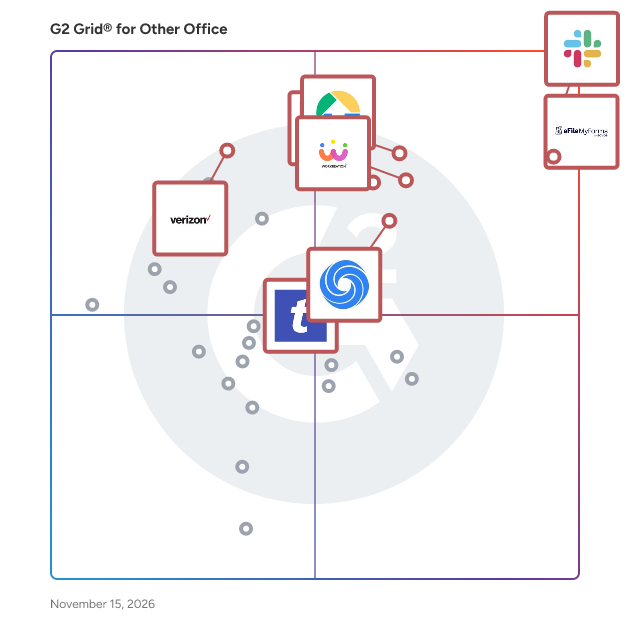
G2 Grid® for Other Office Software

G2 Grid® for Other Office Software plotting products by satisfaction and market presence

Highlighted products: Slack Connector for Jira, Sovos eFileMyForms, Google Drive & Docs for Confluence, Workreation®, Drive Uploader, NoteGPT, TransferNow, and Verizon Business Messaging.

Underlying data: [Grid® JSON](https://www.g2.com/categories/other-office/grids.json?focus%5B%5D=slack-connector-for-jira&focus%5B%5D=sovos-efilemyforms&focus%5B%5D=google-drive-docs-for-confluence&focus%5B%5D=workreation&focus%5B%5D=drive-uploader&focus%5B%5D=notegpt&focus%5B%5D=transfernow&focus%5B%5D=verizon-business-messaging)

PDF to MD

PDF to MD converts PDFs into editable Markdown for notes, documentation, and knowledge workflows. Basic conversion runs locally in the browser without uploading the PDF. Users can review and edit the output before exporting Markdown for tools such as Obsidian and Notion. Optional cloud OCR provides text recognition for scanned documents, while API and MCP access support automated document workflows. Basic conversion is free to try; Pro features and cloud OCR are paid options.

Who Is the Company Behind PDF to MD?

pdftoxlsx

pdftoxlsx converts PDF bank statements into structured Excel and CSV files in under 30 seconds. Built for accountants, bookkeepers, and small businesses who need transaction data out of PDFs without manual re-keying. Supports major US, UK, and Spanish banks including Chase, Bank of America, Wells Fargo, HSBC, Barclays, Santander, BBVA, and 90+ more. Features include OCR for scanned statements, password-protected PDF handling, multi-currency support, and batch conversion of up to 12 statements into one consolidated file. Output columns (date, description, amount, balance, currency) are ready for import into QuickBooks, Xero, FreeAgent, or Sage.

Who Is the Company Behind pdftoxlsx?

PDF to XML Converter Software

PDF to XML Converter Software is a pdf to xml converter for Windows that turns stacks of PDF reports into structured XML your scripts can parse. Every output file follows one documented schema with document, page, heading, paragraph and table elements, and tables are broken into rows and cells. All work happens on your own PC, so no report leaves the machine. 🛠️ How to use 1. Install the program and drag PDF files or a whole folder into the list. 2. Decide whether you need positions and fonts. Tick the coordinates option for block boxes, or leave it off for a lighter text-only file. 3. Press Convert. You get one XML per PDF, named after its source. 4. Point XSLT, Python or your database loader at the output folder. 💼 Why IT and office teams pick it Imports break when every department sends a different layout. This pdf to xml converter keeps the same element names for every file, so a loader written once keeps working. Headings get a level from 1 to 6 based on font size. Each table carries a source attribute that tells you how its grid was found: PDF tags, ruling lines or text alignment. Merged cells keep colspan or rowspan. Text follows reading order, left column before right, and right-to-left lines stay right-to-left. Pages without a text layer are marked scanned="1", so a script can send them to a person. 👥 Who uses it Data engineers and ETL developers feeding report figures into databases. Systems integrators who need to convert PDF to XML for another application. BI analysts, search-index developers and QA testers who check document pipelines. Procurement teams use it to pull supplier price tables into purchasing systems, and layout analysts switch on coordinates to study where each block sits on the page. ❓ FAQ How does the pdf to xml step handle two-column pages? The left column is written first, then the right one. Hebrew and Arabic lines keep their right-to-left order and carry a direction attribute. Can I stop a long batch halfway? Yes. Stop ends the job between two files, and every XML finished before that point stays on disk. Can I convert PDF to XML without uploading files? Yes. The program works offline, and your PDFs stay on your disk. What does the XML look like? A document root with page elements inside. Each page holds headings, paragraphs and tables in reading order, saved as UTF-8 without a byte order mark. Can this pdf to xml converter fill an invoice or XBRL schema? No. It writes its own fixed schema. Mapping to another schema is a job for your XSLT or import script. Is there a command line or API? No. Batches are started by hand in the desktop window, so it cannot run as a server service. 🎁 Free trial: every PDF in a batch gets its first 10 lines or table rows, and the file still passes an XML parser. Runs on Windows desktop and laptop PCs.

Who Is the Company Behind PDF to XML Converter Software?

AI can help you find the answers. G2 helps you trust them.

Connect G2 to Claude or ChatGPT for answers grounded in G2's trusted reviews, comparisons, and pricing from real user insights.

How it works

pdfvera

pdfvera makes small, exact tools for financial files. For Germany, it turns PDF invoices into e-invoices that meet the e-invoicing mandate: XRechnung (UBL and CII) and ZUGFeRD (PDF/A-3, EN 16931). Each one is checked against the official KoSIT rules and comes with a check report. If mandatory data such as the buyer reference or Leitweg-ID is missing, pdfvera asks for it instead of guessing. Free tools: an XRechnung/ZUGFeRD viewer, a KoSIT-based validator and a Leitweg-ID check, all running in the browser without uploading the file. For Brazil, it converts bank statement PDFs (extrato bancário) into OFX for Domínio, Alterdata, Omie and Conta Azul, plus CSV and Excel. Files are only produced when the entries add up to the balances printed on the statement. You can check a PDF for free before converting. Subscription plans; also available as an API and as an MCP server for Claude and other AI assistants.

Who Is the Company Behind pdfvera?

PDMShell

PDMShell is a command-line and workflow automation tool for SOLIDWORKS PDM Professional. Admins and engineers run cleanup, validation, batch processing, workflow and data card tasks with short commands and reusable scripts instead of clicking through files one by one. It covers file operations (check in/out, rename, move, copy, delete, recover), batch actions on search results, reading and updating data card variables, revisions and BOMs, and driving SOLIDWORKS macros from a script. Scripts can be shared as templates, triggered from PDM workflow transitions and menus, or run on a schedule, and a visual editor lets you build them on a canvas. A built-in MCP server lets you run vault operations from Claude Desktop or Codex, with every command reviewed before it runs. Requires SOLIDWORKS PDM Professional. A Free edition and a 7-day Premium trial are available.

Who Is the Company Behind PDMShell?

Pelaa Video Analysis

Pelaa is a native macOS app for coaches to capture, tag, stack, annotate and export game video in one window. Record a game live from a camera, HDMI capture box or stream URL while you tag it, and replay any moment without stopping the recording. Tag events with custom tag windows and keyboard shortcuts, review them on a multi-row Track timeline, send clips to a Stack, draw on stop frames and export single videos, rows or individual clips. Record your voice while you scrub, pause and draw on the video, and Pelaa saves the whole session, drawings and voice-over, as one MP4 on your Mac. A report builder turns tags into count and time tables that update live, with CSV, PDF and PNG export. Tags import and export as XML and CSV. Projects are .pelaa files with the video embedded, kept on your own Mac, so everything works offline. Built from hockey, it works for any sport. Self-serve download with public pricing: EUR 19.99 per month (about USD 23), EUR 199 per year, or EUR 399 Founding Lifetime. Every download starts with a 14-day free trial, no credit card. Requires macOS 12.3 or later.

Who Is the Company Behind Pelaa Video Analysis?

Pentalogic Reminder

Pentalogic Reminder is delivered as a SharePoint web part and an NT Service. Once installed on a SharePoint server you add it to a Web Part Page and then configure it to 'watch' one of your lists and send out Reminder emails according to your requirements.

Who Is the Company Behind Pentalogic Reminder?

PeopleJoy

Who Is the Company Behind PeopleJoy?

  • Seller: PeopleJoy
  • Year Founded: 2016
  • HQ Location: Philadelphia, US
  • LinkedIn® Page: www.linkedin.com
    14 employees on LinkedIn®

PermWatch

Free PERM processing time tracker and estimator for US green card applicants and their employers. Projects the likely PERM decision month from DOL FLAG data, tracks the prevailing wage queue and Visa Bulletin priority dates, updated weekly. Free plan saves one case; Pro $49/year or $79 one-time tracks up to three cases with alerts. Not legal advice. Used by individual applicants and employers tracking PERM cases.

Who Is the Company Behind PermWatch?

PetsVivo for Housing

PetsVivo is the Pet Operating System for hotels and housing properties. We help properties attract, welcome, and retain the most valuable and in-demand demographic right now: pet parents. The PetsVivo platform combines four solutions into one system. Visibility helps properties get discovered by pet owners across Google, AI search engines, and PetCompass, the world's first directory of pet-friendly housing and hotels. Operations automates pet registration, ESA verification, incident tracking, and compliance workflows so teams stop managing pets manually. Protection provides attorney-vetted pet policies, resident and guest attestations, and carve-out insurance coverage for pet-related incidents. Benefits deliver physical and digital amenities, including welcome boxes, free tele-vet access, and local service credits that turn a pet policy into a genuine pet welcome. PetsVivo serves independent and regional multifamily housing operators and boutique and independent hotel owners across the United States. Properties using PetsVivo report higher occupancy, stronger resident and guest retention, reduced liability exposure, and measurable revenue growth from their pet strategy.

Who Is the Company Behind PetsVivo for Housing?

  • Seller: PetsVivo
  • Year Founded: 2024
  • HQ Location: Austin, US
  • LinkedIn® Page: www.linkedin.com
    14 employees on LinkedIn®
Neeraja Prakash
NP
Researched and written by Neeraja Prakash
Updated June 16, 2025