Ainter
Ainter.me is a AI platform that creates icon from transcription.
Who Is the Company Behind Ainter?
- Seller: Ainter
- HQ Location: N/A
-
LinkedIn® Page: www.linkedin.com
1 employees on LinkedIn®
Total Products under this Category: 629
Last updated: November 01, 2026
Why You Can Trust G2's Software Rankings:
G2's software rankings are built on verified user reviews, rigorous moderation, and a consistent research methodology maintained by a team of analysts and data experts. Each product is measured using the same transparent criteria, with no paid placement or vendor influence. While reviews reflect real user experiences, which can be subjective, they offer valuable insight into how software performs in the hands of professionals. Together, these inputs power the G2 Score, a standardized way to compare tools within every category.
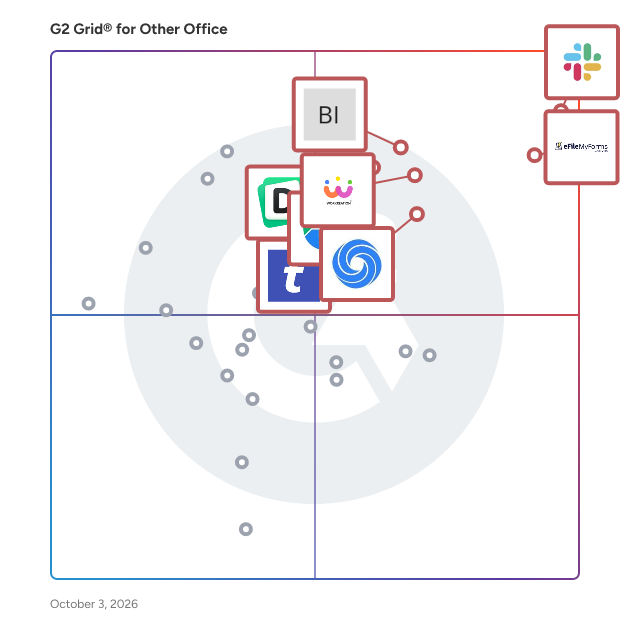
Highlighted products: Slack Connector for Jira, Sovos eFileMyForms, Google Drive & Docs for Confluence, Workreation®, Drive Uploader, NoteGPT, TransferNow, and Diffchecker.
Underlying data: [Grid® JSON](https://www.g2.com/categories/other-office/grids.json?focus%5B%5D=slack-connector-for-jira&focus%5B%5D=sovos-efilemyforms&focus%5B%5D=google-drive-docs-for-confluence&focus%5B%5D=workreation&focus%5B%5D=drive-uploader&focus%5B%5D=notegpt&focus%5B%5D=transfernow&focus%5B%5D=diffchecker)
Ainter.me is a AI platform that creates icon from transcription.
Aircon is an AI-powered air freight quoting platform built specifically for freight forwarders. We automate and accelerate the quoting process so teams can respond in under a minute, even at high volumes. The result is faster response times, improved win rates, and the ability to scale without growing teams. Validated quotes in under 2 minutes
Average Rating: 4.2/5.0
Total Reviews: 3
"Responsive Support and AI-Powered Quoting That Integrates Fast"
Rating: 4.0/5.0 stars
— April P.
"Responsible Support, Direct Contact, Competitive"
Rating: 5.0/5.0 stars
— Verified User in Transportation/Trucking/Railroad
AIRPA Connect is the ultimate productivity app designed for the busy individual. With AIRPA Connect, you're getting: - A modern, intuitive workspace giving you instant access to all your vital links, documents, apps and drives - AI-powered search capabilities across all your apps, including the ability to connect up as many Gmail, Outlook, GDrive, OneDrive and Dropbox accounts as you want - A game-changing tab management solution, powered by AIRPA's game-changing browser extension - A simple way to share groups of links and notes with anybody outside of AIRPA Connect - A smart launchpad for all your essential apps Connect brings all your essentials into one seamless interface, making it easier than ever to stay organised and focused. Why Choose Connect? - Significantly reduce time spent on admin work - Access, organise and find all your info - Stay organised with intuitive categorisation - Collaborate effortlessly across platforms with your peers Make your work and life less about managing admin chaos and more about achieving your goals. Join AIRPA Connect on this journey and experience the future of work and AI with Connect. We are only just getting started and we want to work with YOU, the community, as we build more and more connections to your data. In this connected environment we will bring the full power of market leading AI solutions inside your business. This will give you a platform that rivals that which the big blue chip companies and their people will be using to try to outsmart you.
Connect G2 to Claude or ChatGPT for answers grounded in G2's trusted reviews, comparisons, and pricing from real user insights.
Almeensoft is a specialized software designed to manage accounting systems, particularly the ERP (Enterprise Resource Planning) system. This software provides support for electronic invoicing and electronic receipts. Its primary purpose is to facilitate seamless integration and communication between different departments within a company. Implementing Almeensoft can save valuable time during the initial setup phase. One of the key features of Almeensoft is its ability to manage general accounts. It offers a centralized platform for handling various financial transactions, tracking expenses, and maintaining accurate records. This feature ensures efficient and organized management of a company's financial data. In addition to accounts management, Almeensoft also includes robust inventory management capabilities. It enables effective monitoring and control of stock levels, tracks item movement, and conducts periodic inventory audits. With this functionality, inventory processes can be optimized, and smooth operations within the supply chain can be ensured.
Alliance Virtual Offices provides premium virtual office and telecommunications solutions for companies all over the world. Alliance combines three central components necessary to service mobile and work-from-home professionals: People, Place and Technology.
The All-in-one File Importer for Confluence is a versatile tool designed to streamline the process of importing various document formats into Confluence as pages. By supporting a wide range of file types, this app enhances productivity and simplifies content migration for teams. Key Features and Functionality: - Bulk Import Capability: Efficiently import multiple files simultaneously, saving time and effort. - Wide Format Support: Compatible with numerous file formats, including: - HTML - Markdown (CommonMark, GFM - LaTeX - Open Document Format (ODT - Microsoft Word (docx - reStructuredText (RST - EPUB - DocBook - Various wiki markups - Accurate Content Conversion: Ensures that elements like tables, code blocks, and lists are accurately converted into Confluence pages. Primary Value and User Benefits: The All-in-one File Importer addresses the challenge of integrating diverse documentation formats into Confluence. By automating and simplifying the import process, it reduces manual effort, minimizes errors, and accelerates content migration. This leads to improved collaboration and a more efficient documentation workflow within teams.
AnyCase is an in-place case converter, where you can use shortcuts to convert the text case directly in place without rewriting. +50 Different Windows integrations supported, making it possible to convert Case from uppercase to lowercase, lowercase to uppercase, lowercase to title case, and even toggle case, for those times you started to write with the caps lock on. AnyCase integration lets you convert the case directly in all major browsers such as Google's Chrome, Microsoft Edge, Firefox, Opera, and communication programs such as WhatsApp, Slack, Zoom, in email programs such as Outlook, Thunderbird, Gmail, and many others. Beyond covering all the most popular Windows programs, AnyCase supports case conversions in over 24 different languages and includes a built-in pagination engine. Changing capitalization using AnyCase takes a fraction of a second (~0.3 sec), no matter the program you are working in, in place and without rewriting. Use AnyCase when you want to switch from manually converting, to automatic case conversions across Windows. Shortcuts available: Win+Alt+L – To convert selection to lowercase Win+Alt+U – To convert selection to UPPERCASE Win+Alt+T – To convert selection to Title Case Win+Alt+S – To convert selection to Sentence case Win+Alt+A – To convert selection to AlTeRnAtInG CaPs Win+Alt+O – To Toggle the case of the selected Text You'll be able to convert case in Browser Support - Chrome - Mozilla Firefox - Microsoft Edge - Internet Explorer CMS’s Support - WordPress - Joomla - Drupal - Progress Sitefinity Document Writing / Presentations / Publishing Software / Research Software - Microsoft 360 - Microsoft Word (App + in browser) - Microsoft PowerPoint (App + in browser) - Microsoft Excel (App + in browser) - Microsoft Publisher - OneNote (App + in browser) - Google Docs - Google Slides - Google Spreadsheets - Evernote - Grammarly - EndNote - iA Writer - Affinity Publisher - Scribus - LucidPress - Bibisco - Writemonkey - miro (collaborative whiteboard) E-commerce site support / Web shops / Website Builders - WooCommerce - Squarespace - Shopify - MonsterCommerce - Wix - InfusionSoft - Marketo Marketing (Email Marketing, Social Media Marketing Etc.) - HubSpot - Marketo - InfusionSoft - AWeber - MailChimp - Constant Contact .... and many more (full list on the site) +24 Languages supported!! for Immediate in-place text case conversion (Uppercase to lowercase, lowercase to uppercase etc.
Any Email to PDF Converter Software is an email to PDF converter for Windows that turns saved messages and whole mailboxes into PDF files on your own PC. It reads EML and Outlook MSG files, Outlook PST and OST archives, and MBOX exports from Thunderbird or Apple Mail, all in one batch list. Nothing gets uploaded, and you do not need Outlook or Thunderbird installed to convert email to PDF. Most mail tools save one message at a time. This email to PDF converter treats a folder of mixed files as one job and writes a separate document for every message it finds, so the PDF count matches what went in. 🛠️ How to use 1. Drag messages or a whole export folder into the window, or click Add Files. 2. Pick PDF as the format. Keep one file per message, or tick Merge all into one PDF. 3. Leave Include images on to keep inline pictures, or switch it off for lighter pages. 4. Click Start. PST, OST and MBOX containers unfold into the queue folder by folder, and each row shows OK once its PDF is written. 💼 Why IT and office teams pick it Mixed exports are the usual headache. One folder holds a few MSG files someone dragged out of Outlook, an old PST from a retired laptop and an MBOX from a Thunderbird profile. This tool takes the whole mix in one run, and nobody has to open archive subfolders by hand because the program walks through them. Each PDF opens with a From, Date, To and Subject header above the body, so a printed message still shows who wrote it and when. Work stays on the desktop, which matters for privileged or personal mail. HTML and plain TXT output are there too, for a web copy or for feeding text into a search index. 👥 Who uses it Legal and compliance staff building disclosure sets. HR teams filing a departed employee's mailbox. IT admins retiring old archives during a move away from Outlook or Thunderbird. Anyone who inherited a mailbox backup and simply wants to read and keep parts of it. A paralegal with a single custodian PST and an office manager with a decade of Thunderbird mail can use the same email to PDF converter for both. ❓ FAQ Can it open a PST without Outlook? Yes. The program reads PST and OST files itself, so Outlook does not have to be installed or running. Does it convert a whole mailbox at once? Yes. Add a PST, OST or MBOX and every message from every folder is queued automatically. Can several emails go into one PDF? Yes. Turn on the merge option, and you can also start each email on a new page. Is my mail sent to a server? No. Reading the source and rendering the PDF both happen on your PC. What if PDF is not the right output? Switch the format to HTML for a browser copy or TXT for bare text. Email to PDF stays the default because a PDF opens anywhere without a mail program. 🖥️ Free trial with no sign-up. Runs on Windows 11 and Windows 10, with 4 GB of RAM and 1 GB of free disk space recommended.
AnyRec PhoneMover is your all-in-one phone transfer and manager. You can directly switch files between your iPhone, iPad, iPod, Android, and your computer via a USB connection. It is your best iTunes alternative. You even can transfer and manage iPhone and iPad files without restrictions. Key Features: 1. Manage Files You can transfer, edit, add, delete, change, duplicate, play, and explore more phone management tools within PhoneMover. Find and delete duplicate files to free up storage space on your phone. Moreover, you can merge duplicated contacts here. 2. Restore and Back Up Contacts Restore contacts on iPhone and Android without losing data. You can import contacts from the previous backup in one click. And You can back up your entire contact list between iPhone, Android, and your computer without iCloud or iTunes. 3. Create Ringtone Create your unique ringtone with any song stored on your phone or computer. It works for both iOS and Android users. 4. Convert HEIC Convert HEIC to JPEG or PNG photos while keeping EXIF data. You can convert HEIC photos from your phone or computer freely.
Anytom is an easy to use Microsoft Teams Plug-in, which allows to share any frameable website for all participants. This opens plenty of possibilities.
An online calculator is a digital tool that allows you to perform mathematical calculations on the internet. It is a convenient and accessible way to perform a variety of mathematical functions, including addition, subtraction, multiplication, division, exponents, and more complex functions such as logarithms and trigonometric functions. Online calculators can be accessed through a web browser on any device that is connected to the internet, including computers, tablets, and smartphones. They are available for free or for a fee, depending on the complexity and functionality of the calculator. Online calculators can also be specialized for specific purposes, such as calculating mortgages, loan payments, or investment returns. Some online calculators have advanced features, such as graphing capabilities, and can be used for more complex calculations such as statistical analysis. Overall, online calculators offer a fast, easy, and accurate way to perform mathematical calculations and are a useful tool for students, professionals, and anyone who needs to perform mathematical computations.
Apple Mail to PST Converter Software is a small Windows utility for one moment in the life of a mailbox: the day its owner trades a Mac for a PC. As an apple mail to pst converter it takes the message store copied out of macOS Mail and produces an Outlook data file, so a decade of correspondence arrives on the new laptop with folders and attachments in order. The work happens on the local disk with no internet connection needed, and the old Mac can already be wiped. 🛠️ How to use it 1. On the Mac, grab the Mail library folder or run Export Mailbox, then carry the copy over on a flash drive. 2. Launch the program on Windows and add individual EMLX messages, MBOX mailboxes or a complete directory. 3. Keep the merge box cleared to receive one output per source, or tick it to gather everything into a single file where each source sits in a separate top-level folder. 4. Set a target location and click Start. 5. Attach the finished file in Outlook as an extra data file and browse it like any other mailbox. 💼 Why IT and office teams pick it The result is a Unicode PST that was verified in Outlook 2016. Cyrillic or other non-Latin subjects, HTML bodies, plain text, sender and recipient lists, timestamps, read status and attached files stay as they were. Input copies are opened read-only. Outlook may stay closed, or be absent from the machine, while the job runs. Mail is never sent to a third-party server, which matters when the mailbox holds contracts or HR letters. 👥 Who uses it Home users and freelancers who switch platforms and refuse to lose old threads. Help desk staff who inherit a leaver's Mac and must deliver that person's mail to a manager on Windows. Archivists of family or company history holding years of Mac mail exports on backup drives. ❓ FAQ Can Outlook on Windows open Mac mail files directly? No. Outlook reads PST, not the EMLX and MBOX files macOS Mail writes. An apple mail to pst step in between turns them into something Outlook can attach. Will my Mac folder structure survive? Yes. Mailboxes keep their folder tree, and when several sources are merged each one gets its own top-level folder, so identical names do not clash. Does it handle Outlook for Mac archives? No. Outlook for Mac exports OLM, a separate format. This EMLX to PST tool reads only the built-in Mail app of macOS. Is a Mac required during conversion? No. The Apple Mail to PST Converter runs on Windows and needs only the copied files, so it works after the Mac is returned or erased. Can I check the output before paying? Yes. Run the trial on a real mailbox, attach the result in Outlook and look through the folders yourself. Licensing for this apple mail to pst converter can wait until you are satisfied. ✅ The free trial processes mailboxes of up to 20 messages completely and a sample of bigger ones (10 percent, capped at 100 messages). Works on Windows 11, 10, 8.1, 8 and 7, 32 or 64 bit, with 4 GB of RAM.
Archerbase helps business brokers manage buyers through every stage of a confidential business sale. Brokers use it to capture inquiries, qualify buyers, collect signed NDAs, share documents securely, and track engagement.
