PanKM
Integrated Knowledge Enterprise under a single platform.
Who Is the Company Behind PanKM?
- Seller: PanApps Inc.
- Year Founded: 1993
- HQ Location: Sterling, US
-
LinkedIn® Page: www.linkedin.com
207 employees on LinkedIn®
Total Products under this Category: 112
Last updated: October 24, 2026
Why You Can Trust G2's Software Rankings:
G2's software rankings are built on verified user reviews, rigorous moderation, and a consistent research methodology maintained by a team of analysts and data experts. Each product is measured using the same transparent criteria, with no paid placement or vendor influence. While reviews reflect real user experiences, which can be subjective, they offer valuable insight into how software performs in the hands of professionals. Together, these inputs power the G2 Score, a standardized way to compare tools within every category.
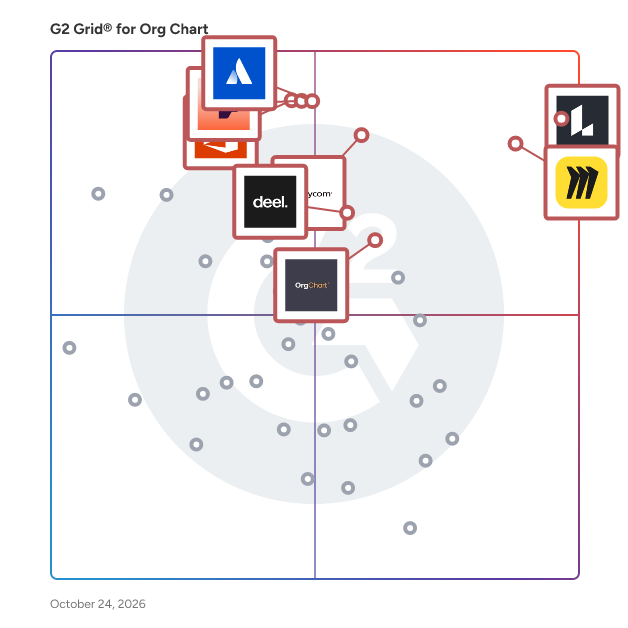
Highlighted products: Lucid Visual Collaboration Suite, Miro, Paycom, Atlassian Atlas, Personio, Visio, Deel HR, and OrgChart.
Underlying data: [Grid® JSON](https://www.g2.com/categories/org-chart/grids.json?focus%5B%5D=lucid-software-inc-lucid-visual-collaboration-suite&focus%5B%5D=miro&focus%5B%5D=paycom&focus%5B%5D=atlassian-atlas&focus%5B%5D=personio&focus%5B%5D=visio&focus%5B%5D=deel-hr&focus%5B%5D=orgchart)
Integrated Knowledge Enterprise under a single platform.
PeopleGuru™ solves complex payroll challenges with a personalized enterprise-level HCM that delivers all the enterprise features, security, and compliance without the enterprise price tag. With fully configurable workflows that scale and adapt as your business changes, you don’t have to pay for costly upgrades or switch systems every year. Backed by award-winning, U.S.-based support, we guarantee fast responses and treat you like a client—not a number in a queue. Clients choose us because we adapt to them, not the other way around. So if you’re tired of the same old systems and demand accurate payroll with fast, responsive support —PeopleGuru™ can help.
Average Rating: 4.4/5.0
Total Reviews: 28
AI-generated summary from verified user reviews
"Streamlined HR Operations, Minor Reporting Hiccups"
Rating: 4.0/5.0 stars
— Lim H.
Rating: 4.5/5.0 stars
— Mahe z.
Connect G2 to Claude or ChatGPT for answers grounded in G2's trusted reviews, comparisons, and pricing from real user insights.
The GPS for your organization: compliments your existing org chart and employee directory by combining them into one.
This will keep your marketing, sales, and UX teams focused on the same people, whether they prefer to use marketing segments, user personas, or both.
Design processes and org charts in one app. Link roles to process steps for instant clarity on what happens and who's responsible.
Relationship Map Features - Why and How We Help You Sell
Rolebase is the missing link between written culture and internal meetings. A lot of companies are faced with these issues: - Documentation is incomplete (it takes time and focus to do so) - Documentation is hard to find (is it in Private, is it tagged correctly?) - Meetings don't generate as much values as they should! - It's hard to find who does what and everyone stays in a silo We tackles this issues by giving a framework for meetings so they're: a) better prepared b) generate documentation on the go with the help of AI c) ensures next steps And we make it all easily searchable and linked to teams that can be displayed on an org chart.
We are a Mexican Enterprise, specialized in Saas solutions and consulting services and focused in improving the Human Resources management and with the goal of generating original solutions, sick for the common good, listen and expressing with respect and exceed the standards and expectations of our clients which, along more than 33 years of experience, in total are more than 1500 adding up a total of 1,000,000 employees managed by our solutions. Our services are divided in modules that can be purchase separately, such as Organizational Control, which helps keeping the structure of your organization in order based on the positions, Payroll, which helps to report to “Hacienda”, a governmental organization, the earns of the employees as well as saving fund, IMSS, vouchers among others, Attendance and Access, which helps in registering the entrance, absences and extra hours of the workers as well as it projects this information in the Payroll, Kiosco RH, which is a platform that help improving the internal communications in the organization.
What Skailer is Skailer is a full-cycle HR and People Intelligence platform that runs HR Core, ATS, Performance Reviews, Surveys, Compensation & Benefits, and E-sign in one connected system, built on a single data model. At the center is a digital twin of the company: roles, grades, org structure. Once that's set up, the platform knows what should happen when someone is promoted, transferred, or moves department, and it triggers the matching workflow and access rights on its own. No manual sync between systems, no separate IT ticket for access changes. This works because every module sits on one data model. A change to an employee's grade in one place is visible and actionable everywhere else immediately, not after a nightly sync job. The problem Most HR teams run five to eight separate tools: an ATS, a performance system, a survey tool, payroll, a document workflow, sometimes a spreadsheet holding the org chart together. Every tool added increases license cost, integration work, and the number of places data can drift out of sync. Some companies respond by building internal tools on Jira, because their own engineers understand the company better and move faster than a vendor. Others avoid younger HR-tech vendors entirely, because a lot of HR-tech startups don't survive long enough to be a safe bet. HR as a function isn't built for early adoption. It's built to avoid risk. Underneath the tool count is a second problem that doesn't show up in a demo: the volume of manual, invisible work. Document routing, access changes tied to a role change, compliance checks, approval chains. That work is the actual daily cost of running HR, and it's the reason most companies switch platforms. Why "People Intelligence" Skailer calls this layer People Intelligence rather than People Ops, because People Ops means different things to different teams: strategic partnering for some, an invisible operational backend for others, a specific bucket of payroll and compliance for a third group. People Intelligence describes the actual mechanism: a layer that sees the company's structure and roles, and runs the operational side of HR from that single source of data. Workflows: the engine underneath Workflows connects every module and takes over the part of HR operations that most companies run through an ERP, or through a patchwork of shared docs and Slack approvals: multi-step sign-off chains, document generation and signing, compliance checks tied to a role or location, access provisioning triggered by an org change. Skailer doesn't replace an ERP end to end. It takes over the HR-specific slice of that work, which is usually the part duct-taped together between systems that were never designed to talk to each other. Full-cycle HR, module by module The term "full-cycle HR" gets used loosely across the market, often narrowed down to hire, onboard, offboard. That skips the middle of the cycle, where most of the recurring work actually lives. Skailer's scope: HR Core — employee records, org structure, roles and grades, the digital twin itself ATS — recruiting and hiring, connected to the same role and org data Performance Reviews — cycles, goals, feedback tied to the same employee profile Surveys — engagement and pulse data feeding back into the same system Role model — the field-based structure that drives access and workflow logic Compensation & Benefits — comp bands and benefit rules tied to grade and role E-sign — contracts and documents signed inside the same workflow, not a separate tool Analytics Skailer ships with dashboards covering total monthly salary, salary growth, headcount growth by department, and hiring close time. These are part of the core platform, not a paid add-on or a BI tool layered on top later. HR teams get the numbers finance and leadership ask for without exporting anything to a spreadsheet first. Who this is built for Companies with 200 to 1,500 employees, running multiple legal entities, countries, or time zones. Remote or hybrid teams. Common industries: product-led IT, SaaS, fintech, e-commerce. What's different about the setup Point solutions solve one problem well and leave the integration work to you. Enterprise systems solve most problems but come with an implementation project measured in months and a dedicated consultant to configure. Skailer sits in between: enterprise-depth configuration inside a single platform, without the multi-month rollout. When the company adds a legal entity, a country, or a few hundred people, the existing setup holds. No re-implementation project. Where the architecture is headed The same data model and role-based permission structure that runs Workflows today is also what would let the platform support more automation safely later, agents included. Anything acting on HR data on its own needs a permission layer this precise, or it can't be trusted with sensitive employee data. Skailer isn't shipping agent features yet. The architecture is built so that when it does, access control doesn't need to be rebuilt from the ground up.
Average Rating: 4.5/5.0
Total Reviews: 2
"Flexible ATS That Brings Hiring Into Focus"
Rating: 5.0/5.0 stars
— Jane S.
"Thanks for providing amazing service!"
Rating: 4.0/5.0 stars
— Verified User in Financial Services
Sprooster is an employee directory and org chart that syncs from your identity provider or HR system and stays up to date on its own. When someone joins, leaves, changes title, or moves to a new manager, the chart updates on the next sync. It is for companies of any size that keep their org chart in a slide deck or a spreadsheet today. An admin connects a directory or uploads an HR export, and setup is five steps. Without a directory, people can be added by name and a directory connected later. Everyone in the company then has one place to see who is who: the org chart, a searchable directory with profiles, teams that cut across reporting lines, and a home page that shows what changed. Admins choose which fields sync and correct anything the directory gets wrong. They publish views of the chart to the audiences they choose, with exports in common presentation and diagram formats.
Product Description Steegle.One is the modern, branded intranet built exclusively for Google Workspace — the easiest, fastest, and most secure way to connect your organization. Designed and developed by Steegle.com, a certified Google Workspace Partner and the world’s #1 Google Sites intranet provider, Steegle.One helps organizations of every size — from ambitious SMEs to global enterprises with over 10,000 users — transform Google Sites into a powerful, unified digital workplace. Trusted across industries including healthcare, education, nonprofits, professional services, energy and utilities, retail, hospitality, and multinational enterprises, Steegle.One empowers employees to work smarter, stay informed, and feel connected. It replaces scattered communication with a polished, centralized hub that enhances engagement, improves productivity, and strengthens organizational culture — all within the secure and familiar Google environment teams already use every day. Key Features and Functionality Steegle.One combines simplicity and innovation in one beautiful, branded platform. It includes an employee directory and organizational chart for seamless connection, a news manager for company updates, employee recognition tools to celebrate success, and custom forms to simplify everyday tasks. Optional modules like workflow automation, ticketing, and data reporting dashboards (powered by Looker Studio) extend functionality even further. Every feature integrates directly with Google Drive, Docs, Calendar, Maps, and Directory, creating a single source of truth that’s easy to manage and even easier to use. Because Steegle.One runs entirely inside your Google Workspace, there’s no external hosting, no complex setup, and no additional security risk — only speed, scalability, and total control. Mobile apps ensure your intranet travels with you, keeping teams connected wherever work happens. Primary Value and Benefits Built on Google’s enterprise-grade infrastructure, Steegle.One delivers uncompromising protection and compliance with HIPAA, SOC 2, ISO 27001, and GDPR standards. It’s the smart choice for organizations that want an intranet that’s fast to deploy, effortless to maintain, and beautifully branded. By combining security, affordability, and innovation, Steegle.One transforms how your teams communicate, collaborate, and celebrate success — giving every employee a more connected, productive, and engaging workplace experience.
Average Rating: 5.0/5.0
Total Reviews: 1
"Springboard Intranet for Google Workspace"
Rating: 5.0/5.0 stars
— Lashika H.
Stracl (Software as a Service) lets users engage, communicate, train and map to prepare their project stakeholders, manage change risks, improve future state adoption, and support benefits realization. Launched in 2021, Stracl is helping global organizations with their Business Transformations and Change Initiatives.
TeamChart is a simple, purpose-built app for creating, planning, and sharing org charts. It helps People teams, founders, managers, operators, and consultants clearly show how an organization is structured without relying on spreadsheets, slide decks, or general-purpose diagramming tools. You can build an org chart from scratch, start with a ready-made template, or import existing organization data from a CSV or XLSX file. Add people, positions, teams, departments, descriptions, and reporting lines, then update the chart visually as the organization changes. TeamChart can also be used to plan hiring, reorganizations, and future team structures. Duplicate an existing chart to explore a new structure without changing the current version. Charts can be shared through a read-only public link, embedded in another website, or exported as PNG, PDF, or CSV. You can also focus on a specific team or branch when you only need to share part of the organization. The goal of TeamChart is to make org
