Best Online Form Builder Software - Page 18

How Many Online Form Builder Software Products Does G2 Track?

Total Products under this Category: 479

Category Stats (Sep 2026)

  • Average Rating: 4.48/5 The average rating of products in this category, based on all submitted ratings
  • Top Trending Product: Rizer (+6.25%) - Among all products in this category, Rizer recorded the largest rating increase compared to last month

Last updated: September 01, 2026

How Does G2 Rank Online Form Builder Software Products?

Why You Can Trust G2's Software Rankings:

  • 30 Analysts and Data Experts
  • 110,300+ Authentic Reviews
  • 479+ Products
  • Unbiased Rankings

G2's software rankings are built on verified user reviews, rigorous moderation, and a consistent research methodology maintained by a team of analysts and data experts. Each product is measured using the same transparent criteria, with no paid placement or vendor influence. While reviews reflect real user experiences, which can be subjective, they offer valuable insight into how software performs in the hands of professionals. Together, these inputs power the G2 Score, a standardized way to compare tools within every category.

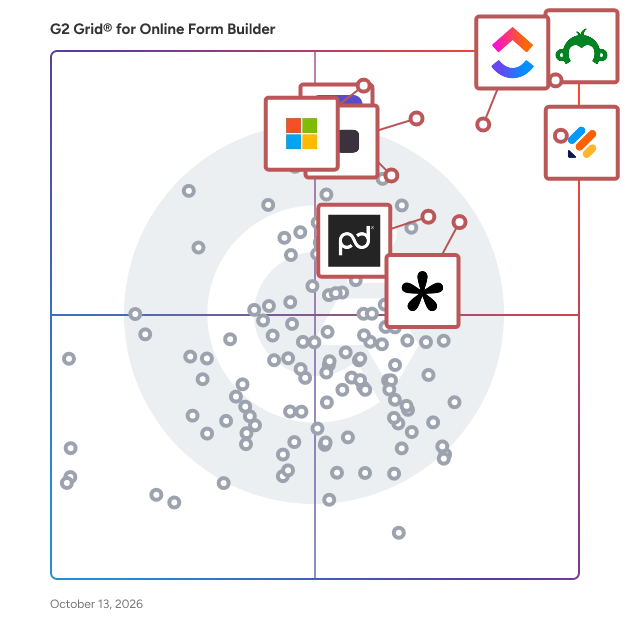
G2 Grid® for Online Form Builder Software

G2 Grid® for Online Form Builder Software plotting products by satisfaction and market presence

Highlighted products: SurveyMonkey, Jotform, ClickUp, Typeform, Microsoft Forms, Tally, ActiveCampaign, and Adobe Acrobat Sign.

Underlying data: [Grid® JSON](https://www.g2.com/categories/online-form-builder/grids.json?focus%5B%5D=surveymonkey&focus%5B%5D=jotform&focus%5B%5D=clickup&focus%5B%5D=typeform&focus%5B%5D=microsoft-forms&focus%5B%5D=tally-forms-tally&focus%5B%5D=activecampaign&focus%5B%5D=adobe-acrobat-sign)

ArcLab Web Form Builder

Arclab Web Form Builder the online form creation software for Windows PC to create php and MySQL forms with ease. Build single or multi-page HTML online forms on your Windows PC and upload the forms to your own website.

Who Is the Company Behind ArcLab Web Form Builder?

  • Seller: Arclab
  • Year Founded: 2019
  • HQ Location: Wiesent, de
  • Twitter: @arclabsoftware
    68 Twitter followers
  • LinkedIn® Page: www.linkedin.com
    2 employees on LinkedIn®

Aroopa Forms

Aroopa Forms is a cloud-based, web-based form builder for building anything from a simple contact form to a complex multi-step form with conditional logic and workflows. Forms can be public, private, or embedded, and can be embedded into Shopify, Wix, Squarespace, or any website. Beyond standard forms, it supports calculators, calendar scheduling, quotation builders, surveys, and assessments — and connects to 100+ third-party tools through Aroopa Flows. What it does Aroopa Forms is a cloud-based, web-based online form builder — no installation required, build and publish from any browser. Public, Private, and Embed Form Types Control how each form is accessed: Public forms – shareable via a link, open to anyone Private forms – restricted access for internal or invite-only use Embed forms – placed directly inside a website or app rather than hosted on a standalone page Simple to Multi-Step Forms Build a single-page form in minutes, or a multi-step form that guides respondents through several stages — useful for longer applications, onboarding flows, or detailed intake processes. Advanced Conditional Logic Show, hide, or branch form fields and steps based on a respondent's previous answers, so each person only sees the questions relevant to them. Workflows Trigger actions based on form submissions — for example, routing a submission, sending a notification, or kicking off an approval process — rather than a form that just collects data with no follow-up action. Website & Platform Embedding Embed forms directly into Shopify, Wix, Squarespace, or any other website, so the form lives inside your existing site rather than sending visitors to a separate page. Beyond Standard Forms: Calculators, Scheduling, Quotation Builders Aroopa Forms isn't limited to basic data collection. Use the same builder to create: Calculators – interactive forms that compute a result (pricing, eligibility, estimates) from user input Calendar scheduling – booking and appointment scheduling forms Quotation builders – forms that generate a quote based on selections and inputs Surveys & Assessments Build surveys and assessments using the same form engine — useful for feedback collection, research, quizzes, or scored evaluations. 100+ Integrations via Aroopa Flows Push form submission data to 100+ third-party tools and services through Aroopa Flows, Aroopa's automation and integration layer, so form data flows into whatever CRM, spreadsheet, email tool, or other system you already use. Who it's for Businesses that need everything from a simple contact form to a complex multi-step application form, without switching tools Shopify, Wix, and Squarespace store owners who need forms embedded directly into their existing website Teams that need calculators, quotation builders, or scheduling forms, not just basic data collection Anyone running surveys, assessments, or quizzes and wanting the results connected to their other business tools Teams that need form data pushed automatically into a CRM, spreadsheet, or other system via integrations FAQ Can I make a form public, private, or embedded on my own site? Yes. Aroopa Forms supports public forms (shareable link), private forms (restricted access), and embed forms placed directly on a website. Can I embed a form into my Shopify, Wix, or Squarespace site? Yes. Forms can be embedded into Shopify, Wix, Squarespace, or any other website. Does it support multi-step forms, not just single-page forms? Yes. You can build simple single-page forms or complex multi-step forms with conditional logic guiding respondents through multiple stages. Can form fields change based on a respondent's answers? Yes. Advanced conditional logic lets you show, hide, or branch fields and steps based on previous responses. Can I build something other than a standard form, like a calculator or quote builder? Yes. The same builder supports calculators, calendar/appointment scheduling forms, and quotation builders, in addition to standard forms. Does Aroopa Forms support surveys and assessments? Yes. Surveys and assessments can be built using the same form engine. Can form submissions trigger a workflow? Yes. Workflows can route submissions, send notifications, or trigger approval steps automatically when a form is submitted. Can I connect form data to other tools I use? Yes. Aroopa Flows connects Aroopa Forms to 100+ third-party integrations, so submission data can be pushed to your CRM, spreadsheet, email tool, or other systems. Is Aroopa Forms cloud-based? Yes. It's fully cloud-based and web-based — build, publish, and manage forms from any browser, with nothing to install.

Who Is the Company Behind Aroopa Forms?
BEEKAI

You can now build form applications with simple, interactive visual flow diagrams. Requires no coding and is built with the best-in-class user experience.

Who Is the Company Behind BEEKAI?

Beetle Eye

Beetle Eye streamlines CRM and marketing tools in order to provide one powerful platform that helps you grow your business

Average Rating: 5.0/5.0

Total Reviews: 1

Who Is the Company Behind Beetle Eye?

  • Seller: Beetle Eye
  • Year Founded: 2017
  • HQ Location: Sarasota, US
  • Twitter: @btleye
    3 Twitter followers
  • LinkedIn® Page: www.linkedin.com
    1 employees on LinkedIn®

Who Uses This Product?

  • Company Size: 100% Small

What Are Recent G2 Reviews of Beetle Eye?

betterform

Forms simply for everyone - betterform is simple and intuitive forms that just work anywhere on your website without the hassle. Forget spending hours setting up custom form handling and notifications. Our forms are a breeze to set up on any tech stack, and even easier to maintain. It's like being on submission auto-pilot. With a small footprint of only 1.2KB zipped, betterform will work and scale with even the most performance-minded websites. Better yet, you own your data, because no one else should. Betterform? I think so.

Who Is the Company Behind betterform?

Bit Form

Bit Form is a WordPress form builder plugin with a ultra lightweight, drag-and-drop builder that lets users create powerful contact forms, payment forms, event registrations, and multi-step forms.

Who Is the Company Behind Bit Form?

Briefing.nl

Briefing is the modern way to create, share, and manage online forms. From smart applications to streamlined internal processes, Briefing helps you create forms that work. For you, your team, and your target audience. The company is headquartered in the Netherlands.

Who Is the Company Behind Briefing.nl?

Brieform

Brieform is an AI-native online form builder. Instead of a drag-and-drop canvas, you describe the form you want in plain English and Brieform builds it natively — fields, validation, conditional logic and multi-step flows — no plugins or integrations required. Every form gets a shareable public link (or embed) so you can collect and store responses directly in Brieform, with built-in analytics on views and conversions. What sets Brieform apart is where the builder lives: it ships as a Model Context Protocol (MCP) server, so you create, edit and publish forms — and read submissions back — from inside your AI assistant (Claude, ChatGPT, Cursor, Le Chat, VS Code). The same assistant can tag and route incoming responses. Build a working form in under 90 seconds, entirely in natural language. Best for solopreneurs, freelancers, agencies and small teams who want lead-capture, intake, feedback and survey forms without learning a new tool. EU-hosted with a native GDPR field. Free to start.

Who Is the Company Behind Brieform?

Captisa Forms

Captisa lets users create online forms. Users can develop forms to generate leads, conduct customer surveys, find applicants for a job, or register guests for an event, Captisa's easy-to-use form builder lets users build a customized online form to fit your exact needs in minutes.

Who Is the Company Behind Captisa Forms?

CaptureIQ

CaptureIQ is an advanced AI-powered form builder designed to go far beyond traditional form tools. At its core, it allows you to generate fully functional, optimized forms instantly using AI—whether it’s a survey, feedback form, lead qualification flow, or a graded quiz. Unlike static builders, every CaptureIQ form can adapt to your needs with AI refinements, ensuring your forms are always optimized for your specific goals. One of the most powerful features inside CaptureIQ is Leads Intelligence Mode, built specifically for businesses that want to capture and qualify leads. By analyzing your website or business description, CaptureIQ understands your Ideal Customer Profile (ICP), key demographics, and priority attributes. Based on this, it automatically generates lead qualification questions and assigns intelligent scoring to responses—giving higher weight to answers that matter most to your business. When it comes to analyzing collected data, CaptureIQ offers Smart Analytics powered by AI. Beyond showing you basic stats like visits, starts, submissions, and completion rates, it goes deeper with Sentiment Analysis, which detects whether responses are positive, negative, or neutral. It also performs Topic and Subtopic Clustering on open-ended responses, helping you instantly see key themes emerging from customer feedback without manual sorting. This turns raw text responses into structured, actionable insights that reveal exactly what your audience is thinking. To make insights even more accessible, CaptureIQ introduces Ask AI, an assistant built directly into your results dashboard. Instead of manually sifting through data, you can simply ask questions in natural language—such as “What are the main concerns customers raised?” or “Which city gave the most positive feedback?”—and the AI will summarize findings instantly. This empowers businesses to move from data collection to decision-making in seconds, without requiring a data team. All of this intelligence is wrapped in a platform that makes sharing forms effortless. CaptureIQ gives you a direct link as soon as a form is published, but also provides advanced options like branded short links with your own domain, QR codes (including fully branded QR codes with logos and colors), and Open Graph Preview customization for social media sharing. You can even embed the first question directly in email campaigns to improve participation rates. Combined with access controls like setting expiration dates or response limits, your forms remain both professional and manageable. Ultimately, CaptureIQ is not just a form builder—it’s an AI-driven insights engine. From creation to distribution to deep analytics, it helps businesses save time, improve lead quality, understand customer sentiment, and extract actionable intelligence at scale. Whether you’re qualifying leads, running campaigns, collecting feedback, or analyzing audience behavior, CaptureIQ transforms simple forms into powerful tools for growth.

Who Is the Company Behind CaptureIQ?

Chekkit

Chekkit is an all-in-one platform that helps local businesses grow faster with less effort. It combines AI-powered messaging and automation with the tools teams use every day—review management, business text messaging, groupchat, a centralized inbox, textable landline, customer surveys, competitive benchmarking, and more—so you can boost engagement, convert more leads, and outperform the competition from one place.

Average Rating: 4.9/5.0

Total Reviews: 154

How Do G2 Users Rate Chekkit?

  • Has the product been a good partner in doing business?: 9.8/10 (Category avg: 9.1/10)

Who Is the Company Behind Chekkit?

  • Seller: Chekkit
  • Year Founded: 2016
  • HQ Location: Winnipeg
  • Twitter: @getchekkit
    204 Twitter followers
  • LinkedIn® Page: www.linkedin.com
    9 employees on LinkedIn®

Who Uses This Product?

  • Who Uses This: Owner, Manager
  • Top Industries: Retail, Luxury Goods & Jewelry
  • Company Size: 90% Small, 10% Medium

What Do G2 Reviewers Say About Chekkit?

AI-generated summary from verified user reviews

Pros
  • Users value the AI integration of Chekkit, enhancing their websites with unique chatbot capabilities for improved customer interaction.
  • Users appreciate the innovative AI chatbot feature of Chekkit, setting their website apart in the industry.
  • Users find the unique chatbot integration feature of Chekkit enhances their website's functionality and user engagement.
  • Users value the integration capabilities of Chekkit, allowing unique features like chatbots on their websites.
Cons
  • Users find the limited communication options of Chekkit frustrating, as responding to guests is only possible through text.
  • Users are frustrated by the limited chat functionality, only allowing responses to guests via text.
  • Users find the limited response options to guests via text to be restrictive and inconvenient.
  • Users find the poor chat functionality of Chekkit limiting, as text responses are the only option for communication.

What Are Recent G2 Reviews of Chekkit?

What Are G2 Users Discussing About Chekkit?

Clickiny

Clickiny is a powerful, easy-to-use platform designed to help businesses and individuals create dynamic forms, quizzes, and surveys effortlessly. Whether you're generating leads, collecting customer feedback, or conducting research, Clickiny offers a seamless experience with smart logic, audience segmentation, and automation features.

Average Rating: 4.5/5.0

Total Reviews: 2

How Do G2 Users Rate Clickiny?

  • CMS Support: 9.2/10 (Category avg: 8.5/10)

Who Is the Company Behind Clickiny?

Who Uses This Product?

  • Company Size: 100% Small

What Do G2 Reviewers Say About Clickiny?

AI-generated summary from verified user reviews

Pros
  • Users value the quick access to design customization offered by Clickiny, enhancing their creative efficiency.
  • Users appreciate the design customization options in Clickiny, enabling quick access to tailored solutions.
  • Users value the quick access to design customization, enhancing their overall experience with Clickiny.
  • Users find the amazing features of Clickiny enhance their experience and enjoyment of the product.
  • Users love the amazing features of Clickiny, enhancing their overall experience and satisfaction.
Cons
  • Users frequently experience slow loading times with Clickiny, impacting overall efficiency and usability of the application.
  • Users experience slow performance, which hampers efficiency and can lead to frustration when using Clickiny.

What Are Recent G2 Reviews of Clickiny?

Clipform

Clipform is a video-first form builder. Every question can be a short video, and respondents reply by video, audio, or text. Build interactive quizzes, surveys, and lead-capture forms, then embed them anywhere - no code required.

Who Is the Company Behind Clipform?

Neeraja Prakash
NP
Researched and written by Neeraja Prakash
Updated April 9, 2026