Best Mobile Forms Automation Software - Page 15

How Many Mobile Forms Automation Software Products Does G2 Track?

Total Products under this Category: 278

Category Stats (Nov 2026)

  • Average Rating: 4.43/5 The average rating of products in this category, based on all submitted ratings
  • Top Trending Product: SurveyCTO (+0.98%) - Among all products in this category, SurveyCTO recorded the largest rating increase compared to last month

Last updated: November 01, 2026

How Does G2 Rank Mobile Forms Automation Software Products?

Why You Can Trust G2's Software Rankings:

  • 30 Analysts and Data Experts
  • 6,700+ Authentic Reviews
  • 278+ Products
  • Unbiased Rankings

G2's software rankings are built on verified user reviews, rigorous moderation, and a consistent research methodology maintained by a team of analysts and data experts. Each product is measured using the same transparent criteria, with no paid placement or vendor influence. While reviews reflect real user experiences, which can be subjective, they offer valuable insight into how software performs in the hands of professionals. Together, these inputs power the G2 Score, a standardized way to compare tools within every category.

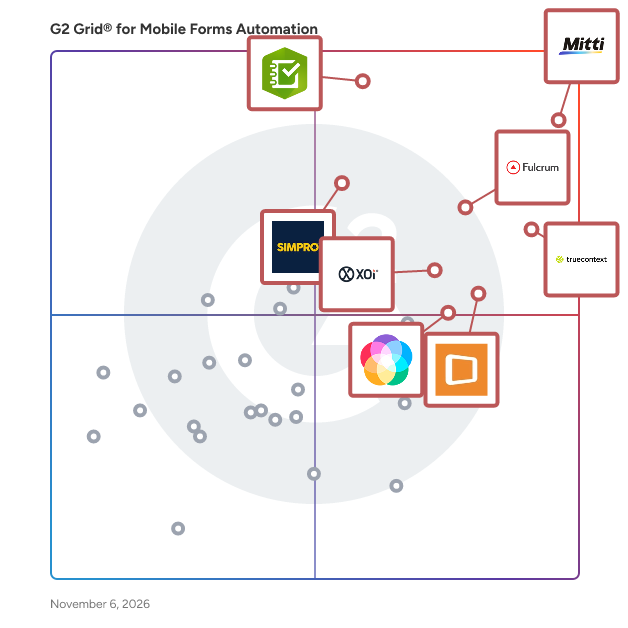
G2 Grid® for Mobile Forms Automation Software

G2 Grid® for Mobile Forms Automation Software plotting products by satisfaction and market presence

Highlighted products: Mitti (by SafetyCulture), TrueContext, ArcGIS Survey123, Fulcrum, Appenate (formerly Forms On Fire), Simpro, XOi, and Lumiform.

Underlying data: [Grid® JSON](https://www.g2.com/categories/mobile-forms-automation/grids.json?focus%5B%5D=safetyculturehq&focus%5B%5D=truecontext&focus%5B%5D=arcgis-survey123&focus%5B%5D=fulcrum&focus%5B%5D=appenate-formerly-forms-on-fire&focus%5B%5D=simpro&focus%5B%5D=xoi&focus%5B%5D=zyp-one-gmbh-lumiform)

Omnidek

Omnidek is an easy-to-use, intuitive Work Process Management platform that centralizes control over repetitive processes for any industry and every team. Create seamless, fast workflows with real-time approvals and business driven chat, drag and drop to build any form or app with reporting on every process. Always see exactly what you need to know using conditional notifications to move work forward. The ultimate alternative to email, spreadsheets, and all those apps.

Average Rating: 4.0/5.0

Total Reviews: 1

How Do G2 Users Rate Omnidek?

  • Has the product been a good partner in doing business?: 8.3/10 (Category avg: 9.0/10)

Who Is the Company Behind Omnidek?

  • Seller: Omnidek
  • Year Founded: 2012
  • HQ Location: Baton Rouge, US
  • LinkedIn® Page: www.linkedin.com
    8 employees on LinkedIn®

Who Uses This Product?

  • Company Size: 100% Small

What Are Recent G2 Reviews of Omnidek?

What Are G2 Users Discussing About Omnidek?

omniForms

Simple to use online forms for every business. Businesses use omniForms to build any type of online forms, manage workflows, collect and manage data with no monthly fees. Create an online form in minutes with omniForms. omniForms is Omnibasis's simple to use form builder that enables businesses and professionals, large and small, to build and launch any type of online form in minutes. Using omniForms, we bring together all Omnibasis solutions together with mobile friendly forms with a rich selection of data collections controls and data management features. omniForms give your the power of online data management and analytics, email and SMS notifications, custom design and look and feel, and intuitive form builder without the costs and challenges associated with building and maintaining their own infrastructure. Unleash the power and capabilities of a flexible web-based forms management software with Omnibasis. omniForms is online forms software that enables businesses to create and manage various types of web-based forms, such as registration forms, contact forms, feedback forms, surveys, and more with the key features of online forms software. Form Builder A form builder is the core feature of online forms software omniForms and allows users to create forms easily by dragging and dropping various form fields, such as text boxes, radio buttons, checkboxes, drop-down menus, and more. Customization Options omniForms software offers a wide range of customization options, allowing users to design forms that match their branding and style. Customization options includes font styles, colors, themes, logos, and custom hosting pages. Form Templates Online forms software from Omnibasis comes with a library of pre-built form templates that users can choose from. These templates can save time and effort when creating forms, and can be customized to meet specific needs. Integration Options omniForms online forms software is integrated with other products from Omnibasis, such as CRMs, marketing automation tools, payment gateways, and more. This helps automate workflows and improve efficiency of your business. Form Analytics omniForms analytics and reporting features enable users to track form submissions, view response rates, and analyze form data to gain insights into customer behavior and preferences. Collaboration Features omniForms online forms software includes collaboration features, such as team members' permissions and sharing options. This enables multiple users to collaborate on form creation and management and use viral options when needed a high response rate. Security and Privacy omniForms online forms software provides security features to protect user data, such as SSL encryption, CAPTCHA, and spam filters. It also often includes privacy features, such as GDPR compliance, data retention policies, and more. With omniForms online forms software your business can streamline form creation and management processes and gather valuable insights into customer behavior and preferences. Start with omniForms FREE today.

Who Is the Company Behind omniForms?

OpenQuire

Quire is a purpose-built Technical Report Management (TRM) platform designed for environmental, geotechnical, and engineering firms that rely on high-quality, defensible reporting. Firms today are producing more reports than ever, under tighter timelines, with increasing pressure on accuracy, consistency, and liability. The challenge isn’t just writing reports. It’s managing the knowledge, data, and decisions behind them. Quire transforms technical reporting from a document-driven process into a connected system. At its core, Quire standardizes how reports are created, edited, and delivered. Custom-built templates ensure consistency across Phase I ESAs, PCAs, geotechnical investigations, and other technical reports, while integrated workflows reduce rework, streamline collaboration, and improve turnaround times. Field data collection allows assessors to capture information directly on-site, feeding structured data seamlessly into the reporting process. And because Quire is data-agnostic, firms can integrate third-party environmental and site data without disruption. But the real advantage isn’t just efficiency. It’s intelligence. Lazarus AI, built directly into Quire, turns your historical reports into a searchable, usable knowledge base. Instead of starting from scratch or manually digging through past projects, teams can instantly find relevant precedent, extract key data points, and generate grounded, defensible content based on real work your firm has already delivered. This changes how reports are written. Engineers and consultants can move faster without sacrificing quality, reuse proven language and methodologies, and ensure consistency across teams and offices. More importantly, they can strengthen defensibility by anchoring decisions in documented historical context. QuireSight Analytics extends this further by providing visibility into how reporting work actually gets done. Firms gain insight into productivity, turnaround times, and workflow bottlenecks, along with benchmarks that help teams continuously improve performance. The result is a system that doesn’t just help you write reports. It helps you scale expertise. Quire enables firms to deliver more work, with greater consistency and confidence, without relying solely on hiring or institutional memory. It captures the knowledge you’ve already built and makes it accessible across your organization. Quire ensures every report is faster to produce, easier to defend, and grounded in the full strength of your firm’s experience. -------------- Core Capabilities Structured Report Authoring: Quire replaces static documents with dynamic, structured templates tailored to your service lines. Teams work within a consistent framework that reduces variability, improves quality, and ensures every deliverable meets your firm’s standards. Field Report Management: Quire extends beyond the office. Field teams can collect site data in real time, directly within the platform, eliminating duplicate entry and reducing the risk of errors. Information flows seamlessly from field to final report, accelerating delivery and improving accuracy. Data-Agnostic Integrations: Quire integrates with leading environmental and site data providers, allowing your team to pull in the data they need without changing workflows. Your systems stay connected, without being locked into a single source. Collaboration and Version Control: Multiple contributors can work within the same report environment with full visibility into edits, approvals, and version history. This reduces rework, improves coordination across offices, and keeps projects moving forward. -------------- Lazarus AI: Your Historical Knowledge, Activated Lazarus AI transforms your archive of past reports into a searchable, usable intelligence layer. Instead of manually digging through folders or starting from scratch, teams can instantly surface relevant precedent, extract key findings, and generate grounded content based on real work your firm has already completed. This enables faster drafting, stronger consistency across reports, and more defensible outputs. Every report benefits from the full depth of your firm’s experience, not just the knowledge of the individual writing it. -------------- QuireSight Analytics: Visibility Into Performance QuireSight provides insight into how reporting work actually gets done. Firms can track productivity, turnaround times, and workflow bottlenecks, gaining a clearer understanding of where time is spent and where improvements can be made. Benchmarking capabilities help teams measure performance and continuously refine their approach. -------------- Quire enables firms to deliver more work, with greater consistency and confidence, without adding complexity or relying solely on headcount growth. It brings structure to reporting, intelligence to decision-making, and visibility to performance, helping teams operate more efficiently while strengthening the quality and defensibility of every deliverable.

Who Is the Company Behind OpenQuire?

  • Seller: Quire
  • Year Founded: 2010
  • HQ Location: Greater Philadelphia, US
  • LinkedIn® Page: www.linkedin.com
    47 employees on LinkedIn®
AI can help you find the answers. G2 helps you trust them.

Connect G2 to Claude or ChatGPT for answers grounded in G2's trusted reviews, comparisons, and pricing from real user insights.

How it works

Opleverformulier

Opleverformulier is the complete platform for creating, managing, and viewing digital forms. From handover reports and home handovers to digital work orders and customer feedback. Digital handover has never been easier.

Who Is the Company Behind Opleverformulier?

OpsTrakker eForms

Replace paper records or spreadsheets with electronic forms that allow operators to execute detailed manufacturing work instructions

Who Is the Company Behind OpsTrakker eForms?

  • Seller: OpsTrakker
  • HQ Location: Stillwater, Minnesota
  • LinkedIn® Page: www.linkedin.com
    1 employees on LinkedIn®
  • Ownership: Enhanced Information Solutions
  • Phone: (651) 351-9227

PaperRoute Lite

PaperRoute Lite is mobile waste documentation software for small UK waste carriers and one-van operators. It lets users create digital Waste Transfer Notes and hazardous waste consignment notes, capture signatures on site, email branded PDFs, and keep a searchable record archive. The iOS and Android apps work offline and sync completed records when a connection returns. Built-in waste carrier registration and vehicle checks help businesses keep key operating details close to each job. PaperRoute Lite is a self-service product focused on compliance paperwork rather than route planning, dispatch, fleet tracking or invoicing.

Who Is the Company Behind PaperRoute Lite?

Paxform

Who Is the Company Behind Paxform?

  • Seller: Paxform
  • Year Founded: 2021
  • HQ Location: Parramatta, AU
  • LinkedIn® Page: www.linkedin.com
    23 employees on LinkedIn®

Payformix

Payformix is a revolutionary new way to create modern online forms, manage online registrations, and accept payments over the Internet.

Who Is the Company Behind Payformix?

PDF to Web Form

PDF to Web Form turns a document you already have into a form people can fill in from a link. Upload a PDF, a Word or Excel file, a scan, or a photo of a printed page. The questions, labels and answer choices are read off the document itself, keeping the wording you already use, so there is nothing to build and no form editor to learn. Tick boxes become choices, and a follow-up such as "if yes, give details" stays hidden until the answer that triggers it. Recipients open the link and fill the form in on any phone, signing with a finger, a mouse, or by typing a name. They never have to create an account. Answers come back as a spreadsheet, or as your original document with the fields filled in. Owners can set how long responses are kept, preview a form before sharing it, and invite teammates. Paid plans serve forms from your own domain instead of ours.

Who Is the Company Behind PDF to Web Form?

PeerAssist

Connect Field and Office to reduce risk, increase profitability, and expand your business. PeerAssist's construction management platform is designed for subcontractors to tackle common risks when managing projects and costs.

Who Is the Company Behind PeerAssist?

PhotoLedger

PhotoLedger is an Android app for structured photo documentation in business workflows. It helps companies collect photos together with the information that belongs to them, so the result is more than just a folder of loose image files. Users can define their own forms depending on the project, task, or use case, and then capture photos together with matching field data in one workflow. This makes the collected information easier to understand, organize, and process later. The app includes its own built-in camera, and only photos taken inside the app can be used. It does not access the user’s existing photo gallery or personal image library. This is intentional and helps keep the process controlled, standardized, and privacy-focused. Before upload, photos can be reviewed and edited inside the app. Users can rotate images, crop them, exclude unwanted photos, choose a main image, and blur sensitive information for privacy reasons. This can be useful for hiding personal data, serial numbers, addresses, labels, or other visible details. PhotoLedger also supports OCR, so text captured from images can be included as raw text in the structured result when needed. The app can also burn selected values directly into the image itself. For example, important form values or identifiers can be written onto the photo so that the image already contains visible reference data. PhotoLedger supports dynamic forms, which means the fields can be freely defined based on the project or business need. This allows teams to create different setups for different workflows instead of using one fixed template for everything. Settings and configurations can also be exported, shared, imported, or reused, which makes it easier to standardize processes across teams or locations. After capture, the collected data can be sent to destinations such as SFTP, Dropbox, or Google Drive. The app’s role is to gather and prepare data in a clean, structured way. It acts like a smart scanner for photo-based workflows. After that, the result can be processed further by scripts, AI systems, triggers, archive processes, or other downstream business tools. Typical use cases include audits, inspections, reports, valuations, before-and-after documentation, experiments, construction and building workflows, warehouse documentation, inventory processes, and proof photos for logistics or shipping. In all of these cases, PhotoLedger helps connect photos with structured context so the information is easier to use in real operations.

Who Is the Company Behind PhotoLedger?

Pitchly Documents

Pitchly helps organizations put their data to work. With a focus on automated data-to-document-generation, our platform and apps have been developed around the mission of making every decision and activity data-driven. Pitchly makes it easy to activate your data into content in a matter of seconds - eliminating the burden of repetitive tasks and increasing the quality of your documents.

Average Rating: 4.5/5.0

Total Reviews: 1

Who Is the Company Behind Pitchly Documents?

  • Seller: Pitchly
  • Year Founded: 2014
  • HQ Location: Des Moines, US
  • LinkedIn® Page: www.linkedin.com
    12 employees on LinkedIn®

Who Uses This Product?

  • Company Size: 100% Medium

What Are Recent G2 Reviews of Pitchly Documents?

What Are G2 Users Discussing About Pitchly Documents?

PlatoForms

PlatoForms is an online form builder and PDF document automation platform that helps businesses collect information, capture signatures, and manage document workflows. Teams can turn existing PDFs into online forms, build web forms from scratch, or create new PDF documents with AI assistance. Its core strength is connecting online form submissions to the documents businesses already use. Respondents complete a form in their browser, and PlatoForms fills the original PDF while preserving its layout. This helps teams reduce printing, scanning, and repeated data entry while keeping their established document formats. Key features • PDF-to-online-form conversion: Upload a PDF and use AI field recognition to help identify its fields. Choose a PDF Fillable Form to keep the original document visible during completion, or a Web PDF Form for a responsive, mobile-friendly experience. Both populate the original PDF with submitted answers. • Web and conversational forms: Create forms from a blank canvas, a ready-made template, or a plain-language prompt. Use a standard layout or guide respondents through one question at a time. Add conditional logic, validation, and save-and-resume options to support more complex forms. • PDF Document Creator: Design documents with a visual editor or describe what you need to AI. Create applications, agreements, certificates, and other business documents, then export them as PDFs or publish them as online forms. • Master Form: Collect shared information once and use it to populate multiple connected PDFs. This is useful for onboarding packets, enrollment documents, and applications that require the same details across several files. • Multi-step workflows: Route forms through different participants so each person can provide information, review entries, or sign. Combine workflows with Master Forms to manage processes involving multiple people and documents. • Electronic signatures: Collect signatures directly within forms. An optional Signature Certificate records supporting details such as the signing timestamp and document checksum. • AI-assisted setup: Use AI to help generate forms, recognize PDF fields, create conditional logic, and translate form content. Generated fields, rules, and translations remain editable for review before publishing. • Sharing and prefilled invitations: Share forms by link or embed them on a website. Send invitations with known information already filled in, including bulk invitations using CSV data. • Automated document delivery: Configure notifications and cloud integrations to deliver and organize completed PDFs, helping teams move submissions into their filing processes. • Reporting and integrations: Review submissions and explore response data with Insights. Use the REST API to connect form and document operations with existing systems, or connect supported AI assistants through MCP with authorized access. Who uses PlatoForms? PlatoForms supports recurring paperwork processes across legal services, healthcare, education, childcare, human resources, nonprofits, and other administrative teams. Common uses include client intake, patient consent, employee onboarding, student enrollment, applications, and internal approvals. It is particularly useful when a process needs to produce completed PDFs in an established format, collect the same information across several documents, or involve multiple people before the paperwork is complete. HIPAA support HIPAA compliance is available for eligible teams on Silver and Gold plans with HIPAA enabled and a signed Business Associate Agreement (BAA). External services and AI providers have separate data-handling requirements and are not automatically covered by the PlatoForms BAA. PlatoForms runs in the browser and offers a limited free plan, a 15-day free trial, and paid subscriptions. Feature availability and usage limits vary by plan.

Average Rating: 5.0/5.0

Total Reviews: 3

How Do G2 Users Rate PlatoForms?

  • Has the product been a good partner in doing business?: 9.2/10 (Category avg: 9.0/10)

Who Is the Company Behind PlatoForms?

Who Uses This Product?

  • Company Size: 67% Small, 33% Medium

What Are Recent G2 Reviews of PlatoForms?

Neeraja Prakash
NP
Researched and written by Neeraja Prakash
Updated October 3, 2024