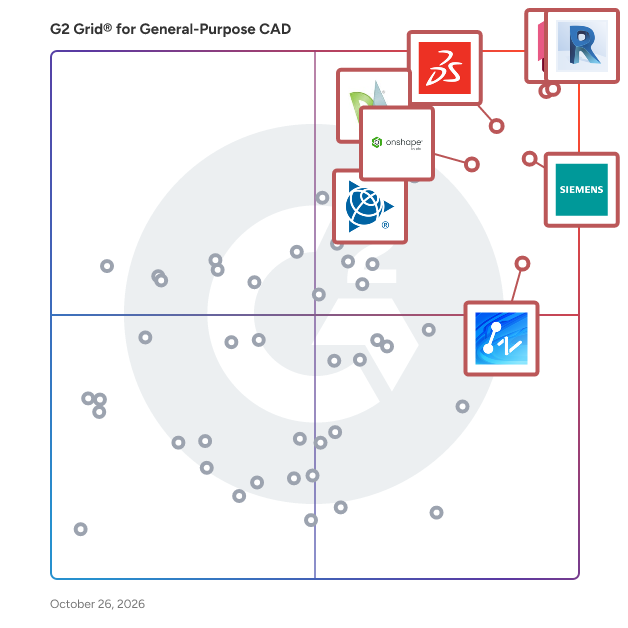
# Best General-Purpose CAD Software - Page 2

*By [Daniel Rivera](https://research.g2.com/insights/author/daniel-rivera)*


General-purpose computer-aided design (CAD) is a prototyping software for engine designs, architectural sketches, 3D models, prototypes, and mock-ups of construction sites and building projects. General-purpose CAD works with the integration of [3D modeling software](https://www.g2.com/categories/3d-modeling), [BIM software](https://www.g2.com/categories/building-design-and-building-information-modeling-bim), [civil engineering software](https://www.g2.com/categories/civil-engineering-design), or [graphic design software](https://www.g2.com/categories/graphic-design) to chart technical, nuanced, and intricate designs.

General-purpose CAD software is general engineering and design software that all industries can use to develop plant designs in the initial stages of a product&#39;s lifecycle. It is used in a project model&#39;s ideation, creation, and planning stages. Once a plan or mockup is ready, the CAD document circulates within RnD, testing, and project management teams for approvals and further design intrications.

To qualify for inclusion in the General-Purpose Computer-Aided Design (CAD) category, a product must:

- Have 2D technical drawing capabilities
- Have 3D modeling capabilities
- Possess the ability to be used across several industries


## Top General-Purpose CAD Software at a Glance
| # | Product | Rating | Best For | What Users Say |
|---|---------|--------|----------|----------------|
| 1 | [AutoCAD](https://www.g2.com/products/autocad/reviews) | 4.4/5.0 (1,836 reviews) | 2D drafting with universal DWG compatibility | "[AutoCAD Delivers Precision Drafting and Professional, Productive Workflows](https://www.g2.com/survey_responses/autocad-review-13040322)" |
| 2 | [Designcenter Solid Edge](https://www.g2.com/products/designcenter-solid-edge/reviews) | 4.3/5.0 (595 reviews) | Synchronous modeling for multi-CAD design reuse | "[Unique Interface, Synchronous Design, and Great Support Boost Efficiency](https://www.g2.com/survey_responses/designcenter-solid-edge-review-12709304)" |
| 3 | [Onshape](https://www.g2.com/products/onshape/reviews) | 4.7/5.0 (683 reviews) | Cloud-native CAD with real-time collaboration | "[Cloud-Based Flexibility with Robust Performance](https://www.g2.com/survey_responses/onshape-review-12462851)" |
| 4 | [SketchUp](https://www.g2.com/products/sketchup/reviews) | 4.5/5.0 (1,297 reviews) | Fast architectural massing and client visualization | "[SketchUp Makes 3D Modeling Fast, Approachable, and Easy to Present](https://www.g2.com/survey_responses/sketchup-review-13033539)" |
| 5 | [ZWCAD](https://www.g2.com/products/zwcad/reviews) | 4.6/5.0 (348 reviews) | AutoCAD-compatible 2D drafting with perpetual licensing | "[Structural Engineer (5 years), Drafting and Detailing Using Zwcad](https://www.g2.com/survey_responses/zwcad-review-8724157)" |
| 6 | [MicroStation](https://www.g2.com/products/microstation/reviews) | 4.0/5.0 (407 reviews) | Infrastructure drafting with large reference file coordination | "[MicroStation Delivers Precision Control for Massive Civil and Infrastructure Models](https://www.g2.com/survey_responses/microstation-review-12853055)" |
| 7 | [Autodesk Fusion](https://www.g2.com/products/autodesk-fusion/reviews) | 4.5/5.0 (510 reviews) | CAD-to-CAM workflows with cloud collaboration | "[Autodesk Fusion Streamlines Parametric 3D Design from Idea to Prototype](https://www.g2.com/survey_responses/autodesk-fusion-review-13041979)" |
| 8 | [DraftSight](https://www.g2.com/products/draftsight/reviews) | 4.2/5.0 (208 reviews) | AutoCAD-compatible 2D drafting without AutoCAD cost | "[DraftSight: Low-Cost, Comfortable UI, and Strong DWG Performance](https://www.g2.com/survey_responses/draftsight-review-12958423)" |
| 9 | [AutoCAD LT](https://www.g2.com/products/autocad-lt/reviews) | 4.3/5.0 (279 reviews) | 2D drafting without 3D modeling overhead | "[AutoCAD LT: Efficient, No-Frills Drafting](https://www.g2.com/survey_responses/autocad-lt-review-12210280)" |
| 10 | [Inventor](https://www.g2.com/products/inventor/reviews) | 4.4/5.0 (423 reviews) | Parametric mechanical design with AutoCAD interoperability | "[Versatile Design Tool with Room for Improvement](https://www.g2.com/survey_responses/inventor-review-7829390)" |

---
## What Are the Most Common Questions About General-Purpose CAD Software?
*AI-generated · Last updated: May 26, 2026*
### What most reliable General Purpose CAD based on reviews from engineer avoiding costly implementations?
Based on G2 reviews, reliability in General-Purpose CAD Software is most often tied to stable day-to-day drafting, familiar workflows, and fewer implementation hurdles. Reviewers frequently describe AutoCAD as dependable for precise 2D drafting, revisions, layering, and broad file compatibility, but they also repeatedly mention subscription cost and hardware demands. According to verified users, ZWCAD stands out when buyers want a more budget-conscious option with an AutoCAD-like interface, DWG compatibility, lightweight performance, and easier switching for established drafting workflows. G2 reviewers mention that products seen as reliable for cost-conscious teams are the ones that reduce retraining, open existing files smoothly, and keep routine drafting work moving without major disruption.

**Here are some of the top-rated products on G2:**

- [ZWCAD](https://www.g2.com/products/zwcad/reviews/zwcad-review-12782007) – budget-friendly DWG drafting with familiar commands and smooth performance on standard computers
- [AutoCAD](https://www.g2.com/products/autocad/reviews/autocad-review-12860214) – precise technical drafting with strong layer control and reliable drawing modification workflows
- [DraftSight](https://www.g2.com/products/draftsight/reviews/draftsight-review-9780623) – 2D drafting alternative used to reduce licensing costs while preserving familiar CAD work


### What are the best General Purpose CAD tools for engineer needing design validation?
Based on G2 reviews, engineers looking for design validation often favor CAD tools that combine modeling with simulation, clash checking, or early issue detection. According to verified users, SOLIDWORKS is often associated with simulation, virtual checks, and converting designs into manufacturing-ready outputs, which helps teams catch problems before production. G2 reviewers mention Autodesk Fusion for bringing modeling, simulation, and manufacturing steps into one workflow, especially for prototyping and fabrication-oriented use cases. Reviewers also describe Inventor as useful for assemblies, 3D modeling, and identifying issues before manufacturing. Across the category, buyers appear to value products that help validate fit, motion, manufacturability, or design accuracy without relying entirely on downstream tools.

**Here are some of the top-rated products on G2:**

- [SOLIDWORKS](https://www.g2.com/products/solidworks/reviews/solidworks-review-12735771) – supports part design, assemblies, and simulation to reduce prototyping and design errors
- [Autodesk Fusion](https://www.g2.com/products/autodesk-fusion/reviews/autodesk-fusion-review-12816734) – combines 3D design, prototyping, and simulation-oriented workflows in one platform
- [Inventor](https://www.g2.com/products/inventor/reviews/inventor-review-11446385) – helps teams review parts and assemblies in 3D before sending designs to manufacture


### Which General Purpose CAD platforms maintain performance as manufacturing &amp; product design teams scale?
Based on G2 reviews, Onshape is the clearest fit for teams prioritizing performance as collaboration expands. Verified users consistently highlight its cloud-based access, centralized data, version control, and real-time collaboration, which reduce local file management issues and make it easier for distributed teams to work from different devices. G2 reviewers mention that Onshape helps avoid server setup, simplifies sharing with non-CAD users, and keeps design history in one place. While some users note occasional server or loading delays, the strongest recurring theme is that scaling teams benefit from its browser-based model and built-in collaboration structure more than from traditional file-based workflows. That makes Onshape a standout option for growing manufacturing and product design organizations.


### What General Purpose CAD solutions with proven design validation for manufacturing &amp; product design teams?
Based on G2 reviews, design validation is most often linked to tools that help teams test assemblies, catch clashes, review fit, and reduce physical rework before production. According to verified users, SOLIDWORKS is frequently used to model parts, run simulation-oriented checks, and generate production-ready drawings. G2 reviewers mention Autodesk Fusion for unifying CAD, CAM, and simulation-related workflows so teams can move from concept to fabrication with fewer handoff gaps. Inventor is also described as helpful for visualizing assemblies, resolving design issues, and checking manufacturability before parts are made. Across these reviews, the strongest validation signals come from products that let engineers inspect, revise, and communicate technical designs clearly before they reach the shop floor.


### Which General Purpose CAD platforms excel at  3d modeling with strong user adoption?
Based on G2 reviews, AutoCAD has the strongest recent user adoption signal in this dataset, and reviewers still describe it as a trusted option for both 2D work and selected 3D use cases. According to verified users, AutoCAD is valued for precision, widespread familiarity, reusable templates, reliable file sharing, and strong layer management, all of which contribute to broad day-to-day usage. G2 reviewers mention that it supports 3D visualization and modeling for some workflows, though several users also note that its 3D capabilities can be less ideal than more specialized tools. For buyers prioritizing both adoption and modeling flexibility, the review data suggests AutoCAD remains one of the most widely used and recognized options in the category.


### How comparing General Purpose CAD providers that prioritize collaboration tools and implementation speed?
Based on G2 reviews, collaboration and implementation speed show up most clearly in tools that are easy to set up, easy to share, and reduce file-handling friction across teams. According to verified users, Onshape stands out for browser-based collaboration, version control, centralized documents, and simple sharing with teammates and non-CAD stakeholders. G2 reviewers mention Autodesk Fusion for consolidating design workflows into one environment while remaining relatively easy to start and use across devices. Designcenter Solid Edge is also associated with Teamcenter integration, cloud sharing, and accessible setup for organizations that need coordinated design work. In this category, buyers appear to prefer platforms that shorten onboarding, simplify access, and keep collaboration inside the product rather than across separate systems.


### What highest rated General Purpose CAD for manufacturing &amp; product design teams optimizing rendering speed?
Based on G2 reviews, rendering speed is discussed less often than drafting, modeling, and file performance, but several products do surface for teams that care about faster visual output. G2 reviewers mention Coohom for quick, high-quality rendering and faster design visualization, especially compared with workflows that previously required longer render times. According to verified users, SketchUp is often chosen for fast conceptual modeling and quick iterations, though some reviewers report slowdowns or crashes on heavy files. Autodesk Fusion is also described as a unified option for design and rendering-related work, especially in prototyping workflows. For buyers optimizing rendering speed, the review data points toward tools that help teams iterate visuals quickly without adding heavy workflow complexity.

**Here are some of the top-rated products on G2:**

- [Coohom](https://www.g2.com/products/coohom/reviews/coohom-review-12396750) – cloud-based 3D design tool praised for fast rendering and strong visualization output
- [SketchUp](https://www.g2.com/products/sketchup/reviews/sketchup-review-12541302) – quick conceptual modeling platform used for rapid iterations and presentation-ready visuals
- [Autodesk Fusion](https://www.g2.com/products/autodesk-fusion/reviews/autodesk-fusion-review-12391106) – supports rendering alongside 3D modeling and product development workflows


### What top General Purpose CAD solutions for 11-50 employees focused on  3d modeling?
Based on G2 reviews, smaller manufacturing and product design teams often value a mix of approachable modeling tools, manageable setup, and efficient collaboration. According to verified users, Designcenter Solid Edge is often positioned well for small to mid-sized businesses because it combines modeling, drafting, and related design workflows in one environment. G2 reviewers mention Autodesk Fusion as a strong fit for teams that want integrated CAD and CAM capabilities without juggling separate products. Reviewers also highlight SOLIDWORKS for straightforward 3D modeling, assemblies, and broad familiarity among engineers. For teams in the 11-50 employee range, the reviews suggest the best fit usually depends on whether the priority is ease of adoption, integrated workflows, or more simulation-heavy product development.

**Here are some of the top-rated products on G2:**

- [Designcenter Solid Edge](https://www.g2.com/products/designcenter-solid-edge/reviews/designcenter-solid-edge-review-12730586) – approachable all-in-one modeling and drafting option noted as suitable for SMEs
- [Autodesk Fusion](https://www.g2.com/products/autodesk-fusion/reviews/autodesk-fusion-review-12391106) – integrated 3D design and manufacturing workflows for prototyping and product design teams
- [SOLIDWORKS](https://www.g2.com/products/solidworks/reviews/solidworks-review-12677529) – user-friendly 3D modeling and assembly platform for detailed product design work


### What most trusted General Purpose CAD by engineer based on user reviews and team collaboration?
Based on G2 reviews, trust is usually earned through precision, file reliability, familiar workflows, and the ability to coordinate work across teams. According to verified users, AutoCAD is repeatedly described as an industry-standard drafting environment that engineers rely on for accurate drawings, revisions, and collaboration through common file formats. G2 reviewers mention MicroStation as a trusted option for large, multidisciplinary infrastructure work because of its reference handling, precision, and ability to manage complex files. Onshape also stands out for collaborative trust signals, especially where teams need centralized version control and real-time sharing. In practice, the most trusted platforms in this review set are the ones buyers already know can support consistent outputs and teamwork under real project conditions.


### What best General Purpose CAD platforms for manufacturing &amp; product design teams managing performance?
Based on G2 reviews, teams managing performance look for CAD platforms that stay stable with larger files, support efficient revisions, and avoid slowing daily engineering work. According to verified users, Onshape is attractive for performance management because its cloud model removes some local hardware constraints and simplifies collaboration. G2 reviewers mention Designcenter Solid Edge for speed in model edits and broad design workflows, although some users still note slowdowns on very large assemblies. AutoCAD remains relevant for dependable drafting performance in technical documentation, but reviewers also caution that heavier files can feel resource-intensive. Overall, the best fit depends on whether performance means cloud accessibility, large-assembly handling, or consistent drafting responsiveness across a growing team.

**Here are some of the top-rated products on G2:**

- [Onshape](https://www.g2.com/products/onshape/reviews/onshape-review-12462851) – cloud-based CAD used to handle complex models without relying on high-end local hardware
- [Designcenter Solid Edge](https://www.g2.com/products/designcenter-solid-edge/reviews/designcenter-solid-edge-review-12622225) – fast model editing and integrated workflows for teams moving designs to customers quickly
- [AutoCAD](https://www.g2.com/products/autocad/reviews/autocad-review-12702586) – reliable drafting and documentation platform valued for precision, collaboration, and revision speed


## How Many General-Purpose CAD Software Products Does G2 Track?
**Total Products under this Category:** 118

### Category Stats (Jul 2026)
- **Average Rating**: 4.36/5 The average rating of products in this category, based on all submitted ratings
- **Top Trending Product**: ZWCAD (+0.13%) - Among all products in this category, ZWCAD recorded the largest rating increase compared to last month
*Last updated: July 04, 2026*


## How Does G2 Rank General-Purpose CAD Software Products?

**Why You Can Trust G2's Software Rankings:**

- 30 Analysts and Data Experts
- 10,300+ Authentic Reviews
- 118+ Products
- Unbiased Rankings

G2's software rankings are built on verified user reviews, rigorous moderation, and a consistent research methodology maintained by a team of analysts and data experts. Each product is measured using the same transparent criteria, with no paid placement or vendor influence. While reviews reflect real user experiences, which can be subjective, they offer valuable insight into how software performs in the hands of professionals. Together, these inputs power the G2 Score, a standardized way to compare tools within every category.


## Which General-Purpose CAD Software Is Best for Your Use Case?

- **Leader:** [AutoCAD](https://www.g2.com/products/autocad/reviews)
- **Highest Performer:** [Shapr3D](https://www.g2.com/products/shapr3d/reviews)
- **Easiest to Use:** [ZWCAD](https://www.g2.com/products/zwcad/reviews)
- **Top Trending:** [MicroStation](https://www.g2.com/products/microstation/reviews)
- **Best Free Software:** [AutoCAD](https://www.g2.com/products/autocad/reviews)


---

**Sponsored**

### CMS IntelliCAD

CMS IntelliCAD® is a sophisticated CAD software solution designed to meet the diverse needs of professionals in engineering, architecture, and consulting. This full-featured software provides users with an extensive array of 2D and 3D drawing tools that are compatible with Autodesk® AutoCAD®, making it an ideal choice for anyone who relies on CAD drawings for their work. With its intelligent design and powerful capabilities, CMS IntelliCAD serves as a reliable alternative for those seeking advanced CAD functionalities without the associated high costs. Targeted primarily at engineers, architects, and consultants, CMS IntelliCAD caters to a wide range of users who require precision and efficiency in their design processes. The software is particularly beneficial for professionals who need to create detailed drawings, models, and documentation. Its compatibility with .DWG file extensions ensures seamless integration with existing projects, allowing users to work with files from various sources without losing data integrity. Additionally, the software supports Building Information Modeling (BIM), enhancing its utility for modern architectural and engineering practices, which increasingly rely on collaborative and data-rich environments. One of the standout features of CMS IntelliCAD is its extensive customization options. Users can take advantage of a comprehensive programming toolkit that includes support for LISP, VBA, .Net, and IRX development. This flexibility allows users to tailor the software to their specific workflows, enhancing productivity and streamlining repetitive tasks. The ability to create custom commands and automate processes can significantly reduce the time spent on drafting and design, making it a valuable asset for busy professionals who need to maximize their efficiency. Moreover, CMS IntelliCAD offers extended interoperability with various file formats, including DGN, .STEP, .IGES, and .PDF. This broad compatibility ensures that users can collaborate effectively with colleagues and clients who may be using different software solutions. The software&#39;s robust features, combined with its affordability, make it an attractive option for businesses and individuals looking to enhance their CAD capabilities without compromising on quality or performance. CMS IntelliCAD stands out in the CAD software landscape by providing a powerful, customizable, and cost-effective solution for professionals in various fields. Its intelligent design, extensive compatibility, and support for advanced programming make it a practical choice for those who require a reliable tool for their design and drafting needs. The combination of these features positions CMS IntelliCAD as a strong contender in the competitive CAD market, appealing to both seasoned professionals and newcomers alike.


[Visit website](https://www.g2.com/external_clickthroughs/record?secure%5Bad_program%5D=ppc&amp;secure%5Bad_slot%5D=category_product_list&amp;secure%5Bcategory_id%5D=291&amp;secure%5Bchosen_at%5D=2026-07-04T15%3A16%3A18Z&amp;secure%5Bdisplayable_resource_id%5D=291&amp;secure%5Bdisplayable_resource_type%5D=Category&amp;secure%5Bmedium%5D=sponsored&amp;secure%5Bplacement_reason%5D=page_category&amp;secure%5Bplacement_resource_ids%5D%5B%5D=291&amp;secure%5Bprioritized%5D=false&amp;secure%5Bproduct_id%5D=5497&amp;secure%5Bresource_id%5D=291&amp;secure%5Bresource_type%5D=Category&amp;secure%5Bsource_type%5D=category_page&amp;secure%5Bsource_url%5D=https%3A%2F%2Fwww.g2.com%2Fcategories%2Fgeneral-purpose-cad%3Fpage%3D2&amp;secure%5Btoken%5D=f28c62fa1d7e7dc5784506ded713c6abbeb78e4cd717a0642cfae9ae2a6369b0&amp;secure%5Burl%5D=https%3A%2F%2Fintellicadms.com%2Fsite%2F&amp;secure%5Burl_type%5D=custom_url)

---

## What Are the Top-Rated General-Purpose CAD Software Products in 2026?
### 1. [CMS IntelliCAD](https://www.g2.com/products/cms-intellicad/reviews)
CMS IntelliCAD® is a sophisticated CAD software solution designed to meet the diverse needs of professionals in engineering, architecture, and consulting. This full-featured software provides users with an extensive array of 2D and 3D drawing tools that are compatible with Autodesk® AutoCAD®, making it an ideal choice for anyone who relies on CAD drawings for their work. With its intelligent design and powerful capabilities, CMS IntelliCAD serves as a reliable alternative for those seeking advanced CAD functionalities without the associated high costs. Targeted primarily at engineers, architects, and consultants, CMS IntelliCAD caters to a wide range of users who require precision and efficiency in their design processes. The software is particularly beneficial for professionals who need to create detailed drawings, models, and documentation. Its compatibility with .DWG file extensions ensures seamless integration with existing projects, allowing users to work with files from various sources without losing data integrity. Additionally, the software supports Building Information Modeling (BIM), enhancing its utility for modern architectural and engineering practices, which increasingly rely on collaborative and data-rich environments. One of the standout features of CMS IntelliCAD is its extensive customization options. Users can take advantage of a comprehensive programming toolkit that includes support for LISP, VBA, .Net, and IRX development. This flexibility allows users to tailor the software to their specific workflows, enhancing productivity and streamlining repetitive tasks. The ability to create custom commands and automate processes can significantly reduce the time spent on drafting and design, making it a valuable asset for busy professionals who need to maximize their efficiency. Moreover, CMS IntelliCAD offers extended interoperability with various file formats, including DGN, .STEP, .IGES, and .PDF. This broad compatibility ensures that users can collaborate effectively with colleagues and clients who may be using different software solutions. The software&#39;s robust features, combined with its affordability, make it an attractive option for businesses and individuals looking to enhance their CAD capabilities without compromising on quality or performance. CMS IntelliCAD stands out in the CAD software landscape by providing a powerful, customizable, and cost-effective solution for professionals in various fields. Its intelligent design, extensive compatibility, and support for advanced programming make it a practical choice for those who require a reliable tool for their design and drafting needs. The combination of these features positions CMS IntelliCAD as a strong contender in the competitive CAD market, appealing to both seasoned professionals and newcomers alike.


**Average Rating:** 4.7/5.0
**Total Reviews:** 92
**How Do G2 Users Rate CMS IntelliCAD?**

- **Has the product been a good partner in doing business?:** 9.5/10 (Category avg: 8.5/10)
- **Drawing:** 9.8/10 (Category avg: 8.9/10)
- **File Import :** 9.5/10 (Category avg: 8.3/10)
- **Views:** 9.5/10 (Category avg: 8.6/10)

**Who Is the Company Behind CMS IntelliCAD?**

- **Seller:** [CMS](https://www.g2.com/sellers/cms)
- **Year Founded:** 1993
- **HQ Location:** Burleson, TX
- **Twitter:** @CMS_INC (167 Twitter followers)
- **LinkedIn® Page:** https://www.linkedin.com/company/cad-manufacturing-solutions-inc- (2 employees on LinkedIn®)

**Who Uses This Product?**
- **Who Uses This:** Architect, Design Engineer
- **Top Industries:** Architecture &amp; Planning, Mechanical or Industrial Engineering
- **Company Size:** 87% Small-Business, 10% Mid-Market


#### What Are CMS IntelliCAD's Pros and Cons?

**Pros:**

- Ease of Use (3 reviews)
- CAD Compatibility (1 reviews)
- Customer Support (1 reviews)
- Drawing Tools (1 reviews)
- Easy Learning (1 reviews)

**Cons:**

- 3D Modeling (1 reviews)
- Difficult Configuration (1 reviews)
- Large File Handling (1 reviews)
- Learning Curve (1 reviews)
- Overwhelming Features (1 reviews)


### What Do G2 Reviewers Say About CMS IntelliCAD?
*AI-generated summary from verified user reviews*

**Pros:**

- Users find CMS IntelliCAD to be **user-friendly** , making it easy to navigate and customize to their needs.
- Users praise the **CAD compatibility** of CMS IntelliCAD, seamlessly opening DWG files and enhancing their drawing experience.
- Users commend the **exceptional customer support** of CMS IntelliCAD, appreciating prompt and courteous assistance during challenging times.
- Users appreciate the **user-friendly drawing tools** of CMS IntelliCAD, which function similarly to AutoCAD at a lower price.
- Users value the **easy learning experience** with CMS IntelliCAD, appreciating its straightforward installation and setup.

**Cons:**

- Users note that the software can be **sluggish with large files** and lacks robustness in advanced 3D tools.
- Users find the **difficult configuration** of CMS IntelliCAD can be confusing and clunky initially.
- Users find the software **sluggish with large file handling** , impacting the performance of advanced 3D tools.
- Users experience a **challenging learning curve** , particularly when starting to use CMS IntelliCAD effectively.
- Users find the **overwhelming features** of CMS IntelliCAD confusing initially, making the learning curve challenging.

#### What Are Recent G2 Reviews of CMS IntelliCAD?

**"[Great CAD Software at a Good Price](https://www.g2.com/survey_responses/cms-intellicad-review-11908599)"**

**Rating:** 4.0/5.0 stars
*— Arjun  M.*

[Read full review](https://www.g2.com/survey_responses/cms-intellicad-review-11908599)

---

**"[Quick commands and ease of use that make the difference](https://www.g2.com/survey_responses/cms-intellicad-review-12569637)"**

**Rating:** 4.5/5.0 stars
*— Verified User in Textiles*

[Read full review](https://www.g2.com/survey_responses/cms-intellicad-review-12569637)

---


#### What Are G2 Users Discussing About CMS IntelliCAD?

- [What do you like most about CMS IntelliCAD for CAD design, and what improvements could be made?](https://www.g2.com/discussions/what-do-you-like-most-about-cms-intellicad-for-cad-design-and-what-improvements-could-be-made)
- [Is nanoCAD still free?](https://www.g2.com/discussions/is-nanocad-still-free)
- [What is the easiest 2D CAD software to use?](https://www.g2.com/discussions/what-is-the-easiest-2d-cad-software-to-use)
- [How much does IntelliCAD cost?](https://www.g2.com/discussions/how-much-does-intellicad-cost)
- [What is CMS IntelliCAD?](https://www.g2.com/discussions/what-is-cms-intellicad) - 1 comment

### 2. [Browzwear](https://www.g2.com/products/browzwear/reviews)
Born in the fashion industry and trusted by over 1000 apparel brands and manufacturers worldwide, Browzwear has transformed tedious physical processes into efficient, collaborative digital workflows. We are redefining the fashion industry with our innovative 3D apparel solutions. Our powerful tools—VStitcher, Stylezone, FAB, Lotta, and our Open Platform—are meticulously designed to bring your creative vision to life, revolutionizing how fashion is designed, developed, and delivered. Browzwear goes beyond creating beautiful 3D renderings. We empower technical designers, pattern makers, and supply chain stakeholders to collaborate on a digital twin of the physical garment, ensuring a trusted fit, consistent product development, and reduced time and resources from sketch to store. With outstanding support and training resources like Browzwear University and dedicated technical specialists, we help fashion brands streamline their design processes, scale efficiently, and maximize the benefits of modern 3D apparel design tools. As a global company with offices in Singapore, New York, Oregon, Hong Kong, Israel, Shanghai, and the Netherlands, Browzwear is at the forefront of fashion&#39;s digital transformation. To learn more, request a demo here: https://browzwear.com/request-a-demo


**Average Rating:** 4.8/5.0
**Total Reviews:** 55
**How Do G2 Users Rate Browzwear?**

- **Has the product been a good partner in doing business?:** 9.3/10 (Category avg: 8.5/10)
- **Drawing:** 8.2/10 (Category avg: 8.9/10)
- **File Import :** 8.9/10 (Category avg: 8.3/10)
- **Views:** 9.2/10 (Category avg: 8.6/10)

**Who Is the Company Behind Browzwear?**

- **Seller:** [Browzwear Solutions](https://www.g2.com/sellers/browzwear-solutions)
- **Year Founded:** 1999
- **HQ Location:** Singapore, Singapore
- **Twitter:** @browzwear (875 Twitter followers)
- **LinkedIn® Page:** https://www.linkedin.com/company/715897/ (137 employees on LinkedIn®)

**Who Uses This Product?**
- **Top Industries:** Apparel &amp; Fashion, Design
- **Company Size:** 59% Small-Business, 29% Enterprise


#### What Are Browzwear's Pros and Cons?

**Pros:**

- Ease of Use (5 reviews)
- 3D Visualization (4 reviews)
- Easy Learning (4 reviews)
- Ease of Learning (3 reviews)
- Simulation Tools (3 reviews)

**Cons:**

- Crashes (3 reviews)
- Tool Issues (3 reviews)
- Limited Rendering Capabilities (2 reviews)
- Limited Tools (2 reviews)
- Missing Features (2 reviews)


### What Do G2 Reviewers Say About Browzwear?
*AI-generated summary from verified user reviews*

**Pros:**

- Users find Browzwear to be **easy to use** , especially beginners, thanks to its intuitive tools and excellent support.
- Users appreciate the **seamless integration of 3D modeling** in Browzwear, enhancing design visualization and streamlining workflow.
- Users find Browzwear to be **easy to learn** , making it an essential tool for designers and beginners alike.
- Users find Browzwear&#39;s **ease of learning** essential, facilitating clothing design and revisions, especially for beginners.
- Users love the **seamless integration of 3D modeling** in Browzwear, enhancing visualization and speeding up the design process.

**Cons:**

- Users face frequent **crashes and bugs** in Browzwear, leading to interrupted workflows and diminished productivity.
- Users often experience **tool issues** with Browzwear, including complexity, bugs, and missing essential features for design efficiency.
- Users report **limited rendering capabilities** , with occasional lag and difficulties when working on complex 3D projects.
- Users find the **limited tools** of Browzwear sometimes complex, leading to bugs and crashes during use.
- Users find the **missing features** in Browzwear limiting, particularly regarding file copying and pattern trace management.

#### What Are Recent G2 Reviews of Browzwear?

**"[Browzwear: Transforming Fashion Design One Stitch at a Time](https://www.g2.com/survey_responses/browzwear-review-10629448)"**

**Rating:** 5.0/5.0 stars
*— David G.*

[Read full review](https://www.g2.com/survey_responses/browzwear-review-10629448)

---

**"[BROWZWEAR  Is Best Soft wear](https://www.g2.com/survey_responses/browzwear-review-10612310)"**

**Rating:** 5.0/5.0 stars
*— sada siva  r.*

[Read full review](https://www.g2.com/survey_responses/browzwear-review-10612310)

---


### 3. [Vectorworks Fundamentals](https://www.g2.com/products/vectorworks-fundamentals/reviews)
Built to showcase your skill and creativity, Vectorworks Fundamentals offers superior 2D and 3D capabilities and an intuitive modeling and documentation platform. Freely sketch, model, and document your design ideas with precision drafting capabilities and the most flexible 3D modeling engine available, powered by SIEMENS Parasolid.


**Average Rating:** 4.2/5.0
**Total Reviews:** 13
**How Do G2 Users Rate Vectorworks Fundamentals?**

- **Has the product been a good partner in doing business?:** 10.0/10 (Category avg: 8.5/10)
- **Drawing:** 10.0/10 (Category avg: 8.9/10)
- **File Import :** 8.3/10 (Category avg: 8.3/10)
- **Views:** 10.0/10 (Category avg: 8.6/10)

**Who Is the Company Behind Vectorworks Fundamentals?**

- **Seller:** [Vectorworks, Inc.](https://www.g2.com/sellers/vectorworks-inc)
- **Year Founded:** 1985
- **HQ Location:** Columbia, Maryland
- **Twitter:** @Vectorworks (10,997 Twitter followers)
- **LinkedIn® Page:** https://www.linkedin.com/company/vectorworks-inc/ (322 employees on LinkedIn®)

**Who Uses This Product?**
- **Top Industries:** Architecture &amp; Planning
- **Company Size:** 69% Small-Business, 23% Mid-Market


#### What Are Recent G2 Reviews of Vectorworks Fundamentals?

**"[Not going back to AutoCad](https://www.g2.com/survey_responses/vectorworks-fundamentals-review-2065710)"**

**Rating:** 5.0/5.0 stars
*— Verified User in Architecture &amp; Planning*

[Read full review](https://www.g2.com/survey_responses/vectorworks-fundamentals-review-2065710)

---

**"[Great Value Perpetual Licensing with Solid 2D/3D Modeling Tools](https://www.g2.com/survey_responses/vectorworks-fundamentals-review-12871856)"**

**Rating:** 5.0/5.0 stars
*— Verified User in Construction*

[Read full review](https://www.g2.com/survey_responses/vectorworks-fundamentals-review-12871856)

---


#### What Are G2 Users Discussing About Vectorworks Fundamentals?

- [What is Vectorworks Fundamentals used for?](https://www.g2.com/discussions/what-is-vectorworks-fundamentals-used-for)

### 4. [Autodesk Alias](https://www.g2.com/products/autodesk-alias/reviews)
Alias® industrial design software powers your creative process with a range of sketching, modeling, surfacing, and visualization tools.


**Average Rating:** 4.0/5.0
**Total Reviews:** 58
**How Do G2 Users Rate Autodesk Alias?**

- **Has the product been a good partner in doing business?:** 8.3/10 (Category avg: 8.5/10)

**Who Is the Company Behind Autodesk Alias?**

- **Seller:** [Autodesk](https://www.g2.com/sellers/autodesk)
- **Year Founded:** 1982
- **HQ Location:** San Francisco
- **Twitter:** @autodesk (273,215 Twitter followers)
- **LinkedIn® Page:** https://www.linkedin.com/company/autodesk/ (15,352 employees on LinkedIn®)
- **Ownership:** NASDAQ:ADSK

**Who Uses This Product?**
- **Top Industries:** Design, Automotive
- **Company Size:** 53% Small-Business, 31% Mid-Market


#### What Are Recent G2 Reviews of Autodesk Alias?

**"[The designer&#39;s tool](https://www.g2.com/survey_responses/autodesk-alias-review-2132915)"**

**Rating:** 4.5/5.0 stars
*— chapo m.*

[Read full review](https://www.g2.com/survey_responses/autodesk-alias-review-2132915)

---

**"[Best in class product for Designers, Product Design, Automotive Styling and Interiors](https://www.g2.com/survey_responses/autodesk-alias-review-4894164)"**

**Rating:** 4.5/5.0 stars
*— Verified User in Design*

[Read full review](https://www.g2.com/survey_responses/autodesk-alias-review-4894164)

---


#### What Are G2 Users Discussing About Autodesk Alias?

- [How much does Autodesk Alias cost?](https://www.g2.com/discussions/how-much-does-autodesk-alias-cost)
- [Who uses Autodesk Alias?](https://www.g2.com/discussions/who-uses-autodesk-alias)
- [What is Alias modeling?](https://www.g2.com/discussions/what-is-alias-modeling)
- [What is Alias software used for?](https://www.g2.com/discussions/what-is-alias-software-used-for)

### 5. [IronCAD](https://www.g2.com/products/ironcad/reviews)
Design better, faster IronCAD is an intuitive 3D and 2D design solution that empowers engineers, increases productivity, and facilitates collaboration throughout the enterprise. IRONCAD 3D modeling software empowers designers to focus on design by giving them an intuitive platform that mirrors how we interact with the physical world. Easily reposition components with the patented TriBall™ visualization tool, resize objects by stretching them with handles, and drag and drop predefined shapes into the design scene for a better, faster design process. 3D models made in IRONCAD only require one file, no matter how complex. Assembly part data is integrated into a file’s unified design environment, rather than linking to external files. Feature, part, and assembly data can be stored in catalogs which can be pre-built to include frequently used parts and assemblies, freeing designers to be more productive and allowing them to extend the use of 3D data throughout the enterprise.


**Average Rating:** 4.4/5.0
**Total Reviews:** 39
**How Do G2 Users Rate IronCAD?**

- **Has the product been a good partner in doing business?:** 8.7/10 (Category avg: 8.5/10)
- **Drawing:** 6.7/10 (Category avg: 8.9/10)
- **File Import :** 8.3/10 (Category avg: 8.3/10)
- **Views:** 8.3/10 (Category avg: 8.6/10)

**Who Is the Company Behind IronCAD?**

- **Seller:** [IronCAD](https://www.g2.com/sellers/ironcad)
- **Year Founded:** 2001
- **HQ Location:** Atlanta, GA
- **LinkedIn® Page:** https://www.linkedin.com/company/92206/ (30 employees on LinkedIn®)

**Who Uses This Product?**
- **Top Industries:** Furniture
- **Company Size:** 74% Small-Business, 14% Enterprise


#### What Are Recent G2 Reviews of IronCAD?

**"[Easier and faster than other CAD programs for general design but still powerful for complex models](https://www.g2.com/survey_responses/ironcad-review-7053978)"**

**Rating:** 4.5/5.0 stars
*— Verified User in Packaging and Containers*

[Read full review](https://www.g2.com/survey_responses/ironcad-review-7053978)

---

**"[Agile in a time where change is key](https://www.g2.com/survey_responses/ironcad-review-8466758)"**

**Rating:** 5.0/5.0 stars
*— Jan G.*

[Read full review](https://www.g2.com/survey_responses/ironcad-review-8466758)

---


#### What Are G2 Users Discussing About IronCAD?

- [Is IronCAD better than Solidworks?](https://www.g2.com/discussions/is-ironcad-better-than-solidworks)
- [How do you use IronCAD?](https://www.g2.com/discussions/how-do-you-use-ironcad)
- [Is IronCAD any good?](https://www.g2.com/discussions/is-ironcad-any-good)
- [What is IronCAD mechanical?](https://www.g2.com/discussions/what-is-ironcad-mechanical) - 2 comments

### 6. [Cimatron](https://www.g2.com/products/cimatron/reviews)
Cimatron&#39;s CAD/CAM solutions address the entire tool making process from quoting to design, applying engineering changes and NC programming. Cimatron delivers major advantages for mold, die and manufacturing shops keeping you more competitive across your entire range of operations


**Average Rating:** 4.1/5.0
**Total Reviews:** 14
**How Do G2 Users Rate Cimatron?**

- **Has the product been a good partner in doing business?:** 8.3/10 (Category avg: 8.5/10)
- **Drawing:** 8.3/10 (Category avg: 8.9/10)
- **File Import :** 8.1/10 (Category avg: 8.3/10)
- **Views:** 8.5/10 (Category avg: 8.6/10)

**Who Is the Company Behind Cimatron?**

- **Seller:** [3D Systems](https://www.g2.com/sellers/3d-systems-5afe2c2f-5716-4cba-a49c-a9d2265fdad8)
- **Year Founded:** 1986
- **HQ Location:** Rock Hill, SC
- **Twitter:** @3dsystems (70,528 Twitter followers)
- **LinkedIn® Page:** https://www.linkedin.com/company/162213/ (3,526 employees on LinkedIn®)
- **Ownership:** VIE:DDD

**Who Uses This Product?**
- **Company Size:** 43% Small-Business, 36% Mid-Market


#### What Are Recent G2 Reviews of Cimatron?

**"[ designing in 2D and 3D](https://www.g2.com/survey_responses/cimatron-review-2605775)"**

**Rating:** 5.0/5.0 stars
*— luis m.*

[Read full review](https://www.g2.com/survey_responses/cimatron-review-2605775)

---

**"[Great NC and CAD tool](https://www.g2.com/survey_responses/cimatron-review-4660200)"**

**Rating:** 5.0/5.0 stars
*— Yaki N.*

[Read full review](https://www.g2.com/survey_responses/cimatron-review-4660200)

---


#### What Are G2 Users Discussing About Cimatron?

- [What is Cimatron used for?](https://www.g2.com/discussions/what-is-cimatron-used-for)

### 7. [progeCAD](https://www.g2.com/products/progecad/reviews)
progeCAD IntelliCAD, the most &quot;AutoCAD Like&quot; software on the market today, is built from the ground up to satisfy those who wish to work with the DWG format and has a familiar interface you are used to designing with


**Average Rating:** 4.3/5.0
**Total Reviews:** 11
**How Do G2 Users Rate progeCAD?**

- **Drawing:** 8.1/10 (Category avg: 8.9/10)
- **File Import :** 8.1/10 (Category avg: 8.3/10)
- **Views:** 7.9/10 (Category avg: 8.6/10)

**Who Is the Company Behind progeCAD?**

- **Seller:** [progeSOFT](https://www.g2.com/sellers/progesoft)
- **Year Founded:** 1985
- **HQ Location:** Como, Italy
- **Twitter:** @progesoft (204 Twitter followers)
- **LinkedIn® Page:** https://www.linkedin.com/company/progesoft (21 employees on LinkedIn®)

**Who Uses This Product?**
- **Company Size:** 45% Small-Business, 36% Mid-Market


#### What Are Recent G2 Reviews of progeCAD?

**"[ProgeCad Software review](https://www.g2.com/survey_responses/progecad-review-8916785)"**

**Rating:** 4.5/5.0 stars
*— BANDARU SAI GANGA DURGA RAM B.*

[Read full review](https://www.g2.com/survey_responses/progecad-review-8916785)

---

**"[Overview On ProgeCad Replacement of Autocad](https://www.g2.com/survey_responses/progecad-review-8198696)"**

**Rating:** 4.0/5.0 stars
*— Ankit M.*

[Read full review](https://www.g2.com/survey_responses/progecad-review-8198696)

---


### 8. [TurboCAD](https://www.g2.com/products/turbocad/reviews)
TurboCAD Pro Platinum is a professional 2D/3D CAD application that offers a great collection of 2D/3D design tools to design, modify, present, and document in an integrated fashion. An optional AutoCAD®-like 2D drafting interface with command line and dynamic input cursor helps professionals already familiar with AutoCAD easily get up to speed. Advanced technology —a powerful drafting palette, D-Cubed constraints, and ACIS® engine—enhance productivity. Advanced architectural and mechanical design tools add even greater flexibility and control, while superior LightWorks® rendering controls produce powerful presentations. Plus TurboCAD Pro Platinum is programmable and supports over 40 file formats including .DWG, .DXF, .SKP, 3D .PDF, and .STL for 3D printing. • Time Saving Features – 64-Bit Compatible Version, GPU-accelerated Drawing Engine, Multi-threading Support, Progressive, Ray-traced Rendering, New Redsdk 3.3 Rendering Engine, AutoCAD 2D work-alike mode, and more! • Precision Drafting &amp; Detailing – A large selection of 2D and 3D tools, snaps modification, and drawing aids, powerful drafting palette, history tree with editor, advanced layer controls, PDF underlay, a full range of dimension types and styles, tables, text, viewports and more! • Powerful Architectural Tools – House wizard, self-healing walls &amp; self aligning blocks, AutoCAD® Architecture (ACA) compatible architectural objects (parametric), section, elevation, and terrain tools, styles &amp; style manager! • Robust Mechanical Tools – New ACIS® R24 engine, 3D solid and surface design and modification tools, geometric and dimensional constraints, assembly tools, a powerful parametric parts manager, and more! • Rendering &amp; Visualization – Choose from wireframe, hidden line, or high quality photorealistic rendering with material editor as well as artistic render styles. Both a Lightworks and Redsdk engines are available with a universal manager.&amp;nbsp; • Outstanding File Compatibility – Open, import, or embed up to 35 file formats and export up to 28, including newly updated AutoCAD® 2013 .DWG, Adobe 3D .PDF, and many others making it an excellent companion product.


**Average Rating:** 4.3/5.0
**Total Reviews:** 31
**How Do G2 Users Rate TurboCAD?**

- **Has the product been a good partner in doing business?:** 8.3/10 (Category avg: 8.5/10)
- **Drawing:** 10.0/10 (Category avg: 8.9/10)
- **File Import :** 8.3/10 (Category avg: 8.3/10)
- **Views:** 7.8/10 (Category avg: 8.6/10)

**Who Is the Company Behind TurboCAD?**

- **Seller:** [TurboCAD](https://www.g2.com/sellers/turbocad)
- **Year Founded:** 1983
- **HQ Location:** Novato, CA
- **Twitter:** @imsidesign (110 Twitter followers)
- **LinkedIn® Page:** https://www.linkedin.com/company/16832/ (126 employees on LinkedIn®)

**Who Uses This Product?**
- **Company Size:** 61% Small-Business, 29% Mid-Market


#### What Are Recent G2 Reviews of TurboCAD?

**"[cheaper cad software that gets the job done](https://www.g2.com/survey_responses/turbocad-review-33557)"**

**Rating:** 4.0/5.0 stars
*— Ricky R.*

[Read full review](https://www.g2.com/survey_responses/turbocad-review-33557)

---

**"[Very good and focus on helping the client in a possible ways.](https://www.g2.com/survey_responses/turbocad-review-3112467)"**

**Rating:** 5.0/5.0 stars
*— Betty k.*

[Read full review](https://www.g2.com/survey_responses/turbocad-review-3112467)

---


#### What Are G2 Users Discussing About TurboCAD?

- [What is TurboCAD used for?](https://www.g2.com/discussions/turbocad-what-is-turbocad-used-for)
- [What does TurboCAD do?](https://www.g2.com/discussions/what-does-turbocad-do)
- [Can Turbocad open Autocad files?](https://www.g2.com/discussions/can-turbocad-open-autocad-files)
- [What is the difference between Autocad and Turbocad?](https://www.g2.com/discussions/what-is-the-difference-between-autocad-and-turbocad)
- [What is Turbocad used for?](https://www.g2.com/discussions/what-is-turbocad-used-for)

### 9. [QCAD](https://www.g2.com/products/qcad/reviews)
QCAD is an open-source 2D computer-aided design (CAD) application developed by RibbonSoft, designed for creating technical drawings such as architectural plans, mechanical parts, and schematics. It operates on Windows, macOS, and Linux platforms, offering a user-friendly interface that caters to both beginners and experienced professionals. QCAD utilizes the DXF file format natively and provides support for DWG files through a commercial plugin, ensuring compatibility with other CAD systems. Key Features and Functionality: - Comprehensive Drawing Tools: Over 40 construction tools and 20 modification tools facilitate the creation and editing of various entities, including points, lines, arcs, circles, ellipses, splines, polylines, texts, dimensions, hatches, fills, and raster images. - Layer and Block Management: Supports layers and blocks (grouping) to organize complex drawings efficiently. - Extensive Font Support: Includes 35 CAD fonts and supports TrueType fonts for versatile text rendering. - Unit Flexibility: Accommodates various metric and imperial units, catering to diverse measurement standards. - File Compatibility: Offers DXF and DWG input and output capabilities, ensuring seamless interoperability with other CAD platforms. - Printing Capabilities: Enables printing to scale and on multiple pages, facilitating accurate physical representations of designs. - Selection and Snap Tools: Provides powerful entity selection tools and object snaps for precise drafting. - Measuring Instruments: Equipped with measuring tools to ensure accuracy in designs. - Part Library: Features a library with over 4,800 CAD parts to expedite the design process. - Scripting Interface: Offers a robust ECMAScript (JavaScript) interface for customization and automation. - Command Line Tools: Includes utilities like dwg2pdf, dwg2svg, and dwg2bmp for batch processing and format conversion. - CAM Integration: QCAD/CAM extension provides G-Code export and nesting capabilities for computer-aided manufacturing applications. Primary Value and User Solutions: QCAD&#39;s primary value lies in its accessibility and affordability as a 2D CAD solution. Its intuitive interface allows users without prior CAD experience to start drafting immediately, making it suitable for a wide range of applications, from architectural floor plans to mechanical part designs. The open-source nature of QCAD ensures continuous development and community support, while its cross-platform compatibility allows users to work seamlessly across different operating systems. By supporting industry-standard file formats like DXF and DWG, QCAD facilitates collaboration and interoperability with other CAD software, addressing the needs of professionals seeking a cost-effective and versatile drafting tool.


**Average Rating:** 4.4/5.0
**Total Reviews:** 13
**How Do G2 Users Rate QCAD?**

- **Has the product been a good partner in doing business?:** 6.7/10 (Category avg: 8.5/10)
- **Drawing:** 9.6/10 (Category avg: 8.9/10)
- **File Import :** 8.3/10 (Category avg: 8.3/10)
- **Views:** 7.7/10 (Category avg: 8.6/10)

**Who Is the Company Behind QCAD?**

- **Seller:** [QCAD.org](https://www.g2.com/sellers/qcad-org)
- **HQ Location:** Sarnen
- **Twitter:** @qcad_org (722 Twitter followers)
- **LinkedIn® Page:** https://www.linkedin.com/company/No-Linkedin-Presence-Added-Intentionally-By-DataOps (1 employees on LinkedIn®)

**Who Uses This Product?**
- **Company Size:** 46% Mid-Market, 38% Small-Business


#### What Are QCAD's Pros and Cons?

**Pros:**

- Ease of Use (2 reviews)
- 3D Modeling (1 reviews)
- Customer Support (1 reviews)
- Features Functionality (1 reviews)
- Powerful Performance (1 reviews)

**Cons:**

- Difficult Learning (1 reviews)
- Learning Curve (1 reviews)


### What Do G2 Reviewers Say About QCAD?
*AI-generated summary from verified user reviews*

**Pros:**

- Users love QCAD&#39;s **ease of use** , enjoying powerful features and great support for their design needs.
- Users enjoy the **incredible features** of QCAD, finding it ideal for landscaping designs with excellent support.
- Users praise the **great customer support** for QCAD, enhancing their experience with helpful resources and assistance.
- Users love the **incredible features** of QCAD, enhancing their CAD landscaping designs with great support and online materials.
- Users find QCAD **powerful and easy to use** , enjoying a bug-free experience so far.

**Cons:**

- Users acknowledge a **steep learning curve** with QCAD, though they believe the robust features justify the effort.
- Users note a **steep learning curve** with QCAD, but find the features worth the initial struggle.

#### What Are Recent G2 Reviews of QCAD?

**"[QCAD is excellent and free!](https://www.g2.com/survey_responses/qcad-review-10747355)"**

**Rating:** 5.0/5.0 stars
*— John C.*

[Read full review](https://www.g2.com/survey_responses/qcad-review-10747355)

---

**"[Amazingly powerful, cheap, Open Source, what&#39;s not to love?](https://www.g2.com/survey_responses/qcad-review-10443330)"**

**Rating:** 5.0/5.0 stars
*— Jake R.*

[Read full review](https://www.g2.com/survey_responses/qcad-review-10443330)

---


### 10. [ActCAD BIM](https://www.g2.com/products/actcad-actcad-bim/reviews)
ActCAD is a native dwg/dxf cad software suitable for professional 2D drafting and 3D modeling projects. ActCAD is trusted by over 30000 users in over 103 countries for more than 10 years. The interface, commands, icons, dialogs, shortcuts etc. are very much similar to other popular cad software tools available in market. Flexible license types available even for single license. There is no learning for existing cad users while saving 80% of the costs. ActCAD offers free email technical support without any limitations. ActCAD can be fully customized and programs can be developed using our free API toolkit. It supports popular programming languages like , lisp dcl, .net, C++ etc. Apart from all regular commands, ActCAD offers many productive tools like pdf to cad converter, Block libraries, Image to Cad converter, handling point sets between Cad and Excel and many more. ActCAD is suitable for any high end professional projects in the domains of Architecture, Civil, Mechanical, Automotive.


**Average Rating:** 4.5/5.0
**Total Reviews:** 47
**How Do G2 Users Rate ActCAD BIM?**

- **Has the product been a good partner in doing business?:** 9.0/10 (Category avg: 8.5/10)
- **Drawing:** 9.2/10 (Category avg: 8.9/10)
- **File Import :** 8.7/10 (Category avg: 8.3/10)
- **Views:** 8.0/10 (Category avg: 8.6/10)

**Who Is the Company Behind ActCAD BIM?**

- **Seller:** [ACTCAD](https://www.g2.com/sellers/actcad)
- **Year Founded:** 2010
- **HQ Location:** Hyderabad, Andhra Pradesh
- **Twitter:** @actcadsoftware (383 Twitter followers)
- **LinkedIn® Page:** https://www.linkedin.com/company/13207154/ (14 employees on LinkedIn®)

**Who Uses This Product?**
- **Top Industries:** Architecture &amp; Planning, Civil Engineering
- **Company Size:** 80% Small-Business, 18% Mid-Market


#### What Are ActCAD BIM's Pros and Cons?

**Pros:**

- Affordable (1 reviews)
- Efficiency (1 reviews)
- Helpful (1 reviews)
- Powerful Performance (1 reviews)
- Pricing (1 reviews)

**Cons:**

- Difficult Learning (1 reviews)
- Expensive (1 reviews)
- Insufficient Training (1 reviews)
- Learning Curve (1 reviews)
- Limited Features (1 reviews)


### What Do G2 Reviewers Say About ActCAD BIM?
*AI-generated summary from verified user reviews*

**Pros:**

- Users appreciate the **affordability** of ActCAD BIM, finding it offers great value for professionals and beginners alike.
- Users praise ActCAD for its **efficiency** , providing a powerful CAD solution that enhances productivity at a great price.
- Users commend the **excellent functionality** of ActCAD BIM, praising its value and usability for all levels of expertise.
- Users appreciate the **powerful performance** of ActCAD BIM, benefiting from its robust functionality and value.
- Users find ActCAD BIM offers **excellent functionality at an attractive price point** , making it suitable for all skill levels.

**Cons:**

- Users find the **difficult learning** process for ActCAD BIM frustrating, impacting the overall usability and experience.
- Users find ActCAD to be **expensive** with a steep learning curve and potential performance issues on older systems.
- Users find the **insufficient training** available for ActCAD BIM challenging, making it hard to utilize advanced features effectively.
- Users find the **steep learning curve** of ActCAD BIM challenging, especially for advanced features and limited documentation.
- Users find the **limited features** of ActCAD BIM restrict their experience and hinder effective utilization of the software.

#### What Are Recent G2 Reviews of ActCAD BIM?

**"[Replacing Autocad with Actcad](https://www.g2.com/survey_responses/actcad-bim-review-7457102)"**

**Rating:** 5.0/5.0 stars
*— Costas S.*

[Read full review](https://www.g2.com/survey_responses/actcad-bim-review-7457102)

---

**"[Good software](https://www.g2.com/survey_responses/actcad-bim-review-10302221)"**

**Rating:** 5.0/5.0 stars
*— Murali K.*

[Read full review](https://www.g2.com/survey_responses/actcad-bim-review-10302221)

---


#### What Are G2 Users Discussing About ActCAD BIM?

- [Who owns ActCAD?](https://www.g2.com/discussions/who-owns-actcad)
- [How much does ActCAD cost?](https://www.g2.com/discussions/how-much-does-actcad-cost)
- [Is ActCAD legit?](https://www.g2.com/discussions/is-actcad-legit) - 1 comment
- [What is ActCAD used for?](https://www.g2.com/discussions/what-is-actcad-used-for) - 1 comment

### 11. [Octave Forte 3D (Intergraph Smart 3D)](https://www.g2.com/products/octave-forte-3d-intergraph-smart-3d/reviews)
Octave Forte 3D is the world’s most advanced data-centric 3D design solution for the industrial facilities, process plant, offshore, shipbuilding, and metals and mining industries. Unlike traditional graphics-based CAD tools, Forte 3D uses a revolutionary rule-based engine that enforces design consistency and prevents errors in real-time. It provides a comprehensive environment for modeling piping, equipment, structural elements, and electrical systems within a unified 3D landscape. By automating repetitive tasks and streamlining the creation of isometric and orthographic drawings, Forte 3D significantly reduces the engineering work-hours required for complex capital projects. Its architecture is built to support the entire lifecycle of an asset, from initial design and construction through to long-term operations and maintenance as part of a digital twin. Find clarity with complex projects of any scale with Forte 3D.


**Average Rating:** 4.4/5.0
**Total Reviews:** 26
**How Do G2 Users Rate Octave Forte 3D (Intergraph Smart 3D)?**

- **Has the product been a good partner in doing business?:** 9.4/10 (Category avg: 8.5/10)
- **Drawing:** 10.0/10 (Category avg: 8.9/10)
- **File Import :** 10.0/10 (Category avg: 8.3/10)
- **Views:** 10.0/10 (Category avg: 8.6/10)

**Who Is the Company Behind Octave Forte 3D (Intergraph Smart 3D)?**

- **Seller:** [Octave](https://www.g2.com/sellers/octave-9e5a428c-f303-4735-9417-dff1ef5736d4)
- **Company Website:** https://www.octave.com/
- **HQ Location:** Madison, US
- **LinkedIn® Page:** https://www.linkedin.com/company/octaveintelligence/ (3,001 employees on LinkedIn®)

**Who Uses This Product?**
- **Top Industries:** Oil &amp; Energy
- **Company Size:** 42% Small-Business, 38% Enterprise


#### What Are Octave Forte 3D (Intergraph Smart 3D)'s Pros and Cons?

**Pros:**

- Collaboration (2 reviews)
- 3D Modeling (1 reviews)
- Accuracy (1 reviews)
- Detailed Engineering Drawings (1 reviews)
- Library Management (1 reviews)

**Cons:**

- Steep Learning Curve (2 reviews)
- 3D Modeling (1 reviews)
- 3D Modeling Issues (1 reviews)
- Difficult Configuration (1 reviews)
- Difficult Learning (1 reviews)


### What Do G2 Reviewers Say About Octave Forte 3D (Intergraph Smart 3D)?
*AI-generated summary from verified user reviews*

**Pros:**

- Users value the **effective collaboration** features of Intergraph Smart 3D, enhancing design accuracy and efficiency across disciplines.
- Users appreciate the **high accuracy and efficiency** of Octave Forte 3D, enhancing quality in complex plant design.
- Users value the **high level of accuracy** in Intergraph Smart 3D, enhancing design quality and efficiency.
- Users value the **detailed engineering drawings** of Octave Forte 3D for enhancing accuracy and collaboration in plant design.
- Users value the **central database** of Octave Forte 3D, enabling global sharing of deliverables as data.

**Cons:**

- Users find the **steep learning curve** of Intergraph Smart 3D challenging, especially for those new to the software.
- Users find the **3D modeling process cumbersome** , especially for non-programmers needing easier access to equipment symbols and automation.
- Users find **3D modeling issues** frustrating, as accessibility and automation in symbol building and specification are lacking.
- Users find the **difficult configuration** of Intergraph Smart 3D challenging, especially during initial setup and customization.
- Users find the **difficult learning curve** of Intergraph Smart 3D challenging, hindering smooth onboarding for new users.

#### What Are Recent G2 Reviews of Octave Forte 3D (Intergraph Smart 3D)?

**"[Controlled Digital Workflows](https://www.g2.com/survey_responses/octave-forte-3d-intergraph-smart-3d-review-11316204)"**

**Rating:** 5.0/5.0 stars
*— Andrian G.*

[Read full review](https://www.g2.com/survey_responses/octave-forte-3d-intergraph-smart-3d-review-11316204)

---

**"[Octave Forte 3D is amazing and  totally worth the learning curve](https://www.g2.com/survey_responses/octave-forte-3d-intergraph-smart-3d-review-12966833)"**

**Rating:** 4.0/5.0 stars
*— Puscuta C.*

[Read full review](https://www.g2.com/survey_responses/octave-forte-3d-intergraph-smart-3d-review-12966833)

---


#### What Are G2 Users Discussing About Octave Forte 3D (Intergraph Smart 3D)?

- [What is Smartplant?](https://www.g2.com/discussions/intergraph-smart-3d-what-is-smartplant)
- [What is Smartplant?](https://www.g2.com/discussions/what-is-smartplant)
- [What is hexagon s3d?](https://www.g2.com/discussions/what-is-hexagon-s3d)
- [What is the use of Intergraph?](https://www.g2.com/discussions/what-is-the-use-of-intergraph)
- [What is Intergraph Smart 3D?](https://www.g2.com/discussions/what-is-intergraph-smart-3d)

### 12. [CorelDRAW Technical Suite X7](https://www.g2.com/products/coreldraw-technical-suite-x7/reviews)
Corel DESIGNER combines technical illustration tools including the ability to manipulate 3D CAD drawings with tools to help you produce technical drawings.


**Average Rating:** 4.2/5.0
**Total Reviews:** 30
**How Do G2 Users Rate CorelDRAW Technical Suite X7?**

- **Has the product been a good partner in doing business?:** 8.3/10 (Category avg: 8.5/10)
- **Drawing:** 9.2/10 (Category avg: 8.9/10)
- **File Import :** 8.7/10 (Category avg: 8.3/10)
- **Views:** 8.2/10 (Category avg: 8.6/10)

**Who Is the Company Behind CorelDRAW Technical Suite X7?**

- **Seller:** [Corel Corporation](https://www.g2.com/sellers/corel-corporation-10b41cd4-0594-4f58-8f0a-212c911385c6)
- **Year Founded:** 2006
- **HQ Location:** Bellevue, WA
- **Twitter:** @corelsoftware (83 Twitter followers)
- **LinkedIn® Page:** https://www.linkedin.com/showcase/mindmanagerglobal/

**Who Uses This Product?**
- **Top Industries:** Design
- **Company Size:** 48% Small-Business, 39% Enterprise


#### What Are CorelDRAW Technical Suite X7's Pros and Cons?

**Pros:**

- 3D Modeling (1 reviews)
- 3D Visualization (1 reviews)
- Collaboration (1 reviews)
- Compatibility (1 reviews)
- Drawing Tools (1 reviews)

**Cons:**

- 3D Modeling (1 reviews)
- Complex Modeling (1 reviews)
- Difficult Learning (1 reviews)
- Expensive (1 reviews)
- High System Requirements (1 reviews)


### What Do G2 Reviewers Say About CorelDRAW Technical Suite X7?
*AI-generated summary from verified user reviews*

**Pros:**

- Users praise the **advanced 3D modeling capabilities** of CorelDRAW Technical Suite X7 for enhancing their design projects.
- Users appreciate the **3D visualization capabilities** of CorelDRAW Technical Suite X7, enhancing their design experience significantly.
- Users value the **collaboration tools** in CorelDRAW Technical Suite X7, facilitating seamless teamwork on design projects.
- Users value the **compatibility** of CorelDRAW Technical Suite X7 across Windows and Mac, enhancing usability and accessibility.
- Users love the **precision design tools** in CorelDRAW Technical Suite X7, enhancing their technical illustration experience.

**Cons:**

- Users find the **3D modeling features overwhelming** , particularly those who are not technical professionals in graphic design.
- Users feel the **complex modeling tools** in CorelDRAW Technical Suite X7 could be improved for a better design experience.
- Users note a **steep learning curve** with CorelDRAW Technical Suite X7, making it challenging for newcomers to graphic design.
- Users often cite the **high cost** of CorelDRAW Technical Suite X7 as a significant barrier to accessibility.
- Users report that **high system requirements** can hinder performance, especially on older or less powerful computers.

#### What Are Recent G2 Reviews of CorelDRAW Technical Suite X7?

**"[CorelDRAW Technical Suite X7: A Comprehensive Review of its Features and Functionality](https://www.g2.com/survey_responses/coreldraw-technical-suite-x7-review-4731943)"**

**Rating:** 4.0/5.0 stars
*— Homer V.*

[Read full review](https://www.g2.com/survey_responses/coreldraw-technical-suite-x7-review-4731943)

---

**"[Powerful Graphics Design Tool since 2 decades](https://www.g2.com/survey_responses/coreldraw-technical-suite-x7-review-8548670)"**

**Rating:** 4.0/5.0 stars
*— Bhushan T.*

[Read full review](https://www.g2.com/survey_responses/coreldraw-technical-suite-x7-review-8548670)

---


#### What Are G2 Users Discussing About CorelDRAW Technical Suite X7?

- [What does Coreldraw Technical Suite X7 do?](https://www.g2.com/discussions/what-does-coreldraw-technical-suite-x7-do)
- [What version of CorelDraw is X7?](https://www.g2.com/discussions/what-version-of-coreldraw-is-x7)
- [What is difference between CorelDraw graphics suite and Technical Suite?](https://www.g2.com/discussions/what-is-difference-between-coreldraw-graphics-suite-and-technical-suite)
- [What are the features of CorelDraw?](https://www.g2.com/discussions/what-are-the-features-of-coreldraw)

### 13. [DesignCAD](https://www.g2.com/products/designcad/reviews)
Easy to Learn &amp; Use 2D/3D CAD - DesignCAD 3D Max combines easy to learn and use 2D drafting with powerful and precise 3D modeling Easily design anything from complex drawings requiring precision metrics, to simple everyday projects and hobbies including furniture, decks, floor plans, architectural drawings to toys and 3D models. • Precision 2D Drafting Tools • 3D Solid Modeling Tools • Mechanical Design Tools • Architectural Design Tools • Realistic Rendering and GPU-Accelerated Drawing • Intuitive User Interface • Extensive Online Help


**Average Rating:** 4.0/5.0
**Total Reviews:** 22
**How Do G2 Users Rate DesignCAD?**

- **Has the product been a good partner in doing business?:** 8.3/10 (Category avg: 8.5/10)
- **Drawing:** 9.0/10 (Category avg: 8.9/10)
- **File Import :** 8.8/10 (Category avg: 8.3/10)
- **Views:** 8.9/10 (Category avg: 8.6/10)

**Who Is the Company Behind DesignCAD?**

- **Seller:** [TurboCAD](https://www.g2.com/sellers/turbocad)
- **Year Founded:** 1983
- **HQ Location:** Novato, CA
- **Twitter:** @imsidesign (110 Twitter followers)
- **LinkedIn® Page:** https://www.linkedin.com/company/16832/ (126 employees on LinkedIn®)

**Who Uses This Product?**
- **Top Industries:** Construction
- **Company Size:** 50% Small-Business, 38% Mid-Market


#### What Are Recent G2 Reviews of DesignCAD?

**"[Professional Designing and Drafting Functions are Effective.](https://www.g2.com/survey_responses/designcad-review-9073118)"**

**Rating:** 5.0/5.0 stars
*— Lilly E.*

[Read full review](https://www.g2.com/survey_responses/designcad-review-9073118)

---

**"[Design Cad software review](https://www.g2.com/survey_responses/designcad-review-8323981)"**

**Rating:** 4.0/5.0 stars
*— Riteek Kumar S.*

[Read full review](https://www.g2.com/survey_responses/designcad-review-8323981)

---


#### What Are G2 Users Discussing About DesignCAD?

- [What is DesignCAD used for?](https://www.g2.com/discussions/what-is-designcad-used-for)

### 14. [nanoCAD Free](https://www.g2.com/products/nanocad-free/reviews)
nanoCAD Free - easy-to-use free CAD software delivering great user experience by providing classic interface and native .dwg support. Being the ultimate in 2D design tools, nanoCAD Free has been built to deliver design and project documentation regardless of the industry or enterprise. And above all, nanoCAD is free to use and share.


**Average Rating:** 4.2/5.0
**Total Reviews:** 23
**How Do G2 Users Rate nanoCAD Free?**

- **Has the product been a good partner in doing business?:** 5.0/10 (Category avg: 8.5/10)
- **Drawing:** 9.0/10 (Category avg: 8.9/10)
- **File Import :** 9.2/10 (Category avg: 8.3/10)
- **Views:** 7.4/10 (Category avg: 8.6/10)

**Who Is the Company Behind nanoCAD Free?**

- **Seller:** [Nanosoft AS](https://www.g2.com/sellers/nanosoft-as-da301259-36f6-44bc-bcab-1ee88f7cf52a)
- **HQ Location:** Norway
- **Twitter:** @nanocad (577 Twitter followers)
- **LinkedIn® Page:** https://www.linkedin.com/company/687918/ (47 employees on LinkedIn®)

**Who Uses This Product?**
- **Company Size:** 57% Mid-Market, 35% Small-Business


#### What Are Recent G2 Reviews of nanoCAD Free?

**"[Forget about Autocad](https://www.g2.com/survey_responses/nanocad-free-review-1684193)"**

**Rating:** 5.0/5.0 stars
*— Jhoan Sebastian T.*

[Read full review](https://www.g2.com/survey_responses/nanocad-free-review-1684193)

---

**"[Very similar to AutoCAD but works better!](https://www.g2.com/survey_responses/nanocad-free-review-8310521)"**

**Rating:** 4.0/5.0 stars
*— Francisco Javier A.*

[Read full review](https://www.g2.com/survey_responses/nanocad-free-review-8310521)

---


#### What Are G2 Users Discussing About nanoCAD Free?

- [What is nanoCAD used for?](https://www.g2.com/discussions/what-is-nanocad-used-for)

### 15. [FreeCAD](https://www.g2.com/products/freecad/reviews)
FreeCAD is a parametric 3D modeler made primarily to design real-life objects of any size.


**Average Rating:** 4.1/5.0
**Total Reviews:** 57
**How Do G2 Users Rate FreeCAD?**

- **Has the product been a good partner in doing business?:** 7.8/10 (Category avg: 8.5/10)
- **Drawing:** 8.5/10 (Category avg: 8.9/10)
- **File Import :** 8.5/10 (Category avg: 8.3/10)
- **Views:** 8.0/10 (Category avg: 8.6/10)

**Who Is the Company Behind FreeCAD?**

- **Seller:** [FreeCAD](https://www.g2.com/sellers/freecad)
- **Year Founded:** 2021
- **HQ Location:** Brussels
- **LinkedIn® Page:** https://www.linkedin.com/company/freecad-project-association/ (10 employees on LinkedIn®)

**Who Uses This Product?**
- **Top Industries:** Design, Mechanical or Industrial Engineering
- **Company Size:** 71% Small-Business, 15% Enterprise


#### What Are Recent G2 Reviews of FreeCAD?

**"[FreeCAD Flexible CAD System and easy to use.](https://www.g2.com/survey_responses/freecad-review-7087937)"**

**Rating:** 4.5/5.0 stars
*— Kelvin C.*

[Read full review](https://www.g2.com/survey_responses/freecad-review-7087937)

---

**"[FreeCAD: Feature-Rich, Customizable CAD at No Cost](https://www.g2.com/survey_responses/freecad-review-12666613)"**

**Rating:** 5.0/5.0 stars
*— Verified User in Design*

[Read full review](https://www.g2.com/survey_responses/freecad-review-12666613)

---


#### What Are G2 Users Discussing About FreeCAD?

- [What is FreeCAD used for?](https://www.g2.com/discussions/what-is-freecad-used-for)
- [Is FreeCAD easy to learn?](https://www.g2.com/discussions/is-freecad-easy-to-learn) - 1 comment
- [Does Google have a free CAD program?](https://www.g2.com/discussions/does-google-have-a-free-cad-program)
- [Is FreeCAD reliable?](https://www.g2.com/discussions/is-freecad-reliable) - 1 comment
- [What can FreeCAD do?](https://www.g2.com/discussions/what-can-freecad-do)

### 16. [OpenSCAD](https://www.g2.com/products/openscad/reviews)
OpenSCAD is a software for creating solid 3D CAD objects.


**Average Rating:** 4.3/5.0
**Total Reviews:** 31
**How Do G2 Users Rate OpenSCAD?**

- **Drawing:** 10.0/10 (Category avg: 8.9/10)
- **File Import :** 7.5/10 (Category avg: 8.3/10)
- **Views:** 10.0/10 (Category avg: 8.6/10)

**Who Is the Company Behind OpenSCAD?**

- **Seller:** [FreeCAD](https://www.g2.com/sellers/freecad)
- **Year Founded:** 2021
- **HQ Location:** Brussels
- **LinkedIn® Page:** https://www.linkedin.com/company/freecad-project-association/ (10 employees on LinkedIn®)

**Who Uses This Product?**
- **Top Industries:** Entertainment
- **Company Size:** 55% Small-Business, 26% Enterprise


#### What Are Recent G2 Reviews of OpenSCAD?

**"[Especially adapted to design parametric geometrical 3D objects](https://www.g2.com/survey_responses/openscad-review-4477849)"**

**Rating:** 4.0/5.0 stars
*— Philippe G.*

[Read full review](https://www.g2.com/survey_responses/openscad-review-4477849)

---

**"[OpenSCAD is the CAD for programmers](https://www.g2.com/survey_responses/openscad-review-4469614)"**

**Rating:** 5.0/5.0 stars
*— Maritza R.*

[Read full review](https://www.g2.com/survey_responses/openscad-review-4469614)

---


#### What Are G2 Users Discussing About OpenSCAD?

- [What is OpenSCAD used for?](https://www.g2.com/discussions/what-is-openscad-used-for)
- [Can Fusion 360 OpenSCAD files?](https://www.g2.com/discussions/can-fusion-360-openscad-files)
- [What is a .scad file?](https://www.g2.com/discussions/what-is-a-scad-file)
- [How do I use OpenSCAD?](https://www.g2.com/discussions/how-do-i-use-openscad)
- [What language does OpenSCAD use?](https://www.g2.com/discussions/what-language-does-openscad-use)

### 17. [LibreCAD](https://www.g2.com/products/librecad/reviews)
LibreCAD is a free Open Source CAD application for Windows, Apple and Linux.


**Average Rating:** 3.8/5.0
**Total Reviews:** 25
**How Do G2 Users Rate LibreCAD?**

- **Has the product been a good partner in doing business?:** 5.0/10 (Category avg: 8.5/10)
- **Drawing:** 8.1/10 (Category avg: 8.9/10)
- **File Import :** 8.1/10 (Category avg: 8.3/10)
- **Views:** 8.3/10 (Category avg: 8.6/10)

**Who Is the Company Behind LibreCAD?**

- **Seller:** [FreeCAD](https://www.g2.com/sellers/freecad)
- **Year Founded:** 2021
- **HQ Location:** Brussels
- **LinkedIn® Page:** https://www.linkedin.com/company/freecad-project-association/ (10 employees on LinkedIn®)

**Who Uses This Product?**
- **Top Industries:** Architecture &amp; Planning
- **Company Size:** 60% Small-Business, 40% Mid-Market


#### What Are Recent G2 Reviews of LibreCAD?

**"[When you need to create 2D technical drawing I always use LibreCAD.](https://www.g2.com/survey_responses/librecad-review-4284484)"**

**Rating:** 5.0/5.0 stars
*— Kiril C.*

[Read full review](https://www.g2.com/survey_responses/librecad-review-4284484)

---

**"[Designing of Floor Plans &amp; Architect Blocks Made Easy with LibreCAD](https://www.g2.com/survey_responses/librecad-review-5098244)"**

**Rating:** 4.5/5.0 stars
*— Preet C.*

[Read full review](https://www.g2.com/survey_responses/librecad-review-5098244)

---


#### What Are G2 Users Discussing About LibreCAD?

- [What is LibreCAD used for?](https://www.g2.com/discussions/what-is-librecad-used-for)

### 18. [Gmsh](https://www.g2.com/products/gmsh/reviews)
Gmsh is a free 3D finite element mesh generator with a built-in CAD engine and post-processor. Its design goal is to provide a fast, light and user-friendly meshing tool with parametric input and advanced visualization capabilities. Gmsh is built around four modules: geometry, mesh, solver and post-processing. The specification of any input to these modules is done either interactively using the graphical user interface, in ASCII text files using Gmsh&#39;s own scripting language (.geo files), or using the C++, Python or C API.


**Average Rating:** 4.4/5.0
**Total Reviews:** 10
**How Do G2 Users Rate Gmsh?**

- **Drawing:** 7.9/10 (Category avg: 8.9/10)
- **File Import :** 5.7/10 (Category avg: 8.3/10)
- **Views:** 7.1/10 (Category avg: 8.6/10)

**Who Is the Company Behind Gmsh?**

- **Seller:** [Gmsh](https://www.g2.com/sellers/gmsh)
- **Year Founded:** 1999
- **HQ Location:** Kiel, Schleswig-Holstein
- **LinkedIn® Page:** https://www.linkedin.com/company/gmsh (379 employees on LinkedIn®)

**Who Uses This Product?**
- **Company Size:** 70% Small-Business, 20% Mid-Market


#### What Are Recent G2 Reviews of Gmsh?

**"[Powerful, but complex software for editing meshes. If it can be done, Gmsh can do it.](https://www.g2.com/survey_responses/gmsh-review-4825781)"**

**Rating:** 4.0/5.0 stars
*— Verified User in Research*

[Read full review](https://www.g2.com/survey_responses/gmsh-review-4825781)

---

**"[Open-source code with lots of scripting options.](https://www.g2.com/survey_responses/gmsh-review-4886379)"**

**Rating:** 5.0/5.0 stars
*— Alfonso S.*

[Read full review](https://www.g2.com/survey_responses/gmsh-review-4886379)

---


#### What Are G2 Users Discussing About Gmsh?

- [What is Gmsh used for?](https://www.g2.com/discussions/what-is-gmsh-used-for)

### 19. [PowerCADD](https://www.g2.com/products/powercadd/reviews)
PowerCADD is a computer-aided design and drafting software program.


**Average Rating:** 4.3/5.0
**Total Reviews:** 12
**How Do G2 Users Rate PowerCADD?**

- **Has the product been a good partner in doing business?:** 8.3/10 (Category avg: 8.5/10)
- **Drawing:** 8.9/10 (Category avg: 8.9/10)
- **File Import :** 8.1/10 (Category avg: 8.3/10)
- **Views:** 7.3/10 (Category avg: 8.6/10)

**Who Is the Company Behind PowerCADD?**

- **Seller:** [Engineered Software](https://www.g2.com/sellers/engineered-software)
- **Year Founded:** 1982
- **HQ Location:** San Francisco, CA
- **LinkedIn® Page:** https://www.linkedin.com/company/3540819/ (1 employees on LinkedIn®)

**Who Uses This Product?**
- **Top Industries:** Architecture &amp; Planning
- **Company Size:** 69% Small-Business, 15% Mid-Market


#### What Are Recent G2 Reviews of PowerCADD?

**"[PowerCadd - Draw your Infrastructure](https://www.g2.com/survey_responses/powercadd-review-8010306)"**

**Rating:** 4.0/5.0 stars
*— ASHISH G.*

[Read full review](https://www.g2.com/survey_responses/powercadd-review-8010306)

---

**"[Excellent experience easy use](https://www.g2.com/survey_responses/powercadd-review-8106326)"**

**Rating:** 5.0/5.0 stars
*— Alok S.*

[Read full review](https://www.g2.com/survey_responses/powercadd-review-8106326)

---


#### What Are G2 Users Discussing About PowerCADD?

- [What is PowerCADD used for?](https://www.g2.com/discussions/what-is-powercadd-used-for)

### 20. [Creo Elements/Direct Drafting](https://www.g2.com/products/ptc-creo-elements-direct-drafting/reviews)
Creo Elements/Direct Drafting is a comprehensive 2D CAD system tailored for product designers and mechanical engineers. It offers an intuitive interface that facilitates the creation of detailed engineering drawings and technical illustrations. The software&#39;s robust assembly management capabilities allow users to visualize and manage complex assembly structures efficiently, streamlining the design and modification of parts and assemblies. Additionally, its strong multi-CAD collaboration features ensure seamless integration and reuse of existing 2D designs from various CAD systems. By automating development processes and providing customization options, Creo Elements/Direct Drafting enhances productivity and ensures design accuracy throughout the product development lifecycle. Key Features and Functionality: - Intuitive User Interface: Enables easy creation and modification of 2D designs, catering to both novice and experienced users. - Assembly Management: Provides a clear parts, assembly, and sub-assembly structure, simplifying the design and modification of complex assemblies. - Multi-CAD Collaboration: Supports importing and exporting files in formats like Autodesk DWG, DXF, and 2D IGES, facilitating seamless collaboration across different CAD platforms. - Customization and Automation: Allows users to tailor the software to specific needs and automate repetitive design tasks, enhancing efficiency. - Parametric Design Capabilities: Enables parameterization of drawings, allowing for easy creation of part or drawing families and efficient reuse of existing designs. Primary Value and User Solutions: Creo Elements/Direct Drafting addresses the need for a powerful yet user-friendly 2D CAD solution in the product development process. By offering robust assembly management and multi-CAD collaboration capabilities, it simplifies the design and modification of complex assemblies and ensures seamless integration with existing designs. The software&#39;s customization and automation features streamline development processes, reducing time-to-market and enhancing productivity. Ultimately, it empowers designers and engineers to produce accurate and professional technical documentation efficiently.


**Average Rating:** 4.7/5.0
**Total Reviews:** 9
**How Do G2 Users Rate Creo Elements/Direct Drafting?**

- **Has the product been a good partner in doing business?:** 10.0/10 (Category avg: 8.5/10)
- **Drawing:** 9.6/10 (Category avg: 8.9/10)
- **File Import :** 8.8/10 (Category avg: 8.3/10)
- **Views:** 8.5/10 (Category avg: 8.6/10)

**Who Is the Company Behind Creo Elements/Direct Drafting?**

- **Seller:** [PTC](https://www.g2.com/sellers/ptc)
- **Year Founded:** 1985
- **HQ Location:** Boston, Massachusetts
- **Twitter:** @PTC (37,560 Twitter followers)
- **LinkedIn® Page:** https://www.linkedin.com/company/1935/ (8,145 employees on LinkedIn®)
- **Ownership:** NASDAQ: PTC

**Who Uses This Product?**
- **Company Size:** 67% Enterprise, 22% Mid-Market


#### What Are Creo Elements/Direct Drafting's Pros and Cons?

**Pros:**

- Ease of Use (3 reviews)
- Detailed Engineering Drawings (2 reviews)
- 3D Visualization (1 reviews)
- CAD Compatibility (1 reviews)
- Ease of Creation (1 reviews)

**Cons:**

- Assembly Issues (1 reviews)
- Command Complexity (1 reviews)
- Performance Issues (1 reviews)
- Slow Simulation (1 reviews)


### What Do G2 Reviewers Say About Creo Elements/Direct Drafting?
*AI-generated summary from verified user reviews*

**Pros:**

- Users appreciate the **ease of use** in Creo Elements/Direct Drafting, enabling quick access to essential functions.
- Users value the **detailed engineering drawings** in Creo Elements/Direct Drafting, facilitating easy creation from 3D models.
- Users appreciate the **ease of use and accessibility** of Creo Elements/Direct Drafting for efficient 2D and 3D rendering.
- Users value the **seamless CAD compatibility** of Creo Elements/Direct Drafting, enhancing efficiency in creating production drawings.
- Users find the **ease of creation** with direct 3D model imports from Creo Parametric to be greatly beneficial.

**Cons:**

- Users find Creo Elements/Direct Drafting struggles with **assembly issues** , particularly in complex and large project scenarios.
- Users find certain commands, like **sweep** , to be complex and lengthy to create in Creo Elements/Direct Drafting.
- Users report significant **performance issues** with Creo Elements/Direct Drafting, especially with large and complex assemblies.
- Users find that **slow simulation** can hinder workflow, as loading 3D models and assemblies takes excessive time.

#### What Are Recent G2 Reviews of Creo Elements/Direct Drafting?

**"[Creo Elements/Direct Drafting: A Reliable Choice for Precise and Integrated Drafting](https://www.g2.com/survey_responses/creo-elements-direct-drafting-review-10137075)"**

**Rating:** 4.0/5.0 stars
*— Harsh  V.*

[Read full review](https://www.g2.com/survey_responses/creo-elements-direct-drafting-review-10137075)

---

**"[Engg Digitization and PLM Analyst](https://www.g2.com/survey_responses/creo-elements-direct-drafting-review-10593721)"**

**Rating:** 5.0/5.0 stars
*— Shubham H.*

[Read full review](https://www.g2.com/survey_responses/creo-elements-direct-drafting-review-10593721)

---


### 21. [Creo Elements/Direct Modeling](https://www.g2.com/products/creo-elements-direct-modeling/reviews)
Creo Elements/Direct Modeling (formerly CoCreate Modeling) provides robust, comprehensive direct modeling capabilities.


**Average Rating:** 4.0/5.0
**Total Reviews:** 21
**How Do G2 Users Rate Creo Elements/Direct Modeling?**

- **Has the product been a good partner in doing business?:** 5.0/10 (Category avg: 8.5/10)
- **Drawing:** 8.9/10 (Category avg: 8.9/10)
- **File Import :** 8.9/10 (Category avg: 8.3/10)
- **Views:** 8.9/10 (Category avg: 8.6/10)

**Who Is the Company Behind Creo Elements/Direct Modeling?**

- **Seller:** [PTC](https://www.g2.com/sellers/ptc)
- **Year Founded:** 1985
- **HQ Location:** Boston, Massachusetts
- **Twitter:** @PTC (37,560 Twitter followers)
- **LinkedIn® Page:** https://www.linkedin.com/company/1935/ (8,145 employees on LinkedIn®)
- **Ownership:** NASDAQ: PTC

**Who Uses This Product?**
- **Top Industries:** Mechanical or Industrial Engineering
- **Company Size:** 55% Small-Business, 32% Enterprise


#### What Are Recent G2 Reviews of Creo Elements/Direct Modeling?

**"[Best 3d design solution for design engineers.](https://www.g2.com/survey_responses/creo-elements-direct-modeling-review-5379275)"**

**Rating:** 4.5/5.0 stars
*— Aman N.*

[Read full review](https://www.g2.com/survey_responses/creo-elements-direct-modeling-review-5379275)

---

**"[Compressive tool to design a product in shorter time.](https://www.g2.com/survey_responses/creo-elements-direct-modeling-review-7777478)"**

**Rating:** 4.5/5.0 stars
*— Hrishikesh P.*

[Read full review](https://www.g2.com/survey_responses/creo-elements-direct-modeling-review-7777478)

---


### 22. [Arcadium](https://www.g2.com/products/arcadium/reviews)
Arcadium 3D is a free 3D house design tool. It runs in the browser and uses AI to generate 3D furniture and rendered scenes. Unlike traditional 3D software, Arcadium is fastest and intuitive to use. It comes pre-bundled with a 3D object library and dynamic window, door and stair generation tools. It&#39;s ideal for 3D house design, room layout, landscape design, floor plans and interior design. It&#39;s also great for professionals as designs and ideas can be shared and discussed instantly online by sharing a URL (no file management or download needed)


**Average Rating:** 4.9/5.0
**Total Reviews:** 30
**How Do G2 Users Rate Arcadium?**

- **Has the product been a good partner in doing business?:** 5.0/10 (Category avg: 8.5/10)
- **Drawing:** 9.6/10 (Category avg: 8.9/10)
- **File Import :** 7.8/10 (Category avg: 8.3/10)
- **Views:** 10.0/10 (Category avg: 8.6/10)

**Who Is the Company Behind Arcadium?**

- **Seller:** [Arcadium](https://www.g2.com/sellers/arcadium)
- **HQ Location:** New York, US
- **LinkedIn® Page:** https://www.linkedin.com/company/arcadium-3d (1 employees on LinkedIn®)

**Who Uses This Product?**
- **Top Industries:** Architecture &amp; Planning, Design
- **Company Size:** 90% Small-Business, 10% Mid-Market


#### What Are Arcadium's Pros and Cons?

**Pros:**

- Ease of Use (18 reviews)
- Intuitive (14 reviews)
- Ease of Learning (8 reviews)
- Customization (7 reviews)
- Features (7 reviews)

**Cons:**

- Design Difficulties (1 reviews)
- Interface Usability (1 reviews)
- Lighting Issues (1 reviews)
- Limited Library (1 reviews)
- Limited Modeling Capabilities (1 reviews)


### What Do G2 Reviewers Say About Arcadium?
*AI-generated summary from verified user reviews*

**Pros:**

- Users highlight the **ease of use** of Arcadium, enabling quick learning and efficient design without installation.
- Users enjoy the **intuitive design** of Arcadium, allowing for quick setup and seamless creativity in projects.
- Users find Arcadium&#39;s **ease of learning** exceptional, allowing quick mastery and efficient design of spaces in no time.
- Users value the **easy customization** in Arcadium, enabling precise and personalized designs without previous experience.
- Users appreciate the **variety of helpful tools** in Arcadium, making project creation and layout planning easy and effective.

**Cons:**

- Users find the **design difficulties** with the sidebar distracting, hindering their overall design experience.
- Users find the **sidebar can obstruct the design process** , affecting workflow and overall usability of Arcadium.
- Users desire improvements in **lighting customization** , seeking more options to create versatile and personalized lighting effects.
- Users feel the **limited library** restricts creative potential and desire more items for a better experience.
- Users desire more **advanced modeling capabilities** in Arcadium, citing limited options for terrain and garden features.

#### What Are Recent G2 Reviews of Arcadium?

**"[A surprisingly captivating experience](https://www.g2.com/survey_responses/arcadium-review-11918464)"**

**Rating:** 4.0/5.0 stars
*— Verified User in Architecture &amp; Planning*

[Read full review](https://www.g2.com/survey_responses/arcadium-review-11918464)

---

**"[Great visualization tool for garden design](https://www.g2.com/survey_responses/arcadium-review-12277007)"**

**Rating:** 5.0/5.0 stars
*— Yulija K.*

[Read full review](https://www.g2.com/survey_responses/arcadium-review-12277007)

---


### 23. [BeeGraphy](https://www.g2.com/products/beegraphy/reviews)
BeeGraphy offers a tech infrastructure and extensive tools and services for 3D artists, custom product manufacturers, and sellers. BeeGraphy offers cloud-based computational design software, allowing users to create parametric 3D models directly in the browser with real-time collaboration and the ability to share models with others via URL. BeeGraphy leverages computational design for e-commerce by integrating with the API. This allows for the use of parametric 3D models created on the platform as product configurators on e-commerce sites, enhancing the shopper experience through visually interactive product displays. Additionally, the platform auto-generates production-ready CAD files, streamlining the custom order manufacturing process.


**Average Rating:** 4.1/5.0
**Total Reviews:** 5
**How Do G2 Users Rate BeeGraphy?**

- **Has the product been a good partner in doing business?:** 8.3/10 (Category avg: 8.5/10)
- **Drawing:** 8.3/10 (Category avg: 8.9/10)
- **File Import :** 8.3/10 (Category avg: 8.3/10)
- **Views:** 7.9/10 (Category avg: 8.6/10)

**Who Is the Company Behind BeeGraphy?**

- **Seller:** [BeeGraphy](https://www.g2.com/sellers/beegraphy)
- **Year Founded:** 2021
- **HQ Location:** Sheridan, US
- **Twitter:** @bee_graphy (565 Twitter followers)
- **LinkedIn® Page:** https://www.linkedin.com/company/beegraphy/ (33 employees on LinkedIn®)

**Who Uses This Product?**
- **Company Size:** 60% Small-Business, 20% Enterprise


#### What Are Recent G2 Reviews of BeeGraphy?

**"[Build your 3D objects](https://www.g2.com/survey_responses/beegraphy-review-8188255)"**

**Rating:** 4.5/5.0 stars
*— CHATAKONDU V.*

[Read full review](https://www.g2.com/survey_responses/beegraphy-review-8188255)

---

**"[BeeGraphy Marketplace: Your One-Stop Shop for Tailored 3D Models](https://www.g2.com/survey_responses/beegraphy-review-8219538)"**

**Rating:** 4.5/5.0 stars
*— AMAN RAJ G.*

[Read full review](https://www.g2.com/survey_responses/beegraphy-review-8219538)

---


### 24. [GstarCAD](https://www.g2.com/products/gstarcad/reviews)
GstarCAD is a type of computer-aided design (CAD) solution designed to help users create, modify, analyze, and optimize designs across various industries. This software serves as a robust alternative to traditional CAD applications, particularly AutoCAD, and is tailored to meet the needs of professionals in fields such as architecture, engineering, construction, and manufacturing. GstarCAD combines high functionality with compatibility, making it an attractive option for those seeking an efficient design tool. Targeted primarily at architects, engineers, and designers, GstarCAD offers a comprehensive suite of tools that streamline the design process. Its user-friendly interface is designed to accommodate both seasoned professionals and newcomers to CAD software. The platform is particularly advantageous for teams working on complex projects, as it supports a variety of file formats and facilitates easy sharing and editing of designs. This collaborative aspect is crucial in today’s fast-paced work environments, where effective communication and teamwork are essential for project success. One of the key features of GstarCAD is its high compatibility with AutoCAD, allowing users to transition between the two platforms seamlessly without compromising functionality or data integrity. This compatibility extends to file formats, enabling users to open, edit, and save DWG files with ease. Additionally, GstarCAD is engineered for enhanced performance and stability, ensuring that users can handle large and intricate projects without encountering lag or crashes, which can disrupt workflow and productivity. GstarCAD also includes a variety of specialized tools tailored to specific industries, enhancing its versatility. The software provides advanced 2D and 3D modeling capabilities, allowing users to create detailed representations of their designs. It supports various design methodologies, including parametric design, which offers greater flexibility and efficiency in the design process. Furthermore, GstarCAD incorporates cloud collaboration features, enabling teams to work together in real-time, regardless of their physical locations, thus fostering a more integrated approach to project development. With nearly 30 years of continuous improvement and innovation, GstarCAD has established itself as a leading CAD software solution on a global scale. Its commitment to enhancing user experience through regular updates and feature enhancements ensures that it remains relevant in a rapidly evolving industry. By providing a reliable, efficient, and feature-rich platform, GstarCAD empowers users to bring their creative visions to life while optimizing their workflow and productivity.


**Average Rating:** 4.5/5.0
**Total Reviews:** 5
**How Do G2 Users Rate GstarCAD?**

- **Drawing:** 9.4/10 (Category avg: 8.9/10)
- **File Import :** 9.4/10 (Category avg: 8.3/10)
- **Views:** 9.4/10 (Category avg: 8.6/10)

**Who Is the Company Behind GstarCAD?**

- **Seller:** [Gstarsoft](https://www.g2.com/sellers/gstarsoft-7f64628b-68f9-44a2-8822-34c6217c7ed3)
- **Company Website:** https://www.gstarcad.net
- **Year Founded:** 2001
- **HQ Location:** Suzhou, CN
- **Twitter:** @Gstarsoft_CAD (1,616 Twitter followers)
- **LinkedIn® Page:** https://www.linkedin.com/company/2444016/ (79 employees on LinkedIn®)

**Who Uses This Product?**
- **Company Size:** 60% Small-Business, 20% Mid-Market


#### What Are Recent G2 Reviews of GstarCAD?

**"[G Star CAD is richer drawing solution to enhance drawing efficiency](https://www.g2.com/survey_responses/gstarcad-review-10016476)"**

**Rating:** 5.0/5.0 stars
*— amol b.*

[Read full review](https://www.g2.com/survey_responses/gstarcad-review-10016476)

---

**"[Affordable and Comprehensive CAD Solution](https://www.g2.com/survey_responses/gstarcad-review-12919369)"**

**Rating:** 4.5/5.0 stars
*— Verified User*

[Read full review](https://www.g2.com/survey_responses/gstarcad-review-12919369)

---


#### What Are G2 Users Discussing About GstarCAD?

- [What is GStarCAD used for?](https://www.g2.com/discussions/gstarcad-what-is-gstarcad-used-for)
- [What is GStarCAD used for?](https://www.g2.com/discussions/what-is-gstarcad-used-for) - 1 comment

### 25. [Alibre Design](https://www.g2.com/products/alibre-design/reviews)
Alibre Design is an engineering CAD software provides tools for engineers to project and manufacture anything they want.


**Average Rating:** 4.8/5.0
**Total Reviews:** 13
**How Do G2 Users Rate Alibre Design?**

- **Has the product been a good partner in doing business?:** 8.3/10 (Category avg: 8.5/10)

**Who Is the Company Behind Alibre Design?**

- **Seller:** [Alibre](https://www.g2.com/sellers/alibre)
- **Year Founded:** 2017
- **HQ Location:** N/A
- **LinkedIn® Page:** https://www.linkedin.com/company/18082575 (13 employees on LinkedIn®)

**Who Uses This Product?**
- **Company Size:** 85% Small-Business, 15% Mid-Market


#### What Are Alibre Design's Pros and Cons?

**Pros:**

- Ease of Use (1 reviews)
- Intuitive (1 reviews)
- Intuitive Use (1 reviews)
- Simple (1 reviews)
- User Interface (1 reviews)

**Cons:**

- Missing Features (1 reviews)
- Software Import (1 reviews)


### What Do G2 Reviewers Say About Alibre Design?
*AI-generated summary from verified user reviews*

**Pros:**

- Users value the **ease of use** of Alibre Design, appreciating its intuitive interface for basic tasks.
- Users praise the **intuitive interface** of Alibre Design, noting its ease of use for basic tasks.
- Users praise the **intuitive interface** of Alibre Design, finding it easy to use with fewer parameters for tasks.
- Users appreciate the **simple and intuitive interface** of Alibre Design, making basic tasks easier to accomplish.
- Users value the **intuitive interface** of Alibre Design, finding it easy and simple for basic tasks.

**Cons:**

- Users are disappointed by the **missing feature of STL file support** , which is only expected in future updates.
- Users are disappointed that **STL file support** is not available yet, as it impacts usability for some tasks.

#### What Are Recent G2 Reviews of Alibre Design?

**"[A Long-Time Alibre User](https://www.g2.com/survey_responses/alibre-design-review-9597333)"**

**Rating:** 5.0/5.0 stars
*— Verified User in Automotive*

[Read full review](https://www.g2.com/survey_responses/alibre-design-review-9597333)

---

**"[The most affordable and intuitive 3D CAD software.](https://www.g2.com/survey_responses/alibre-design-review-12213366)"**

**Rating:** 5.0/5.0 stars
*— Humberto R.*

[Read full review](https://www.g2.com/survey_responses/alibre-design-review-12213366)

---


#### What Are G2 Users Discussing About Alibre Design?

- [Is alibre Parametric?](https://www.g2.com/discussions/is-alibre-parametric) - 1 comment
- [Who owns alibre?](https://www.g2.com/discussions/who-owns-alibre)
- [Is Alibre a good software?](https://www.g2.com/discussions/is-alibre-a-good-software)
- [How much does Alibre Design cost?](https://www.g2.com/discussions/how-much-does-alibre-design-cost) - 1 comment


## What Is General-Purpose CAD Software?

[CAD Software](https://www.g2.com/categories/cad)

## What Software Categories Are Similar to General-Purpose CAD Software?

- [Mechanical Computer-aided Design (MCAD) Software](https://www.g2.com/categories/mechanical-computer-aided-design-mcad)
- [3D Modeling Software](https://www.g2.com/categories/3d-modeling)
- [CAD Viewers](https://www.g2.com/categories/cad-viewers)


---

## How Do You Choose the Right General-Purpose CAD Software?

### What You Should Know About CAD Software

### What is CAD Software?

General-purpose CAD is a visual design software that enables construction engineers, architects, and civil engineers to visualize their product designs. The interface is simple, intuitive, and user-friendly, making it accessible for developers, software engineers, and graphic designers.

General-purpose CAD software stores design components, tools, and assets within a library.&amp;nbsp;

It is used in construction and architecture as part of the design and implementation processes. It is also a prime tech suite for real estate developers, civil and printed circuit board&amp;nbsp;(PCB) engineers, and urban planners.

The main goal of general-purpose CAD is to make projects sustainable and efficient, offering potential stakeholders a detailed preview of products before committing to any specific course of action.

### What are the common features of general-purpose CAD software?

Traditionally, the concept of a product requires input from different teams. The process becomes difficult when you don’t have a standard prototype that everyone can review. Still, with general-purpose CAD, businesses can create a lo-fi version of their prototype and review it.&amp;nbsp;

- **Parametric modeling:** General-purpose CAD software defines dimensions, localizes objects, and determines the parameters of different visual blocks. These factors are imperative for planning a construction or infrastructure project.
- **3D modeling:** 3D modeling is helpful for initial design iterations, such as reference geometry. Solid modeling offers mass properties and sectioning capabilities. Surface modeling gives users control over curved surfaces for accurate manipulation, and modeling is ideal for freeform sculpting, ceasing, and smoothing.
- **Assembly design:** General-purpose CAD is used in factories to assemble complex spare parts or machinery, build schematic captures, and digitize operations with a computer program.
- **Drafting:** An object designed with a general-purpose CAD tool will eventually be created in reality. CAD allows designers to manage 2D drafting and 2D drawings as much as needed. You can erase, trim, and modify the drawings you create to ensure they are up to your organization’s standards.
- **Collaboration and sharing:** The software has real-time project collaboration and sharing across different verticals and engineers. The general-purpose CAD software keeps you updated on projects in which a good share of revenue has been invested. 
- **Real-time document management:** The software stores your documents and design histories so you can access them anytime. It manages electronic documents, signatures, and other assets for a structured and efficient workflow.
- Compatibility and interoperability: You can easily embed the general-purpose CAD software with your business&#39;s custom ERP or database management system. While integrating CAD software with your system, ensure it works on your operating systems like Windows, Linux, or macOS.
- **Customization and automation:** The tool makes it easier to build custom logic, codes, typedefs, and plugins to automate project workflows and speed up product development. 
- **Computer-aided manufacturing (CAM) integration:** General-purpose CAD software integrates with computer-aided manufacturing (CAM) for making machines and renewing the process from design to production.
- **Mobile accessibility:** The mobile CAD app manages real-time design changes and tracks user activity and location. It brings added flexibility, convenience, and work efficiency to organizations dealing with complex designs and manufacturing processes. 
- **Finite element analysis:** This feature conducts feasibility analysis for a product under severe conditions and ensures the fallback or failover mechanism is in place.
- **Drawing:** The most basic feature of a general-purpose CAD platform is drawing, allowing&amp;nbsp;you to sketch your initial ideas. With this feature, you’ll find tools to create a precise drawing of your object.
- **Rendering:** Rendering a 3D model creates a raster image based on the 3D objects in a previously-designed scene. This feature shows a clear vision of the design, not just a plotted drawing. A rendering of a 3D object allows you to see certain details, such as the effect of light and shadows.
- **Editing:** With this software, designers can edit their designs as much as they need. They can perform actions like erase, trim, and undo until your work matches your vision.
- **File options:** You can rely on general-purpose CAD tools for sharing your work with colleagues via file export through many different formats. The native file format for CAD software is typically compatible with advanced design and imaging applications. These tools also support large file sizes, so you must limit the designs you are working on.

### What are the benefits of general-purpose CAD software?

CAD is a step forward for automation and digital thinking. With a simple learning curve, any team can design top-notch products. Other benefits of general-purpose CAD are:

- **Accelerated time to market:** With CAD automation, the planning and ideation of a product are done sooner than without. The more quickly the product lands in a manufacturing plant, the faster the supply chain network moves. This speeds up the time to market.
- **Enhanced collaboration:** General-purpose CAD software’s intuitive dashboards and applications provide multiple-user access, role-based access, and secure authentication for better collaboration and team communication.
- **Improved decision-making:** The software easily embeds strategies into drafts and automates decision-making processes. It simulates agile designs, incorporates critical path feedback, and arranges review processes for faster project submission. This improves decisions made by investors and yields better monetary outcomes.
- **Interdisciplinary integration:** The software supports integration with various engineering disciplines like civil, PCB, mechanical, structural, electronics, and telecommunications (ENTC). Within these disciplines, it keeps project teams updated and notified of all edits made to the master file.
- **Cost reduction through simulation:** CAD technology builds virtual models that teams test remotely, reducing upfront asset and training expenditures.
- **Resource efficiency and energy savings:** The software reduces manual effort by building foolproof, intricate design drafts and product mock-ups. This saves time, energy, power, internet consumption, and other implicit business resources.
- **Scalability:** CAD software manages a business’s evolving needs as it grows its workforce or exerts team efforts in new directions. The data management module of a general-purpose CAD platform handles increasing volumes of design data while permitting scope for the expansion of infrastructure and the tech ecosystem.

### Who uses general-purpose CAD software?

While it is useful across many fields, such as construction and filmmaking, engineers use this software the most. The introduction of this tool was revolutionary because it allowed designers and artists to merge with engineers.&amp;nbsp;

People in construction and filmmaking use general-purpose CAD tools to develop 2D and 3D precision drawings and models of buildings and physical objects. Engineers and other users depend on this software to digitally draft their designs and analyze materials, processes, dimensions, and tolerance. Engineers utilize all this data to create 2D or 3D objects.

Besides engineering teams, the tool has been integrated into graphic design and 3D modeling software like SketchUp, Blender, and AutoCAD to teach non-technical teams about product design. Real estate developers, product designers, data visualization experts, urban planners, and interior decorators use general-purpose CAD integration to analyze current status and predict future marketability and asset life. For furniture and decor, the software renders home layouts to create plans for building and renovation.

### Software and services related to general-purpose CAD software

General-purpose CAD is critical to a company&#39;s standard product design and testing workflow. By examining your design from all angles and discussing it with peers via CAD testing, you can reduce shutdowns and system halts due to faulty products. Here are the related software and services categories related to general-purpose CAD software, which serves different product use cases in a business:&amp;nbsp;

- [3D Rendering](https://www.g2.com/categories/3d-rendering) **:** CAD users can take their models and render them into a scalable, navigable, interactive object. [3D rendering tools](https://www.g2.com/categories/3d-rendering) add features such as lighting and texturing so that they can have the most realistic version of their design possible.
- [PLM Software:](https://www.g2.com/categories/plm)[](https://www.g2.com/categories/plm)You can greatly benefit from using product lifecycle management (PLM) tools alongside your CAD tool. A PLM solution manages data during product development from inception through the manufacturing, servicing, and disposal processes. Using general-purpose CAD and PLM together lets you design and track the progress of your new tool in conjunction with each other.
- [PCB design software](https://www.g2.com/categories/pcb-design) **:**  **&amp;nbsp;** Integrating PCB design software with general-purpose CAD software streamlines electronic designs of products within a unified environment. It also allows real-time synchronization between schematic and PCB layouts, design components, shared libraries, and efficient design rule checking. This integration enhances team collaboration and reduces errors. 
- [AR visualization software:](https://www.g2.com/categories/ar-visualization) Integrating AR visualization software enhances the outcome of general-purpose CAD software by helping view 3D objects in augmented reality. This aids real-time design inspection, visualization, and collaborative decision-making. 
- [Building design and information management (BIM) software](https://www.g2.com/categories/building-design-and-building-information-modeling-bim): This software enhances the applicability of general-purpose CAD software by integrating parametric and nonparametric data, which supports the entire project lifecycle. BIM emphasizes collaboration and interdisciplinary coordination, parametric modeling which helps architects and engineers to make strategic decisions.&amp;nbsp;

### Challenges with general-purpose CAD software:

Being adept at understanding the technicalities of a product is difficult. That hurdle makes general-purpose CAD software a little unapproachable in the following ways.

- **License and cost:** Since general-purpose CAD software has intricate design plugins and prototype building and testing integrations, the license is a little tricky. The prices soar a bit if you compare it to your product&#39;s ROI and dividend value. 
- **Security:** Since general-purpose CAD software contains a rough blueprint of a service or app that you want to develop, it can be risky to share it with other people. It might trigger security issues, vulnerabilities, or brute force attacks.
- **Learning curve:** Consider the project methodology you plan to use with this software. Keeping the project deadlines in mind, users might find it challenging to work and inspect designs with the tool.
- **&amp;nbsp;Performance optimization:** The software has limited performance capabilities as it builds simulations in 2D or 3D within a computer network. The performance of CAD testing is limited and calculated and doesn’t anticipate any long-term usability.
- **Vendor support:** Users need to investigate the quality of customer support provided by the software vendor, including availability, responsiveness, and the availability of training resources. They should inquire about the frequency and nature of software updates to ensure ongoing compatibility with evolving industry standards.
- **Feature set and compatibility:** CAD designs aren’t formattable if opened with a different system application. Before purchasing a general-purpose CAD solution, evaluate your project requirements and ERP software so there is no onboarding error.

### Which companies should buy general-purpose CAD software?

Evaluating your design with physical and mathematical logic steers you ahead in the market. Below are seven major sectors that should invest in general-purpose CAD software.

- **Manufacturing companies:** Product manufacturing companies across different industries require this tool to build cost-efficient products, understand supplier and landing cost requirements, and strengthen their supply chain with efficient resource handling.
- **Aerospace and aviation:** The aerospace and aviation industry can optimize passenger services, fleet management, safety practices, and engine manufacturing by revamping aircraft designs with general-purpose CAD integration. By allowing all stakeholders to understand engine counterparts and features, they can build solid and crashproof systems. 
- **Architectural, construction, and infrastructure:** Architectural and infrastructure companies need general-purpose CAD to build virtual models, site layouts, and plans, analyze investment areas, and reduce construction costs.&amp;nbsp;
- **Engineering consultancies:** From civil firms to mechanical systems, consultants can outsource design analysis and help create efficient products. 
- **Electronics and semiconductors:** Investing in this tool can help identify electronic components and their technical specifications and allow you to manage and produce good-quality circuit boards.
- **Energy and utilities:** Companies that supervise facility maintenance and plant, property, and equipment (PPE) operations can use general-purpose CAD to manage their services and factory inspections remotely.
- **Product design and e-commerce:** With the newest addition in bulk, product design, and e-commerce, firms can use general-purpose CAD&amp;nbsp;to incorporate durability in products. This gives them a competitive edge and benchmark for their brand reputation.

### General purpose CAD software pricing

The cost of general-purpose CAD software depends on what software variant fits your business and project requirements. Use cases are based on business size (small, medium, and large) and domain specialization. The mainstream way of purchasing this software is by buying an upfront annual license or monthly subscription ranging from $150 to $300 across different software-as-a-service solutions.

SketchUp, SolidEdge, AutoCAD, Onshape, Revit, Fusion 360, and Solidworks are all in the leader quadrant of G2’s Fall 2023 grid report. Solutions listed on G2 offer free tutorials at $0 for 30. However, the price may vary, and you need to contact the vendor directly to get a custom quote.&amp;nbsp;

CAD software subscriptions are mostly monthly, annual, 2-year, or 3-year plans. Free versions of the tool are a great option if you are a hobbyist or gamer who needs a new toolset. While premium plans may seem expensive, checking out G2 deals will help you invest smarter and analyze ROI.&amp;nbsp;

To figure out how to buy the best general-purpose CAD software, experiment with a few providers. Click on&amp;nbsp;“Start a Trial” directly via their G2 page to visit the vendor website or register for a demo.

### Implementation of general-purpose CAD software

To implement general-purpose CAD software, make sure you select the right software that fits your business needs and follow the below-mentioned steps:&amp;nbsp;

- **Assessment of developer assets:** Besides knowledge, the developer needs physical infrastructure and CAD software access. Enabling permissions for software assets helps create an easy implementation workflow for your teams.
- **Software selection:** Do not depend on price constraints and the license renewal process. Select software based on budget health, ROI value, and existing vendor partnerships. Make sure you shortlist the software based on feedback from your team.
- **Budget constraints:** Integrating general-purpose CAD software should not hurt other software investments or spending you’ll be working on for the next fiscal year. Straining your financial health is not advised. Analyze economic profits, opportunity costs, and alternative options to manage your operating margins. 
- **Data migration:** Plan and execute the migration of existing data pools and lakes that contain design workflows to maintain data integrity. Ensure you make a container image and store design data securely.
- **Customer success support:** Evaluate the customer success of vendors via their testimonials, partner stories, and responses on the website. Learn the previous experience through community forums.
- **Contract and memorandum of understanding (MOU):** List the areas where you require specialized CAD assistance within the MOU you sign with your software provider. Flag it during the product implementation process. 
- **Proposal match:** Match the proposal quote and the negotiated price during the customer journey. The details, numbers, and prices quoted by the vendor should be the same as the base price **.**

### General-purpose CAD software trends

General-purpose CAD&amp;nbsp;visualization has recently turned to immersive tech. CAD providers now offer AR and VR-based software stacks with added features and enhancements to change your product lifecycle.

**CAD and VR:** &amp;nbsp;[VR technology](https://www.g2.com/categories/virtual-reality) has become common in our day-to-day lives and has even begun entering the workplace. Virtual reality breaks the barrier on CAD’s 3D display, making it appear that users can design a model with their hands. VR enables general-purpose CAD users to visualize how their design will appear at scale against other virtual objects.

**Movement to the cloud:** General-purpose CAD is traditionally implemented on-premise, but many CAD vendors are considering a move to the cloud. Some users of this tool are concerned that the shift could leave their data unprotected. However, it could help improve cross-departmental collaboration, ultimately benefiting businesses.

_Written and Researched by_ [_Anindita Sengupta_](https://research.g2.com/insights/author/anindita-sengupta)

_Reviewed and edited by_ [_Aisha West_](https://www.linkedin.com/in/westeawest/)


