Best File Transfer Protocol (FTP) Software - Page 2

How Many File Transfer Protocol (FTP) Software Products Does G2 Track?

Total Products under this Category: 125

Category Stats (Sep 2026)

  • Average Rating: 4.33/5 (↑0.01 vs Aug 2026) The average rating of products in this category, based on all submitted ratings
  • Top Trending Product: Informatica Operational Integration (+3.23%) - Among all products in this category, Informatica Operational Integration recorded the largest rating increase compared to last month

Last updated: September 02, 2026

How Does G2 Rank File Transfer Protocol (FTP) Software Products?

Why You Can Trust G2's Software Rankings:

  • 30 Analysts and Data Experts
  • 5,400+ Authentic Reviews
  • 125+ Products
  • Unbiased Rankings

G2's software rankings are built on verified user reviews, rigorous moderation, and a consistent research methodology maintained by a team of analysts and data experts. Each product is measured using the same transparent criteria, with no paid placement or vendor influence. While reviews reflect real user experiences, which can be subjective, they offer valuable insight into how software performs in the hands of professionals. Together, these inputs power the G2 Score, a standardized way to compare tools within every category.

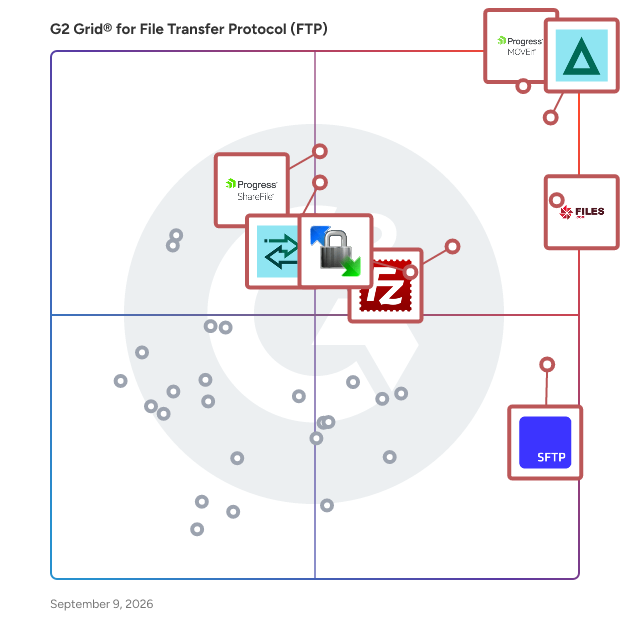
G2 Grid® for File Transfer Protocol (FTP) Software

G2 Grid® for File Transfer Protocol (FTP) Software plotting products by satisfaction and market presence

Highlighted products: Progress MOVEit, GoAnywhere MFT, Files.com, FileZilla, SFTP To Go, Progress ShareFile, Globalscape, and WinSCP.

Underlying data: [Grid® JSON](https://www.g2.com/categories/file-transfer-protocol-ftp/grids.json?focus%5B%5D=progress-moveit&focus%5B%5D=goanywhere-mft&focus%5B%5D=files-com&focus%5B%5D=filezilla&focus%5B%5D=sftp-to-go&focus%5B%5D=progress-sharefile&focus%5B%5D=globalscape&focus%5B%5D=winscp)

Couchdrop

Couchdrop enables businesses to send, receive, and automate secure file transfers in one simple platform. As a modern, cloud-native platform, Couchdrop automatically scales to meet the needs of businesses from startups to enterprises. Organizations can securely transfer millions of files and terabytes of data with automatic scaling that can meet the most intense file transfer requirements, all without having any infrastructure management. Supporting, simple, direct connections to storage like SharePoint, Dropbox, Azure, and more, Couchdrop integrates with over 20 platforms and growing. Couchdrop does not store data at any stage of the process and acts as a secure pipe between systems, leaving you in full control at all times. Couchdrop aims to be simple and easy enough for anyone to use. An SFTP server is created immediately at sign-up, and all admin and management tasks are done through a modern, uncomplicated web interface where users can connect platforms, add external users, and build workflows using the no-code automation builder. Both transfer automation and file actions are created with this visual builder. Transfer automations push or pull files from external sources, while file actions can move, copy, rename, encrypt/decrypt, compress/decompress, and more, including firing external webhooks. Automations can be scheduled to happen at set times or based on events like uploads, downloads, or a trigger from one of Couchdrop's file intake methods. These ingestion options include mailboxes for email attachments, upload links as a secure client-facing brandable web portal, and secure shared links with optional password protection and expiration. Couchdrop is suitable for organizations of all sizes, with simple, transparent monthly pricing and plans set for businesses at different stages and transfer requirements. All plans are backed by award-winning support from product experts with typical responses within half a day. While simple to use, Couchdrop has enterprise-grade security controls available to everyone. Features and protocols can be restricted at the user or organization level, and users can be isolated to a specific directory as their root with granular access controls. Couchdrop's already comprehensive auditing can also be enhanced by integrating with SIEM providers to send logs and events. Join the thousands of private and public sector organizations that use Couchdrop for all their secure file transfer needs. All new accounts include a 14-day free trial with no credit card or demo required.

Average Rating: 4.8/5.0

Total Reviews: 30

How Do G2 Users Rate Couchdrop?

  • File Transfer: 9.2/10 (Category avg: 9.1/10)
  • Performance: 10.0/10 (Category avg: 8.5/10)
  • File Management: 10.0/10 (Category avg: 9.1/10)
  • Has the product been a good partner in doing business?: 10.0/10 (Category avg: 8.8/10)

Who Is the Company Behind Couchdrop?

  • Seller: Couchdrop
  • Company Website:
  • Year Founded: 2017
  • HQ Location: Christchurch, NZ
  • Twitter: @couchdrop_
    842 Twitter followers
  • LinkedIn® Page: www.linkedin.com
    25 employees on LinkedIn®

Who Uses This Product?

  • Top Industries: Information Technology and Services
  • Company Size: 58% Small, 35% Medium

What Do G2 Reviewers Say About Couchdrop?

AI-generated summary from verified user reviews

Pros
  • Users value the ease of use of Couchdrop, facilitating efficient data management with excellent support throughout the process.
  • Users value the easy setup of Couchdrop, allowing for quick implementation and efficient data handling.
  • Users highlight the quick setup of Couchdrop, allowing rapid implementation and efficient data management.
  • Users find the setup ease of Couchdrop incredibly efficient, enabling quick implementation and seamless onboarding support.
  • Users find Couchdrop to be an affordable solution, saving costs on pen tests and engineering overhead.
Cons
  • Users desire more resources for insufficient training on API user auto-provisioning and secure webhook features.
  • Users desire more comprehensive documentation for API user provisioning and secure webhook features for better verification.
  • Users desire better notification features for webhooks to ensure authenticity and improved automation guidance.

What Are Recent G2 Reviews of Couchdrop?

What Are G2 Users Discussing About Couchdrop?

Progress WS_FTP

Progress WS_FTP is a suite of secure file transfer solutions designed to facilitate reliable and protected data exchange for businesses of all sizes. The suite includes WS_FTP Server and WS_FTP Professional Client, both engineered to ensure the secure transmission of critical files through advanced encryption and comprehensive administrative controls. Key Features and Functionality: - Advanced Security Protocols: Utilizes 256-bit AES encryption, FIPS 140-2 validated cryptography, and OpenPGP file encryption to safeguard data before, during, and after transfer. - Comprehensive Protocol Support: Supports multiple file transfer protocols, including FTP, SSL/FTPS, SSH/SFTP, and HTTP/S, ensuring compatibility with various systems and servers. - User-Friendly Interface: Features a customizable display with drag-and-drop functionality, integrated search capabilities, and the ability to connect to multiple servers simultaneously, streamlining file management tasks. - Automation and Scheduling: Allows users to automate recurring transfers, schedule backups, synchronize files across locations, and set post-transfer actions such as file deletion, movement, or renaming. - Administrative Control: Provides robust user management, including the assignment of permissions, remote server administration, and integration with authentication systems like Active Directory and LDAP. Primary Value and User Solutions: WS_FTP addresses the critical need for secure and efficient file transfers in today's digital landscape. By offering robust security measures, it protects sensitive data from unauthorized access and breaches. The suite's automation capabilities reduce manual intervention, enhancing operational efficiency. Its user-friendly design simplifies complex file transfer processes, making it accessible for users with varying technical expertise. Additionally, the comprehensive administrative tools provide organizations with the control and visibility necessary to manage file transfer activities effectively, ensuring compliance with industry standards and regulations.

Average Rating: 4.4/5.0

Total Reviews: 17

How Do G2 Users Rate Progress WS_FTP?

  • File Transfer: 6.7/10 (Category avg: 9.1/10)
  • Performance: 10.0/10 (Category avg: 8.5/10)
  • File Management: 10.0/10 (Category avg: 9.1/10)
  • Has the product been a good partner in doing business?: 8.3/10 (Category avg: 8.8/10)

Who Is the Company Behind Progress WS_FTP?

  • Seller: Progress Software
  • Year Founded: 1981
  • HQ Location: Burlington, MA.
  • Twitter: @ProgressSW
    48,773 Twitter followers
  • LinkedIn® Page: www.linkedin.com
    4,242 employees on LinkedIn®
  • Ownership: NASDAQ:PRGS

Who Uses This Product?

  • Company Size: 41% Small, 35% Medium

What Do G2 Reviewers Say About Progress WS_FTP?

AI-generated summary from verified user reviews

Pros
  • Users commend the easy setup of Progress WS_FTP, making the initial experience smooth and hassle-free.
  • Users value the bulletproof security and 256-bit AES encryption provided by Progress WS_FTP, enhancing data protection.
  • Users appreciate the bulletproof security and 256-bit AES encryption provided by Progress WS_FTP for secure file transfers.

What Are Recent G2 Reviews of Progress WS_FTP?

CuteFTP

A Key Part of Fortra (the new face of HelpSystems) Globalscape is proud to be part of Fortra’s comprehensive cybersecurity portfolio. Fortra simplifies today’s complex cybersecurity landscape by bringing complementary products together to solve problems in innovative ways. These integrated, scalable solutions address the fast-changing challenges you face in safeguarding your organization. With the help of the powerful protection from Cute FTP and others, Fortra is your relentless ally, here for you every step of the way throughout your cybersecurity journey.

Average Rating: 4.6/5.0

Total Reviews: 22

How Do G2 Users Rate CuteFTP?

  • File Transfer: 10.0/10 (Category avg: 9.1/10)
  • Performance: 10.0/10 (Category avg: 8.5/10)

Who Is the Company Behind CuteFTP?

  • Seller: Fortra
  • Year Founded: 1982
  • HQ Location: Eden Prairie, Minnesota
  • Twitter: @fortraofficial
    2,773 Twitter followers
  • LinkedIn® Page: www.linkedin.com
    1,784 employees on LinkedIn®

Who Uses This Product?

  • Top Industries: Luxury Goods & Jewelry
  • Company Size: 78% Small, 17% Medium

What Are Recent G2 Reviews of CuteFTP?

What Are G2 Users Discussing About CuteFTP?

Sharetru

Elevate Your Business with Sharetru: FedRAMP Authorized. Compliance Ready. When your organization’s reputation, contracts, and security depend on getting compliance right, Sharetru is more than just a Managed File Transfer (MFT) solution—it’s your compliance-ready command center. We’re one of the few MFT providers that operates as a FedRAMP Moderate Authorized Cloud Service Provider (CSP)—not just “equivalent,” but fully authorized—giving you built-in reciprocity for CMMC Advanced (Level 2) requirements and the peace of mind that comes with the most rigorous federal security review available. From DFARS/NIST SP 800-171 to ITAR, from HIPAA/HITECH to CJIS and beyond, Sharetru helps regulated industries meet and exceed the standards that keep sensitive information safe—whether that’s Controlled Unclassified Information (CUI), ePHI, financial data, or trade secrets. Why Organizations Choose Sharetru Compliance at the Core – We don’t just meet the letter of the law; we build to its highest standards. Every transfer and stored file inherits our compliance posture for FedRAMP Moderate, CMMC, HIPAA, ITAR, DFARS, and more. Proven Security Architecture – FIPS 140-2 certified encryption modules, TLS 1.3 in transit, AES-256 at rest, role-based access, and SIEM integration come standard—no bolt-ons required. Industry Expertise – Our team lives and breathes compliance. From onboarding to audits, we help you configure, document, and maintain a secure environment that passes the toughest scrutiny. Cost Predictability – Enterprise-grade compliance shouldn’t be an enterprise-only privilege. Our unlimited-user plans and scalable storage keep costs in check while security stays uncompromised. Built for defense and aerospace, healthcare and life sciences, financial services, and AEC firms handling sensitive client data, Sharetru supports the way you need to work—securely, compliantly, and without compromise. Whether you’re sending a single confidential file or running automated SFTP workflows that move terabytes daily, Sharetru is the platform trusted to protect what matters most. Your compliance is our baseline. Your security is our promise.

Average Rating: 4.8/5.0

Total Reviews: 13

How Do G2 Users Rate Sharetru?

  • File Transfer: 9.3/10 (Category avg: 9.1/10)
  • Performance: 9.2/10 (Category avg: 8.5/10)
  • File Management: 9.3/10 (Category avg: 9.1/10)
  • Has the product been a good partner in doing business?: 9.8/10 (Category avg: 8.8/10)

Who Is the Company Behind Sharetru?

  • Seller: Sharetru
  • Year Founded: 1999
  • HQ Location: Las Vegas, NV
  • Twitter: @sharetru1
    1,893 Twitter followers
  • LinkedIn® Page: www.linkedin.com
    13 employees on LinkedIn®

Who Uses This Product?

  • Company Size: 77% Medium, 15% Small

What Do G2 Reviewers Say About Sharetru?

AI-generated summary from verified user reviews

Pros
  • Users highlight the exceptional ITAR compliance capabilities of Sharetru, ensuring seamless and secure file transfers effortlessly.
  • Users value Sharetru's strong security focus and the ongoing development of innovative features enhancing their experience.
  • Users value Sharetru for its affordable ITAR compliance, making secure file transfers seamless and essential for daily operations.
  • Users value the secure file transfer provided by Sharetru, enabling effortless ITAR compliance and enhancing operational efficiency.
  • Users value Sharetru for its secure ITAR compliance, ensuring efficient and reliable file transfers without regulatory stress.

What Are Recent G2 Reviews of Sharetru?

What Are G2 Users Discussing About Sharetru?

Titan SFTP Server

Titan SFTP Server is a secure, high-performance file transfer solution designed to facilitate the transmission of sensitive data over SSH-based SFTP protocols. With a strong emphasis on security, Titan SFTP ensures that all data transfers are fully encrypted and protected by robust access controls and automated threat protection measures. This solution is particularly tailored for enterprise IT, security, and compliance teams, providing a scalable and policy-driven approach to secure file transfers across cloud, hybrid, or on-premises environments. The platform is equipped with advanced automation capabilities through its built-in events engine, which allows administrators to establish real-time triggers for various security measures. These include antivirus scanning, IP blocking, tracking of login failures, and alerts for unauthorized access attempts. Such proactive security features not only safeguard sensitive data from external threats but also alleviate the administrative workload on IT teams, enabling them to focus on more strategic initiatives. Titan SFTP Server enforces strong password policies and supports multi-factor authentication, ensuring that only authorized users can access sensitive information. Administrators can define granular user roles, implement IP restrictions, and maintain detailed audit logs for compliance and monitoring purposes. The user-friendly browser-based interface allows for secure file sending and receiving, while features like password-protected download links and DropZone functionality enable seamless file reception from external parties without the need for additional software installations. For organizations that prioritize continuous uptime and fault tolerance, Titan SFTP supports clustering and failover capabilities across geographically distributed nodes. This ensures that file transfer operations remain uninterrupted, even in the event of hardware or network failures. The solution is available as either a perpetual license or a subscription model through major cloud marketplaces, including AWS, Azure, and Google Cloud, making it accessible for a variety of deployment preferences. Titan SFTP Server is particularly beneficial for use cases that demand secure SFTP file transfers with enterprise-grade encryption, real-time automation for access control and intrusion prevention, and scalable deployment options with high availability. Additionally, it supports compliance with critical regulations such as HIPAA, FIPS 140-2, and PCI DSS. By empowering organizations to protect, manage, and streamline their file transfer processes, Titan SFTP Server ensures that data is transmitted securely, reliably, and efficiently, whether for internal operations or external partner collaborations.

Average Rating: 4.7/5.0

Total Reviews: 33

How Do G2 Users Rate Titan SFTP Server?

  • File Transfer: 9.3/10 (Category avg: 9.1/10)
  • Performance: 9.1/10 (Category avg: 8.5/10)
  • File Management: 9.1/10 (Category avg: 9.1/10)
  • Has the product been a good partner in doing business?: 9.6/10 (Category avg: 8.8/10)

Who Is the Company Behind Titan SFTP Server?

Who Uses This Product?

  • Top Industries: Information Technology and Services
  • Company Size: 44% Small, 41% Medium

What Do G2 Reviewers Say About Titan SFTP Server?

AI-generated summary from verified user reviews

Pros
  • Users value the reliability of Titan SFTP Server, ensuring secure and consistent file transfers with ease.
  • Users value the high customizability of Titan SFTP Server, enabling seamless integration and enhanced efficiency in file management.
  • Users appreciate the flexibility and security features of Titan SFTP Server, making it ideal for businesses handling sensitive data.
  • Users value the strong security features of Titan SFTP Server, ensuring secure and reliable transfers for sensitive data.
  • Users value the automation features of Titan SFTP Server, enhancing efficiency and saving valuable time in operations.
Cons
  • Users find the complexity of Titan SFTP Server overwhelming, especially for basic file transfer needs and initial setup.
  • Users find the complex setup of Titan SFTP Server challenging, especially those needing basic file transfer capabilities.
  • Users find the limited compatibility with different software vendors frustrating, complicating their file transfer processes.
  • Users feel the outdated interface of Titan SFTP Server detracts from the overall user experience.
  • Users often experience poor customer support, making it challenging to resolve issues with the Titan SFTP Server.

What Are Recent G2 Reviews of Titan SFTP Server?

What Are G2 Users Discussing About Titan SFTP Server?

SFTP Drive

An easy-to-use utility that mounts SFTP servers as local drives. Once connected, you can browse and work with files as if they were stored on your local machine. SFTP Drive is Yubikey verified and runs on Windows (Intel and Arm64), Linux and Mac. Standard SFTP Drive Features: - Use your favorite file manager, such as Windows Explorer. - Choose from three authentication types: Password, Key-based, or both. - Store multiple connection profiles for a quick and convenient connection. - Perform common directory and file operations such as move, copy, rename, in both Windows UI and the command line. - Configure advanced profile settings that give you granular control over how you connect to your server. Advanced SFTP Drive Features: - Run on Windows Server OS - Run as a Windows Service on IIS - Manage shared or isolated drives - Connect multiple drives For additional information please visit https://www.nsoftware.com/sftpdrive or contact sales@nsoftware.com

Average Rating: 4.5/5.0

Total Reviews: 10

How Do G2 Users Rate SFTP Drive?

  • File Transfer: 9.4/10 (Category avg: 9.1/10)
  • Performance: 9.4/10 (Category avg: 8.5/10)
  • File Management: 9.4/10 (Category avg: 9.1/10)
  • Has the product been a good partner in doing business?: 8.3/10 (Category avg: 8.8/10)

Who Is the Company Behind SFTP Drive?

  • Seller: n software
  • Year Founded: 1994
  • HQ Location: Chapel Hill, NC
  • Twitter: @nsoftware
    1,901 Twitter followers
  • LinkedIn® Page: www.linkedin.com
    34 employees on LinkedIn®

Who Uses This Product?

  • Company Size: 60% Small, 30% Medium

What Do G2 Reviewers Say About SFTP Drive?

AI-generated summary from verified user reviews

Pros
  • Users value the cross-platform compatibility of SFTP Drive, enabling easy access and file management across different systems.
  • Users value the readily available customer support for SFTP Drive, ensuring assistance when needed.
  • Users value the easy file storage and retrieval of SFTP Drive, appreciating its simplicity and cross-platform availability.
  • Users find SFTP Drive to be simple to use, making file storage and retrieval effortlessly accessible across platforms.
  • Users appreciate the ease of use of SFTP Drive, valuing its accessibility and reliable support for file storage.
Cons
  • Users face editing limitations with SFTP Drive, including compatibility issues and the challenge of binary data format.
  • Users face limited compatibility issues and encounter challenges with binary file formats restricting manual reading.

What Are Recent G2 Reviews of SFTP Drive?

Panic Transmit

Panic Transmit allows to upload, download, and manage files on tons of servers with an easy, familiar, and powerful UI

Average Rating: 4.3/5.0

Total Reviews: 13

How Do G2 Users Rate Panic Transmit?

  • File Transfer: 9.4/10 (Category avg: 9.1/10)
  • Performance: 10.0/10 (Category avg: 8.5/10)
  • File Management: 6.1/10 (Category avg: 9.1/10)
  • Has the product been a good partner in doing business?: 7.8/10 (Category avg: 8.8/10)

Who Is the Company Behind Panic Transmit?

  • Seller: Panic
  • Year Founded: 1997
  • HQ Location: Portland, US
  • Twitter: @panic
    52,533 Twitter followers
  • LinkedIn® Page: www.linkedin.com
    20 employees on LinkedIn®

Who Uses This Product?

  • Company Size: 79% Small, 21% Medium

What Are Recent G2 Reviews of Panic Transmit?

What Are G2 Users Discussing About Panic Transmit?

Quatrix

Quatrix is trusted by UK Central Government and global corporate enterprises in 65 industries including finance, healthcare, retail and banking to provide secure file transfers and automated workflows. With a focus on being easy to deploy, manage and use, Quatrix offers advanced security and compliance (including GDPR, HIPAA and ISO 27001) for Managed File Transfer (MFT / Automation), user to user file sharing and secure data acquisition. It integrates with third party systems through an API and IPAAS / ESB integrations to provide pre-configured connections that benefit from it's in-built compliance. security and automation capabilities. It offers a reduced total cost of ownership when compared with in-house, legacy or on-premises products, is backed by world-class customer support and is consistently recommended by customers (96% would or have already recommended it according to the 2021 annual customer satisfaction survey). A free 14 day trial is available at Maytech.net.

Average Rating: 4.4/5.0

Total Reviews: 77

How Do G2 Users Rate Quatrix?

  • File Transfer: 9.4/10 (Category avg: 9.1/10)
  • Performance: 9.1/10 (Category avg: 8.5/10)
  • File Management: 9.4/10 (Category avg: 9.1/10)
  • Has the product been a good partner in doing business?: 9.4/10 (Category avg: 8.8/10)

Who Is the Company Behind Quatrix?

  • Seller: Kiteworks
  • Year Founded: 1999
  • HQ Location: Palo Alto, CA
  • Twitter: @Kiteworks
    3,460 Twitter followers
  • LinkedIn® Page: www.linkedin.com
    380 employees on LinkedIn®
  • Phone: 650-485-4300

Who Uses This Product?

  • Top Industries: Computer Software, Higher Education
  • Company Size: 34% Medium, 34% Small

What Do G2 Reviewers Say About Quatrix?

AI-generated summary from verified user reviews

Pros
  • Users value the ease of use of Quatrix, finding setup and secure file sharing straightforward and efficient.
  • Users value the robust security features of Quatrix, ensuring safe and private file sharing with ease.
  • Users value the easy and secure file sharing capabilities of Quatrix, making data exchange efficient and straightforward.
  • Users value the secure sharing capabilities of Quatrix, enabling effortless management of sensitive files with robust security features.
  • Users find the initial setup very easy, allowing them to quickly start utilizing Quatrix's secure features.
Cons
  • Users find the complexity of integration and interface challenging, especially without development support or technical experience.
  • Users find difficult learning due to complex setups and overwhelming interface, especially for first-time users of Quatrix.
  • Users find Quatrix lacking features, wishing for better editing tools, advanced task options, and proactive alerts integration.
  • Users find Quatrix has limited functionality for advanced reporting and co-authoring documents directly within the platform.
  • Users find the interface design poor, feeling overwhelmed and desiring more customization and modern features.

What Are Recent G2 Reviews of Quatrix?

What Are G2 Users Discussing About Quatrix?

ExaVault

ExaVault is the modern alternative to legacy file servers for organizations that aren't moving to SaaS today. Many businesses still rely on aging SFTP/FTP infrastructure, stitched-together servers, or brittle custom solutions. The result is wasted IT resources, compliance risks, and slower business operations. ExaVault is a self-managed file transfer appliance designed for on-premises, private cloud, or virtualized environments. Built on SaaS-grade technology, it delivers modern security, automation, and usability while running entirely under your control. Unlike traditional servers that demand endless patching, licensing, and certificate management, ExaVault is built to take care of itself. Automatic security updates keep your system protected against vulnerabilities without weekend patch cycles. Hands-free licensing renews in the background with no downtime or manual key uploads. SSL certificates are fully managed to prevent costly outages. The result is a reliable platform that runs with minimal administrative overhead. For IT and DevOps teams, ExaVault is purpose-built for system-to-system workflows: secure SFTP automation, ingestion pipelines, internal dropboxes, and compliance-driven transfers. For regulated industries and organizations with strict residency requirements, it keeps sensitive data inside infrastructure you control, without sacrificing modern features or reliability. When the time comes to embrace SaaS, ExaVault provides an automated migration path to Files.com. ExaVault gives you a modern file transfer solution you own today, with a clear path to the cloud when you're ready.

Average Rating: 4.5/5.0

Total Reviews: 191

How Do G2 Users Rate ExaVault?

  • File Transfer: 9.3/10 (Category avg: 9.1/10)
  • Performance: 8.9/10 (Category avg: 8.5/10)
  • File Management: 9.3/10 (Category avg: 9.1/10)
  • Has the product been a good partner in doing business?: 9.2/10 (Category avg: 8.8/10)

Who Is the Company Behind ExaVault?

  • Seller: Files.com
  • Company Website:
  • Year Founded: 2008
  • HQ Location: Scottsdale, Arizona
  • LinkedIn® Page: www.linkedin.com
    82 employees on LinkedIn®

Who Uses This Product?

  • Who Uses This: CEO, CTO
  • Top Industries: Computer Software, Information Technology and Services
  • Company Size: 54% Small, 39% Medium

What Do G2 Reviewers Say About ExaVault?

AI-generated summary from verified user reviews

Pros
  • Users appreciate the data security of ExaVault, ensuring protection against theft by third parties.
  • Users value the high reliability of ExaVault, noting its stability and minimal outages.
  • Users value the secure sharing feature of ExaVault, ensuring their data remains protected from unauthorized access.
  • Users value the secure transfer feature of ExaVault, ensuring their data stays safe from third-party theft.
  • Users value the strong security measures of ExaVault, ensuring data remains safe from third-party theft.
Cons
  • Users find ExaVault's pricing predatory and expensive, with additional concerns about user management and usability.
  • Users find poor usability in ExaVault, with slow processes and a frustrating interface affecting their experience.
  • Users feel that ExaVault has security issues and ineffective user management, negatively impacting their experience.

What Are Recent G2 Reviews of ExaVault?

What Are G2 Users Discussing About ExaVault?

Syncplify

Syncplify is a dynamic software company based in the US. It develops software for secure file transfer and sharing. The flagship product is Syncplify Server!, a cross-platform SFTP, SSH2, SCP, FTP(E/S), HTTPS, and sharing server, which focuses on security and extensibility. Our secure file server software is trusted by thousands of small-medium businesses, Fortune 500 companies, and government entities all around the world.

Average Rating: 4.6/5.0

Total Reviews: 16

G2 Deal: Save 30% on Syncplify Server

Syncplify secure file transfer solution, aka Syncplify Server!, is known to have zero vulnerabilities, offers limitless options through scripting, and provides robust security through AI-backed Protector. 30% discount only for G2 users.

View this exclusive G2 deal

How Do G2 Users Rate Syncplify?

  • File Transfer: 9.5/10 (Category avg: 9.1/10)
  • Performance: 9.1/10 (Category avg: 8.5/10)
  • File Management: 8.7/10 (Category avg: 9.1/10)
  • Has the product been a good partner in doing business?: 9.2/10 (Category avg: 8.8/10)

Who Is the Company Behind Syncplify?

  • Seller: Syncplify
  • Year Founded: 2014
  • HQ Location: Wilmington, DE
  • LinkedIn® Page: www.linkedin.com
    2 employees on LinkedIn®

Who Uses This Product?

  • Company Size: 63% Medium, 31% Small

What Do G2 Reviewers Say About Syncplify?

AI-generated summary from verified user reviews

Pros
  • Users praise the reliability and stable performance of Syncplify, highlighting its smooth functionality over the years.
  • Users highlight the excellent customer support from Syncplify, praising their responsiveness and willingness to assist effectively.
  • Users appreciate the easy setup of Syncplify, making installation and use quick and intuitive.
  • Users appreciate the stability and ease of use of Syncplify, benefiting from extensive customization and excellent support.
  • Users commend the speed and reliability of Syncplify, noting its fast performance and excellent support over the years.
Cons
  • Users struggle with the poor interface design of Syncplify, finding it challenging to navigate and use effectively.
  • Users find the user interface issues of Syncplify challenging, hindering their overall experience with the product.
  • Users describe the unusual architecture and interface of Syncplify as potentially confusing and challenging to navigate.

What Are Recent G2 Reviews of Syncplify?

UltraFTP

UltraFTP is a secure 64-bit Windows FTP client which includes session management, ability to import / export accounts, overwrite rules, and a lot more.

Average Rating: 4.2/5.0

Total Reviews: 13

How Do G2 Users Rate UltraFTP?

  • Has the product been a good partner in doing business?: 8.6/10 (Category avg: 8.8/10)

Who Is the Company Behind UltraFTP?

  • Seller: Idera, Inc.
  • Year Founded: 2007
  • HQ Location: Austin, US
  • Twitter: @MigrationWiz
    482 Twitter followers
  • LinkedIn® Page: www.linkedin.com

Who Uses This Product?

  • Company Size: 62% Small, 31% Medium

What Are Recent G2 Reviews of UltraFTP?

What Are G2 Users Discussing About UltraFTP?

Sendlinx

Sendlinx is a leading Link Management Software Company. Using Sendlinx's desktop applications or the online portal you can upload files, generate one or more different links to the same file, change or delete links, or set expiry dates on links you wish to share with anyone. You can also collaborate with your team members by sharing folders and easily keep track of the activity of each user within the shared folder.

Average Rating: 4.9/5.0

Total Reviews: 72

How Do G2 Users Rate Sendlinx?

  • File Transfer: 9.6/10 (Category avg: 9.1/10)
  • Performance: 9.5/10 (Category avg: 8.5/10)
  • File Management: 9.7/10 (Category avg: 9.1/10)
  • Has the product been a good partner in doing business?: 9.2/10 (Category avg: 8.8/10)

Who Is the Company Behind Sendlinx?

Who Uses This Product?

  • Top Industries: Computer Software, Information Technology and Services
  • Company Size: 81% Small, 16% Medium

What Do G2 Reviewers Say About Sendlinx?

AI-generated summary from verified user reviews

Pros
  • Users love the secure sharing features of Sendlinx, appreciating its simplicity and customizable privacy options.
  • Users love the easy file sharing with Sendlinx, enabling password protection and multiple file uploads seamlessly.
  • Users value the customizable link management in Sendlinx, finding it simple and privacy-focused for sharing files.
  • Users value the enhanced collaboration features of Sendlinx, enjoying secure and efficient document sharing with teams.
  • Users appreciate the easy file sharing on Sendlinx, enabling seamless uploads of multiple files from others.
Cons
  • Users find the interface too basic compared to competitors, lacking the alignment and polish expected in modern apps.

What Are Recent G2 Reviews of Sendlinx?

Zivver Email Encryption

Zivver provides secure email communications for effortless compliance. Founded in the Netherlands in 2015, Zivver is trusted by over 10,000 organizations globally to prevent data leaks caused by human error and ensure compliance. Zivver’s platform offers key features such as AES-256 encryption, keyless encryption, and multi-factor authentication, making it a robust tool for protecting sensitive data. Its integration with popular email clients like Microsoft 365 and Gmail, along with capabilities like secure file transfer up to 5TB and e-signatures directly within email, makes Zivver both user-friendly and highly secure. By offering smart prevention rules, secure communication options, and seamless integration with existing workflows, Zivver not only enhances security but also improves efficiency and productivity, helping organizations remain compliant with global data protection regulations.

Average Rating: 4.4/5.0

Total Reviews: 50

How Do G2 Users Rate Zivver Email Encryption?

  • File Transfer: 9.6/10 (Category avg: 9.1/10)
  • Performance: 9.5/10 (Category avg: 8.5/10)
  • File Management: 9.0/10 (Category avg: 9.1/10)
  • Has the product been a good partner in doing business?: 9.0/10 (Category avg: 8.8/10)

Who Is the Company Behind Zivver Email Encryption?

  • Seller: Zivver
  • Year Founded: 2015
  • HQ Location: Amsterdam, Noord-Holland
  • Twitter: @zivver_en
    265 Twitter followers
  • LinkedIn® Page: www.linkedin.com
    53 employees on LinkedIn®

Who Uses This Product?

  • Top Industries: Hospital & Health Care, Mental Health Care
  • Company Size: 52% Small, 26% Medium

What Do G2 Reviewers Say About Zivver Email Encryption?

AI-generated summary from verified user reviews

Pros
  • Users highlight the excellent customer support of Zivver Email Encryption, enhancing their overall experience and satisfaction.
  • Users commend Zivver's user-friendly interface, providing a seamless experience for secure email communication.
  • Users appreciate the email notifications of Zivver, ensuring timely updates and enhancing communication efficiency.
  • Users appreciate the near 100% reliability of Zivver, enjoying hassle-free secure communication effortlessly integrated into their workflow.
  • Users appreciate the secure file sharing capabilities of Zivver, allowing safe transmission of sensitive documents effortlessly.
Cons
  • Users face frequent access issues with Zivver, including persistent login prompts for outdated shared mailboxes.
  • Users find 2FA implementation frustrating, creating complications in access and management due to missing options and visibility issues.
  • Users find the security issues with Zivver Email Encryption, especially around 2FA, frustrating and cumbersome.
  • Users find the attachment issues in Zivver awkward, complicating email formatting and recipient management unnecessarily.
  • Users find the setup process complicated, often facing confusion with guidance and integration with email services.

What Are Recent G2 Reviews of Zivver Email Encryption?

Apache FtpServer

Apache FtpServer is a 100% pure Java FTP server.

Average Rating: 4.6/5.0

Total Reviews: 14

How Do G2 Users Rate Apache FtpServer?

  • File Transfer: 8.3/10 (Category avg: 9.1/10)
  • Performance: 5.0/10 (Category avg: 8.5/10)
  • File Management: 8.3/10 (Category avg: 9.1/10)
  • Has the product been a good partner in doing business?: 8.3/10 (Category avg: 8.8/10)

Who Is the Company Behind Apache FtpServer?

Who Uses This Product?

  • Company Size: 43% Medium, 36% Small

What Are Recent G2 Reviews of Apache FtpServer?

What Are G2 Users Discussing About Apache FtpServer?

ForkLift

ForkLift is the most advanced dual pane file manager and file transfer client for macOS.

Average Rating: 4.4/5.0

Total Reviews: 10

How Do G2 Users Rate ForkLift?

  • File Transfer: 8.3/10 (Category avg: 9.1/10)
  • Performance: 9.0/10 (Category avg: 8.5/10)
  • File Management: 8.7/10 (Category avg: 9.1/10)
  • Has the product been a good partner in doing business?: 10.0/10 (Category avg: 8.8/10)

Who Is the Company Behind ForkLift?

  • Seller: Binarynights
  • HQ Location: N/A
  • Twitter: @BinaryNights
    3,407 Twitter followers
  • LinkedIn® Page: www.linkedin.com
    1 employees on LinkedIn®

Who Uses This Product?

  • Company Size: 82% Small, 18% Large

What Do G2 Reviewers Say About ForkLift?

AI-generated summary from verified user reviews

Pros
  • Users appreciate the clean and efficient interface of ForkLift, significantly enhancing their file management experience.
  • Users value the ease of use of ForkLift, praising its simplicity and efficiency in file management tasks.
  • Users value the efficiency of ForkLift, appreciating its speed and simplified management for file operations.
  • Users love the speed and efficiency of ForkLift, enhancing file management with a clear and lightweight interface.
  • Users appreciate the easy connectivity of ForkLift, allowing quick access to servers and file transfer without hassle.
Cons
  • Users find the complexity of ForkLift challenging, with many options making navigation and understanding difficult.
  • Users find the difficult learning curve of ForkLift frustrating, often struggling with navigation and delayed folder updates.
  • Users find folder update delays and complex menus frustrating, making navigation and file management cumbersome at times.
  • Users report integration issues with ForkLift, particularly after macOS updates and with large folders, hindering performance.
  • Users report slow performance when launching multiple transfers, often consuming excessive resources and creating frustration.

What Are Recent G2 Reviews of ForkLift?

Shalaka Joshi
SJ
Researched and written by Shalaka Joshi
Updated October 3, 2024