Le Parapheur
Who Is the Company Behind Le Parapheur?
- Seller: Le Parapheur
- Year Founded: 2020
- HQ Location: Paris, FR
-
LinkedIn® Page: www.linkedin.com
14 employees on LinkedIn®
Total Products under this Category: 750
Last updated: October 26, 2026
Why You Can Trust G2's Software Rankings:
G2's software rankings are built on verified user reviews, rigorous moderation, and a consistent research methodology maintained by a team of analysts and data experts. Each product is measured using the same transparent criteria, with no paid placement or vendor influence. While reviews reflect real user experiences, which can be subjective, they offer valuable insight into how software performs in the hands of professionals. Together, these inputs power the G2 Score, a standardized way to compare tools within every category.
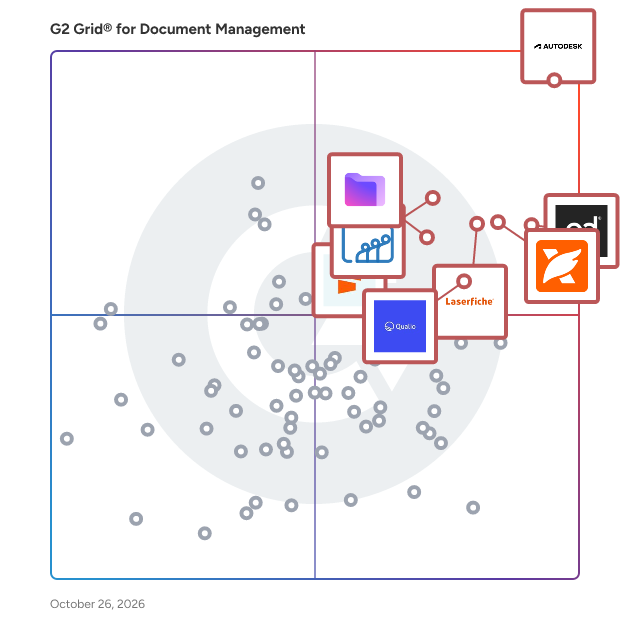
Highlighted products: Autodesk Forma (formerly Autodesk Construction Cloud), PandaDoc, Foxit PDF Editor, Laserfiche, Zoho WorkDrive, Proton Drive For Business, Qualio, and Seismic Enablement Cloud.
Underlying data: [Grid® JSON](https://www.g2.com/categories/document-management/grids.json?focus%5B%5D=autodesk-forma-formerly-autodesk-construction-cloud&focus%5B%5D=pandadoc&focus%5B%5D=foxit-pdf-editor&focus%5B%5D=laserfiche&focus%5B%5D=zoho-workdrive&focus%5B%5D=proton-drive-for-business&focus%5B%5D=qualio&focus%5B%5D=seismic-enablement-cloud)
Lex Cloak is a local-first PDF redaction tool. Drop in a document, whether a contract, a medical record, a court filing, or an employee file, and the free scan surfaces what's exposed: Social Security numbers, dates of birth, names, addresses, account identifiers, and many other identifier types. You review the matches, and Lex Cloak applies the redactions you approve and writes a redacted PDF. Detection runs on your computer using OCR and pattern matching. Your documents stay on your machine. Use Lex Cloak anywhere documents leave your control: sharing with a client, sending to opposing counsel, responding to a FOIA request, releasing medical records, preparing employee files, or removing the names, Social Security numbers and account numbers from a tax return before you give it to an AI tool. Available for macOS and Windows. Scanning is free, and so are your first three redacted documents. After that, a subscription is $35 a month or $350 a year. Built by Monty Home LLC (Denver, CO).
LexWorkplace is a cloud-based legal document management system (DMS) built for law firms. It helps teams organize matter-centric documents and email, search across content, and manage versioning, permissions, and collaboration in firms of 5 to 50 users. Many firms move to LexWorkplace after relying on shared drives, file servers, basic cloud storage, practice management file areas, or legacy DMS platforms. Those systems often separate email from documents, make version control inconsistent, and limit a firm’s ability to apply permissions, search effectively, or maintain a clear audit trail across matters. What Makes LexWorkplace a Strong Fit: - Matter-centric workspaces that keep documents, email, and attachments together by client or matter - Outlook integration with Smart File for matter suggestions and Multi Select for bulk email filing - Full-text and OCR search with filters, plus version history, document compare, and check-in/check-out - Role-based permissions, audit trails, and secure external sharing to support governance and control - Microsoft 365 and Outlook integration, support for Mac and Windows, and optional AI tools for summarizing and drafting using firm-controlled data Benefits Firms Can Expect: - Faster retrieval and fewer misfiled emails by keeping communications and documents in one matter record - A clearer history of changes to support oversight, accountability, and quality control - More consistent filing practices across teams, which simplifies onboarding and day-to-day work - More controlled collaboration through permissions, check-in/check-out, and secure external sharing - Time savings in daily workflows by filing from Outlook, reusing searches, and locating precedent more quickly LexWorkplace is designed for legal teams that want a single, organized system for work product without leaving familiar tools. It brings documents and email together by matter, supports search and versioning in ways that fit legal workflows, and gives administrators the controls needed to manage access, visibility, and change history across the firm.
Connect G2 to Claude or ChatGPT for answers grounded in G2's trusted reviews, comparisons, and pricing from real user insights.
LEYMAX Records is a cloud-based healthcare documentation management platform designed for Nurse Registries and home care agencies, with a focus on the Florida market. The software centralizes patient records, caregiver credentials, agency documents, electronic forms, and signatures in one organized workspace. Key capabilities include document tracking, credential expiration alerts, customizable forms, electronic signatures, staff portals, document submission and review workflows, and preparation for regulatory surveys. LEYMAX Records helps agencies reduce manual paperwork, improve document visibility, and coordinate administrative workflows between office staff, nurses, and independent contractors. The platform supports English and Spanish workflows, making it particularly suitable for bilingual and Spanish-speaking healthcare organizations.
LocalDMS (localdms.com) is free, secure, browser-based document management software and electronic document management system (EDMS) that deploys 100% on-premises on your local Windows network in under 5 minutes. It delivers enterprise-grade version control, full-text search, immutable audit trails, approval workflows, and role-based access control—with a free-forever Community Edition for up to 10 users and affordable perpetual licenses that let you pay once and own the software forever. Free Document Management for Small Teams. Enterprise Power for Everyone. LocalDMS solves the everyday chaos of shared drives, email attachments, outdated SOPs, and uncontrolled document versions. Teams in manufacturing, engineering, professional services, legal, healthcare, government, and quality-driven organizations gain a centralized, searchable repository where every file stays secure, current, and fully audited—whether users work on-site or remotely on the corporate network. Unlike expensive subscription DMS platforms that charge per user every month, LocalDMS prioritizes data sovereignty and low total cost of ownership. Your documents never leave your servers in the on-premises model. There is no internet dependency for core operations, no forced cloud migration, and no recurring licensing fees required. Core Features of LocalDMS Document Management Software LocalDMS includes the essential capabilities organizations expect from a professional EDMS: Instant full-text search — Query document content, metadata, and filenames across the entire repository in seconds. Automated version control — Every revision is tracked automatically. Retrieve any prior version at any time and eliminate messy “final_v3_revised” naming conventions. Immutable audit trails — Every user action is permanently logged in compliance-ready, tamper-proof records that support ISO 9001, quality audits, and regulatory requirements. Live browser previews — View documents directly in Chrome, Edge, or Safari without forcing downloads or creating uncontrolled local copies. Granular access control — Set exact permissions by role, workspace, folder, or individual user. Integrate with Active Directory and LDAP so teams log in with existing Windows credentials. Rapid approvals and workflows — Assign tasks, collect comments, and obtain electronic sign-offs inside the system. Remove email bottlenecks and create a clear, auditable approval chain. Hybrid flexibility — Run fully on-premises on your own Windows servers or choose a managed SaaS option when preferred. The architecture is deliberately lightweight. A one-click installer bundles the database components—no separate SQL Server setup required. The system detects network paths automatically, maps existing folder structures and security groups, and becomes available to users through any modern browser. Mobile devices on corporate Wi-Fi work immediately. Built-in backup scheduling and self-healing services keep operations simple. On-Premises EDMS That Installs Faster Than a Coffee Break Most enterprise document management systems require weeks or months of IT projects, custom configuration, and ongoing consultants. LocalDMS is designed for speed and self-sufficiency: Installs on a Windows desktop or server you already own in under 5 minutes. No complex network changes or external database licenses. Zero-client design—no desktop software to push or maintain on user machines. Full data control: documents stay on infrastructure you own and manage. This on-premises model is especially valuable for regulated or security-conscious environments where cloud data residency, long-term retention of quality records, or air-gapped networks matter. Quality records that must be retained for 10–30 years remain under your control regardless of vendor status. A hosted SaaS option is also available for teams that prefer zero infrastructure management, automatic updates, and access from any location. Pricing Built for Real Businesses LocalDMS uses transparent, perpetual licensing for on-premises deployments: EditionUsersPriceCommunity EditionUp to 10Free foreverProfessionalUp to 20$750BusinessUp to 50$3,000CorporateUp to 250$5,000Enterprise250+Contact us All on-premises licenses are perpetual—you pay once and own the software forever. There are no mandatory annual renewal fees or per-user monthly charges. An optional 10% annual maintenance plan provides access to the latest updates if you choose it. The free Community Edition is fully functional with the same core features (version control, search, audit trails, workflows, and access control) and requires no credit card. Ideal for Manufacturing Document Control and ISO 9001 Compliance Manufacturing operations depend on controlled documents. Outdated SOPs, missing quality records, or uncontrolled engineering changes lead directly to nonconformances, scrap, customer complaints, and audit findings. Studies indicate that a large percentage of manufacturing quality failures trace back to document or process control deficiencies. LocalDMS directly supports ISO 9001 clause 7.5 requirements for documented information: Version identification, review, and approval before issue Availability of current approved documents at the point of use Protection from unauthorized change Controlled distribution, access, retention, and disposition of obsolete versions Manufacturers use LocalDMS to manage: Standard Operating Procedures (SOPs) and work instructions Engineering specifications and control plans Test and inspection records, Device History Records (DHR), and Device Master Records (DMR) Safety Data Sheets (SDS) Process flow diagrams, product specifications, and change control records Training records and nonconformance reports When an SOP is revised and approved, the new version becomes the only current document visible to production staff. Prior versions remain in history for reference but are clearly marked obsolete—eliminating the classic problem of outdated paper binders or shared-drive copies. Engineering change requests, impact assessments, and coordinated document updates stay fully traceable. Quality records remain searchable by product, batch, date, or process for customer audits and regulatory inspections. Why Organizations Choose LocalDMS Over SharePoint and Traditional DMS Platforms SharePoint and general-purpose collaboration tools often lack enforced version control, immutable audit trails, and built-in approval workflows without extensive customization. Traditional enterprise EDMS platforms frequently carry high annual subscription costs and complex implementations. LocalDMS focuses on the document-control essentials that regulated and quality-driven teams actually need, delivered at a fraction of the cost and with dramatically faster deployment. It is particularly well-suited for engineering, manufacturing, consulting, legal, government, healthcare, and professional services organizations that require genuine control over their documents without perpetual SaaS fees. Get Started with Free Document Management Software Today Download the LocalDMS Community Edition—free forever for up to 10 users, no credit card, no time limit, and no feature restrictions on core EDMS capabilities. Larger teams can upgrade to a perpetual professional or business license starting at $750 and own the software outright. Visit localdms.com to request early access to the free edition, explore the full feature list, compare on-premises and SaaS options, or schedule a demonstration. Take control of your documents with secure, searchable, compliance-ready document management that installs in minutes and stays under your control.
LoreSign is an electronic signature software that enables document signing through PDF uploads, customizable signing fields, and legally recognized signatures. The platform allows signature, name, date, initials, or text fields to be added to any PDF without document reconstruction. Fields can be assigned to multiple signers with a defined signing order. Recipients access documents through a secure link and can sign from any device without creating an account. Activity tracking displays when documents are sent, opened, viewed, or signed. Built-in reminders enable follow-ups directly from the platform. Once completed, LoreSign delivers the sealed PDF and a certificate of completion to all participants. The software supports agreements, proposals, NDAs, statements of work, offer letters, and approvals. It integrates with workflow tools and offers unlimited signers per document across all pricing tiers. A public verification page is available for authentication.
Document management is easy with Lucidoc. Whether you are keeping track of policies and procedures, collaborating on new documents, or working with high-level document approval, we've got you covered. When you work with Lucidoc, you will always be audit-ready. Software application features: document management, accreditation manager, multi-org document control, consent agenda, acknowledgements, and continuing education.
LuitBiz DMS is easy to use web-based document management system that helps organizations digitally manage their documents over the cloud and access them from any device.
Lyfeguard is personal information infrastructure for life. It gives individuals and families one secure, structured place to organise important personal, financial, legal, medical and household information, connect key data sources and control who can access each part of their record. By turning fragmented documents and data into a current, connected picture, Lyfeguard reduces life admin and helps people prepare for major life events. The same client-controlled record gives trusted professionals richer context, smoother information gathering and a clearer foundation for advice. Lyfeguard supports individuals, families, wealth managers, financial advisers and private client law firms in making important information easier to collect, understand, share and act on.
Lystproof is a safe online platform that handles and validates employee and HR paperwork. Organizations can securely store, verify, and exchange documents without the need for human follow-ups using its permission-based access. The technology greatly reduces verification effort while expediting hiring and compliance workflows. Every document activity is audit-ready, traceable, and completely secure. Lystproof increases trust and transparency within the company while streamlining employee paperwork.
MacroView DMS Next is a document and email management solution for organisations using Microsoft 365 and SharePoint that want a simpler, more intuitive way to find, save, and manage information. It focuses on improving the user experience of working with documents and emails across SharePoint, Microsoft Teams, and Outlook without requiring changes to existing Microsoft infrastructure. DMS Next provides a tree-view navigation for SharePoint, Teams, and OneDrive content, allowing users to browse libraries and locations in a familiar folder-style interface. It integrates directly with Outlook (new and classic), Microsoft Teams, and the Microsoft 365 App, enabling users to drag and drop documents and emails into SharePoint, save content to the correct location, and quickly access frequently used files and workspaces. Built-in search helps users locate documents and emails across Microsoft 365 more efficiently. MacroView DMS Next is developed by MacroView, an Australian-based software company with more than 30 years’ experience delivering document and email management solutions for Microsoft platforms. It is used by organisations in legal, financial services, government, and professional services that want to improve usability, consistency, and adoption of SharePoint as their document management platform.
MacroView DMS Pro is a comprehensive document management solution built on Microsoft 365 and SharePoint, designed for organisations that require structured information management, strong governance, and consistent user experiences across complex environments. It provides a scalable way to manage documents and emails within SharePoint while maintaining familiar Microsoft workflows. DMS Pro extends SharePoint with structured filing, standardised metadata, and enhanced navigation to support consistent document management across teams and departments. Users can save and manage documents and emails directly from Microsoft applications such as Outlook, Word, Excel, and Windows File Explorer, ensuring information is captured correctly at the point of creation or receipt. By reducing reliance on inboxes and local drives, DMS Pro helps organisations centralise content and improve visibility. The solution supports metadata-driven organisation and advanced search capabilities, enabling users to quickly locate documents and emails based on content, context, and classification. Consistent information structures and controlled filing help improve findability, version control, and information quality across SharePoint libraries, even in large or highly regulated environments. Built on Microsoft 365, MacroView DMS Pro leverages SharePoint’s native security, permissions, and governance features. All content remains within the organisation’s Microsoft tenant, supporting compliance, auditability, and records management requirements. The solution is well suited to organisations in legal, financial services, government, and professional services that require a robust document management platform aligned with Microsoft standards. MacroView DMS Pro is developed by MacroView, an Australian-based software company with over 30 years’ experience delivering document and email management solutions for Microsoft platforms. It helps organisations maximise the value of SharePoint as an enterprise document management system without forcing users to change how they work.
ManualOut helps food and FMCG distributors simplify the way they process customer orders. Orders can come through WhatsApp, email, PDFs, spreadsheets, voice notes and other channels. ManualOut processes these orders and sends the information directly to the ERP, helping businesses reduce manual data entry and save time.
